If you had to sum up the Tyk approach in three sentences, the above would be spot on. Working at Tyk means being encouraged to create and collaborate, and the pace of AI evolution right now means there are plenty of opportunities to do so.
This is how the Tyk MCP mock server and mock client were born…
I needed a mock server for integration testing. When you’re building an API gateway that proxies MCP traffic, you need to test the full round-trip: client → gateway → upstream server.
The problem was that any real MCP server I pointed at during testing was either too complex, too stateful, or too flaky to be useful in a CI loop. I needed something deterministic and self-contained – so I built the Tyk mock MCP server.
The mock server is a Go implementation of the MCP 2025-11-05 specification (the current version), with a set of tools, prompts, and resources baked in. It uses
in-memory storage, so there’s no setup. It starts in under a second, and it behaves consistently between runs. You just point it at localhost:7878/mcp and it’s ready.
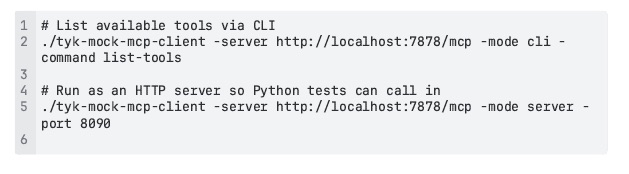
Of course, test servers go hand-in-hand with test clients, so that was my next build. It’s an MCP client that deliberately has no LLM in it. It speaks the MCP protocol directly, handles the initialization handshake automatically, and exposes three modes:
- A CLI you can invoke from a shell
- An HTTP server that Python test code can call into
- A Go library you can import directly into test suites
I built the mock MCP client to stand in for an AI agent in integration tests where I want to verify protocol correctness through a gateway without spinning up a full LLM client. Used with the mock MCP server, it provides the client → gateway → server flow in a fully controlled environment. That means I can build something that proxies or transforms MCP traffic and be certain it actually works.
Going beyond integration testing
What’s so great about handy tools like this is how you end up finding new use cases for them. With integration testing sorted, I realised I could use the mock MCP server and client for internal demos, to show how Tyk handles MCP proxying. The mock server has a realistic enough set of tools, user management, products, orders, analytics, utilities, that it reads as a plausible upstream. It’s easy to spin up locally or in a Docker Compose stack and tear down after, meaning I can run demos without having to depend on an external service staying up or having the right tools available – the mock MCP server and client provide all I need.
That was when colleagues at Tyk started asking to use the mock server and client too. Next, we all found we were reaching for them to explore MCP protocol behavior. Because the server implements the current specification and the client handles the protocol handshake transparently, we could quickly answer questions like:
- What does a well-formed tool call look like over SSE?
- How does the protocol handle a slow upstream?
The server has a slow_response tool that introduces configurable latency, SSE endpoints that simulate upstream failures, and a get_anything tool that echoes back the actual request metadata (headers, client IP, method) in httpbin format, which is super useful for verifying that a proxy is passing the right headers through.
Docker Compose integration came next. Both the mock server and the mock client ship with Docker images and are designed to be dropped into a Compose stack. So for Dockerized environments where you need an MCP server and don’t want to run a full application, they’re easy to wire in. The server takes a handful of environment variables ( PORT , DEBUG , WRITE_TIMEOUT ) and that’s it.
Sharing is caring
At this point, I realized these two tools were too handy to keep to ourselves here within Tyk, so I’ve shared them on GitHub for anyone to use:
As a quick reference, the server implements these 15 tools across six categories:
| Category | Tools |
| User management | get_userscreate_user update_user delete_user |
| Content | get_postscreate_post |
| Ecommerce | get_productsprocess_order |
| Analytics | get_analyticsgenerate_report |
| Utilities | validate_emailgenerate_uuid format_date get_anything |
| Testing | slow_response |
It also exposes four prompts and three resources (users, products, posts), which is enough to exercise the full surface area of the MCP spec in a client.
The client supports three modes:
It also works as a Go library if you want tighter integration with Go test suites.
Connecting to Claude Desktop or Claude Code
You can use the mock server as an MCP server in Claude Desktop. Simply add it to
claude_desktop_config.json :
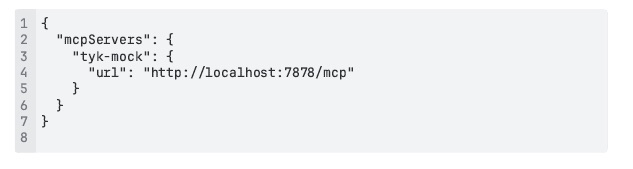
It works the same way with other MCP-compatible clients. The server speaks standard streamable HTTP transport.
Let me know what you think!
If you’re building something that touches MCP (a gateway, a proxy, an agent framework, or tooling around the protocol), the mock server and mock client could save you some time. Both are open source and available via the links above on GitHub, so feel free to make use of them and let me know if they help!
Just open an issue or a PR if you run into something that doesn’t work or feel something’s missing and I’ll take a look.
And if you’re immersed in all things MCP, there’s a whole bunch of articles on the Tyk Learning Center that may well be of use.