

The proliferation of enterprise AI agents is creating a new kind of chaos, with autonomous agents directly accessing a growing number of internal and external tools, APIs, and services. This is creating wild west environments rife with security vulnerabilities, unmanageable costs, and a complete lack of operational oversight. Engineering leaders are asking critical questions:
- Who is using what tool?
- How much is it costing?
- Is our data secure?
Without a central control plane, these questions are impossible to answer. This is why MCP gateway architecture has rapidly become crucial. This guide covers authentication, per-tool access control, rate limiting and observability, all of which can run on your own infrastructure.
A quick primer on the Model Context Protocol (MCP)
The Model Context Protocol is an open-source specification that standardizes how AI models and agents discover and interact with external tools, APIs, and services. It provides a simple, model-agnostic contract for these interactions, based on JSON-RPC.
The protocol specification defines two core participants:
- MCP clients: These are the AI agents or LLM-based applications that need to use external capabilities.
- MCP servers: These are the services that expose capabilities to agents via three core primitives. Tools are executable functions the agent can invoke to take action. Resources are read-only data sources the agent can query for context. Prompts are reusable templates that guide AI interactions. A server can expose any combination of these primitives depending on its purpose.
MCP solves a significant problem: It removes the need for AI developers to write bespoke, one-off integrations for every new tool an agent needs to access. By adhering to a common protocol, any MCP-compliant agent can theoretically communicate with any MCP-compliant tool.
The problem: Why MCP alone isn’t enough for the enterprise
A direct client-to-server MCP architecture breaks down at enterprise scale. When dozens or hundreds of agents begin directly accessing an equally large number of tools, the wild west scenario emerges. This creates several critical challenges that the protocol itself does not address:
- Security: In a direct model, how do you verify an agent’s identity? How do you enforce fine-grained permissions, ensuring one agent can only read from a database while another can write? Without a central checkpoint, every tool must implement its own complex authentication and authorization logic. This is inefficient and prone to error.
- Governance: How do you enforce usage quotas to prevent a single runaway agent from incurring massive costs or overloading a critical internal service? How do you apply rate limits? How do you ensure that requests and responses comply with data privacy regulations by, for example, masking personally identifiable information (PII)?
- Observability: How do you track which agent used what tool, and why? Without a central point of logging and monitoring, debugging a failed agent interaction or auditing tool usage for compliance becomes a forensic nightmare, requiring you to stitch together logs from multiple disparate systems.
| Challenge | Direct client-to-server model (the problem) | MCP gateway model (the solution) |
| Security | Each tool must implement its own authentication and authorization. This is inconsistent and error-prone. | Centralized authentication and fine-grained authorization for all agents and tools at the gateway. |
| Governance | No central way to enforce usage quotas, rate limits, or data privacy rules. | Policies for rate limiting, quotas, and data masking are enforced consistently for all traffic. |
| Observability | Debugging requires stitching together logs from every individual agent and tool. | A single, unified audit log captures every agent interaction, simplifying monitoring and debugging. |
The solution: A gateway for centralized control and governance
An MCP gateway is a specialized middleware layer that sits between MCP clients (AI agents) and MCP servers (tools), acting as a single, centralized policy enforcement point for all AI-driven traffic. It is the architectural solution to the problems of a direct-access model.
Its primary function is to intercept every request from an agent, apply a series of security, policy, and routing rules, and then forward the request to the appropriate upstream tool. By doing this, it transforms the chaotic mesh of connections into a managed, hub-and-spoke architecture. The gateway becomes the single entry and exit point for all tool-based AI activity, providing a unified place to manage the entire system. This abstraction gives platform teams the control they need to deploy AI agents safely and at scale.
MCP gateway architecture: How it works from request to response
An MCP gateway architecture introduces a critical intermediary layer that intercepts and manages all communication between AI agents and their tools. The technical flow involves the gateway:
- Authenticating the agent
- Consulting policies
- Routing the request to the correct registered upstream MCP server.
- Applying filtered discovery and returning only the tools the agent is permitted to see.
Which MCP gateway architecture offers the lowest latency?
For high-throughput AI agents, an in-process data-plane gateway typically delivers the lowest latency because requests avoid an additional network hop. A sidecar data-plane gateway offers nearly the same performance while improving isolation and operational flexibility. Centralized gateways are simpler to govern but can become throughput bottlenecks at very large scale. Federated or mesh deployments provide the highest aggregate throughput and regional resilience at the cost of greater operational complexity.
It’s important to distinguish the data plane from the control plane:
- Data plane: Handles live MCP traffic such as tools/list, tools/call, authentication, authorization, routing, rate limiting, caching, and observability. Its architecture has the greatest impact on latency and throughput.
- Control plane: Manages configuration, policy distribution, service registration, certificates, analytics, and administration. Because it is not involved in every request, it has minimal impact on request latency and should be designed primarily for reliability and consistency rather than raw performance.
| Architecture pattern | Typical deployment | Added latency | Throughput ceiling | Operational complexity | Best fit |
|---|---|---|---|---|---|
| Centralized gateway (shared proxy) | One or more gateway clusters serving all agents | Low, but includes an extra network hop | Moderate to high depending on horizontal scaling | Low | Most enterprise deployments prioritizing centralized governance and simple operations |
| Federated/mesh gateways | Multiple regional or domain-specific gateways | Low local latency with regional routing | Very high, scales horizontally across teams and regions | High | Large enterprises, multi-region AI platforms, high-volume agent workloads |
| Sidecar gateway (data plane) | Gateway runs alongside each MCP server or agent workload | Very low | High because traffic is distributed | Medium | Kubernetes environments where isolation and independent scaling are important |
| In-process gateway (embedded data plane) | Gateway logic runs inside the application process | Lowest | High, limited mainly by application resources | Medium to high (software lifecycle) | Ultra-low-latency systems and high-frequency AI agent interactions |
No single pattern is universally “best” but for most organizations, a centralized control plane combined with distributed data-plane gateways provides a strong balance between governance and performance. The control plane distributes policies, manages configuration, and collects analytics, while lightweight data-plane instances enforce authentication, authorization, routing, and rate limiting close to the AI agents and MCP servers. This separation avoids turning governance into a performance bottleneck while maintaining consistent policy enforcement across the entire MCP ecosystem.
Core components of a gateway-centric architecture
A production-ready MCP gateway system is composed of four main components that work in concert:
- MCP clients: These are the consumers of the tools. Typically, they are AI agents, LLM-powered applications, or services built using frameworks like LangChain or LlamaIndex. The client is configured to send tool requests to the gateway’s proxy URLs rather than directly to upstream MCP server endpoints. Each MCP server registered with the gateway has its own proxy URL, ensuring all traffic passes through the governance layer regardless of which tool is being called.
- The MCP gateway: This is the central component of the architecture. It is a high-performance network service that acts as the central policy enforcement point for MCP traffic. Each registered MCP server is accessed through its own governed proxy URL on the gateway, ensuring all agent-to-tool traffic passes through centralized authentication, policy enforcement, and observability regardless of which server is being called. Tyk is one platform with a native MCP gateway built into the Tyk API Management Platform.
- Upstream MCP servers: This is the collection of tools and services that provide the actual capabilities. Each server implements the MCP specification (e.g. the tools/list and tools/call methods) and is registered with the gateway as an upstream target.
- Management plane: This is the administrative interface or API used to configure and manage the gateway. Platform engineers use the management plane to define routes, create security policies, set rate limits, and monitor the health and performance of the entire system.
Visualizing the flow: A detailed architectural diagram
To understand how these components interact, consider a common scenario: An AI agent needs to discover which tools are available to it. The following sequence illustrates the architectural flow, which is far more sophisticated than a simple proxy.
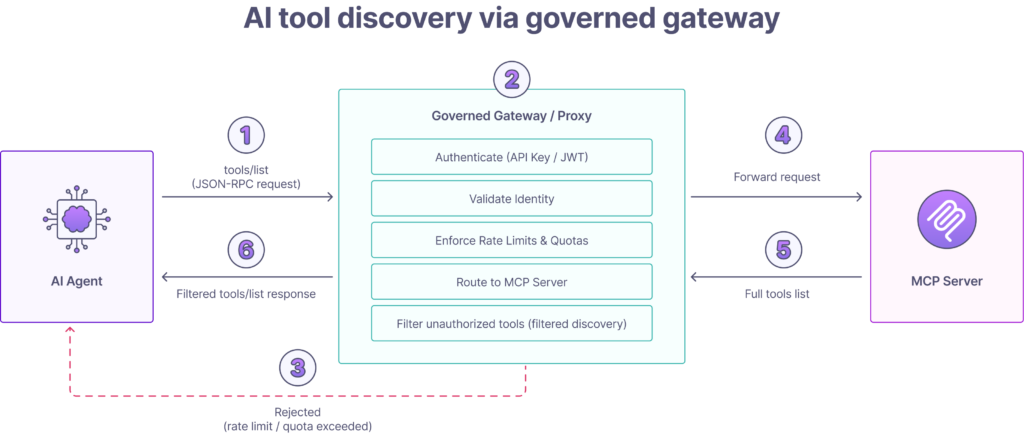
- Request initiation: An AI agent sends a tools/list JSON-RPC request to the governed proxy URL for the MCP server it needs to reach.
- Gateway interception and security: The gateway authenticates the client by inspecting the request for credentials such as an API key or JWT bearer token and validates the agent’s identity.
- Policy enforcement: The gateway’s policy engine checks whether the authenticated agent is subject to rate limits or usage quotas. If a limit is exceeded, the gateway rejects the request immediately with an appropriate error code.
- Routing: The gateway routes the request to the correct registered upstream MCP server.
- Authorization and filtered discovery: The gateway applies filtered discovery to the tool list before returning it to the agent. It strips out any tools the authenticated agent is not permitted to see. The agent receives only the tools it is explicitly authorized to access and has no visibility into tools it cannot call.
- Final response: The gateway returns the permission-aware tools/list response to the agent.
Note: Some purpose-built MCP aggregators extend this pattern with fan-out routing, querying multiple upstream MCP servers concurrently and merging their tool lists into a single unified response. This is an advanced capability, and is not a universal feature of all MCP gateway implementations.
What are the essential capabilities of an enterprise MCP gateway?
A robust, enterprise-grade MCP gateway must provide a comprehensive set of features that go far beyond simple request forwarding. These capabilities form the foundation for securely deploying, managing, and scaling AI agent-based systems. They can be grouped into five critical areas: security, routing, governance, performance, and observability.
1. Unified security and access control
Security is the primary driver for implementing an MCP gateway. It centralizes all security enforcement, removing the burden from individual tool developers and ensuring consistent policy application across the entire AI ecosystem.
- Authentication (AuthN): The gateway must verify the identity of every AI agent making a request. This is the first line of defense. Common mechanisms include validating API keys, OAuth 2.0 tokens, or JSON Web Tokens (JWT). By handling AuthN at the edge, upstream tools can be simplified, as they can trust that any request they receive has already been authenticated.
- Authorization (AuthZ): Once an agent is authenticated, the gateway must determine what it is allowed to do. This involves enforcing fine-grained permissions. For example, a “customer-support-agent” might be authorized to access the read_ticket method on a tool, while an “admin-agent” has access to both read_ticket and delete_ticket. This level of control is critical for implementing the principle of least privilege.
- Threat protection: The gateway acts as a shield for your upstream services. It can mitigate common security risks by inspecting incoming payloads for malicious content. This includes protecting against tool-poisoning attacks, scanning for prompt injection patterns, and preventing data exfiltration by blocking requests that look suspicious or violate defined data access policies.
2. Centralized discovery, routing, and composition
The gateway abstracts the complexity of the backend system, presenting a clean, unified interface to AI agents.
This includes presenting a unified tool catalog, where the gateway acts as a single source of truth for all available tools. Agents connect to governed proxy URLs and receive a consistent, permission-aware view of the tools they are authorized to access on each registered MCP server. Some purpose-built MCP aggregators extend this further by querying multiple upstream MCP servers concurrently and merging their tool lists into a single unified catalog. This is an advanced capability but isn’t yet a universal feature of all MCP gateway implementations.
Can AI agents discover APIs across multiple gateways from a single source of truth?
Yes. In large enterprises, APIs are often distributed across multiple API gateways, business units, cloud providers, or geographic regions. Rather than requiring AI agents to connect to each gateway individually, an MCP gateway can act as a federation layer, presenting a single, governed tool catalog while intelligently routing requests to the appropriate upstream gateway or MCP server.
This architecture allows agents to discover and use tools through one MCP endpoint even when the underlying services remain distributed across multiple infrastructure domains.
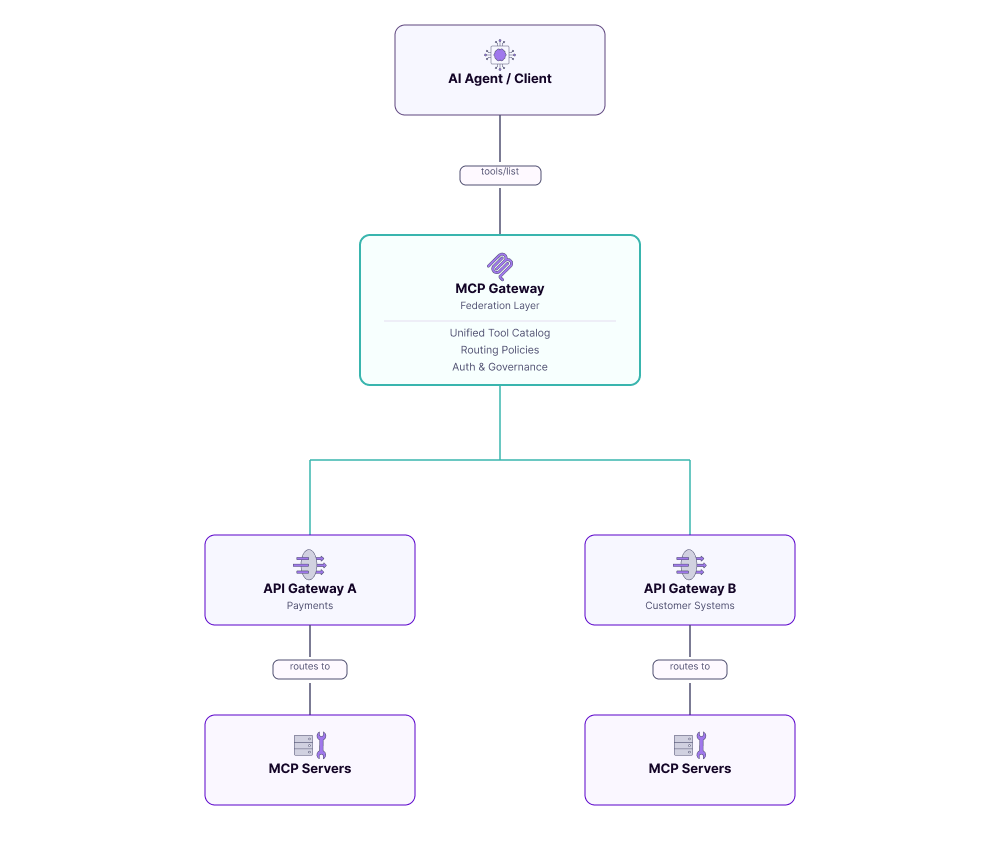
Instead of exposing every backend independently, the federation gateway becomes the single source of truth for tool discovery. During a tools/list request, it queries or synchronizes metadata from multiple upstream gateways, applies authorization policies, and returns a unified, permission-aware catalog containing only the tools the authenticated agent is allowed to access.
When the agent invokes a tool, the gateway applies routing policies to forward the request to the correct upstream environment. Routing decisions may be based on factors such as:
- Business domain (payments, customer data, trading, HR)
- Geographic region or data residency requirements
- Environment (development, staging, production)
- Customer or tenant
- Service health and availability
- Latency or proximity
- Compliance requirements
This separation allows discovery to remain centralized while execution remains distributed.
Intelligent routing and tool composition
Beyond simple request forwarding, some MCP gateways can orchestrate multiple backend services to expose higher-level business capabilities as a single tool.
For example, a financial services organization may expose one “Customer Financial Profile” tool to an AI agent. Behind the scenes, the gateway routes requests across multiple gateways and services (customer profile APIs, account balance services, payment history systems, fraud detection platforms, credit risk services, and so on).
The agent interacts with one logical MCP tool, while the gateway performs the necessary routing, aggregation, and response composition across multiple backend systems. This reduces complexity for AI applications and keeps governance, authentication, and auditing centralized.
This federation pattern is particularly valuable following mergers and acquisitions, in multi-cloud deployments, or in large organizations where different business units manage independent API gateway estates. Rather than forcing every team to migrate onto a single gateway platform, an MCP gateway provides a unified control plane that overlays existing infrastructure, enabling AI agents to discover and securely access distributed capabilities through a single, governed interface.
Dynamic routing
A sophisticated gateway can route requests based on more than just a static path. It can use the client’s identity, parameters in the request payload, or other contextual information to dynamically route the request to the correct upstream MCP server. For instance, requests from EU-based agents could be routed to a GDPR-compliant tool server hosted in the EU.
Exposing legacy services as MCP tools
If you want an AI agent to access an existing internal service through your MCP gateway, you have options. You can call the service directly from the agent using standard API calls outside of MCP, which is simple and practical for known integrations. Alternatively, you can wrap the service in an MCP server that exposes it as MCP-compliant tools, bringing it under the same governance, filtered discovery, and audit trail as the rest of your MCP infrastructure. Which approach you choose depends on whether you need the governance benefits of MCP for that particular service.
3. Governance and policy enforcement
Governance is about enforcing business and operational rules to ensure the AI system operates safely, predictably, and cost-effectively.
- Rate limiting and quotas: To prevent abuse and manage costs, the gateway must enforce usage limits. This can be configured per agent, per tool, or globally. For example, you could limit a specific agent to 1,000 requests per hour or cap calls to an expensive, third-party API at 100 per day to avoid unexpected charges.
- Request/response transformation: The gateway can modify payloads in-flight. A common use case is data masking. If a tool’s response contains sensitive data like a credit card number or social security number, the gateway can transform the response to mask that data before it reaches the agent and potentially gets included in a log or a model’s context window.
Governing AI coding assistants and IDE MCP clients
As AI coding assistants become standard developer tools, organizations increasingly need to govern not only production AI agents but also the MCP clients embedded in developer environments. Tools such as Cursor, Claude Code, GitHub Copilot, Visual Studio Code extensions, and ChatGPT desktop integrations can all connect to MCP servers that expose internal development, infrastructure, documentation, and operational capabilities.
Without centralized governance, developers may configure arbitrary MCP servers locally, creating inconsistent security controls, duplicated credentials, and limited visibility into which tools are being accessed. This makes it difficult for platform engineering and security teams to enforce organizational policies or audit AI-assisted development activity.
An MCP gateway provides a centralized control plane for developer AI tooling while allowing developers to continue using their preferred coding assistant.
Key governance capabilities include:
- Centralized client configuration: Platform teams define approved gateway endpoints, authentication methods, and default MCP server registrations once, rather than relying on individual developers to configure every AI client consistently.
- Approved-server allowlists: The control plane maintains an allowlist of sanctioned MCP servers. AI coding assistants can discover only approved development tools, preventing accidental or unauthorized connections to personal, experimental, or untrusted MCP servers.
- Consistent identity and authentication: Developers authenticate through enterprise identity providers, allowing the gateway to apply role-based permissions regardless of whether requests originate from Cursor, Claude Code, Visual Studio Code, ChatGPT, GitHub Copilot, or another MCP-compatible client.
- Per-developer auditing: Every tool invocation can be associated with an authenticated developer identity, producing a complete audit trail showing which user accessed which MCP server, when, and for what operation. This simplifies security investigations, compliance reporting, and usage analytics.
- Centralized policy enforcement: Rate limits, data masking, approval workflows, and access policies are enforced once within the gateway instead of being configured separately across multiple IDEs and AI coding assistants.
This approach separates developer experience from governance. Developers remain free to use different MCP-compatible clients while platform teams retain centralized control over which MCP servers are trusted, how credentials are managed, and how AI-assisted development activity is monitored. As organizations adopt dozens of internal MCP servers (for source code, documentation, CI/CD, cloud infrastructure, ticketing systems, and knowledge bases), the gateway becomes the control plane that standardizes access across the entire developer AI ecosystem.
4. Performance optimization and reliability
While a gateway introduces an extra network hop, a well-architected one can improve overall system performance and resilience.
- Caching: The tools/list operation can be expensive if it requires querying many upstream services. A gateway can cache these responses for a configurable period (time-to-live). Subsequent requests from agents receive the cached response almost instantly, reducing latency for the agent and lowering the load on the backend servers.
- Load balancing: For high-demand tools, you may run multiple instances of the upstream MCP server. The gateway can act as a load balancer, distributing incoming tools/call requests across these instances to ensure high availability and prevent any single server from becoming a bottleneck.
- Retries and circuit breakers: Upstream tools can sometimes fail or become slow. A resilient gateway can automatically retry a failed request. For more serious failures, it can implement a circuit breaker pattern, temporarily halting requests to a failing service to allow it time to recover, preventing cascading failures across the system. The latency trade-off is real, but a high-performance gateway written in a language like Go, such as the Tyk Gateway, typically adds only single-digit milliseconds of overhead per request, a negligible cost for the immense security and control benefits it provides.
Worked implementation examples: Payload transformation, caching, and request deduplication
One of the biggest advantages of placing an MCP gateway between AI agents and MCP servers is that the gateway can adapt traffic in-flight without requiring changes to either the client or the upstream service. This allows platform teams to modernize existing systems, expose legacy services through MCP, and improve performance while keeping agents and backend services loosely coupled.
Example 1: Request and response transformation
Not every upstream service exposes exactly the payload structure an AI agent expects. Rather than modifying the agent or rewriting the MCP server, the gateway can transform requests and responses as they pass through.
Suppose an AI agent calls an MCP tool using this standard request:
Agent request
{
“jsonrpc”: “2.0”,
“id”: 42,
“method”: “tools/call”,
“params”: {
“name”: “customer.lookup”,
“arguments”: {
“customerId”: “12345”
}
}
}
However, the upstream service expects a different schema:
Gateway transforms request
{
“customer_id”: “12345”,
“include_accounts”: true,
“include_history”: false
}
The gateway performs the translation before forwarding the request.
Likewise, the upstream service might return:
{
“customer_name”: “Jane Smith”,
“acct_balance”: 1250.42,
“acct_status”: “ACTIVE”
}
The gateway reshapes this into a consistent MCP tool response:
{
“content”: [
{
“type”: “text”,
“text”: “Customer Jane Smith has an active account with a balance of $1,250.42.”
}
]
}
Neither the AI agent nor the backend service needs to know the other’s internal schema. The gateway acts as an adaptation layer, allowing APIs and MCP servers to evolve independently while maintaining a stable interface for AI applications.
In platforms such as Tyk, these transformations can be implemented using request and response middleware, enabling platform teams to rewrite headers, modify JSON payloads, inject metadata, or normalize responses without changing application code.
Example 2: Response caching and request deduplication
Many AI agents repeatedly issue identical requests during planning or tool discovery. Examples include:
- Multiple tools/list requests during agent startup.
- Repeated lookups of relatively static reference data.
- Concurrent requests from multiple agents for the same customer record.
- Multiple reasoning iterations asking identical questions.
Without caching, every request reaches the upstream MCP server, increasing latency and unnecessary backend load.
An MCP gateway can apply a caching policy based on factors such as MCP method (tools/list), tool name, request arguments, authenticated user or tenant, and time-to-live (TTL). For example:
| Request | Gateway behavior |
|---|---|
| First tools/list | Forward upstream and cache response for 5 minutes |
| Subsequent identical requests | Return cached response immediately |
| Tool catalog changes | Invalidate cache and refresh |
The same approach can be used for expensive read-only tools.
For example, if twenty AI agents simultaneously request customer.lookup(customerId=12345) the gateway can detect that these requests are identical, forward only a single request to the upstream MCP server, and distribute the resulting response to all waiting clients. This request deduplication (sometimes called request coalescing or collapsed forwarding) prevents traffic spikes during periods of high agent concurrency.
A typical policy might be:
- Cache successful read-only tool responses for 30–60 seconds.
- Never cache state-changing operations.
- Deduplicate identical in-flight requests.
- Invalidate cached responses when upstream data changes or TTL expires.
This approach improves end-to-end latency while protecting backend systems from repeated identical queries generated by autonomous AI agents.
When should you cache MCP traffic?
Not every MCP operation is a good candidate for caching.
| Operation | Cache recommendation | Reason |
|---|---|---|
| tools/list | ✔ Excellent | Tool catalogs change infrequently |
| Read-only reference tools | ✔ Good | Frequently requested, low volatility |
| Customer or product lookups | ✔ Conditional | Use short TTLs where freshness matters |
| Search results | ✔ Conditional | Depends on data volatility |
| Write operations or actions | ✖ Do not cache | Must always execute against the upstream system |
| Transactional tools | ✖ Do not cache | Responses must always reflect current state |
By combining payload transformation, intelligent caching, and request deduplication, the gateway becomes more than a security layer. It acts as an application-aware traffic management platform that improves compatibility, reduces backend load, and delivers lower latency without requiring changes to AI agents or upstream MCP servers. These capabilities are particularly valuable in enterprise deployments where many autonomous agents interact with the same tools concurrently and where backend systems can’t easily be modified.
5. Comprehensive observability and auditing
If you can’t see what your agents are doing, you can’t manage them or provide your regulators with the assurance they demand. The gateway is the perfect vantage point for observing all AI-driven activity.
- Logging and auditing: The gateway can create an immutable audit trail of every single request. This log should capture which agent (identity) accessed what tool, with what input parameters, at what time, and what the outcome was. This detailed record is indispensable for debugging, security analysis, and regulatory compliance.
- Metrics and monitoring: A gateway should emit detailed performance and usage metrics. This includes data like request latency, error rates per tool, and even token usage if it’s parsing model responses. These metrics can be fed into platforms such as Prometheus or Datadog to create dashboards and alerts, giving platform teams real-time insight into the health of their AI infrastructure.
MCP gateway vs. the alternatives: Where does it fit?
An MCP gateway is a specialized piece of infrastructure that, while similar in concept to other tools, is uniquely suited for managing AI agent traffic. It is not a replacement for existing API gateways but a new, complementary layer in the modern technical stack. Understanding its relationship to traditional API gateways and other AI patterns like RAG is key to deploying it effectively. For a vendor-by-vendor view, see enterprise MCP gateway providers compared, a Portkey self-hosted alternative and LiteLLM alternatives.
MCP gateway vs. traditional API gateway
An MCP gateway and a traditional API gateway are philosophically similar, with both acting as a centralized control point for network traffic. However they are specialized for different protocol layers and consumers. The key difference is not traffic direction but protocol awareness and where policy is enforced.
A traditional API gateway enforces policy at the transport and HTTP layer. It understands request methods, headers, paths, and JSON payloads, and excels at authentication, rate limiting, and routing for REST, GraphQL, and gRPC traffic from human-driven applications. It is generally payload-agnostic, meaning it routes requests without understanding what is inside the body.
An MCP gateway enforces policy at the tool and agent semantic layer. It understands the MCP protocol natively, parsing the JSON-RPC body to identify which tool is being called, by which consumer, and under which policy. This enables capabilities a traditional API gateway cannot provide, including filtered discovery, per-tool rate limiting, and schema-level policy enforcement. Importantly, the two can coexist and complement each other. An API gateway continues to manage your existing REST and GraphQL estate. An MCP gateway governs the agent-to-tool traffic layer on top of it.
| Dimension | Traditional API gateway | MCP gateway |
| Primary protocol | HTTP (REST, GraphQL, gRPC-web). | JSON-RPC 2.0 over HTTP/S (Streamable HTTP) or STDIO for local deployments. |
| Policy enforcement layer | Transport and HTTP layer | Tool and agent semantic layer |
| Payload awareness | Aware of HTTP methods, paths, and headers. Generally payload-agnostic. | Semantically aware of the MCP schema (tools/list, tools/call). Can parse and modify the JSON-RPC body. |
| Typical consumers | Web browsers, mobile apps, third-party developers. | LLM-based AI agents, autonomous systems. |
How gateways complement RAG and function calling
An MCP gateway does not compete with AI patterns like retrieval-augmented generation (RAG) or model features like function calling. Instead, it provides the essential infrastructure to make them secure, scalable, and manageable in an enterprise environment.
- RAG: RAG is a pattern where an LLM’s knowledge is supplemented by fetching relevant data from an external source before generating a response. If your RAG data sources are exposed as MCP tools, an MCP gateway can govern access to them, securing retrieval, applying rate limits, and auditing every data access. However RAG systems that retrieve data directly outside of MCP do not involve the gateway at all. The gateway is only relevant to the MCP layer of your architecture.
- Function calling: This is a feature built into models like OpenAI’s GPT series that allows them to declare a need to call an external tool. MCP is a model-agnostic, open standard for this exact interaction. An MCP gateway is the infrastructure that brings enterprise-grade control to function calling. It ensures that when a model decides to call a function, that call is authenticated, authorized, logged, and routed securely, regardless of which underlying model is being used.
In short, RAG and function calling are application-level patterns, while the MCP gateway is the infrastructure-level control plane that ensures those patterns are executed safely.
How to implement an MCP gateway: A four-phase checklist
Deploying an MCP gateway is a strategic infrastructure project that brings order to your AI ecosystem. Following a phased approach allows you to demonstrate value quickly, mitigate risk, and build a scalable foundation for future AI agent deployments.
Phase 1: Discovery and planning
Goal: Define the scope of your initial implementation and establish clear success criteria.
- Identify a pilot use case: Start small. Choose a single, well-understood internal AI agent with a limited set of required tools. A low-risk, high-visibility project is ideal, for example an agent that needs to access a customer database and a ticketing system.
- Inventory your MCP servers: List the MCP servers your pilot agent needs to reach. If the tools your agent needs are already exposed via MCP servers, these become your first upstream targets. If they are not yet exposed via MCP, that is a separate workstream involving MCP server development or wrapping, which should be scoped alongside but separately from the gateway deployment.
- Define initial policies: Establish the baseline security and governance policies for the pilot. Which agent identity will be making requests? Which specific tools should it be permitted to call? What rate limits are appropriate to prevent runaway loops or unexpected costs?
Phase 2: Selection and deployment
Goal: Choose your gateway technology and deploy the infrastructure.
- Evaluate build vs. buy: Purpose-built MCP gateways and API management platforms with native MCP support both offer faster time to value than building from scratch. Evaluate against your requirements for filtered discovery, per-tool rate limiting, OAuth 2.1 support, observability, and deployment flexibility. Tyk is one platform with a native MCP gateway built into the Tyk API Management Platform.
- Choose a deployment model: Decide where the gateway will run. Options include self-hosting on Kubernetes or VMs for full control, or using a cloud-managed offering. The right choice depends on your organization’s data sovereignty requirements, operational expertise, and security posture.
Phase 3: Configuration and onboarding
Goal: Configure the gateway to manage your pilot agent and its permitted tools.
- Register upstream MCP servers: In your gateway’s management plane, register each upstream MCP server as a target. The gateway will route agent requests to these servers. Each MCP server is responsible for its own tool implementations and any underlying service integrations.
- Create and attach security policies: Create a security policy for your pilot agent and issue credentials, either an API key or OAuth token. Attach a policy that grants the agent access only to the specific tools you defined in the planning phase. Verify that filtered discovery is working correctly by confirming the agent can only see the tools it is permitted to call.
- Configure rate limits: Implement the rate limits and usage quotas defined in Phase 1. Apply them at the tool level where your gateway supports it. This protects backend services from accidental loops and runaway costs.
Phase 4: Testing and monitoring
Goal: Go live with the pilot and validate everything is working as expected.
- Redirect the agent: Update your pilot agent’s configuration to point to the gateway’s proxy URLs rather than directly to the upstream MCP server URLs. In most MCP gateway implementations each registered MCP server has its own governed proxy URL through the gateway. The agent connects to these gateway URLs instead of the raw server endpoints. Authentication, policy enforcement, filtered discovery, and logging all apply at the gateway layer before the request reaches the upstream server. The agent should not require any changes beyond updating its endpoint configuration.
- Validate policy enforcement: Confirm that authentication is working correctly, that filtered discovery is returning only the permitted tools, and that rate limits are being enforced. Test a denied request explicitly to verify the gateway rejects it with the correct error.
- Monitor logs and performance: Monitor the gateway’s logs and analytics as the agent runs. Verify the audit trail is capturing tool name, consumer identity, response code, and latency. Observe end-to-end latency to confirm the gateway is adding minimal overhead.
Frequently asked questions
What’s the difference between an MCP gateway and an MCP server?
The main difference between an MCP gateway and an MCP server is that the MCP server exposes tools and capabilities, while the MCP gateway routes, manages, and secures requests between clients and servers. The server executes functions and is responsible for its own tool implementations. The gateway handles authentication, policy enforcement, filtered discovery, per-tool rate limiting, and observability across all registered MCP servers, regardless of how many are deployed.
How much latency does an MCP gateway add to AI agent requests?
An MCP gateway introduces some latency as an intermediary layer, but a well-engineered gateway is designed to keep this overhead minimal. A high-performance gateway written in Go, such as Tyk, typically adds single-digit milliseconds of overhead per request. In practice this is a negligible cost given the security, governance, and observability benefits the gateway provides. Some gateway capabilities, such as caching tools/list responses, can actually reduce overall end-to-end latency by eliminating repeated upstream calls for information that has not changed.
How do AI agents discover APIs that are spread across multiple gateways?
AI agents don’t need to connect directly to every API gateway. An MCP gateway can federate multiple upstream gateways and MCP servers into a single, permission-aware tool catalog. During tool discovery, the gateway aggregates available capabilities, filters them according to the agent’s permissions, and presents a unified view through a single MCP endpoint. When the agent invokes a tool, the gateway applies routing rules to send the request to the appropriate backend gateway or service. This architecture gives agents a single source of truth for enterprise APIs while allowing organizations to retain distributed ownership of their existing gateway infrastructure.
Should I build my own MCP gateway or use a commercial/open-source solution?
Building your own MCP gateway offers complete customization but requires significant, ongoing investment in development, maintenance, and security. Using a platform such as Tyk, with a native MCP gateway built into the Tyk API Management Platform, provides a robust foundation with enterprise-grade features like filtered discovery, per-tool rate limiting, analytics, and a management dashboard, allowing you to focus on your core business logic instead of infrastructure. Tyk Gateway 5.16 supports both the MCP 2025-11-25 and 2026-07-28 specifications, and Tyk Enterprise 5.15+ can expose existing Tyk OAS APIs as MCP tools without writing an MCP server.
Does an MCP gateway replace my existing API gateway?
No. An MCP gateway and an API gateway serve fundamentally different purposes and operate at different layers. Your existing API gateway manages HTTP traffic between clients and backend services, enforcing policy at the transport and HTTP layer. An MCP gateway enforces policy at the tool and agent semantic layer, understanding which MCP tool is being called, by which agent, and under which policy. These are complementary layers in your stack, not competing ones. Some API management platforms now include native MCP gateway capabilities alongside their existing API gateway, allowing you to govern both from a single control plane. Tyk is one such platform, with a native MCP gateway built into the Tyk API Management Platform.
Conclusion
The Model Context Protocol provides a vital standard for how AI agents and tools communicate, but a standard for communication is not enough for production enterprise systems. You also need a control plane. An MCP gateway provides that control plane, sitting between your agents and your tools to enforce authentication, govern tool access, apply rate limits, and maintain a full audit trail of every agent action.
The distinction matters. A traditional API gateway enforces policy at the HTTP and transport layer. An MCP gateway enforces policy at the tool and agent semantic layer, understanding what is inside every request, which tool is being called, by which agent, and under which policy. These are complementary layers, not competing ones, and enterprises that treat them that way are better positioned to govern AI safely at scale.
As AI agents become more capable and widespread, the MCP gateway will evolve from a best practice to a non-negotiable part of enterprise AI infrastructure. It is the component that ensures AI operates not as a black box, but as a transparent, controlled, and trusted part of your technical stack.
Ready to establish your MCP governance layer? Talk to the Tyk team about how the native MCP gateway built into the Tyk API Management Platform can help you secure, govern, and observe your AI agents today.