Documentation Index

Fetch the complete documentation index at: https://tyk.io/docs/llms.txt

Use this file to discover all available pages before exploring further.

Using Docker

This guide explains how to set up Jaeger to ingest OpenTelemetry traces via the OpenTelemetry Collector (OTel Collector) using Docker. We will cover the installation of essential components, their configuration, and the process of ensuring seamless integration. For Kubernetes instructions, please refer to How to integrate with Jaeger on Kubernetes.

Prerequisites

Ensure the following prerequisites are met before proceeding:

Steps for Configuration

  1. Create the Docker-Compose File for Jaeger Save the following YAML configuration in a file named docker-compose.yml:
    version: "2"
    services:
      # Jaeger: Distributed Tracing System
      jaeger-all-in-one:
        image: jaegertracing/all-in-one:latest
        ports:
          - "16686:16686" # Jaeger UI
          - "4317:4317" # OTLP receiver
    
    This configuration sets up Jaeger’s all-in-one instance with ports exposed for Jaeger UI and the OTLP receiver.
  2. Deploy a Test API Definition If you haven’t configured any APIs yet, follow these steps:
    • Create a subdirectory named apps in the current directory.
    • Create a new file named apidef-hello-world.json.
    • Copy the provided simple API definition below into the apidef-hello-world.json file:
    { 
        "name": "Hello-World",
        "slug": "hello-world",
        "api_id": "Hello-World",
        "org_id": "1",
        "use_keyless": true,
        "detailed_tracing": true,
        "version_data": {
          "not_versioned": true,
          "versions": {
            "Default": {
              "name": "Default",
              "use_extended_paths": true
            }
          }
        },
        "proxy": {
          "listen_path": "/hello-world/",
          "target_url": "http://httpbin.org/",
          "strip_listen_path": true
        },
        "active": true
    }
    
    This API definition sets up a basic API named Hello-World for testing purposes, configured to proxy requests to http://httpbin.org/.
  3. Run Tyk Gateway OSS with OpenTelemetry Enabled To run Tyk Gateway with OpenTelemetry integration, extend the previous Docker Compose file to include Tyk Gateway and Redis services. Follow these steps:
    • Add the following configuration to your existing docker-compose.yml file:
    # ... Existing docker-compose.yml content for jaeger
    
    tyk:
      image: tykio/tyk-gateway:v5.2.0
      ports:
        - 8080:8080
      environment:
        - TYK_GW_OPENTELEMETRY_ENABLED=true
        - TYK_GW_OPENTELEMETRY_EXPORTER=grpc
        - TYK_GW_OPENTELEMETRY_ENDPOINT=jaeger-all-in-one:4317
      volumes:
        - ${TYK_APPS:-./apps}:/opt/tyk-gateway/apps
      depends_on:
        - redis
    
    redis:
      image: redis:4.0-alpine
      ports:
        - 6379:6379
      command: redis-server --appendonly yes
    
    • Navigate to the directory containing the docker-compose.yml file in your terminal.
    • Execute the following command to start the services:
    docker compose up
    
  4. Explore OpenTelemetry Traces in Jaeger
    • Start by sending a few requests to the API endpoint configured in Step 2:
    curl http://localhost:8080/hello-world/ -i
    
    • Access Jaeger at http://localhost:16686.
    • In Jaeger’s interface:
    • Select the service named tyk-gateway.
    • Click the Find Traces button.
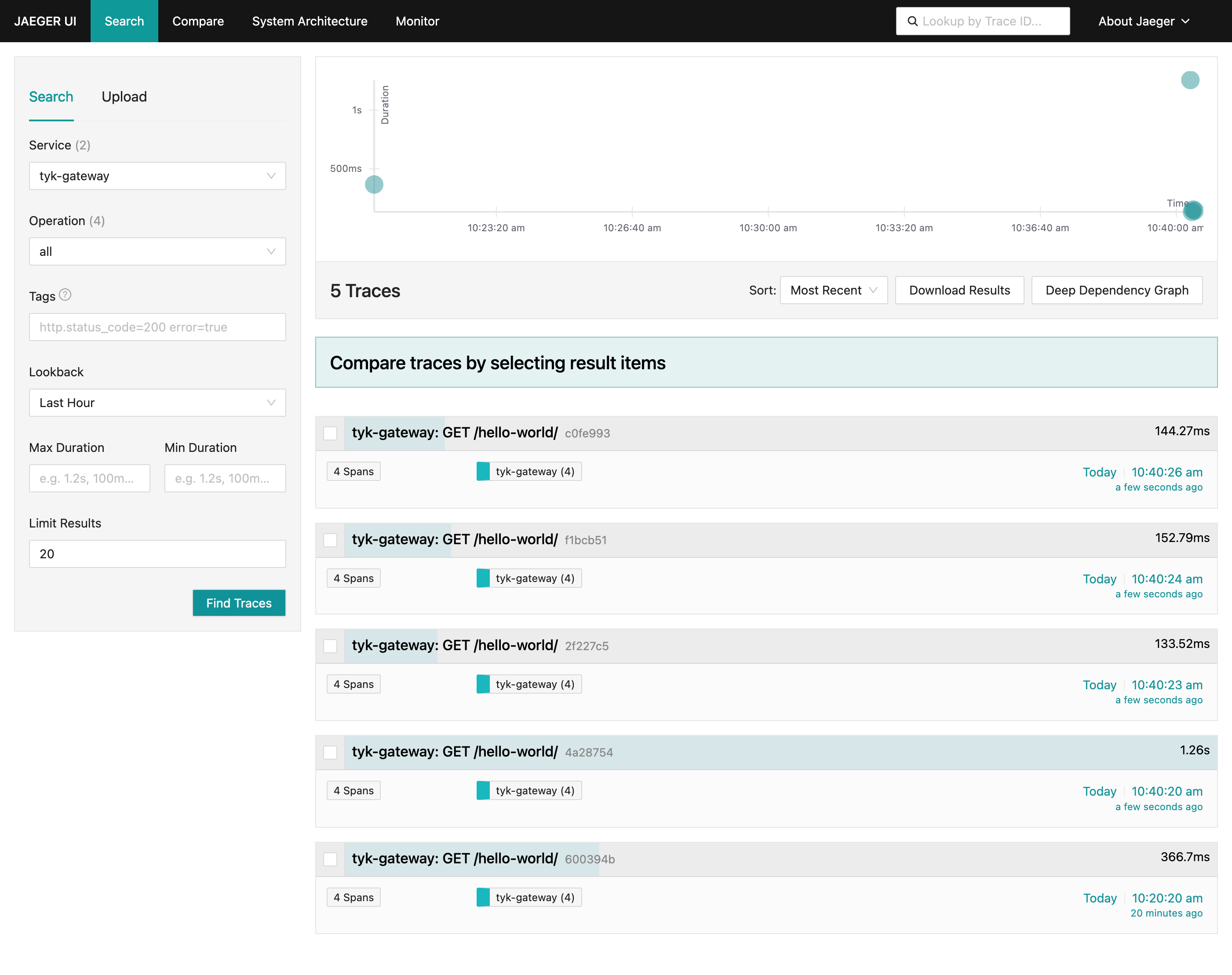
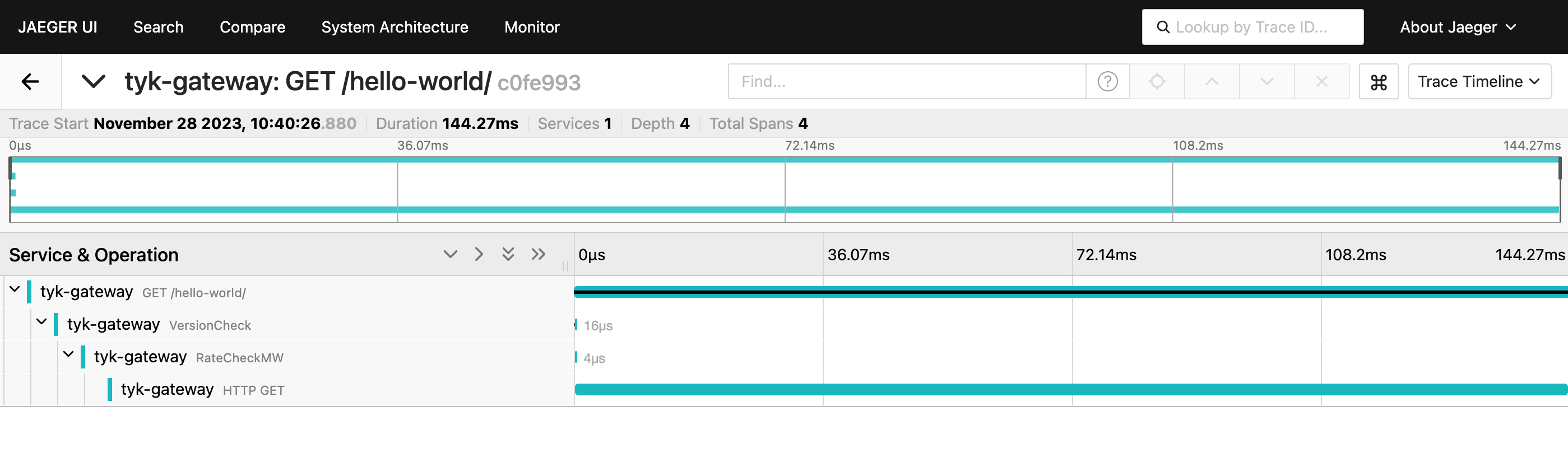
    You should observe traces generated by Tyk Gateway, showcasing the distributed tracing information. Tyk API Gateway distributed trace in Jaeger Select a trace to visualize its corresponding internal spans: Tyk API Gateway spans in Jaeger

Using Kubernetes

This guide explains how to set up Jaeger to ingest OpenTelemetry traces via the OpenTelemetry Collector (OTel Collector) using Kubernetes. We will cover the installation of essential components, their configuration, and the process of ensuring seamless integration. For Docker instructions, please refer to How to integrate with Jaeger on Docker.

Prerequisites

Ensure the following prerequisites are in place before proceeding:
  • A functional Kubernetes cluster
  • kubectl and helm CLI tools installed

Steps for Configuration

  1. Install Jaeger Operator For the purpose of this tutorial, we will use jaeger-all-in-one, which includes the Jaeger agent, collector, query, and UI in a single pod with in-memory storage. This deployment is intended for development, testing, and demo purposes. Other deployment patterns can be found in the Jaeger Operator documentation.
    1. Install the cert-manager release manifest (required by Jaeger)
    kubectl apply -f https://github.com/cert-manager/cert-manager/releases/download/v1.13.2/cert-manager.yaml
    
    1. Install Jaeger Operator.
    kubectl create namespace observability
    kubectl create -f https://github.com/jaegertracing/jaeger-operator/releases/download/v1.51.0/jaeger-operator.yaml -n observability
    
    
    1. After the Jaeger Operator is deployed to the observability namespace, create a Jaeger instance:
    kubectl apply -n observability -f - <<EOF
    apiVersion: jaegertracing.io/v1
    kind: Jaeger
    metadata:
      name: jaeger-all-in-one
    EOF
    
  2. Deploy Tyk Gateway with OpenTelemetry Enabled using Helm To install or upgrade Tyk Gateway OSS using Helm, execute the following commands:
    NAMESPACE=tyk
    APISecret=foo
    TykVersion=v5.3.0
    REDIS_BITNAMI_CHART_VERSION=19.0.2
    
    helm upgrade tyk-redis oci://registry-1.docker.io/bitnamicharts/redis -n $NAMESPACE --create-namespace --install --version $REDIS_BITNAMI_CHART_VERSION --set image.repository=bitnamilegacy/redis
    helm upgrade tyk-otel tyk-helm/tyk-oss -n $NAMESPACE --create-namespace \
    --install \
    --set global.secrets.APISecret="$APISecret" \
    --set tyk-gateway.gateway.image.tag=$TykVersion \
    --set global.redis.addrs="{tyk-redis-master.$NAMESPACE.svc.cluster.local:6379}" \
    --set global.redis.pass="$(kubectl get secret --namespace $NAMESPACE tyk-redis -o jsonpath='{.data.redis-password}' | base64 -d)" \
    --set tyk-gateway.gateway.opentelemetry.enabled=true \
    --set tyk-gateway.gateway.opentelemetry.exporter="grpc" \
    --set tyk-gateway.gateway.opentelemetry.endpoint="jaeger-all-in-one-collector.observability.svc:4317"
    

Please make sure you are installing Redis versions that are supported by Tyk. Please refer to Tyk docs to get list of supported versions.
Tyk Gateway is now accessible through service gateway-svc-tyk-oss-tyk-gateway at port 8080 and exports the OpenTelemetry traces to the jaeger-all-in-one-collector service.
  1. Deploy Tyk Operator Deploy Tyk Operator to manage APIs in your cluster:
    kubectl create namespace tyk-operator-system
    kubectl create secret -n tyk-operator-system generic tyk-operator-conf \
    --from-literal "TYK_AUTH=$APISecret" \
    --from-literal "TYK_ORG=org" \
    --from-literal "TYK_MODE=ce" \
    --from-literal "TYK_URL=http://gateway-svc-tyk-otel-tyk-gateway.tyk.svc:8080" \
    --from-literal "TYK_TLS_INSECURE_SKIP_VERIFY=true"
    helm install tyk-operator tyk-helm/tyk-operator -n tyk-operator-system
    
    
  2. Deploy a Test API Definition Save the following API definition as apidef-hello-world.yaml:
    apiVersion: tyk.tyk.io/v1alpha1
    kind: ApiDefinition
    metadata:
      name: hello-world
    spec:
      name: hello-world
      use_keyless: true
      protocol: http
      active: true
      proxy:
        target_url: http://httpbin.org/
        listen_path: /hello-world
        strip_listen_path: true
    
    To apply this API definition, run the following command:
    kubectl apply -f apidef-hello-world.yaml 
    
    This step deploys an API definition named hello-world using the provided configuration. It enables a keyless HTTP API proxying requests to http://httpbin.org/ and accessible via the path /hello-world.
  3. Explore OpenTelemetry traces in Jaeger You can use the kubectl port-forward command to access Tyk and Jaeger services running in the cluster from your local machine’s localhost: For Tyk Gateway:
    kubectl port-forward service/gateway-svc-tyk-otel-tyk-gateway 8080:8080 -n tyk
    
    For Jaeger:
    kubectl port-forward service/jaeger-all-in-one-query 16686 -n observability
    
    Begin by sending a few requests to the API endpoint configured in step 2:
    curl http://localhost:8080/hello-world/ -i
    
    Next, navigate to Jaeger on http://localhost:16686, select the ´service´ called ´tyk-gateway´ and click on the button ´Find traces´. You should see traces generated by Tyk: Tyk Gateway distributed trace in Jaeger Click on a trace to view all its internal spans: Tyk Gateway spans in Jaeger