Documentation Index

Fetch the complete documentation index at: https://tyk.io/docs/llms.txt

Use this file to discover all available pages before exploring further.

Introduction

Tyk Gateway exports all three observability signals (structured logs, distributed traces, and metrics) via the OpenTelemetry Protocol (OTLP). This guide shows you how to enable each signal and route them to a local Grafana stack (Prometheus, Loki, Tempo) using an OpenTelemetry Collector. By the end of this guide you will have:
  • Structured JSON access logs from Tyk Gateway shipping to Loki
  • Distributed traces exporting to Tempo
  • Gateway metrics (request rate, latency, error rate) flowing to Prometheus
  • A Grafana instance wired up to all three backends

Availability

SignalMinimum Gateway version
Structured JSON logs (log_format: json)5.6.0
Access logs (access_logs.enabled)5.8.0
Distributed traces (OTLP)5.3.0
OTLP metrics5.13.0

Prerequisites

Architecture

All three signals flow from Tyk Gateway to a single OpenTelemetry Collector endpoint. The Collector fans them out to the appropriate backend. Grafana queries all three.
Tyk Gateway does not export logs via OTLP. It writes structured JSON to stderr. The OTel Collector reads those logs from the Docker container log path using the filelog receiver.

Instructions

Step 1: Configure Tyk Gateway

Add the following environment variables to your tyk-gateway service. These enable all three signals:
services:
  tyk-gateway:
    environment:
      # Structured JSON logs (requires v5.6.0+)
      - TYK_GW_LOGFORMAT=json
      # Per-request access logs with trace ID correlation (requires v5.8.0+)
      - TYK_GW_ACCESSLOGS_ENABLED=true

      # Distributed tracing
      - TYK_GW_OPENTELEMETRY_TRACES_ENABLED=true
      - TYK_GW_OPENTELEMETRY_TRACES_ENDPOINT=otel-collector:4317
      - TYK_GW_OPENTELEMETRY_TRACES_SAMPLING_TYPE=TraceIDRatioBased
      - TYK_GW_OPENTELEMETRY_TRACES_SAMPLING_RATE=1.0

      # OTLP metrics
      - TYK_GW_OPENTELEMETRY_METRICS_ENABLED=true
      - TYK_GW_OPENTELEMETRY_METRICS_ENDPOINT=otel-collector:4317
      - TYK_GW_OPENTELEMETRY_METRICS_EXPORTINTERVAL=15
If you prefer tyk.conf, the equivalent configuration is:
{
  "log_format": "json",
  "access_logs": {
    "enabled": true
  },
  "opentelemetry": {
    "traces": {
      "enabled": true,
      "endpoint": "otel-collector:4317",
      "sampling": {
        "type": "TraceIDRatioBased",
        "rate": 1.0
      }
    },
    "metrics": {
      "enabled": true,
      "endpoint": "otel-collector:4317",
      "export_interval": 15
    }
  }
}
sampling.rate: 1.0 captures every request, which is suitable for getting started. In production, lower this to 0.1 (10%) or use ParentBased sampling. See the Tyk Gateway configuration reference for all options.

Step 2: Add the OTel Collector

Create an otelcol-config.yml file in your deployment directory:
receivers:
  otlp:
    protocols:
      grpc:
        endpoint: 0.0.0.0:4317
      http:
        endpoint: 0.0.0.0:4318

  filelog/tyk-gateway:
    include: ["/var/lib/docker/containers/*/*-json.log"]
    include_file_name: false
    include_file_path: true
    start_at: end
    operators:
      - type: json_parser
        parse_from: body
        parse_to: attributes.docker
        on_error: drop
      - type: move
        from: attributes.docker.log
        to: body
      - type: json_parser
        parse_from: body
        parse_to: attributes.tyk
        on_error: drop
      - type: filter
        expr: 'attributes.tyk.prefix == nil and attributes.tyk.msg == nil'
      - type: time_parser
        parse_from: attributes.tyk.time
        layout: '%Y-%m-%dT%H:%M:%SZ'
        on_error: send_quiet
      - type: severity_parser
        parse_from: attributes.tyk.level
        on_error: send_quiet

processors:
  batch: {}
  resource/tyk_gateway_logs:
    attributes:
      - action: upsert
        key: service.name
        value: tyk-gateway
  memory_limiter:
    check_interval: 1s
    limit_percentage: 75
    spike_limit_percentage: 20
  transform/tyk_gw_resource_attrs:
    error_mode: ignore
    metric_statements:
      - context: datapoint
        statements:
          - set(attributes["tyk_gw_id"], resource.attributes["tyk.gw.id"]) where resource.attributes["tyk.gw.id"] != nil
          - set(attributes["tyk_gw_group_id"], resource.attributes["tyk.gw.group.id"]) where resource.attributes["tyk.gw.group.id"] != nil
          - set(attributes["tyk_gw_tags"], resource.attributes["tyk.gw.tags"]) where resource.attributes["tyk.gw.tags"] != nil

exporters:
  otlphttp/prometheus:
    endpoint: "http://prometheus:9090/api/v1/otlp"
    tls:
      insecure: true
  otlphttp/loki:
    endpoint: "http://loki:3100/otlp"
    tls:
      insecure: true
  otlp/tempo:
    endpoint: "tempo:4317"
    tls:
      insecure: true

service:
  pipelines:
    traces:
      receivers: [otlp]
      processors: [memory_limiter, batch]
      exporters: [otlp/tempo]
    metrics:
      receivers: [otlp]
      processors: [memory_limiter, transform/tyk_gw_resource_attrs, batch]
      exporters: [otlphttp/prometheus]
    logs:
      receivers: [filelog/tyk-gateway]
      processors: [memory_limiter, resource/tyk_gateway_logs, batch]
      exporters: [otlphttp/loki]
Then add the otel-collector service to your docker-compose.yml:
services:
  otel-collector:
    image: ghcr.io/open-telemetry/opentelemetry-collector-releases/opentelemetry-collector-contrib:0.133.0
    user: "0"   # Required — without this, permission denied reading /var/lib/docker/containers
    volumes:
      - ./otelcol-config.yml:/etc/otelcol-contrib/config.yaml
      - /var/lib/docker/containers:/var/lib/docker/containers:ro
      - /var/run/docker.sock:/var/run/docker.sock:ro
    ports:
      - "4317:4317"
      - "4318:4318"
    networks:
      - tyk
The volume mounts give the Collector read access to Docker container logs for the filelog receiver.

Step 3: Add the Grafana stack

Add Prometheus, Loki, Tempo, and Grafana to your docker-compose.yml:
services:
  prometheus:
    image: prom/prometheus:v3.4.0
    command:
      - --config.file=/etc/prometheus/prometheus.yml
      - --web.enable-otlp-receiver
    volumes:
      - ./prometheus.yml:/etc/prometheus/prometheus.yml
    ports:
      - "9090:9090"
    networks:
      - tyk

  loki:
    image: grafana/loki:3.5.0
    command: -config.file=/etc/loki/local-config.yaml
    ports:
      - "3100:3100"
    networks:
      - tyk

  tempo:
    image: grafana/tempo:2.7.2
    command: -config.file=/etc/tempo.yaml
    volumes:
      - ./tempo.yaml:/etc/tempo.yaml
    ports:
      - "3200:3200"
      - "4317"
    networks:
      - tyk

  grafana:
    image: grafana/grafana:12.0.0
    environment:
      - GF_AUTH_ANONYMOUS_ENABLED=true
      - GF_AUTH_ANONYMOUS_ORG_ROLE=Admin
    volumes:
      - ./grafana/provisioning:/etc/grafana/provisioning
    ports:
      - "3001:3000"
    networks:
      - tyk
    depends_on:
      - prometheus
      - loki
      - tempo
Grafana is mapped to port 3001 to avoid conflicting with Tyk Dashboard on port 3000. Adjust if needed.
Create a minimal prometheus.yml to allow OTLP ingest:
global:
  scrape_interval: 15s

storage:
  tsdb:
    out_of_order_time_window: 10m
Create a minimal tempo.yaml:
server:
  http_listen_port: 3200

distributor:
  receivers:
    otlp:
      protocols:
        grpc:
          endpoint: 0.0.0.0:4317

storage:
  trace:
    backend: local
    local:
      path: /tmp/tempo/blocks

Provision Grafana datasources

Create grafana/provisioning/datasources/tyk.yaml:
apiVersion: 1
datasources:
  - name: Prometheus
    type: prometheus
    url: http://prometheus:9090
    isDefault: true

  - name: Loki
    type: loki
    url: http://loki:3100

  - name: Tempo
    type: tempo
    url: http://tempo:3200

Step 4: Start and verify

Restart your deployment to apply the configuration changes to your Gateway and bring up the new services:
docker compose up -d
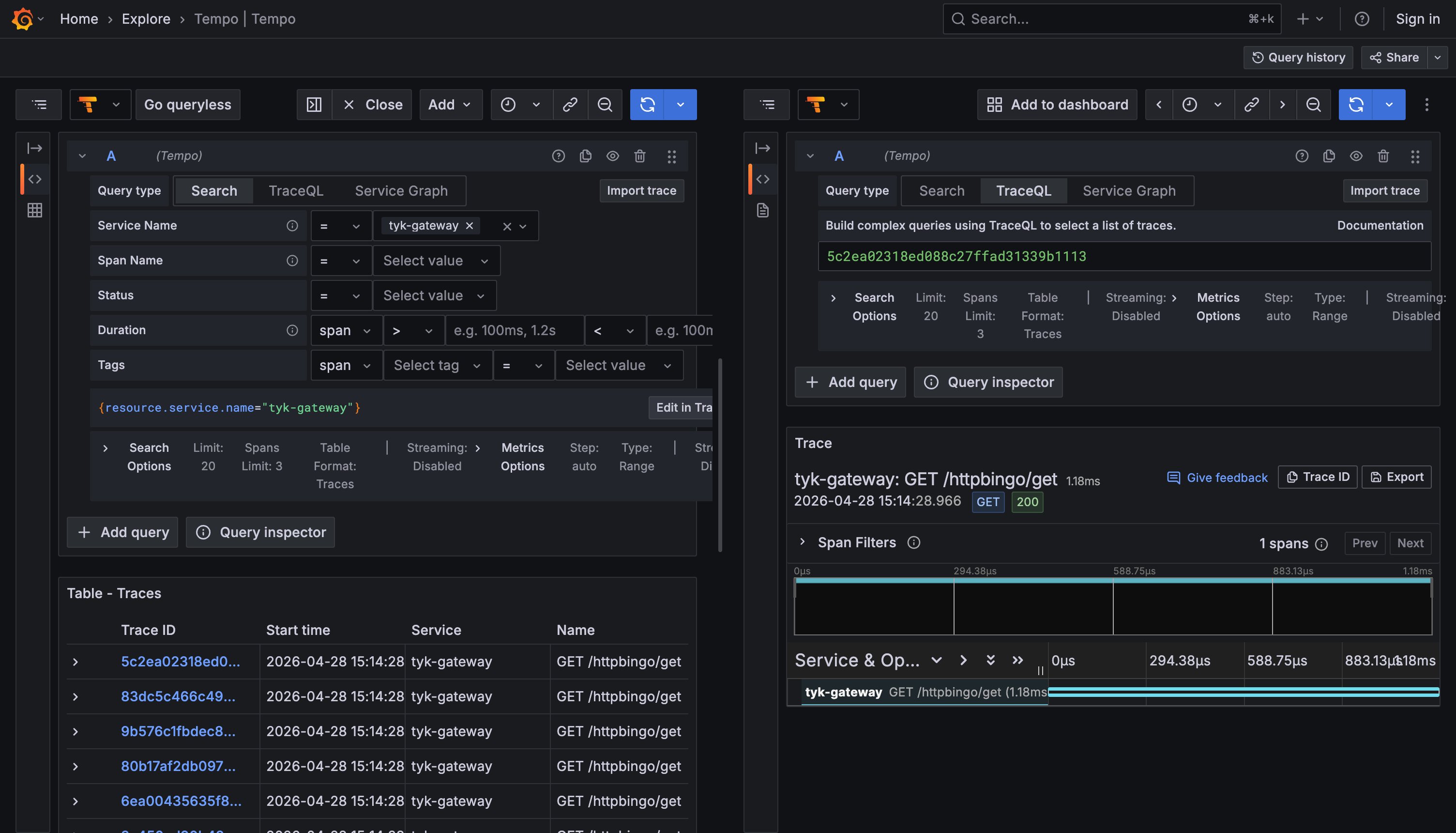
Send test requests through Tyk Gateway, then open Grafana at http://localhost:3001 and verify each signal.
If you are following this guide using the Tyk Self-Managed getting started setup, an httpbingo API is pre-configured. Generate test traffic with:
for i in $(seq 1 10); do curl -s -o /dev/null -w "HTTP %{http_code}\n" \
  -H "Authorization: <your-api-key>" http://localhost:8080/httpbingo/get; done
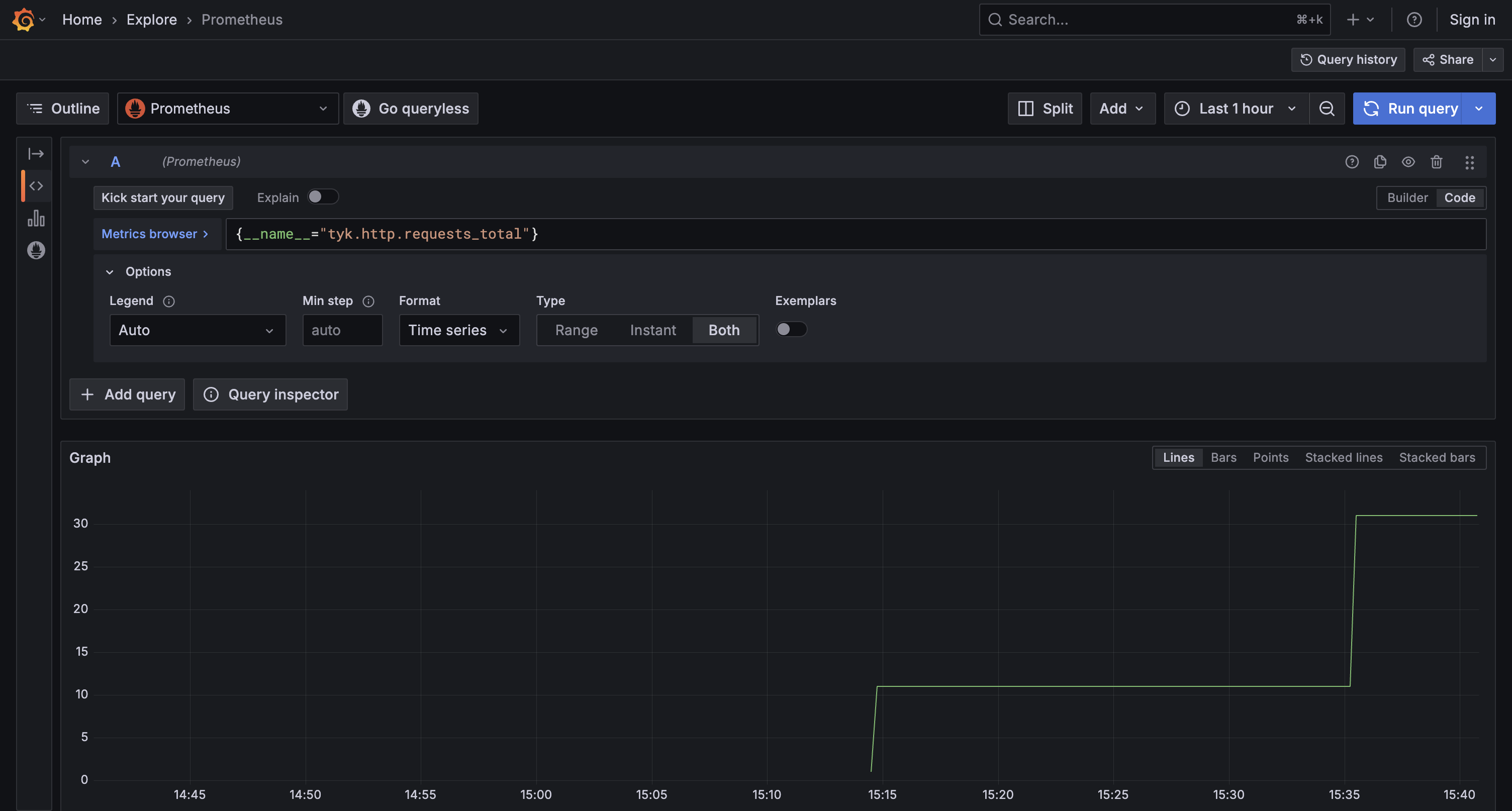
Metrics: in Explore, select the Prometheus datasource and run:
{__name__="tyk.http.requests_total"}
You should see request counts rise as traffic flows through the Gateway. Metrics in Grafana Logs: in Explore, select the Loki datasource and run:
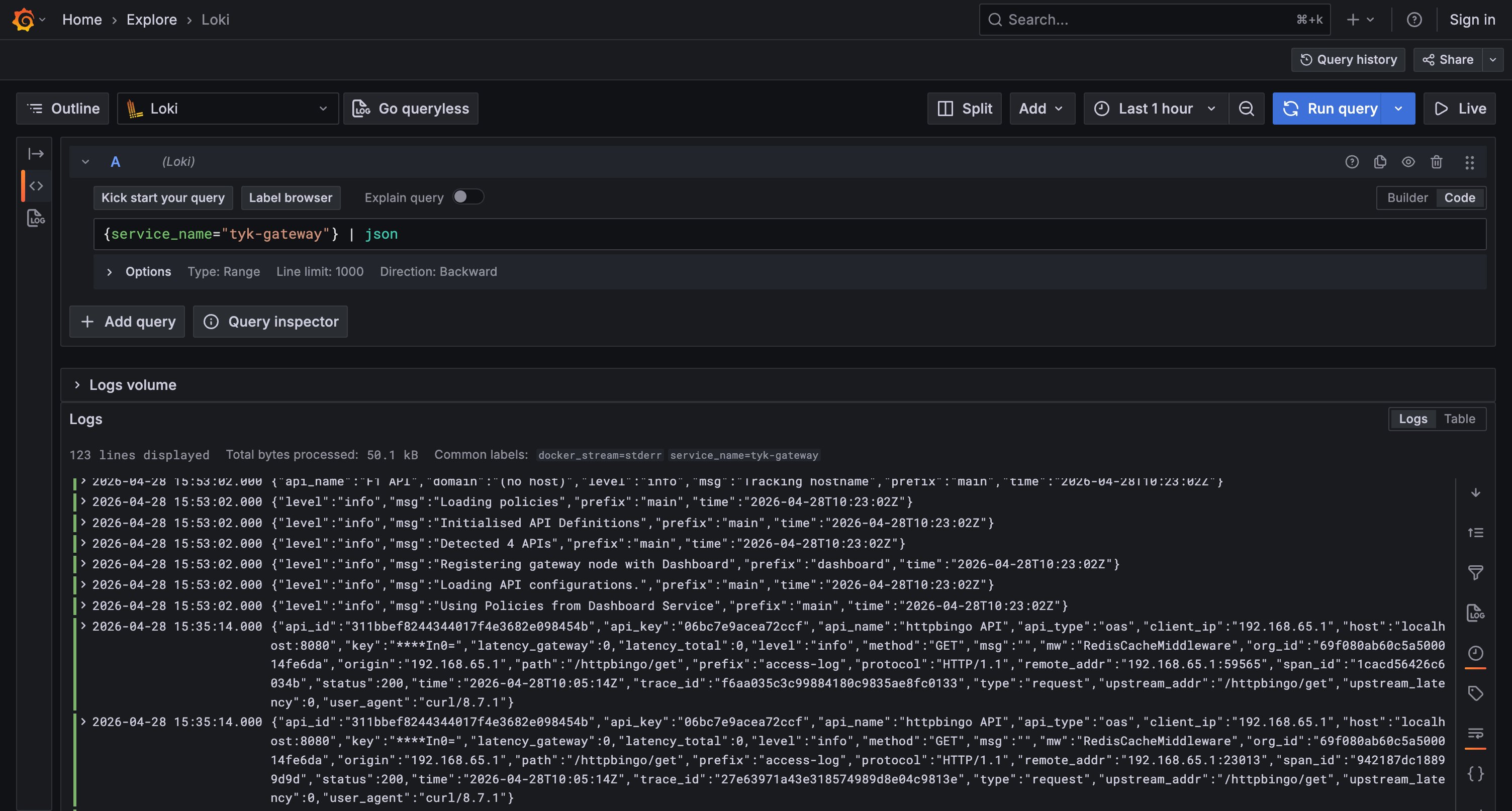
{service_name="tyk-gateway"} | json
You should see structured access log entries with fields like api_id, path, status, latency_total, and trace_id. Logs in Grafana Traces: in Explore, select the Tempo datasource and search for recent traces. Each trace should show one span for the request. Traces in Grafana
If traces are not appearing, verify that TYK_GW_OPENTELEMETRY_TRACES_ENABLED=true is set and that the Gateway can reach otel-collector:4317. Check the OTel Collector logs with docker compose logs otel-collector for any connection errors.

Next steps