Request rate tells you how much traffic the Gateway is handling. Sudden drops indicate that requests are not reaching the Gateway: DNS failures, network partitions between clients and the gateway, or client-side misconfiguration.Metrics:
What are normal request rate thresholds?There is no universal baseline. Request rate varies by deployment. Establish a baseline over 7 days and alert on deviations greater than ±30% from the rolling average for the same hour of the prior week.A more actionable check is to watch for a sudden drop to near-zero on a previously active API:
# Alert if rate drops > 80% compared to 1 hour agorate(tyk_api_requests_total{tyk_api_id="<api_id>"}[5m]) < 0.2 * rate(tyk_api_requests_total{tyk_api_id="<api_id>"}[5m] offset 1h)
Troubleshooting unexpected changes in request rate:
Issue
Possible Causes
Remediation
Rate drops to zero on one API, others normal
API definition deleted or disabled; DNS for that API’s listen path changed
Check Gateway logs for api_id config errors; verify API is active in Tyk Dashboard
Rate drops uniformly across all APIs
Network partition between clients and Gateway; load balancer health check failure; OTel Collector not receiving (metrics gap, not a real traffic drop)
Check Gateway health endpoint; confirm traffic is actually dropping and not just metric export failing
Rate spikes suddenly on one API
Traffic surge, DDoS, or runaway batch client
Filter logs by api_id and group by api_key to identify the calling consumer
Rate split unevenly across Gateway instances
Sticky sessions or uneven load balancer weights
Check service.instance.id label in metrics to compare per-instance rates
Error rate is the primary SLI for API availability. Tyk classifies every non-success response with a response_flag: a two- or three-character code that tells you exactly where and why a request failed, before you read a single log line.Metrics:
Successful request — tyk_response_flag is set to the HTTP status code
AMF
401
No
AuthKey
Auth header entirely absent
AKI
403
No
AuthKey
Auth header present, key invalid or expired
QEX
403
No
RateLimitAndQuotaCheck
Key’s quota window exhausted
RLT
429
No
RateLimitAndQuotaCheck
Per-second rate limit exceeded
URS
500
Yes
Upstream
Upstream returned a 5xx error
What error rate thresholds should I set?A non-2xx rate below 2% is a healthy baseline for most APIs with authenticated consumers. Alert at 10% over a 5-minute window for most APIs. For payment or health endpoints, tighten to 1%.Calculate the current error rate:
Classify errors by flag to route to the right runbook:
sum by (tyk_response_flag) ( rate(http_server_request_duration_seconds_count{tyk_api_id="<api_id>"}[5m]))
Check upstream_latency in logs first. If it is 0, the request never left the Gateway: the error originated in auth, quota, or rate-limit middleware. If upstream_latency > 0 and response_flag = URS, the upstream itself failed.
Troubleshooting elevated error rates:
Issue
Possible Causes
Remediation
Surge in AMF (401)
Auth header entirely absent at Tyk — the client never sends it, or an intermediary (load balancer, CDN, reverse proxy) strips it before reaching the Gateway
Identify source: {prefix="access-log"} | json | response_flag="AMF" | line_format "ip={{.client_ip}} api={{.api_name}}". Single IP after a network change → suspect header stripping by an intermediary. Wide IP spread → clients calling the wrong listen path
Surge in AKI (403)
Key was rotated, expired, or revoked; credential stuffing attack
Single source IP → contact consumer. Wide IP spread → credential attack; tighten rate limits
Sustained QEX (403)
Consumer legitimately exhausted their quota tier
Identify consumer via key field in logs; invite upgrade or raise quota ceiling in policy
RLT (429) climbing
Legitimate traffic burst; retry storm after upstream error
Check whether RLT is protecting a degraded upstream (correct) or blocking legitimate traffic (adjust limit). Add backoff guidance to consumer
Sustained URS (500)
Backend service degraded; upstream 5xx errors
Extract error_target (upstream hostname) and upstream_addr from logs; escalate to backend team. Check retry/circuit-breaker plugin config
Tyk exports three latency histograms that let you decompose end-to-end response time into what the Gateway spent versus what the upstream spent. Use them together. Any one alone gives an incomplete picture.Metrics:
Prometheus name
Measures
Key labels
http_server_request_duration_seconds
Total time from first byte received to last byte sent (client view)
Latency isolation rule: If http_server_request_duration_seconds p95 is high but tyk_gateway_request_duration_seconds p95 is < 10ms, the Gateway is healthy: the latency is upstream. If both histograms are elevated, the gateway is the bottleneck.
Gateway health metrics reflect the internal state of the Gateway process itself, independent of API traffic. They are available when opentelemetry.metrics.enabled: true (Tyk Gateway 5.13+) and can be disabled independently with runtime_metrics: false if you only need RED signals.
Memory in use by the Go runtime, broken down by go_memory_type label ("stack" or "other"). Monitor go_memory_type="other" for leak detection; the stack series grows proportionally with goroutine count
go.memory.gc.goal
go_memory_gc_goal_bytes
Gauge
Target heap size before next GC cycle
go.memory.limit
go_memory_limit_bytes
Gauge
Configured GOMEMLIMIT value; use as the denominator for utilization alerts (alert when go_memory_used_bytes exceeds 85% of this)
go.memory.allocated
go_memory_allocated_bytes_total
Counter
Total bytes allocated since startup
go.memory.allocations
go_memory_allocations_total
Counter
Total allocation count since startup. High rate = allocation pressure
What memory thresholds should I set?There is no fixed absolute limit. Thresholds depend on how many APIs are loaded. Alert on rate of growth instead:
go_memory_used_bytes{go_memory_type="other"} growing > 10% per hour with stable traffic and stable API count → investigate
If you set GOMEMLIMIT, alert when go_memory_used_bytes{go_memory_type="other"} exceeds 85% of go_memory_limit_bytes; GC will become aggressive and start impacting request latency
Troubleshooting memory issues:
Issue
Possible Causes
Remediation
go_memory_used_bytes{go_memory_type="other"} growing monotonically over hours with stable API count
Memory leak in a middleware or connection pool
Requires "enable_http_profiler": true in tyk.conf. Capture heap profile: curl http://gateway:<control_api_port>/debug/pprof/heap > heap.pprof. Contact Tyk support with the profile and trend chart
Memory growing proportionally with API count
Normal — each API definition has memory overhead
Increase instance memory; review whether all loaded APIs are still needed
Memory growing faster than expected with stable API count
High allocation pressure from request handling
Check rate of go_memory_allocations_total; if climbing steeply, contact Tyk support with a heap profile
Number of active goroutines. Monotonic growth = leak
go.processor.limit
go_processor_limit
Gauge
Number of OS threads available (GOMAXPROCS)
go.config.gogc
go_config_gogc_percent
Gauge
GC target percentage (GOGC env var)
What goroutine thresholds should I set?A healthy Gateway at moderate load runs with 500–2,000 goroutines. Alert at 5,000 goroutines sustained for 10 minutes. A one-time spike during a traffic burst is normal; a monotonically increasing trend over hours is not.
go_goroutine_count{service_name="tyk-gateway"}
Troubleshooting goroutine growth:
Issue
Possible Causes
Remediation
Monotonically increasing goroutine count over hours
Goroutine leak in connection handler or background worker
Requires "enable_http_profiler": true in tyk.conf (off by default). Collect from the Control API port: curl http://gateway:<control_api_port>/debug/pprof/goroutine > goroutine.pprof. Share with Tyk support along with the trend chart
Goroutine count high relative to traffic
CPU saturation; too many goroutines contending for OS threads
API definitions currently loaded. Sudden drop = sync failure
tyk.gateway.policies.loaded
tyk_gateway_policies_loaded
Gauge
Policies currently loaded
tyk.gateway.config.reload
tyk_gateway_config_reload_total
Counter
Total config reloads since startup
tyk.gateway.config.reload.duration
tyk_gateway_config_reload_duration_seconds
Histogram
Time per reload. High values indicate large API counts
What to watch for:
A sudden drop in tyk_gateway_apis_loaded (not a gradual decrease) typically means a failed sync from the Dashboard or an accidental bulk delete. Alert if the value drops by more than 10% in a single scrape interval.
A steady increase in tyk_gateway_config_reload_total at a rate faster than your deployment cadence suggests a reload loop; investigate what is triggering reloads.
Reload duration p95 growing over time suggests the API definition set is expanding and reload times need to be accounted for in SLOs.
A sudden spike in AMF or AKI response flags means clients are failing authentication. Sustained rates above 0.1 req/s (6 per minute) warrant investigation.Identify:
AMF and AKI are identical from a consumer-impact perspective: both result in the request never reaching the upstream. The distinction matters for root cause: AMF means the client didn’t send a key at all; AKI means the client sent a key that Tyk cannot resolve.
The Gateway caps at 2,000 unique attribute combinations per instrument by default (see cardinality control). When this cap is reached, additional data points are recorded with otel.metric.overflow = true rather than creating new time series.Detect:
# Any non-zero result means cardinality overflow is occurringtyk_api_requests_total{otel_metric_overflow="true"}
Troubleshoot:
Issue
Possible Causes
Remediation
Overflow on tyk_api_requests_total
More than 2,000 unique api_id × method × status_code combinations
Audit which APIs are generating unusual method/status combinations; consider raising cardinality_limit — contact Tyk support before doing so in production
Overflow after adding custom dimensions
Custom dimension like client_ip or user_id is high-cardinality
Remove the high-cardinality dimension or scope it with a hash/prefix
Cardinality overflow does not drop data. The aggregate counts are preserved in the overflow bucket. You will see correct totals but lose the ability to break the data down by the overflowing dimension combination.
Client retries without exponential backoff amplify an upstream failure. RLT (429) responses trigger more retries, which hit rate limits, which trigger more retries, a self-reinforcing loop that increases load on both the Gateway and the upstream.Identify:A retry storm shows RLT rate climbing while overall request rate is also climbing:
# RLT rate climbingrate(http_server_request_duration_seconds_count{tyk_response_flag="RLT"}[1m])# If this is also climbing, clients are retryingrate(tyk_api_requests_total[1m])
Troubleshoot:
Issue
Possible Causes
Remediation
RLT climbing with overall rate climbing
Clients retrying 429s without backoff
Identify consumer via logs: response_flag="RLT" | line_format "key={{.key}} ip={{.client_ip}}". Advise consumer to implement exponential backoff with jitter
RLT starts immediately after upstream error (URS)
Upstream degradation triggers client retries which hit rate limits
Fix the upstream first. The rate limit is correctly protecting the backend during degradation
RLT on a single consumer, others unaffected
Single consumer batch job sending bursts
Work with consumer to spread requests or raise their rate limit ceiling
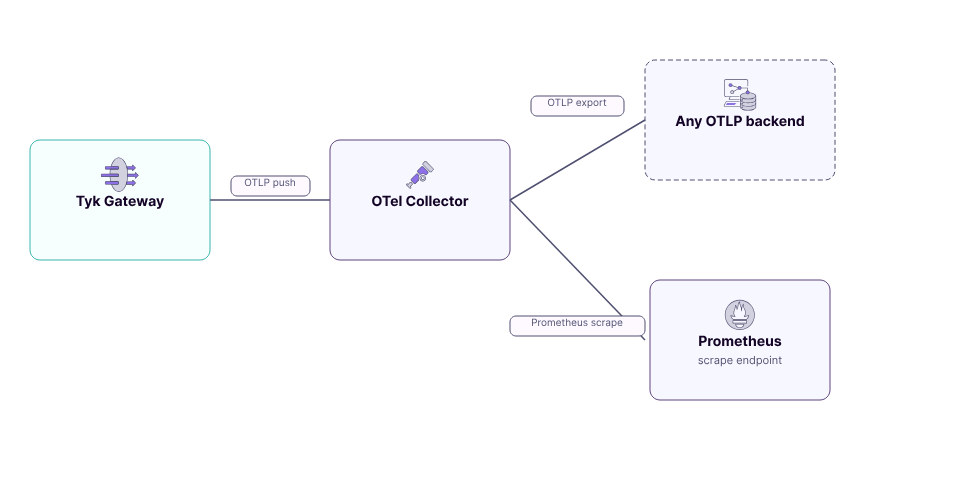
Prometheus Alertmanager handles alert routing. The Gateway emits Prometheus-compatible metrics via the OTel Collector; alert rules evaluate against those metrics.Configure Prometheus to load alert rules:
## Error rates# Overall non-2xx rate (as percentage)( rate(tyk_api_requests_total{http_response_status_code!~"2..", tyk_api_id="<api_id>"}[5m]) / rate(tyk_api_requests_total{tyk_api_id="<api_id>"}[5m])) * 100# Error breakdown by response flagsum by (tyk_response_flag) ( rate(http_server_request_duration_seconds_count{tyk_api_id="<api_id>"}[5m]))# Upstream error rate (URS only)rate(http_server_request_duration_seconds_count{tyk_response_flag="URS", tyk_api_id="<api_id>"}[5m])## Latency# p50 / p95 / p99 end-to-endhistogram_quantile(0.50, rate(http_server_request_duration_seconds_bucket{tyk_api_id="<api_id>"}[5m]))histogram_quantile(0.95, rate(http_server_request_duration_seconds_bucket{tyk_api_id="<api_id>"}[5m]))histogram_quantile(0.99, rate(http_server_request_duration_seconds_bucket{tyk_api_id="<api_id>"}[5m]))# Gateway-only average latencyrate(tyk_gateway_request_duration_seconds_sum{tyk_api_id="<api_id>"}[5m]) / rate(tyk_gateway_request_duration_seconds_count{tyk_api_id="<api_id>"}[5m])# Upstream average latencyrate(tyk_upstream_request_duration_seconds_sum{tyk_api_id="<api_id>"}[5m]) / rate(tyk_upstream_request_duration_seconds_count{tyk_api_id="<api_id>"}[5m])## Gateway health# Goroutine count trendgo_goroutine_count{service_name="tyk-gateway"}# Memory in use (go_memory_type="other" = heap-adjacent; use for leak detection)go_memory_used_bytes{service_name="tyk-gateway", go_memory_type="other"}# GC target heap sizego_memory_gc_goal_bytes{service_name="tyk-gateway"}# Configured GOMEMLIMIT (denominator for utilization alert)go_memory_limit_bytes{service_name="tyk-gateway"}# APIs and policies loadedtyk_gateway_apis_loaded{service_name="tyk-gateway"}tyk_gateway_policies_loaded{service_name="tyk-gateway"}## Consumer-level breakdown (requires custom api_metrics configuration)# These metrics are NOT emitted by default. They must be defined in# opentelemetry.metrics.api_metrics in tyk.conf.# Example: requests by API key (last 6 chars), if configured with api_key session dimension# increase(tyk_requests_by_apikey_total{tyk_api_id="<api_id>"}[1h]) by (api_key)# Example: 5xx errors by route, if configured with endpoint metadata dimension# increase(tyk_requests_by_route_total{tyk_api_id="<api_id>", http_response_status_code="500"}[1h]) by (tyk_endpoint)
Enable the OTel pipeline: if you haven’t yet, follow the setup instructions to enable native OTLP export and route signals to your observability backend.
Try the reference Grafana dashboards: see the observability setup guide for a full modern observability stack (Loki, Grafana, Tempo, Prometheus) with pre-built panels for all the metrics in this guide.
Configure Prometheus alerting: copy the alert rules from Set Up Alerting, replace <api_id> with your real API IDs, save as tyk_alerts.yml, and restart Prometheus.