Every MCP server an employee connects to an AI agent is a new door into company systems. Through it, an agent can read source code, post in Slack or change records in a CRM, with that employee’s access and at machine speed. Left alone, each person picks their own servers, stores vendor tokens on their laptop, and grants whatever scopes the consent screen asks for. The company can’t see which agents touched which data, can’t limit what they do, and can’t cut off access in one place when someone leaves or a token leaks. That’s a security problem. For regulated teams, it’s an audit problem, too. Putting third-party MCP servers behind a gateway gives back the controls companies already expect for APIs, so they can see who called what, for whom, and within which limits.
AI agents also now call third-party MCP servers on behalf of real people: GitHub, Linear, Slack, Google Workspace. The vendor needs to see that person, with that person’s own permissions. Security needs one place that records which agent called which tool, for whom.
In our post on governing third-party MCP servers with Tyk, we covered three approaches. The strongest, Tyk as an ID-JAG broker, gives each call a fresh, per-user token through Cross App Access (XAA). But it only works where the vendor accepts your identity provider as an ID-JAG issuer and Tyk as a client. Most vendors aren’t there yet.
This post adds a fourth option that works with vendors today: Tyk plus Auth0 Token Vault. The user signs in once to Auth0. Then, on every MCP call, Tyk swaps the user’s Auth0 token for that same user’s own vendor token, held in Token Vault, and forwards the call. The vendor needs nothing new, only an ordinary OAuth app.
The scenario
Riley asks Claude Code to list their GitHub repositories. Claude Code is pointed at one URL on the Tyk gateway, /github-mcp/mcp, not at GitHub.
- Riley signs in once, to Auth0. Claude Code finds the login page through Tyk’s Protected Resource Metadata and gets an Auth0 token for Riley.
- Tyk checks that token on every call: right issuer, right audience (this MCP server), genuine signature.
- GitHub doesn’t trust Auth0. It only accepts GitHub tokens. So Tyk hands Riley’s Auth0 token to Token Vault and asks for Riley’s own GitHub token.
- Token Vault already has it. Riley linked their GitHub account once, earlier. Auth0 keeps the refresh token and returns a fresh GitHub token.
- The call reaches GitHub as Riley, with Riley’s own repositories and org permissions. The Auth0 token never leaves Tyk.
Riley never sees a GitHub token. Neither does Claude Code.
How it works
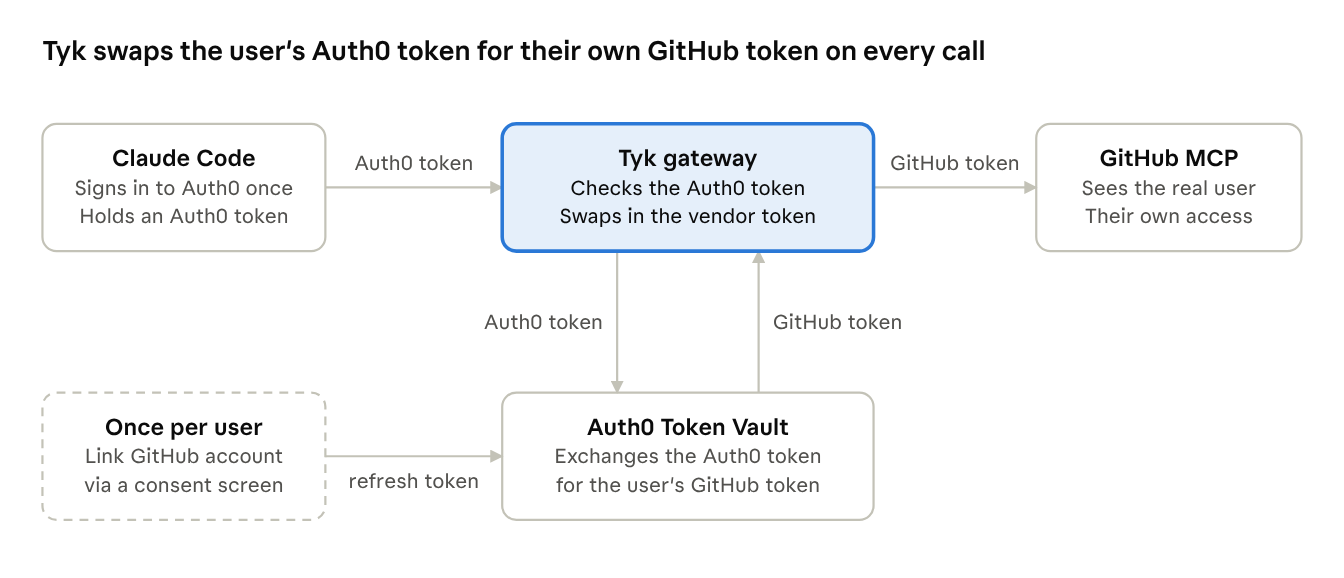
The dashed box happens once per user; everything else happens on every call. After the first exchange, Tyk keeps a copy of the vendor token per user for up to five minutes by default (configurable, and never past the token’s own expiry), so most calls don’t go to Auth0 at all, and a user blocked or unlinked in Auth0 loses access within that window.
What you gain and what it costs
The Tyk MCP Identity Broker, a gRPC plugin for the gateway, does the token work. The MCP client only does standard OAuth with Auth0.
What you add over options 1 and 2 (detailed in our earlier article on governing third-party MCP servers with Tyk):
- Real user identity at the vendor. GitHub sees Riley, not a service account, and applies Riley’s own permissions.
- Real user identity in Tyk. Every call is logged and traced against the Auth0 user (
sub), with the MCP method and tool name. - Any MCP client. The client signs in to your Auth0, so it doesn’t need to be on the vendor’s list of approved clients.
- No vendor credential on the client. Claude Code, Cursor, or n8n holds an Auth0 token only. The vendor token stays inside Tyk, in memory for a few minutes at most (never on disk, in Redis, or in logs).
- Tyk’s controls on top. Tool allow-lists and block-lists, rate limits, and quotas per user, plus OpenTelemetry traces through the token exchange.
What it costs:
- Every user links their vendor account once. A one-time consent at GitHub, stored in Token Vault. Until they give consent, Tyk blocks their calls with a 403 error telling them to link their GitHub account.
- Auth0 holds long-lived refresh tokens for every user. Protect the tenant accordingly.
- Scope is per connection, not per tool. Every GitHub token carries what the Auth0 GitHub connection asks for (
repo,read:org,read:user). Narrow it at the connection, or block tools at the gateway. - One header rule per tool. Tyk’s MCP proxy re-checks the Auth0 token on each internal hop, so the plugin parks the vendor token in a side header and a per-tool rule moves it into
Authorizationon the way out. When the vendor adds a tool, add a rule. - Cut-off isn’t instant. To avoid calling Auth0 on every request, Tyk reuses each vendor token for up to five minutes (a per-API setting). Blocking or unlinking a user in Auth0 takes effect within that window. Set it to zero for an immediate cut-off, at the cost of an Auth0 call per request.
Choose this option when: your company needs one place to see, limit, and switch off what AI agents do in vendor tools, and each vendor must see the real person with their own permissions. It works today, even with vendors that don’t support Cross App Access yet.
Token Vault vs the ID-JAG broker
Both approaches give the vendor a token for the real user, and both keep the user’s sign-in token from your own IdP (Okta or Auth0) away from the vendor. They differ in what they need from the vendor and what they store.
| ID-JAG broker (any ID-JAG IdP) | Token Vault (Auth0) | |
|---|---|---|
| Who signs the user in | Your IdP (Okta or another ID-JAG issuer), once for all vendors | Auth0, once for all vendors |
| Token the vendor receives | A new token per user and per tool | The user’s own vendor token, per user |
| Least privilege | One scope per tool | Scope of the vendor connection; block tools at Tyk |
| User setup | None | Link each vendor account once |
| Stored secrets | None per user | A vendor refresh token per user, in Auth0 |
| Revoke access | Remove one assignment in the IdP | Unlink in Auth0 (Tyk stops within its cache window, five minutes by default) or revoke at the vendor |
| Needs from the vendor | ID-JAG support, your IdP as issuer, Tyk as client | An ordinary OAuth app; MCP server accepts that app’s tokens |
In short: ID-JAG is the end state. Token Vault works today with most SaaS vendors that host MCP servers, like GitHub. Both run side by side on one Tyk Gateway, with one plugin (the Tyk MCP Identity Broker), so you can move a vendor from Token Vault to ID-JAG when it’s ready.
How to choose
- You want to see what agents do and block risky tools, with the least setup: Option 1, mirror mode.
- Team or app accountability and quotas: Option 2, add a Tyk credential.
- Per-user identity at the vendor, with vendors as they are today: Option 4, Token Vault.
- Per-user, per-tool least privilege with no stored vendor tokens: Option 3, the ID-JAG broker, once the vendor accepts it.
Most teams will run a mix. Mirror mode for vendors with an approved client, Token Vault for vendors such as GitHub where the person matters, and ID-JAG as each vendor adds support. All of it sits behind one gateway, one set of logs and one place to switch a tool off.
Auth0 decides who the user is and keeps their vendor tokens. Tyk decides what the agent may do with them, call by call, across every vendor.