AI agents now call third-party MCP servers every day: Jira and Confluence through Atlassian, designs through Figma, threads through Slack. Each vendor runs its own OAuth, so every user signs in to every vendor, and the security team has no single record of which agent called which tool for whom.
Okta Cross App Access (XAA), Okta’s implementation of the IETF Identity Assertion JWT Authorization Grant (ID-JAG), fixes the sign-in half. The enterprise identity provider decides which agent may reach which app for which user, with no per-user consent screens. It doesn’t see what the agent does once it has a token. That’s the gateway’s job.
There are three ways to put Tyk in front of a third-party MCP server. Each adds control and each asks more of the setup.
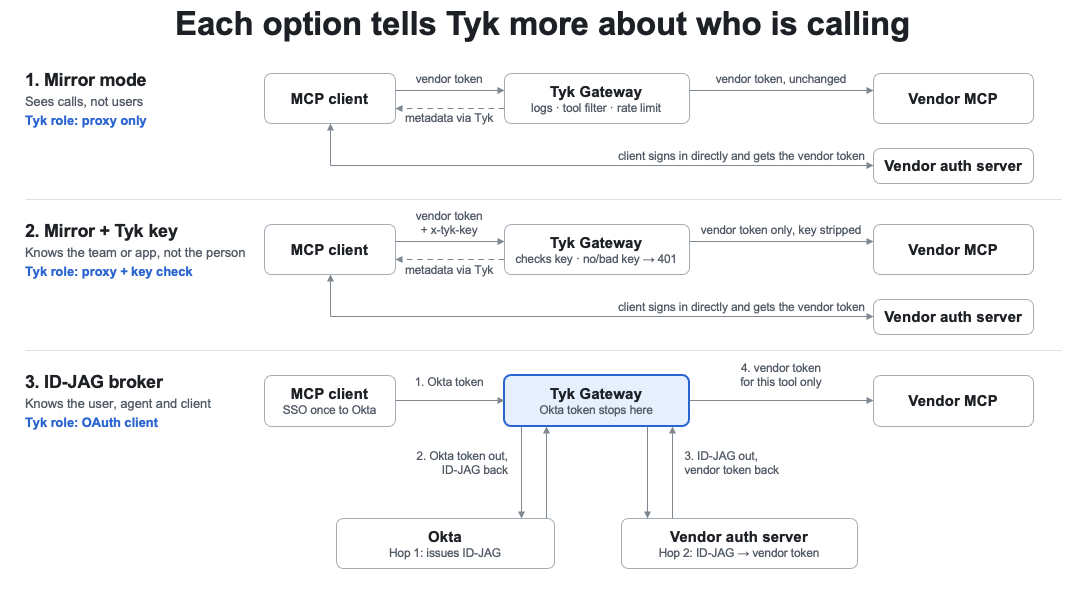
Only the ID-JAG broker gives the vendor a new token, which Tyk obtains for this user and this tool.
Option 1: Transparent proxy in mirror mode
Mirror mode gives you one governed front door for a vendor’s MCP server without touching its authentication. Tyk fetches the vendor’s Protected Resource Metadata, rewrites its resource to the Tyk URL and serves it. The MCP client discovers the vendor’s authorization server through Tyk, signs in with the vendor as usual, and Tyk forwards its token unchanged.
What you get
- One URL per vendor that your teams register, instead of the vendor’s own.
- A log of every MCP call: Method, tool, status, latency, with OpenTelemetry traces.
- Tool allow-lists and block-lists, and rate limits, enforced before the call leaves your network.
What you don’t get
- Who the user is. The vendor’s token is opaque to Tyk, so logs and limits can’t be per user.
- Least privilege beyond allowing or blocking a tool. The token’s scopes are whatever the vendor granted.
- Freedom of client choice. The client still registers with the vendor, so it must be one the vendor allows.
Choose this option when: Your agents already use an approved client (Claude, Cursor, VS Code) and you want visibility and tool filtering this week.
Option 2: Mirror mode plus a Tyk credential
Adding a Tyk credential tells the gateway who’s calling, while the vendor’s token still passes through untouched. Each consuming team or app gets a Tyk auth key (JWT or mTLS work too), sent in its own header (e.g. x-tyk-key) so Authorization stays free for the vendor’s token. Keys can be issued and revoked from the Tyk Developer Portal.
What you add over option 1
- Per-consumer policies: Which tools each team may call, with their own rate limits and quotas.
- Analytics and audit per consumer, not just per vendor.
- An instant off switch. Revoke one key without touching the vendor or other teams.
What it costs
- Two credentials per client, and the client must be able to send a custom header (Claude Code can, with
--header). - A key usually identifies a team or an app, not the person; the vendor still sees only its own token.
- The client must still be one the vendor allows.
Choose this option when: You need accountability and quotas per team or app quickly, without identity-provider work.
Option 3: Tyk as the ID-JAG broker
In this option, Tyk performs the XAA exchange itself, so the user signs in once to Okta and every vendor call carries a token scoped to the specific tool being called. The MCP client performs only standard single sign-on; a Tyk plugin handles the token operations on each call:
- Tyk validates the user’s Okta access token and finds the tool’s required scope.
- Hop 1, Okta: Tyk exchanges that token for an ID-JAG for the vendor, asking only for that tool’s scope. Okta checks if the user is assigned and the scope is allowed. The ID-JAG names the user and the actor chain: the Tyk agent acting for the MCP client (
act). - Hop 2, the vendor: Tyk redeems the ID-JAG at the vendor’s authorization server (RFC 7523 jwt-bearer) for the vendor’s own access token.
- Tyk swaps the token into the request and forwards the call.
The user’s Okta token never reaches the vendor, as the MCP specification requires.
What you add over option 2
- Real user identity on every call, linked to the agent and the client that made it.
- Least privilege per tool. A read tool gets a read-only token, a refund tool a refund-only one.
- Governance in the identity provider. Assign or remove a user or an agent in Okta and access follows.
- No per-vendor sign-in or consent screens for users.
What it costs
- The vendor must accept Okta as an ID-JAG issuer and Tyk as an allowed client.
- More moving parts. An Okta AI agent, an XAA target app per vendor, and the plugin.
Choose this option when: You need per-user, per-tool audit and least privilege, typically in regulated industries.
Key details compared
Each option keeps everything provided by the previous option and adds a layer of identity.
| 1. Mirror mode | 2. Mirror + Tyk key | 3. ID-JAG broker | |
|---|---|---|---|
| Who signs the user in | The vendor | The vendor | Okta, once for all vendors |
| Token the vendor receives | The client’s own vendor token | The client’s own vendor token | A new token Tyk obtains per user and tool |
| Who Tyk knows is calling | No one | The team or app | The user, the agent, and the client |
| Per-call log of tool and status | Yes | Yes, per consumer | Yes, with the full identity chain |
| Least privilege | Allow or block tools | Allow or block tools per consumer | One scope per tool, per user |
| Revoke access | At the vendor | One Tyk key (consumer or group) | One Okta assignment |
| Needs from the vendor | Nothing new | Nothing new | ID-JAG support and Tyk as an allowed client |
What vendors support today
The ID-JAG plumbing is appearing fast, but most vendors still decide which clients may connect. In November 2026, 10 of 20 popular remote MCP servers we checked advertised the jwt-bearer grant in their authorization server metadata, including Atlassian, Figma, Slack, Notion, and Datadog. Advertising the grant is a strong signal, not proof that a vendor accepts Okta ID-JAGs.
- Figma documents XAA with Okta for Organization and Enterprise plans, for “Anthropic models only”. Its MCP catalog lists 30 approved clients; new clients and private clients can apply for review by contacting their Figma SME.
- Atlassian supports ID-JAG on its Rovo MCP server in private beta, with admins choosing which clients are allowed.
Until you complete registering your Tyk instance as a client with the vendor, options 1 and 2 still give you the per-call record and tool controls, with an approved client doing the vendor sign-in.
How to choose
Start with mirror mode, add Tyk credentials when you need accountability, and move a vendor to the ID-JAG broker once it accepts your gateway as a client. The three options run side by side on one Tyk gateway, so each vendor can sit at the level it supports today.
Okta decides whether an agent may act for a user in an app. Tyk shows and controls what the agent actually does, call by call, across every app.
Sources
- Tyk: MCP Gateway OAuth 2.1 and Protected Resource Metadata
- IETF draft: Identity Assertion JWT Authorization Grant
- Okta: Cross App Access, agent to app
Frequently asked questions
What is Okta Cross App Access (XAA)? Okta Cross App Access (XAA) is Okta’s implementation of the IETF Identity Assertion JWT Authorization Grant (ID-JAG). It lets the enterprise identity provider decide which AI agent may reach which app for which user, without per-user consent screens.
What is an ID-JAG? An Identity Assertion JWT Authorization Grant (ID-JAG) is a token that Okta issues for a specific user, app, and scope. The agent or gateway redeems it at the vendor’s authorization server, using the RFC 7523 jwt-bearer grant, for the vendor’s own access token.
Does Okta XAA replace an API gateway for MCP? No. XAA controls who may get a token, but it doesn’t see what the agent does once it has one. A gateway like Tyk logs and controls each MCP call: Which tool was called, by whom, and whether it was allowed.
How can I govern third-party MCP servers like Atlassian, Figma, or Slack? Put Tyk in front of each vendor’s MCP server. Tyk gives every vendor one governed URL, logs every MCP call with OpenTelemetry traces, and enforces tool allow-lists, block-lists, and rate limits before the call leaves your network.
What is Tyk mirror mode for MCP servers? Mirror mode makes Tyk a transparent proxy for a vendor’s MCP server. Tyk rewrites the vendor’s Protected Resource Metadata to point at the Tyk URL. The client then signs in with the vendor as usual and Tyk forwards the vendor token unchanged. You can set it up in minutes, with nothing new needed from the vendor.
How does Tyk know which team or app is calling an MCP server? Give each consuming team or app a Tyk credential, such as an auth key, a JWT, or mTLS. The client sends it in its own header (for example, x-tyk-key), so the Authorization header stays free for the vendor’s token. Tyk then applies tool policies, quotas, and analytics per consumer.
How does Tyk act as an ID-JAG broker for MCP? Tyk validates the user’s Okta token and exchanges it with Okta for an ID-JAG scoped to the tool being called. It then redeems the ID-JAG at the vendor’s authorization server for a vendor token and forwards the call. Each call carries a token for one user and one tool.
Does the user’s Okta token reach the MCP vendor? No. In the ID-JAG broker option, Tyk swaps the Okta token for a vendor-issued token before forwarding the call, as the MCP specification requires.
Which MCP vendors support ID-JAG today? As at November 2026, 10 of 20 popular remote MCP servers we checked advertised the jwt-bearer grant, including Atlassian, Figma, Slack, Notion, and Datadog. Figma documents XAA with Okta, while Atlassian supports ID-JAG on Rovo MCP in private beta. Vendors still decide which clients may connect.
Which option should I start with? Start with mirror mode for visibility and tool filtering. Add Tyk credentials when you need per-team accountability. Move a vendor to the ID-JAG broker once it accepts Tyk as a client. All three run side by side on one Tyk Gateway.