

Availability
The audit trail is available from v2.2.0. The Community Edition records nothing. Its audit API endpoints return
403 with the title Enterprise Feature.
Overview
The audit trail is an append-only record of the actions on the AI Studio management API, and of some background actions. Each record shows:- Who did the action, and how they authenticated.
- When they did it, and from which IP address.
- Which object the action changed.
- If the action was successful.
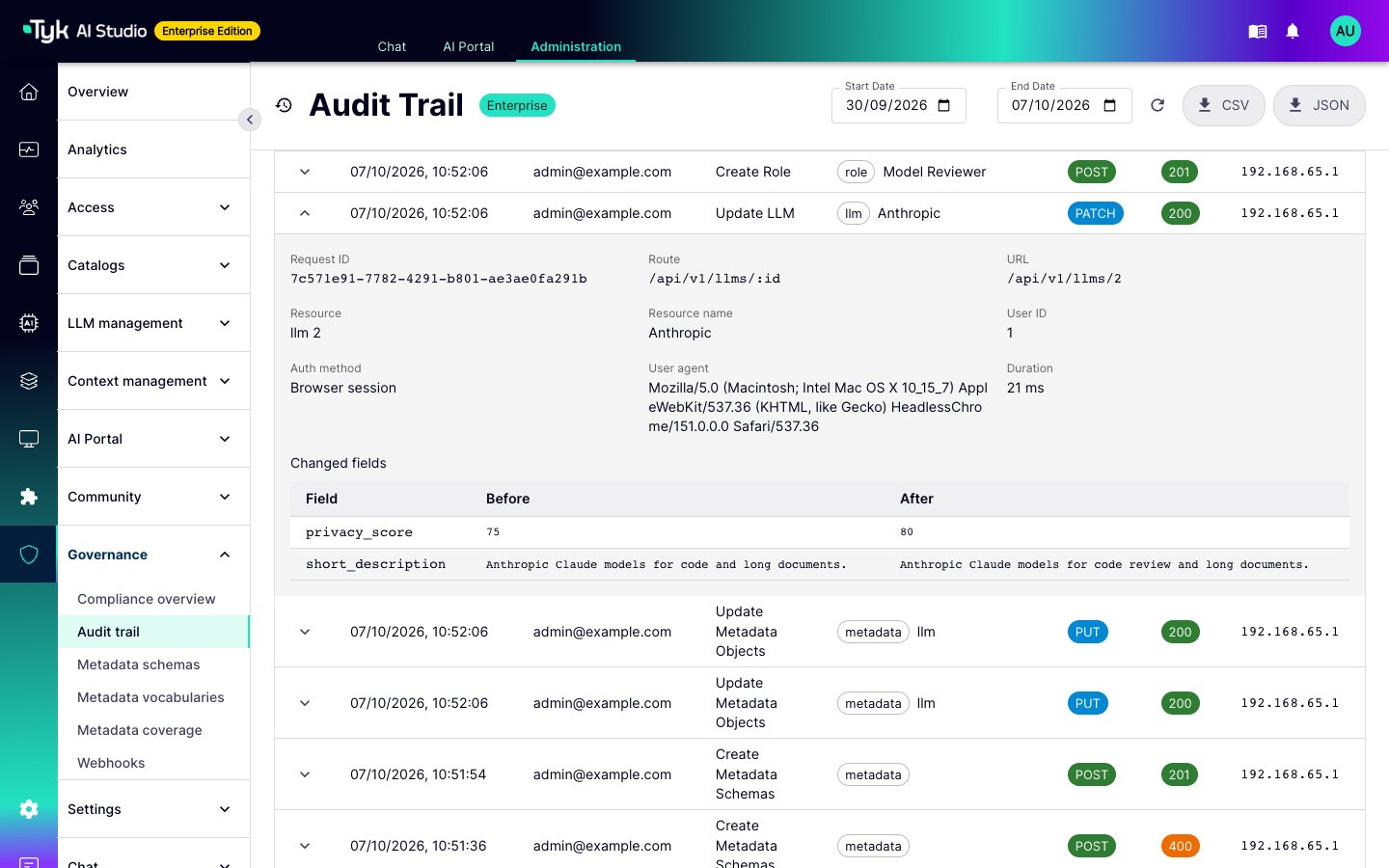
- For a change, which fields changed, with their old and new values.
What AI Studio Records
AI Studio records one entry for each request to the management paths:/api/v1/*, /common/*, /auth/*, /oauth/*, /api/sso*, and /analytics/*.
Actions on Edge Gateways through the management API, such as a configuration push or an edge deletion, are recorded.
Records Without an HTTP Request
Some actions do not come from a request to the management API. AI Studio records these actions too. In the Enterprise Edition, background workers write records with the methodSYSTEM and the user email system. The user name shows which worker wrote the record:
When a plugin changes the governance state of an App, AI Studio writes a record with the method
RPC. The user name is plugin: <plugin name>.
How AI Studio Writes Records
AI Studio writes records after the request completes, outside the request path:- AI Studio puts each record in an in-memory queue (
AUDIT_QUEUE_SIZE). - A background worker writes the queued records in batches.
- If the queue is full, AI Studio drops the record and counts it. It does not block the request. The Audit trail page shows a warning with the number of dropped records. AI Studio also logs
audit: write queue full, dropped N record(s) so farfor the first dropped record and for every 100th. To detect lost records, alert on this log message. - On a graceful shutdown, AI Studio writes all queued records. If the process stops suddenly, the queued records are lost.
Record Fields
For a failed login,
user contains the text that the visitor entered, with a maximum of 255 characters. It can contain typing errors, or addresses that do not exist. Treat this value as untrusted input when you review or export records.Diffs
When an action changes an object that has a database row, AI Studio reads the row before and after the action. Thediff field contains the columns that changed:
- For an update, the diff contains only the columns that changed.
- For a create, the diff contains all columns, with
oldset tonull. - For a delete, the diff contains all columns, with
newset tonull. The last configuration of a deleted object stays in the audit trail. - The diff does not include
created_at,updated_at,deleted_at, session tokens, or heartbeat timestamps. - If a diff is larger than
AUDIT_MAX_BODY_BYTES, AI Studio removes the largest fields first. It lists the removed fields in_truncated_fields.
Redaction
AI Studio does not store secret values in the audit trail. A changed secret still shows as changed, with the value[REDACTED].
- Columns and JSON keys: AI Studio redacts a column or JSON key when its name contains one of these fragments:
password,secret,api_key,apikey,token,auth_key,authkey,conn_string,connstring,private_key,privatekey,passphrase,credentials,client_key,access_key,authorization, orcookie. The match is not case-sensitive. - Nested values: AI Studio also redacts secrets inside JSON columns, such as plugin configuration and SSO profile settings.
- Secrets: AI Studio always redacts the
valuecolumn of Secrets. - Headers: In detailed recording, AI Studio masks the
Authorization,Proxy-Authorization,Cookie,Set-Cookie,X-CSRF-Token,X-API-Key, andX-Auth-Tokenheaders.
AUDIT_REDACT_KEYS. To mask more headers, add names to AUDIT_REDACT_HEADERS. You cannot remove the built-in rules.
Configuration
Set these environment variables on the AI Studio server. For the full reference, refer to AI Studio Environment Variables.
Detailed recording makes each record larger. Plan your retention period and database storage for this. If you keep long-term evidence in the
file store, archive the log file outside AI Studio.
Forward Records to a SIEM
To send records to a SIEM, set these values:View the Audit Trail
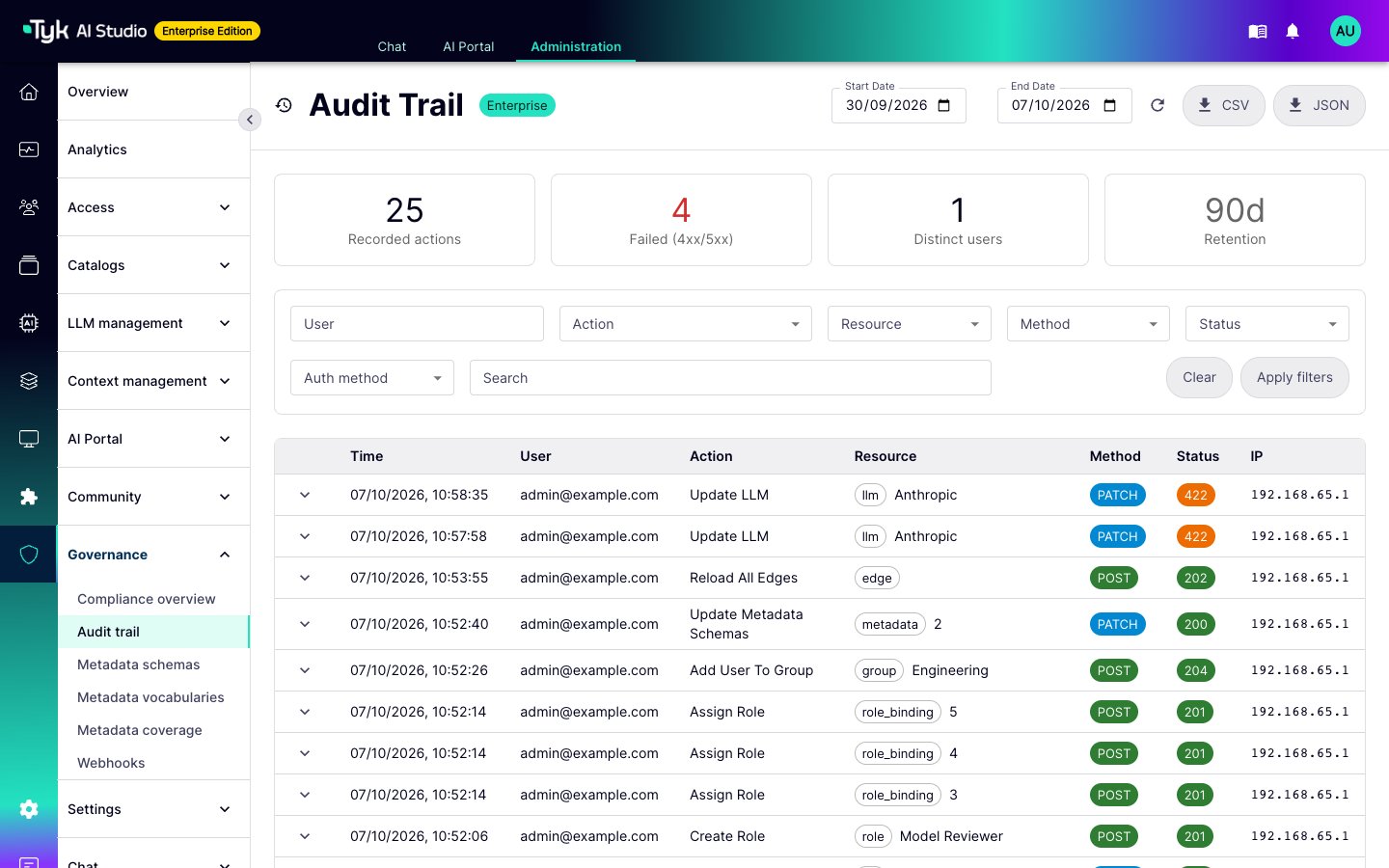
To view the audit trail, go to Governance > Audit trail in the admin console. You need theaudit:read permission. Refer to User Management.
The page shows records with the newest first. It has these features:
- A date range, a text search, and filters for user, action, resource type, HTTP method, status, and authentication method.
- Summary tiles for the date range: recorded actions, failed actions (
4xxand5xx), and distinct users. A fourth tile shows the retention period. - A row for each record that you can expand. The row shows the request ID, route, resource, error, field changes, and the dumps, when detailed recording is on.
- CSV and JSON export of the filtered records. An export contains a maximum of 50,000 records. In a CSV export, AI Studio escapes cells that start with
=,+,-,@, a tab, or a carriage return. This stops a spreadsheet from running the value as a formula.
AUDIT_STORE_TYPE=file, read the records from the log file.