

Availability
Webhooks are available from v2.2.0. In the Community Edition, the Webhooks page is not in the admin sidebar. The webhook API endpoints return
403 with the title Enterprise Feature.
Overview
A webhook sends an AI Studio event to an HTTP endpoint that you operate. For example, AI Studio can tell your SIEM when an administrator deletes an LLM. It can also post a message to a Slack channel when an administrator approves an App. Each endpoint is a target. A target has a URL, a list of the topics that it receives, and a payload template. AI Studio sends each event as a signed JSON document. If the receiver is not available, AI Studio tries again. When all attempts fail, AI Studio keeps the delivery in a dead-letter queue, so that you can send it again later. A target URL can send platform data out of your organization. For this reason, a target receives nothing until an administrator approves its URL. Webhooks are one-way. AI Studio does not accept data back from the receiver. A2xx response is the only acknowledgement.
Target Lifecycle
Each target has one of these states:
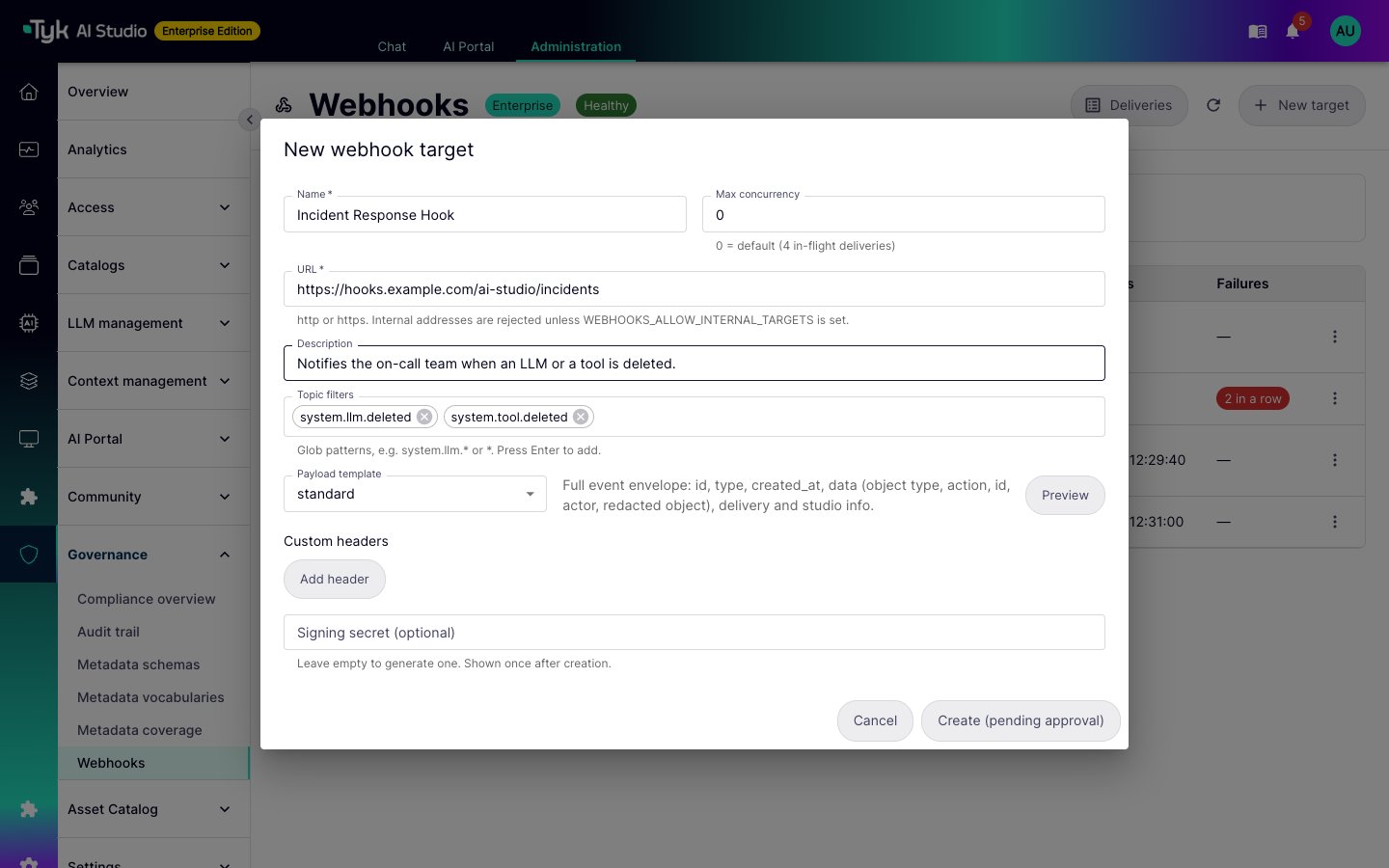
A new target always starts as
pending. These changes also put a target back to pending:
- A change to the URL or the custom headers of an approved target. The destination changes, so an administrator must approve it again.
- Any change to a rejected or revoked target. This submits the target again.
WEBHOOKS_REQUIRE_DIFFERENT_APPROVER=true.
The audit trail records each action on a target, such as create, approve, reject, revoke, pause, and secret rotation. For each change, it records which fields changed. It does not record header values or signing secrets.
URL Policy
AI Studio checks each target URL when you create, edit, or approve the target, and again before each delivery:- The URL must use
httporhttps. - The URL must not contain a user name, a password, or a fragment (
#...). To send credentials, use a custom header. - By default, AI Studio rejects internal destinations. These are loopback, private (RFC 1918), link-local, cloud metadata, and unique-local IPv6 addresses. They also include
localhostand host names that end in.localor.internal. - AI Studio also checks the IP address that a host name resolves to when it connects. A host name that later points to an internal address is still blocked.
- AI Studio does not follow redirects. A
3xxresponse stops the delivery. To use a new location, change the target URL and approve it again.
Topics
Each event has a topic. The topics for configuration changes have the formatsystem.<object>.<action>, for example system.llm.created.
AI Studio publishes these topics:
Enterprise plugins can publish more topics, for example the Asset Catalog plugin. The target editor shows the topics in the list above and all other topics that AI Studio received in the last 30 days.
Topic Filters
A target subscribes to topics with one or more filters. A filter is a topic name or a glob pattern:
A target can have a maximum of 50 filters.
Payloads
Each target uses a payload template. Select one of these presets, or write your own template:
To see the output of a template, select Preview in the target editor. AI Studio renders the template with a sample event. It also checks the template when you save the target, and it rejects a template that does not produce valid JSON. A custom template can be a maximum of 64 KB. AI Studio stops a render after 2 seconds or 1 MB of output.
A custom template can use the event data, for example
.Event.ID, .Event.Topic, .ObjectType, .Action, .ObjectID, .ActorUserID, .Object, and .Target.Name. It can also use helper functions such as toJson, jsonStr, default, get, and date. The functions cannot read environment variables or files, and they cannot make network calls.
This custom template sends the object type, the action, and the name of the object:
Redaction
Before AI Studio stores an event, it replaces secret values with[REDACTED]. It also redacts each value that a template reads. AI Studio does not store the original object.
AI Studio redacts a JSON key when its name contains one of these fragments: password, secret, api_key, apikey, token, auth_key, authkey, conn_string, connstring, private_key, privatekey, passphrase, credential, client_key, access_key, authorization, cookie, or bearer. The match is not case-sensitive. For example, the API key of an LLM is always redacted.
To redact more keys, add fragments to WEBHOOKS_REDACT_KEYS.
Verify a Delivery
AI Studio sends each delivery as an HTTPPOST with a JSON body and these headers:
AI Studio also sends the custom headers of the target, for example an
Authorization header that your receiver expects. A custom header cannot replace an X-Webhook-* header, Content-Type, Content-Length, or Host.
Each target has a signing secret. You can enter your own secret (16 to 256 characters) when you create the target. If you do not, AI Studio makes a random secret. The console shows the secret one time only, after you create the target. Keep it in your receiver.
The signature is an HMAC-SHA256 of the timestamp, a period, and the raw body, with the signing secret as the key. To verify a delivery:
- Read the
X-Webhook-Timestampheader and the raw request body. - Calculate
HMAC-SHA256(secret, timestamp + "." + body)and encode it as hexadecimal. - Compare
v1=<your value>with each comma-separated entry inX-Webhook-Signature. Use a constant-time comparison. - Reject the request if no entry matches, or if the timestamp is older than a few minutes.
- Send a
2xxresponse.
Rotate the Signing Secret
When you select Rotate signing secret for a target, AI Studio makes a new secret and shows it one time. For a grace period, each delivery has two signatures: first with the new secret, then with the old secret. Update your receiver during this period. The default period is 24 hours. To change it, setWEBHOOKS_SECRET_ROTATION_GRACE.
Retries and Dead Letters
AI Studio puts each matching event in a queue for each approved target. A delivery worker then sends it. The result of each attempt decides what happens next:
The time between attempts doubles after each attempt, with a random variation. It starts at 5 seconds and has a maximum of 1 hour. If the receiver sends a
Retry-After header with a longer time, AI Studio waits for that time. After 10 attempts, AI Studio marks the delivery as dead_lettered.
Each attempt sends the same body and the same X-Webhook-Id. The X-Webhook-Attempt, X-Webhook-Timestamp, and X-Webhook-Signature headers change.
AI Studio delivers each event at least one time. A receiver can get the same event more than one time, for example after a replay. If your receiver must process each event only one time, use the X-Webhook-Event-Id header to find duplicates.
When AI Studio dead-letters a delivery, it:
- Notifies administrators. It sends a maximum of one notification for each target in each hour.
- Records a
Webhook Delivery Dead-Letteredentry in the audit trail, with the usersystem.
Delivery Log
To manage targets, go to Governance > Webhooks in the admin console. The page shows each target with its state, topic filters, time of the last successful delivery, and number of failures in a row. The Awaiting approval filter shows the targets that need a decision. The status bar shows the number of queued, retrying, and dead-lettered deliveries.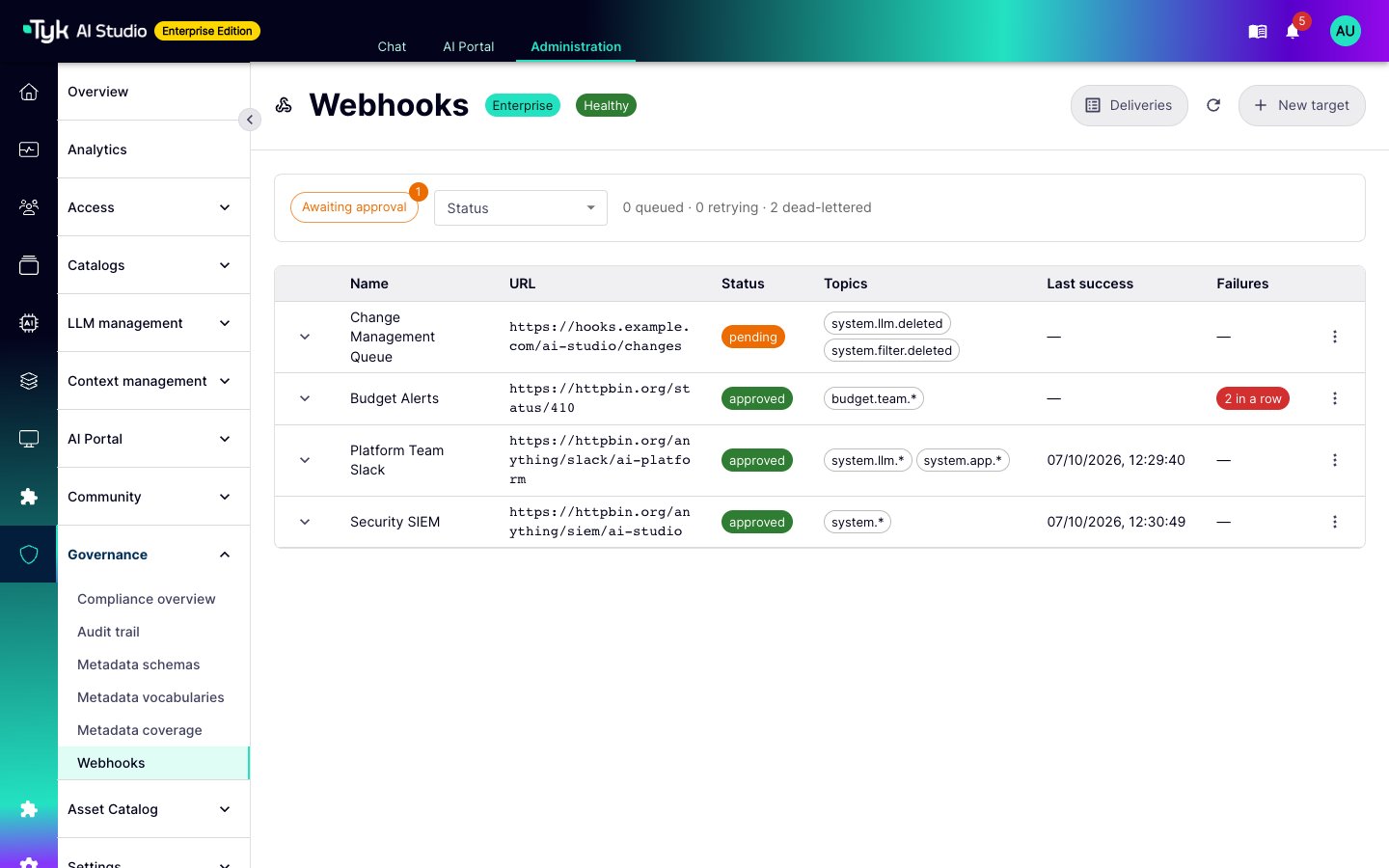
pending until an administrator approves it.
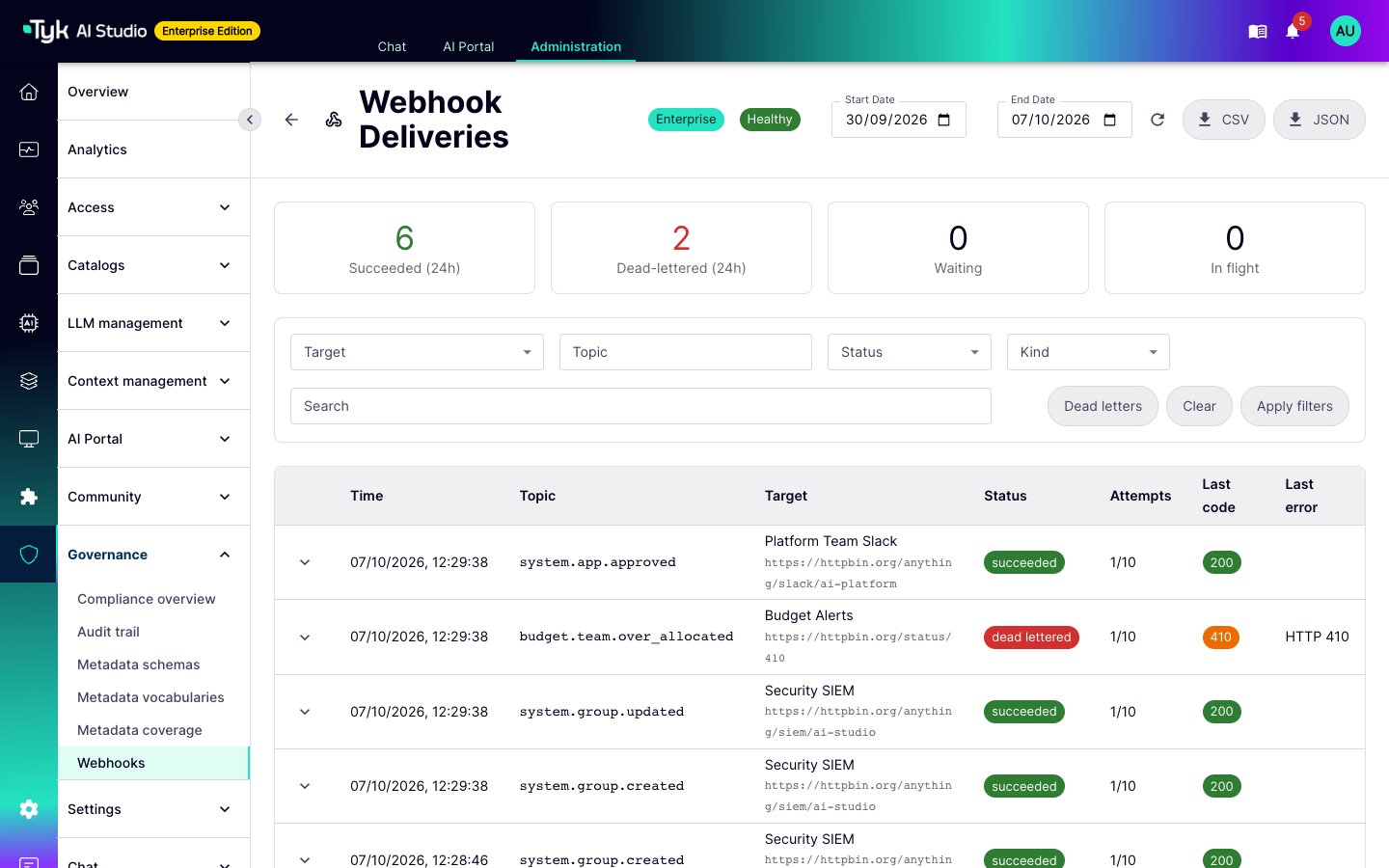
- Tiles with the number of succeeded and dead-lettered deliveries in the last 24 hours. Two more tiles show the deliveries that wait and the deliveries in progress.
- Filters for the target, topic, status, kind (event, test, or replay), date range, and a text search.
- A row for each delivery with its status, number of attempts, last status code, and last error.
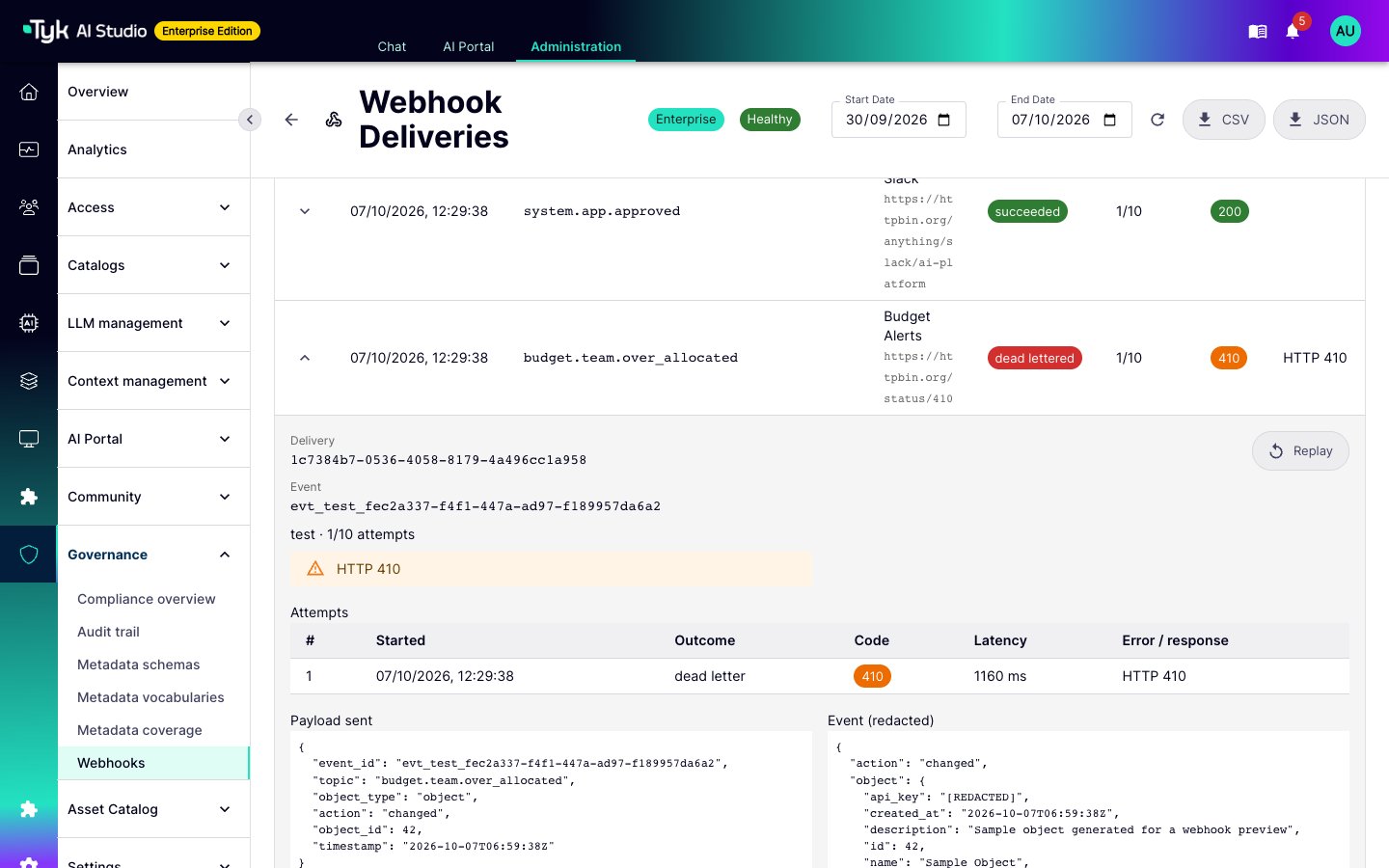
- Replay a finished delivery. AI Studio sends the same event to the target again as a new delivery. This works only for an approved target.
- Replay all dead-lettered deliveries in one action. Select Dead letters, then Replay all dead letters.
- Cancel a delivery that waits in the queue or for a retry.
- Export the filtered deliveries as CSV or JSON, with a maximum of 50,000 rows.
webhooks.test. The other actions in this menu are Approve, Reject, Revoke, Rotate signing secret, Edit, and Delete.
Permissions
Webhooks use thewebhooks resource in the Governance group. Refer to Role-Based Access Control.
These actions send platform data to an external URL, so the
webhooks resource is sensitive and privileged.
Configuration
Webhooks need theTYK_AI_SECRET_KEY environment variable. AI Studio encrypts the custom header values and signing secrets with this key. If the key is not set, the webhook feature does not start, and the Webhooks page shows the reason. Refer to Secrets Management.
Set these environment variables on the AI Studio server:
Multiple AI Studio Nodes
Each AI Studio node receives the events that it creates and stores them in the shared database. Each node with a delivery worker takes deliveries from the database. Two nodes do not send the same delivery at the same time. AI Studio does not guarantee the order of deliveries. Edge Gateways do not publishsystem.* events. Only changes on the AI Studio control plane create webhook events.
AI Studio sends an event only after it saves the change. If AI Studio stops between the save and the event, that one event is lost.