

Availability
Guardrails are available from v2.2.0. In the Community Edition, you can create a guardrail and attach it, but AI Studio does not run it. The guardrail lets all content through and AI Studio logs a warning, the same as for a script filter.
Overview
A guardrail is a filter that sends text to a detection provider. A script filter runs a script instead. You select a provider, the detectors to turn on, and the action to take when the provider finds a match. The action is block, redact, or log. You do not write code. A guardrail is a filter type, so it attaches and runs in the same way as a script filter:- You attach it to LLMs, chat rooms, and tools. Refer to Filters.
- It runs on requests, on responses, and on tool arguments and tool results. Streamed responses are also included.
- It runs in AI Studio and on each Edge Gateway.
- Each match records a compliance event.
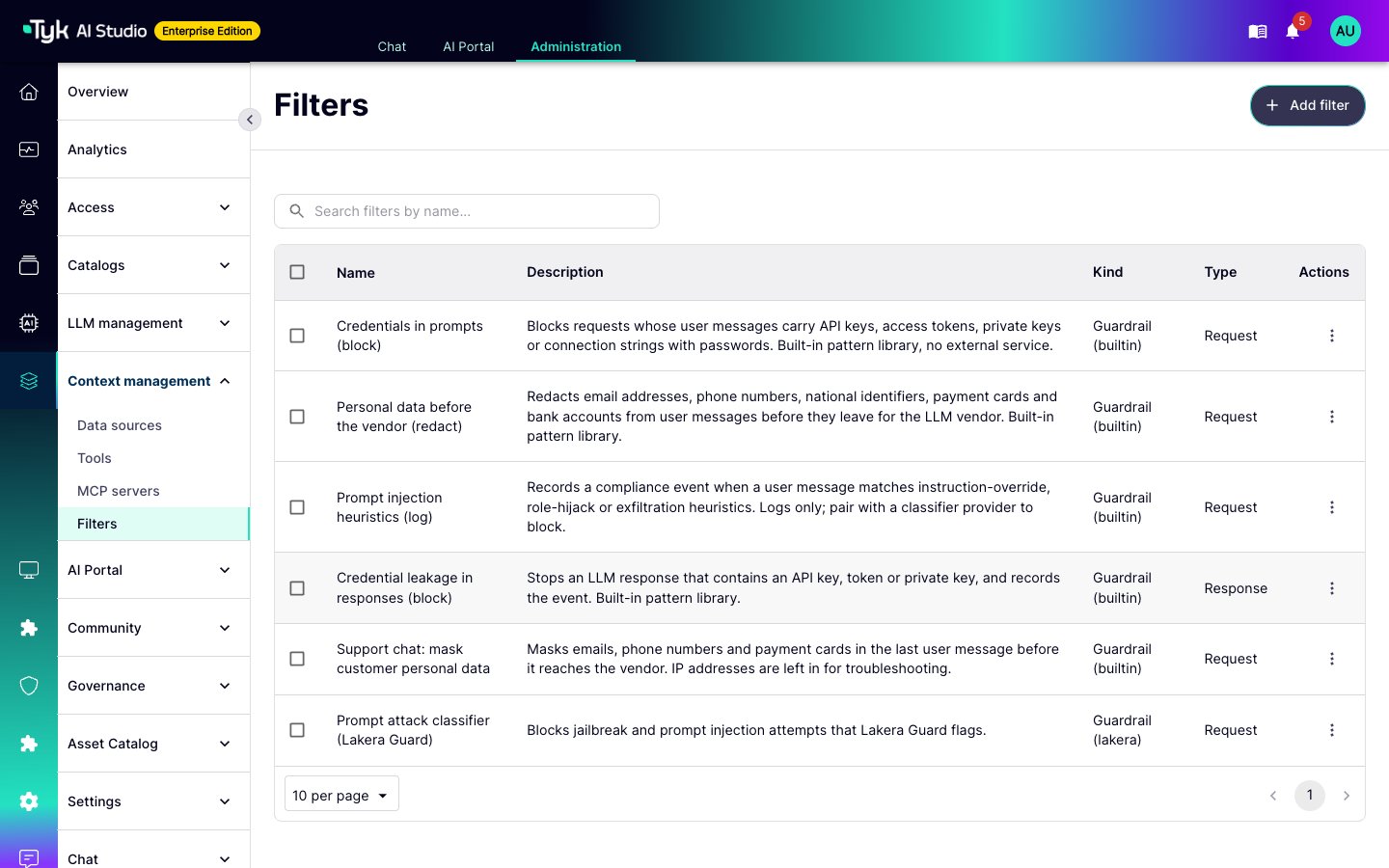
Create a Guardrail
- Go to Context management > Filters and select Add filter.
- In Filter type, select Guardrail.
- To check the LLM response instead of the request, select Is this a Response Filter?.
- Select a Provider and an On detection action.
- Select one or more Detectors.
- Set the other fields. The table below describes them.
- Use the Test panel to check the guardrail. Refer to Test a Guardrail.
- Save the filter. Then attach it to an LLM, a chat room, or a tool.
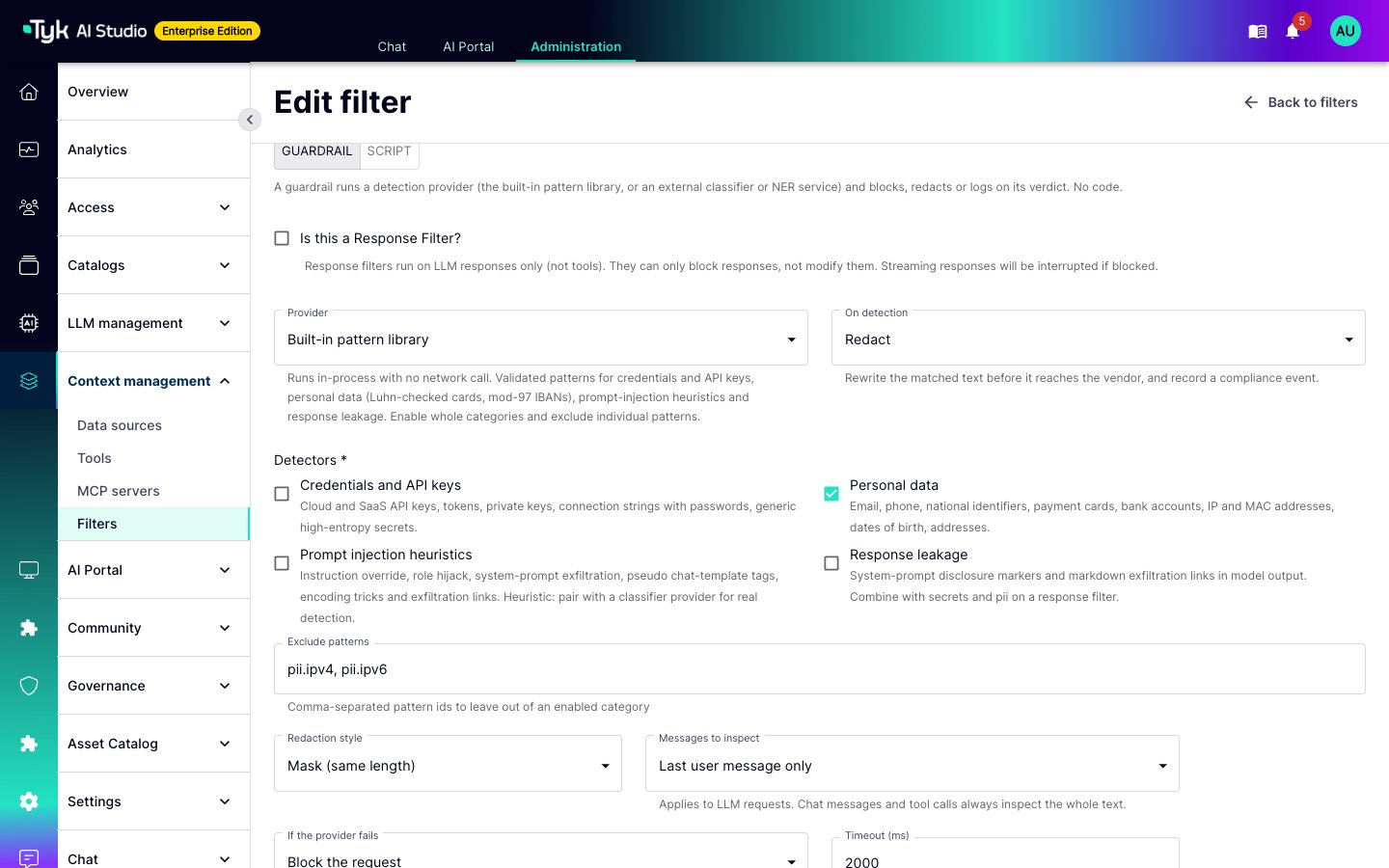
AI Studio validates the configuration when you save it. For example, it rejects an unknown detector, a Redact action on a provider that cannot redact, or a missing required connection field. The error message gives the cause.
Providers
External providers use the same outbound rules as LLM upstreams and the
tyk.makeHTTPRequest script function. For example, when LLM_UPSTREAM_BLOCK_INTERNAL=true, a provider endpoint on an internal address is blocked. Refer to Runtime Limits and Outbound Calls.
Built-in Pattern Library
The built-in pattern library runs in the AI Studio process. It does not need an external service. It uses checks in addition to regular expressions, to reduce false positives:- Payment card numbers must pass the Luhn check.
- IBANs must pass the mod-97 check.
- US Social Security numbers must be in an issued range.
- UK National Insurance numbers must use a valid prefix.
- NHS numbers must have a correct check digit.
- Generic secrets must have the entropy of a secret.
The
injection category is a set of heuristics, not a classifier. It finds well-known phrases and encoding tricks. Use it as a baseline, for example in an air-gapped deployment. For real prompt-injection detection, add a classifier provider, such as Lakera Guard or Azure AI Content Safety.tyk.detect and tyk.redact functions. The script templates Built-in library: block credentials and Built-in library: redact personal data show how to use them.
HTTP Classifier
Use the HTTP classifier to connect your own classifier or NER service. Examples are a self-hosted Llama Prompt Guard 2 or LLM Guard model. Set these connection fields:- Endpoint URL (required): AI Studio sends a
POSTrequest to this URL. - API key: AI Studio sends it in the
Authorization: Bearerheader. - Auth header: a different header name for the key, for example
X-API-Key.
request or response), the detector names, a redact flag, and the text segments. Each segment has an index, a role, and the text. The request also contains metadata, such as the request ID, the vendor, and the model. It never contains credentials.
Your service must return a flagged value and a list of findings. Each finding has a detector name, a category, a score, a segment index, and an optional span. When AI Studio asks for redaction, the service can also return the rewritten text for each segment in rewritten. AI Studio drops a finding when its score is below the detector threshold. The default threshold is 0.5. A finding without a score always counts.
Microsoft Presidio
Detectors are Presidio entity types. The threshold is the recognizer score from 0 to 1. The default is 0.5. Connection fields:- Analyzer URL (required): the base URL of
presidio-analyzer. - Anonymizer URL: the base URL of
presidio-anonymizer. If you do not set it, AI Studio redacts the text from the analyzer spans. - Language: the ISO 639-1 language code. The default is
en.
PHONE_NUMBER recognizer finds North American numbers best. It can miss international formats, such as +44 7700 900123. If you must detect international numbers, add a custom recognizer in Presidio, or add a built-in pattern library guardrail with pii.phone_international.
Lakera Guard
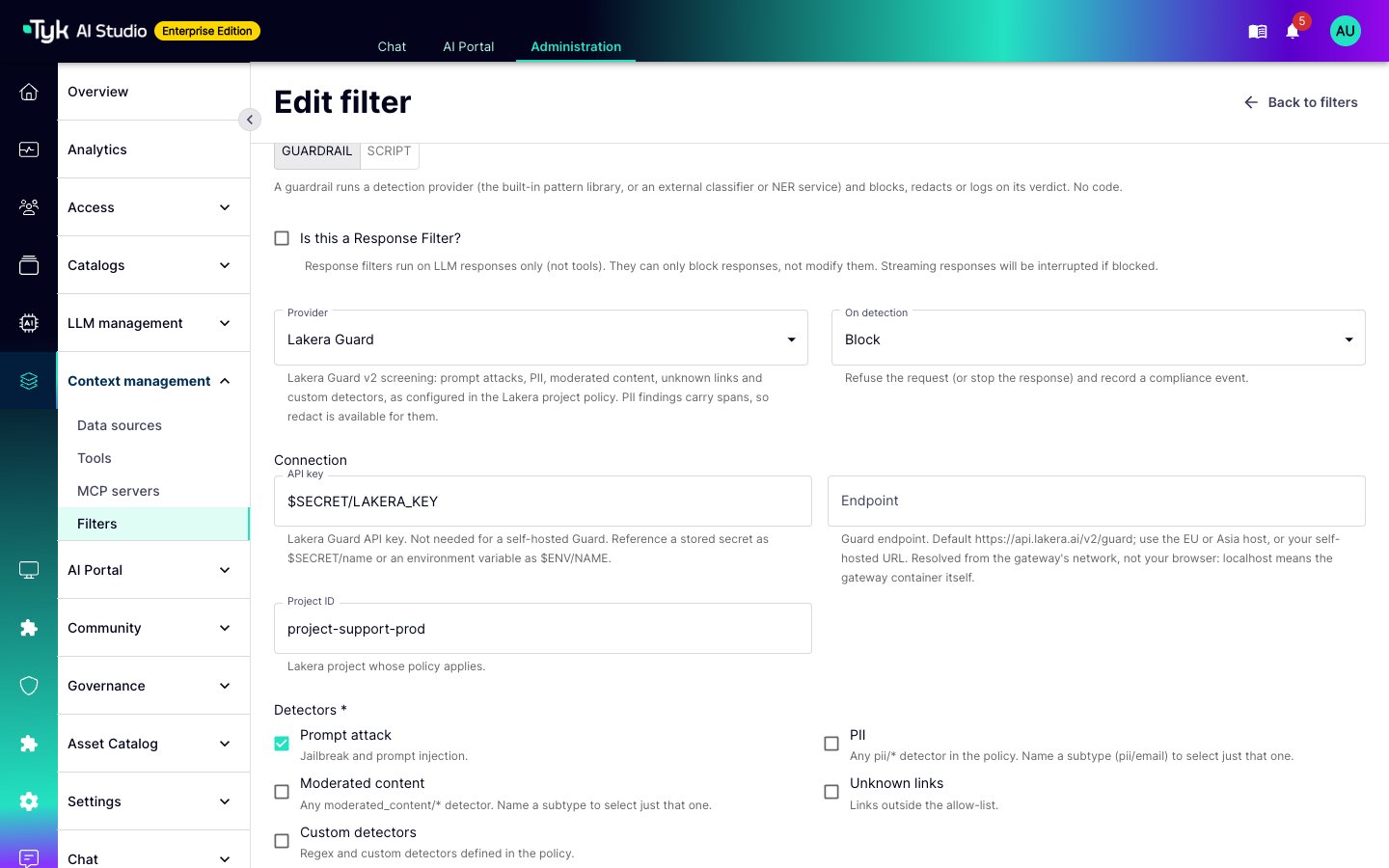
This provider uses Lakera Guard v2. The detectors areprompt_attack, pii, moderated_content, unknown_links, and custom. To select one subtype only, type its name in Add detector, for example pii/email. The policy of your Lakera project decides which detectors run.
Connection fields:
- API key: the Lakera Guard API key. A self-hosted Guard does not need it.
- Endpoint: the default is
https://api.lakera.ai/v2/guard. Use it to set the EU or Asia host, or a self-hosted Guard. - Project ID: the Lakera project whose policy applies.
Azure AI Content Safety
The detectors areprompt_attack (Prompt Shields) and the moderation categories Hate, Sexual, SelfHarm, and Violence. Each moderation category has a severity threshold from 0 to 6. The default is 4. AI Studio flags the text when the severity is at or above the threshold. AI Studio splits text that is longer than 10,000 characters.
Connection fields are Endpoint (required), Subscription key (required), and Blocklists. Blocklists is a comma-separated list of blocklist names. This provider cannot redact, so use Block or Log only.
Azure AI Language PII
The detectors are Azure PII categories, such asPerson, PhoneNumber, Email, and CreditCardNumber, or all. The threshold is the confidence from 0 to 1. The default is 0.5.
Connection fields are Endpoint (required), Subscription key (required), Language (default en), and Domain. Set Domain to phi to detect protected health information.
Amazon Bedrock Guardrails
This provider calls the BedrockApplyGuardrail operation for a guardrail that you define in Amazon Bedrock. It works with all LLMs, not only with models that Bedrock hosts. The detectors select which assessments count:
content: content filters, including prompt attackstopic: denied topicsword: word filterssensitive_information: PII entities and custom regular expressions. This detector supports redaction.grounding: contextual grounding
DRAFT), AWS region, Access key ID, and Secret access key. You must set the first three. If you do not set the access keys, the gateway uses its own AWS credentials from the environment.
Actions
All three actions record a compliance event for each detector that matches.
Redaction
Redaction applies to request-side filters only: LLM requests, chat messages, and tool arguments.Messages to Inspect
On an LLM request, Messages to inspect selects the messages that the provider gets:- All user messages (default)
- Last user message only
- System and user messages
- Every message, including assistant and tool turns
Provider Failures
If the provider fails controls what happens when the provider returns an error or the call takes longer than the timeout:- On request filters, the default is to block. This is fail closed. Request filters include filters on tool arguments.
- On response filters, the default is to let the content through. This is fail open. Response filters include filters on tool results.
guardrail.error compliance event.
Streamed Responses
On a streamed response, a guardrail does not examine each chunk. It examines the accumulated response each time the response gets longer by N characters. The default N is 250 for the built-in pattern library and 1000 for external providers. To change it, set Streaming: evaluate every N characters. The guardrail also examines the full response once when the stream ends. This makes sure that it examines a response that is shorter than N. If the guardrail blocks during the stream, AI Studio stops the stream. If it blocks at the end of the stream, AI Studio ends the stream with an error and records the block. But the client already has the chunks that AI Studio sent before.Default Guardrails
A new Enterprise installation includes four guardrails that use the built-in pattern library:
They are not attached, so they have no effect until you attach them. AI Studio creates each one by name only if it does not exist. It does not change a default guardrail that you edited, and it does not create a deleted guardrail again. To skip them on a new installation, set
SKIP_FILTER_DEFAULTS=true.
Test a Guardrail
The Test panel on the filter form runs the guardrail against sample text before you save it. The result shows the compliance events and the output. In this example, the built-in pattern library finds a payment card, an email address, and a phone number. It masks all three.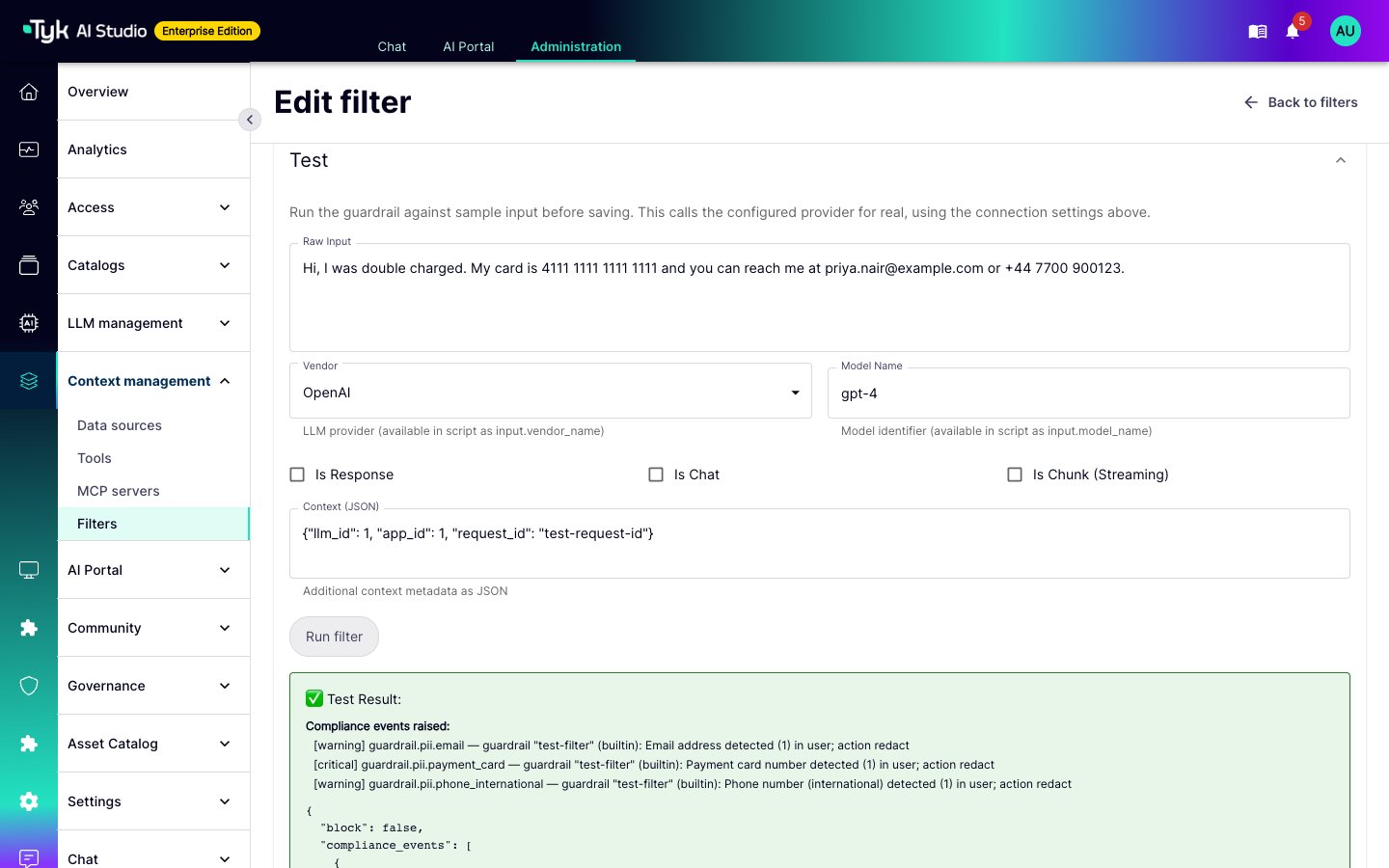
$SECRET/ or $ENV/ reference, save the filter first. AI Studio resolves references in a test only when the provider and the connection settings are the same as the saved filter.
Provider Credentials
For a connection field that holds a credential, such as an API key, use a reference instead of the value:$SECRET/namerefers to a secret.$ENV/NAMErefers to an environment variable.
Compliance Events and Metrics
Each match records one compliance event for each detector. The event type isguardrail. and the detector name, for example guardrail.pii.email, guardrail.secrets.aws_access_key, or guardrail.prompt_attack. The event never contains the matched text. For the event fields, refer to Compliance Events.
A block increments aistudio_policy_blocks_total, the same as a block from a script filter. Guardrails also export these metrics: