

Introduction
A Traffic Log is a structured record of an individual API request and response, generated by Tyk Gateway and written to Redis. Tyk Pump is used to read these from Redis and distribute them to Tyk Dashboard’s Traffic Analytics and Log Browser, and to external analytics backends. This page covers how Traffic Logs are generated and stored, and contains a full reference for every field they contain.Traffic Log vs Access Log
Both Traffic Logs and Access Logs record individual requests, but serve different purposes:
Use a Traffic Log when you need Tyk Dashboard’s Traffic Analytics or Log Browser, or want request data routed to an external analytics backend via Tyk Pump.
Use an Access Log when you want a lightweight, real-time per-request line in your existing log pipeline.
How Traffic Logs Are Generated
When a client makes a request, Tyk Gateway generates a Traffic Log capturing the request and response details, and writes it to Redis when the request completes. Redis is a temporary, high-throughput buffer, not intended as a long-term store. Tyk Pump reads and purges the logs from there; see Dashboard Analytics for what happens to the data after that. Enable traffic logging by settingenable_analytics in the Gateway configuration:
user_agent. The full set of headers, and the request and response bodies, are only captured when Detailed Recording is enabled.
Controlling Which Endpoints Are Tracked
Thetrack_path field is set on each Traffic Log by the Track Endpoint middleware (trackEndpoint in Tyk OAS, track_endpoints in Tyk Classic), enabled per endpoint on the API definition:
- Endpoints with Track Endpoint enabled get
track_path: true. - Endpoints without it get
track_path: false.
x-tyk-api-gateway.middleware.operations section of the API definition. For example, to enable tracking for the GET /status/200 operation:
This only determines the value of the
track_path field. It’s Tyk Dashboard’s aggregation that uses this field to decide whether an endpoint is broken out individually in its per-endpoint breakdowns. Despite the similar name, this is unrelated to Do Not Track, which suppresses the Traffic Log entirely.Detailed Recording
Tyk Gateway does not usually include the full request and response, with headers and body, in Traffic Logs, to keep them small and to avoid capturing sensitive data. If this level of detail is required, for example when debugging an API, you can use Tyk’s detailed recording option. With this enabled, the complete request and response are included in wire format, base64-encoded, in the Traffic Log’sraw_request and raw_response fields respectively.
Traffic logs generated for GraphQL APIs automatically include full request and response, regardless of these config settings. See GraphQL Fields.
There are three levels of granularity at which detailed recording of logs can be configured:
- API level to capture detailed records for all requests made to a specific API
- Key level to capture detailed records for all requests made by a specific access token
- Gateway level to capture detailed records for all requests to APIs on the Gateway
- API Level
- Key Level
- Gateway Level
Set 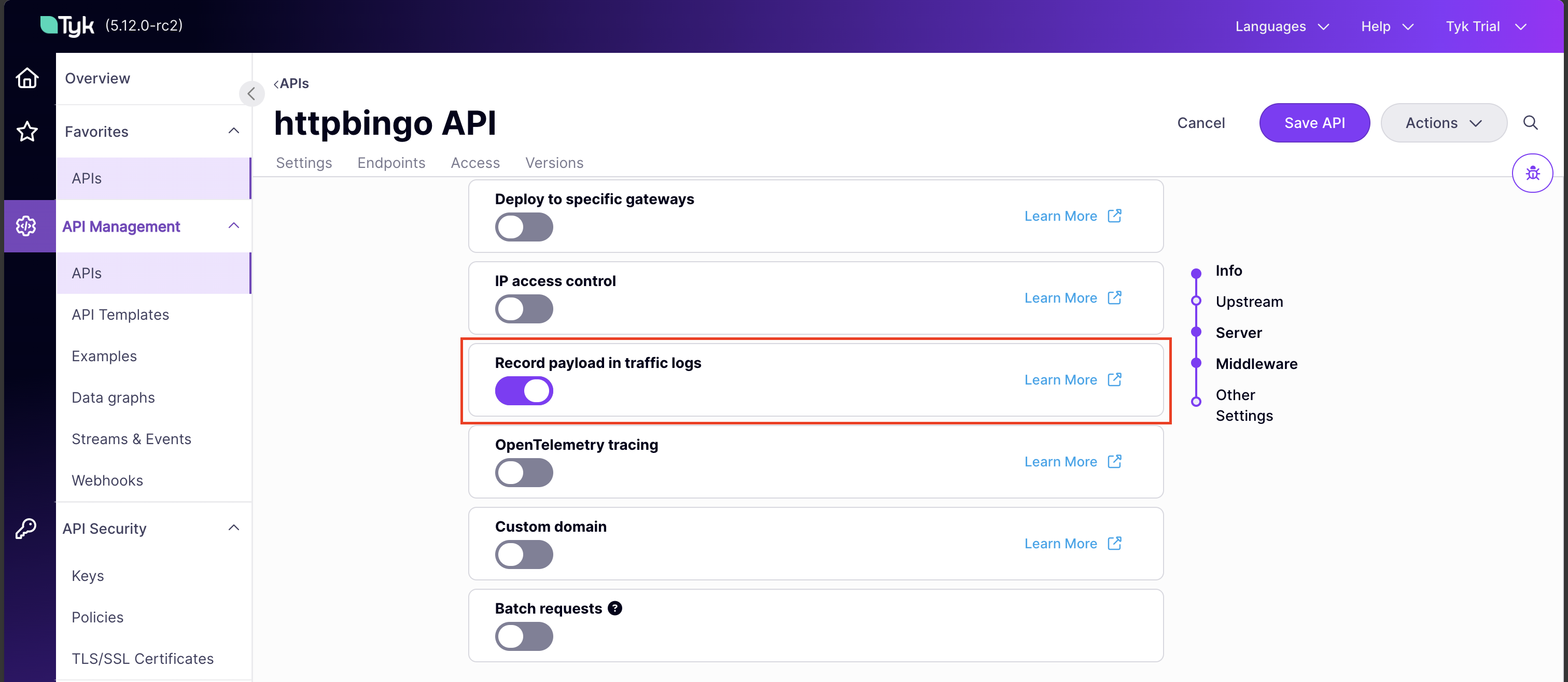
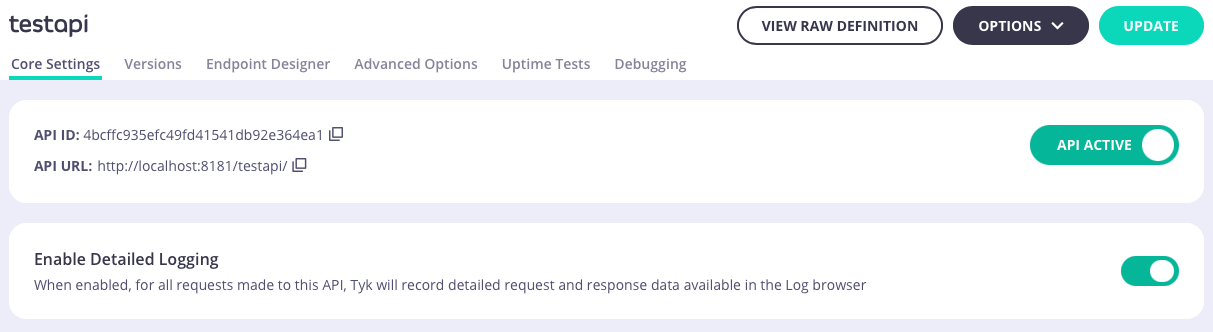
server.detailedActivityLogs.enabled in the Tyk Vendor Extension, or use the Record payload in traffic logs option in the API Designer.enable_detailed_recording, or use Enable Detailed Logging in Core Settings in the Tyk Classic API Designer.spec.enable_detailed_recording to true:Tyk Pump has additional, pump-specific options to give you granular control over whether and how this recorded data reaches its destination: see Omit Detailed Recording and Decode Raw Request and Raw Response.
Custom Tags
Tyk Gateway can tag a Traffic Log with the value of any HTTP request header, such asX-Account-ID. This is useful when you need to distinguish traffic beyond the standard fields, for example when several sub-accounts share a single API key and you need to differentiate between them in the logs.
Configure custom tags by adding the header name to middleware.global.trafficLogs.tagHeaders in the Tyk Vendor Extension. For example:
x-account-id header, using the value x-account-id-<value>.
A request sent with --header "x-account-id: 1234" therefore produces a Traffic Log tagged x-account-id-1234, added to the tags field.
If using Tyk Classic APIs, the equivalent field is tag_headers, also available in the Tyk Classic API Designer under Advanced Options:
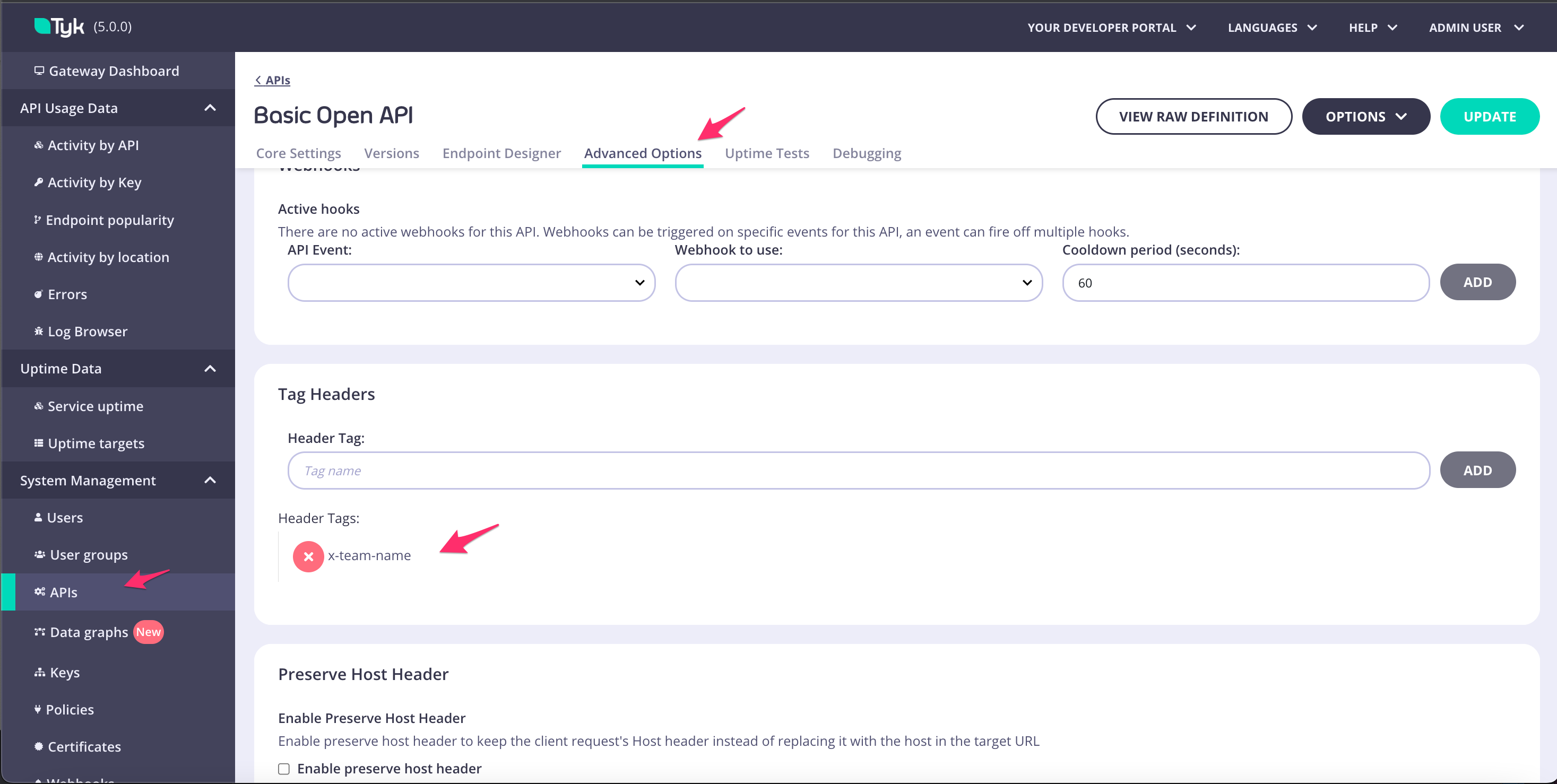
spec.tag_headers:
Tyk Dashboard’s Aggregate Pumps can compute hourly aggregates per distinct tag value observed; see Custom Aggregation Tags for that usage.
Traffic Log Content
Tyk Gateway writes each Traffic Log as a structured record, which Tyk Pump then serializes into whatever format a given Pump requires. An illustrative JSON representation, using the field names documented below, looks like:SQL-based Pumps (Postgres) use different column names, and don’t store
api_name, day, month, year, hour, api_schema, graphql_stats, or mcp_stats at all.Traffic Log Field Reference
Request
Request method.Example:
GET, POST.Request
Host header, including the host and optional port number of the server the request was sent to.Example: tyk.io, or tyk.io:8080 if a port is included.Request path, in decoded form.Example:
/foo/bar for /foo%2Fbar or /foo/bar.Request path, decoded but otherwise unchanged from the original request.Example:
/foo/bar for /foo%2Fbar or /foo/bar.The client’s request path, captured before Tyk Gateway applies any path-modifying middleware, such as stripping the API’s listen path. Equal to
path unless something changes the path during processing.Example: /api/v1/users, when path is /users because the API’s listen path /api/v1/ was stripped.The API’s configured listen path.Example:
/api/v1/.Request
Content-Length header: the number of bytes in the request body.Example: 10 for a request body of 0123456789.Request
User-Agent header.Example: curl/7.86.0.Base64-encoded copy of the request sent from Tyk Gateway to the upstream server. Empty unless detailed recording is enabled (automatic for GraphQL APIs). A pump can remove the base64 encoding via
raw_request_decoded, or omit this field entirely via omit_detailed_recording.Example: R0VUIC9nZXQgSFRUUC8xLjEKSG9zdDogdHlrLmlv.Response
The integer response code, generated by either Tyk Gateway or the upstream server depending on how the request was handled.Example:
200 for 200 OK.Base64-encoded copy of the response sent from Tyk Gateway to the client. Empty unless detailed recording is enabled (automatic for GraphQL APIs). A pump can remove the base64 encoding via
raw_response_decoded, or omit this field entirely via omit_detailed_recording.Example: SFRUUC8xLjEgMjAwIE9LCkNvbnRlbnQtTGVuZ3RoOiAxOQpEYXRlOiBXZWQsIDE2IE5vdiAyMDIyIDA2OjIxOjE2IEdNVApTZXJ2ZXI6IGd1bmljb3JuLzE5LjkuMAoKewogICJmb28iOiAiYmFyIgp9Cg==.Duration of the upstream round trip, equal to
latency.total.Example: 3 for a 3ms round trip.Contains three fields:
upstream, the round trip between Tyk Gateway sending the request and receiving a response; gateway, additional Gateway-side processing outside that round trip, such as writing analytics; and total, the sum of both.Example: {"total":4,"upstream":3,"gateway":1}.Measured from Tyk Gateway’s reverse proxy: the sum of leaving Tyk, reaching the upstream, and the response returning to Tyk, plus Tyk Gateway’s own processing time.
API and Authentication
The ID of the requested API definition.Example:
727dad853a8a45f64ab981154d1ffdad.The name of the requested API definition. Not stored by SQL-based Pumps.Example:
Foo API.The version of the requested API definition, or
Not Versioned if the API is unversioned.Example: 1, b, or Not Versioned.The Organisation ID of the requested API definition.Example:
5e9d9544a1dcd60001d0ed20.The authentication key provided in the request. If no key was provided, Tyk Gateway substitutes a default value.Example: an unhashed
auth_key, a hashed value such as 6129dc1e8b64c6b4, or 00000000 if no authentication was provided.The OAuth client ID, or an empty string if OAuth was not used.Example:
my-oauth-client-id.The alias of the authenticated identity, blank if unset or the request is unauthenticated.Example:
my-key-alias.Timestamps
Generated by Tyk Gateway when it finishes handling the request and writes the traffic log, not when it first received the request. For most requests the difference is small, roughly the request’s own
request_time, but it’s after the upstream round trip, not before it.Example: 2022-11-16T03:01:54.648+00:00.Day of the month, derived from
timestamp. Not stored by SQL-based Pumps.Example: 16 for 2022-11-16T03:01:54Z.Month, derived from
timestamp. Not stored by SQL-based Pumps.Example: 11 for 2022-11-16T03:01:54Z.Year, derived from
timestamp. Not stored by SQL-based Pumps.Example: 2022 for 2022-11-16T03:01:54Z.Hour of the day, derived from
timestamp. Not stored by SQL-based Pumps.Example: 3 for 2022-11-16T03:01:54Z.A future expiry date, used to implement automated data expiry where the storage backend supports it.Example:
2022-11-23T07:26:25.762+00:00.Client
Client IP address, taken from the
X-Real-IP or X-Forwarded-For header if set, otherwise determined by Tyk Gateway from the request.Example: 172.18.0.1.Client geolocation, calculated from the IP address using the MaxMind database.Example:
{"country":{"iso_code":"SG"},"city":{"geonameid":0,"names":{}},"location":{"latitude":0,"longitude":0,"timezone":""}}.Network statistics. Not currently populated by Tyk Gateway.
Metadata
Session context tags, which can refer to the Gateway, API key, Organisation, API definition, and other dimensions.Example:
["key-00000000","org-5e9d9544a1dcd60001d0ed20","api-accbdd1b89e84ec97f4f16d4e3197d5c"].true if the requested endpoint is configured to be tracked, otherwise false. See Controlling Which Endpoints Are Tracked.GraphQL Fields
Only populated for requests to a GraphQL API; absent or empty for other requests. Not stored by SQL-based Pumps.Base64-encoded copy of the API’s GraphQL schema.Example:
dHlwZSBRdWVyeSB7IGhlbGxvOiBTdHJpbmd9.Details about the GraphQL operation:
Variables, RootFields, Types, Errors, OperationType (0 Unknown, 1 Query, 2 Mutation, 3 Subscription), HasErrors, and IsGraphQL.Example: {"IsGraphQL":true,"OperationType":1,"RootFields":["hello"],"HasErrors":false}.MCP Fields
Only populated for requests to an MCP Proxy; absent or empty for other requests. Not stored by SQL-based Pumps.Details about the MCP request:
is_mcp, jsonrpc_method, primitive_type (tool, resource, or prompt), and primitive_name.Example: {"is_mcp":true,"jsonrpc_method":"tools/call","primitive_type":"tool","primitive_name":"get_current_weather"}.