

This page is for installing Tyk Self-Managed. If you are looking to use Tyk as part of Tyk Cloud, please refer to the Tyk Cloud documentation.
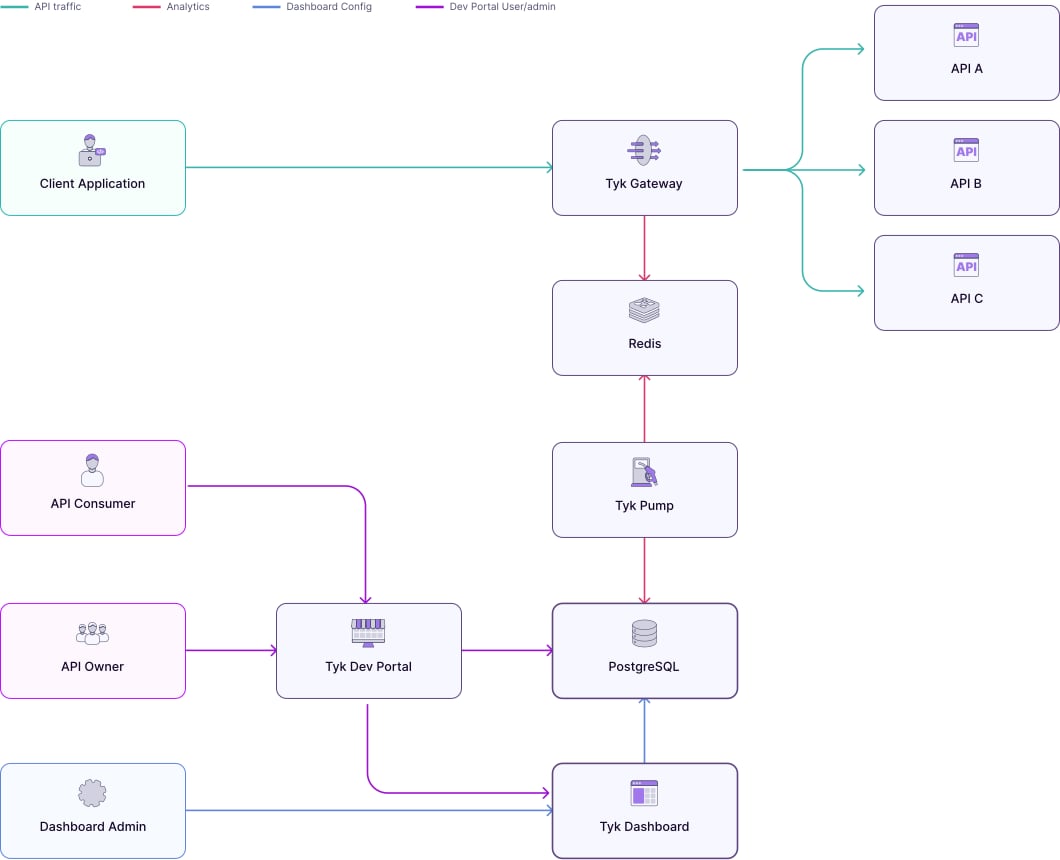
Architecture
Requirements
Tyk Dashboard requires a persistent datastore for its operations. By default MongoDB is used. From Tyk v4.0, we also support PostgreSQL.PostgreSQL
You can also use the following as a drop in replacement for PostgreSQL:
- Amazon RDS
- Amazon Aurora PostgreSQL
- Azure CosmosDB for PostgreSQL
- Sqlite (for development and testing only)
SQLite support will be deprecated from Tyk 5.7.0. To avoid disruption, please transition to PostgreSQL, MongoDB or one of the listed compatible alternatives.
MongoDB
You can also use the following as a drop-in replacement for MongoDB:
- Amazon DocumentDB 3.6 and 4 engine
- Azure Cosmos DB for MongoDB 3.6 and 4 engine
Redis
Tyk Gateway requires Redis for its operations. Here is the list of supported versions:
Visit the Redis page for more info.