

Supported Service Types
Tyk Governance currently supports:- OpenAPI Specification (OAS) APIs, including Tyk OAS extensions.
Note: Additional service types may be supported in future releases.
Glossary
- Service: The umbrella term for a resource that governance can evaluate. Today it means Tyk OAS APIs. As governance coverage expands, other resource types such as MCPs will also be Services.
- API Category: A tag applied to services in Tyk Dashboard, used to organize the service portfolio and to scope governance rulesets to specific subsets of services. See Scoping Rulesets to Services.
- Compliance: The degree to which a service adheres to the rulesets applied to it. A service is non-compliant when at least one rule is failing at Error severity; otherwise it is compliant.
- Deployment Warning: A per-ruleset toggle that controls whether saving a non-compliant service produces a soft warning. Off by default, and it never hard-blocks. See The Deployment Warning.
- Issue: A specific instance of a rule failure detected against a service. Each issue carries a severity of Error, Warn, Info, or Hint.
- Remediation: The structured process of addressing and resolving service governance issues using the per-rule guidance authored alongside the rule. See Remediate Issues.
- Rule: A specific check that evaluates one aspect of a service definition.
- Ruleset: A collection of governance rules that can be applied to services by linking the ruleset to one or more API Categories.
- Ruleset Template: A pre-built ruleset that provides a starting point for common governance domains. See Ruleset Templates.
- Severity: A per-rule attribute indicating the impact of a rule failure on compliance status. Error makes a service non-compliant. Warn and Info are advisory and do not change compliance status.
- Spectral: A widely adopted open-source linting format for service specifications. Tyk Governance rulesets are compatible with the Spectral format, allowing existing rulesets to be reused without rewriting.
- Vacuum: The high-performance, Go-based linting engine used by Tyk Governance to execute rulesets. It is compatible with the Spectral ruleset format and optimized for fast evaluation of large OpenAPI specifications.
Severity and Compliance
Each rule in a ruleset carries a severity that determines the impact of a rule failure on the service’s compliance status. Tyk Governance uses three severity levels:
A service is non-compliant when at least one rule is failing at Error severity. Services whose only failures are at Warn or Info severity remain compliant. The issues are surfaced in the Governance tab as advisory feedback, but no compliance flag is raised.
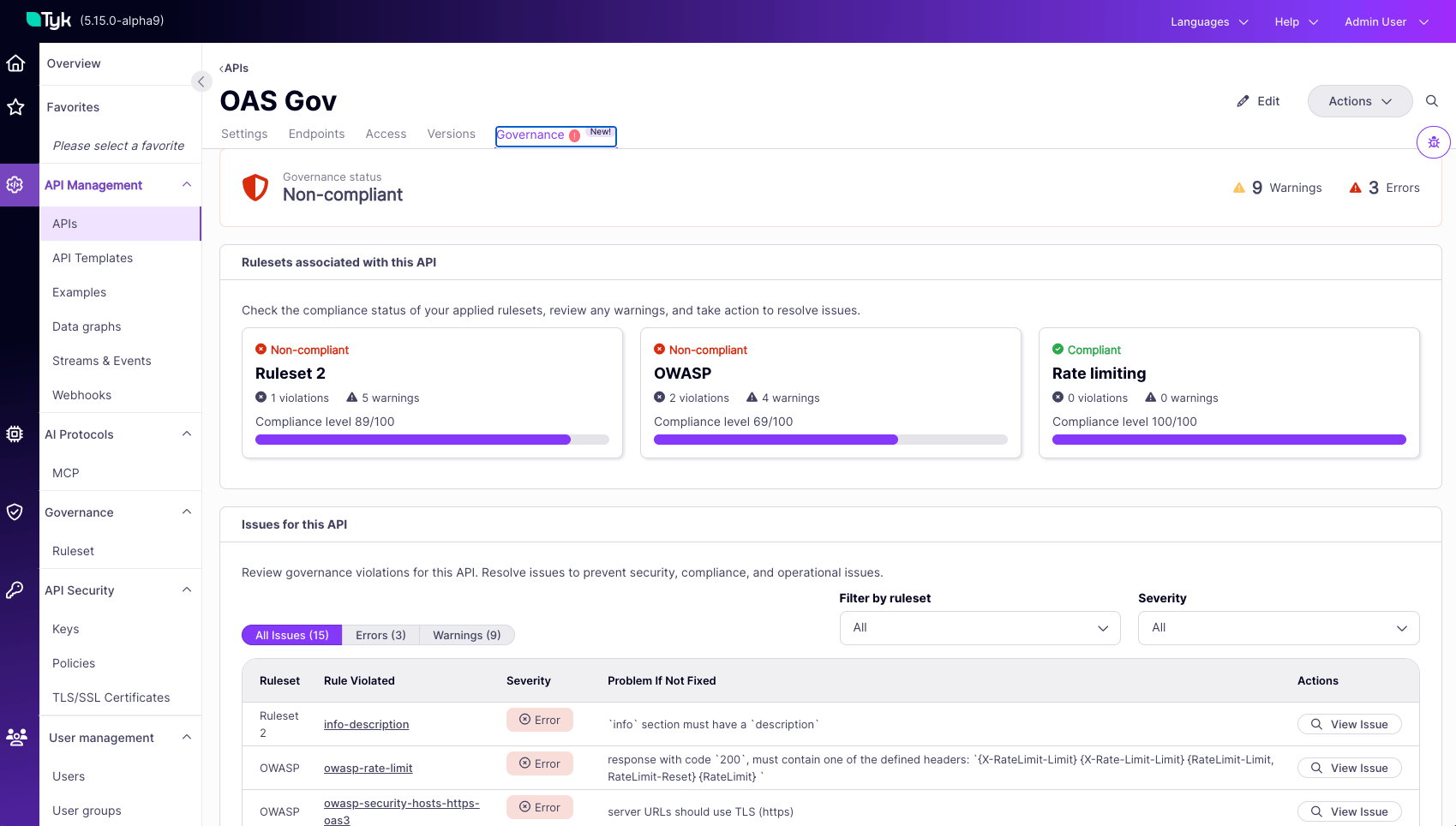
Default severity: If a rule is created without a severity value, it defaults towarn, matching the Vacuum engine default. When this happens, the rule’s entry inapplied_rulesomits theseverityfield rather than storing it explicitly. Consumers ofapplied_rulesshould treat a missingseverityfield aswarn.
How Evaluation Works
When you save an API definition or a governance ruleset, Tyk Dashboard queues a background evaluation. Evaluation never runs in the path of your API traffic, and it never blocks saving or deploying an API. All of the work happens on the control plane: Tyk Dashboard lints the API definition against the applicable rulesets, writes its findings to the Dashboard database, and releases the resources it used as soon as the evaluation completes. Your Tyk Gateways are not involved at any point. Evaluation cost is driven by the size of the API definition, primarily the number of endpoints it declares, and to a lesser extent the weight of its schemas. It does not change with the volume of traffic your APIs receive. For measured timings, see Evaluation Performance.When Evaluation Runs
Compliance is not a one-time check at service creation. Evaluation runs in the following situations:- A service is saved with a category linked to a ruleset: Whenever a service, new or existing, is saved while carrying an API Category linked to an active ruleset, that ruleset is evaluated against it.
- A service’s categories change: Adding the service to a new category, removing it from a category, or moving it between categories changes which rulesets apply. The service is re-evaluated against its new set of applicable rulesets.
- A ruleset is added to a category: When a ruleset is linked to a category for the first time, every service tagged with that category is evaluated against the new ruleset.
- A ruleset is edited: When the rules, categories, status, or any other content of an existing ruleset changes, every service governed by that ruleset is re-evaluated.
Roles and Access
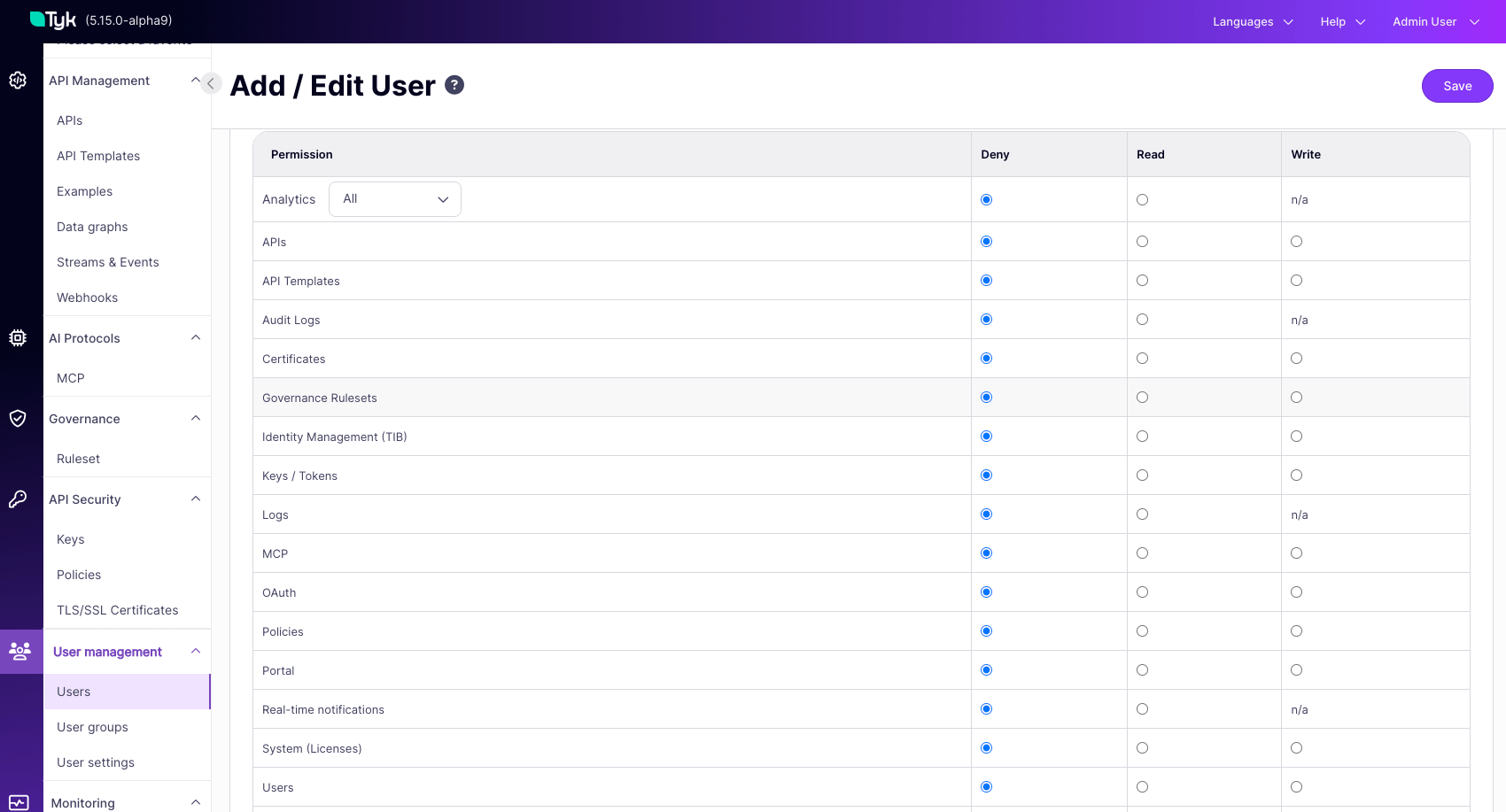
Access to Tyk Governance is governed by the Rulesets Governance permission group, which has three levels:- Read: Allows viewing the Rulesets section and using the test functionality per ruleset, but not creating, editing, or deleting rulesets.
- Write: Allows everything in Read, plus creating, editing, and deleting rulesets.
- Deny: Hides the governance ruleset feature entirely.
FAQ
What's the practical difference between Error, Warn, and Info severity?
What's the practical difference between Error, Warn, and Info severity?
Severity determines whether a rule failure affects compliance status. Error means the service is non-compliant until fixed. Warn and Info are surfaced for review but do not affect compliance; a service with only Warn or Info issues is still compliant.
What severity does a rule get if I don't set one?
What severity does a rule get if I don't set one?
It defaults to Warn.
Can a single service be governed by more than one ruleset?
Can a single service be governed by more than one ruleset?
Yes. A service can be governed by multiple rulesets at once, for example a design-standards ruleset plus an OWASP security ruleset. Each is evaluated and reported independently.
What actually triggers a re-evaluation, and how long does it take?
What actually triggers a re-evaluation, and how long does it take?
Re-evaluation runs automatically whenever a service carrying a category linked to an active ruleset is saved or updated, or a ruleset itself changes or is newly applied. It typically completes within a few seconds, and the result is cached until the next run. Because this is ongoing rather than a one-time save-time check, compliance status can flip in either direction over time.
Does Governance evaluate only my OpenAPI spec, or also my Tyk Gateway configuration?
Does Governance evaluate only my OpenAPI spec, or also my Tyk Gateway configuration?
Both. Rules can target standard OpenAPI fields as well as Tyk-specific gateway configuration via the
x-tyk-api-gateway extension.What roles can create rulesets, and what permission level should each user get?
What roles can create rulesets, and what permission level should each user get?
The ruleset permission group (Read, Write, Deny) maps to the two main governance roles:
- Platform Teams need Write to define standards and set severity.
- An API Developer needs Read to see their own APIs’ compliance and remediation guidance, separate from whatever access they already have to edit their own APIs.