

Introduction
Granular endpoint access restricts a client to specific paths and HTTP methods. Sometimes the path and method are not enough to decide whether to allow a request.
For example, a single endpoint
GET /connections can return different data for different query parameters:
GET /connectionsreturns the connections of the authenticated user.GET /connections?customer_id=123returns the connections of a different customer.
- query parameters
- request headers
- segments of the request path
- the Session metadata
- values in the request context
- the request body, either as a whole or by named JSON field
How Access Conditions Work
You add conditions to an entry in theallowed_urls list of an access definition. You can configure them on a key or on a Policy.
Tyk Gateway checks conditions after it authenticates the request. The check works in the same way for every authentication method.
For each request, Tyk Gateway examines the allowed_urls entries for the API:
- It looks for an entry that matches the request path and method.
- If that entry has conditions, it evaluates them against the request.
- If all the conditions are met, it allows the request.
- If a condition is not met, it continues to the next matching entry.
403 Forbidden and the message Access to this resource has been disallowed.
Each entry is an alternative. If two entries have the same path and method but different conditions, Tyk Gateway allows a request that meets the conditions of either entry. To require several checks together, put them in the conditions of one entry.
Condition Groups
Each entry in theconditions list is a condition group. A group contains one or more match rules and declares how to combine them:
- All of (
"on": "all"): every rule in the group must be met. - Any of (
"on": "any"): at least one rule in the group must be met.
X-Tenant header, and it must have either a customer_id or an account_id query parameter”.
Match Rules
Each match rule checks one value in the request and has one of these requirements:
Patterns are Go regular expressions. Tyk Gateway searches the value for the pattern, so
[0-9]+ matches abc123. To match the whole value, add anchors, such as ^[0-9]+$.
Configure Access Conditions in Tyk Dashboard
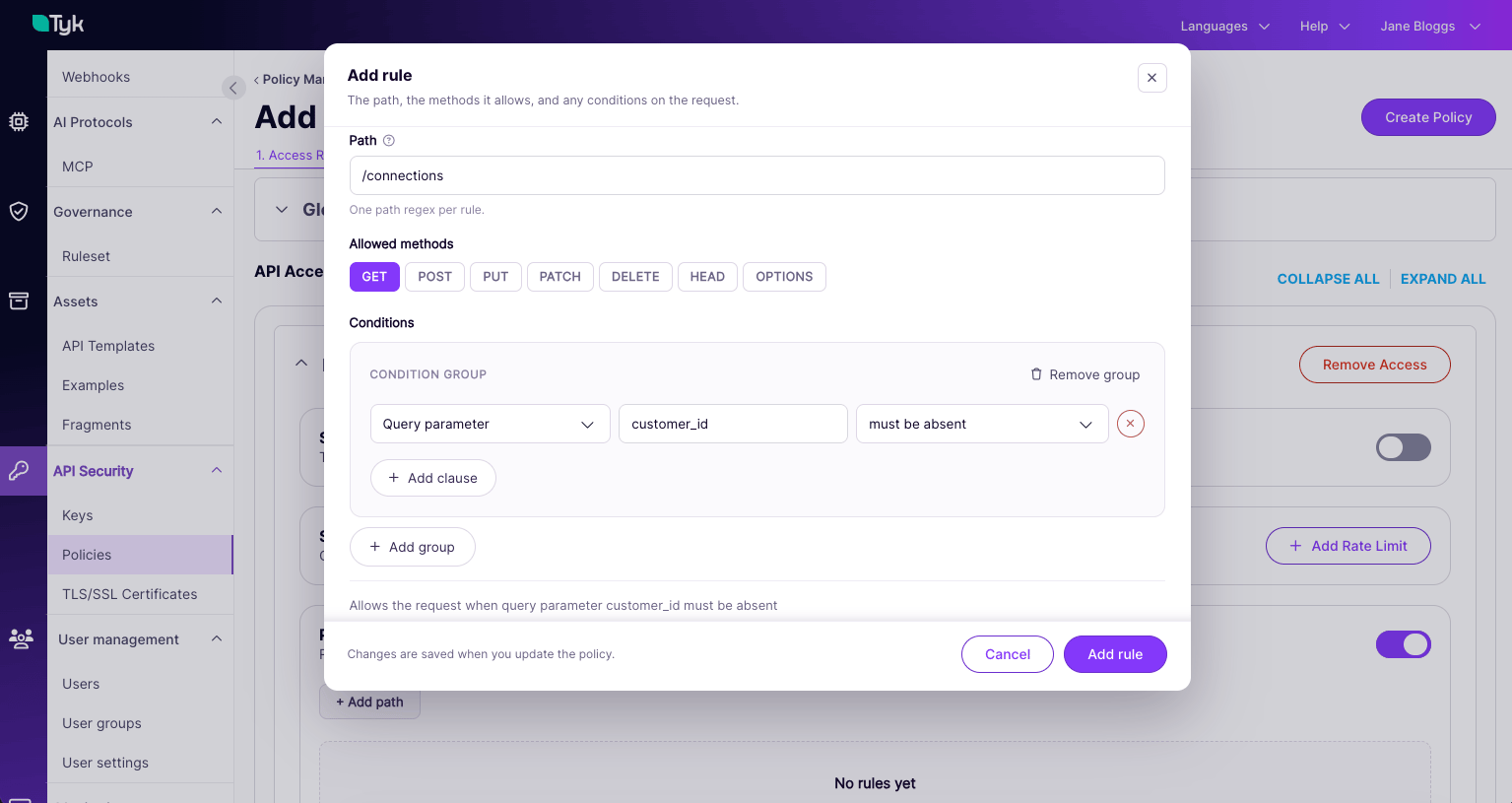
You can configure conditions on the Path-based permissions section of an API, for a Policy or for a key with access rights set directly on it.- Open the Policy or key, and go to the API that you want to restrict.
- Turn on Path-based permissions.
- Click Add path to create a rule, or click the edit icon on an existing rule.
- Enter the Path as a regular expression, or select an endpoint of the API.
- Select the Allowed methods.
- Click Add conditions.
- In the Condition group, click Add clause and set the source, name, requirement and pattern.
- If the group has more than one clause, select All of or Any of.
- To add a group that the request must also meet, click Add group.
- Read the summary below the groups. It describes, in plain language, which requests the rule allows.
- Click Add rule or Save rule.
- Save the Policy or key.
Configure Access Conditions in the API
To configure conditions with the Tyk Dashboard API or Tyk Gateway API, add aconditions list to an allowed_urls entry of the key or Policy.
GET /connections only when the request has no customer_id query parameter.
Condition Fields
Each item inconditions has these fields:
options can contain these fields:
Each field can contain more than one rule, except
payload_matches, which contains one rule. A condition can also combine rules from several fields. The on setting decides how Tyk combines all the rules in the condition.
For the format of each field, see the examples.
A match rule has these fields:
Use these combinations to set each requirement:
path_part_matches and payload_matches support only must match and must not match.
Examples
Require Query Parameters to Be Absent
Allow the request only when it has none of thecustomer_id, account_id and agreement_id query parameters. Each rule is keyed by the parameter name:
?page=2, still meets this condition.
Require a Query Parameter Value
Allow the request only whencustomer_id is present and contains only digits:
Combine Any Of and All Of
Allow the request when it has a numericcustomer_id or a numeric account_id, and its X-Tenant header is acme. The two condition groups must both be met:
Combine Several Sources in One Group
One condition group can contain rules from several fields. Allow the request when theX-Tenant header is acme, the Session metadata has tier set to gold, and the request has no debug query parameter:
on to any, the request needs to meet only one of these three rules.
Check the Request Context
Allow the request only from clients in the10.0.0.0/8 network. This uses the remote_addr request context variable, so you must enable context variables for the API:
request_data or headers hold lists, so use the single-value forms instead, such as request_data_customer_id or headers_X_Tenant.
Check Fields in a JSON Body
Allow the request only when the body has a numericcustomer.id, and every sku in the items array starts with PRD-:
body_field_matches is a list, so each rule includes its path, and you can add more than one rule for the same path.
The path items.#.sku selects the sku of each item in the array. Tyk ignores items that don’t have a sku, so this rule doesn’t check that every item has one.
Check a Path Segment
Allow the request only when no segment of the path isinternal:
no-internal, is only a label. Tyk tests the pattern against every segment of the path.
Matching Behavior
Tyk Gateway applies these rules when it evaluates a condition:Combining Policies
When you apply more than one Policy to a key, Tyk Gateway merges their access rights. Each entry keeps its conditions:- If two entries have the same path and the same conditions, Tyk combines their methods into one entry.
- If two entries have the same path and different conditions, Tyk keeps both entries. Tyk Gateway allows a request that meets either entry.
Validation and Errors
Tyk Dashboard and Tyk Gateway check conditions when you create or update a key or Policy. They reject a condition with400 Bad Request if:
onis notall,anyor empty- the condition contains no match rules
match_rxis not a valid regular expression- a body field rule has an empty
path
Could not compile access condition pattern, denying access and rejects the request with 403 Forbidden.
To see why Tyk Gateway rejected a request, set the log level to debug. Tyk Gateway then logs Granular access condition not satisfied with the path and the index of the condition that failed.
Limitations
- Access conditions apply only to APIs that use authentication. Tyk Gateway doesn’t evaluate access rights for keyless APIs.
- Conditions add restrictions to an
allowed_urlsentry. Ifallowed_urlsis empty, the client can access every endpoint, and Tyk Gateway doesn’t evaluate conditions.