Availability
Model Prices define the cost per million tokens for using different language models. This helps track usage costs, allowing you to manage and optimize expenses when interacting with different models.
Use cases
- AI Gateway Tracking: Ensures that token-based costs for API calls through the AI Gateway are accurately logged and monitored.
- Chat Room Cost Analysis: Tracks and evaluates expenses associated with user interactions in the Chat Room feature.
- Budget Enforcement: Provides the underlying cost data needed to enforce monthly budgets set on LLMs and Applications.
Model Prices
The Model Prices system allows administrators to define the cost structure for specific Large Language Models (LLMs). The pricing information configured here is used by the Analytics system for cost tracking and billing purposes. Key components of a Model Price entity include:- Model Identification: The exact name of the model (e.g.,
claude-3.5-sonnet-20240620) and the vendor providing it. - Token Costs: The price charged per million input tokens and output tokens.
- Cache Costs: Optional pricing for tokens written to or read from the LLM’s prompt cache.
- Currency: The currency in which the model’s pricing is defined (e.g., USD).
Configuration
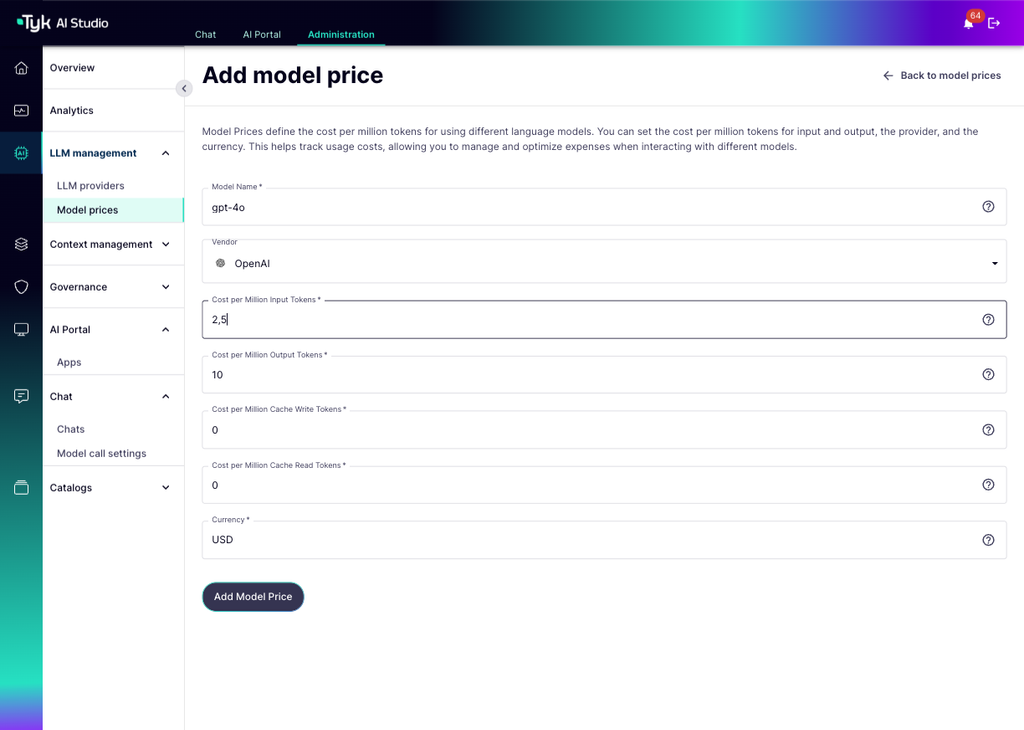
Administrators can configure pricing for specific models through the UI or API. The configuration includes:- Model Name: Must match the exact name used in client API calls or the LLM settings in the admin console for correct mapping.
- Vendor: Selectable from pre-configured vendors in the admin console.
- Cost per Million Input Tokens: The price charged per million input tokens sent to the LLM.
- Cost per Million Output Tokens: The price charged per million output tokens generated by the LLM.
- Cost per Million Cache Write Tokens: The price charged per million tokens written to the prompt cache (defaults to input token pricing if not set).
- Cost per Million Cache Read Tokens: The price charged per million cached tokens read (typically much lower than input costs).
- Currency: The currency in which the pricing is defined.
How to Create the Entity
You can create and manage Model Prices through the Tyk AI Studio Admin UI.- Navigate: Go to the Model Prices section in the Admin UI. This view lists all configured model prices, showing the Model Name, Vendor, Cost per Input Token, Cost per Output Token, Cost per Cache Write Token, Cost per Cache Read Token, and Currency.
- Add New Model Price: Click the ”+ ADD MODEL PRICE” button.
-
Fill in the Model Price Details:
- Model Name: The exact name of the model this price configuration applies to (Required).
- Vendor: Select the name of the LLM provider (e.g., Anthropic, OpenAI).
- Cost per Million Input Tokens: The price charged per million input tokens sent to the LLM (Required).
- Cost per Million Output Tokens: The price charged per million output tokens generated by the LLM (Required).
- Cost per Million Cache Write Tokens: The price charged per million tokens written to the prompt cache (Optional).
- Cost per Million Cache Read Tokens: The price charged per million cached tokens read (Optional).
- Currency: The currency in which the pricing is defined (e.g., USD) (Required).
-
Save: Click “Update Model Price” or “Create Model Price” to save the configuration.