

This page is for installing Tyk Self-Managed. If you are looking to use Tyk as part of Tyk Cloud, please refer to the Tyk Cloud documentation.
Architecture
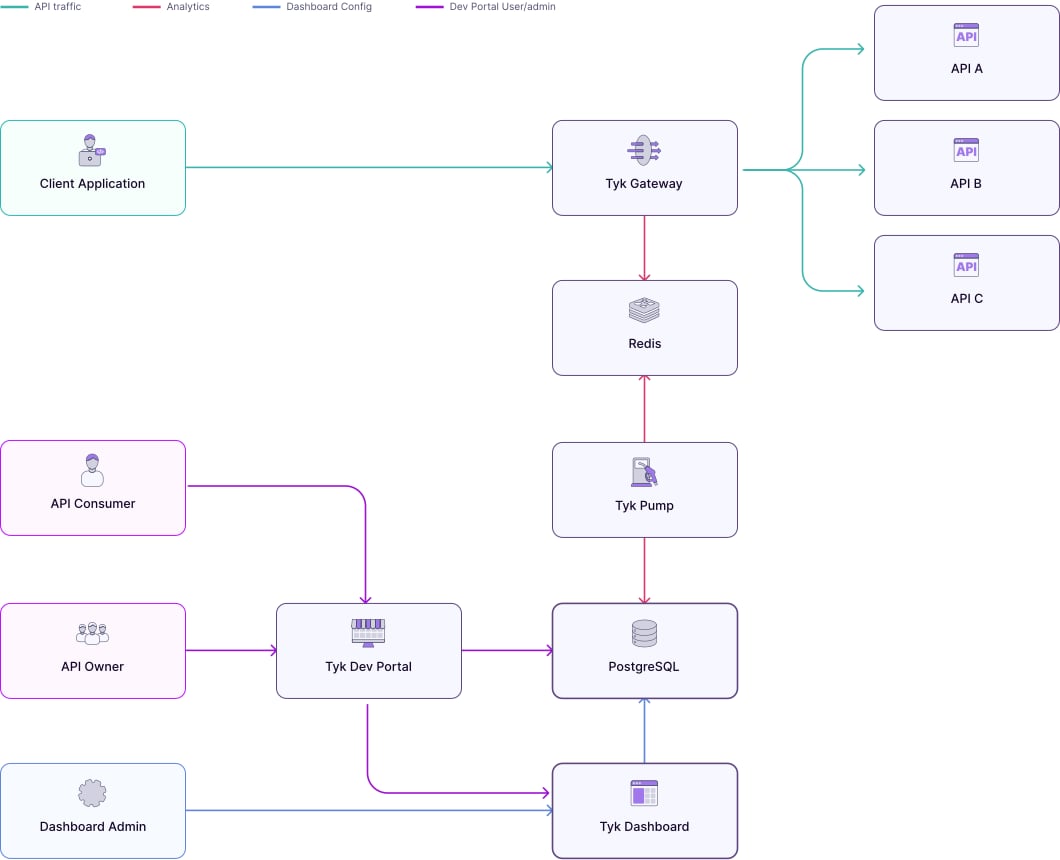
Requirements
Tyk Dashboard requires a persistent datastore for its operations. By default MongoDB is used. From Tyk v4.0, we also support PostgreSQL.PostgreSQL
The following managed services are expected to work as a drop-in replacement for PostgreSQL. Tyk does not test them directly:
- Amazon RDS for PostgreSQL
- Amazon Aurora PostgreSQL
- Azure Database for PostgreSQL
- Google Cloud SQL for PostgreSQL
Sqlite support was previously offered for development and testing only. It reached End of Life and is no longer supported from Tyk 5.7.0 onward. Use PostgreSQL, MongoDB, or another listed compatible alternative instead.
MongoDB
You can also use the following as a drop-in replacement for MongoDB:
- Amazon DocumentDB 3.6 and 4 engine
- Azure Cosmos DB for MongoDB 3.6 and 4 engine
Redis
Visit the Configure Redis page for more info.
Please check here for production configuration.
Recommended Installation: Docker
For development, testing, and proof of concept purposes, we recommend using our Docker installation, which allows you to quickly spin up a full Tyk stack on your local machine.
Install with Docker
Alternative Installation Methods

Install on K8s

Install with Ansible

Install on Red Hat

Install on Ubuntu

Install on Amazon AWS

Install Tyk on Heroku

Install on Microsoft Azure