> ## Documentation Index
> Fetch the complete documentation index at: https://tyk.io/docs/llms.txt
> Use this file to discover all available pages before exploring further.
# Installation Options for Tyk Self-Managed
> Explore the various installation options for Tyk Self-Managed, including Docker, Kubernetes, Linux packages, Ansible, and more.
export const ResponsiveGrid = ({children}) => {
return
{children}
;
};
| Edition | Deployment Type |
| :--------- | :------------------- |
| Enterprise | Self-Managed, Hybrid |
This page is for installing **Tyk Self-Managed**. If you are looking to use Tyk as part of **Tyk Cloud**, please refer to [the Tyk Cloud documentation](/getting-started/create-account).
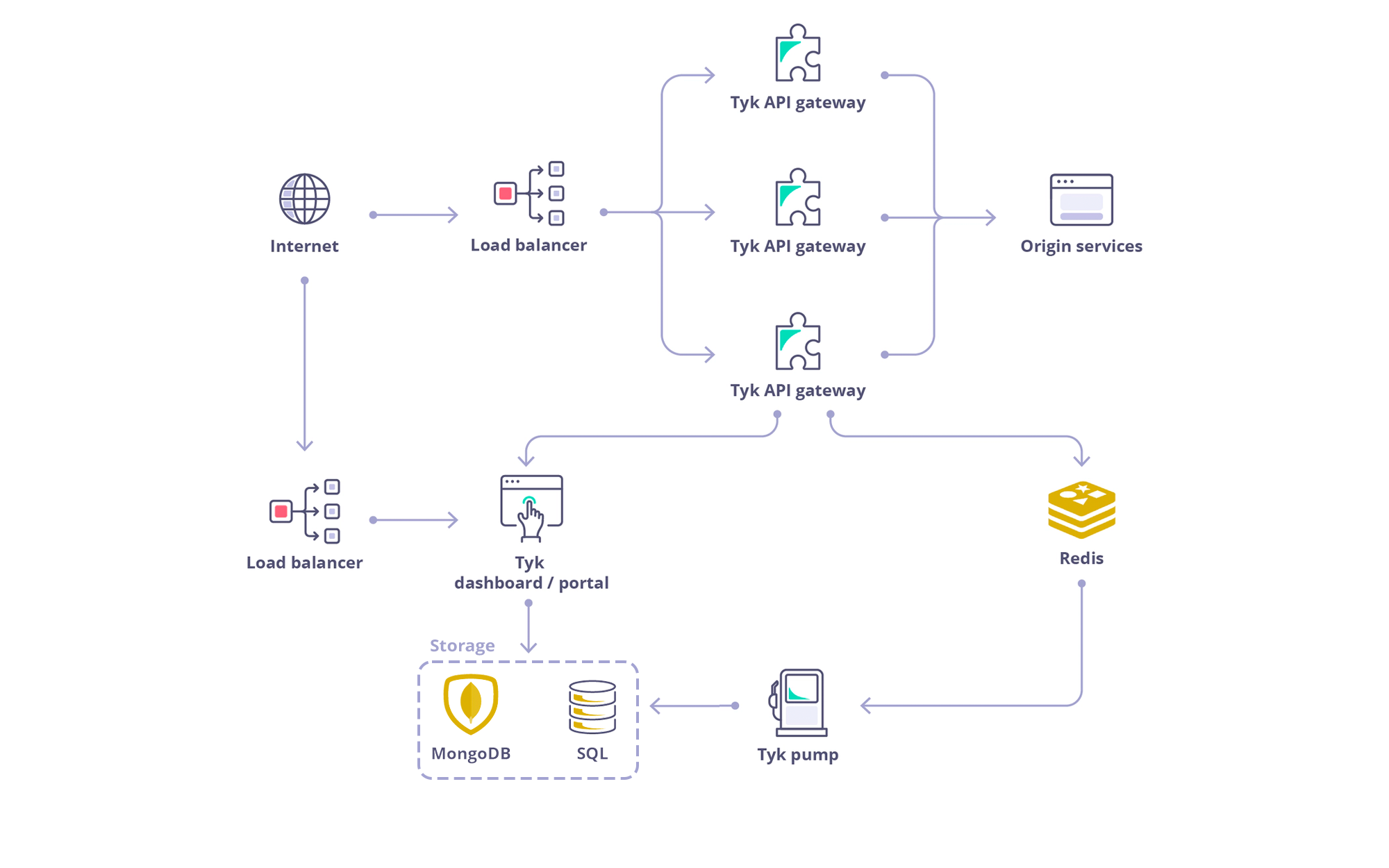
## Architecture
 ## Requirements
**Tyk Dashboard** requires a persistent datastore for its operations. By default MongoDB is used. From Tyk v4.0, we also support PostgreSQL.
### PostgreSQL
| Tyk Version | PostgreSQL Version |
| ----------- | ------------------ |
| From 4.X | PSQL 14.x |
| From 5.X | PSQL 15.x |
| From 5.X | PSQL 16.x |
| From 5.9 | PSQL 17.x |
### MongoDB
| Tyk Version | MongoDB Version |
| ----------- | ----------------- |
| From 5.X | MongoDB 5.0 (EOL) |
| From 5.X | MongoDB 6.0 |
| From 5.X | MongoDB 7.0 |
| From 5.9 | MongoDB 8.0 |
See [Database Options](/api-management/dashboard-configuration#supported-database) for a list of versions and drop-in replacements we support.
### Redis
**Tyk Gateway** requires Redis for its operations. Here is the list of supported versions:
| Tyk Version | Redis Version |
| ------------------- | --------------------------------- |
| From 3.x.x | 2.8.x, 3.x.x, 4.x.x, 5.x.x, 6.x.x |
| From 4.x.x | 2.8.x, 3.x.x, 4.x.x, 5.x.x, 6.x.x |
| From 5.0.x to 5.8.x | 6.2.x, 7.x |
| From 5.9.x onwards | 6.2.x, 7.x, 7.4.x |
Visit the [Redis page](/planning-for-production/database-settings#redis) for more info.
## Recommended Installation: Docker
For development, testing, and proof of concept purposes, we recommend using our Docker installation, which allows you to quickly spin up a full Tyk stack on your local machine.
Install with Docker
## Alternative Installation Methods
Install on K8s
Install with Ansible
Install on Red Hat
Install on Ubuntu
Install on Amazon AWS
Install Tyk on Heroku
Install on Microsoft Azure
## Air Gapped Installation
For environments with restricted network access, we provide guidance on how to deploy Tyk using private container registries and local package mirrors.
Refer to our [Air-Gapped Deployment guide](/api-management/air-gapped-deployment) for detailed instructions on how to set up Tyk in air-gapped or network-restricted environments.
## Requirements
**Tyk Dashboard** requires a persistent datastore for its operations. By default MongoDB is used. From Tyk v4.0, we also support PostgreSQL.
### PostgreSQL
| Tyk Version | PostgreSQL Version |
| ----------- | ------------------ |
| From 4.X | PSQL 14.x |
| From 5.X | PSQL 15.x |
| From 5.X | PSQL 16.x |
| From 5.9 | PSQL 17.x |
### MongoDB
| Tyk Version | MongoDB Version |
| ----------- | ----------------- |
| From 5.X | MongoDB 5.0 (EOL) |
| From 5.X | MongoDB 6.0 |
| From 5.X | MongoDB 7.0 |
| From 5.9 | MongoDB 8.0 |
See [Database Options](/api-management/dashboard-configuration#supported-database) for a list of versions and drop-in replacements we support.
### Redis
**Tyk Gateway** requires Redis for its operations. Here is the list of supported versions:
| Tyk Version | Redis Version |
| ------------------- | --------------------------------- |
| From 3.x.x | 2.8.x, 3.x.x, 4.x.x, 5.x.x, 6.x.x |
| From 4.x.x | 2.8.x, 3.x.x, 4.x.x, 5.x.x, 6.x.x |
| From 5.0.x to 5.8.x | 6.2.x, 7.x |
| From 5.9.x onwards | 6.2.x, 7.x, 7.4.x |
Visit the [Redis page](/planning-for-production/database-settings#redis) for more info.
## Recommended Installation: Docker
For development, testing, and proof of concept purposes, we recommend using our Docker installation, which allows you to quickly spin up a full Tyk stack on your local machine.
Install with Docker
## Alternative Installation Methods
Install on K8s
Install with Ansible
Install on Red Hat
Install on Ubuntu
Install on Amazon AWS
Install Tyk on Heroku
Install on Microsoft Azure
## Air Gapped Installation
For environments with restricted network access, we provide guidance on how to deploy Tyk using private container registries and local package mirrors.
Refer to our [Air-Gapped Deployment guide](/api-management/air-gapped-deployment) for detailed instructions on how to set up Tyk in air-gapped or network-restricted environments.