> ## Documentation Index
> Fetch the complete documentation index at: https://tyk.io/docs/llms.txt
> Use this file to discover all available pages before exploring further.
# SSO with Auth0
> Learn how to configure Single Sign-On (SSO) for Tyk Dashboard or Tyk Developer Portal using Auth0 via OpenID Connect (OIDC), with worked examples for Dashboard and Portal.
## Introduction
[Auth0](https://auth0.com/) is an OIDC-compatible identity provider. TIB connects to Auth0 using `SocialProvider` with the `openid-connect` provider type.
Before configuring your IdP and TIB profile, read [Dashboard SSO](/tyk-identity-broker/dashboard-sso) or [Portal SSO](/tyk-stack/tyk-developer-portal/enterprise-developer-portal/managing-access/enable-sso) to understand the `ActionType`, `ReturnURL`, and `IdentityHandlerConfig` fields required for your use case.
This page covers the Auth0-specific configuration only.
## Configure Auth0
1. Log in to the [Auth0 Dashboard](https://manage.auth0.com/) and navigate to **Applications > Applications**.
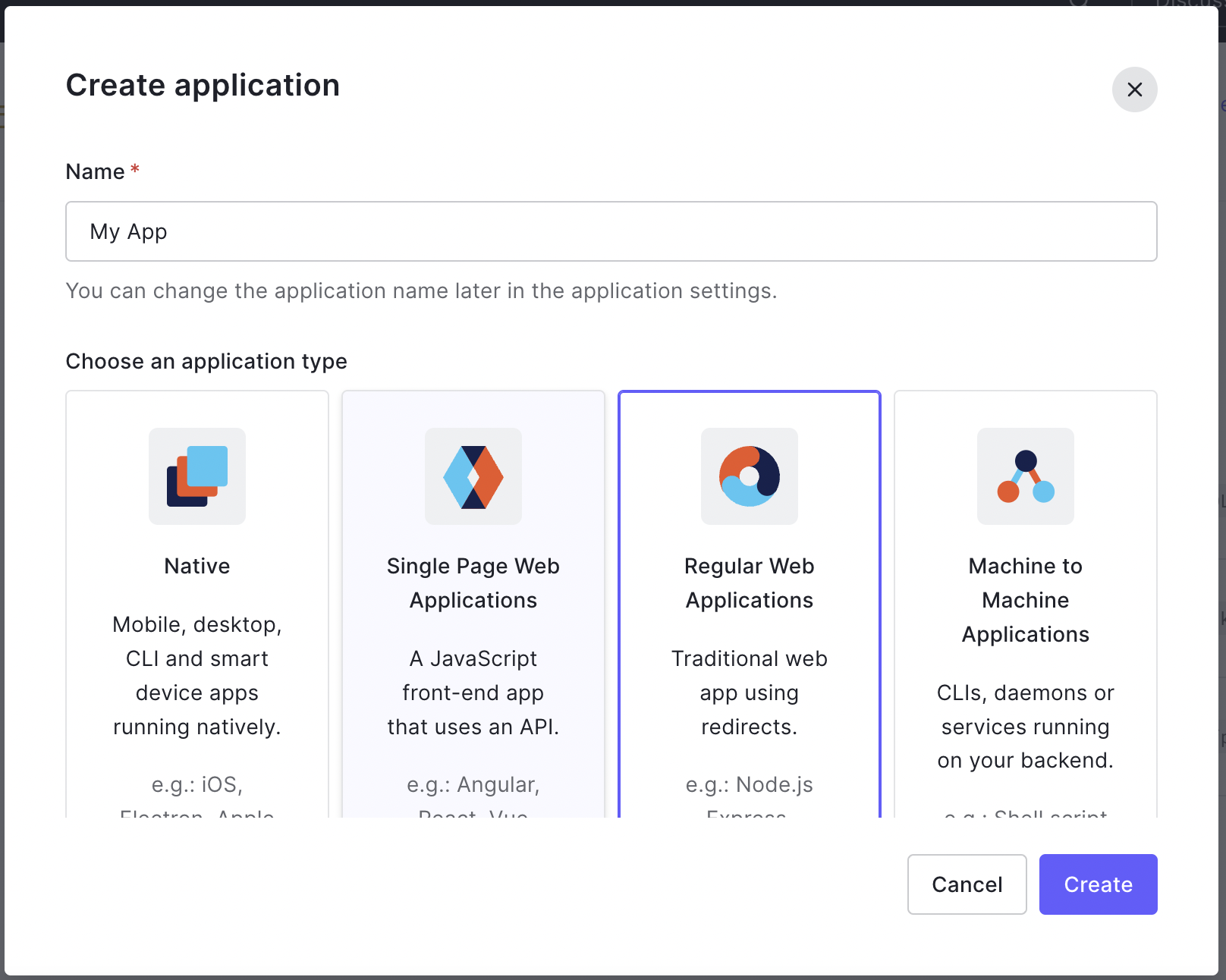
2. Click **Create Application**, give it a name, select **Regular Web Application**, and click **Create**.
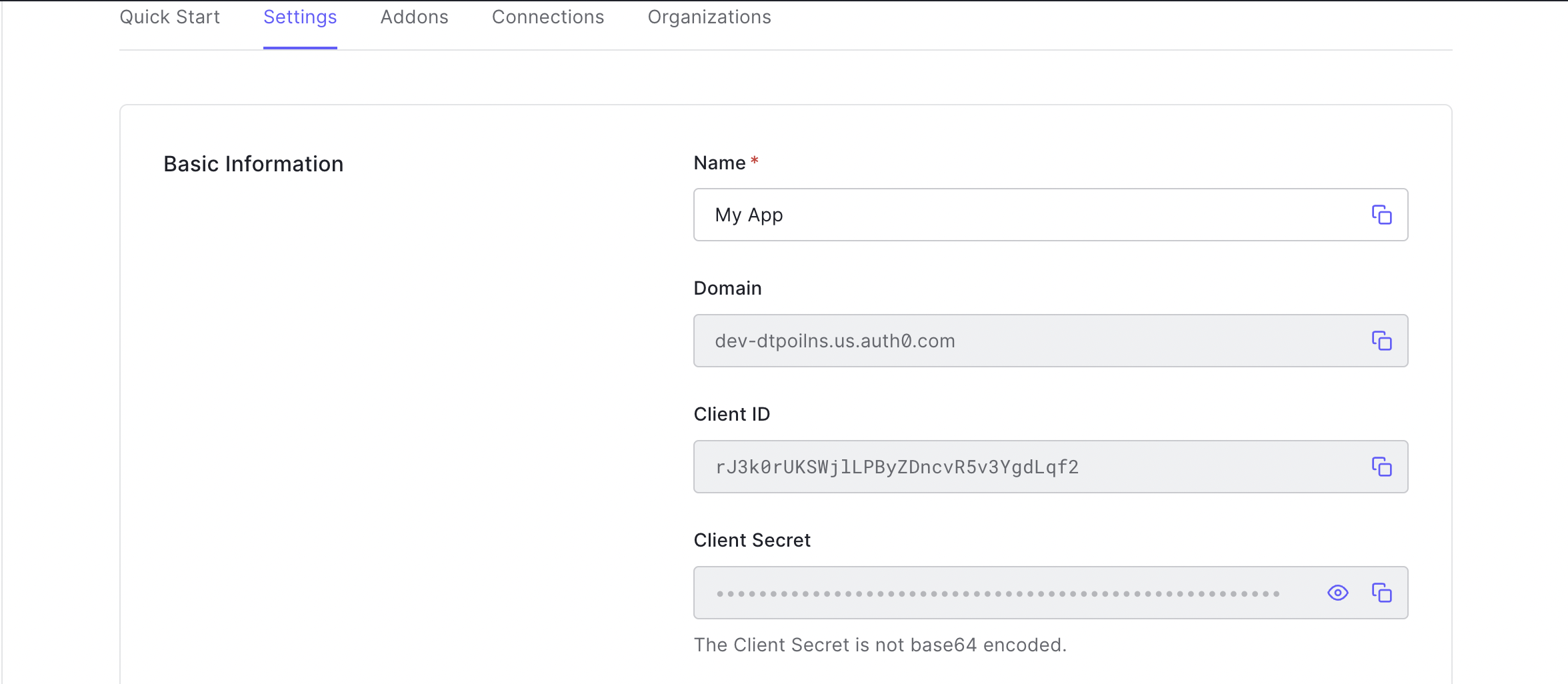
 3. From the application's **Settings** tab, note the **Domain**, **Client ID**, and **Client Secret**. You will need all three for the TIB profile.
 4. In the **Allowed Callback URLs** field, add the TIB callback URL:
```
http://{tib-host}/auth/{profile-id}/openid-connect/callback
```
Replace `{tib-host}` with the hostname of your TIB instance and `{profile-id}` with the ID you will assign to the TIB profile.
5. Click **Save Changes**.
The Auth0 OIDC discovery URL for your tenant is:
```
https://{auth0-domain}/.well-known/openid-configuration
```
Where `{auth0-domain}` is the **Domain** value from your Auth0 application settings (for example, `your-tenant.auth0.com`).
## TIB Profile
The Auth0-specific configuration goes in the `ProviderConfig` block of the TIB profile. Set `ProviderName` to `SocialProvider` and `Type` to `redirect`.
```json expandable theme={null}
{
"ProviderName": "SocialProvider",
"Type": "redirect",
"ProviderConfig": {
"CallbackBaseURL": "http://{tib-host}",
"FailureRedirect": "http://{failure-redirect-url}",
"UseProviders": [
{
"Name": "openid-connect",
"Key": "{auth0-client-id}",
"Secret": "{auth0-client-secret}",
"Scopes": ["openid", "email", "profile"],
"DiscoverURL": "https://{auth0-domain}/.well-known/openid-configuration"
}
]
}
}
```
The Auth0-specific `ProviderConfig` fields are:
| Field | Description |
| -------------------------- | ---------------------------------------------------------------------------------------------- |
| `CallbackBaseURL` | The base URL of your TIB instance. TIB appends the callback path automatically. |
| `FailureRedirect` | URL to redirect the user to on authentication failure. |
| `UseProviders.Name` | Must be `openid-connect`. This value routes TIB to the OpenID Connect provider implementation. |
| `UseProviders.Key` | The Auth0 Client ID. |
| `UseProviders.Secret` | The Auth0 Client Secret. |
| `UseProviders.Scopes` | OAuth scopes to request. `openid` and `email` are required. |
| `UseProviders.DiscoverURL` | The Auth0 OIDC discovery URL for your tenant. |
### JSON Web Encryption (JWE)
If Auth0 is configured to encrypt ID tokens, TIB can decrypt them using JWE. Add a `JWE` block to `ProviderConfig` to enable this:
```json theme={null}
{
"ProviderConfig": {
"UseProviders": [...],
"JWE": {
"Enabled": true,
"PrivateKeyLocation": "{certificate-id-or-path}"
}
}
}
```
For embedded TIB in Tyk Dashboard, set `PrivateKeyLocation` to the certificate ID from the Tyk Dashboard certificate manager. For standalone TIB, set it to the file path of a PEM file containing the private key. The key must correspond to the public key registered with Auth0 for token encryption.
Requires Tyk Identity Broker v1.6.1+ and Tyk Dashboard v5.7.0+.
## Worked Examples
These examples use embedded TIB, so the `CallbackBaseURL` is the same as the Dashboard or Portal respectively; TIB handles requests on the same host and port.
In this example, Tyk Dashboard is running at `http://dashboard.example.com` on port `3000`; replace the example values with your own.
**Tyk Dashboard configuration**
```json theme={null}
{
"sso_enable_user_lookup": true,
"sso_permission_defaults": {
"apis": "write",
"keys": "write",
"policies": "write"
},
"sso_default_group_id": "{tyk-user-group-id}"
}
```
With this configuration, registered users (with a Tyk Dashboard user account) get their own permissions; unregistered users fall back to the group specified in `sso_default_group_id`. See [Dashboard SSO](/tyk-identity-broker/dashboard-sso) for full details.
**TIB profile**
The TIB profile is created via the [Tyk Identity Broker API](/tyk-identity-broker/tib-rest-api) or the [Tyk Dashboard UI](/tyk-identity-broker/dashboard-sso#create-a-tib-profile-using-dashboard-ui).
```json expandable theme={null}
{
"ID": "auth0-dashboard-oidc",
"Name": "Auth0 Dashboard SSO",
"OrgID": "{tyk-org-id}",
"ActionType": "GenerateOrLoginUserProfile",
"Type": "redirect",
"ProviderName": "SocialProvider",
"ReturnURL": "http://dashboard.example.com:3000/tap",
"IdentityHandlerConfig": {
"DashboardCredential": "{tib-service-user-api-key}"
},
"ProviderConfig": {
"CallbackBaseURL": "http://dashboard.example.com:3000",
"FailureRedirect": "http://dashboard.example.com:3000/?fail=true",
"UseProviders": [
{
"Name": "openid-connect",
"Key": "{auth0-client-id}",
"Secret": "{auth0-client-secret}",
"Scopes": ["openid", "email", "profile"],
"DiscoverURL": "https://{auth0-domain}/.well-known/openid-configuration"
}
]
}
}
```
* set `Key` to the Auth0 **Client ID**
* set `Secret` to the Auth0 **Client Secret**
* set `DashboardCredential` to the [TIB service account's](/tyk-identity-broker/dashboard-sso#tib-service-account) Dashboard credentials
**Auth0 callback URL**
Ensure the following URL is listed in **Allowed Callback URLs** in your Auth0 application settings. The `ID` in the registered URL must exactly match the `ID` in your TIB profile; a mismatch will result in a `400 Bad Request` error:
```
http://dashboard.example.com:3000/auth/auth0-dashboard-oidc/openid-connect/callback
```
**Login URL**
This URL initiates the SSO login flow:
```
http://dashboard.example.com:3000/auth/auth0-dashboard-oidc/openid-connect
```
In production, present this as a "Log in with Auth0" button or link on a custom login page, rather than expecting users to navigate to it directly.
See [Dashboard SSO](/tyk-identity-broker/dashboard-sso) for details on session behavior, permissions, and user group mapping.
In this example, Tyk Developer Portal is running at `http://portal.example.com` on port `3001`; replace the example values with your own.
**Tyk Developer Portal configuration**
Enable embedded TIB in the Portal configuration:
```json theme={null}
{
"TIB": {
"Enable": true
}
}
```
**TIB profile**
The TIB profile is created via the Tyk Developer Portal UI under **Settings > SSO Profiles**.
```json expandable theme={null}
{
"ID": "auth0-portal-oidc",
"Name": "Auth0 Portal SSO",
"OrgID": "{tyk-org-id}",
"ActionType": "GenerateOrLoginDeveloperProfile",
"Type": "redirect",
"ProviderName": "SocialProvider",
"ReturnURL": "http://portal.example.com:3001/sso",
"IdentityHandlerConfig": {
"DashboardCredential": "{portal-api-secret}"
},
"ProviderConfig": {
"CallbackBaseURL": "http://portal.example.com:3001",
"FailureRedirect": "http://portal.example.com:3001/?fail=true",
"UseProviders": [
{
"Name": "openid-connect",
"Key": "{auth0-client-id}",
"Secret": "{auth0-client-secret}",
"Scopes": ["openid", "email", "profile"],
"DiscoverURL": "https://{auth0-domain}/.well-known/openid-configuration"
}
]
}
}
```
* set `ActionType` and `OrgID` based on the audience:
* Admin Portal (API owners): `ActionType: "GenerateOrLoginUserProfile"`, `OrgID: "0"`
* Live Portal (API consumers): `ActionType: "GenerateOrLoginDeveloperProfile"`, `OrgID` is not required
* set `Key` to the Auth0 **Client ID**
* set `Secret` to the Auth0 **Client Secret**
* set `DashboardCredential` to the [PORTAL\_API\_SECRET](/product-stack/tyk-enterprise-developer-portal/deploy/configuration#portal_api_secret) used to authenticate with the Portal's management API
**Auth0 callback URL**
Ensure the following URL is listed in **Allowed Callback URLs** in your Auth0 application settings. The `ID` in the registered URL must exactly match the `ID` in your TIB profile; a mismatch will result in a `400 Bad Request` error:
```
http://portal.example.com:3001/auth/auth0-portal-oidc/openid-connect/callback
```
**Login URL**
This URL initiates the SSO login flow:
```
http://portal.example.com:3001/auth/auth0-portal-oidc/openid-connect
```
In production, present this as a "Log in with Auth0" button or link on the Portal login page.
For details on user group mapping and admin vs developer profiles, see [Portal SSO](/tyk-stack/tyk-developer-portal/enterprise-developer-portal/managing-access/enable-sso).
4. In the **Allowed Callback URLs** field, add the TIB callback URL:
```
http://{tib-host}/auth/{profile-id}/openid-connect/callback
```
Replace `{tib-host}` with the hostname of your TIB instance and `{profile-id}` with the ID you will assign to the TIB profile.
5. Click **Save Changes**.
The Auth0 OIDC discovery URL for your tenant is:
```
https://{auth0-domain}/.well-known/openid-configuration
```
Where `{auth0-domain}` is the **Domain** value from your Auth0 application settings (for example, `your-tenant.auth0.com`).
## TIB Profile
The Auth0-specific configuration goes in the `ProviderConfig` block of the TIB profile. Set `ProviderName` to `SocialProvider` and `Type` to `redirect`.
```json expandable theme={null}
{
"ProviderName": "SocialProvider",
"Type": "redirect",
"ProviderConfig": {
"CallbackBaseURL": "http://{tib-host}",
"FailureRedirect": "http://{failure-redirect-url}",
"UseProviders": [
{
"Name": "openid-connect",
"Key": "{auth0-client-id}",
"Secret": "{auth0-client-secret}",
"Scopes": ["openid", "email", "profile"],
"DiscoverURL": "https://{auth0-domain}/.well-known/openid-configuration"
}
]
}
}
```
The Auth0-specific `ProviderConfig` fields are:
| Field | Description |
| -------------------------- | ---------------------------------------------------------------------------------------------- |
| `CallbackBaseURL` | The base URL of your TIB instance. TIB appends the callback path automatically. |
| `FailureRedirect` | URL to redirect the user to on authentication failure. |
| `UseProviders.Name` | Must be `openid-connect`. This value routes TIB to the OpenID Connect provider implementation. |
| `UseProviders.Key` | The Auth0 Client ID. |
| `UseProviders.Secret` | The Auth0 Client Secret. |
| `UseProviders.Scopes` | OAuth scopes to request. `openid` and `email` are required. |
| `UseProviders.DiscoverURL` | The Auth0 OIDC discovery URL for your tenant. |
### JSON Web Encryption (JWE)
If Auth0 is configured to encrypt ID tokens, TIB can decrypt them using JWE. Add a `JWE` block to `ProviderConfig` to enable this:
```json theme={null}
{
"ProviderConfig": {
"UseProviders": [...],
"JWE": {
"Enabled": true,
"PrivateKeyLocation": "{certificate-id-or-path}"
}
}
}
```
For embedded TIB in Tyk Dashboard, set `PrivateKeyLocation` to the certificate ID from the Tyk Dashboard certificate manager. For standalone TIB, set it to the file path of a PEM file containing the private key. The key must correspond to the public key registered with Auth0 for token encryption.
Requires Tyk Identity Broker v1.6.1+ and Tyk Dashboard v5.7.0+.
## Worked Examples
These examples use embedded TIB, so the `CallbackBaseURL` is the same as the Dashboard or Portal respectively; TIB handles requests on the same host and port.
In this example, Tyk Dashboard is running at `http://dashboard.example.com` on port `3000`; replace the example values with your own.
**Tyk Dashboard configuration**
```json theme={null}
{
"sso_enable_user_lookup": true,
"sso_permission_defaults": {
"apis": "write",
"keys": "write",
"policies": "write"
},
"sso_default_group_id": "{tyk-user-group-id}"
}
```
With this configuration, registered users (with a Tyk Dashboard user account) get their own permissions; unregistered users fall back to the group specified in `sso_default_group_id`. See [Dashboard SSO](/tyk-identity-broker/dashboard-sso) for full details.
**TIB profile**
The TIB profile is created via the [Tyk Identity Broker API](/tyk-identity-broker/tib-rest-api) or the [Tyk Dashboard UI](/tyk-identity-broker/dashboard-sso#create-a-tib-profile-using-dashboard-ui).
```json expandable theme={null}
{
"ID": "auth0-dashboard-oidc",
"Name": "Auth0 Dashboard SSO",
"OrgID": "{tyk-org-id}",
"ActionType": "GenerateOrLoginUserProfile",
"Type": "redirect",
"ProviderName": "SocialProvider",
"ReturnURL": "http://dashboard.example.com:3000/tap",
"IdentityHandlerConfig": {
"DashboardCredential": "{tib-service-user-api-key}"
},
"ProviderConfig": {
"CallbackBaseURL": "http://dashboard.example.com:3000",
"FailureRedirect": "http://dashboard.example.com:3000/?fail=true",
"UseProviders": [
{
"Name": "openid-connect",
"Key": "{auth0-client-id}",
"Secret": "{auth0-client-secret}",
"Scopes": ["openid", "email", "profile"],
"DiscoverURL": "https://{auth0-domain}/.well-known/openid-configuration"
}
]
}
}
```
* set `Key` to the Auth0 **Client ID**
* set `Secret` to the Auth0 **Client Secret**
* set `DashboardCredential` to the [TIB service account's](/tyk-identity-broker/dashboard-sso#tib-service-account) Dashboard credentials
**Auth0 callback URL**
Ensure the following URL is listed in **Allowed Callback URLs** in your Auth0 application settings. The `ID` in the registered URL must exactly match the `ID` in your TIB profile; a mismatch will result in a `400 Bad Request` error:
```
http://dashboard.example.com:3000/auth/auth0-dashboard-oidc/openid-connect/callback
```
**Login URL**
This URL initiates the SSO login flow:
```
http://dashboard.example.com:3000/auth/auth0-dashboard-oidc/openid-connect
```
In production, present this as a "Log in with Auth0" button or link on a custom login page, rather than expecting users to navigate to it directly.
See [Dashboard SSO](/tyk-identity-broker/dashboard-sso) for details on session behavior, permissions, and user group mapping.
In this example, Tyk Developer Portal is running at `http://portal.example.com` on port `3001`; replace the example values with your own.
**Tyk Developer Portal configuration**
Enable embedded TIB in the Portal configuration:
```json theme={null}
{
"TIB": {
"Enable": true
}
}
```
**TIB profile**
The TIB profile is created via the Tyk Developer Portal UI under **Settings > SSO Profiles**.
```json expandable theme={null}
{
"ID": "auth0-portal-oidc",
"Name": "Auth0 Portal SSO",
"OrgID": "{tyk-org-id}",
"ActionType": "GenerateOrLoginDeveloperProfile",
"Type": "redirect",
"ProviderName": "SocialProvider",
"ReturnURL": "http://portal.example.com:3001/sso",
"IdentityHandlerConfig": {
"DashboardCredential": "{portal-api-secret}"
},
"ProviderConfig": {
"CallbackBaseURL": "http://portal.example.com:3001",
"FailureRedirect": "http://portal.example.com:3001/?fail=true",
"UseProviders": [
{
"Name": "openid-connect",
"Key": "{auth0-client-id}",
"Secret": "{auth0-client-secret}",
"Scopes": ["openid", "email", "profile"],
"DiscoverURL": "https://{auth0-domain}/.well-known/openid-configuration"
}
]
}
}
```
* set `ActionType` and `OrgID` based on the audience:
* Admin Portal (API owners): `ActionType: "GenerateOrLoginUserProfile"`, `OrgID: "0"`
* Live Portal (API consumers): `ActionType: "GenerateOrLoginDeveloperProfile"`, `OrgID` is not required
* set `Key` to the Auth0 **Client ID**
* set `Secret` to the Auth0 **Client Secret**
* set `DashboardCredential` to the [PORTAL\_API\_SECRET](/product-stack/tyk-enterprise-developer-portal/deploy/configuration#portal_api_secret) used to authenticate with the Portal's management API
**Auth0 callback URL**
Ensure the following URL is listed in **Allowed Callback URLs** in your Auth0 application settings. The `ID` in the registered URL must exactly match the `ID` in your TIB profile; a mismatch will result in a `400 Bad Request` error:
```
http://portal.example.com:3001/auth/auth0-portal-oidc/openid-connect/callback
```
**Login URL**
This URL initiates the SSO login flow:
```
http://portal.example.com:3001/auth/auth0-portal-oidc/openid-connect
```
In production, present this as a "Log in with Auth0" button or link on the Portal login page.
For details on user group mapping and admin vs developer profiles, see [Portal SSO](/tyk-stack/tyk-developer-portal/enterprise-developer-portal/managing-access/enable-sso).