> ## Documentation Index
> Fetch the complete documentation index at: https://tyk.io/docs/llms.txt
> Use this file to discover all available pages before exploring further.
# Service Compliance
> How API owners see governance compliance for their services, in the per-service Governance tab and the portfolio-level API list.
Service Compliance is the API-owner-facing side of Tyk Governance. Where [Rulesets](/docs/tyk-governance/rulesets) covers how governance owners define standards, this page covers how API owners see where their services stand.
Tyk Governance surfaces compliance information in two places: the **Governance tab** on each individual service, which gathers the detailed per-service picture, and the **API list**, which gives a portfolio-level view across all services.
Once you can read a result, see [Remediate Issues](/docs/tyk-governance/remediate-issues) for acting on it.
## See Compliance for a Service
Open a service from the APIs list, then switch to the **Governance** tab. It is the last tab in the API details page, marked with a **New!** badge.
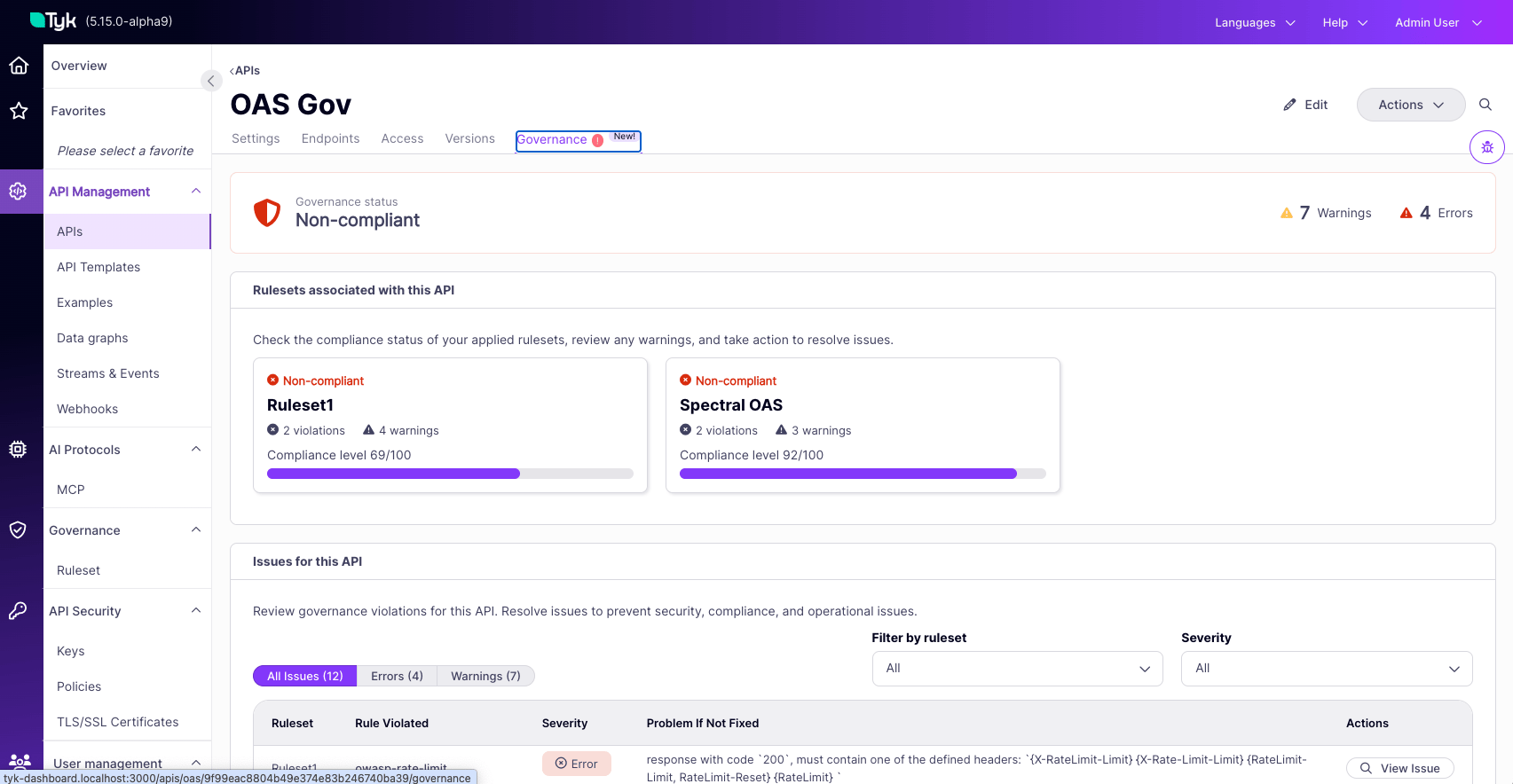 The tab is organized into four sections, top to bottom: the status banner, the rulesets card grid, the issues table, and the test panel.
### Governance Status Banner
A full-width card at the top of the tab summarizing the service's overall compliance posture.
* **Status icon and label.** Compliant (green) if the service has zero Error-severity issues across all applicable rulesets. Non-compliant (red) if any Error-severity issue exists. An amber warning state while evaluation is in progress.
* **Errors count.** The number of Error-severity issues across all rulesets evaluating this service. Errors are the issues that affect compliance status.
* **Warnings count.** The number of Warn-severity issues across all rulesets. Warnings are advisory and do not change compliance status.
The banner reflects the current state of compliance. It updates automatically when the service changes, when a ruleset changes, or when API Categories are updated.
The tab is organized into four sections, top to bottom: the status banner, the rulesets card grid, the issues table, and the test panel.
### Governance Status Banner
A full-width card at the top of the tab summarizing the service's overall compliance posture.
* **Status icon and label.** Compliant (green) if the service has zero Error-severity issues across all applicable rulesets. Non-compliant (red) if any Error-severity issue exists. An amber warning state while evaluation is in progress.
* **Errors count.** The number of Error-severity issues across all rulesets evaluating this service. Errors are the issues that affect compliance status.
* **Warnings count.** The number of Warn-severity issues across all rulesets. Warnings are advisory and do not change compliance status.
The banner reflects the current state of compliance. It updates automatically when the service changes, when a ruleset changes, or when API Categories are updated.
 ### Rulesets Associated With This Service
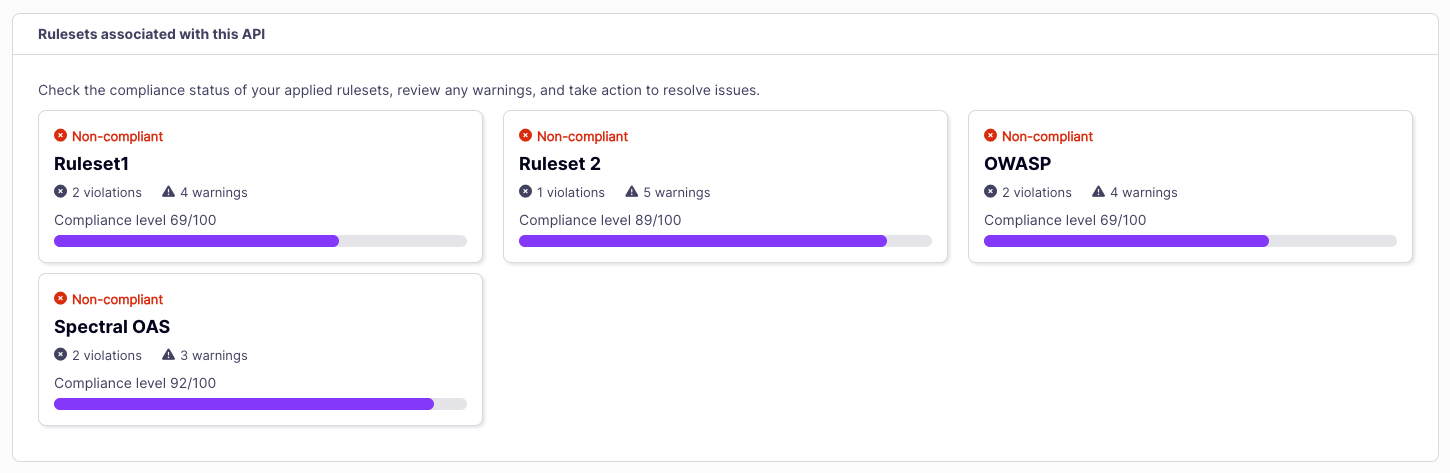
A card grid showing every ruleset evaluating this service. Each card represents one ruleset, identified through API Category match. See [Scoping Rulesets to Services](/docs/tyk-governance/scoping-rulesets) for how scoping works.
Each card shows:
* **Status badge.** Compliant or Non-compliant for this ruleset against this service.
* **Ruleset name.** Click to navigate to the ruleset's detail page.
* **Errors count.** Number of Error-severity issues this ruleset detected on this service.
* **Warnings count.** Number of Warn-severity issues this ruleset detected on this service.
The grid is paginated at 6 cards per page. If a service is governed by many rulesets, additional pages of cards become available.
### Rulesets Associated With This Service
A card grid showing every ruleset evaluating this service. Each card represents one ruleset, identified through API Category match. See [Scoping Rulesets to Services](/docs/tyk-governance/scoping-rulesets) for how scoping works.
Each card shows:
* **Status badge.** Compliant or Non-compliant for this ruleset against this service.
* **Ruleset name.** Click to navigate to the ruleset's detail page.
* **Errors count.** Number of Error-severity issues this ruleset detected on this service.
* **Warnings count.** Number of Warn-severity issues this ruleset detected on this service.
The grid is paginated at 6 cards per page. If a service is governed by many rulesets, additional pages of cards become available.
 ### Issues for This Service
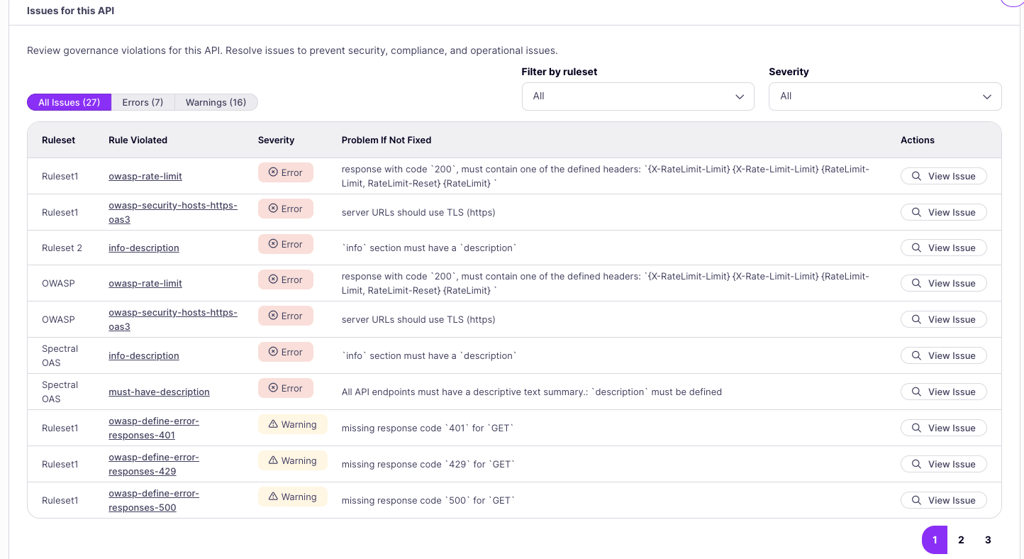
A filterable, paginated table of every individual issue detected against this service across all evaluating rulesets.
**Filters**
* **Severity pills (left).** Toggle between All issues, Errors, and Warnings. Each pill shows a count.
* **Filter by ruleset (right).** Restrict the table to issues from a single ruleset.
* **Severity.** Restrict the table by severity: Error, Warn, or Info.
**Columns**
* **Ruleset**: The ruleset that produced the issue.
* **Rule violated**: The rule identifier, for example `authentication_required`. Clickable to view full issue details.
* **Severity**: A badge showing Error, Warn, or Info. The column header carries a tooltip explaining the difference.
* **Problem if not fixed**: Short description of the risk if the issue is left unresolved.
* **Actions**: A **View issue** button that opens the issue details panel.
### Issues for This Service
A filterable, paginated table of every individual issue detected against this service across all evaluating rulesets.
**Filters**
* **Severity pills (left).** Toggle between All issues, Errors, and Warnings. Each pill shows a count.
* **Filter by ruleset (right).** Restrict the table to issues from a single ruleset.
* **Severity.** Restrict the table by severity: Error, Warn, or Info.
**Columns**
* **Ruleset**: The ruleset that produced the issue.
* **Rule violated**: The rule identifier, for example `authentication_required`. Clickable to view full issue details.
* **Severity**: A badge showing Error, Warn, or Info. The column header carries a tooltip explaining the difference.
* **Problem if not fixed**: Short description of the risk if the issue is left unresolved.
* **Actions**: A **View issue** button that opens the issue details panel.
 For what the issue details panel contains and how to act on it, see [Reading an Issue](/docs/tyk-governance/remediate-issues#reading-an-issue).
### Test Panel
The Test ruleset panel at the bottom of the Governance tab lets you preview how any ruleset would behave against this service, without affecting compliance status. It is useful for previewing a ruleset before it is linked to your service, or for focusing on one ruleset at a time when several evaluate your service.
Select a ruleset from the dropdown and click **Run ruleset**. Results display in the panel, graded by severity.
For what the issue details panel contains and how to act on it, see [Reading an Issue](/docs/tyk-governance/remediate-issues#reading-an-issue).
### Test Panel
The Test ruleset panel at the bottom of the Governance tab lets you preview how any ruleset would behave against this service, without affecting compliance status. It is useful for previewing a ruleset before it is linked to your service, or for focusing on one ruleset at a time when several evaluate your service.
Select a ruleset from the dropdown and click **Run ruleset**. Results display in the panel, graded by severity.
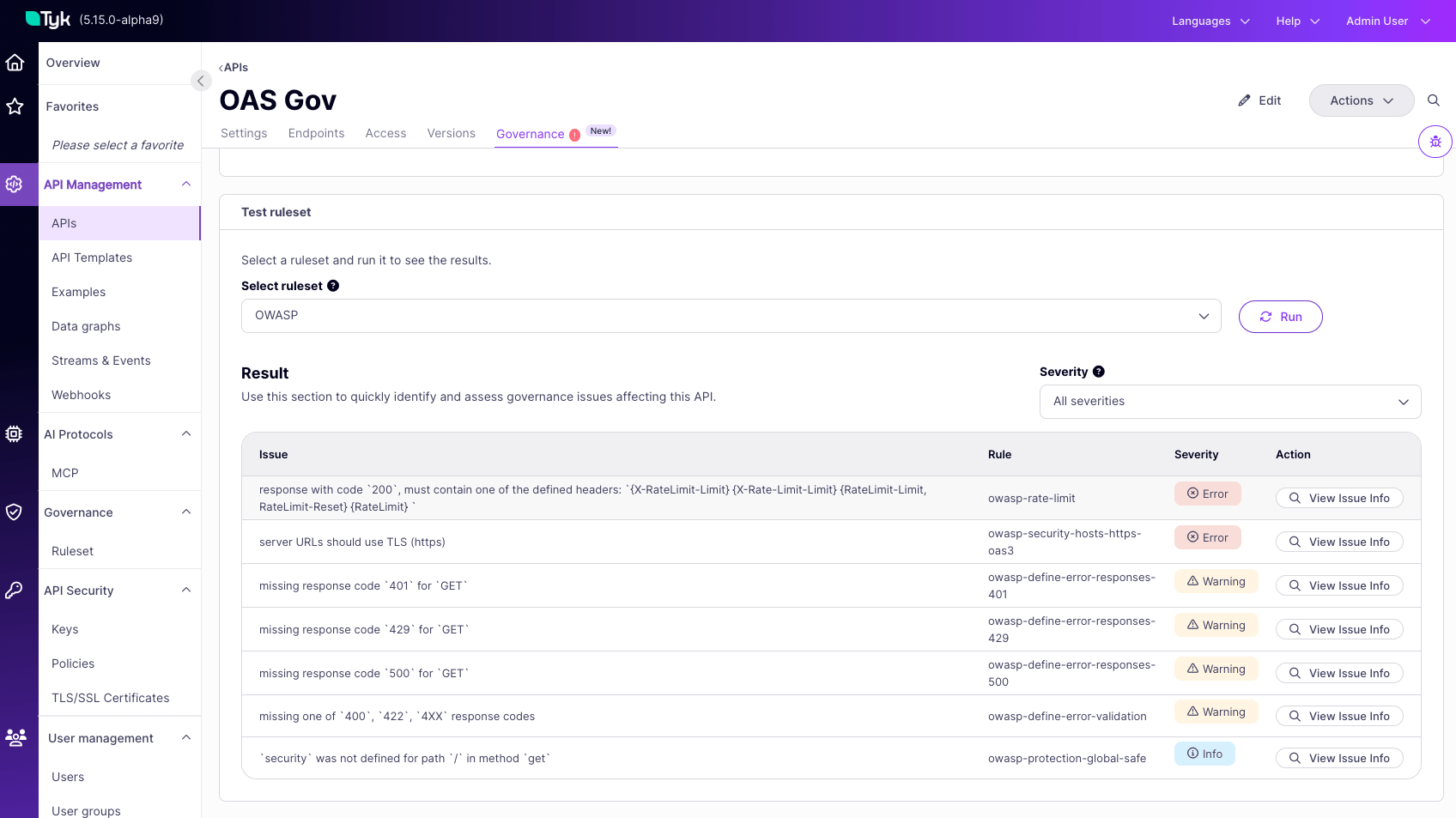 Test results are sandboxed. They are not saved, do not change the status banner, and do not trigger background re-evaluation. For the full behavior and the equivalent panel on the ruleset side, see [Test a Ruleset Against a Service](/docs/tyk-governance/rulesets#test-a-ruleset-against-a-service).
## Portfolio View: The API List
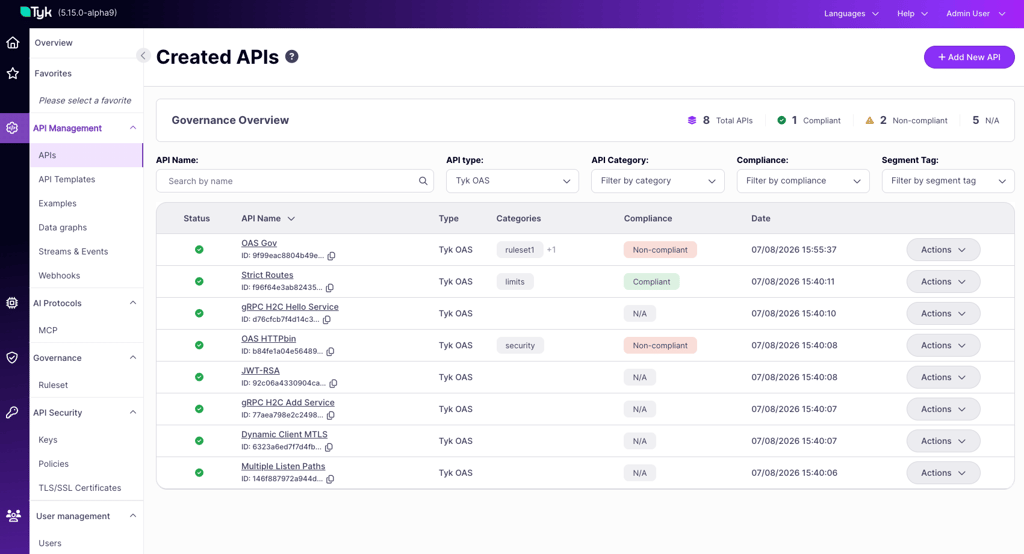
The API list in Tyk Dashboard is enhanced with three governance-related features:
* **Compliance status per service**: Each row shows the service's current compliance status, Compliant or Non-compliant, alongside its existing metadata.
* **Filter by compliance**: Filter the list to show only Compliant or only Non-compliant services, so platform engineers and governance owners can focus on the services that need attention without scrolling the full portfolio.
* **Governance Overview banner**: A summary banner at the top of the API list shows the total number of services in the organization, the number that are Compliant, and the number that are Non-compliant, giving an immediate read on overall compliance posture.
Test results are sandboxed. They are not saved, do not change the status banner, and do not trigger background re-evaluation. For the full behavior and the equivalent panel on the ruleset side, see [Test a Ruleset Against a Service](/docs/tyk-governance/rulesets#test-a-ruleset-against-a-service).
## Portfolio View: The API List
The API list in Tyk Dashboard is enhanced with three governance-related features:
* **Compliance status per service**: Each row shows the service's current compliance status, Compliant or Non-compliant, alongside its existing metadata.
* **Filter by compliance**: Filter the list to show only Compliant or only Non-compliant services, so platform engineers and governance owners can focus on the services that need attention without scrolling the full portfolio.
* **Governance Overview banner**: A summary banner at the top of the API list shows the total number of services in the organization, the number that are Compliant, and the number that are Non-compliant, giving an immediate read on overall compliance posture.
 The API list and Governance tab reflect APIs already in Tyk Dashboard. To check a spec before it is imported, for example from a pull request, see [CI/CD Governance Checks](/docs/tyk-governance/cicd-checks).
## Compliance Notifications
Because Tyk Governance evaluates services continuously, a service's compliance status can change without any direct action from its owner: a ruleset is edited, a new ruleset is linked to one of the service's categories, or a background re-evaluation completes and flips the result.
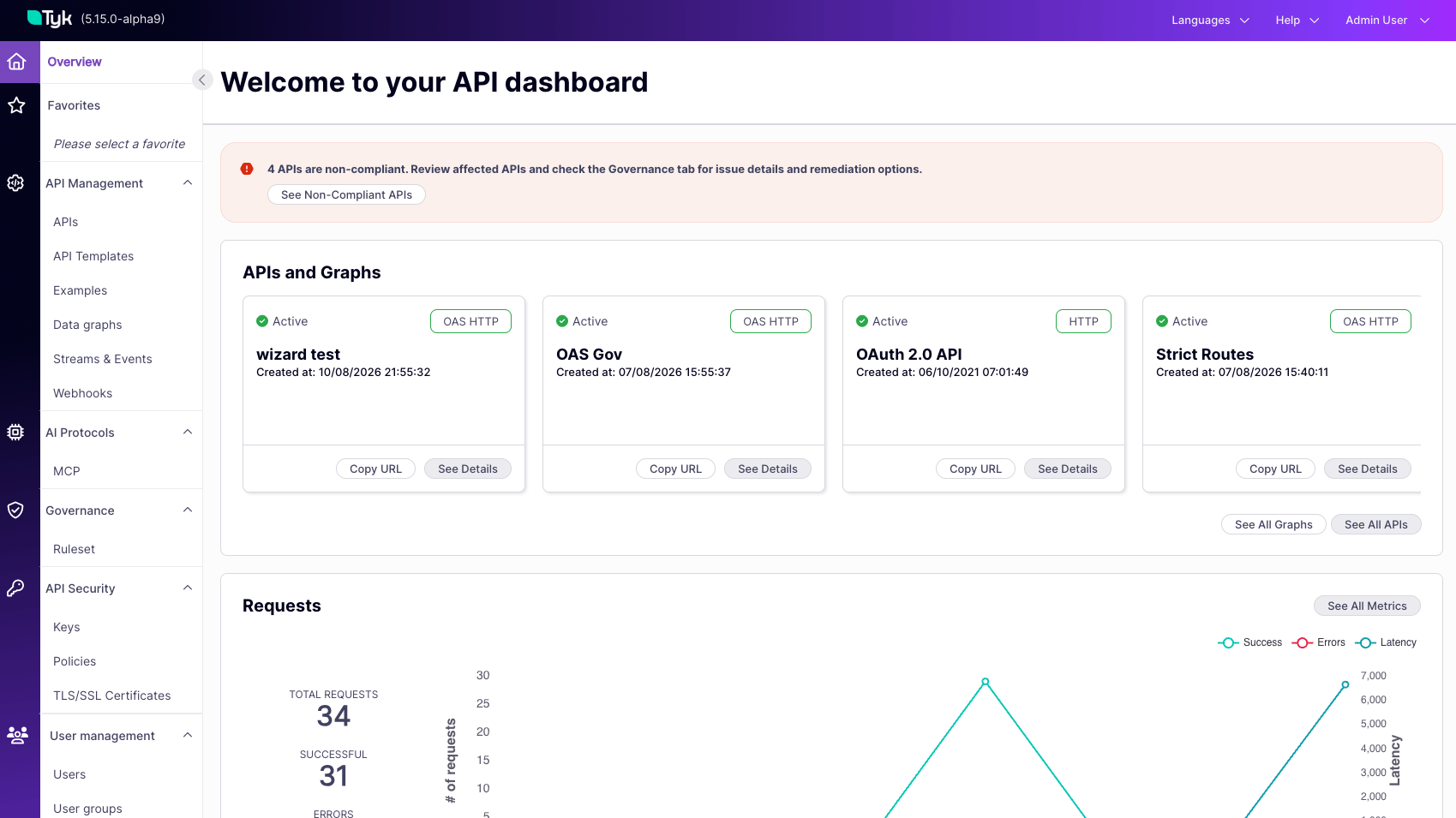
The Tyk Dashboard home page shows a Compliance Notification banner whenever one or more services in the organization become non-compliant, meaning at least one Error-severity issue. It follows the same pattern as the existing certificate expiry banner: a single summary message at the top of the home page with a primary action that takes you to the right place to act on it.
The banner is driven by the current compliance state of the organization's services, not by individual evaluation events:
* If one or more services have Error-level failures, a danger banner appears summarizing the failure count.
* If every service is compliant, no banner is shown. Silence means everything is fine.
Compliance is an ongoing state, not a moment. Someone who is not watching the Dashboard at the instant an async evaluation completes still needs to know their services are non-compliant next time they return. The banner is therefore persistent, visible on every home page visit, and can be dismissed explicitly rather than disappearing on its own.
The API list and Governance tab reflect APIs already in Tyk Dashboard. To check a spec before it is imported, for example from a pull request, see [CI/CD Governance Checks](/docs/tyk-governance/cicd-checks).
## Compliance Notifications
Because Tyk Governance evaluates services continuously, a service's compliance status can change without any direct action from its owner: a ruleset is edited, a new ruleset is linked to one of the service's categories, or a background re-evaluation completes and flips the result.
The Tyk Dashboard home page shows a Compliance Notification banner whenever one or more services in the organization become non-compliant, meaning at least one Error-severity issue. It follows the same pattern as the existing certificate expiry banner: a single summary message at the top of the home page with a primary action that takes you to the right place to act on it.
The banner is driven by the current compliance state of the organization's services, not by individual evaluation events:
* If one or more services have Error-level failures, a danger banner appears summarizing the failure count.
* If every service is compliant, no banner is shown. Silence means everything is fine.
Compliance is an ongoing state, not a moment. Someone who is not watching the Dashboard at the instant an async evaluation completes still needs to know their services are non-compliant next time they return. The banner is therefore persistent, visible on every home page visit, and can be dismissed explicitly rather than disappearing on its own.
 ## Evaluation Performance
Evaluation runs entirely on the control plane, in the background. It never sits in the path of your API traffic, and it never blocks saving or deploying a service. Your Tyk Gateways are not involved at any point. Evaluation cost is driven by the size of the API definition, mainly its endpoint count, not by traffic volume or by how many rules a ruleset contains.
### Typical Evaluation Times
Benchmarked using Tyk's strictest built-in ruleset with every rule enabled. Real-world rulesets typically complete faster.
| Endpoints in your API definition | Time from save to results |
| -------------------------------- | ------------------------- |
| 0 to 100 (most APIs) | under 1 second |
| 100 to 200 | about 1 second |
| 200 to 500 | 1 to 5 seconds |
| 500 to 1,000 | a few seconds |
| 1,000+ | up to about 10 seconds |
Ruleset size adds negligible overhead. Evaluating the same API against rulesets from 5 to 250 rules added roughly half a millisecond of evaluation time per rule, so you can apply comprehensive rulesets without a meaningful performance cost.
### Keeping Evaluation Fast
* **Keep API definitions modular.** Documents under about 1 MB evaluate fastest. Very large monolithic OAS documents are harder to manage generally, and governance follows the same curve.
* **Curate rulesets for signal.** Extra rules cost milliseconds, so the real goal is a findings list your team will act on. Start from Tyk's shipped templates and trim to what you enforce.
* **Scope rulesets with categories.** A ruleset re-evaluates every API that shares its categories when it changes, so focused categories keep re-evaluation windows short.
If your API catalog includes many large definitions of 1,000 or more endpoints, talk to your Tyk account team about sizing Tyk Dashboard memory for your deployment.
## FAQ
Most APIs in under 1 second, and up to about 10 seconds for definitions with 1,000 or more endpoints.
Rulesets reach a service through API Categories, not by being selected on the service. Any active ruleset linked to a category your service carries evaluates it. See [Scoping Rulesets to Services](/docs/tyk-governance/scoping-rulesets).
The most common causes are an inactive ruleset, a category that does not match, or a service that has never been set to active. Work through [Why a Service Is Not Being Evaluated](/docs/tyk-governance/scoping-rulesets#why-a-service-is-not-being-evaluated).
## Evaluation Performance
Evaluation runs entirely on the control plane, in the background. It never sits in the path of your API traffic, and it never blocks saving or deploying a service. Your Tyk Gateways are not involved at any point. Evaluation cost is driven by the size of the API definition, mainly its endpoint count, not by traffic volume or by how many rules a ruleset contains.
### Typical Evaluation Times
Benchmarked using Tyk's strictest built-in ruleset with every rule enabled. Real-world rulesets typically complete faster.
| Endpoints in your API definition | Time from save to results |
| -------------------------------- | ------------------------- |
| 0 to 100 (most APIs) | under 1 second |
| 100 to 200 | about 1 second |
| 200 to 500 | 1 to 5 seconds |
| 500 to 1,000 | a few seconds |
| 1,000+ | up to about 10 seconds |
Ruleset size adds negligible overhead. Evaluating the same API against rulesets from 5 to 250 rules added roughly half a millisecond of evaluation time per rule, so you can apply comprehensive rulesets without a meaningful performance cost.
### Keeping Evaluation Fast
* **Keep API definitions modular.** Documents under about 1 MB evaluate fastest. Very large monolithic OAS documents are harder to manage generally, and governance follows the same curve.
* **Curate rulesets for signal.** Extra rules cost milliseconds, so the real goal is a findings list your team will act on. Start from Tyk's shipped templates and trim to what you enforce.
* **Scope rulesets with categories.** A ruleset re-evaluates every API that shares its categories when it changes, so focused categories keep re-evaluation windows short.
If your API catalog includes many large definitions of 1,000 or more endpoints, talk to your Tyk account team about sizing Tyk Dashboard memory for your deployment.
## FAQ
Most APIs in under 1 second, and up to about 10 seconds for definitions with 1,000 or more endpoints.
Rulesets reach a service through API Categories, not by being selected on the service. Any active ruleset linked to a category your service carries evaluates it. See [Scoping Rulesets to Services](/docs/tyk-governance/scoping-rulesets).
The most common causes are an inactive ruleset, a category that does not match, or a service that has never been set to active. Work through [Why a Service Is Not Being Evaluated](/docs/tyk-governance/scoping-rulesets#why-a-service-is-not-being-evaluated).