> ## Documentation Index
> Fetch the complete documentation index at: https://tyk.io/docs/llms.txt
> Use this file to discover all available pages before exploring further.
# Extend Permissions using Open Policy Agent
> Learn how to extend and customize Tyk Dashboard permissions using Open Policy Agent (OPA) rules
## Overview
The Tyk Dashboard permission system can be extended by writing custom rules using an Open Policy Agent (OPA). The rules engine works on top of your Dashboard API, which means you can control not only access rules, but also behavior of all Dashboard APIs (except your public developer portal).
To give you some inspiration here are some ideas of the rules you can implement now:
* Enforce HTTP proxy option for all APIs for which the target URL does not point at the internal domain
* Control access for individual fields. For example, do not allow changing the API "active" status (e.g. deploy), unless you have a specific permission set (and make new permissions to be available to the Dashboard/API). Custom permissions can be creating using the [Additional Permissions API](https://tyk.io/docs/api-reference/additional-permissions/list-additional-permissions)
* Have a user(or group) which has read access to one APIs and write to another
We have a video that demonstrates how our Open Policy Agent enables you to add custom permissions.
### Configuration
By default the Dashboard OPA engine is turned off, and you need to explicitly enable it via your Dashboard `tyk_analytics.conf` file.
You can then control OPA functionality on a global level via your `tyk_analytics.conf` file, or at an organization level using either the [OPA API](https://tyk.io/docs/api-reference/open-policy-agent/list-opa-rules) or the [Dashboard](#using-the-open-policy-agent-in-the-dashboard).
| Key | Type | Description | Example |
| :-------------------------------- | :--------- | :------------------------------------------------------------------------------------------------------------------- | :---------------------- |
| security.open\_policy.enabled | boolean | Toggle support for OPA | false |
| security.open\_policy.debug | boolean | Enable debugging mode, prints a lot of information to the console | false |
| security.open\_policy.enable\_api | boolean | Enable access to the OPA API, even for users with Admin role | false |
| security.additional\_permissions | string map | Add custom user/user\_group permissions. You can use them in your rules, and they will be displayed in the Dashboard | `{"key": "human name"}` |
### Example
```json theme={null}
"basic-config-and-security/security": {
"open_policy": {
"enabled":true,
"debug": true,
"enable_api": true
},
"additional_permissions": {}
}
```
With the OPA turned on, the majority of the security rules will be dynamically evaluated based on these rules.
Additionally, users can modify OPA rules, and define their own, through the [OPA API](https://tyk.io/docs/api-reference/additional-permissions/list-additional-permissions). For Self-Managed installations you can access and modify the OPA rules from your Tyk installation directory from [schemas/dashboard.rego](/docs/platform-management/open-policy-agent#dashboard-opa-rules).
Moreover, using these rules you can also modify request content. Our recommendation is to use those modifications in a development environment and remember to create a backup of the rego rules.
### Language intro
The Open Policy Agent (OPA, pronounced “oh-pa”) is an open source, general-purpose policy engine that unifies policy enforcement across the stack. OPA provides a high-level declarative language (Rego) that lets you specify policy as code and simple APIs to offload policy decision-making from your software. (source: [https://www.openpolicyagent.org/docs/latest/](https://www.openpolicyagent.org/docs/latest/))
### Tyk policy primitives
The main building block which is required for controlling access is a "deny" rule, which should return a detailed error in case of a rejection. You can specify multiple deny rules, and they will all be evaluated. If none of the rules was matched, user will be allowed to access the resource.
A simple deny rule with a static error message can look like:
```javascript theme={null}
deny["User is not active"] {
not input.user.active
}
```
You can also specify a dynamic error message:
```javascript theme={null}
# None of the permissions was matched based on path
deny[x] {
count(request_permission) == 0
x := sprintf("Unknown action '%v'", [input.request.path])
}
```
In addition, to `deny` rules, you can also modify the requests using `patch_request`.
You should respond with a JSON merge patch format [https://tools.ietf.org/html/rfc7396](https://tools.ietf.org/html/rfc7396)
For example:
```javascript theme={null}
# Example: Enforce http proxy configuration for an APIs with category #external.
patch_request[x] {
request_permission[_] == "apis"
request_intent == "write"
contains(input.request.body.api_definition.name, "#external")
x := {"api_definition": {"proxy": {"transport": {"proxy_url": "http://company-proxy:8080"}}}}
}
```
### Getting Tyk Objects
In some cases, you may want to write a rule which is based on existing Tyk Object.
For example, you can write a rule for a policy API, which depends on the metadata of the API inside it.
The policy engine has access to the `TykAPIGet` function, which essentially just does a GET call to the Tyk Dashboard API.
Example:
```javascript theme={null}
api := TykAPIGet("/apis/api/12345")
contains(api.target_url, "external.com")
```
Getting changeset of current request
For requests which modify the content, you can get a changeset (e.g. difference) using the `TykDiff` function, combined with a `TykAPIGet` call to get the original object.
Example:
```javascript theme={null}
# Example of the complex rule which forbids user to change API status, if he has some custom permission
deny["You are not allowed to change API status"] {
input.user.user_permissions["test_disable_deploy"]
# Intent is to to update API
request_permission[_] == "apis"
request_intent == "write"
# Lets get original API object, before update
# TykAPIGet accepts API url as argument, e.g. to receive API object call: TykAPIGet("/api/apis/")
api := TykAPIGet(input.request.path)
# TykDiff performs Object diff and returns JSON Merge Patch document https://tools.ietf.org/html/rfc7396
# For example if only state has changed diff may look like: {"api_definition":{"state": "active"}}
diff := TykDiff(api, input.request.body)
# API state has changed
not is_null(diff.api_definition.active)
}
```
### Developer guide
Since Opa rules are declarative, to test them in the majority of the cases, you can test your rules without using the Tyk Dashboard, and using this Rego [playground](https://play.openpolicyagent.org).
When it comes to the `TykAPIGet` and `TykDiff` functions, you can mock them in your tests.
In order to understand how the Dashboard evaluates the rules, you can enable debugging mode by setting the `security.open_policy.debug` option, and in the Dashboard logs, you will see the detailed output with input and output of the rule engine. It can be useful to copy-paste the Dashboard log output to the Rego playground, fix the issue, and validate it on the Dashboard.
When you modify the `dashboard.opa` file, you will need to restart your tyk Dashboard.
### Using the Open Policy Agent in the Dashboard
As well as configuring OPA rules through the API, admin users can view and edit OPA rules from within the Tyk Dashboard. The advantage of configuring your OPA rules in the Dashboard is that you can use a code editor for it, emulating a proper developer experience. There are two ways you can do this:
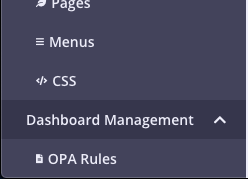
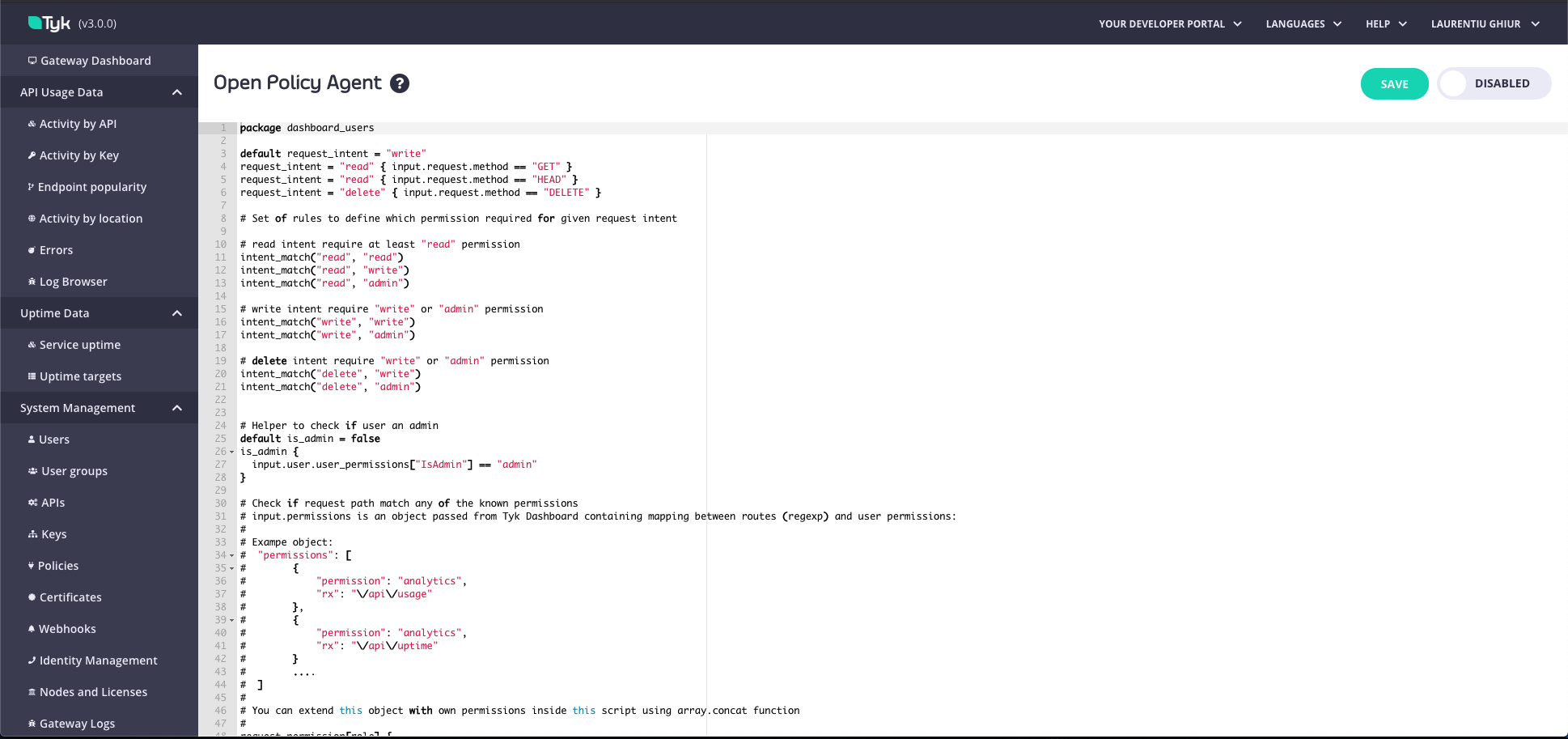
1. From the **OPA Rules menu**. From the Dashboard Management menu, select OPA Rules. You can view and make any changes and select whether your OPA rules should be enabled or disabled.
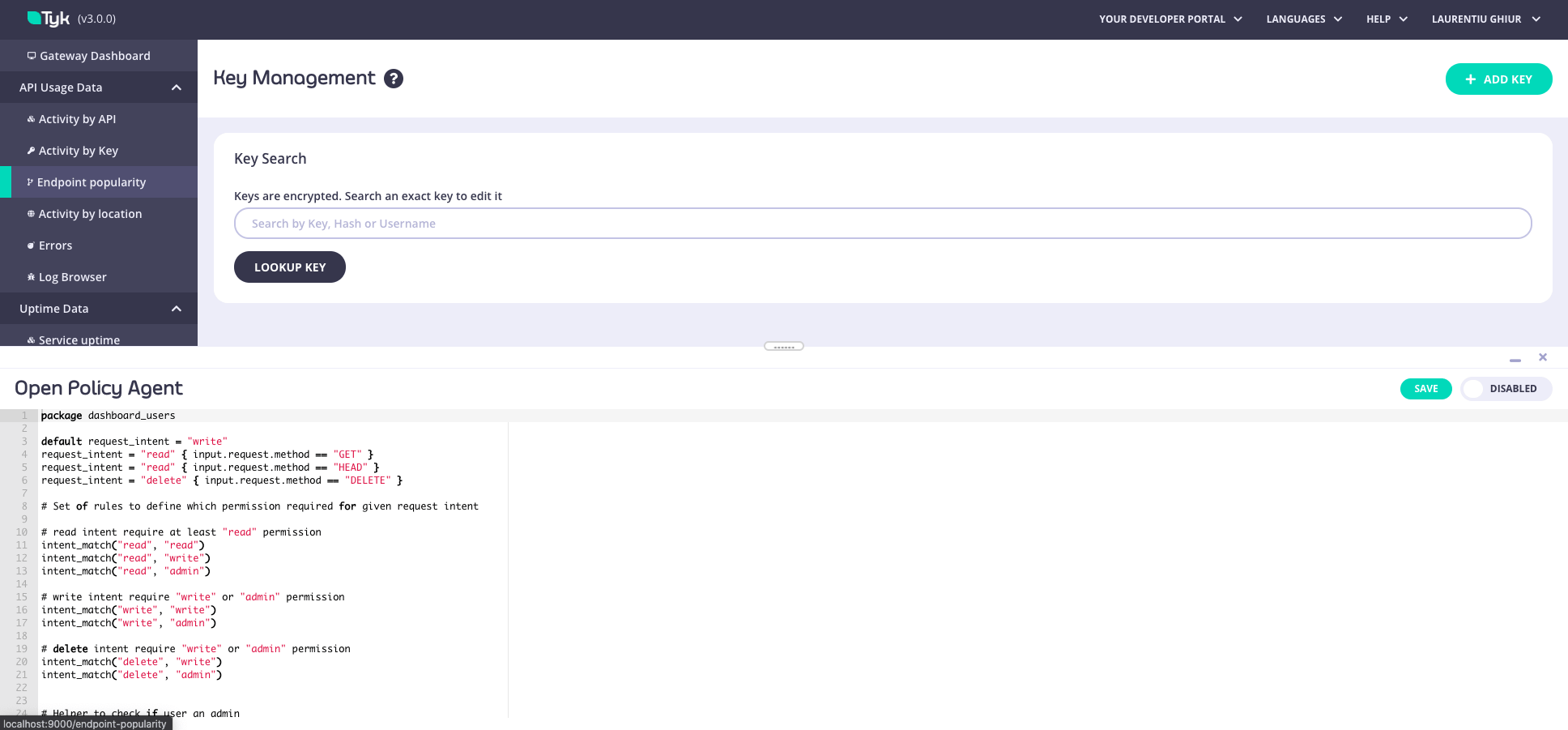
2. From **Developer Tools**. Using the keyboard shortcut `CMD+SHIFT+D` (or `CTRL+SHIFT+D` for PC), you can open the Developer Tools panel on any page in the Dashboard and configure the permissions. Updates are applied in real-time.
OPA rules can only be accessed by admin role users in the Dashboard.
### OPA Rule Precedence: Organization-Level Rules Override the File
Tyk Dashboard evaluates OPA rules from one of two sources, with a strict precedence:
1. **Organization-level rules (database)**. If a ruleset is stored at the organization level, Tyk Dashboard uses it and ignores the file.
2. **File-based default (`schema/dashboard.rego`)**. Used only when no organization-level ruleset exists.
OPA rules are stored at the organization level when:
* the organization is first bootstrapped, where the default ruleset is seeded, or
* you save rules through the [OPA API](https://tyk.io/docs/api-reference/open-policy-agent/list-opa-rules) (`PUT /api/org/opa`) or the Tyk Dashboard UI.
To check which rules are currently stored at the organization level, use the [List OPA rules and settings](https://tyk.io/docs/api-reference/open-policy-agent/list-opa-rules) endpoint.
Because organization-level rules take precedence, editing `schema/dashboard.rego` (or its mounted ConfigMap on Kubernetes) has no effect while organization-level rules exist, even after a Tyk Dashboard restart. Setting `security.open_policy.enable_api: false` does not delete rules already stored at the organization level; they continue to load and be enforced.
#### Revert to the File-Based Ruleset
To make Tyk Dashboard fall back to `schema/dashboard.rego`, clear the organization-level rules:
1. Temporarily enable the OPA API in `tyk_analytics.conf` and restart:
```json theme={null}
"security": { "open_policy": { "enabled": true, "enable_api": true } }
```
On Kubernetes, update the `opa` block in `values.yaml`:
```yaml theme={null}
dashboard:
opa:
enabled: true # maps to security.open_policy.enabled
api: true # maps to security.open_policy.enable_api
```
2. Back up the current rules:
```bash theme={null}
curl -s https://DASHBOARD_HOST/api/org/opa \
-H "Authorization: ADMIN_API_KEY" > opa-backup.json
```
3. Clear them with an empty ruleset:
```bash theme={null}
curl -s -X PUT https://DASHBOARD_HOST/api/org/opa \
-H "Authorization: ADMIN_API_KEY" -H "Content-Type: application/json" \
-d '{"open_policy":{"rules":""}}'
```
4. Confirm `GET /api/org/opa` now returns the `schema/dashboard.rego` ruleset. Tyk Dashboard now enforces `schema/dashboard.rego`, so your OPA policies come from the file mount. Set `enable_api: false` again and restart.
To restore the previous rules, enable the API config again and `PUT` the backup:
```bash theme={null}
curl -s -X PUT https://DASHBOARD_HOST/api/org/opa \
-H "Authorization: ADMIN_API_KEY" -H "Content-Type: application/json" \
-d @opa-backup.json
```
## Dashboard OPA rules
```rego theme={null}
# Default OPA rules
package dashboard_users
default request_intent = "write"
request_intent = "read" { input.request.method == "GET" }
request_intent = "read" { input.request.method == "HEAD" }
request_intent = "delete" { input.request.method == "DELETE" }
# Set of rules to define which permission is required for a given request intent.
# read intent requires, at a minimum, the "read" permission
intent_match("read", "read")
intent_match("read", "write")
intent_match("read", "admin")
# write intent requires either the "write" or "admin" permission
intent_match("write", "write")
intent_match("write", "admin")
# delete intent requires either the "write" or "admin permission
intent_match("delete", "write")
intent_match("delete", "admin")
# Helper to check if the user has "admin" permissions
default is_admin = false
is_admin {
input.user.user_permissions["IsAdmin"] == "admin"
}
is_self_key_reset {
request_intent == "write"
# The path must match /users/:userId/actions/key/reset
path_parts := split(input.request.path, "/")
path_parts[2] == "users"
path_parts[4] == "actions"
path_parts[5] == "key"
path_parts[6] == "reset"
# The path's userId must match the currently logged-in user's id
path_parts[3] == input.user.id
}
is_me {
# The path must match GET /users/:userId
request_intent == "read"
path_parts := split(input.request.path, "/")
path_parts[2] == "users"
# The path's userId must match the currently logged-in user's id
path_parts[3] == input.user.id
}
# Check if the request path matches any of the known permissions.
# input.permissions is an object passed from the Tyk Dashboard containing mapping between user permissions (“read”, “write” and “deny”) and the endpoint associated with the permission.
# (eg. If “deny” is the permission for Analytics, it means the user would be denied the ability to make a request to ‘/api/usage’.)
#
# Example object:
# "permissions": [
# {
# "permission": "analytics",
# "rx": "\\/api\\/usage"
# },
# {
# "permission": "analytics",
# "rx": "\\/api\\/uptime"
# }
# ....
# ]
#
# The input.permissions object can be extended with additional permissions (eg. you could create a permission called ‘Monitoring’ which gives “read” access to the analytics API ‘/analytics’).
# This is can be achieved inside this script using the array.concat function.
request_permission[role] {
perm := input.permissions[_]
regex.match(perm.rx, input.request.path)
role := perm.permission
}
# --------- Start "deny" rules -----------
# A deny object contains a detailed reason behind the denial.
default allow = false
allow { count(deny) == 0 }
deny["User is not active"] {
not input.user.active
}
# If a request to an endpoint does not match any defined permissions, the request will be denied.
deny[x] {
# Only deny if there are NO matching permissions
count(request_permission) == 0
# AND it's NOT a self-key-reset call
not is_self_key_reset
# AND it's NOT retrieving the user's own data
not is_me
# In that case, deny:
x := sprintf("This action is unknown. You do not have permission to access '%v'.", [input.request.path])
}
# Reset password permissions are restricted.
deny[x] {
perm := request_permission[_]
perm != "ResetPassword"
# it's NOT admin
not is_admin
# AND it's NOT a self-key-reset call
not is_self_key_reset
# AND it's NOT retrieving the user's own data
not is_me
not input.user.user_permissions[perm]
x := sprintf("You do not have permission to access '%v'.", [input.request.path])
}
# Deny requests for non-admins if the intent does not match or does not exist.
deny[x] {
# SKIP the check if it's self-key-reset
not is_self_key_reset
perm := request_permission[_]
not is_admin
not intent_match(request_intent, input.user.user_permissions[perm])
x := sprintf("You do not have permission to carry out '%v' operation.", [request_intent, input.request.path])
}
# If the "deny" rule is found, deny the operation for admins.
deny[x] {
not is_self_key_reset
perm := request_permission[_]
is_admin
input.user.user_permissions[perm] == "deny"
x := sprintf("You do not have permission to carry out '%v' operation.", [request_intent, input.request.path])
}
# Do not allow users (excluding admin users) to reset the password of another user.
deny[x] {
request_permission[_] = "ResetPassword"
not is_admin
user_id := split(input.request.path, "/")[3]
user_id != input.user.id
x := sprintf("You do not have permission to reset the password for other users.", [user_id])
}
# Do not allow admin users to reset passwords if it is not allowed in the global config
deny[x] {
request_permission[_] == "ResetPassword"
is_admin
user_id := split(input.request.path, "/")[3]
user_id != input.user.id
not input.config.security.allow_admin_reset_password
not input.user.user_permissions["ResetPassword"]
x := "You do not have permission to reset the password for other users. As an admin user, this permission can be modified using OPA rules."
}
# --------- End "deny" rules ----------
##################################################################################################################
# Demo Section: Examples of rule capabilities. #
# The rules below are not executed until additional permissions have been assigned to the user or user group. #
##################################################################################################################
# If you are testing using OPA playground, you can mock Tyk functions like this:
#
# TykAPIGet(path) = {}
# TykDiff(o1,o2) = {}
#
# You can use this pre-built playground: https://play.openpolicyagent.org/p/T1Rcz5Ugnb
# Example: Deny users the ability to change the API status with an additional permission.
# Note: This rule will not be executed unless the additional permission is set.
deny["You do not have permission to change the API status."] {
# Checks the additional user permission enabled with tyk_analytics config: `"additional_permissions":["test_disable_deploy"]`
input.user.user_permissions["test_disable_deploy"]
# Checks the request intent is to update the API
request_permission[_] == "apis"
request_intent == "write"
# Checks if the user is attempting to update the field for API status.
# TykAPIGet accepts API URL as an argument, e.g. to receive API object call: TykAPIGet("/api/apis/")
api := TykAPIGet(input.request.path)
# TykDiff performs Object diff and returns JSON Merge Patch document https://tools.ietf.org/html/rfc7396
# eg. If only the state has changed, the diff may look like: {"active": true}
diff := TykDiff(api, input.request.body)
# Checks if API state has changed.
not is_null(diff.api_definition.active)
}
# Using the patch_request helper you can modify the content of the request
# You should respond with JSON merge patch.
# See https://tools.ietf.org/html/rfc7396 for more details
#
# Example: Modify data under a certain condition by enforcing http proxy configuration for all APIs with the #external category.
patch_request[x] {
# Enforce only for users with ["test_patch_request"] permissions.
# Remove the ["test_patch_request"] permission to enforce the proxy configuration for all users instead of those with the permission.
input.user.user_permissions["test_patch_request"]
request_permission[_] == "apis"
request_intent == "write"
contains(input.request.body.api_definition.name, "#external")
isTykClassic()
x := {"api_definition": {"proxy": {"transport": {"proxy_url": "http://company-proxy:8080"}}}}
}
# You can create additional permissions for not only individual users, but also user groups in your rules.
deny["Only '%v' group has permission to access this API"] {
# Checks for the additional user permission enabled with tyk_analytics config: '"additional_permissions":["test_admin_usergroup"]
input.user.user_permissions["test_admin_usergroup"]
# Checks that the request intent is to access the API.
request_permission[_] == "apis"
api := TykAPIGet(input.request.path)
# Checks that the API being accessed has the category #admin-teamA
contains(input.request.body.api_definition.name, "#admin-teamA")
# Checks for the user group name.
not input.user.group_name == "TeamA-Admin"
}
```
## Configuring Open Policy Agent Rules
This is an end-to-end worked example showing how to configure Open Policy Agent rules with some [additional permissions](https://tyk.io/docs/api-reference/additional-permissions/list-additional-permissions).
### Use Case
Tyk's [RBAC](/docs/api-management/user-management) includes out of the box permissions to Write, Read, and Deny access to API Definitions, but what if we want to distinguish between those users who can create APIs and those users who can edit or update APIs? Essentially, we want to extend Tyk's out of the box RBAC to include more fine grained permissions that prevent an `API Editor` role from creating new APIs, but allow them to edit or update existing APIs.
### High Level Steps
The high level steps to realize this use case are as follows:
1. Create additional permissions using API
2. Create user
3. Add Open Policy Agent Rule
4. Test new rule
### Create additional permissions
To include the `API Editor` role with additional permissions, send a PUT Request to the [Dashboard Additional Permissions API endpoint](https://tyk.io/docs/api-reference/additional-permissions/list-additional-permissions) `/api/org/permissions`
**Sample Request**
In order to add the new role/permissions use the following payload.
```console theme={null}
PUT /api/org/permissions HTTP/1.1
Host: localhost:3000
authorization:7a7b140f-2480-4d5a-4e78-24049e3ba7f8
{
"additional_permissions": {
"api_editor": "API Editor"
}
}
```
**Sample Response**
```json theme={null}
{
"Status": "OK",
"Message": "Additional Permissions updated in org level",
"Meta": null
}
```
Remember to set the `authorization` header to your Tyk Dashboard API Access Credentials secret, obtained from your user profile on the Dashboard UI.
This assumes no other additional permissions already exist. If you're adding to existing permissions you'll want to send a GET to `/api/org/permissions` first, and then add the new permission to the existing list.
### Create user
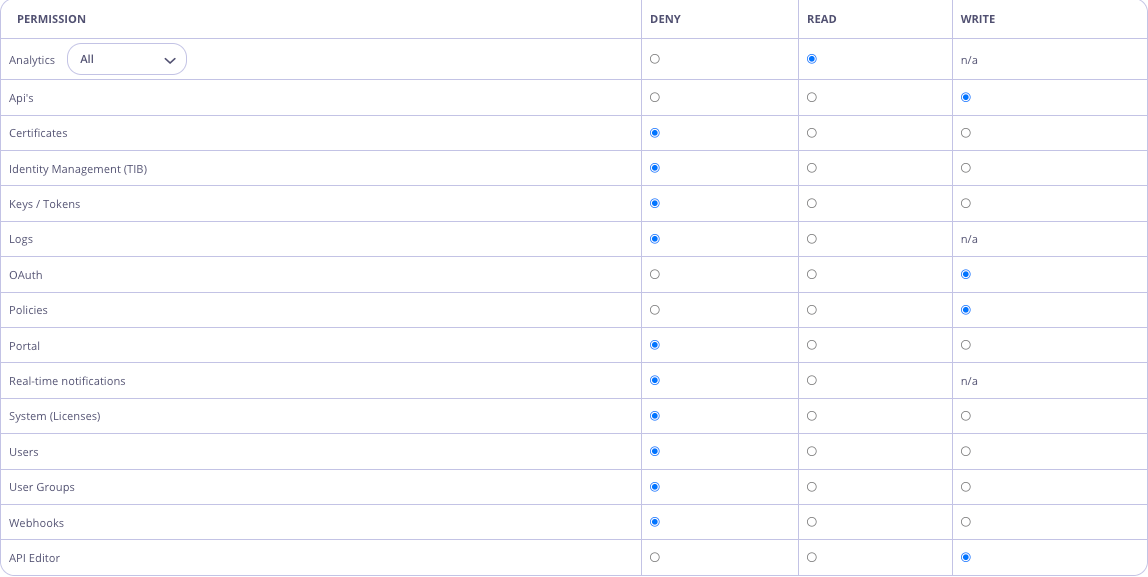
In the Dashboard UI, navigate to System Management -> Users, and hit the `Add User` button. Create a user that has API `Write` access and the newly created `API Editor` permission, e.g.
#### Add Open Policy Agent (OPA) Rule
In the Dashboard UI, navigate to Dashboard Management -> OPA Rules
Edit the rules to add the following:
```
request_intent = "create" { input.request.method == "POST" }
request_intent = "update" { input.request.method == "PUT" }
# Editor and Creator intent
intent_match("create", "write")
intent_match("update", "write")
# API Editors not allowed to create APIs
deny[x] {
input.user.user_permissions["api_editor"]
request_permission[_] == "apis"
request_intent == "create"
x := "API Editors not allowed to create APIs."
}
```
Updated Default OPA Rules incorporating the above rules as follows:
```bash theme={null}
# Default OPA rules
package dashboard_users
default request_intent = "write"
request_intent = "read" { input.request.method == "GET" }
request_intent = "read" { input.request.method == "HEAD" }
request_intent = "delete" { input.request.method == "DELETE" }
request_intent = "create" { input.request.method == "POST" }
request_intent = "update" { input.request.method == "PUT" }
# Set of rules to define which permission is required for a given request intent.
# read intent requires, at a minimum, the "read" permission
intent_match("read", "read")
intent_match("read", "write")
intent_match("read", "admin")
# write intent requires either the "write" or "admin" permission
intent_match("write", "write")
intent_match("write", "admin")
# delete intent requires either the "write" or "admin permission
intent_match("delete", "write")
intent_match("delete", "admin")
# Editor and Creator intent
intent_match("create", "write")
intent_match("update", "write")
# Helper to check if the user has "admin" permissions
default is_admin = false
is_admin {
input.user.user_permissions["IsAdmin"] == "admin"
}
# Check if the request path matches any of the known permissions.
# input.permissions is an object passed from the Tyk Dashboard containing mapping between user permissions (“read”, “write” and “deny”) and the endpoint associated with the permission.
# (eg. If “deny” is the permission for Analytics, it means the user would be denied the ability to make a request to ‘/api/usage’.)
#
# Example object:
# "permissions": [
# {
# "permission": "analytics",
# "rx": "\\/api\\/usage"
# },
# {
# "permission": "analytics",
# "rx": "\\/api\\/uptime"
# }
# ....
# ]
#
# The input.permissions object can be extended with additional permissions (eg. you could create a permission called ‘Monitoring’ which gives “read” access to the analytics API ‘/analytics’).
# This is can be achieved inside this script using the array.concat function.
request_permission[role] {
perm := input.permissions[_]
regex.match(perm.rx, input.request.path)
role := perm.permission
}
# --------- Start "deny" rules -----------
# A deny object contains a detailed reason behind the denial.
default allow = false
allow { count(deny) == 0 }
deny["User is not active"] {
not input.user.active
}
# If a request to an endpoint does not match any defined permissions, the request will be denied.
deny[x] {
count(request_permission) == 0
x := sprintf("This action is unknown. You do not have permission to access '%v'.", [input.request.path])
}
deny[x] {
perm := request_permission[_]
perm != "ResetPassword"
not is_admin
not input.user.user_permissions[perm]
x := sprintf("You do not have permission to access '%v'.", [input.request.path])
}
# Deny requests for non-admins if the intent does not match or does not exist.
deny[x] {
perm := request_permission[_]
not is_admin
not intent_match(request_intent, input.user.user_permissions[perm])
x := sprintf("You do not have permission to carry out '%v' operation.", [request_intent, input.request.path])
}
# If the "deny" rule is found, deny the operation for admins
deny[x] {
perm := request_permission[_]
is_admin
input.user.user_permissions[perm] == "deny"
x := sprintf("You do not have permission to carry out '%v' operation.", [request_intent, input.request.path])
}
# Do not allow users (excluding admin users) to reset the password of another user.
deny[x] {
request_permission[_] = "ResetPassword"
not is_admin
user_id := split(input.request.path, "/")[3]
user_id != input.user.id
x := sprintf("You do not have permission to reset the password for other users.", [user_id])
}
# Do not allow admin users to reset passwords if it is not allowed in the global config
deny[x] {
request_permission[_] == "ResetPassword"
is_admin
not input.config.security.allow_admin_reset_password
not input.user.user_permissions["ResetPassword"]
x := "You do not have permission to reset the password for other users. As an admin user, this permission can be modified using OPA rules."
}
# API Editors not allowed to create APIs
deny[x] {
input.user.user_permissions["api_editor"]
request_permission[_] == "apis"
request_intent == "create"
x := "API Editors not allowed to create APIs."
}
# --------- End "deny" rules ----------
##################################################################################################################
# Demo Section: Examples of rule capabilities. #
# The rules below are not executed until additional permissions have been assigned to the user or user group. #
##################################################################################################################
# If you are testing using OPA playground, you can mock Tyk functions like this:
#
# TykAPIGet(path) = {}
# TykDiff(o1,o2) = {}
#
# You can use this pre-built playground: https://play.openpolicyagent.org/p/T1Rcz5Ugnb
# Example: Deny users the ability to change the API status with an additional permission.
# Note: This rule will not be executed unless the additional permission is set.
deny["You do not have permission to change the API status."] {
# Checks the additional user permission enabled with tyk_analytics config: `"additional_permissions":["test_disable_deploy"]`
input.user.user_permissions["test_disable_deploy"]
# Checks the request intent is to update the API
request_permission[_] == "apis"
request_intent == "write"
# Checks if the user is attempting to update the field for API status.
# TykAPIGet accepts API URL as an argument, e.g. to receive API object call: TykAPIGet("/api/apis/")
api := TykAPIGet(input.request.path)
# TykDiff performs Object diff and returns JSON Merge Patch document https://tools.ietf.org/html/rfc7396
# eg. If only the state has changed, the diff may look like: {"active": true}
diff := TykDiff(api, input.request.body)
# Checks if API state has changed.
not is_null(diff.api_definition.active)
}
# Using the patch_request helper you can modify the content of the request
# You should respond with JSON merge patch.
# See https://tools.ietf.org/html/rfc7396 for more details
#
# Example: Modify data under a certain condition by enforcing http proxy configuration for all APIs with the #external category.
patch_request[x] {
# Enforce only for users with ["test_patch_request"] permissions.
# Remove the ["test_patch_request"] permission to enforce the proxy configuration for all users instead of those with the permission.
input.user.user_permissions["test_patch_request"]
request_permission[_] == "apis"
request_intent == "write"
contains(input.request.body.api_definition.name, "#external")
x := {"api_definition": {"proxy": {"transport": {"proxy_url": "http://company-proxy:8080"}}}}
}
# You can create additional permissions for not only individual users, but also user groups in your rules.
deny["Only '%v' group has permission to access this API"] {
# Checks for the additional user permission enabled with tyk_analytics config: '"additional_permissions":["test_admin_usergroup"]
input.user.user_permissions["test_admin_usergroup"]
# Checks that the request intent is to access the API.
request_permission[_] == "apis"
api := TykAPIGet(input.request.path)
# Checks that the API being accessed has the category #admin-teamA
contains(input.request.body.api_definition.name, "#admin-teamA")
# Checks for the user group name.
not input.user.group_name == "TeamA-Admin"
}
```
### Test
Login to the Dashboard UI as the new `API Editor` user and try to create a new API. You should see an `Access Denied` error message. Now try to update an existing API. This should be successful!!
 2. From **Developer Tools**. Using the keyboard shortcut `CMD+SHIFT+D` (or `CTRL+SHIFT+D` for PC), you can open the Developer Tools panel on any page in the Dashboard and configure the permissions. Updates are applied in real-time.
 ### OPA Rule Precedence: Organization-Level Rules Override the File
Tyk Dashboard evaluates OPA rules from one of two sources, with a strict precedence:
1. **Organization-level rules (database)**. If a ruleset is stored at the organization level, Tyk Dashboard uses it and ignores the file.
2. **File-based default (`schema/dashboard.rego`)**. Used only when no organization-level ruleset exists.
OPA rules are stored at the organization level when:
* the organization is first bootstrapped, where the default ruleset is seeded, or
* you save rules through the [OPA API](https://tyk.io/docs/api-reference/open-policy-agent/list-opa-rules) (`PUT /api/org/opa`) or the Tyk Dashboard UI.
To check which rules are currently stored at the organization level, use the [List OPA rules and settings](https://tyk.io/docs/api-reference/open-policy-agent/list-opa-rules) endpoint.
### OPA Rule Precedence: Organization-Level Rules Override the File
Tyk Dashboard evaluates OPA rules from one of two sources, with a strict precedence:
1. **Organization-level rules (database)**. If a ruleset is stored at the organization level, Tyk Dashboard uses it and ignores the file.
2. **File-based default (`schema/dashboard.rego`)**. Used only when no organization-level ruleset exists.
OPA rules are stored at the organization level when:
* the organization is first bootstrapped, where the default ruleset is seeded, or
* you save rules through the [OPA API](https://tyk.io/docs/api-reference/open-policy-agent/list-opa-rules) (`PUT /api/org/opa`) or the Tyk Dashboard UI.
To check which rules are currently stored at the organization level, use the [List OPA rules and settings](https://tyk.io/docs/api-reference/open-policy-agent/list-opa-rules) endpoint.
 #### Add Open Policy Agent (OPA) Rule
In the Dashboard UI, navigate to Dashboard Management -> OPA Rules
Edit the rules to add the following:
```
request_intent = "create" { input.request.method == "POST" }
request_intent = "update" { input.request.method == "PUT" }
# Editor and Creator intent
intent_match("create", "write")
intent_match("update", "write")
# API Editors not allowed to create APIs
deny[x] {
input.user.user_permissions["api_editor"]
request_permission[_] == "apis"
request_intent == "create"
x := "API Editors not allowed to create APIs."
}
```
Updated Default OPA Rules incorporating the above rules as follows:
```bash theme={null}
# Default OPA rules
package dashboard_users
default request_intent = "write"
request_intent = "read" { input.request.method == "GET" }
request_intent = "read" { input.request.method == "HEAD" }
request_intent = "delete" { input.request.method == "DELETE" }
request_intent = "create" { input.request.method == "POST" }
request_intent = "update" { input.request.method == "PUT" }
# Set of rules to define which permission is required for a given request intent.
# read intent requires, at a minimum, the "read" permission
intent_match("read", "read")
intent_match("read", "write")
intent_match("read", "admin")
# write intent requires either the "write" or "admin" permission
intent_match("write", "write")
intent_match("write", "admin")
# delete intent requires either the "write" or "admin permission
intent_match("delete", "write")
intent_match("delete", "admin")
# Editor and Creator intent
intent_match("create", "write")
intent_match("update", "write")
# Helper to check if the user has "admin" permissions
default is_admin = false
is_admin {
input.user.user_permissions["IsAdmin"] == "admin"
}
# Check if the request path matches any of the known permissions.
# input.permissions is an object passed from the Tyk Dashboard containing mapping between user permissions (“read”, “write” and “deny”) and the endpoint associated with the permission.
# (eg. If “deny” is the permission for Analytics, it means the user would be denied the ability to make a request to ‘/api/usage’.)
#
# Example object:
# "permissions": [
# {
# "permission": "analytics",
# "rx": "\\/api\\/usage"
# },
# {
# "permission": "analytics",
# "rx": "\\/api\\/uptime"
# }
# ....
# ]
#
# The input.permissions object can be extended with additional permissions (eg. you could create a permission called ‘Monitoring’ which gives “read” access to the analytics API ‘/analytics’).
# This is can be achieved inside this script using the array.concat function.
request_permission[role] {
perm := input.permissions[_]
regex.match(perm.rx, input.request.path)
role := perm.permission
}
# --------- Start "deny" rules -----------
# A deny object contains a detailed reason behind the denial.
default allow = false
allow { count(deny) == 0 }
deny["User is not active"] {
not input.user.active
}
# If a request to an endpoint does not match any defined permissions, the request will be denied.
deny[x] {
count(request_permission) == 0
x := sprintf("This action is unknown. You do not have permission to access '%v'.", [input.request.path])
}
deny[x] {
perm := request_permission[_]
perm != "ResetPassword"
not is_admin
not input.user.user_permissions[perm]
x := sprintf("You do not have permission to access '%v'.", [input.request.path])
}
# Deny requests for non-admins if the intent does not match or does not exist.
deny[x] {
perm := request_permission[_]
not is_admin
not intent_match(request_intent, input.user.user_permissions[perm])
x := sprintf("You do not have permission to carry out '%v' operation.", [request_intent, input.request.path])
}
# If the "deny" rule is found, deny the operation for admins
deny[x] {
perm := request_permission[_]
is_admin
input.user.user_permissions[perm] == "deny"
x := sprintf("You do not have permission to carry out '%v' operation.", [request_intent, input.request.path])
}
# Do not allow users (excluding admin users) to reset the password of another user.
deny[x] {
request_permission[_] = "ResetPassword"
not is_admin
user_id := split(input.request.path, "/")[3]
user_id != input.user.id
x := sprintf("You do not have permission to reset the password for other users.", [user_id])
}
# Do not allow admin users to reset passwords if it is not allowed in the global config
deny[x] {
request_permission[_] == "ResetPassword"
is_admin
not input.config.security.allow_admin_reset_password
not input.user.user_permissions["ResetPassword"]
x := "You do not have permission to reset the password for other users. As an admin user, this permission can be modified using OPA rules."
}
# API Editors not allowed to create APIs
deny[x] {
input.user.user_permissions["api_editor"]
request_permission[_] == "apis"
request_intent == "create"
x := "API Editors not allowed to create APIs."
}
# --------- End "deny" rules ----------
##################################################################################################################
# Demo Section: Examples of rule capabilities. #
# The rules below are not executed until additional permissions have been assigned to the user or user group. #
##################################################################################################################
# If you are testing using OPA playground, you can mock Tyk functions like this:
#
# TykAPIGet(path) = {}
# TykDiff(o1,o2) = {}
#
# You can use this pre-built playground: https://play.openpolicyagent.org/p/T1Rcz5Ugnb
# Example: Deny users the ability to change the API status with an additional permission.
# Note: This rule will not be executed unless the additional permission is set.
deny["You do not have permission to change the API status."] {
# Checks the additional user permission enabled with tyk_analytics config: `"additional_permissions":["test_disable_deploy"]`
input.user.user_permissions["test_disable_deploy"]
# Checks the request intent is to update the API
request_permission[_] == "apis"
request_intent == "write"
# Checks if the user is attempting to update the field for API status.
# TykAPIGet accepts API URL as an argument, e.g. to receive API object call: TykAPIGet("/api/apis/
#### Add Open Policy Agent (OPA) Rule
In the Dashboard UI, navigate to Dashboard Management -> OPA Rules
Edit the rules to add the following:
```
request_intent = "create" { input.request.method == "POST" }
request_intent = "update" { input.request.method == "PUT" }
# Editor and Creator intent
intent_match("create", "write")
intent_match("update", "write")
# API Editors not allowed to create APIs
deny[x] {
input.user.user_permissions["api_editor"]
request_permission[_] == "apis"
request_intent == "create"
x := "API Editors not allowed to create APIs."
}
```
Updated Default OPA Rules incorporating the above rules as follows:
```bash theme={null}
# Default OPA rules
package dashboard_users
default request_intent = "write"
request_intent = "read" { input.request.method == "GET" }
request_intent = "read" { input.request.method == "HEAD" }
request_intent = "delete" { input.request.method == "DELETE" }
request_intent = "create" { input.request.method == "POST" }
request_intent = "update" { input.request.method == "PUT" }
# Set of rules to define which permission is required for a given request intent.
# read intent requires, at a minimum, the "read" permission
intent_match("read", "read")
intent_match("read", "write")
intent_match("read", "admin")
# write intent requires either the "write" or "admin" permission
intent_match("write", "write")
intent_match("write", "admin")
# delete intent requires either the "write" or "admin permission
intent_match("delete", "write")
intent_match("delete", "admin")
# Editor and Creator intent
intent_match("create", "write")
intent_match("update", "write")
# Helper to check if the user has "admin" permissions
default is_admin = false
is_admin {
input.user.user_permissions["IsAdmin"] == "admin"
}
# Check if the request path matches any of the known permissions.
# input.permissions is an object passed from the Tyk Dashboard containing mapping between user permissions (“read”, “write” and “deny”) and the endpoint associated with the permission.
# (eg. If “deny” is the permission for Analytics, it means the user would be denied the ability to make a request to ‘/api/usage’.)
#
# Example object:
# "permissions": [
# {
# "permission": "analytics",
# "rx": "\\/api\\/usage"
# },
# {
# "permission": "analytics",
# "rx": "\\/api\\/uptime"
# }
# ....
# ]
#
# The input.permissions object can be extended with additional permissions (eg. you could create a permission called ‘Monitoring’ which gives “read” access to the analytics API ‘/analytics’).
# This is can be achieved inside this script using the array.concat function.
request_permission[role] {
perm := input.permissions[_]
regex.match(perm.rx, input.request.path)
role := perm.permission
}
# --------- Start "deny" rules -----------
# A deny object contains a detailed reason behind the denial.
default allow = false
allow { count(deny) == 0 }
deny["User is not active"] {
not input.user.active
}
# If a request to an endpoint does not match any defined permissions, the request will be denied.
deny[x] {
count(request_permission) == 0
x := sprintf("This action is unknown. You do not have permission to access '%v'.", [input.request.path])
}
deny[x] {
perm := request_permission[_]
perm != "ResetPassword"
not is_admin
not input.user.user_permissions[perm]
x := sprintf("You do not have permission to access '%v'.", [input.request.path])
}
# Deny requests for non-admins if the intent does not match or does not exist.
deny[x] {
perm := request_permission[_]
not is_admin
not intent_match(request_intent, input.user.user_permissions[perm])
x := sprintf("You do not have permission to carry out '%v' operation.", [request_intent, input.request.path])
}
# If the "deny" rule is found, deny the operation for admins
deny[x] {
perm := request_permission[_]
is_admin
input.user.user_permissions[perm] == "deny"
x := sprintf("You do not have permission to carry out '%v' operation.", [request_intent, input.request.path])
}
# Do not allow users (excluding admin users) to reset the password of another user.
deny[x] {
request_permission[_] = "ResetPassword"
not is_admin
user_id := split(input.request.path, "/")[3]
user_id != input.user.id
x := sprintf("You do not have permission to reset the password for other users.", [user_id])
}
# Do not allow admin users to reset passwords if it is not allowed in the global config
deny[x] {
request_permission[_] == "ResetPassword"
is_admin
not input.config.security.allow_admin_reset_password
not input.user.user_permissions["ResetPassword"]
x := "You do not have permission to reset the password for other users. As an admin user, this permission can be modified using OPA rules."
}
# API Editors not allowed to create APIs
deny[x] {
input.user.user_permissions["api_editor"]
request_permission[_] == "apis"
request_intent == "create"
x := "API Editors not allowed to create APIs."
}
# --------- End "deny" rules ----------
##################################################################################################################
# Demo Section: Examples of rule capabilities. #
# The rules below are not executed until additional permissions have been assigned to the user or user group. #
##################################################################################################################
# If you are testing using OPA playground, you can mock Tyk functions like this:
#
# TykAPIGet(path) = {}
# TykDiff(o1,o2) = {}
#
# You can use this pre-built playground: https://play.openpolicyagent.org/p/T1Rcz5Ugnb
# Example: Deny users the ability to change the API status with an additional permission.
# Note: This rule will not be executed unless the additional permission is set.
deny["You do not have permission to change the API status."] {
# Checks the additional user permission enabled with tyk_analytics config: `"additional_permissions":["test_disable_deploy"]`
input.user.user_permissions["test_disable_deploy"]
# Checks the request intent is to update the API
request_permission[_] == "apis"
request_intent == "write"
# Checks if the user is attempting to update the field for API status.
# TykAPIGet accepts API URL as an argument, e.g. to receive API object call: TykAPIGet("/api/apis/