> ## Documentation Index
> Fetch the complete documentation index at: https://tyk.io/docs/llms.txt
> Use this file to discover all available pages before exploring further.

# Customizing using jQuery

<Warning>
  **Legacy: Tyk Classic Portal**

  You're viewing documentation for the **Tyk Classic Portal**, which is no longer actively maintained.

  If you're looking for the latest API documentation for the **new Tyk Developer Portal**, please refer to the
  [Postman collection](/nightly/product-stack/tyk-enterprise-developer-portal/api-documentation/tyk-edp-api) or visit the
  [Tyk Developer Portal](/nightly/portal/overview/intro) section.

  The Classic Portal is in maintenance mode and will be deprecated soon. For questions or support, contact us at
  [support@tyk.io](<mailto:support@tyk.io?subject=Tyk classic developer portal>).
</Warning>

Tyk Portal comes prepackaged with jQuery.  This opens up a whole world of customization, by extending our Portal using JavaScript and HTML to create dynamic content.

## Dynamic Content Rendering & Filtering

Let's walk through an example where you use jQuery to fetch data from a REST endpoint, then display it in a table where we can filter our results.

<iframe width="560" height="315" src="https://www.youtube.com/embed/njRgYUpL5vs" frameborder="0" allow="accelerometer; autoplay; clipboard-write; encrypted-media; gyroscope; picture-in-picture" allowfullscreen />

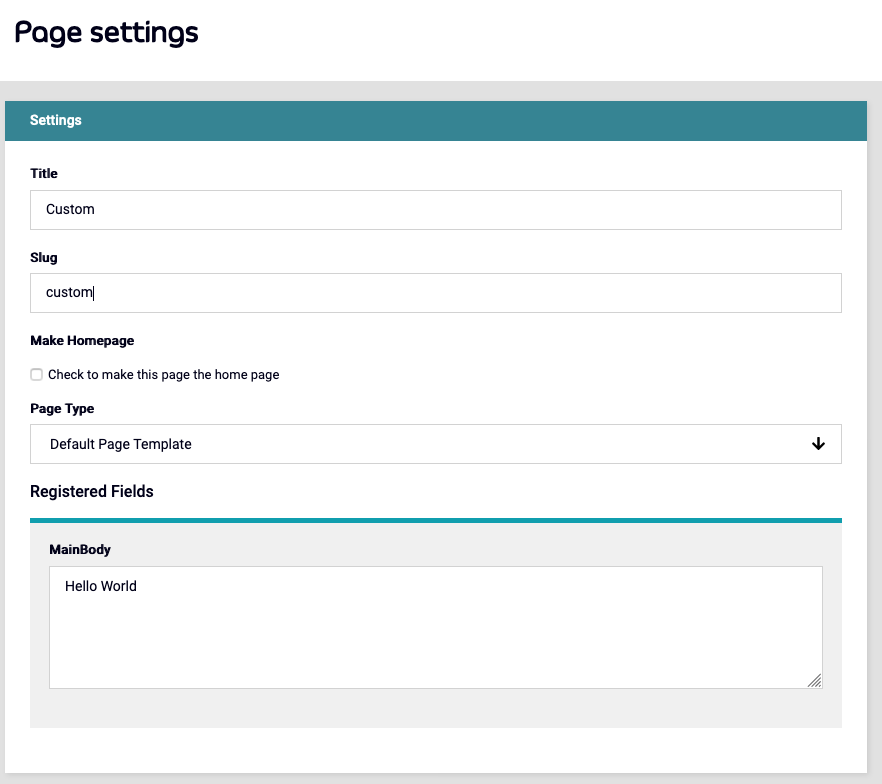
**First of all, create a custom page in the portal.**

<img src="https://mintcdn.com/tyk/FZbs3pJQw2fNkYsW/img/dashboard/portal-management/new_custom_page.png?fit=max&auto=format&n=FZbs3pJQw2fNkYsW&q=85&s=27e42f71df442f180b4f0987afaa0ea3" alt="custom_page_setup" width="882" height="784" data-path="img/dashboard/portal-management/new_custom_page.png" />

In the MainBody, you can paste the code below (click the text to display):

<Expandable title="Click to display the code">
  ```.html theme={null}

  <h2> Filterable Table </h2>

  <script>
  window.onload = function() {

      $.ajax({  
              type: "GET",
              url: "https://www.mocky.io/v2/5eb1a7c53200005c8f28f8b5",  
              beforeSend: function() 
              {
                  $('html, body').animate({scrollTop: 0
                  }, 'slow');
                  $("#response").html('<img src="loading.gif" align="absmiddle" alt="Loading..."> Loading...<br /><br />');
              },  
              success: function(response)
              {
                  var htmlResponse = '<table id=results>\
                  <thead>\
                  <tr>\
                    <th>Name</th>\
                    <th>Location</th>\
                    <th>Age</th>\
                  </tr>\
                  </thead>\
                  <tbody id="myTable">'

                  response.forEach( item => {
                      htmlResponse += '  <tr>\
                      <td>' + item.name + '</td>\
                      <td>' + item.location + '</td>\
                      <td>' + item.Age + '</td>\
                    </tr>'
                  });
                  htmlResponse += "</tbody></table>"

                  $('#results')[0].innerHTML = htmlResponse;
              }
          });

      $("#myInput").on("keyup", function() {
          var value = $(this).val().toLowerCase();
          $("#myTable tr").filter(function() {
            $(this).toggle($(this).text().toLowerCase().indexOf(value) > -1)
          });
        });
      }
  </script>


  <style>
  table {
    font-family: arial, sans-serif;
    border-collapse: collapse;
    width: 100%;
  }

  td, th {
    border: 1px solid #dddddd;
    text-align: left;
    padding: 8px;
  }

  tr:nth-child(even) {
    background-color: #dddddd;
  }
  </style>

  <p>Type something in the input field to search the table for first names, last names or emails:</p>  
  <input id="myInput" type="text" placeholder="Search..">
  <br /><br />

  <div id=results>
  </results>
  ```
</Expandable>

And save.

Now visit the portal at "[http://dashboard-host:3000/portal/custom](http://dashboard-host:3000/portal/custom)"
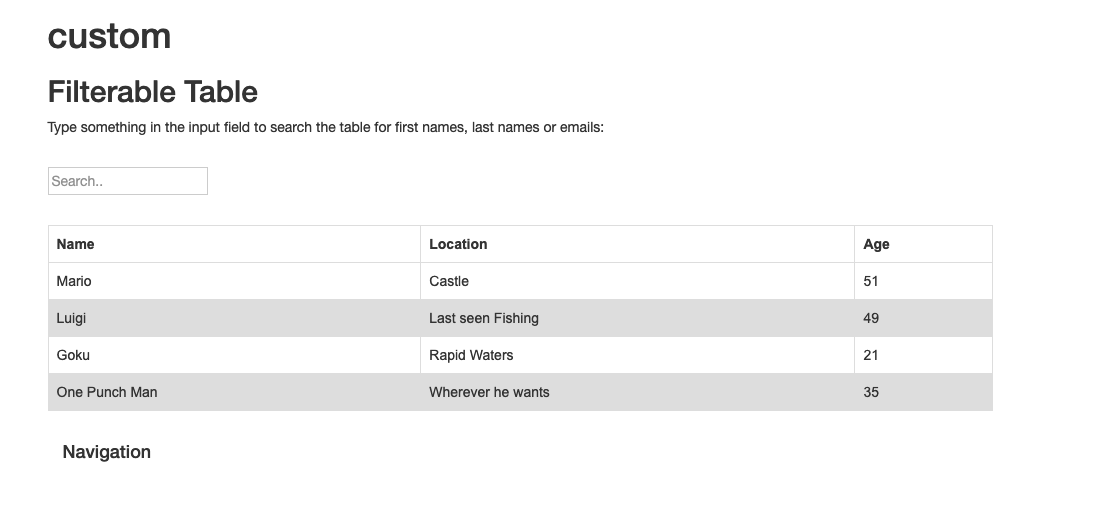
<img src="https://mintcdn.com/tyk/t33iko3u1oEeVF8p/img/dashboard/portal-management/custom_page_dynamic.png?fit=max&auto=format&n=t33iko3u1oEeVF8p&q=85&s=6b02795d4d1a22020cdd8d01311fe6bb" alt="custom_page_display" width="1110" height="506" data-path="img/dashboard/portal-management/custom_page_dynamic.png" />

You now have a searchable Input box that will dynamically filter the results of the table.
