> ## Documentation Index
> Fetch the complete documentation index at: https://tyk.io/docs/llms.txt
> Use this file to discover all available pages before exploring further.
# Response Body
> Learn how to transform the body of API responses
## Overview
Tyk enables you to modify the payload of API responses received from your upstream services before they are passed on to the client that originated the request. This makes it easy to transform between payload data formats or to expose legacy APIs using newer schema models without having to change any client implementations. This middleware is only applicable to endpoints that return a body with the response.
With the body transform middleware you can modify XML or JSON formatted payloads to ensure that the response contains the information required by your upstream service. You can enrich the response by adding contextual data that is held by Tyk but not included in the original response from the upstream.
This middleware changes only the payload and not the headers. You can, however, combine this with the [Response Header Transform](/nightly/api-management/traffic-transformation/response-headers) to apply more complex transformation to responses.
There is a closely related [Request Body Transform](/nightly/api-management/traffic-transformation/request-body) middleware that provides the same functionality on the request sent by the client prior to it being proxied to the upstream.
### Use Cases
#### Maintaining compatibility with legacy clients
Sometimes you might have a legacy API and need to migrate the transactions to a new upstream service but do not want to upgrade all the existing clients to the newer upstream API. Using response body transformation, you can convert the new format that your upstream services provide into legacy XML or JSON expected by the clients.
#### Shaping responses for different devices
You can detect the client device types via headers or context variables and transform the response payload to optimize it for that particular device. For example, you might optimize the response content for mobile apps.
#### SOAP to REST translation
A common use of the response body transform middleware is when surfacing a legacy SOAP service with a REST API. Full details of how to perform this conversion using Tyk are provided [here](/nightly/advanced-configuration/transform-traffic/soap-rest).
### Working
Tyk's body transform middleware uses the [Go template language](https://golang.org/pkg/text/template/) to parse and modify the provided input. We have bundled the [Sprig Library (v3)](http://masterminds.github.io/sprig/) which provides over 70 pre-written functions for transformations to assist the creation of powerful Go templates to transform your API responses.
The Go template can be defined within the API Definition or can be read from a file that is accessible to Tyk.
We have provided more detail, links to reference material and some examples of the use of Go templating [here](/nightly/api-management/traffic-transformation/go-templates).
Tyk evaluates templates stored in files on startup, so if you make changes to a template you must remember to restart the gateway.
#### Supported response body formats
The body transformation middleware can modify response payloads in the following formats:
* JSON
* XML
When working with JSON format data, the middleware will unmarshal the data into a data structure, and then make that data available to the template in dot-notation.
#### Data accessible to the middleware
The middleware has direct access to the response body and also to dynamic data as follows:
* [Context variables](/nightly/api-management/traffic-transformation/request-context-variables), extracted from the request at the start of the middleware chain, can be injected into the template using the `._tyk_context.KEYNAME` namespace
* [Session metadata](/nightly/api-management/access-control/sessions-and-keys/understanding-sessions#metadata-and-context), from the Tyk Session Object linked to the request, can be injected into the template using the `._tyk_meta.KEYNAME` namespace
* Inbound form or query data can be accessed through the `._tyk_context.request_data` namespace where it will be available in as a `key:[]value` map
* values from [key-value (KV) storage](/nightly/tyk-configuration-reference/kv-store#transformation-middleware) can be injected into the template using the notation appropriate to the location of the KV store
The response body transform middleware can iterate through list indices in dynamic data so, for example, calling `{{ index ._tyk_context.request_data.variablename 0 }}` in a template will expose the first entry in the `request_data.variablename` key/value array.
As explained in the [documentation](https://pkg.go.dev/text/template), templates are executed by applying them to a data structure. The template receives the decoded JSON or XML of the response body. If session variables or meta data are enabled, additional fields will be provided: `_tyk_context` and `_tyk_meta` respectively.
#### Automatic XML \<-> JSON Transformation
A very common transformation that is applied in the API Gateway is to convert between XML and JSON formatted body content.
The Response Body Transform supports two helper functions that you can use in your Go templates to facilitate this:
* `jsonMarshal` performs JSON style character escaping on an XML field and, for complex objects, serialises them to a JSON string ([example](/nightly/api-management/traffic-transformation/go-templates#xml-to-json-conversion-using-jsonmarshal))
* `xmlMarshal` performs the equivalent conversion from JSON to XML ([example](/nightly/api-management/traffic-transformation/go-templates#json-to-xml-conversion-using-xmlmarshal))
## Using Tyk OAS
The [response body transform](/nightly/api-management/traffic-transformation/response-body) middleware provides a way to modify the payload of API responses before they are returned to the client.
The middleware is configured in the [Tyk OAS API Definition](/nightly/api-management/gateway-config-tyk-oas#operation). You can do this via the Tyk Dashboard API or in the API Designer.
If you're using the legacy Tyk Classic APIs, then check out the [Tyk Classic](/nightly/#response-body-using-classic) page.
### API Definition
The design of the Tyk OAS API Definition takes advantage of the `operationId` defined in the OpenAPI Document that declares both the path and method for which the middleware should be added. Endpoint `paths` entries (and the associated `operationId`) can contain wildcards in the form of any string bracketed by curly braces, for example `/status/{code}`. These wildcards are so they are human readable and do not translate to variable names. Under the hood, a wildcard translates to the “match everything” regex of: `(.*)`.
The response body transformation middleware (`transformResponseBody`) can be added to the `operations` section of the Tyk OAS Extension (`x-tyk-api-gateway`) in your Tyk OAS API Definition for the appropriate `operationId` (as configured in the `paths` section of your OpenAPI Document).
The `transformResponseBody` object has the following configuration:
* `enabled`: enable the middleware for the endpoint
* `format`: the format of input data the parser should expect (either `xml` or `json`)
* `body`: \[see note] this is a `base64` encoded representation of your template
* `path`: \[see note] this is the path to the text file containing the template
You should configure only one of `body` or `path` to indicate whether you are embedding the template within the middleware or storing it in a text file. The middleware will automatically select the correct source based on which of these fields you complete. If both are provided, then `body` will take precedence and `path` will be ignored.
For example:
```json {hl_lines=["39-43"],linenos=true, linenostart=1} theme={null}
{
"components": {},
"info": {
"title": "example-response-body-transform",
"version": "1.0.0"
},
"openapi": "3.0.3",
"paths": {
"/anything": {
"put": {
"operationId": "anythingput",
"responses": {
"200": {
"description": ""
}
}
}
}
},
"x-tyk-api-gateway": {
"info": {
"name": "example-response-body-transform",
"state": {
"active": true
}
},
"upstream": {
"url": "http://httpbin.org/"
},
"server": {
"listenPath": {
"value": "/example-response-body-transform/",
"strip": true
}
},
"middleware": {
"operations": {
"anythingput": {
"transformResponseBody": {
"enabled": true,
"format": "json",
"body": "ewogICJ2YWx1ZTEiOiAie3sudmFsdWUyfX0iLAogICJ2YWx1ZTIiOiAie3sudmFsdWUxfX0iLAogICJyZXEtaGVhZGVyIjogInt7Ll90eWtfY29udGV4dC5oZWFkZXJzX1hfSGVhZGVyfX0iLAogICJyZXEtcGFyYW0iOiAie3suX3R5a19jb250ZXh0LnJlcXVlc3RfZGF0YS5wYXJhbX19Igp9"
}
}
}
}
}
}
```
In this example the response body transform middleware has been configured for requests to the `PUT /anything` endpoint. The `body` contains a base64 encoded Go template (which you can check by pasting the value into a service such as [base64decode.org](https://www.base64decode.org)).
Decoded, this template is:
```go theme={null}
{
"value1": "{{.value2}}",
"value2": "{{.value1}}",
"req-header": "{{._tyk_context.headers_X_Header}}",
"req-param": "{{._tyk_context.request_data.param}}"
}
```
So if you make a request to `PUT /anything?param=foo`, configuring a header `X-Header`:`bar` and providing this payload:
```json theme={null}
{
"value1": "world",
"value2": "hello"
}
```
httpbin.org will respond with the original payload in the response and, if you do not have the response body transform middleware enabled, the response from Tyk will include:
```json theme={null}
{
"value1": "world",
"value2": "hello"
}
```
If, however, you enable the response body transform middleware, Tyk will modify the response to include this content:
```json theme={null}
{
"req-header": "bar",
"req-param": "[foo]",
"value1": "hello",
"value2": "world"
}
```
You can see that Tyk has swapped `value1` and `value2` and embedded the `X-Header` header and `param` query values from the request into the body of the response.
The configuration above is a complete and valid Tyk OAS API Definition that you can import into Tyk to try out the mock response middleware.
If using a template in a file (i.e. you configure `path` in the `transformResponseBody` object), remember that Tyk will load and evaluate the template when the Gateway starts up. If you modify the template, you will need to restart Tyk in order for the changes to take effect.
### API Designer
Adding Response Body Transformation to your API endpoints is easy when using the API Designer in the Tyk Dashboard, simply follow the following steps:
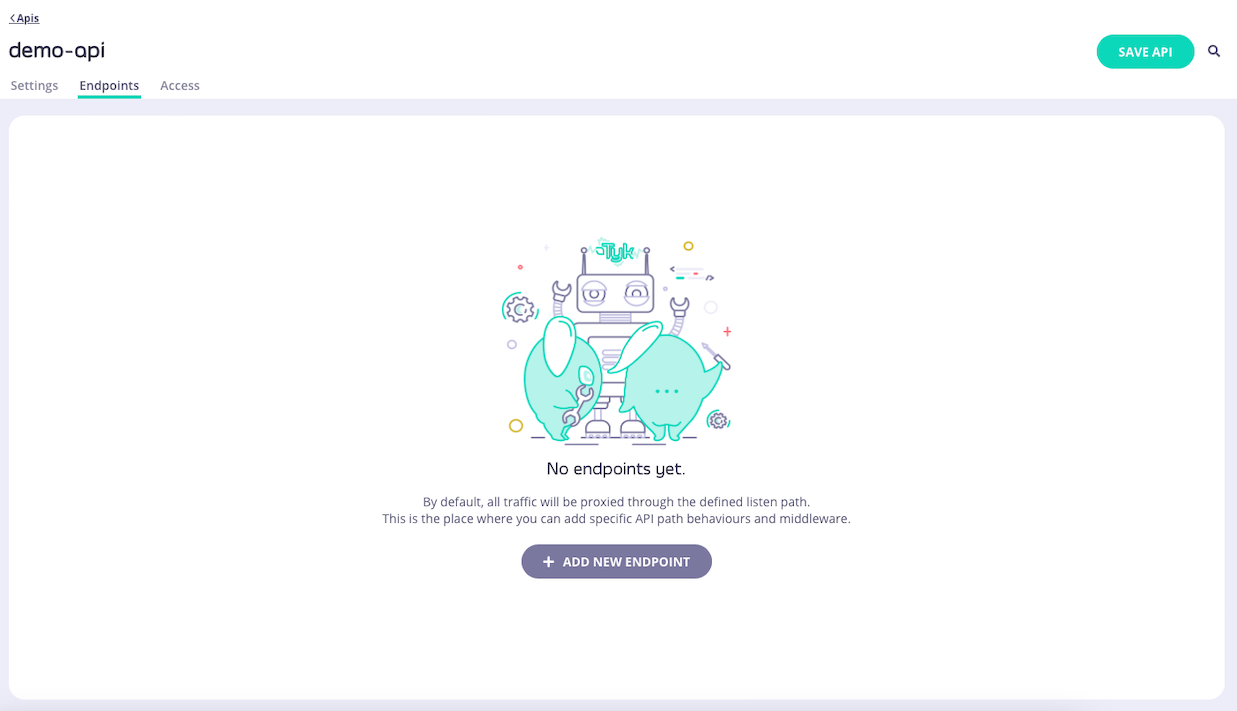
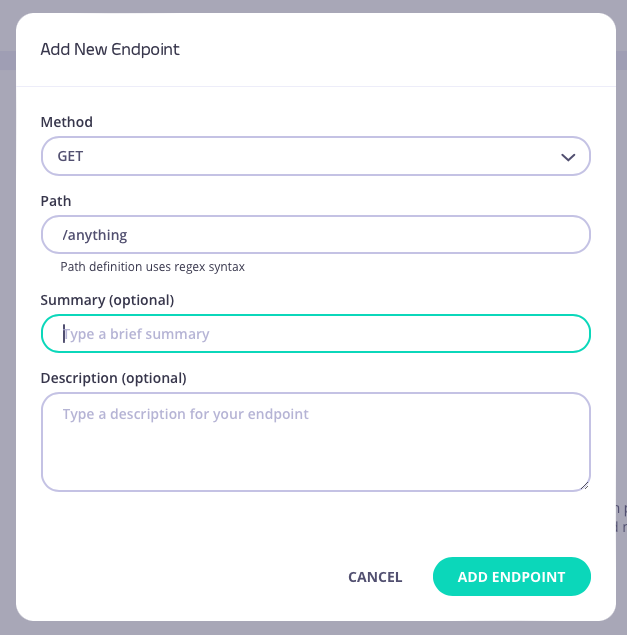
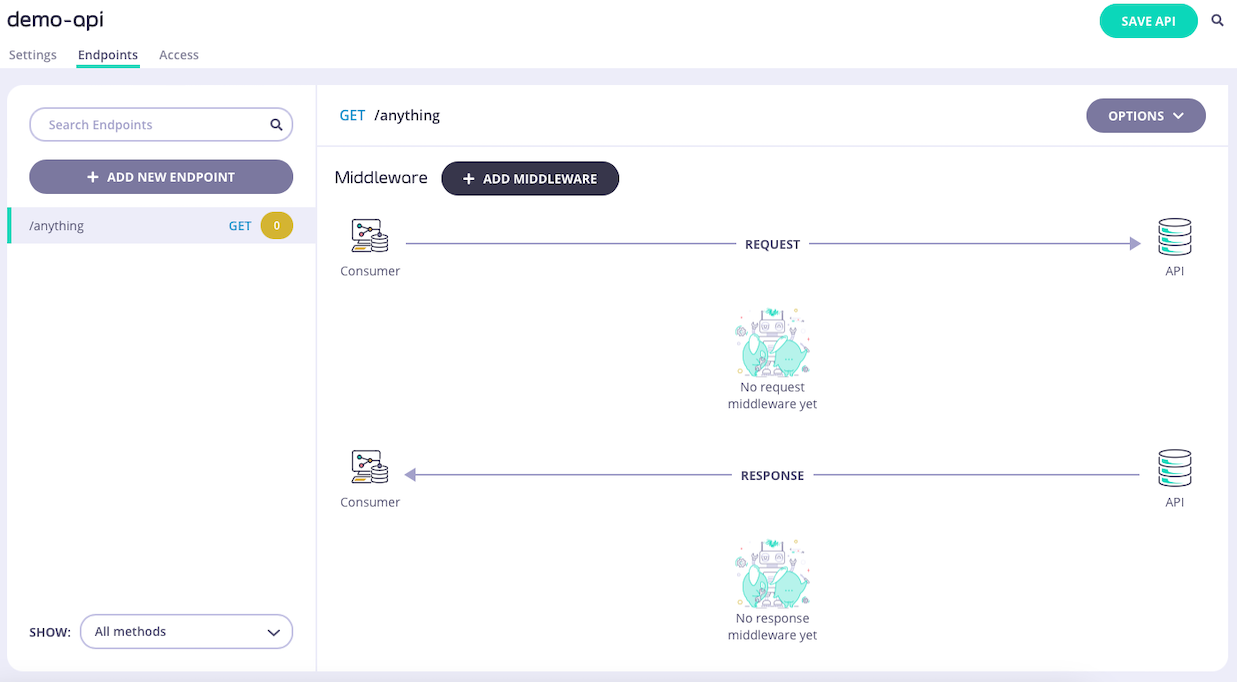
1. **Add an endpoint**
From the **API Designer** add an endpoint that matches the path and method to which you want to apply the middleware.
 2. **Select the Response Body Transform middleware**
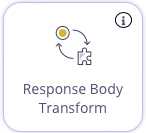
Select **ADD MIDDLEWARE** and choose the **Response Body Transform** middleware from the *Add Middleware* screen.
2. **Select the Response Body Transform middleware**
Select **ADD MIDDLEWARE** and choose the **Response Body Transform** middleware from the *Add Middleware* screen.
 3. **Configure the middleware**
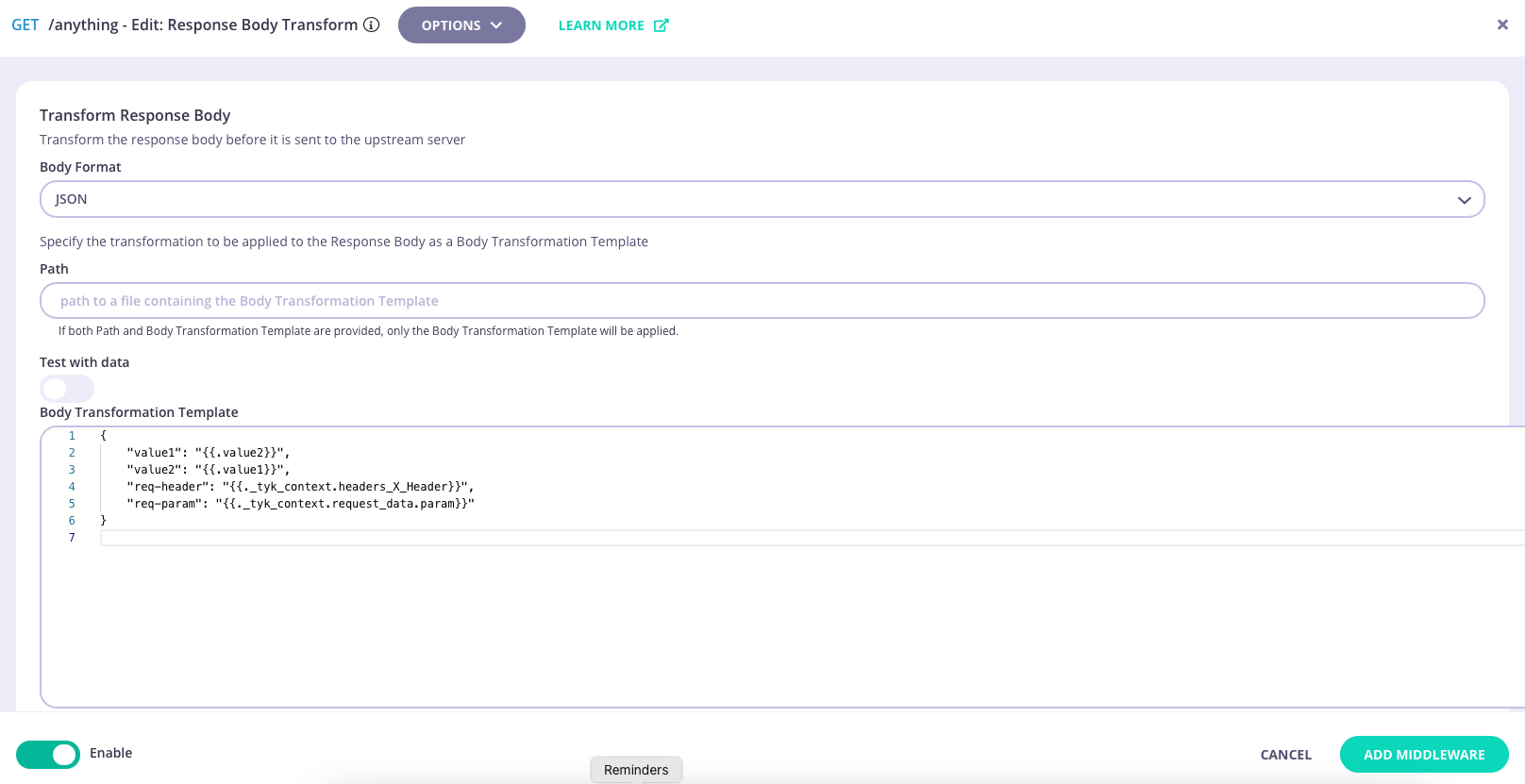
Now you can select the response body format (JSON or XML) and add either a path to the file containing the template, or directly enter the transformation template in the text box.
3. **Configure the middleware**
Now you can select the response body format (JSON or XML) and add either a path to the file containing the template, or directly enter the transformation template in the text box.
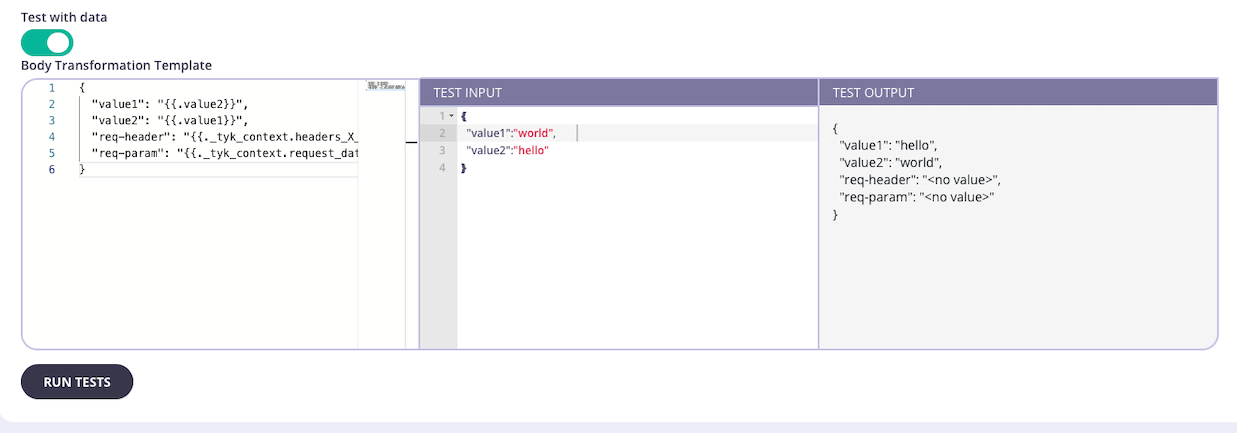
 The **Test with data** control will allow you to test your body transformation function by providing an example response body and generating the output from the transform. It is not possible to configure headers, other request parameters, context or session metadata to this template test so if you are using these data sources in your transform it will not provide a complete output, for example:
 4. **Save the API**
Select **SAVE API** to apply the changes to your API.
## Using Classic
The [response body transform](/nightly/api-management/traffic-transformation/response-body) middleware provides a way to modify the payload of API responses before they are returned to the client.
This middleware is configured in the Tyk Classic API Definition at the endpoint level. You can do this via the Tyk Dashboard API or in the API Designer.
If you're using the newer Tyk OAS APIs, then check out the [Tyk OAS](/nightly/#response-body-using-tyk-oas) page.
If you're using Tyk Operator then check out the [configuring the middleware in Tyk Operator](/nightly/#tyk-operator) section below.
### API Definition
To enable the middleware you must add a new `transform_response` object to the `extended_paths` section of your API definition.
The `transform_response` object has the following configuration:
* `path`: the path to match on
* `method`: this method to match on
* `template_data`: details of the Go template to be applied for the transformation of the response body
The Go template is described in the `template_data` object by the following fields:
* `input_type`: the format of input data the parser should expect (either `xml` or `json`)
* `enable_session`: set this to `true` to make session metadata available to the transform template
* `template_mode`: instructs the middleware to look for the template either in a `file` or in a base64 encoded `blob`; the actual file location (or base64 encoded template) is provided in `template_source`
* `template_source`: if `template_mode` is set to `file`, this will be the path to the text file containing the template; if `template_mode` is set to `blob`, this will be a `base64` encoded representation of your template
For example:
```json {linenos=true, linenostart=1} theme={null}
{
"extended_paths": {
"transform_response": [
{
"path": "/anything",
"method": "POST",
"template_data": {
"template_mode": "file",
"template_source": "./templates/transform_test.tmpl",
"input_type": "json",
"enable_session": true
}
}
]
}
}
```
In this example, the Response Body Transform middleware is directed to use the template located in the `file` at location `./templates/transform_test.tmpl`. The input (pre-transformation) response payload will be `json` format and session metadata will be available for use in the transformation.
Tyk will load and evaluate the template file when the Gateway starts up. If you modify the template, you will need to restart Tyk in order for the changes to take effect.
Prior to Tyk 5.3, there was an additional step to enable response body transformation. You would need to add the following to the Tyk Classic API definition:
```json theme={null}
{
"response_processors":[
{"name": "response_body_transform"}
]
}
```
If using the Endpoint Designer in the Tyk Dashboard, this would be added automatically.
We removed the need to configure the `response_processors` element in Tyk 5.3.0.
### API Designer
You can use the API Designer in the Tyk Dashboard to configure the response body transform middleware for your Tyk Classic API by following these steps.
1. **Add an endpoint for the path and select the plugin**
From the **Endpoint Designer** add an endpoint that matches the path for which you want to perform the transformation. Select the **Body Transforms** plugin.
4. **Save the API**
Select **SAVE API** to apply the changes to your API.
## Using Classic
The [response body transform](/nightly/api-management/traffic-transformation/response-body) middleware provides a way to modify the payload of API responses before they are returned to the client.
This middleware is configured in the Tyk Classic API Definition at the endpoint level. You can do this via the Tyk Dashboard API or in the API Designer.
If you're using the newer Tyk OAS APIs, then check out the [Tyk OAS](/nightly/#response-body-using-tyk-oas) page.
If you're using Tyk Operator then check out the [configuring the middleware in Tyk Operator](/nightly/#tyk-operator) section below.
### API Definition
To enable the middleware you must add a new `transform_response` object to the `extended_paths` section of your API definition.
The `transform_response` object has the following configuration:
* `path`: the path to match on
* `method`: this method to match on
* `template_data`: details of the Go template to be applied for the transformation of the response body
The Go template is described in the `template_data` object by the following fields:
* `input_type`: the format of input data the parser should expect (either `xml` or `json`)
* `enable_session`: set this to `true` to make session metadata available to the transform template
* `template_mode`: instructs the middleware to look for the template either in a `file` or in a base64 encoded `blob`; the actual file location (or base64 encoded template) is provided in `template_source`
* `template_source`: if `template_mode` is set to `file`, this will be the path to the text file containing the template; if `template_mode` is set to `blob`, this will be a `base64` encoded representation of your template
For example:
```json {linenos=true, linenostart=1} theme={null}
{
"extended_paths": {
"transform_response": [
{
"path": "/anything",
"method": "POST",
"template_data": {
"template_mode": "file",
"template_source": "./templates/transform_test.tmpl",
"input_type": "json",
"enable_session": true
}
}
]
}
}
```
In this example, the Response Body Transform middleware is directed to use the template located in the `file` at location `./templates/transform_test.tmpl`. The input (pre-transformation) response payload will be `json` format and session metadata will be available for use in the transformation.
Tyk will load and evaluate the template file when the Gateway starts up. If you modify the template, you will need to restart Tyk in order for the changes to take effect.
Prior to Tyk 5.3, there was an additional step to enable response body transformation. You would need to add the following to the Tyk Classic API definition:
```json theme={null}
{
"response_processors":[
{"name": "response_body_transform"}
]
}
```
If using the Endpoint Designer in the Tyk Dashboard, this would be added automatically.
We removed the need to configure the `response_processors` element in Tyk 5.3.0.
### API Designer
You can use the API Designer in the Tyk Dashboard to configure the response body transform middleware for your Tyk Classic API by following these steps.
1. **Add an endpoint for the path and select the plugin**
From the **Endpoint Designer** add an endpoint that matches the path for which you want to perform the transformation. Select the **Body Transforms** plugin.
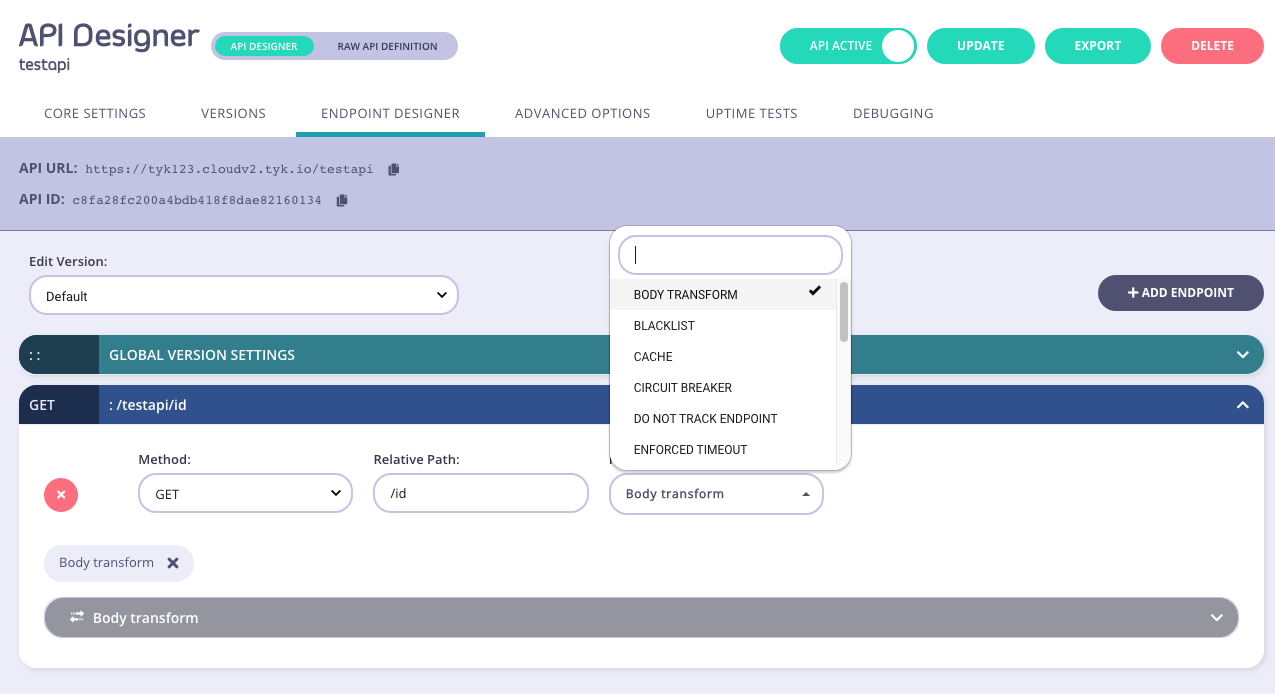 2. **Configure the middleware**
Ensure that you have selected the `RESPONSE` tab, then select your input type, and then add the template you would like to use to the **Template** input box.
2. **Configure the middleware**
Ensure that you have selected the `RESPONSE` tab, then select your input type, and then add the template you would like to use to the **Template** input box.
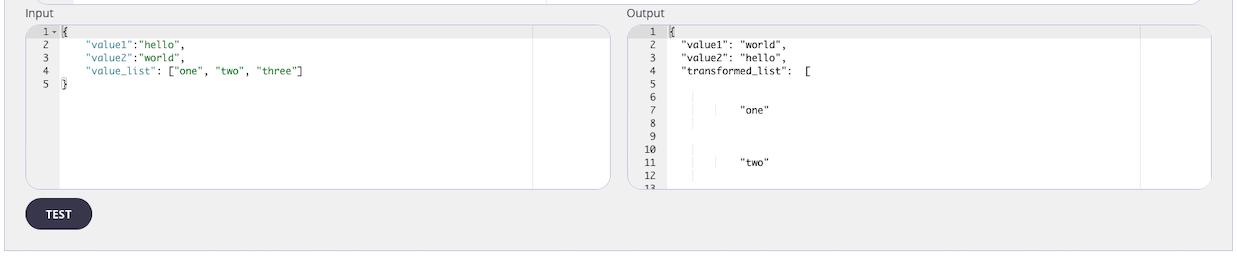
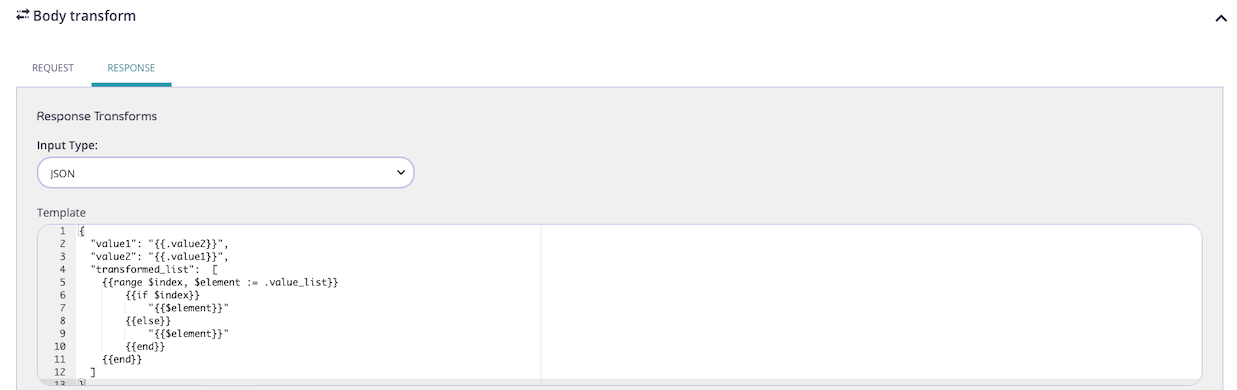 3. **Test the Transform**
If you have sample input data, you can use the Input box to add it, and then test it using the **Test** button. You will see the effect of the template on the sample input in the Output box.
3. **Test the Transform**
If you have sample input data, you can use the Input box to add it, and then test it using the **Test** button. You will see the effect of the template on the sample input in the Output box.
 4. **Save the API**
Use the *save* or *create* buttons to save the changes and activate the Response Body Transform middleware.
### Tyk Operator
The process of configuring a transformation of a response body for a specific endpoint is similar to that defined in section configuring the middleware in the Tyk Classic API Definition for the Tyk Classic API definition. To enable the middleware you must add a new `transform_response` object to the `extended_paths` section of your API definition.
In the examples below, the Response Body Transform middleware (`transform_response`) is directed to use the template located in the `template_source`, decoding the xml in the base64 encoded string. The input (pre-transformation) response payload will be `xml` format and there is no session metadata provided for use in the transformation.
#### Example
```yaml {linenos=true, linenostart=1, hl_lines=["45-53"]} theme={null}
apiVersion: tyk.tyk.io/v1alpha1
kind: ApiDefinition
metadata:
name: httpbin-transform
spec:
name: httpbin-transform
use_keyless: true
protocol: http
active: true
proxy:
target_url: http://httpbin.org
listen_path: /httpbin-transform
strip_listen_path: true
version_data:
default_version: Default
not_versioned: true
versions:
Default:
name: Default
use_extended_paths: true
paths:
black_list: []
ignored: []
white_list: []
extended_paths:
transform:
- method: POST
path: /anything
template_data:
enable_session: false
input_type: json
template_mode: blob
# base64 encoded template
template_source: eyJiYXIiOiAie3suZm9vfX0ifQ==
transform_headers:
- delete_headers:
- "remove_this"
add_headers:
foo: bar
path: /anything
method: POST
transform_response:
- method: GET
path: /xml
template_data:
enable_session: false
input_type: xml
template_mode: blob
# base64 encoded template
template_source: e3sgLiB8IGpzb25NYXJzaGFsIH19
transform_response_headers:
- method: GET
path: /xml
add_headers:
Content-Type: "application/json"
act_on: false
delete_headers: []
```
#### Tyk Gateway \< 5.3.0 Example
If using Tyk Gateway \< v5.3.0 then a `response_processor` object must be added to the API definition containing a `response_body_transform` item, as highlighted below:
```yaml {linenos=true, linenostart=1, hl_lines=["17-18", "48-56"]} theme={null}
apiVersion: tyk.tyk.io/v1alpha1
kind: ApiDefinition
metadata:
name: httpbin-transform
spec:
name: httpbin-transform
use_keyless: true
protocol: http
active: true
proxy:
target_url: http://httpbin.org
listen_path: /httpbin-transform
strip_listen_path: true
response_processors:
- name: response_body_transform
- name: header_injector
version_data:
default_version: Default
not_versioned: true
versions:
Default:
name: Default
use_extended_paths: true
paths:
black_list: []
ignored: []
white_list: []
extended_paths:
transform:
- method: POST
path: /anything
template_data:
enable_session: false
input_type: json
template_mode: blob
# base64 encoded template
template_source: eyJiYXIiOiAie3suZm9vfX0ifQ==
transform_headers:
- delete_headers:
- "remove_this"
add_headers:
foo: bar
path: /anything
method: POST
transform_response:
- method: GET
path: /xml
template_data:
enable_session: false
input_type: xml
template_mode: blob
# base64 encoded template
template_source: e3sgLiB8IGpzb25NYXJzaGFsIH19
transform_response_headers:
- method: GET
path: /xml
add_headers:
Content-Type: "application/json"
act_on: false
delete_headers: []
```
4. **Save the API**
Use the *save* or *create* buttons to save the changes and activate the Response Body Transform middleware.
### Tyk Operator
The process of configuring a transformation of a response body for a specific endpoint is similar to that defined in section configuring the middleware in the Tyk Classic API Definition for the Tyk Classic API definition. To enable the middleware you must add a new `transform_response` object to the `extended_paths` section of your API definition.
In the examples below, the Response Body Transform middleware (`transform_response`) is directed to use the template located in the `template_source`, decoding the xml in the base64 encoded string. The input (pre-transformation) response payload will be `xml` format and there is no session metadata provided for use in the transformation.
#### Example
```yaml {linenos=true, linenostart=1, hl_lines=["45-53"]} theme={null}
apiVersion: tyk.tyk.io/v1alpha1
kind: ApiDefinition
metadata:
name: httpbin-transform
spec:
name: httpbin-transform
use_keyless: true
protocol: http
active: true
proxy:
target_url: http://httpbin.org
listen_path: /httpbin-transform
strip_listen_path: true
version_data:
default_version: Default
not_versioned: true
versions:
Default:
name: Default
use_extended_paths: true
paths:
black_list: []
ignored: []
white_list: []
extended_paths:
transform:
- method: POST
path: /anything
template_data:
enable_session: false
input_type: json
template_mode: blob
# base64 encoded template
template_source: eyJiYXIiOiAie3suZm9vfX0ifQ==
transform_headers:
- delete_headers:
- "remove_this"
add_headers:
foo: bar
path: /anything
method: POST
transform_response:
- method: GET
path: /xml
template_data:
enable_session: false
input_type: xml
template_mode: blob
# base64 encoded template
template_source: e3sgLiB8IGpzb25NYXJzaGFsIH19
transform_response_headers:
- method: GET
path: /xml
add_headers:
Content-Type: "application/json"
act_on: false
delete_headers: []
```
#### Tyk Gateway \< 5.3.0 Example
If using Tyk Gateway \< v5.3.0 then a `response_processor` object must be added to the API definition containing a `response_body_transform` item, as highlighted below:
```yaml {linenos=true, linenostart=1, hl_lines=["17-18", "48-56"]} theme={null}
apiVersion: tyk.tyk.io/v1alpha1
kind: ApiDefinition
metadata:
name: httpbin-transform
spec:
name: httpbin-transform
use_keyless: true
protocol: http
active: true
proxy:
target_url: http://httpbin.org
listen_path: /httpbin-transform
strip_listen_path: true
response_processors:
- name: response_body_transform
- name: header_injector
version_data:
default_version: Default
not_versioned: true
versions:
Default:
name: Default
use_extended_paths: true
paths:
black_list: []
ignored: []
white_list: []
extended_paths:
transform:
- method: POST
path: /anything
template_data:
enable_session: false
input_type: json
template_mode: blob
# base64 encoded template
template_source: eyJiYXIiOiAie3suZm9vfX0ifQ==
transform_headers:
- delete_headers:
- "remove_this"
add_headers:
foo: bar
path: /anything
method: POST
transform_response:
- method: GET
path: /xml
template_data:
enable_session: false
input_type: xml
template_mode: blob
# base64 encoded template
template_source: e3sgLiB8IGpzb25NYXJzaGFsIH19
transform_response_headers:
- method: GET
path: /xml
add_headers:
Content-Type: "application/json"
act_on: false
delete_headers: []
```