> ## Documentation Index
> Fetch the complete documentation index at: https://tyk.io/docs/llms.txt
> Use this file to discover all available pages before exploring further.
# Request Validation
> Learn how to validate that requests meet the expected contract
## Overview
Requests to your upstream services should meet the contract that you have defined for those APIs. Checking the content and format of incoming requests before they are passed to the upstream APIs can avoid unexpected errors and provide additional security to those services. Tyk's request validation middleware provides a way to validate the presence, correctness and conformity of HTTP requests to make sure they meet the expected format required by the upstream API endpoints.
Request validation enables cleaner backend APIs, better standardization across consumers, easier API evolution and reduced failure risk leading to higher end-to-end reliability.
### Use Cases
#### Improving security of upstream services
Validating incoming requests against a defined schema protects services from unintended consequences arising from bad input, such as SQL injection or buffer overflow errors, or other unintended failures caused by missing parameters or invalid data types. Offloading this security check to the API Gateway provides an early line of defense as potentially bad requests are not proxied to your upstream services.
#### Offloading contract enforcement
You can ensure that client requests adhere to a defined contract specifying mandatory headers or parameters before sending requests upstream. Performing these validation checks in the API Gateway allows API developers to focus on core domain logic.
#### Supporting data transformation
Validation goes hand-in-hand with request [header](/nightly/api-management/traffic-transformation/request-headers) and [body](/nightly/api-management/traffic-transformation/request-body) transformation by ensuring that a request complies with the expected schema prior to transformation. For example, you could validate that a date parameter is present, then transform it into a different date format as required by your upstream API dynamically on each request.
### Working
The incoming request is compared with a defined schema, which is a structured description of the expected format for requests to the endpoint. This request schema defines the required and optional elements such as headers, path/query parameters, payloads and their data types. It acts as a contract for clients.
If the incoming request does not match the schema, it will be rejected with an `HTTP 422 Unprocessable Entity` error. This error code can be customized if required.
When using [Tyk OAS APIs](/nightly/api-management/traffic-transformation/request-validation#request-validation-using-tyk-oas), request validation is performed by the `Validate Request` middleware which can be enabled per-endpoint. The schema against which requests are compared is defined in the OpenAPI description of the endpoint. All elements of the request can have a `schema` defined in the OpenAPI description so requests to Tyk OAS APIs can be validated for headers, path/query parameters and body (payload).
When using the legacy [Tyk Classic APIs](/nightly/api-management/traffic-transformation/request-validation#request-validation-using-classic), request validation is performed by the `Validate JSON` middleware which can be enabled per-endpoint. The schema against which requests are compared is defined in the middleware configuration and is limited to the request body (payload). Request headers and path/query parameters cannot be validated when using Tyk Classic APIs.
## Using Tyk OAS
The [request validation](/nightly/#request-validation-overview) middleware provides a way to validate the presence, correctness and conformity of HTTP requests to make sure they meet the expected format required by the upstream API endpoints. If the incoming request fails validation, the Tyk Gateway will reject the request with an `HTTP 422 Unprocessable Entity` response. Tyk can be [configured](/nightly/#configuring-the-request-validation-middleware) to return a different HTTP status code if required.
The middleware is configured in the [Tyk OAS API Definition](/nightly/api-management/gateway-config-tyk-oas#operation). You can do this via the Tyk Dashboard API or in the API Designer.
If you're using the legacy Tyk Classic APIs, then check out the [Tyk Classic](/nightly/api-management/traffic-transformation/request-validation#request-validation-using-classic) page.
### Request schema in OpenAPI Specification
The OpenAPI Specification supports the definition of a [schema](https://learn.openapis.org/specification/content.html#the-schema-object) to describe and limit the content of any field in an API request or response.
Tyk's request validation middleware automatically parses the schema for the request in the OpenAPI description part of the Tyk OAS API Definition and uses this to compare against the incoming request.
An OpenAPI schema can reference other schemas defined elsewhere, letting you write complex validations very efficiently since you don’t need to re-define the validation for a particular object every time you wish to refer to it. Tyk only supports local references to schemas (within the same OpenAPI document).
As explained in the OpenAPI [documentation](https://learn.openapis.org/specification/parameters.html), the structure of an API request is described by two components:
* parameters (headers, query parameters, path parameters)
* request body (payload)
#### Request parameters
The `parameters` field in the OpenAPI description is an array of [parameter objects](https://swagger.io/docs/specification/describing-parameters/) that each describe one variable element in the request. Each `parameter` has two mandatory fields:
* `in`: the location of the parameter (`path`, `query`, `header`)
* `name`: a unique identifier within that location (i.e. no duplicate header names for a given operation/endpoint)
There are also optional `description` and `required` fields.
For each parameter, a schema can be declared that defines the `type` of data that can be stored (e.g. `boolean`, `string`) and any `example` or `default` values.
##### Operation (endpoint-level) parameters
An operation is a combination of HTTP method and path or, as Tyk calls it, an endpoint - for example `GET /users`. Operation, or endpoint-level parameters can be defined in the OpenAPI description and will apply only to that operation within the API. These can be added or modified within Tyk Dashboard's [API designer](/nightly/#api-designer).
##### Common (path-level) parameters
[Common parameters](https://swagger.io/docs/specification/v3_0/describing-parameters/#common-parameters), that apply to all operations within a path, can be defined at the path level within the OpenAPI description. Tyk refers to these as path-level parameters and displays them as read-only fields in the Dashboard's API designer. If you need to add or modify common parameters you must use the *Raw Definition* editor, or edit your OpenAPI document outside Tyk and [update](/nightly/api-management/gateway-config-managing-oas#updating-an-api) the API.
#### Request body
The `requestBody` field in the OpenAPI description is a [Request Body Object](https://swagger.io/docs/specification/describing-request-body/). This has two optional fields (`description` and `required`) plus the `content` section which allows you to define a schema for the expected payload. Different schemas can be declared for different media types that are identified by content-type (e.g. `application/json`, `application/xml` and `text/plain`).
### Configuring the request validation middleware
When working with Tyk OAS APIs, the request validation middleware automatically determines the validation rules based on the API schema. The only configurable option for the middleware is to set the desired HTTP status code that will be returned if a request fails validation. The default response will be `HTTP 422 Unprocessable Entity` unless otherwise configured.
### Enabling the request validation middleware
If the middleware is enabled for an endpoint, then Tyk will automatically validate requests made to that endpoint against the schema defined in the API definition.
When you create a Tyk OAS API by importing your OpenAPI description, you can instruct Tyk to enable request validation [automatically](/nightly/#automatically-enabling-the-request-validation-middleware) for all endpoints with defined schemas.
If you are creating your API without import, or if you only want to enable request validation for some endpoints, you can [manually enable](/nightly/#manually-enabling-the-request-validation-middleware) the middleware in the Tyk OAS API definition.
#### Automatically enabling the request validation middleware
The request validation middleware can be enabled for all endpoints that have defined schemas when [importing](/nightly/api-management/gateway-config-managing-oas#importing-an-openapi-description-to-create-an-api) an OpenAPI Document to create a Tyk OAS API.
* if you are using the `POST /apis/oas/import` endpoint in the [Tyk Dashboard API](/nightly/tyk-dashboard-api) or [Tyk Gateway API](/nightly/tyk-gateway-api) then you can do this by setting the `validateRequest=true` query parameter
* if you are using the API Designer, select the **Auto-generate middleware to validate requests** option on the **Import API** screen
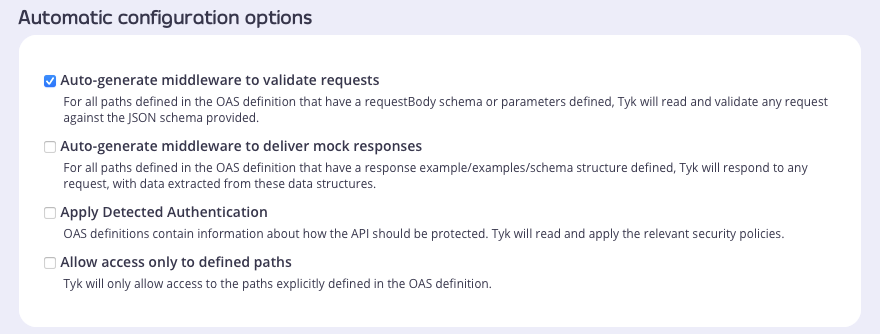 As noted, the automatic application of request validation during import will apply the middleware to all endpoints declared in your OpenAPI description. If you want to adjust this configuration, for example to remove validation from specific endpoints or to change the HTTP status code returned on error, you can update the Tyk OAS API definition as described [here](/nightly/#manually-enabling-the-request-validation-middleware).
#### Manually enabling the request validation middleware
The design of the Tyk OAS API Definition takes advantage of the `operationId` defined in the OpenAPI Document that declares both the path and method for which the middleware should be added. Endpoint `paths` entries (and the associated `operationId`) can contain wildcards in the form of any string bracketed by curly braces, for example `/status/{code}`. These wildcards are so they are human readable and do not translate to variable names. Under the hood, a wildcard translates to the “match everything” regex of: `(.*)`.
The request validation middleware (`validateRequest`) can be added to the `operations` section of the Tyk OAS Extension (`x-tyk-api-gateway`) in your Tyk OAS API Definition for the appropriate `operationId`. The `operationId` for an endpoint can be found within the `paths` section of your [OpenAPI specification](https://swagger.io/docs/specification/paths-and-operations/?sbsearch=operationIds).
The `validateRequest` object has the following configuration:
* `enabled`: enable the middleware for the endpoint
* `errorResponseCode`: \[optional] the HTTP status code to be returned if validation fails (this defaults to `HTTP 422 Unprocessable Entity` if not set)
For example:
```json {hl_lines=["69-72"],linenos=true, linenostart=1} theme={null}
{
"components": {},
"info": {
"title": "example-validate-request",
"version": "1.0.0"
},
"openapi": "3.0.3",
"paths": {
"/anything": {
"get": {
"operationId": "anythingget",
"parameters": [
{
"in": "header",
"name": "X-Security",
"required": true,
"schema": {
"type": "boolean"
}
}
],
"requestBody": {
"required": true,
"content": {
"application/json": {
"schema": {
"properties": {
"firstname": {
"description": "The person's first name",
"type": "string"
},
"lastname": {
"description": "The person's last name",
"type": "string"
}
},
"type": "object"
}
}
}
},
"responses": {
"200": {
"description": ""
}
}
}
}
},
"x-tyk-api-gateway": {
"info": {
"name": "example-validate-request",
"state": {
"active": true
}
},
"upstream": {
"url": "http://httpbin.org/"
},
"server": {
"listenPath": {
"value": "/example-validate-request/",
"strip": true
}
},
"middleware": {
"operations": {
"anythingget": {
"validateRequest": {
"enabled": true,
"errorResponseCode": 400
}
}
}
}
}
}
```
In this example the request validation middleware has been configured for requests to the `GET /anything` endpoint. The middleware will check for the existence of a header named `X-Security` and the request body will be validated against the declared schema. If there is no match, the request will be rejected and Tyk will return `HTTP 400` (as configured in `errorResponseCode`).
The configuration above is a complete and valid Tyk OAS API Definition that you can import into Tyk to try out the request validation middleware.
### API Designer
Adding and configuring Request Validation for your API endpoints is easy when using the API Designer in the Tyk Dashboard, simply follow these steps:
1. **Add an endpoint**
From the **API Designer** add an endpoint that matches the path and method to which you want to apply the middleware.
As noted, the automatic application of request validation during import will apply the middleware to all endpoints declared in your OpenAPI description. If you want to adjust this configuration, for example to remove validation from specific endpoints or to change the HTTP status code returned on error, you can update the Tyk OAS API definition as described [here](/nightly/#manually-enabling-the-request-validation-middleware).
#### Manually enabling the request validation middleware
The design of the Tyk OAS API Definition takes advantage of the `operationId` defined in the OpenAPI Document that declares both the path and method for which the middleware should be added. Endpoint `paths` entries (and the associated `operationId`) can contain wildcards in the form of any string bracketed by curly braces, for example `/status/{code}`. These wildcards are so they are human readable and do not translate to variable names. Under the hood, a wildcard translates to the “match everything” regex of: `(.*)`.
The request validation middleware (`validateRequest`) can be added to the `operations` section of the Tyk OAS Extension (`x-tyk-api-gateway`) in your Tyk OAS API Definition for the appropriate `operationId`. The `operationId` for an endpoint can be found within the `paths` section of your [OpenAPI specification](https://swagger.io/docs/specification/paths-and-operations/?sbsearch=operationIds).
The `validateRequest` object has the following configuration:
* `enabled`: enable the middleware for the endpoint
* `errorResponseCode`: \[optional] the HTTP status code to be returned if validation fails (this defaults to `HTTP 422 Unprocessable Entity` if not set)
For example:
```json {hl_lines=["69-72"],linenos=true, linenostart=1} theme={null}
{
"components": {},
"info": {
"title": "example-validate-request",
"version": "1.0.0"
},
"openapi": "3.0.3",
"paths": {
"/anything": {
"get": {
"operationId": "anythingget",
"parameters": [
{
"in": "header",
"name": "X-Security",
"required": true,
"schema": {
"type": "boolean"
}
}
],
"requestBody": {
"required": true,
"content": {
"application/json": {
"schema": {
"properties": {
"firstname": {
"description": "The person's first name",
"type": "string"
},
"lastname": {
"description": "The person's last name",
"type": "string"
}
},
"type": "object"
}
}
}
},
"responses": {
"200": {
"description": ""
}
}
}
}
},
"x-tyk-api-gateway": {
"info": {
"name": "example-validate-request",
"state": {
"active": true
}
},
"upstream": {
"url": "http://httpbin.org/"
},
"server": {
"listenPath": {
"value": "/example-validate-request/",
"strip": true
}
},
"middleware": {
"operations": {
"anythingget": {
"validateRequest": {
"enabled": true,
"errorResponseCode": 400
}
}
}
}
}
}
```
In this example the request validation middleware has been configured for requests to the `GET /anything` endpoint. The middleware will check for the existence of a header named `X-Security` and the request body will be validated against the declared schema. If there is no match, the request will be rejected and Tyk will return `HTTP 400` (as configured in `errorResponseCode`).
The configuration above is a complete and valid Tyk OAS API Definition that you can import into Tyk to try out the request validation middleware.
### API Designer
Adding and configuring Request Validation for your API endpoints is easy when using the API Designer in the Tyk Dashboard, simply follow these steps:
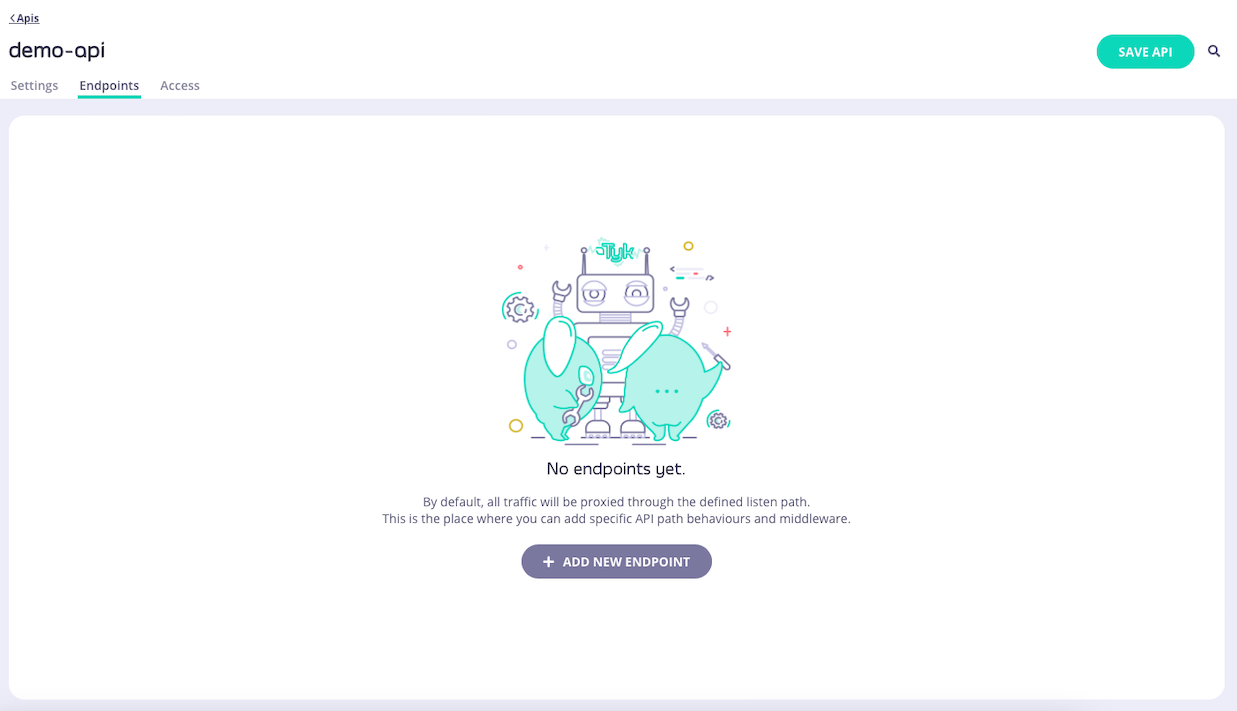
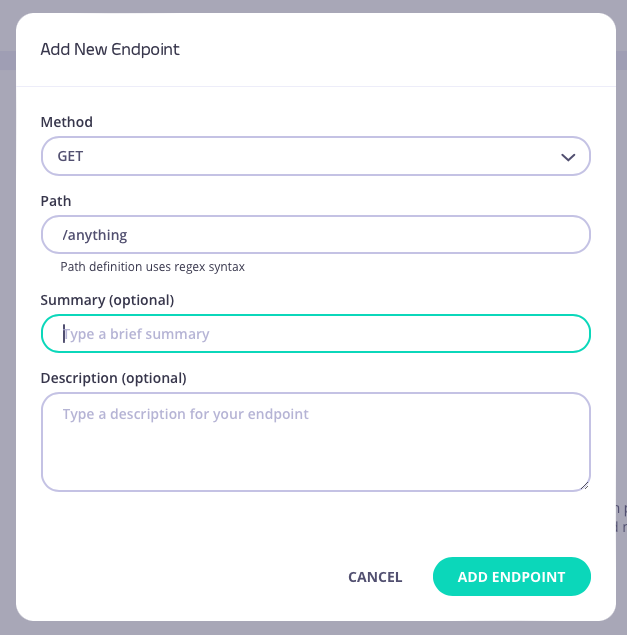
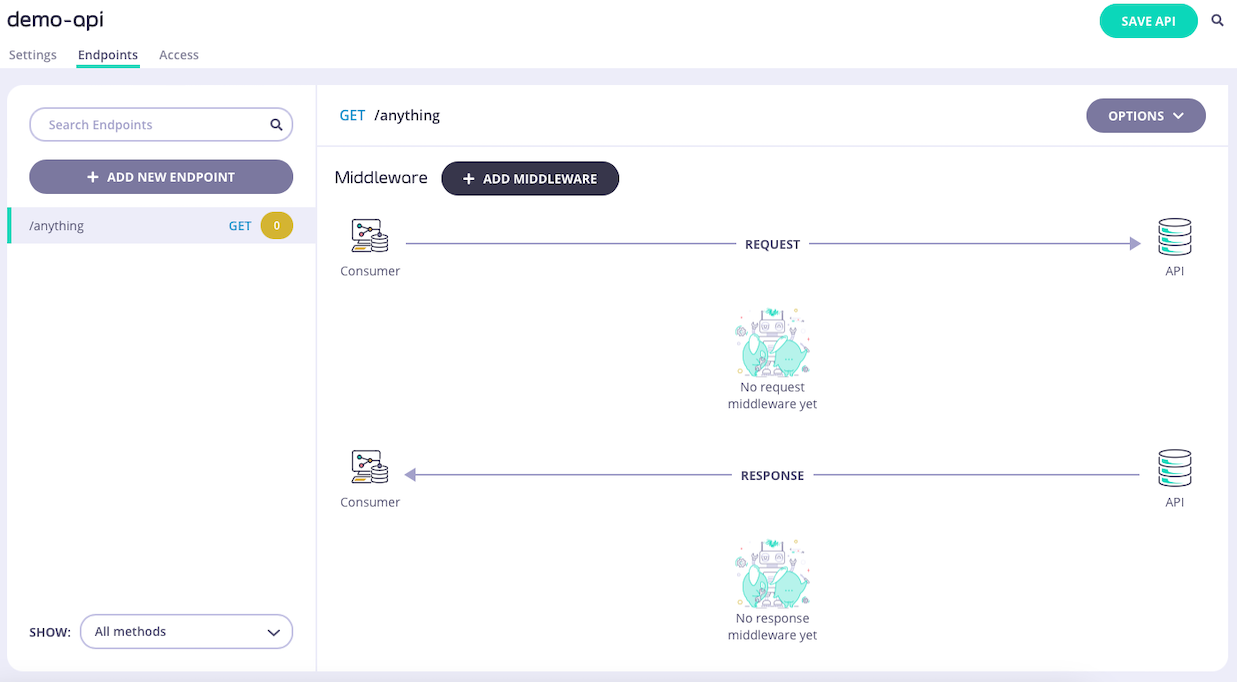
1. **Add an endpoint**
From the **API Designer** add an endpoint that matches the path and method to which you want to apply the middleware.
 2. **Select the Validate Request middleware**
Select **ADD MIDDLEWARE** and choose **Validate Request** from the *Add Middleware* screen.
2. **Select the Validate Request middleware**
Select **ADD MIDDLEWARE** and choose **Validate Request** from the *Add Middleware* screen.
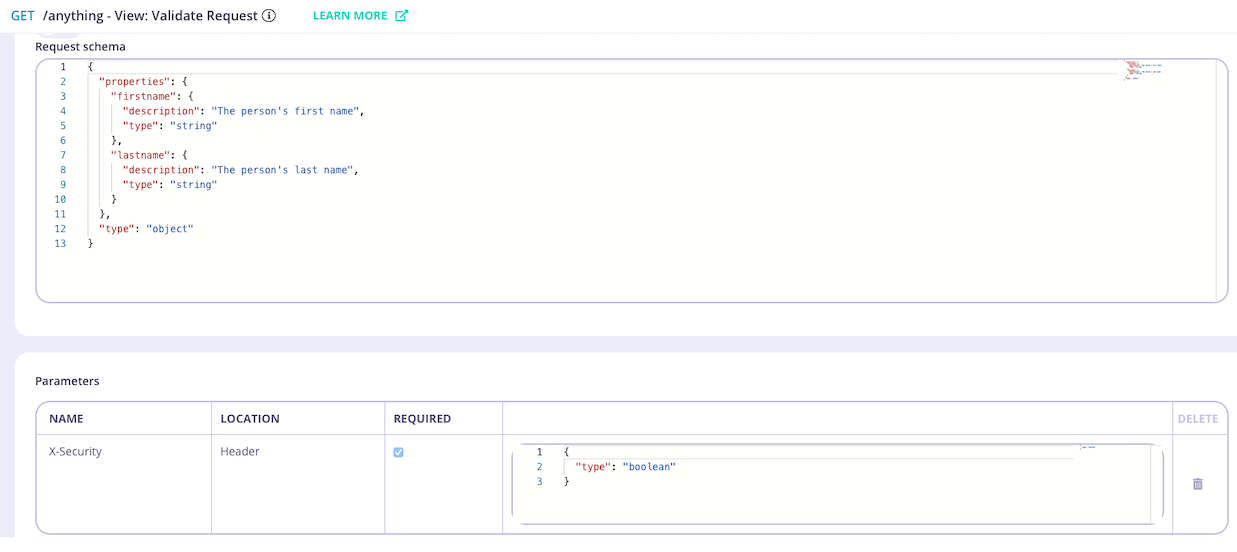
 The API Designer will show you the request body and request parameters schema detected in the OpenAPI description of the endpoint.
 3. **Configure the middleware**
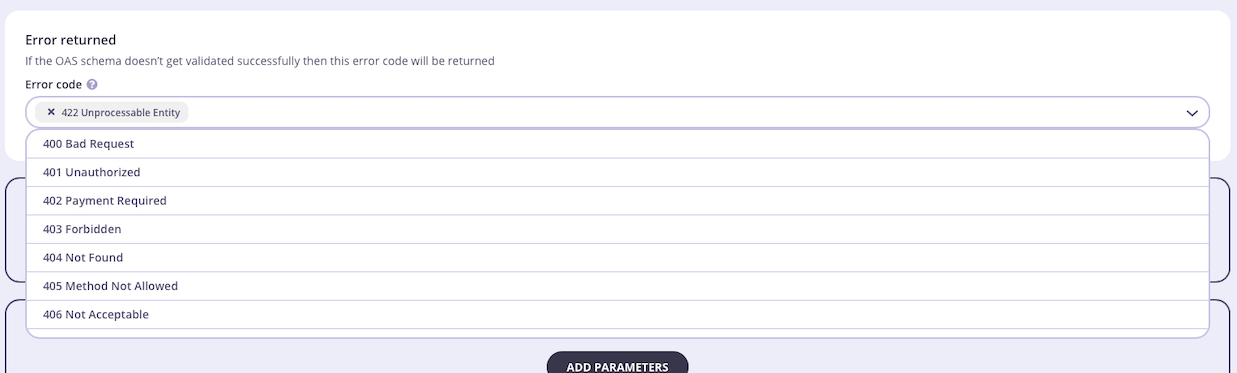
If required, you can select an alternative HTTP status code that will be returned if request validation fails.
3. **Configure the middleware**
If required, you can select an alternative HTTP status code that will be returned if request validation fails.
 4. **Save the API**
Select **ADD MIDDLEWARE** to save the middleware configuration. Remember to select **SAVE API** to apply the changes.
## Using Classic
The [request validation](/nightly/#request-validation-overview) middleware provides a way to validate the presence, correctness and conformity of HTTP requests to make sure they meet the expected format required by the upstream API endpoints.
When working with legacy Tyk Classic APIs, request validation is performed by the `Validate JSON` middleware which can be enabled per-endpoint. The schema against which requests are compared is defined in the middleware configuration and is limited to the request body (payload). Request headers and path/query parameters cannot be validated when using Tyk Classic APIs.
This middleware is configured in the Tyk Classic API Definition. You can do this via the Tyk Dashboard API or in the API Designer.
If you're using the newer Tyk OAS APIs, then check out the [Tyk OAS](/nightly/api-management/traffic-transformation/request-validation#request-validation-using-tyk-oas) page.
If you're using Tyk Operator then check out the [configuring the middleware in Tyk Operator](/nightly/#tyk-operator) section below.
### API Definition
To enable the middleware you must add a new `validate_json` object to the `extended_paths` section of your API definition.
The `validate_json` object has the following configuration:
* `path`: the endpoint path
* `method`: the endpoint HTTP method
* `schema`: the [JSON schema](https://json-schema.org/understanding-json-schema/basics) against which the request body will be compared
* `error_response_code`: the HTTP status code that will be returned if validation fails (defaults to `422 Unprocessable Entity`)
For example:
```json {linenos=true, linenostart=1} theme={null}
{
"extended_paths": {
"validate_json": [
{
"disabled": false,
"path": "/register",
"method": "POST",
"schema": {
"type": "object",
"properties": {
"firstname": {
"type": "string",
"description": "The person's first name"
},
"lastname": {
"type": "string",
"description": "The person's last name"
}
}
},
"error_response_code": 422
}
]
}
}
```
In this example the Validate JSON middleware has been configured for requests to the `POST /register` endpoint. For any call made to this endpoint, Tyk will compare the request body with the schema and, if it does not match, the request will be rejected with the error code `HTTP 422 Unprocessable Entity`.
#### Understanding JSON Schema Version Handling
The Gateway automatically detects the version of the JSON schema from the `$schema` field in your schema definition. This field specifies the version of the [JSON schema standard](https://json-schema.org/specification-links) to be followed.
From Tyk 5.8 onwards, supported versions are [draft-04](https://json-schema.org/draft-04/schema), [draft-06](https://json-schema.org/draft-06/schema) and [draft-07](https://json-schema.org/draft-07/schema).
In previous versions of Tyk, only [draft-04](https://json-schema.org/draft-04/schema) is supported. Please be careful if downgrading from Tyk 5.8 to an earlier version that your JSON is valid as you might experience unexpected behaviour if using features from newer drafts of the JSON schema.
* If the `$schema` field is present, the Gateway strictly follows the rules of the specified version.
* If the `$schema` field is missing or the version is not specified, the Gateway uses a hybrid mode that combines features from multiple schema versions. This mode ensures that the validation will still work, but may not enforce the exact rules of a specific version.
To ensure consistent and predictable validation, it is recommended to always include the `$schema` field in your schema definition. For example:
```json theme={null}
{
"$schema": "http://json-schema.org/draft-07/schema#",
"type": "object",
"properties": {
"firstname": {
"type": "string"
},
"lastname": {
"type": "string"
}
}
}
```
By including `$schema`, the validator can operate in strict mode, ensuring that the rules for your chosen schema version are followed exactly.
### API Designer
You can use the API Designer in the Tyk Dashboard to configure the request validation middleware for your Tyk Classic API by following these steps.
1. **Add an endpoint for the path and select the plugin**
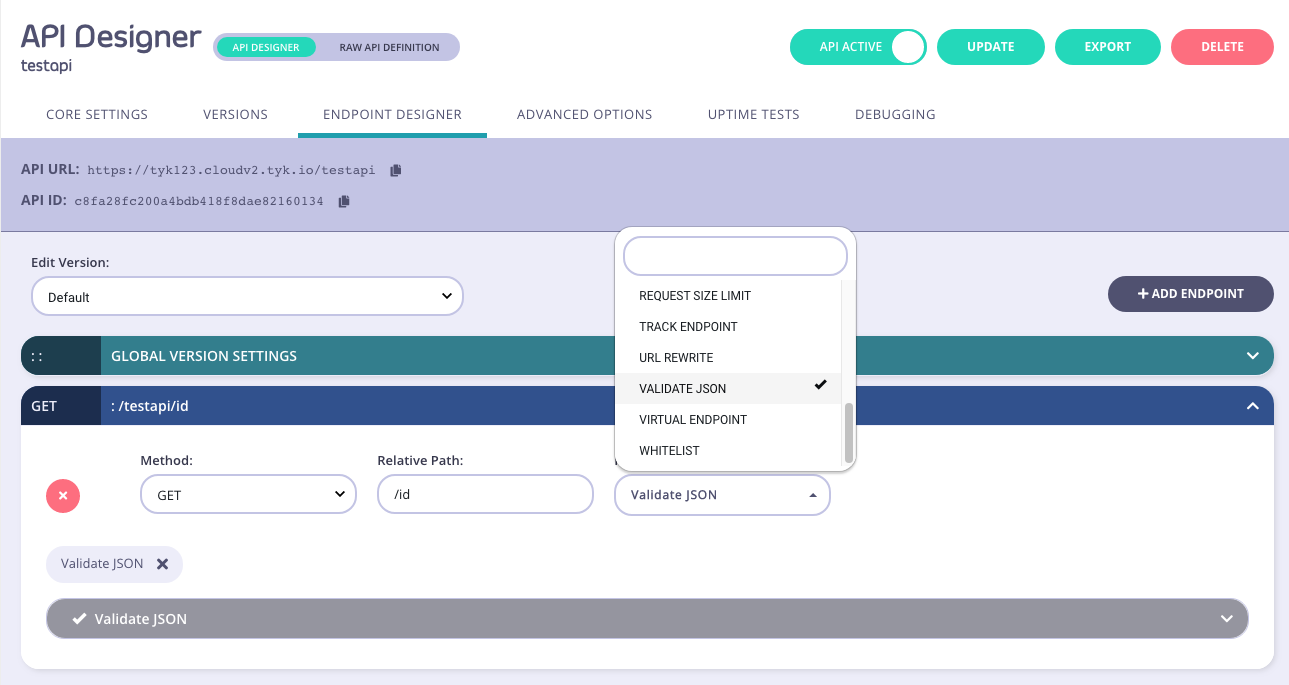
From the **Endpoint Designer** add an endpoint that matches the path for which you want to validate the request payload. Select the **Validate JSON** plugin.
4. **Save the API**
Select **ADD MIDDLEWARE** to save the middleware configuration. Remember to select **SAVE API** to apply the changes.
## Using Classic
The [request validation](/nightly/#request-validation-overview) middleware provides a way to validate the presence, correctness and conformity of HTTP requests to make sure they meet the expected format required by the upstream API endpoints.
When working with legacy Tyk Classic APIs, request validation is performed by the `Validate JSON` middleware which can be enabled per-endpoint. The schema against which requests are compared is defined in the middleware configuration and is limited to the request body (payload). Request headers and path/query parameters cannot be validated when using Tyk Classic APIs.
This middleware is configured in the Tyk Classic API Definition. You can do this via the Tyk Dashboard API or in the API Designer.
If you're using the newer Tyk OAS APIs, then check out the [Tyk OAS](/nightly/api-management/traffic-transformation/request-validation#request-validation-using-tyk-oas) page.
If you're using Tyk Operator then check out the [configuring the middleware in Tyk Operator](/nightly/#tyk-operator) section below.
### API Definition
To enable the middleware you must add a new `validate_json` object to the `extended_paths` section of your API definition.
The `validate_json` object has the following configuration:
* `path`: the endpoint path
* `method`: the endpoint HTTP method
* `schema`: the [JSON schema](https://json-schema.org/understanding-json-schema/basics) against which the request body will be compared
* `error_response_code`: the HTTP status code that will be returned if validation fails (defaults to `422 Unprocessable Entity`)
For example:
```json {linenos=true, linenostart=1} theme={null}
{
"extended_paths": {
"validate_json": [
{
"disabled": false,
"path": "/register",
"method": "POST",
"schema": {
"type": "object",
"properties": {
"firstname": {
"type": "string",
"description": "The person's first name"
},
"lastname": {
"type": "string",
"description": "The person's last name"
}
}
},
"error_response_code": 422
}
]
}
}
```
In this example the Validate JSON middleware has been configured for requests to the `POST /register` endpoint. For any call made to this endpoint, Tyk will compare the request body with the schema and, if it does not match, the request will be rejected with the error code `HTTP 422 Unprocessable Entity`.
#### Understanding JSON Schema Version Handling
The Gateway automatically detects the version of the JSON schema from the `$schema` field in your schema definition. This field specifies the version of the [JSON schema standard](https://json-schema.org/specification-links) to be followed.
From Tyk 5.8 onwards, supported versions are [draft-04](https://json-schema.org/draft-04/schema), [draft-06](https://json-schema.org/draft-06/schema) and [draft-07](https://json-schema.org/draft-07/schema).
In previous versions of Tyk, only [draft-04](https://json-schema.org/draft-04/schema) is supported. Please be careful if downgrading from Tyk 5.8 to an earlier version that your JSON is valid as you might experience unexpected behaviour if using features from newer drafts of the JSON schema.
* If the `$schema` field is present, the Gateway strictly follows the rules of the specified version.
* If the `$schema` field is missing or the version is not specified, the Gateway uses a hybrid mode that combines features from multiple schema versions. This mode ensures that the validation will still work, but may not enforce the exact rules of a specific version.
To ensure consistent and predictable validation, it is recommended to always include the `$schema` field in your schema definition. For example:
```json theme={null}
{
"$schema": "http://json-schema.org/draft-07/schema#",
"type": "object",
"properties": {
"firstname": {
"type": "string"
},
"lastname": {
"type": "string"
}
}
}
```
By including `$schema`, the validator can operate in strict mode, ensuring that the rules for your chosen schema version are followed exactly.
### API Designer
You can use the API Designer in the Tyk Dashboard to configure the request validation middleware for your Tyk Classic API by following these steps.
1. **Add an endpoint for the path and select the plugin**
From the **Endpoint Designer** add an endpoint that matches the path for which you want to validate the request payload. Select the **Validate JSON** plugin.
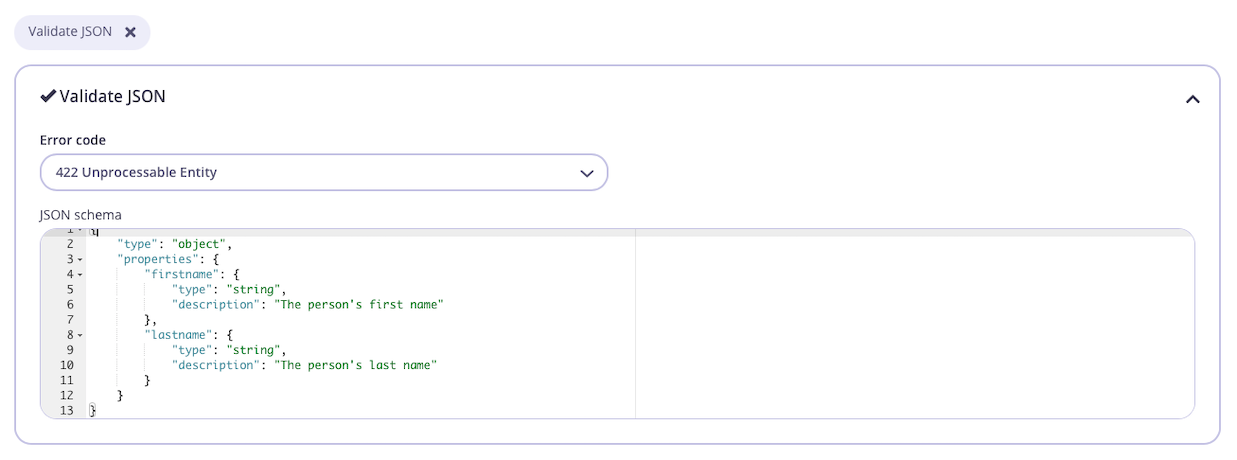
 2. **Configure the middleware**
Once you have selected the request validation middleware for the endpoint, you can select an error code from the drop-down list (if you don't want to use the default `422 Unprocessable Entity`) and enter your JSON schema in the editor.
2. **Configure the middleware**
Once you have selected the request validation middleware for the endpoint, you can select an error code from the drop-down list (if you don't want to use the default `422 Unprocessable Entity`) and enter your JSON schema in the editor.
 3. **Save the API**
Use the *save* or *create* buttons to save the changes and activate the middleware.
### Tyk Operator
The process for configuring the middleware in Tyk Operator is similar to that explained in configuring the middleware in the Tyk Classic API Definition. To configure the request validation middleware you must add a new `validate_json` object to the `extended_paths` section of your API definition, for example:
The example API Definition below configures an API to listen on path `/httpbin` and forwards requests upstream to [http://httpbin.org](http://httpbin.org).
In this example, the Validate JSON middleware has been configured for requests to the `GET /get` endpoint. For any call made to this endpoint, Tyk will compare the request body with the schema and, if it does not match, the request will be rejected with the error code `HTTP 422 Unprocessable Entity`.
```yaml {linenos=true, linenostart=1, hl_lines=["26-41"]} theme={null}
apiVersion: tyk.tyk.io/v1alpha1
kind: ApiDefinition
metadata:
name: httpbin-json-schema-validation
spec:
name: httpbin-json-schema-validation
use_keyless: true
protocol: http
active: true
proxy:
target_url: http://httpbin.org
listen_path: /httpbin
strip_listen_path: true
version_data:
default_version: Default
not_versioned: true
versions:
Default:
name: Default
use_extended_paths: true
paths:
black_list: []
ignored: []
white_list: []
extended_paths:
validate_json:
- error_response_code: 422
disabled: false
path: /get
method: GET
schema:
properties:
userName:
type: string
minLength: 2
age:
type: integer
minimum: 1
required:
- userName
type: object
```
3. **Save the API**
Use the *save* or *create* buttons to save the changes and activate the middleware.
### Tyk Operator
The process for configuring the middleware in Tyk Operator is similar to that explained in configuring the middleware in the Tyk Classic API Definition. To configure the request validation middleware you must add a new `validate_json` object to the `extended_paths` section of your API definition, for example:
The example API Definition below configures an API to listen on path `/httpbin` and forwards requests upstream to [http://httpbin.org](http://httpbin.org).
In this example, the Validate JSON middleware has been configured for requests to the `GET /get` endpoint. For any call made to this endpoint, Tyk will compare the request body with the schema and, if it does not match, the request will be rejected with the error code `HTTP 422 Unprocessable Entity`.
```yaml {linenos=true, linenostart=1, hl_lines=["26-41"]} theme={null}
apiVersion: tyk.tyk.io/v1alpha1
kind: ApiDefinition
metadata:
name: httpbin-json-schema-validation
spec:
name: httpbin-json-schema-validation
use_keyless: true
protocol: http
active: true
proxy:
target_url: http://httpbin.org
listen_path: /httpbin
strip_listen_path: true
version_data:
default_version: Default
not_versioned: true
versions:
Default:
name: Default
use_extended_paths: true
paths:
black_list: []
ignored: []
white_list: []
extended_paths:
validate_json:
- error_response_code: 422
disabled: false
path: /get
method: GET
schema:
properties:
userName:
type: string
minLength: 2
age:
type: integer
minimum: 1
required:
- userName
type: object
```