> ## Documentation Index
> Fetch the complete documentation index at: https://tyk.io/docs/llms.txt
> Use this file to discover all available pages before exploring further.
# Send Tyk Traces to Elasticsearch
> Step-by-step guide to connect Tyk Gateway distributed traces to Elasticsearch using the OpenTelemetry Collector, for OSS, self-managed, and hybrid deployments.
This guide explains how to set up [Elasticsearch](https://www.elastic.co/observability) to ingest OpenTelemetry traces via the OpenTelemetry Collector (OTel Collector).
## Prerequisites
Ensure the following prerequisites are met before proceeding:
* Tyk Gateway v5.2 or higher
* OpenTelemetry Collector deployed locally
* Elasticsearch deployed locally or an account on Elastic Cloud with Elastic APM
Elastic Observability natively supports OpenTelemetry and its OpenTelemetry protocol (OTLP) to ingest traces, metrics, and logs.
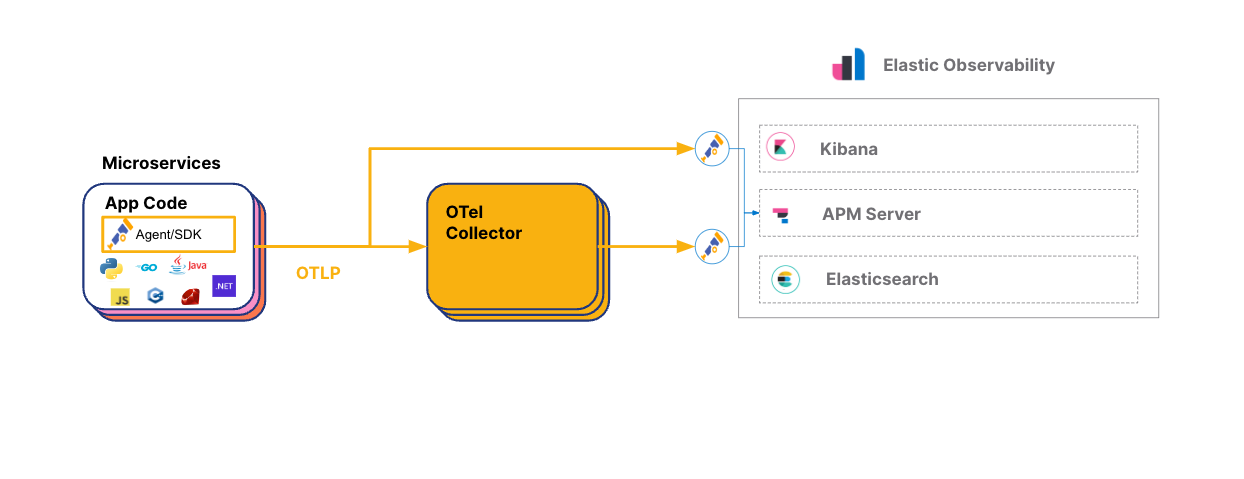 Credit: Elasticsearch, [OpenTelemetry on Elastic](https://www.elastic.co/blog/opentelemetry-observability)
## Steps for Configuration
### Step 1. Configure Tyk Gateway
To enable OpenTelemetry when using Tyk Helm Charts add the following configuration to the Tyk Gateway section:
```yaml theme={null}
tyk-gateway:
gateway:
opentelemetry:
enabled: true
endpoint: {{Add your endpoint here}}
exporter: grpc
```
To enable OpenTelemetry when using Docker Compose add the following environment variables to your `docker-compose.yml` file for Tyk Gateway:
```yaml theme={null}
environment:
- TYK_GW_OPENTELEMETRY_ENABLED=true
- TYK_GW_OPENTELEMETRY_EXPORTER=grpc
- TYK_GW_OPENTELEMETRY_ENDPOINT={{Add your endpoint here}}
```
For both deployment types, make sure to replace `` with the appropriate endpoint from your OpenTelemetry collector.
After enabling OpenTelemetry for the Gateway, you can activate [detailed tracing](/nightly/api-management/traces#detailed-tracing) for specific APIs in their respective API definitions. Detailed tracing is not enabled by default so you will need to set the `detailed_tracing` option to `true` to collect detailed traces.
### Step 2. Configure the OpenTelemetry Collector to Export to Elasticsearch
To configure the OTel Collector with Elasticsearch Cloud, follow these steps:
1. Sign up for an [Elastic account](https://www.elastic.co/) if you haven't already
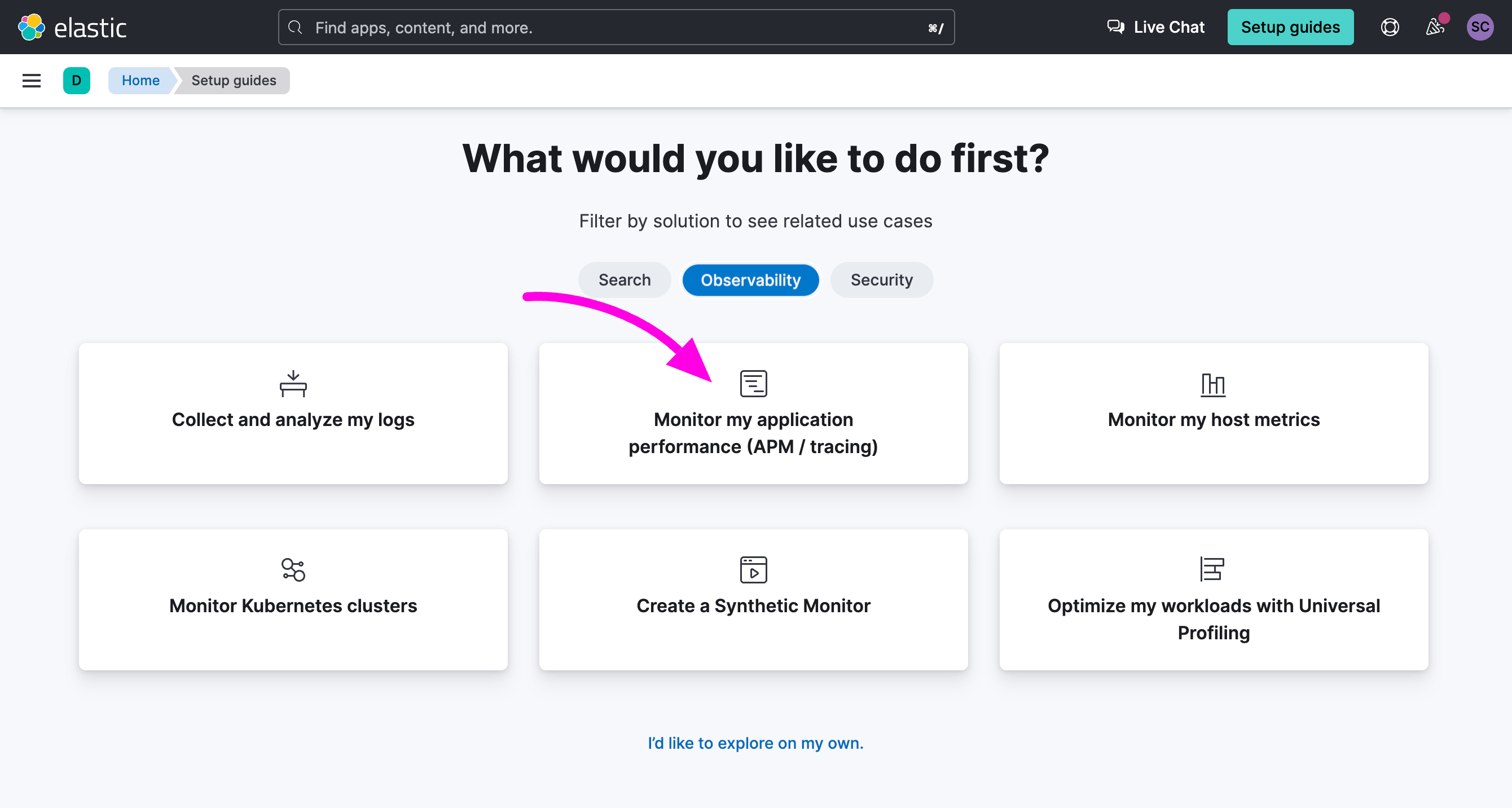
2. Once logged in to your Elastic account, select **Observability** and click on the option **Monitor my application performance**
Credit: Elasticsearch, [OpenTelemetry on Elastic](https://www.elastic.co/blog/opentelemetry-observability)
## Steps for Configuration
### Step 1. Configure Tyk Gateway
To enable OpenTelemetry when using Tyk Helm Charts add the following configuration to the Tyk Gateway section:
```yaml theme={null}
tyk-gateway:
gateway:
opentelemetry:
enabled: true
endpoint: {{Add your endpoint here}}
exporter: grpc
```
To enable OpenTelemetry when using Docker Compose add the following environment variables to your `docker-compose.yml` file for Tyk Gateway:
```yaml theme={null}
environment:
- TYK_GW_OPENTELEMETRY_ENABLED=true
- TYK_GW_OPENTELEMETRY_EXPORTER=grpc
- TYK_GW_OPENTELEMETRY_ENDPOINT={{Add your endpoint here}}
```
For both deployment types, make sure to replace `` with the appropriate endpoint from your OpenTelemetry collector.
After enabling OpenTelemetry for the Gateway, you can activate [detailed tracing](/nightly/api-management/traces#detailed-tracing) for specific APIs in their respective API definitions. Detailed tracing is not enabled by default so you will need to set the `detailed_tracing` option to `true` to collect detailed traces.
### Step 2. Configure the OpenTelemetry Collector to Export to Elasticsearch
To configure the OTel Collector with Elasticsearch Cloud, follow these steps:
1. Sign up for an [Elastic account](https://www.elastic.co/) if you haven't already
2. Once logged in to your Elastic account, select **Observability** and click on the option **Monitor my application performance**
 3. Scroll down to the **APM Agents** section and click on the **OpenTelemetry** tab
 4. Search for the section **Configure OpenTelemetry in your application"** You will need to copy the value of `OTEL_EXPORTER_OTLP_ENDPOINT` and `OTEL_EXPORTER_OTLP_HEADERS` in your OpenTelemetry Collector configuration file.
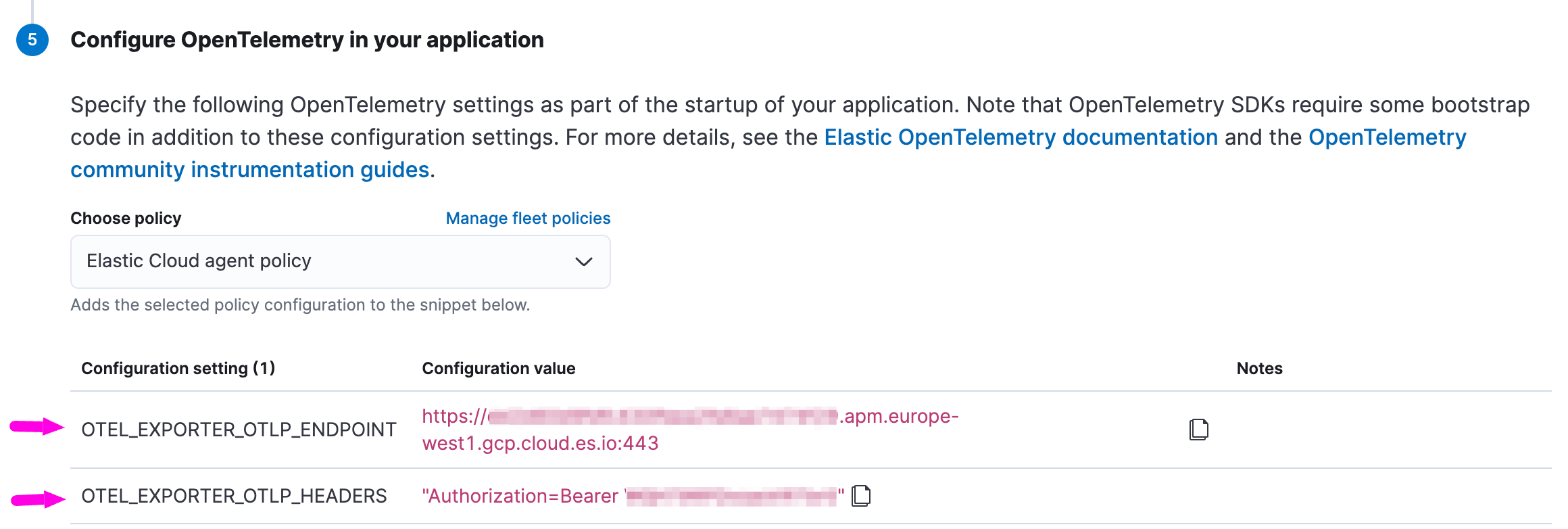 5. Update your OpenTelemetry Collector configuration, here's a simple example:
```yaml expandable theme={null}
receivers:
otlp:
protocols:
grpc:
endpoint: 0.0.0.0:4317 # OpenTelemetry receiver endpoint
processors:
batch:
exporters:
otlp/elastic:
endpoint: "ELASTIC_APM_SERVER_ENDPOINT_GOES_HERE" #exclude scheme, e.g. HTTPS:// or HTTP://
headers:
# Elastic APM Server secret token
Authorization: "Bearer ELASTIC_APM_SECRET_TOKEN_GOES_HERE"
service:
pipelines:
traces:
receivers: [otlp]
exporters: [otlp/elastic]
```
If are running Elasticsearch locally, you will need to use your APM Server endpoint (elastic-apm-server:8200) and set up [a secret token authorization in ElasticSearch](https://www.elastic.co/guide/en/observability/current/secret-token.html).
You can refer to the [example configuration provided by Elastic](https://www.elastic.co/guide/en/observability/current/open-telemetry-direct.html#connect-open-telemetry-collector) for more guidance on the OpenTelemetry Collector configuration.
### Step 3. Explore OpenTelemetry Traces in Elasticsearch
In Elasticsearch Cloud:
1. Go to **Home** and select **Observability**.
5. Update your OpenTelemetry Collector configuration, here's a simple example:
```yaml expandable theme={null}
receivers:
otlp:
protocols:
grpc:
endpoint: 0.0.0.0:4317 # OpenTelemetry receiver endpoint
processors:
batch:
exporters:
otlp/elastic:
endpoint: "ELASTIC_APM_SERVER_ENDPOINT_GOES_HERE" #exclude scheme, e.g. HTTPS:// or HTTP://
headers:
# Elastic APM Server secret token
Authorization: "Bearer ELASTIC_APM_SECRET_TOKEN_GOES_HERE"
service:
pipelines:
traces:
receivers: [otlp]
exporters: [otlp/elastic]
```
If are running Elasticsearch locally, you will need to use your APM Server endpoint (elastic-apm-server:8200) and set up [a secret token authorization in ElasticSearch](https://www.elastic.co/guide/en/observability/current/secret-token.html).
You can refer to the [example configuration provided by Elastic](https://www.elastic.co/guide/en/observability/current/open-telemetry-direct.html#connect-open-telemetry-collector) for more guidance on the OpenTelemetry Collector configuration.
### Step 3. Explore OpenTelemetry Traces in Elasticsearch
In Elasticsearch Cloud:
1. Go to **Home** and select **Observability**.
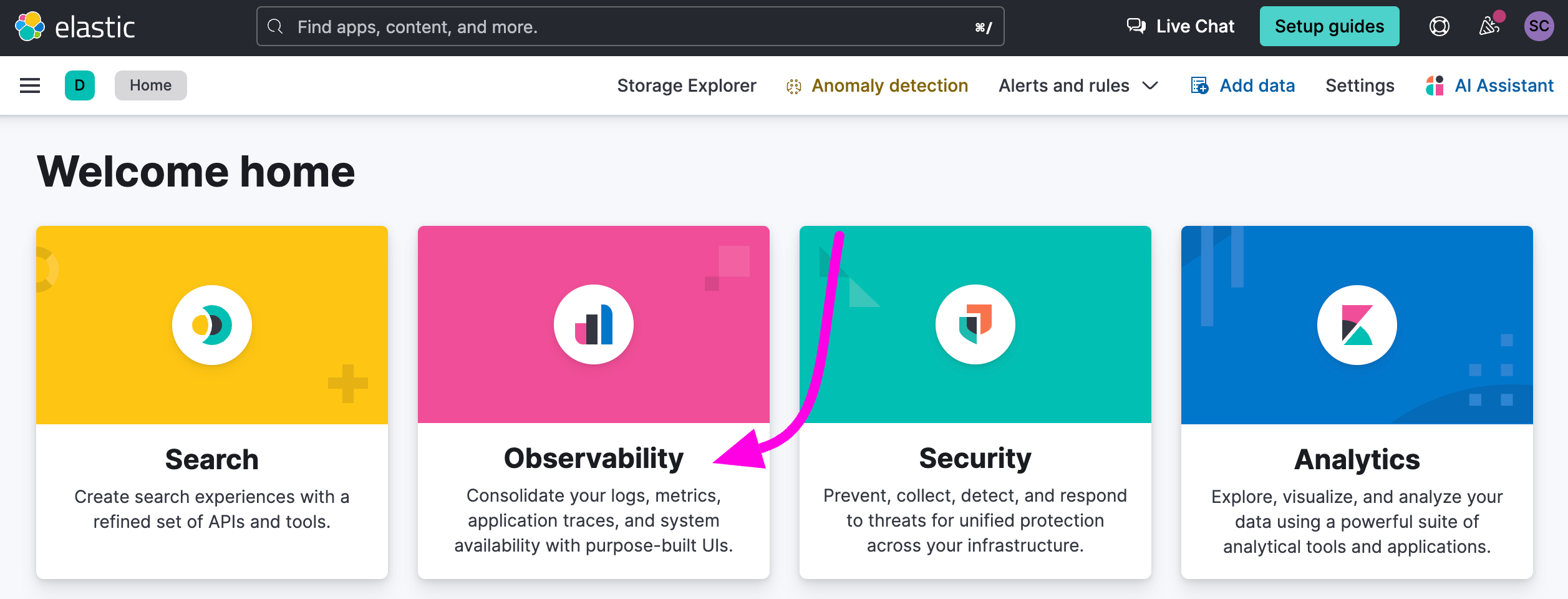 2. On the right menu, click on **APM / Services**.
3. Click on **tyk-gateway**.
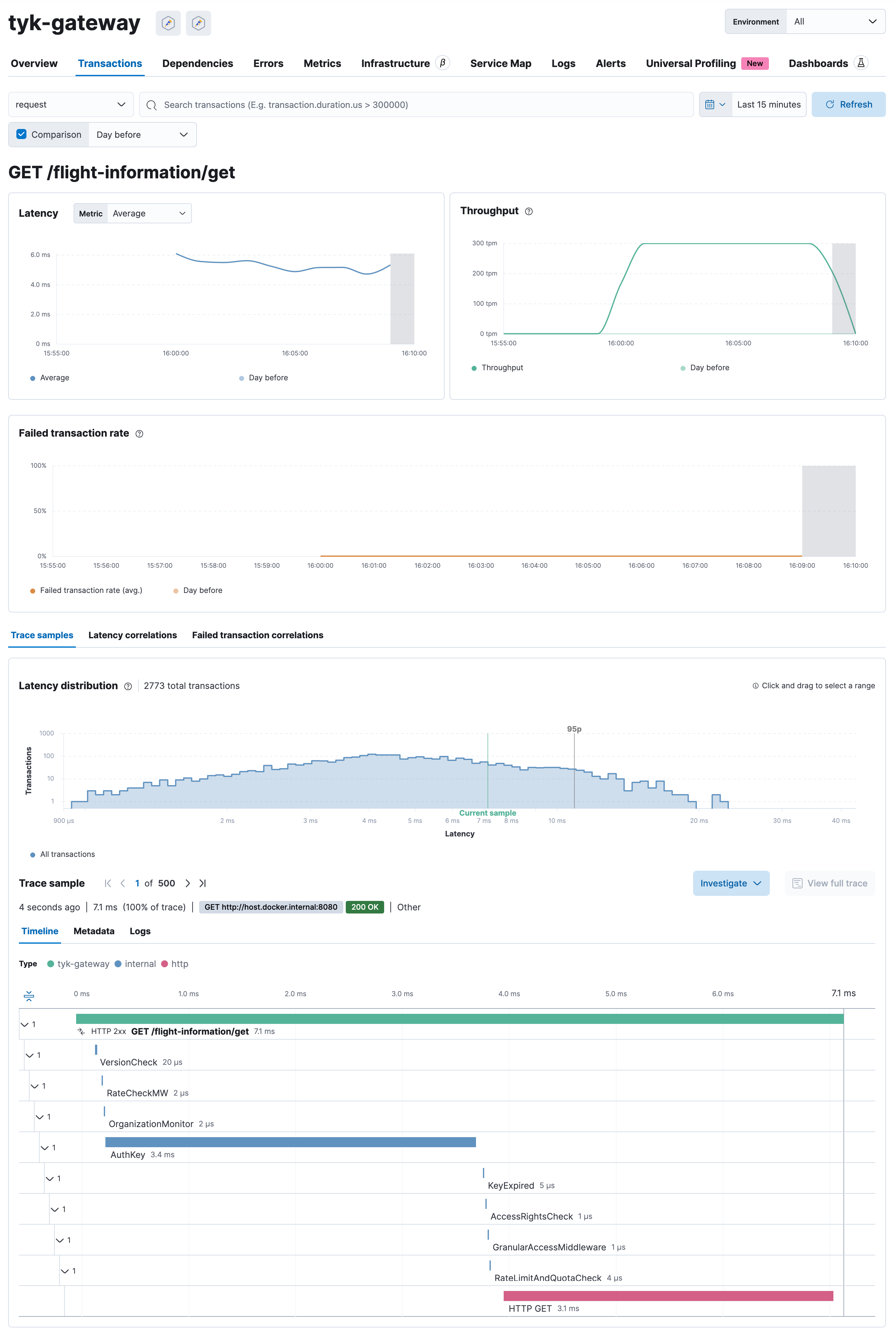
4. You will see a dashboard automatically generated based on the distributed traces sent by Tyk Gateway to Elasticsearch.
2. On the right menu, click on **APM / Services**.
3. Click on **tyk-gateway**.
4. You will see a dashboard automatically generated based on the distributed traces sent by Tyk Gateway to Elasticsearch.
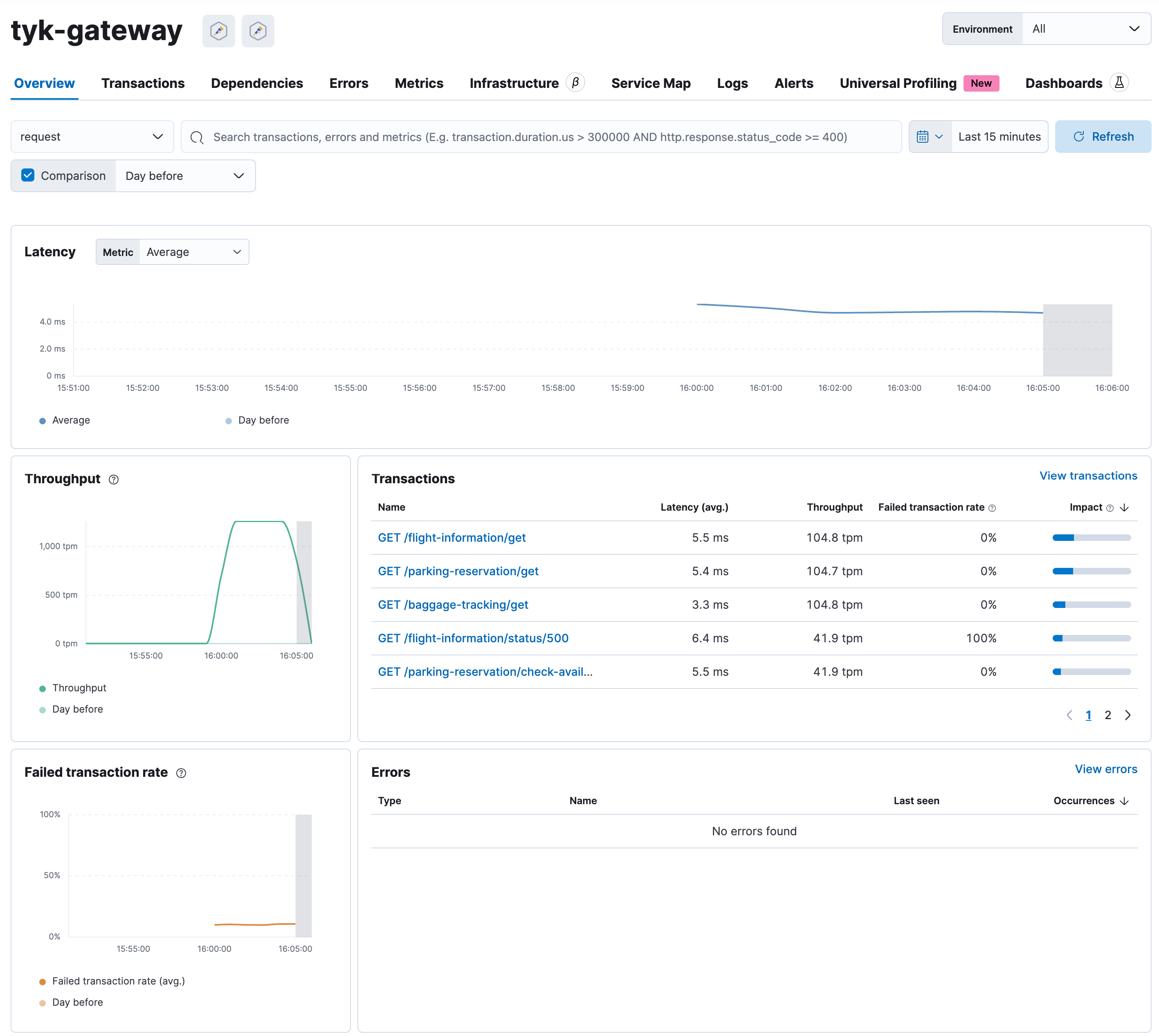 Select a transaction to view more details, including the distributed traces: