> ## Documentation Index
> Fetch the complete documentation index at: https://tyk.io/docs/llms.txt
> Use this file to discover all available pages before exploring further.
# How to secure an MCP proxy
> Secure a remote MCP Server so only authorised agents can connect. This guide uses the Tyk Mock MCP Server and takes around ten minutes.
After completing the [quickstart](/nightly/ai-management/mcp-gateway/quickstart), you have a working MCP proxy, but it accepts connections from any client. This guide secures your remote MCP server so that only agents with a valid key can reach it.
***
## Before you begin
* A Tyk Gateway (v5.13 or later) connected to your Tyk Dashboard
* The Mock MCP Server running on `http://localhost:7878`. See the [quickstart](/nightly/ai-management/mcp-gateway/quickstart).
* An MCP proxy named **Mock MCP Server** already created. Also covered in the quickstart.
* [Node.js](https://nodejs.org/) 18 or later (to run [MCP Inspector](https://github.com/modelcontextprotocol/inspector))
* A Dashboard user account with MCP write permissions
***
## Instructions
### Step 1: Enable authentication
1. In the Tyk Dashboard sidebar, click **MCP**, then click **Edit** next to **Mock MCP Server**.
2. In the designer, click the **Authentication** switch.
3. Select **Auth Token** as the authentication method.
4. Set the token location to **use header value** and leave the header name as `Authorization`.
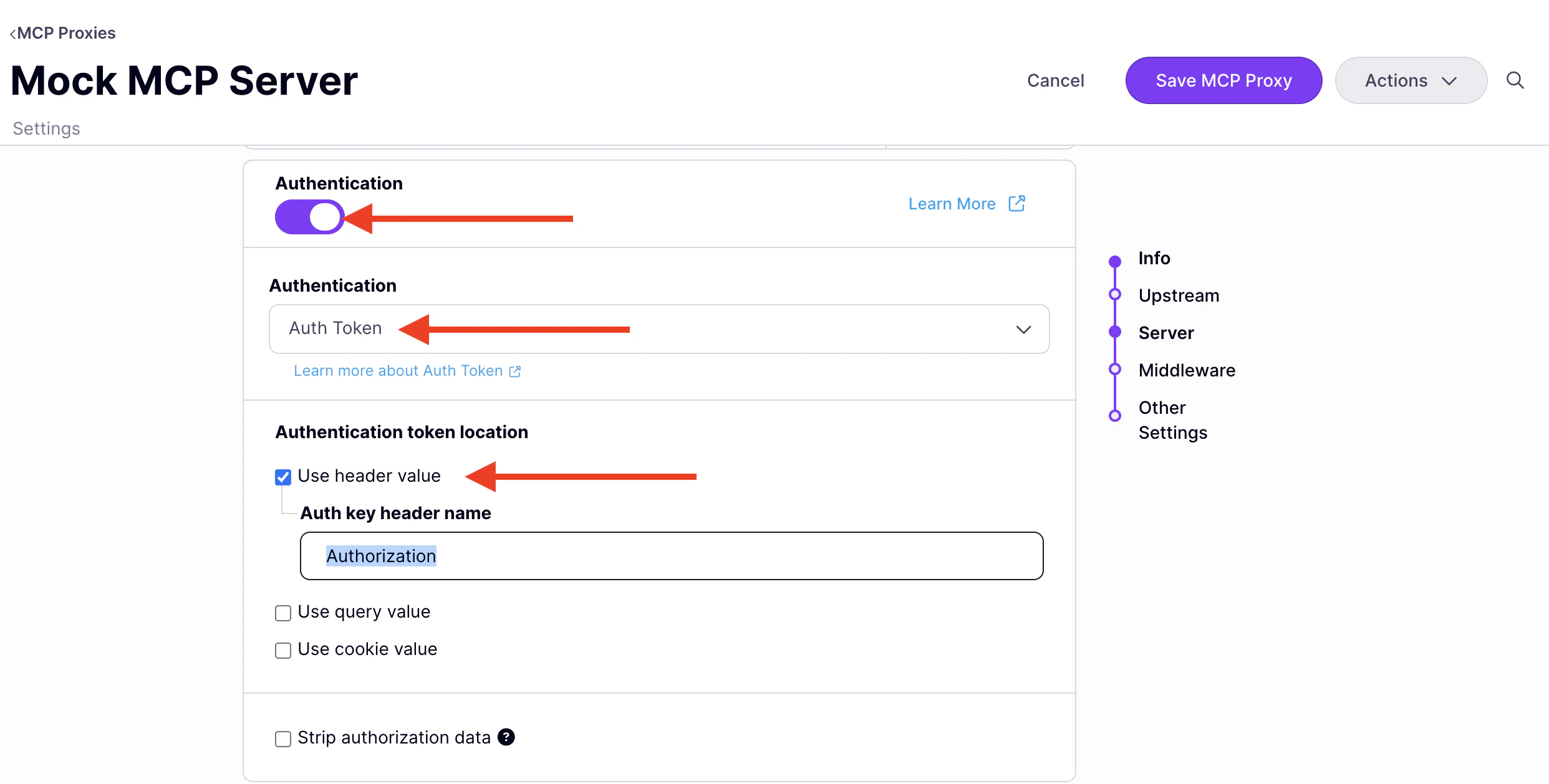 5. Click **Save MCP Proxy**.
The proxy now requires a bearer token on every request. Clients that connect without a valid key receive a `401 Unauthorized` response.
### Step 2: Issue an API key
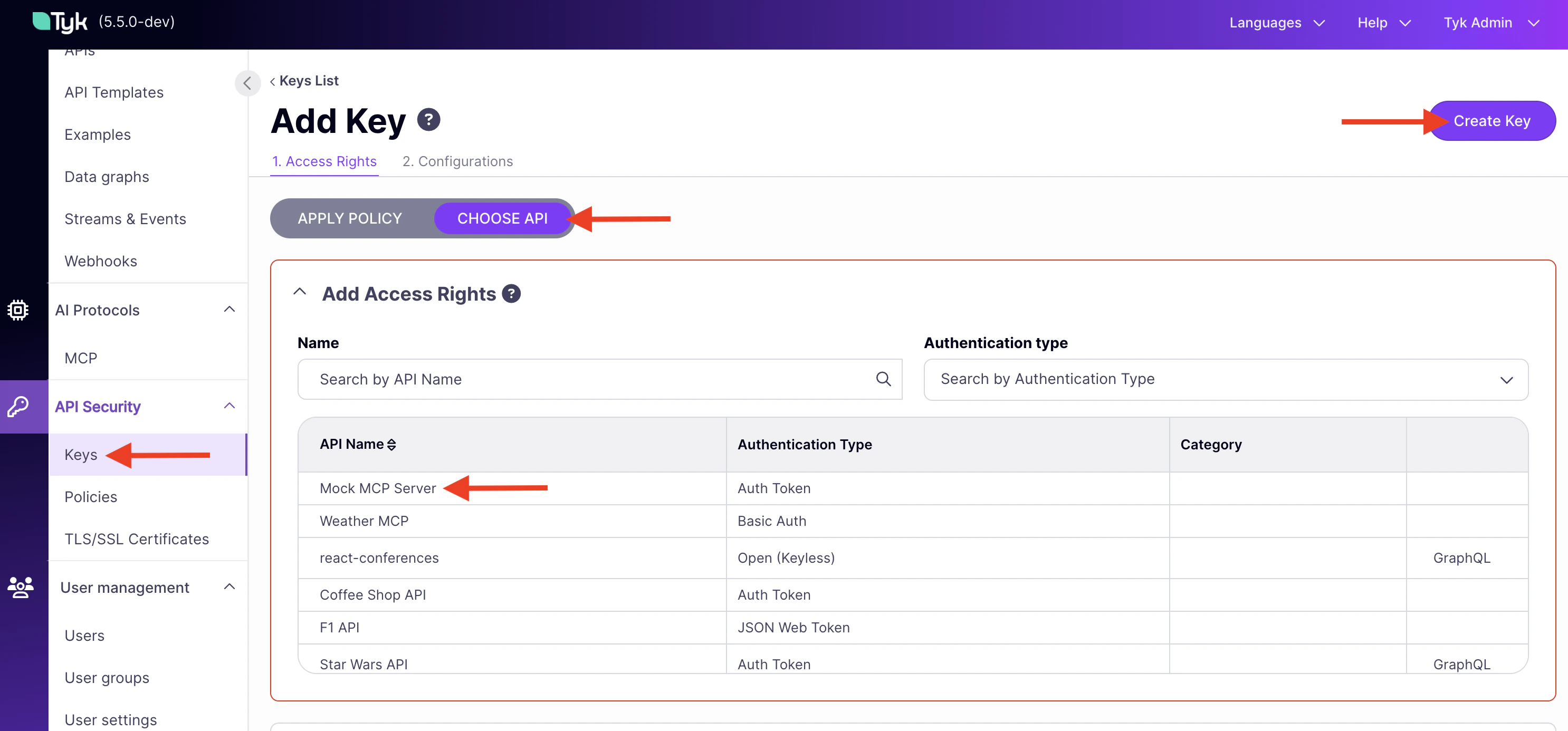
1. In the Dashboard sidebar, click **Keys**, then click **Add Key**.
2. Under **Access rights**, click **Choose API** and select **Mock MCP Server**.
3. Click **Create Key**. Copy the key shown — you cannot retrieve it after navigating away.
5. Click **Save MCP Proxy**.
The proxy now requires a bearer token on every request. Clients that connect without a valid key receive a `401 Unauthorized` response.
### Step 2: Issue an API key
1. In the Dashboard sidebar, click **Keys**, then click **Add Key**.
2. Under **Access rights**, click **Choose API** and select **Mock MCP Server**.
3. Click **Create Key**. Copy the key shown — you cannot retrieve it after navigating away.
 ### Step 3: Verify with MCP Inspector
1. Start MCP Inspector:
```bash theme={null}
npx @modelcontextprotocol/inspector
```
2. Open the URL printed in your terminal.
3. Set **Transport Type** to `Streamable HTTP`.
4. Set **URL** to your MCP endpoint (find it under **MCP Proxy URL** in the proxy designer, then append `/mcp`).
5. Click **Connect** without adding an `Authorization` header. The connection fails with a `401 Unauthorized` error, confirming authentication is enforced.
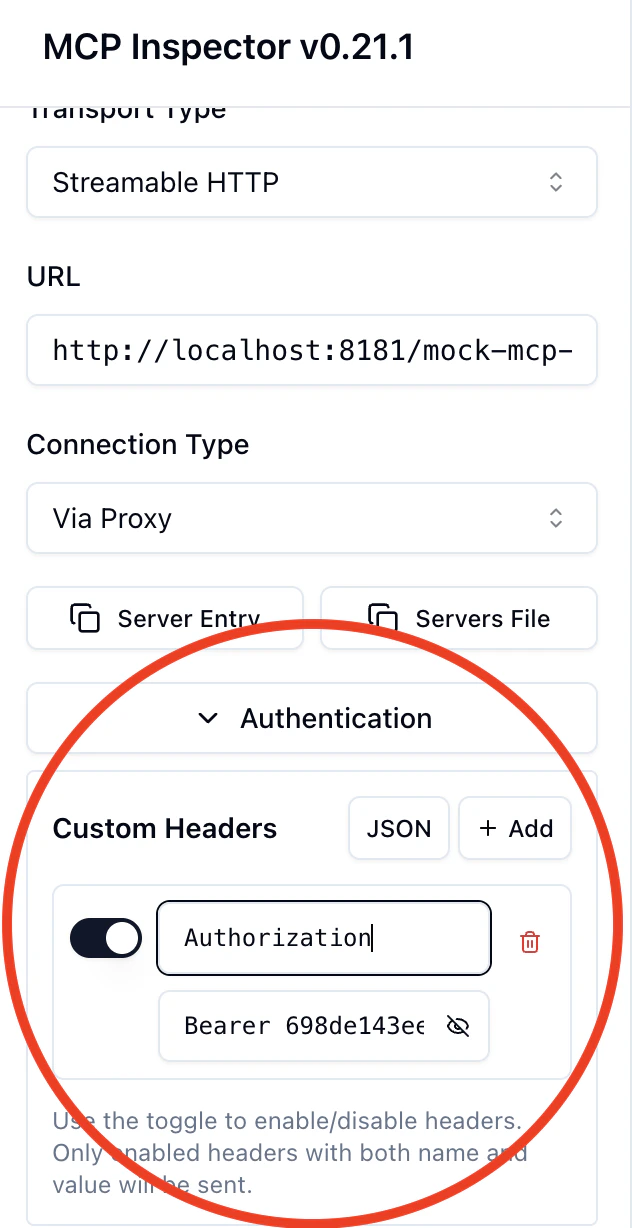
6. Add a header: `Authorization` = `Bearer {your-api-key}` and click **Connect** again.
### Step 3: Verify with MCP Inspector
1. Start MCP Inspector:
```bash theme={null}
npx @modelcontextprotocol/inspector
```
2. Open the URL printed in your terminal.
3. Set **Transport Type** to `Streamable HTTP`.
4. Set **URL** to your MCP endpoint (find it under **MCP Proxy URL** in the proxy designer, then append `/mcp`).
5. Click **Connect** without adding an `Authorization` header. The connection fails with a `401 Unauthorized` error, confirming authentication is enforced.
6. Add a header: `Authorization` = `Bearer {your-api-key}` and click **Connect** again.
 7. Click the **Tools** tab. All 15 Mock MCP Server tools appear.
***
## Limitations and alternatives
API key authentication via a bearer token header is a straightforward way to secure an MCP proxy, but it has limitations: keys are long-lived, there is no built-in token expiry or rotation, and clients must manage the key securely.
For more demanding scenarios, Tyk supports a range of [client authentication methods](/nightly/api-management/client-authentication), including JWT, mutual TLS, and OAuth 2.1. For MCP specifically, Tyk extends OAuth 2.1 with Protected Resource Metadata so MCP-aware clients can discover authentication requirements automatically. See [MCP Gateway: OAuth 2.1 authentication](/nightly/ai-management/mcp-gateway/oauth-2-1).
7. Click the **Tools** tab. All 15 Mock MCP Server tools appear.
***
## Limitations and alternatives
API key authentication via a bearer token header is a straightforward way to secure an MCP proxy, but it has limitations: keys are long-lived, there is no built-in token expiry or rotation, and clients must manage the key securely.
For more demanding scenarios, Tyk supports a range of [client authentication methods](/nightly/api-management/client-authentication), including JWT, mutual TLS, and OAuth 2.1. For MCP specifically, Tyk extends OAuth 2.1 with Protected Resource Metadata so MCP-aware clients can discover authentication requirements automatically. See [MCP Gateway: OAuth 2.1 authentication](/nightly/ai-management/mcp-gateway/oauth-2-1).