> ## Documentation Index
> Fetch the complete documentation index at: https://tyk.io/docs/llms.txt
> Use this file to discover all available pages before exploring further.
# Archived Releases
> Tyk Old releases
## 2.9.0 Release Notes
### TCP Proxying
Tyk now can be used as a reverse proxy for your TCP services. It means that you can put Tyk not only on top of your APIs, but on top of **any** network application, like databases, services using custom protocols and etc.
The main benefit of using Tyk as your TCP proxy is that functionality you used to managed your APIs now can be used for your TCP services as well. Features like load balancing, service discovery, Mutual TLS (both authorization and communication with upstream), certificate pinning: all work exactly the same way as for your HTTP APIs.
See our [TCP Proxy Docs](/key-concepts/tcp-proxy) for more details.
### APIs as Products
With this release we have removed all the barriers on how you can mix and match policies together, providing you with ultimate flexibility for configuring your access rules.
Now a key can have multiple policies, each containing rules for different APIs. In this case each distinct policy will have its own rate limit and quota counters. For example if the first policy gives access to `API1` and second policy to `API2` and `API3`, if you create a key with both policies, your user will have access to all three APIs, where `API1` will have quotas and rate limits defined inside the first policy, and `API2`, `API3` will have shared quotas and rate limits defined inside the second policy.
Additionally you can now mix policies defined for the same API but having different path and methods access rules. For example you can have one policy which allows only access to `/users` and a second policy giving user access to a `/companies` path. If you create a key with both policies, their access rules will be merged, and user will get access to both paths. See [Multiple APIs for single Key Requests](/tyk-developer-portal/tyk-portal-classic/portal-concepts#multiple-apis-for-a-single-key-request).
#### Developer Portal Updates
Developers now can have multiple API keys, and subscribe to multiple catalogs with a single key. Go to the Portal settings and set `Enable subscribing to multiple APIs with single key` option to enable this new flow. When enabled, developers will see the new API generation user interface, which allows users to request access to multiple Catalogs of the **same type** with a single key.
From an implementation point of view, Developer objects now have a `Keys` attribute, which is the map where the key is a `key` and the value is an array of policy IDs. The `Subscriptions` field can be considered as deprecated, with retained backwards compatibility. We have added new set of Developer APIs to manage the keys, similar to the deprecated subscriptions APIs.
Other changes:
* Added two new Portal templates, which are used by a new key request flow `portal/templates/request_multi_key.html`, `portal/templates/request_multi_key_success.html`
* The Portal Catalog list page has been updated to show the Catalog authentication mode
* The API dashboard screen now show keys instead of subscriptions, and if subscribed to multiple policies, it will show the allowance rules for all catalogs.
* The Key request API has been updated to accept an `apply_policies` array instead of `for_plan`
### JWT and OpenID scope support
Now you can set granular permissions on per user basis, by injecting permissions to the "scope" claim of a JSON Web Token. To make it work you need to provide mapping between the scope and policy ID, and thanks to enchanced policy merging capabilities mentioned above, Tyk will read the scope value from the JWT and will generate dynamic access rules. Your JWT scopes can look like `"users:read companies:write"` or similar, it is up to your imagination. OpenID supports it as well, but at the moment only if your OIDC provider can generate ID tokens in JWT format (which is very common this days).
See our [JWT Scope docs](/basic-config-and-security/security/authentication-authorization/json-web-tokens) for more details.
### Go plugins
[Go](https://golang.org/) is an open source programming language that makes it easy to build simple, reliable, and efficient software. The whole Tyk stack is written in Go language, and it is one of the reasons of behind our success.
With this release you now can write native Go plugins for Tyk. Which means extreme flexibility and the best performance without any overhead.
Your plugin can be as simple as:
```{.go} theme={null}
package main
import (
"net/http"
)
// AddFooBarHeader adds custom "Foo: Bar" header to the request
func AddFooBarHeader(rw http.ResponseWriter, r *http.Request) {
r.Header.Add("Foo", "Bar")
}
```
See our [Golang plugin documentation](/api-management/plugins/golang#) for more details.
### Distributed tracing
We have listened to you, and tracing is recently one of your most common requests. Distributed tracing takes your monitoring and profiling experience to the next level, since you can see the whole request flow, even if it has complex route though multiple services. And inside this flow, you can go deep down into the details like individual middleware execution performance.
At the moment we are offering [OpenTracing](https://opentracing.io/) support, with [Zipkin](https://zipkin.io/) and [Jaeger](https://www.jaegertracing.io/) as supported tracers.
See our [Distributed Tracing documentation](/api-management/traces) for more details.
### HMAC request signing
Now Tyk can sign a request with HMAC, before sending to the upsteam target.
This feature is implemented using [Draft 10](https://tools.ietf.org/html/draft-cavage-http-signatures-10) RFC.
`(request-target)` and all the headers of the request will be used for generating signature string.
If the request doesn't contain a `Date` header, middleware will add one as it is required according to above draft.
A new config option `request_signing` can be added in an API Definition to enable/disable the request signing. It has following format:
```{.json} theme={null}
"request_signing": {
"is_enabled": true,
"secret": "xxxx",
"key_id": "1",
"algorithm": "hmac-sha256"
}
```
The following algorithms are supported:
1. `hmac-sha1`
2. `hmac-sha256`
3. `hmac-sha384`
4. `hmac-sha512`
### Simplified Dashboard installation experience
We worked a lot with our clients to build a way nicer on-boarding experience for Tyk. Instead of using the command line, you can just run the Dashboard, and complete a form which will configure your Dashboard. However, we did not forget about our experienced users too, and now provide a CLI enchanced tool for bootstrapping Tyk via a command line.
See our updated [Getting Started](/tyk-self-managed/install) section and [new CLI documentation](/tyk-self-managed).
### DNS Caching
Added a global DNS cache in order to reduce the number of request to a Gateway's local DNS server and the appropriate gateway config section. This feature is turned off by default.
```
"dns_cache": {
"enabled": true, //Turned off by default
"ttl": 60, //Time in seconds before the record will be removed from cache
"multiple_ips_handle_strategy": "pick_first" //A strategy, which will be used when dns query will reply with more than 1 ip address per single host.
},
```
### Python Plugin Improvements
We have completed a massive rewrite of our Python scripting engine in order to simplify the installation and usage of Python scripts. From now on, you no longer need to use a separate Tyk binary for Python plugins. Everything is now bundled to the main binary.
This also means that you can combine JSVM, Python and Coprocess plugins inside the same installation.
In addition you can now use any Python 3.x version. Tyk will automatically detect a supported version and will load the required libraries. If you have multiple Python versions available, you can specify the exact version using `python_version`.
### Importing Custom Keys using the Dashboard API
Previously if you wanted migrate to Tyk and keep existing API keys, you had to use our low level Tyk Gateway API, which has lot of constraints, especially regarding complex setups with multiple organizations and data centers.
We have introduced a new Dashboard API for importing custom keys, which is as simple as `POST /api/keys/{custom_key} {key-payload}`. This new API ensures that Keys from multiple orgs will not intersect, and it also works for multi-data center setups, and even Tyk SaaS.
### Single sign on for the Tyk SaaS
Before SSO was possible only for Tyk On-Premise, since it required access to low-level Dashboard Admin APIs. With 2.9 we have added new a new Dashboard SSO API, which you can use without having super admin access, and it works at the organization level. This means that all our Tyk SaaS users can use 3rd party IDPs to manage Dashboard users and Portal developers.
> **NOTE**: This feature is available by request. Please contact our sales team for details.
See our [Dashboard SSO documentation](/api-management/dashboard-configuration#single-sign-on-api) for more details.
### Importing WSDL APIs
WSDL now is a first class citizen at Tyk. You can take your WSDL definition and simply import to the Dashboard, creating a nice boilerplate for your service. See [Import APIs](/api-management/gateway-config-managing-classic#import-an-api) for more details.
### Updated Versions
* Tyk Gateway 2.9.0
* Tyk Dashboard 1.9.0
* Tyk Pump 0.8.0
* Tyk MDCB 1.7.0
### Upgrading From Version 2.8
#### Tyk On-Premises
For this release, you should upgrade your Tyk Pump first.
#### Tyk MDCB
For this release, you should upgrade your MDCB component first.
## 2.8.0 Release Notes
### Debugger
You can now safely test all API changes without publishing them, and visually see the whole request flow, including which plugins are running and even their individual logs.
We have added a new `Debugging` tab in the API designer which provides a "Postman" like HTTP client interface to simulate queries for the current API definition being edited.
You can even debug your virtual endpoints by dynamically modifying the code, sending the request via `Debugger` and watching the virtual endpoint plugin logs.
See [Debugging Tab](/api-management/dashboard-configuration#debugging) for more information.
***
### Developer portal oAuth support
The Developer portal now fully supports exposing oAuth2 APIs:
* Developers can register their oAuth clients and see analytics
* Administrators can see list of oAuth clients from a developer screen
***
### Multi-organization users
NOTE: Currently only available with >2 node Dashboard license.
You can now create users with the same email address in different organizations. Users will then be able to select an organization
when logging in, and can easily switch between organizations via the navigation menu. To enable set
`"enable_multi_org_users": true`.
***
### Developer management improvements
* You can now manually create developer subscriptions from the developer screen.
* We've added a quick way to change a subscription policy and reset a quota
* All actions on the developer screen now only require developer permissions
### Dashboard Audit Log improvements
There is a [new section](/api-management/dashboard-configuration#dashboard-audit-logs) in the Tyk Dashboard config file where you can specify parameters for the audit log (containing audit records for all requests made to all endpoints under the `/api` route).
***
### Detailed changelog
* Added API Debugger tab to the API Designer.
* Extended the Portal templating functionality.
* Similar to the Gateway, you now can specify a list of acceptable TLS ciphers using the\
`http_server_options.cipher_suites` array option.
* Audit log improvements
* Exposing oAuth2 APIs to developer portal
* Allow for the retrieval of an API via it's external API
* Allow updating keys by hash
* Added support for `SMTP` noauth.
## 2.7.0 Release Notes
### Tyk Gateway v2.7.0
#### Performance improvements
> **TLDR**
> To get benefit or performance improvements ensure that you have `close_connections` set to `false` and set `max_idle_connections_per_host` according to our [production perfomance guide](/planning-for-production)
We have thoroughly analyzed every part of our Gateway, and the results are astounding, up to 160% improvement, compared to our 2.6 release.
Such a performance boost comes from various factors, such as optimizing our default configs, better HTTP connection re-use, optimization of the analytics processing pipeline, regexp caching, doing fewer queries to the database, and numerous small changes in each of the middleware we have.
Our performance testing plan was focused on replicating our customer's setup, and try not to optimize for “benchmarks”: so no supercomputers and no sub-millisecond inner DC latency. Instead, we were testing on average performance 2 CPU Linode machine, with 50ms latency between Tyk and upstream. For testing, we used the Tyk Gateway in Hybrid mode, with a default config, except for a single 2.7 change where `max_idle_connections_per_host ` is set to 500, as apposed to 100 in 2.6. Test runner was using [Locust](https://locust.io/) framework and [Boomer](https://github.com/myzhan/boomer) for load generation.
For a keyless API we were able to achieve 3.7K RPS (requests per second) for 2.7, while 2.6 showed about 2.5K RPS, which is a 47% improvement.
For protected APIs, when Tyk needs to track both rate limits and quotas, 2.7 shows around 3.1K RPS, while 2.6 shows around 1.2K RPS, which is 160% improvement!
In 2.7 we optimized the connection pool between Tyk and upstream, and previously `max_idle_connections_per_host` option was capped to 100. In 2.7 you can set it to any value. `max_idle_connections_per_host` by itself controls an amount of keep-alive connections between clients and Tyk. If you set this value too low, then Tyk will not re-use connections and will have to open a lot of new connections to your upstream. If you set this value too big, you may encounter issues with slow clients occupying your connection and you may reach OS limits. You can calculate the correct value using a straightforward formula: if latency between Tyk and Upstream is around 50ms, then a single connection can handle 1s / 50s = 20 requests. So if you plan to handle 2000 requests per second using Tyk, the size of your connection pool should be at least 2000 / 20 = 100. For example, on low-latency environments (like 5ms), a connection pool of 100 connections will be enough for 20k RPS.
To get the benefit of optimized connection pooling, ensure that `close_connections` is set to `false`, which enables keep-alive between Tyk and Upstream.
#### Custom key hashing algorithms
Key hashing is a security technique introduced inside Tyk a long time ago, which allows you to prevent storing your API tokens in database, and instead, only store their hashes. Only API consumers have access to their API tokens, and API owners have access to the hashes, which gives them access to usage and analytics in a secure manner. Time goes on, algorithms age, and to keep up with the latest security trends, we introduce a way to change algorithms used for key hashing.
This new feature is in public beta, and turned off by default, keeping old behavior when Tyk uses `murmur32` algorithm. To set the custom algorithm, you need to set `hash_key_function` to one of the following options:
* `murmur32`
* `murmur64`
* `murmur128`
* `sha256`
MurMur non-cryptographic hash functions is considered as industry fastest and conflict-prone algorithms up to date, which gives a nice balance between security and performance. With this change you now you may choose the different hash length, depending on your organization security policies. As well, we have introduced a new `sha256` **cryptographic** key hashing algorithm, for cases when you are willing to sacrifice performance with additional security.
Performance wise, setting new key hashing algorithms can increase key hash length, as well as key length itself, so expect that your analytics data size to grow (but not that much, up to 10%). Additionally, if you set the `sha256` algorithm, it will significantly slowdown Tyk, because `cryptographic` functions are slow by design but very secure.
Technically wise, it is implemented by new key generation algorithms, which now embed additional metadata to the key itself, and if you are curious about the actual implementation details, feel free to check the following [pull request](https://github.com/TykTechnologies/tyk/pull/1753).
Changing hashing algorithm is entirely backward compatible. All your existing keys will continue working with the old `murmur32` hashing algorithm, and your new keys will use algorithm specified in Tyk config. Moreover, changing algorithms is also backward compatible, and Tyk will maintain keys multiple hashing algorithms without any issues.
### Tyk Dashboard v1.7.0
#### User Groups
Instead of setting permissions per user, you can now [create a user group](/api-management/user-management#manage-tyk-dashboard-user-groups), and assign it to multiple users. It works for Single Sign-On too, just specify group ID during [SSO API](/api-management/dashboard-configuration#single-sign-on-api-1) flow.
This feature is available to all our Cloud and Hybrid users. For Self-Managed installations, this feature is available for customers with an "Unlimited" license.
To manage user groups, ensure that you have either admin or “user groups” permission for your user, which can be enabled by your admin.
From an API standpoint, user groups can be managed by [new Dashboard API](/api-management/dashboard-configuration#user-groups-api). The User object now has a new `group_id` field, and if it is specified, all permissions will be inherited from the specified group. [SSO API](/api-management/dashboard-configuration#single-sign-on-api-1) has been updated to include `group_id` field as well.
#### Added SMTP support
Now you can configure the Dashboard to send transactional emails using your SMTP provider. See [Outbound Email Configuration](/configure/outbound-email-configuration) for details.
#### Upgrading all new Components
For details on upgrading all Tyk versions, see [Upgrading Tyk](/developer-support/upgrading).
### Don't Have Tyk Yet?
Get started now, for free, or contact us with any questions.
* [Get Started](https://tyk.io/pricing/compare-api-management-platforms/#get-started)
* [Contact Us](https://tyk.io/about/contact/)
## 2.6.0 Release Notes
### Tyk Gateway v2.6.0
#### Organization Level Rate Limiting
Endpoints Create organization keys and
Add/update organization keys now allow you to set rate limits at an organization level. You will need to add the following fields in your create/add/update key request:
* `"allowance"`
* `"rate"`
These are the number of allowed requests for the specified `per` value, and need to be set to the same value.
* `"per"` is the time period, in seconds.
So, if you want to restrict an organization rate limit to 100 requests per second you will need to add the following to your request:
```
"allowance": 100,
"rate": 100,
"per": 5
```
> **NOTE:** if you don't want to have organization level rate limiting, set `"rate"` or `"per"` to zero, or don't add them to your request.
See the Keys section of the [Tyk Gateway REST API](/tyk-gateway-api) Swagger doc for more details.
#### Keys hashing improvements
Now it is possible to do more operations with key by hash (when we set `"hash_keys":` to `true` in `tyk.conf`):
* endpoints `POST /keys/create`, `POST /keys` and `POST /keys/{keyName}` also return field `"key_hash"` for future use
* endpoint `GET /keys` get all (or per API) key hashes. You can disable this endpoint by using the new `tyk.conf` setting `enable_hashed_keys_listing` (set to false by default)
* endpoint `GET /keys/{keyName}` was modified to be able to get a key by hash. You just need provide the key hash as a `keyName`
and call it with the new optional query parameter `hashed=true`. So the new format is `GET /keys/{keyName}?hashed=true"`
* also, we already have the same optional parameter for endpoint `DELETE /keys/{keyName}?hashed=true`
#### JSON schema validation
You can now use Tyk to verify user requests against a specified JSON schema and check that the data sent to your API by a consumer is in the right format. This means you can offload data validation from your application to us.
If it's not in the right format, then the request will be rejected. And even better, the response will be a meaningful error rather than just a 'computer says no'.
Schema validation is implemented as for the rest of our plugins, and its configuration should be added to `extended_paths` in the following format:
```
"validate_json": [{
"method": "POST",
"path": "me",
"schema": {..schema..}, // JSON object
"error_response_code": 422 // 422 default however can override.
}]
```
The schema must be a draft v4 JSON Schema spec, see [http://json-schema.org/specification-links.html#draft-4](http://json-schema.org/specification-links.html#draft-4) for details. An example schema can look like this:
```
{
"title": "Person",
"type": "object",
"properties": {
"firstName": {
"type": "string"
},
"lastName": {
"type": "string"
},
"age": {
"description": "Age in years",
"type": "integer",
"minimum": 0
}
},
"required": ["firstName", "lastName"]
}
```
#### New endpoint to get list of tokens generated for provided OAuth-client
`GET /oauth/clients/{apiID}/{oauthClientId}/tokens`
This endpoint allows you to retrieve a list of all current tokens and their expiry date issued for a provided API ID and OAuth-client ID in the following format. New endpoint will work only for newly created tokens:
```
[
{
"code": "5a7d110be6355b0c071cc339327563cb45174ae387f52f87a80d2496",
"expires": 1518158407
},
{
"code": "5a7d110be6355b0c071cc33988884222b0cf436eba7979c6c51d6dbd",
"expires": 1518158594
},
{
"code": "5a7d110be6355b0c071cc33990bac8b5261041c5a7d585bff291fec4",
"expires": 1518158638
},
{
"code": "5a7d110be6355b0c071cc339a66afe75521f49388065a106ef45af54",
"expires": 1518159792
}
]
```
You can control how long you want to store expired tokens in this list using `oauth_token_expired_retain_period ` which specifies the retain period for expired tokens stored in Redis. The value is in seconds, and the default value is `0`. Using the default value means expired tokens are never removed from Redis.
#### Creating OAuth clients with access to multiple APIs
When creating a client using `POST /oauth/clients/create`, the `api_id` is now optional - these changes make the endpoint more generic. If you provide the `api_id` it works the same as in previous releases. If you don't provide the `api_id` the request uses policy access rights and enumerates APIs from their setting in the newly created OAuth-client.
At the moment this changes not reflected on Dashboard UI yet, as we going to do major OAuth improvements in 2.7
#### Certificate public key pinning
Certificate pinning is a feature which allows you to allow public keys used to generate certificates, so you will be protected in case an upstream certificate is compromised.
Using Tyk you can allow one or multiple public keys per domain. Wildcard domains are also supported.
Public keys are stored inside the Tyk certificate storage, so you can use Certificate API to manage them.
You can define them globally, from the Tyk Gateway configuration file using the `security.pinned_public_keys` option, or via an API definition `pinned_public_keys` field, using the following format:
```
{
"example.com": "",
"foo.com": "/path/to/pub.pem",
"*.wild.com": ","
}
```
For `key-id` you should set the ID returned after you upload the public key using the Certificate API. Additionally, you can just set path to public key, located on your server. You can specify multiple public keys by separating their IDs by a comma.
Note that only public keys in PEM format are supported.
If public keys are not provided by your upstream, you can extract them
by yourself using the following command:
> openssl s\_client -connect the.host.name:443 | openssl x509 -pubkey -noout
If you already have a certificate, and just need to get its public key, you can do it using the following command:
> openssl x509 -pubkey -noout -in cert.pem
**Note:** Upstream certificates now also have wildcard domain support
#### JQ transformations (experimental support)
> This feature is experimental and can be used only if you compile Tyk yourself own using `jq` tag: `go build --tags 'jq'`
If you work with JSON you are probably aware of the popular `jq` command line JSON processor. For more details, see here [https://stedolan.github.io/jq/](https://stedolan.github.io/jq/)
Now you can use the full power of its queries and transformations to transform requests, responses, headers and even context variables.
We have added two new plugins:
* `transform_jq` - for request transforms.
* `transform_jq_response` - for response transforms
Both have the same structure, similar to the rest of our plugins:
`{ "path": "", "method": "", "filter": "" }`
#### Request Transforms
Inside a request transform you can use following variables:
* `.body` - your current request body
* `._tyk_context` - Tyk context variables. You can use it to access request headers as well.
Your JQ request transform should return an object in the following format:
`{ "body": , "rewrite_headers": , "tyk_context": }`.
`body` is required, while `rewrite_headers` and `tyk_context` are optional.
#### Response Transforms
Inside a response transform you can use following variables:
* `.body` - your current response body
* `._tyk_context` - Tyk context variables. You can use it to access request headers as well.
* `._tyk_response_headers` - Access to response headers
Your JQ response transform should return an object in the following format:
`{ "body": , "rewrite_headers": }`.
`body` is required, while `rewrite_headers` is optional.
#### Example
```
"extended_paths": {
"transform_jq": [{
"path": "/post",
"method": "POST",
"filter": "{\"body\": (.body + {\"TRANSFORMED-REQUEST-BY-JQ\": true, path: ._tyk_context.path, user_agent: ._tyk_context.headers_User_Agent}), \"rewrite_headers\": {\"X-added-rewrite-headers\": \"test\"}, \"tyk_context\": {\"m2m_origin\": \"CSE3219/C9886\", \"deviceid\": .body.DEVICEID}}"
}],
"transform_jq_response": [{
"path": "/post",
"method": "POST",
"filter": "{\"body\": (.body + {\"TRANSFORMED-RESPONSE-BY-JQ\": true, \"HEADERS-OF-RESPONSE\": ._tyk_response_headers}), \"rewrite_headers\": {\"JQ-Response-header\": .body.origin}}"
}]
}
```
### Tyk Dashboard v1.6.0
#### API categories
You can apply multiple categories to an API definition, and then filter by these categories on the API list page.
They might refer to the APIs general focus: 'weather', 'share prices'; geographic location 'APAC', 'EMEA'; or technical markers 'Dev', 'Test'. It's completely up to you.
From an API perspective, categories are stored inside API definition `name` field like this: "Api name #category1 #category2", e.g. categories just appended to the end of the name.
Added new API `/api/apis/categories` to return list of all categories and belonging APIs.
#### Raw API Definition mode
Now you can directly edit a raw API definition JSON object directly from the API Designer, by selecting either the **Raw API Definition** or the **API Designer** at the top of the API Designer screen.
 This feature comes especially handy if you need copy paste parts of one API to another, or if you need to access fields not yet exposed to the Dashboard UI.
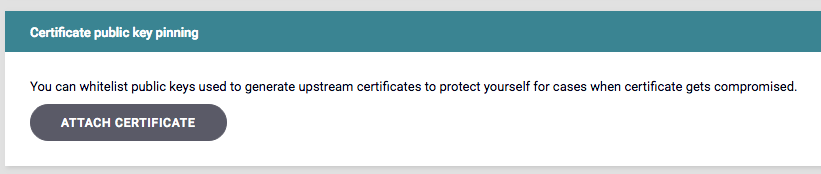
#### Certificate public key pinning
You can configure certificate pinning on the **Advanced** tab of the API Designer, using a similar method to how you specify upstream client certificates.
This feature comes especially handy if you need copy paste parts of one API to another, or if you need to access fields not yet exposed to the Dashboard UI.
#### Certificate public key pinning
You can configure certificate pinning on the **Advanced** tab of the API Designer, using a similar method to how you specify upstream client certificates.
 #### JSON schema validation
Reflecting the Tyk Gateway changes, on the Dashboard we have added a new **Validate JSON** plugin, which you can specify per URL, and can set both a schema, and custom error code, if needed.
#### Improved key hashing support
The Tyk Dashboard API reflects changes made in the v2.6.0 Gateway API, and now supports more operations with key by hash (when we have set `"hash_keys":` to ` true` in `tyk_analytics.conf`):
* endpoint `POST /keys/` also returns a new field `key_hash` per each key in the list
* endpoint `GET /apis/{apiId}/keys/{keyId}` supports query string parameter `hashed=true` to get the key info via hash
* endpoint `GET /apis/{apiId}/keys` returns keys hashes
* endpoint `DELETE /apis/{apiId}/keys?hashed=true` can delete a key by its hash, but its functionality is disabled by default, unless you set `enable_delete_key_by_hash` boolean option inside the Dashboard configuration file.
#### Key requests management API now supports OAuth
For this release we've improved our developer portal APIs to fully support an OAuth2.0 based workflow. Developers using your API will now be able to register OAuth clients and manage them.
This change is not yet supported by our built-in portal, but if you are using custom developer portals, you can start using this new functionality right away. Full UI support for built-in portal will be shipped with our next 2.7 release.
Developers can request access to an API protected with OAuth and get OAuth client credentials.
The endpoint `POST /api/portal/requests` now has an optional `"oauth_info"` field which identifies the OAuth key request.
Example of the OAuth key request:
```
{
"by_user": "5a3b2e7798b28f03a4b7b3f0",
"date_created": "2018-01-15T04:49:20.992-04:00",
"for_plan": "5a52dfce1c3b4802c10053c8",
"version": "v2",
"oauth_info": {
"redirect_uri": "http://new1.com,http://new2.com"
}
}
```
Where:
* `"by_user"` - contains the ID of portal developer who is requesting OAuth access
* `"for_plan"` - subscription ID
* `"version"` - is expected to have the value `"v2"`
* `"oauth_info"` - simple structure which contains a field with comma-separated list of redirect URI for OAuth flow
A new field `"oauth_info"` will be present in replies for endpoints `GET /api/portal/requests/{id}` and `GET /api/portal/requests`
When this kind of OAuth key request gets approved when using endpoint `PUT /api/portal/requests/approve/{id}`
a new OAuth-client is generated for a developer specified in the specified `"by_user"` field.
Example of OAuth key request approval reply:
```
{
"client_id": "203defa5162b42708c6bcafcfa28c9fb",
"secret": "YjUxZDJjNmYtMzgwMy00YzllLWI2YzctYTUxODQ4ODYwNWQw",
"policy_id": "5a52dfce1c3b4802c10053c8",
"redirect_uri": "http://new1.com,http://new2.com"
}
```
Where:
* `"client_id"` and `"secret"` are OAuth-client credentials used to request the get token (they are to be kept in secret)
* `"policy_id"` - the subscription this OAuth-client provides access to
* `"redirect_uri"` - with comma-separated list of redirect URI for OAuth flow
Also, if you set email notifications in your portal, an email with the OAuth-client credentials will be sent to the developer
who made that OAuth key request.
There is also a change in the reply from the `GET /api/portal/developers` endpoint.The developer object will have new field -
`"oauth_clients"` which will contain a mapping of subscription IDs to the list of OAuth clients that the developer requested and
was approved, i.e.:
```
"oauth_clients": {
"5a52dfce1c3b4802c10053c8": [
{
"client_id": "203defa5162b42708c6bcafcfa28c9fb",
"redirect_uri": "http://new1.com,http://new2.com",
"secret": "YjUxZDJjNmYtMzgwMy00YzllLWI2YzctYTUxODQ4ODYwNWQw"
}
]
},
```
#### New endpoints to get tokens per OAuth client
These endpoints allow you to get a list of all current tokens issued for provided OAuth client ID:
* `GET /apis/oauth/{apiId}/{oauthClientId}/tokens`
* `GET /apis/oauth/{oauthClientId}/tokens` when the API ID is unknown or OAuth-client provides access to several APIs
#### Renamed the response `_id` field to `id` in List Key Requests
We have renamed the response `_id` field when retrieving a list of key requests to `id`.
See [List Key Requests](/tyk-apis/tyk-dashboard-api/manage-key-requests#list-key-requests) for more details.
#### Developers can request a password reset email
If a developer forgets their password, they can now request a password reset email from the Developer Portal Login screen.
#### JSON schema validation
Reflecting the Tyk Gateway changes, on the Dashboard we have added a new **Validate JSON** plugin, which you can specify per URL, and can set both a schema, and custom error code, if needed.
#### Improved key hashing support
The Tyk Dashboard API reflects changes made in the v2.6.0 Gateway API, and now supports more operations with key by hash (when we have set `"hash_keys":` to ` true` in `tyk_analytics.conf`):
* endpoint `POST /keys/` also returns a new field `key_hash` per each key in the list
* endpoint `GET /apis/{apiId}/keys/{keyId}` supports query string parameter `hashed=true` to get the key info via hash
* endpoint `GET /apis/{apiId}/keys` returns keys hashes
* endpoint `DELETE /apis/{apiId}/keys?hashed=true` can delete a key by its hash, but its functionality is disabled by default, unless you set `enable_delete_key_by_hash` boolean option inside the Dashboard configuration file.
#### Key requests management API now supports OAuth
For this release we've improved our developer portal APIs to fully support an OAuth2.0 based workflow. Developers using your API will now be able to register OAuth clients and manage them.
This change is not yet supported by our built-in portal, but if you are using custom developer portals, you can start using this new functionality right away. Full UI support for built-in portal will be shipped with our next 2.7 release.
Developers can request access to an API protected with OAuth and get OAuth client credentials.
The endpoint `POST /api/portal/requests` now has an optional `"oauth_info"` field which identifies the OAuth key request.
Example of the OAuth key request:
```
{
"by_user": "5a3b2e7798b28f03a4b7b3f0",
"date_created": "2018-01-15T04:49:20.992-04:00",
"for_plan": "5a52dfce1c3b4802c10053c8",
"version": "v2",
"oauth_info": {
"redirect_uri": "http://new1.com,http://new2.com"
}
}
```
Where:
* `"by_user"` - contains the ID of portal developer who is requesting OAuth access
* `"for_plan"` - subscription ID
* `"version"` - is expected to have the value `"v2"`
* `"oauth_info"` - simple structure which contains a field with comma-separated list of redirect URI for OAuth flow
A new field `"oauth_info"` will be present in replies for endpoints `GET /api/portal/requests/{id}` and `GET /api/portal/requests`
When this kind of OAuth key request gets approved when using endpoint `PUT /api/portal/requests/approve/{id}`
a new OAuth-client is generated for a developer specified in the specified `"by_user"` field.
Example of OAuth key request approval reply:
```
{
"client_id": "203defa5162b42708c6bcafcfa28c9fb",
"secret": "YjUxZDJjNmYtMzgwMy00YzllLWI2YzctYTUxODQ4ODYwNWQw",
"policy_id": "5a52dfce1c3b4802c10053c8",
"redirect_uri": "http://new1.com,http://new2.com"
}
```
Where:
* `"client_id"` and `"secret"` are OAuth-client credentials used to request the get token (they are to be kept in secret)
* `"policy_id"` - the subscription this OAuth-client provides access to
* `"redirect_uri"` - with comma-separated list of redirect URI for OAuth flow
Also, if you set email notifications in your portal, an email with the OAuth-client credentials will be sent to the developer
who made that OAuth key request.
There is also a change in the reply from the `GET /api/portal/developers` endpoint.The developer object will have new field -
`"oauth_clients"` which will contain a mapping of subscription IDs to the list of OAuth clients that the developer requested and
was approved, i.e.:
```
"oauth_clients": {
"5a52dfce1c3b4802c10053c8": [
{
"client_id": "203defa5162b42708c6bcafcfa28c9fb",
"redirect_uri": "http://new1.com,http://new2.com",
"secret": "YjUxZDJjNmYtMzgwMy00YzllLWI2YzctYTUxODQ4ODYwNWQw"
}
]
},
```
#### New endpoints to get tokens per OAuth client
These endpoints allow you to get a list of all current tokens issued for provided OAuth client ID:
* `GET /apis/oauth/{apiId}/{oauthClientId}/tokens`
* `GET /apis/oauth/{oauthClientId}/tokens` when the API ID is unknown or OAuth-client provides access to several APIs
#### Renamed the response `_id` field to `id` in List Key Requests
We have renamed the response `_id` field when retrieving a list of key requests to `id`.
See [List Key Requests](/tyk-apis/tyk-dashboard-api/manage-key-requests#list-key-requests) for more details.
#### Developers can request a password reset email
If a developer forgets their password, they can now request a password reset email from the Developer Portal Login screen.
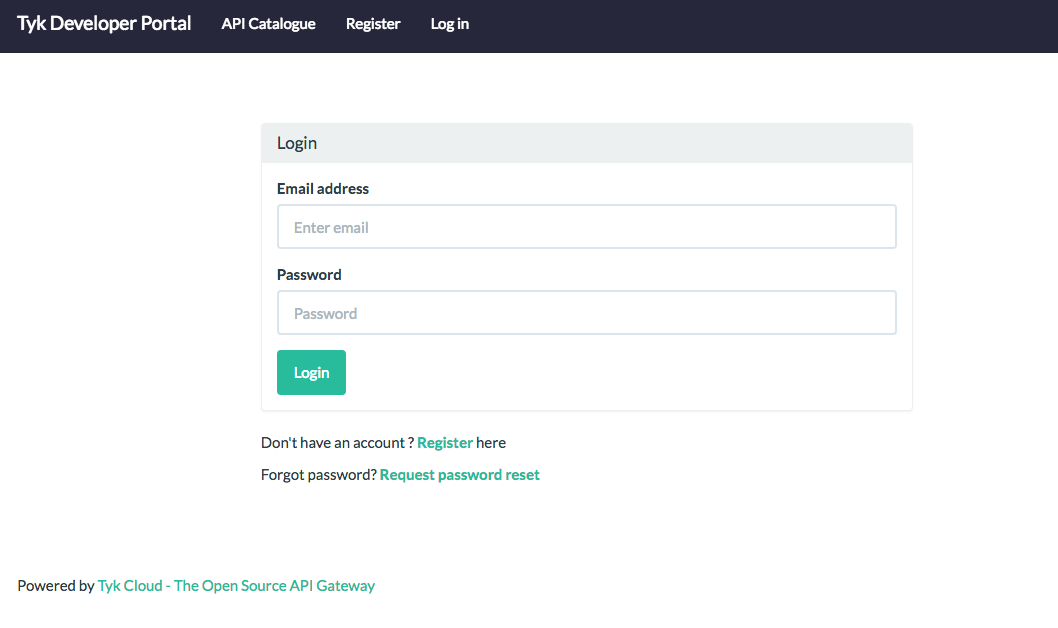 See [Developer Profiles](/tyk-developer-portal/tyk-portal-classic/developer-profiles#reset-developer-password) for more details.
#### SSO API custom email support
Now you can set email address for users logging though the Dashboard SSO API, by adding an "Email" field to the JSON payload which you sent to `/admin/sso` endpoint. For example:
```
POST /admin/sso HTTP/1.1
Host: localhost:3000
admin-auth: 12345
{
"ForSection": "dashboard",
"Email": "user@example.com",
"OrgID": "588b4f0bb275ff0001cc7471"
}
```
#### Set Catalog settings for each individual API
Now you can override the global catalog settings and specify settings per catalog.
The Catalog object now has `config` field, with exactly same structure as Portal Config, except new `override` boolean field.
If set, Catalog settings will override global ones.
At the moment the following options can be overriden: `Key request fields`, `Require key approval` and `Redirect on key request` (with `Redirect to` option as well).
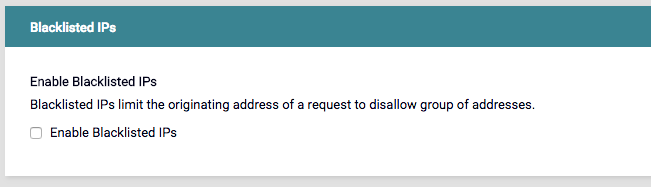
#### Blocklist IP Support
Tyk allows you to block IP Addresses, which is located in the **Advanced Options** tab in the **Endpoint Designer**.
See [Developer Profiles](/tyk-developer-portal/tyk-portal-classic/developer-profiles#reset-developer-password) for more details.
#### SSO API custom email support
Now you can set email address for users logging though the Dashboard SSO API, by adding an "Email" field to the JSON payload which you sent to `/admin/sso` endpoint. For example:
```
POST /admin/sso HTTP/1.1
Host: localhost:3000
admin-auth: 12345
{
"ForSection": "dashboard",
"Email": "user@example.com",
"OrgID": "588b4f0bb275ff0001cc7471"
}
```
#### Set Catalog settings for each individual API
Now you can override the global catalog settings and specify settings per catalog.
The Catalog object now has `config` field, with exactly same structure as Portal Config, except new `override` boolean field.
If set, Catalog settings will override global ones.
At the moment the following options can be overriden: `Key request fields`, `Require key approval` and `Redirect on key request` (with `Redirect to` option as well).
#### Blocklist IP Support
Tyk allows you to block IP Addresses, which is located in the **Advanced Options** tab in the **Endpoint Designer**.
 ### Tyk Identity Broker v0.4.0
With this release TIB joins the Tyk product line as a first class citizen and is now distributed via packages and [Docker image](https://hub.docker.com/r/tykio/tyk-identity-broker/).
#### Support for SSO API email field
If IDP provides a user email, it should be passed to the Dashboard SSO API, and you should see it in the Dashboard UI.
#### Improved support for local IDPs
If you run a local IDP, like Ping, with an untrusted SSL certificate, you can now turn off SSL verification by setting `SSLInsecureSkipVerify` to `true` in the TIB configuration file.
#### Added Redis TLS support
To enable set `BackEnd.UseSSL` and, optionally, `BackEnd.SSLInsecureSkipVerify`.
### Tyk Pump v0.5.2
#### Redis TLS support
Added new `redis_use_ssl` and `redis_ssl_insecure_skip_verify` options.
### Redis TLS support
Many Redis hosting providers now support TLS and we're pleased to confirm that we do too.
Whether it's the open source API Gateway, or Dashboard, Pump, Sink and Tyk Identity Broker (TIB): you can now make secure connections to Redis from all Tyk products, as long as your provider allows it.
### MDCB v1.5.3
#### Redis TLS support
Added new `redis_use_ssl` and `redis_ssl_insecure_skip_verify` options.
### Upgrading all new Components
For details on upgrading all Tyk versions, see [Upgrading Tyk](https://tyk.io/docs/upgrading-tyk/).
### Don't Have Tyk Yet?
Get started now, for free, or contact us with any questions.
* [Get Started](https://tyk.io/pricing/compare-api-management-platforms/#get-started)
* [Contact Us](https://tyk.io/about/contact/)
## 2.5.0 Release Notes
This release touches all our products and brings you numerous features and fixes. Here are the packages and their versions we are releasing today: Tyk Gateway v2.5.0, Tyk Dashboard v1.5.0, Tyk Pump v0.6.0, MDCB v1.5.0, TIB v0.3.
### Major Highlights
#### New Dashboard Look and Feel
Our Dashboard has had a UI overhaul, with the following improvements:
* A more modern, fun look and feel
* Consistent layouts and action buttons across each section
* Better feedback on errors and updates
* Various UX improvements
#### SSO with OpenId Identity Providers
With TIB v0.3 we have made it possible to integrate any OpenID supported Identity provider with Tyk so you can configure Single Sign On (SSO), if the provider supports those.
#### Searching API and Policies List
This long awaited feature has been added on the Dashboard UI.
#### Default API Versioning
You can now specify a default API version when using a versioning strategy.
#### Tyk Pump with MDCB
We've added MDCB support in this release of Tyk Pump
### Tyk Gateway v2.5.0
#### New Relic Instrumentation Support
We have added support for New Relic Instrumentation using:
`"newrelic": {"app_name": "", "license_key": ""}`
[Docs](/api-management/logs-metrics#statsd-deprecated)
#### Default API Versioning
You can now specify a default API version, and it will be used if a version is not set via headers, or URL parameters. Use the new option:
`spec.version_data.default_version`
[Docs](/api-management/gateway-config-tyk-classic#tyk-classic-api-versioning)
#### Disable URL Encoding
You can disable URL encoding using a new boolean `http_server_options` setting:
`skip_target_path_escaping`
[Docs](/tyk-oss-gateway/configuration#http_server_options)
#### Enable Key Logging
By default all key ids in logs are hidden. You can now turn it on if you want to see them for debugging reasons using the `enable_key_logging` option.
[Docs](/tyk-oss-gateway/configuration#enable_key_logging)
#### Specify TLS Cipher Suites
We have added support for specifying allowed SSL ciphers using the following option:
`http_server_options - ssl_ciphers`
[Docs](/api-management/certificates)
### Plugins Updates
* Coprocess plugins now have access to `config_data`
* The JSVM `spec` object now has access to `APIID` and `OriginID` to reflect similar functionality of Coprocess plugins.
* Plugins now have access to Host HTTP Header.
[JSVM Docs](/api-management/plugins/javascript#using-javascript-with-tyk)
[Plugin Data Structure Docs](/api-management/plugins/rich-plugins#rich-plugins-data-structures)
### Tyk Dashboard v1.5.0
#### A Fresh Look and Feel
With this release we have refreshed the entire Dashboard UI with a new look-and-feel, bringing with it such improvements as:
* A more modern, fun look and feel
* Consistent layouts and action buttons across each section
* Better feedback on errors and updates
* UX improvements
#### Search on API and Policy List Pages
We have added API and Policy search functionality, which should help those with long lists.
* [API Docs](/api-management/dashboard-configuration#manage-apis-api-definition)
* [Policy Docs](/tyk-apis/tyk-dashboard-api/portal-policies)
#### A New, Interactive Getting Started Walkthrough
We have swapped out the old Getting started tutorial and added a new interactive one, which should make it easier for new users to get started with the Dashboard UI.
#### Advanced URL Rewrites
We have extended the URL Rewrite plugin functionality by enabling users to create more advanced rewrite rules based on Header matches, Query string variable/value matches, Path part matches, (i.e. components of the path itself), Session metadata values, and Payload matches.
[Docs](/transform-traffic/url-rewriting)
#### Portal Session Lifetime
You can now control the portal session lifetime using the `portal_session_lifetime` config variable.
[Docs](https://tyk.io/docs/configure/tyk-dashboard-configuration-options/)
#### Configure Port for WebSockets
We have added `notifications_listen_port` option to configure the port used by WebSockets for real-time notifications.
[Docs](/tyk-oss-gateway/configuration)
#### Slug
Once set, the API slug will no longer be overridden when the API title is changed.
#### Custom Domain
We have fixed the API URL if a custom domain is set.
### Tyk Pump v0.5.0
#### Splunk Support
We added support for forwarding analytics data to Splunk. A sample configuration is:
```
"pumps": {
"splunk": {
"name": "splunk",
"meta": {
"collector_token": "",
"collector_url": "https://.cloud.splunk.com:
8088",
"ssl_insecure_skip_verify": true
}
}
},
```
#### Analytics Collection Capping
Detailed analytics collection capping is now enabled by default and configurable via the `collection_cap_enable` and `collection_cap_max_size_bytes` options.
### MDCB v1.5.0
We've introduced long awaited support for using Tyk Pump in conjunction with MDCB to use any of services supported by Tyk Pump, like ElasticSearch, Splunk and etc. This works by setting `forward_analytics_to_pump` to true, which disables analytics processing by MDCB itself, and enables the forwarding of all data to Tyk Pump running inside your management environment.
### TIB v0.3
With this release, you now can use any OpenID Connect compatible provider with TIB. This means that you can use almost any Identity management solution, supporting OpenID, like Okta, Ping or Keycloak.
Use `SocialProvider` with the following options:
```
"UseProviders": [{
"Name": "openid-connect",
"Key": "CLIENT-KEY",
"Secret": "CLIENT-SECRET",
"DiscoverURL": "https:///.well-known/openidconfiguration"
}]
```
### Packaging changes across all products
New deb and rpm packages add the "tyk" user and group so that package files and directories would be owned by it and the process run with its effective uid and gid. In addition to this gateway PID now has to reside in its own sub-rundir due to this change, so that's created (and additionally managed by systemd where it's available), default pidfile location changed appropriately so that upgrade wouldn't require any config changes by the users. The gateway config file is now only readable and writable by the "tyk" user and group. This change is applied across all our products except Gateway: its changes scheduled to 2.6.
The "default" init system files are not removed on upgrade/remove anymore so that it's now a way for users to run the respective process with custom environment variables.
The bug with removal of init system files on upgrade in rpm-based systems is now fixed.
### Upgrading all new Components
For details on upgrading all Tyk versions, see [Upgrading Tyk](https://tyk.io/docs/upgrading-tyk/).
### Don't Have Tyk Yet?
Get started now, for free, or contact us with any questions.
* [Get Started](https://tyk.io/pricing/compare-api-management-platforms/#get-started)
* [Contact Us](https://tyk.io/about/contact/)
## 2.4.0 Release Notes
This release touch all our products and brings you numerous long awaited features and fixes.
Here are the packages and their versions we are releasing today: Tyk Gateway v2.4.0, Tyk Dashboard v1.4.0, Tyk Pump v0.4.2, MDCB v1.4.0, TIB v0.2.
### Major highlights
#### Mutual TLS
A major feature of this release is the implementation of Mutual TLS. Now you can protect your APIs by allow listing certificates, idenitfy users based on them, and increase security between Tyk and upstream API. For details, see [Mutual TLS](/api-management/implement-tls#secure-hosted-apis-with-mtls).
#### Extended use of Multiple Policies
We have extended support for partitioned policies, and you can now mix them up when creating a key. Each policy should have own partition, and will not intersect, to avoid conflicts while merging their rules.
Using this approach could be useful when you have lot of APIs and multiple subscription options. Before, you had to create a separate policy per API and subscription option.
Using multiple partitioned policies you can create basic building blocks separately for accessing rules, rate limits and policies, and then mix them for the key, to creating unique combination that fit your needs.
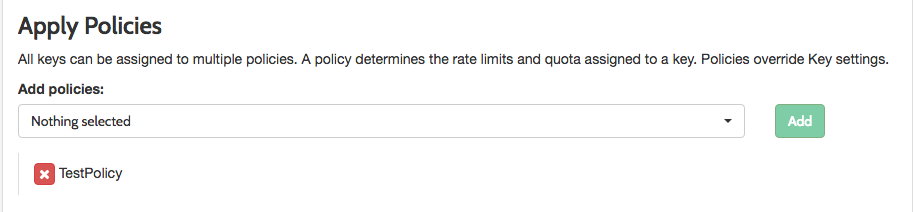
We have added a new `apply_policies` field to the Key definition, which is an string array of Policy IDs.
> **NOTE**: The old key apply\_policy\_id is supported, but is now deprecated.
We have updated the Dashboard **Apply Policies** section of the **Add Key** section.
### Tyk Identity Broker v0.4.0
With this release TIB joins the Tyk product line as a first class citizen and is now distributed via packages and [Docker image](https://hub.docker.com/r/tykio/tyk-identity-broker/).
#### Support for SSO API email field
If IDP provides a user email, it should be passed to the Dashboard SSO API, and you should see it in the Dashboard UI.
#### Improved support for local IDPs
If you run a local IDP, like Ping, with an untrusted SSL certificate, you can now turn off SSL verification by setting `SSLInsecureSkipVerify` to `true` in the TIB configuration file.
#### Added Redis TLS support
To enable set `BackEnd.UseSSL` and, optionally, `BackEnd.SSLInsecureSkipVerify`.
### Tyk Pump v0.5.2
#### Redis TLS support
Added new `redis_use_ssl` and `redis_ssl_insecure_skip_verify` options.
### Redis TLS support
Many Redis hosting providers now support TLS and we're pleased to confirm that we do too.
Whether it's the open source API Gateway, or Dashboard, Pump, Sink and Tyk Identity Broker (TIB): you can now make secure connections to Redis from all Tyk products, as long as your provider allows it.
### MDCB v1.5.3
#### Redis TLS support
Added new `redis_use_ssl` and `redis_ssl_insecure_skip_verify` options.
### Upgrading all new Components
For details on upgrading all Tyk versions, see [Upgrading Tyk](https://tyk.io/docs/upgrading-tyk/).
### Don't Have Tyk Yet?
Get started now, for free, or contact us with any questions.
* [Get Started](https://tyk.io/pricing/compare-api-management-platforms/#get-started)
* [Contact Us](https://tyk.io/about/contact/)
## 2.5.0 Release Notes
This release touches all our products and brings you numerous features and fixes. Here are the packages and their versions we are releasing today: Tyk Gateway v2.5.0, Tyk Dashboard v1.5.0, Tyk Pump v0.6.0, MDCB v1.5.0, TIB v0.3.
### Major Highlights
#### New Dashboard Look and Feel
Our Dashboard has had a UI overhaul, with the following improvements:
* A more modern, fun look and feel
* Consistent layouts and action buttons across each section
* Better feedback on errors and updates
* Various UX improvements
#### SSO with OpenId Identity Providers
With TIB v0.3 we have made it possible to integrate any OpenID supported Identity provider with Tyk so you can configure Single Sign On (SSO), if the provider supports those.
#### Searching API and Policies List
This long awaited feature has been added on the Dashboard UI.
#### Default API Versioning
You can now specify a default API version when using a versioning strategy.
#### Tyk Pump with MDCB
We've added MDCB support in this release of Tyk Pump
### Tyk Gateway v2.5.0
#### New Relic Instrumentation Support
We have added support for New Relic Instrumentation using:
`"newrelic": {"app_name": "", "license_key": ""}`
[Docs](/api-management/logs-metrics#statsd-deprecated)
#### Default API Versioning
You can now specify a default API version, and it will be used if a version is not set via headers, or URL parameters. Use the new option:
`spec.version_data.default_version`
[Docs](/api-management/gateway-config-tyk-classic#tyk-classic-api-versioning)
#### Disable URL Encoding
You can disable URL encoding using a new boolean `http_server_options` setting:
`skip_target_path_escaping`
[Docs](/tyk-oss-gateway/configuration#http_server_options)
#### Enable Key Logging
By default all key ids in logs are hidden. You can now turn it on if you want to see them for debugging reasons using the `enable_key_logging` option.
[Docs](/tyk-oss-gateway/configuration#enable_key_logging)
#### Specify TLS Cipher Suites
We have added support for specifying allowed SSL ciphers using the following option:
`http_server_options - ssl_ciphers`
[Docs](/api-management/certificates)
### Plugins Updates
* Coprocess plugins now have access to `config_data`
* The JSVM `spec` object now has access to `APIID` and `OriginID` to reflect similar functionality of Coprocess plugins.
* Plugins now have access to Host HTTP Header.
[JSVM Docs](/api-management/plugins/javascript#using-javascript-with-tyk)
[Plugin Data Structure Docs](/api-management/plugins/rich-plugins#rich-plugins-data-structures)
### Tyk Dashboard v1.5.0
#### A Fresh Look and Feel
With this release we have refreshed the entire Dashboard UI with a new look-and-feel, bringing with it such improvements as:
* A more modern, fun look and feel
* Consistent layouts and action buttons across each section
* Better feedback on errors and updates
* UX improvements
#### Search on API and Policy List Pages
We have added API and Policy search functionality, which should help those with long lists.
* [API Docs](/api-management/dashboard-configuration#manage-apis-api-definition)
* [Policy Docs](/tyk-apis/tyk-dashboard-api/portal-policies)
#### A New, Interactive Getting Started Walkthrough
We have swapped out the old Getting started tutorial and added a new interactive one, which should make it easier for new users to get started with the Dashboard UI.
#### Advanced URL Rewrites
We have extended the URL Rewrite plugin functionality by enabling users to create more advanced rewrite rules based on Header matches, Query string variable/value matches, Path part matches, (i.e. components of the path itself), Session metadata values, and Payload matches.
[Docs](/transform-traffic/url-rewriting)
#### Portal Session Lifetime
You can now control the portal session lifetime using the `portal_session_lifetime` config variable.
[Docs](https://tyk.io/docs/configure/tyk-dashboard-configuration-options/)
#### Configure Port for WebSockets
We have added `notifications_listen_port` option to configure the port used by WebSockets for real-time notifications.
[Docs](/tyk-oss-gateway/configuration)
#### Slug
Once set, the API slug will no longer be overridden when the API title is changed.
#### Custom Domain
We have fixed the API URL if a custom domain is set.
### Tyk Pump v0.5.0
#### Splunk Support
We added support for forwarding analytics data to Splunk. A sample configuration is:
```
"pumps": {
"splunk": {
"name": "splunk",
"meta": {
"collector_token": "",
"collector_url": "https://.cloud.splunk.com:
8088",
"ssl_insecure_skip_verify": true
}
}
},
```
#### Analytics Collection Capping
Detailed analytics collection capping is now enabled by default and configurable via the `collection_cap_enable` and `collection_cap_max_size_bytes` options.
### MDCB v1.5.0
We've introduced long awaited support for using Tyk Pump in conjunction with MDCB to use any of services supported by Tyk Pump, like ElasticSearch, Splunk and etc. This works by setting `forward_analytics_to_pump` to true, which disables analytics processing by MDCB itself, and enables the forwarding of all data to Tyk Pump running inside your management environment.
### TIB v0.3
With this release, you now can use any OpenID Connect compatible provider with TIB. This means that you can use almost any Identity management solution, supporting OpenID, like Okta, Ping or Keycloak.
Use `SocialProvider` with the following options:
```
"UseProviders": [{
"Name": "openid-connect",
"Key": "CLIENT-KEY",
"Secret": "CLIENT-SECRET",
"DiscoverURL": "https:///.well-known/openidconfiguration"
}]
```
### Packaging changes across all products
New deb and rpm packages add the "tyk" user and group so that package files and directories would be owned by it and the process run with its effective uid and gid. In addition to this gateway PID now has to reside in its own sub-rundir due to this change, so that's created (and additionally managed by systemd where it's available), default pidfile location changed appropriately so that upgrade wouldn't require any config changes by the users. The gateway config file is now only readable and writable by the "tyk" user and group. This change is applied across all our products except Gateway: its changes scheduled to 2.6.
The "default" init system files are not removed on upgrade/remove anymore so that it's now a way for users to run the respective process with custom environment variables.
The bug with removal of init system files on upgrade in rpm-based systems is now fixed.
### Upgrading all new Components
For details on upgrading all Tyk versions, see [Upgrading Tyk](https://tyk.io/docs/upgrading-tyk/).
### Don't Have Tyk Yet?
Get started now, for free, or contact us with any questions.
* [Get Started](https://tyk.io/pricing/compare-api-management-platforms/#get-started)
* [Contact Us](https://tyk.io/about/contact/)
## 2.4.0 Release Notes
This release touch all our products and brings you numerous long awaited features and fixes.
Here are the packages and their versions we are releasing today: Tyk Gateway v2.4.0, Tyk Dashboard v1.4.0, Tyk Pump v0.4.2, MDCB v1.4.0, TIB v0.2.
### Major highlights
#### Mutual TLS
A major feature of this release is the implementation of Mutual TLS. Now you can protect your APIs by allow listing certificates, idenitfy users based on them, and increase security between Tyk and upstream API. For details, see [Mutual TLS](/api-management/implement-tls#secure-hosted-apis-with-mtls).
#### Extended use of Multiple Policies
We have extended support for partitioned policies, and you can now mix them up when creating a key. Each policy should have own partition, and will not intersect, to avoid conflicts while merging their rules.
Using this approach could be useful when you have lot of APIs and multiple subscription options. Before, you had to create a separate policy per API and subscription option.
Using multiple partitioned policies you can create basic building blocks separately for accessing rules, rate limits and policies, and then mix them for the key, to creating unique combination that fit your needs.
We have added a new `apply_policies` field to the Key definition, which is an string array of Policy IDs.
> **NOTE**: The old key apply\_policy\_id is supported, but is now deprecated.
We have updated the Dashboard **Apply Policies** section of the **Add Key** section.
 For this release multiple policies are only supported only via the Add Key section and via the API. Support for OIDC, oAuth, and Portal API Catalogs are planned for subsequent releases.
[Docs](/api-management/access-control/policies/applying-policies#partitioned-policies)
#### Global API Rate Limits
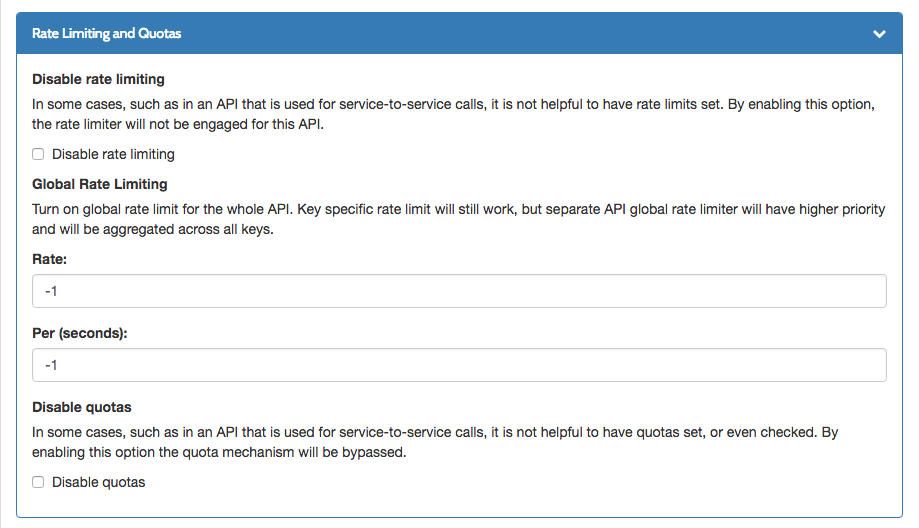
We have added a new API definition field `global_rate_limit` which specifies a global API rate limit in the following format: `{"rate": 10, "per": 1}`, similar to policies or keys.
The API rate limit is an aggregate value across all users, which works in parallel with user rate limits, but has higher priority.
Extended Dashboard API designer Rate Limiting and Quotas section in Core settings:
For this release multiple policies are only supported only via the Add Key section and via the API. Support for OIDC, oAuth, and Portal API Catalogs are planned for subsequent releases.
[Docs](/api-management/access-control/policies/applying-policies#partitioned-policies)
#### Global API Rate Limits
We have added a new API definition field `global_rate_limit` which specifies a global API rate limit in the following format: `{"rate": 10, "per": 1}`, similar to policies or keys.
The API rate limit is an aggregate value across all users, which works in parallel with user rate limits, but has higher priority.
Extended Dashboard API designer Rate Limiting and Quotas section in Core settings:
 [Docs](/api-management/access-control/policies/applying-policies#partitioned-policies)
#### Specify custom analytics tags using HTTP headers
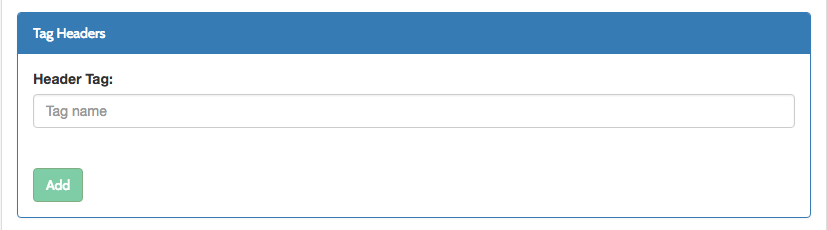
We have added a new API definition field `tag_headers` which specifies a string array of HTTP headers which can be extracted and turned to tags.
For example if you include `X-Request-ID` header to tag\_headers, for each incoming request it will include a `x-request-id-` tag to request an analytic record.
This functionality can be useful if you need to pass additional information from the request to the analytics, without enabling detailed logging, which records the full request and response objects.
We have added a new **Tag headers** section to the Dashboard **API Designer Advanced** tab.
[Docs](/api-management/access-control/policies/applying-policies#partitioned-policies)
#### Specify custom analytics tags using HTTP headers
We have added a new API definition field `tag_headers` which specifies a string array of HTTP headers which can be extracted and turned to tags.
For example if you include `X-Request-ID` header to tag\_headers, for each incoming request it will include a `x-request-id-` tag to request an analytic record.
This functionality can be useful if you need to pass additional information from the request to the analytics, without enabling detailed logging, which records the full request and response objects.
We have added a new **Tag headers** section to the Dashboard **API Designer Advanced** tab.
 [Docs](/api-management/dashboard-configuration#activity-logs)
#### Single-Sign-On (SSO) improvements
More SSO functionality is something that a lot of our customers have been asking for. In this release we've significantly improved our support for SSO, and you can now:
* Enable Tyk Identity Broker to apply LDAP filters to user search [Docs](/api-management/single-sign-on-ldap)
* Set permissions for your users, logged via SSO, via `sso_permission_defaults` in Dashboard config file. [Docs](/tyk-identity-broker/overview)
* Setup a login page redirect, using `sso_custom_login_url` and `sso_custom_portal_login_url` Dashboard config options to enable users login using a custom SSO login page. [Docs](/tyk-identity-broker/overview)
* For those who love to build everything in-house, we have added new API for custom dashboard authentication integrations. [Docs](/api-management/custom-auth-with-proxy-identity-provider)
### Tyk Gateway v2.4.0
#### Mutual TLS support
[Docs](/api-management/implement-tls#secure-hosted-apis-with-mtls)
#### Global API rate limits
[Docs](/api-management/rate-limit#rate-limiting-layers)
#### Specify custom analytics tags using HTTP headers
[Docs](/api-management/dashboard-configuration#activity-logs)
#### Attaching Multiple Policies to the Keys
[Docs](/api-management/access-control/policies/applying-policies#partitioned-policies)
#### Default User Agent set to Tyk/\$VERSION
If no user agent is specified in a request, it is now set as `Tyk/$VERSION`.
#### Include `x-tyk-api-expires` date header for versioned APIs
If a request is made for an API which has an expiry date, the response will include the `x-tyk-api-expires` header with expiry date.
[Docs](/api-management/gateway-config-tyk-classic#tyk-classic-api-versioning)
#### Run Admin Control API on a separate port
Using `control_api_port` option in configuration file, you can run the admin control api on a separate port, and hide it behind firewall if needed.
[Docs](/tyk-oss-gateway/configuration#control_api_port)
#### Added a Configuration Linter
We have added a new `tyk lint ` command which will validate your `tyk.conf` file and validate it for syntax correctness, misspelled attribute names or format of values. The Syntax can be:
`tyk lint` or `tyk --conf=path lint`
If `--conf` is not used, the first of the following paths to exist is used:
`./tyk.conf`
`/etc/tyk/tyk.conf`
[Docs](/tyk-oss-gateway/configuration)
#### Set log\_level from tyk.conf
We have added a new `log_level` configuration variable to `tyk.conf` to control logging level.
Possible values are: `debug`, `info`, `warn`, `error`
[Docs](/tyk-oss-gateway/configuration#log_level)
#### Added jsonMarshal to body transform templates
We have added the `jsonMarshal` helper to the body transform templates. You can apply jsonMarshal on a string in order to perform JSON style character escaping, and on complex objects to serialise them to a JSON string.
Example: `{{ .myField | jsonMarshal }}`
[Docs](/api-management/traffic-transformation/request-body)
#### Added a blocking reload endpoint
Now you can add a `?block=true` argument to the `/tyk/reload` API endpoint, which will block a response, until the reload is performed. This can be useful in scripting environments like CI/CD workflows.
[Docs](/tyk-gateway-api)
#### `tyk_js_path` file now contains only user code
Internal JS API not budled into tyk binary, and `js/tyk.js` file used only for custom user code. It is recommended to delete this file, if you are not using it, or remove Tyk internal code from it. New releases do not ship this file by default.
#### Improved Swagger API import defaults
When importing Swagger based APIs they now generate tracked URLs instead of allow listed ones.
[More](https://github.com/TykTechnologies/tyk/issues/643)
#### Respond with 503 if all hosts are down.
Previously, the internal load balancer was cycling though hosts even if they were known as down.
#### Request with OPTIONS method should not be cached.
[More](https://github.com/TykTechnologies/tyk/issues/376)
#### Health check API is officially deprecated.
This was very resource consuming and unstable feature. We recommend using load balancers of your choice for this.
#### Fixed custom error templates for authentication errors.
[More](https://github.com/TykTechnologies/tyk/issues/438)
### Tyk Dashboard v1.4.0
#### Mutual TLS support
[Docs](/api-management/implement-tls#secure-hosted-apis-with-mtls)
#### Global API rate limits
[Docs](/api-management/rate-limit#rate-limiting-layers)
#### Specify custom analytics tags using HTTP headers
[Docs](/api-management/dashboard-configuration#activity-logs)
#### Attaching Multiple Policies to the Keys
[Docs](/api-management/access-control/policies/applying-policies#applying-multiple-policies)
#### Set permissions for users logged via SSO (Tyk Identity Broker)
Added new option `sso_permission_defaults` in Dashboard config file.
Example:
```
"sso_permission_defaults": {
"analytics": "read",
"apis": "write",
"hooks": "write",
"idm": "write",
"keys": "write",
"policy": "write",
"portal": "write",
"system": "write",
"users": "write"
},
```
[Docs](/tyk-identity-broker/overview)
#### Set custom login pages for portal and dashboard
If you are using 3-rd party authentication like TIB, you maybe want to redirect from standard login pages to your own using following attributes in dashboard config: `sso_custom_login_url`, `sso_custom_portal_login_url`.
[Docs](/tyk-identity-broker/overview)
#### Added new set of APIs for custom dashboard authentication
Added new `/admin/sso` endpoint for custom integration. In fact, the same API is used by our own Tyk Identity Broker.
[Docs](/api-management/custom-auth-with-proxy-identity-provider)
#### Service discovery form improved with most common pre-defined templates
Now you can pre-fill the form with most popular templates like consul or etcd.
#### RPC credentials renamed to Organization ID
Yay!
#### Replaced text areas with a code editors
All multi-line text fields now replaced with a code editors.
#### Replace dropdowns with the live search component
All the dropdown lists now support live search, and work with a large number of elements (especially handy for API or Policiy lists).
#### Display user ID and email on when listing users
The **Users list** now displays the **User ID** and **Email**.
#### Added search for portal developers
We have added search for the users listed in the developer portal.
#### Key request email link to developer details
The email address in a **Key Request** from the **Developer Portal** is now a link to the relevant developer profile.
#### Country code in log browser links to geo report
The country code in the log browser has been changed to a link to the geographic report.
#### Added support for HEAD methods in the Dashboard API Designer.
#### Redirect user to the login page if session is timed out.
#### When creating a portal API catalog, you can now attach documentation without saving the catalog first.
#### Fixed the` proxy.preserve_host_header` field when saved via the UI.
Previously, the field was available in the API definition, but got removed if the API was saved via the UI.
#### Prevent an admin user revoking their own permissions.
This is a UI only fix, it is still allowable via the API (which is OK).
#### Other UX Improvements
* Key pieces of data made accessible to quickly copy+paste
* Improved help tips
* Get your API URL without having to save and go back
* Improved pagination
* Improved feedback messaging
* Improved charts
* Improved analytics search
### Tyk Pump v0.4.2
#### Support added for Mongo SSL connections
See [https://tyk.io/docs/configure/tyk-pump-configuration/](https://tyk.io/docs/configure/tyk-pump-configuration/) for a sample pump.conf file.
### MDCB v1.4.0
Added support for Mutual TLS, mentioned by Gateway and Dashboard above. See [Docs](/api-management/implement-tls#secure-hosted-apis-with-mtls)
Also fixed bug when Mongo connections became growing though the roof if client with wrong credentials tries to connect.
### TIB v0.2
Tyk Identity Broker now fully support LDAP search with complex filters! [Docs](/api-management/single-sign-on-ldap)
### Upgrading all new Components
> **NOTE**: This release is fully compatible with the previous version, except that if you want to use new features, like Mutual TLS, you need to upgrade all the related components.
Cloud users will be automatically upgraded to the new release.
Hybrid users should follow the upgrade instructions [here](/developer-support/upgrading#tyk-upgrade-guides-for-different-deployment-models).
Self-Managed users can download the new release packages from their usual repositories.
[3]: /img/release-notes/tag_headers.png
[4]: /img/release-notes/import_api_definition.png
[5]: /img/release-notes/live_search.png
[6]: /img/release-notes/user_list.png
[7]: /img/release-notes/dev_list.png
[8]: /img/release-notes/key_request_user.png
## Upgrading to v2.3 from v2.2
Tyk v2.3 is backwards-compatible with v2.2 in terms of the configuration file and the original `tyk.conf` can be used with the new version. If you would like to keep your v2.2 settings, please remember to **backup your `tyk.conf` file before upgrading as it will be overwritten during the upgrade process.**
*However*, there are behavioral differences in a v2.3 cluster when hooked up to a Dashboard that can cause some odd behavior if the upgrade is not conducted in the right order.
Tyk v2.3 Gateways continuously talk to each other sharing load data, they also share information with the Dashboard regarding their current configuration. This chatter, if exposed to a v2.2 Gateway, can cause it go into a reload loop, which isn't ideal. Because of this, the recommended upgrade procedure for a Tyk v2.2 system is:
1. Upgrade all the Tyk Gateways to v2.3
2. Upgrade the Dashboard to v1.3
3. Update the Tyk Pump to v0.4
If upgraded in this order, then the reload loop can be avoided on a production system.
If the reload loop does occur it is not disastrous, Tyk will just keep proxying traffic even though it is constantly pulling new configurations. It's just not particularly efficient.
> **Note for MDCB**: If you are using MDCB and want to upgrade your Gateways to v2.3, you will also need to upgrade your MDCB to v1.2.0.2.
#### Retaining rate limiter functionality
Tyk v2.3 introduces a new in-memory leaky-bucket *distributed* rate limiter, this is much more performant than the older rate limiter which hard-synchronised via Redis, and puts far less strain on a Redis instance or cluster than the old rate limiter. By default, Tyk v2.3 will switch to this rate limiter, however it is possible to retain the old behavior by enabling it explicitly in the `tyk.conf` file:
```
"enable_redis_rolling_limiter": true
```
This might be useful if you do not wish to switch over immediately and wish to test the new rate limiter first.
#### Public and Private keys
Tyk v2.3 introduces public/private key message authentication for messages that are sent from the management interface to the Gateways, and for code that is being deployed as a plugin to a Gateway via the bundle downloader.
By default, Tyk's new config file has this feature *disabled*, however since it is new, an existing `tyk.conf` will assume a secure installation as the feature must be explicitly disabled. This means, prior to starting your new Gateways, either disable the security feature, or add a public/private key pair to your `tyk.conf` and `tyk_analytics.conf` files:
##### Disable secure messages
**If you are upgrading from v2.2 then you must either generate a public/private keypair or disable the option to validate inbound payloads against a key. You can do this by setting the following key in your `tyk.conf`:**
```
"allow_insecure_configs": true
```
##### Add a public key and private key pair
First, generate the key pair:
```
# private key
openssl genrsa -out privkey.pem 2048
# public key
openssl rsa -in privkey.pem -pubout -out pubkey.pem
```
**`tyk.conf`:**
```
"public_key_path": "/path/to/public/key.pem"
```
**`tyk_analytics.conf`:**
```
"private_key_path": "/path/to/private/key.pem"
```
#### Conclusion
The above are the key changes in v2.3 that could affect your setup and configuration during an upgrade. All other settings should be backwards compatible and not introduce breaking changes.
[Docs](/api-management/dashboard-configuration#activity-logs)
#### Single-Sign-On (SSO) improvements
More SSO functionality is something that a lot of our customers have been asking for. In this release we've significantly improved our support for SSO, and you can now:
* Enable Tyk Identity Broker to apply LDAP filters to user search [Docs](/api-management/single-sign-on-ldap)
* Set permissions for your users, logged via SSO, via `sso_permission_defaults` in Dashboard config file. [Docs](/tyk-identity-broker/overview)
* Setup a login page redirect, using `sso_custom_login_url` and `sso_custom_portal_login_url` Dashboard config options to enable users login using a custom SSO login page. [Docs](/tyk-identity-broker/overview)
* For those who love to build everything in-house, we have added new API for custom dashboard authentication integrations. [Docs](/api-management/custom-auth-with-proxy-identity-provider)
### Tyk Gateway v2.4.0
#### Mutual TLS support
[Docs](/api-management/implement-tls#secure-hosted-apis-with-mtls)
#### Global API rate limits
[Docs](/api-management/rate-limit#rate-limiting-layers)
#### Specify custom analytics tags using HTTP headers
[Docs](/api-management/dashboard-configuration#activity-logs)
#### Attaching Multiple Policies to the Keys
[Docs](/api-management/access-control/policies/applying-policies#partitioned-policies)
#### Default User Agent set to Tyk/\$VERSION
If no user agent is specified in a request, it is now set as `Tyk/$VERSION`.
#### Include `x-tyk-api-expires` date header for versioned APIs
If a request is made for an API which has an expiry date, the response will include the `x-tyk-api-expires` header with expiry date.
[Docs](/api-management/gateway-config-tyk-classic#tyk-classic-api-versioning)
#### Run Admin Control API on a separate port
Using `control_api_port` option in configuration file, you can run the admin control api on a separate port, and hide it behind firewall if needed.
[Docs](/tyk-oss-gateway/configuration#control_api_port)
#### Added a Configuration Linter
We have added a new `tyk lint ` command which will validate your `tyk.conf` file and validate it for syntax correctness, misspelled attribute names or format of values. The Syntax can be:
`tyk lint` or `tyk --conf=path lint`
If `--conf` is not used, the first of the following paths to exist is used:
`./tyk.conf`
`/etc/tyk/tyk.conf`
[Docs](/tyk-oss-gateway/configuration)
#### Set log\_level from tyk.conf
We have added a new `log_level` configuration variable to `tyk.conf` to control logging level.
Possible values are: `debug`, `info`, `warn`, `error`
[Docs](/tyk-oss-gateway/configuration#log_level)
#### Added jsonMarshal to body transform templates
We have added the `jsonMarshal` helper to the body transform templates. You can apply jsonMarshal on a string in order to perform JSON style character escaping, and on complex objects to serialise them to a JSON string.
Example: `{{ .myField | jsonMarshal }}`
[Docs](/api-management/traffic-transformation/request-body)
#### Added a blocking reload endpoint
Now you can add a `?block=true` argument to the `/tyk/reload` API endpoint, which will block a response, until the reload is performed. This can be useful in scripting environments like CI/CD workflows.
[Docs](/tyk-gateway-api)
#### `tyk_js_path` file now contains only user code
Internal JS API not budled into tyk binary, and `js/tyk.js` file used only for custom user code. It is recommended to delete this file, if you are not using it, or remove Tyk internal code from it. New releases do not ship this file by default.
#### Improved Swagger API import defaults
When importing Swagger based APIs they now generate tracked URLs instead of allow listed ones.
[More](https://github.com/TykTechnologies/tyk/issues/643)
#### Respond with 503 if all hosts are down.
Previously, the internal load balancer was cycling though hosts even if they were known as down.
#### Request with OPTIONS method should not be cached.
[More](https://github.com/TykTechnologies/tyk/issues/376)
#### Health check API is officially deprecated.
This was very resource consuming and unstable feature. We recommend using load balancers of your choice for this.
#### Fixed custom error templates for authentication errors.
[More](https://github.com/TykTechnologies/tyk/issues/438)
### Tyk Dashboard v1.4.0
#### Mutual TLS support
[Docs](/api-management/implement-tls#secure-hosted-apis-with-mtls)
#### Global API rate limits
[Docs](/api-management/rate-limit#rate-limiting-layers)
#### Specify custom analytics tags using HTTP headers
[Docs](/api-management/dashboard-configuration#activity-logs)
#### Attaching Multiple Policies to the Keys
[Docs](/api-management/access-control/policies/applying-policies#applying-multiple-policies)
#### Set permissions for users logged via SSO (Tyk Identity Broker)
Added new option `sso_permission_defaults` in Dashboard config file.
Example:
```
"sso_permission_defaults": {
"analytics": "read",
"apis": "write",
"hooks": "write",
"idm": "write",
"keys": "write",
"policy": "write",
"portal": "write",
"system": "write",
"users": "write"
},
```
[Docs](/tyk-identity-broker/overview)
#### Set custom login pages for portal and dashboard
If you are using 3-rd party authentication like TIB, you maybe want to redirect from standard login pages to your own using following attributes in dashboard config: `sso_custom_login_url`, `sso_custom_portal_login_url`.
[Docs](/tyk-identity-broker/overview)
#### Added new set of APIs for custom dashboard authentication
Added new `/admin/sso` endpoint for custom integration. In fact, the same API is used by our own Tyk Identity Broker.
[Docs](/api-management/custom-auth-with-proxy-identity-provider)
#### Service discovery form improved with most common pre-defined templates
Now you can pre-fill the form with most popular templates like consul or etcd.
#### RPC credentials renamed to Organization ID
Yay!
#### Replaced text areas with a code editors
All multi-line text fields now replaced with a code editors.
#### Replace dropdowns with the live search component
All the dropdown lists now support live search, and work with a large number of elements (especially handy for API or Policiy lists).
#### Display user ID and email on when listing users
The **Users list** now displays the **User ID** and **Email**.
#### Added search for portal developers
We have added search for the users listed in the developer portal.
#### Key request email link to developer details
The email address in a **Key Request** from the **Developer Portal** is now a link to the relevant developer profile.
#### Country code in log browser links to geo report
The country code in the log browser has been changed to a link to the geographic report.
#### Added support for HEAD methods in the Dashboard API Designer.
#### Redirect user to the login page if session is timed out.
#### When creating a portal API catalog, you can now attach documentation without saving the catalog first.
#### Fixed the` proxy.preserve_host_header` field when saved via the UI.
Previously, the field was available in the API definition, but got removed if the API was saved via the UI.
#### Prevent an admin user revoking their own permissions.
This is a UI only fix, it is still allowable via the API (which is OK).
#### Other UX Improvements
* Key pieces of data made accessible to quickly copy+paste
* Improved help tips
* Get your API URL without having to save and go back
* Improved pagination
* Improved feedback messaging
* Improved charts
* Improved analytics search
### Tyk Pump v0.4.2
#### Support added for Mongo SSL connections
See [https://tyk.io/docs/configure/tyk-pump-configuration/](https://tyk.io/docs/configure/tyk-pump-configuration/) for a sample pump.conf file.
### MDCB v1.4.0
Added support for Mutual TLS, mentioned by Gateway and Dashboard above. See [Docs](/api-management/implement-tls#secure-hosted-apis-with-mtls)
Also fixed bug when Mongo connections became growing though the roof if client with wrong credentials tries to connect.
### TIB v0.2
Tyk Identity Broker now fully support LDAP search with complex filters! [Docs](/api-management/single-sign-on-ldap)
### Upgrading all new Components
> **NOTE**: This release is fully compatible with the previous version, except that if you want to use new features, like Mutual TLS, you need to upgrade all the related components.
Cloud users will be automatically upgraded to the new release.
Hybrid users should follow the upgrade instructions [here](/developer-support/upgrading#tyk-upgrade-guides-for-different-deployment-models).
Self-Managed users can download the new release packages from their usual repositories.
[3]: /img/release-notes/tag_headers.png
[4]: /img/release-notes/import_api_definition.png
[5]: /img/release-notes/live_search.png
[6]: /img/release-notes/user_list.png
[7]: /img/release-notes/dev_list.png
[8]: /img/release-notes/key_request_user.png
## Upgrading to v2.3 from v2.2
Tyk v2.3 is backwards-compatible with v2.2 in terms of the configuration file and the original `tyk.conf` can be used with the new version. If you would like to keep your v2.2 settings, please remember to **backup your `tyk.conf` file before upgrading as it will be overwritten during the upgrade process.**
*However*, there are behavioral differences in a v2.3 cluster when hooked up to a Dashboard that can cause some odd behavior if the upgrade is not conducted in the right order.
Tyk v2.3 Gateways continuously talk to each other sharing load data, they also share information with the Dashboard regarding their current configuration. This chatter, if exposed to a v2.2 Gateway, can cause it go into a reload loop, which isn't ideal. Because of this, the recommended upgrade procedure for a Tyk v2.2 system is:
1. Upgrade all the Tyk Gateways to v2.3
2. Upgrade the Dashboard to v1.3
3. Update the Tyk Pump to v0.4
If upgraded in this order, then the reload loop can be avoided on a production system.
If the reload loop does occur it is not disastrous, Tyk will just keep proxying traffic even though it is constantly pulling new configurations. It's just not particularly efficient.
> **Note for MDCB**: If you are using MDCB and want to upgrade your Gateways to v2.3, you will also need to upgrade your MDCB to v1.2.0.2.
#### Retaining rate limiter functionality
Tyk v2.3 introduces a new in-memory leaky-bucket *distributed* rate limiter, this is much more performant than the older rate limiter which hard-synchronised via Redis, and puts far less strain on a Redis instance or cluster than the old rate limiter. By default, Tyk v2.3 will switch to this rate limiter, however it is possible to retain the old behavior by enabling it explicitly in the `tyk.conf` file:
```
"enable_redis_rolling_limiter": true
```
This might be useful if you do not wish to switch over immediately and wish to test the new rate limiter first.
#### Public and Private keys
Tyk v2.3 introduces public/private key message authentication for messages that are sent from the management interface to the Gateways, and for code that is being deployed as a plugin to a Gateway via the bundle downloader.
By default, Tyk's new config file has this feature *disabled*, however since it is new, an existing `tyk.conf` will assume a secure installation as the feature must be explicitly disabled. This means, prior to starting your new Gateways, either disable the security feature, or add a public/private key pair to your `tyk.conf` and `tyk_analytics.conf` files:
##### Disable secure messages
**If you are upgrading from v2.2 then you must either generate a public/private keypair or disable the option to validate inbound payloads against a key. You can do this by setting the following key in your `tyk.conf`:**
```
"allow_insecure_configs": true
```
##### Add a public key and private key pair
First, generate the key pair:
```
# private key
openssl genrsa -out privkey.pem 2048
# public key
openssl rsa -in privkey.pem -pubout -out pubkey.pem
```
**`tyk.conf`:**
```
"public_key_path": "/path/to/public/key.pem"
```
**`tyk_analytics.conf`:**
```
"private_key_path": "/path/to/private/key.pem"
```
#### Conclusion
The above are the key changes in v2.3 that could affect your setup and configuration during an upgrade. All other settings should be backwards compatible and not introduce breaking changes.