> ## Documentation Index
> Fetch the complete documentation index at: https://tyk.io/docs/llms.txt
> Use this file to discover all available pages before exploring further.
# Request Size Limits
> Learn how to set request size limits
## Overview
With Tyk, you can apply limits to the size of requests made to your HTTP APIs. You might use this feature to protect your Tyk Gateway or upstream services from excessive memory usage or brute force attacks.
Tyk Gateway offers a flexible tiered system of limiting request sizes ranging from globally applied limits across all APIs deployed on the gateway down to specific size limits for individual API endpoints.
### Use Case
#### Protecting the entire Tyk Gateway from DDoS attacks
You can configure a system-wide request size limit that protects all APIs managed by the Tyk Gateway from being overwhelmed by excessively large requests, which could be part of a DDoS attack, ensuring the stability and availability of the gateway.
#### Limiting request sizes for a lightweight microservice
You might expose an API for a microservice that is designed to handle lightweight, fast transactions and is not equipped to process large payloads. You can set an API-level size limit that ensures the microservice behind this API is not forced to handle requests larger than it is designed for, maintaining its performance and efficiency.
#### Controlling the size of GraphQL queries
A GraphQL API endpoint might be susceptible to complex queries that can lead to performance issues. By setting a request size limit for the GraphQL endpoint, you ensure that overly complex queries are blocked, protecting the backend services from potential abuse and ensuring a smooth operation.
#### Restricting upload size on a file upload endpoint
An API endpoint is designed to accept file uploads, but to prevent abuse, you want to limit the size of uploads to 1MB. To enforce this, you can enable the Request Size Limit middleware for this endpoint, configuring a size limit of 1MB. This prevents users from uploading excessively large files, protecting your storage and bandwidth resources.
### Working
Tyk compares each incoming API request with the configured maximum size for each level of granularity in order of precedence and will reject any request that exceeds the size you have set at any level of granularity, returning an HTTP 4xx error as detailed below.
All size limits are stated in bytes and are applied only to the request *body* (or payload), excluding the headers.
| Precedence | Granularity | Error returned on failure |
| :--------- | :--------------- | :----------------------------- |
| 1st | System (gateway) | `413 Request Entity Too Large` |
| 2nd | API | `400 Request is too large` |
| 3rd | Endpoint | `400 Request is too large` |
The system level request size limit is the only size limit applied to [TCP](/key-concepts/tcp-proxy) and [Websocket](/advanced-configuration/websockets) connections.
#### Applying a system level size limit
You can configure a request size limit (in bytes) that will be applied to all APIs on your Tyk Gateway by adding `max_request_body_size` to the `http_server_options` [element](/tyk-oss-gateway/configuration#http_server_options-max_request_body_size) of your `tyk.conf` Gateway configuration. For example:
```yaml theme={null}
"max_request_body_size": 5000
```
A value of zero (default) means that no maximum is set and the system-wide size limit check will not be performed.
This limit will be evaluated before API-level or endpoint-level configurations. If this test fails, the Tyk Gateway will return an error `HTTP 413 Request Entity Too Large`.
If you're using Tyk OAS APIs, then you can find details and examples of how to configure an API or endpoint-level request size limit [here](#request-size-limits-using-tyk-oas).
If you're using Tyk Classic APIs, then you can find details and examples of how to configure an API or endpoint-level request size limit [here](#request-size-limits-using-classic).
## Using Tyk OAS
The [request size limit](/api-management/traffic-transformation/request-size-limits) middleware enables you to apply limits to the size of requests made to your HTTP APIs. You might use this feature to protect your Tyk Gateway or upstream services from excessive memory usage or brute force attacks.
The middleware is configured in the [Tyk OAS API Definition](/api-management/gateway-config-tyk-oas#operation). You can do this via the Tyk Dashboard API or in the API Designer.
If you're using the legacy Tyk Classic APIs, then check out the [Tyk Classic](#request-size-limits-using-classic) page.
### API Definition
There are three different levels of granularity that can be used when configuring a request size limit.
* [system-wide](#applying-a-system-level-size-limit): affecting all APIs deployed on the gateway
* [API-level](#applying-a-size-limit-for-a-specific-api): affecting all endpoints for an API
* [endpoint-level](#applying-a-size-limit-for-a-specific-endpoint): affecting a single API endpoint
#### Applying a size limit for a specific API
You can configure a request size limit (in bytes) to an API by configuring the `requestSizeLimit` within the `middleware.global` element of the Tyk OAS Extension (`x-tyk-api-gateway`), for example:
```json theme={null}
"x-tyk-api-gateway": {
"middleware": {
"global": {
"requestSizeLimit": {
"enabled": true,
"value": 2500
}
}
}
}
```
A value of zero (default) means that no maximum is set and the API-level size limit check will not be performed.
This limit is applied to all endpoints within an API. It is evaluated after the Gateway-wide size limit and before any endpoint-specific size limit. If this test fails, the Tyk Gateway will report `HTTP 400 Request is too large`.
#### Applying a size limit for a specific endpoint
The design of the Tyk OAS API Definition takes advantage of the `operationId` defined in the OpenAPI Document that declares both the path and method for which the middleware should be added. Endpoint `paths` entries (and the associated `operationId`) can contain wildcards in the form of any string bracketed by curly braces, for example `/status/{code}`. These wildcards are so they are human readable and do not translate to variable names. Under the hood, a wildcard translates to the “match everything” regex of: `(.*)`.
The virtual endpoint middleware (`requestSizeLimit`) can be added to the `operations` section of the Tyk OAS Extension (`x-tyk-api-gateway`) in your Tyk OAS API Definition for the appropriate `operationId` (as configured in the `paths` section of your OpenAPI Document).
The `requestSizeLimit` object has the following configuration:
* `enabled`: enable the middleware for the endpoint
* `value`: the maximum size permitted for a request to the endpoint (in bytes)
For example:
```json {hl_lines=["39-44"],linenos=true, linenostart=1} theme={null}
{
"components": {},
"info": {
"title": "example-request-size-limit",
"version": "1.0.0"
},
"openapi": "3.0.3",
"paths": {
"/anything": {
"post": {
"operationId": "anythingpost",
"responses": {
"200": {
"description": ""
}
}
}
}
},
"x-tyk-api-gateway": {
"info": {
"name": "example-request-size-limit",
"state": {
"active": true,
"internal": false
}
},
"upstream": {
"url": "http://httpbin.org/"
},
"server": {
"listenPath": {
"value": "/example-request-size-limit/",
"strip": true
}
},
"middleware": {
"operations": {
"anythingpost": {
"requestSizeLimit": {
"enabled": true,
"value": 100
}
}
}
}
}
}
```
In this example the endpoint-level Request Size Limit middleware has been configured for HTTP `POST` requests to the `/anything` endpoint. For any call made to this endpoint, Tyk will check the size of the payload (Request body) and, if it is larger than 100 bytes, will reject the request, returning `HTTP 400 Request is too large`.
The configuration above is a complete and valid Tyk OAS API Definition that you can import into Tyk to try out the virtual endpoint middleware.
### API Designer
Adding the Request Size Limit middleware to your API endpoints is easy when using the API Designer in the Tyk Dashboard, simply follow these steps:
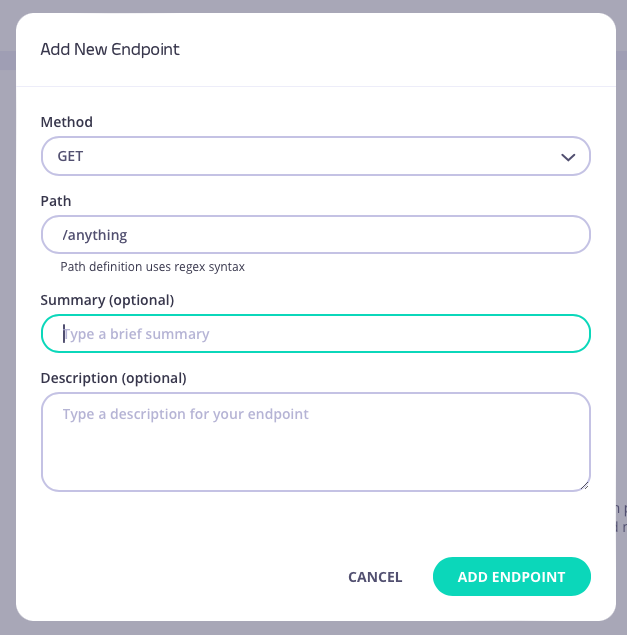
1. **Add an endpoint for the path**
From the **API Designer** add an endpoint that matches the path for you want to limit the size of requests.

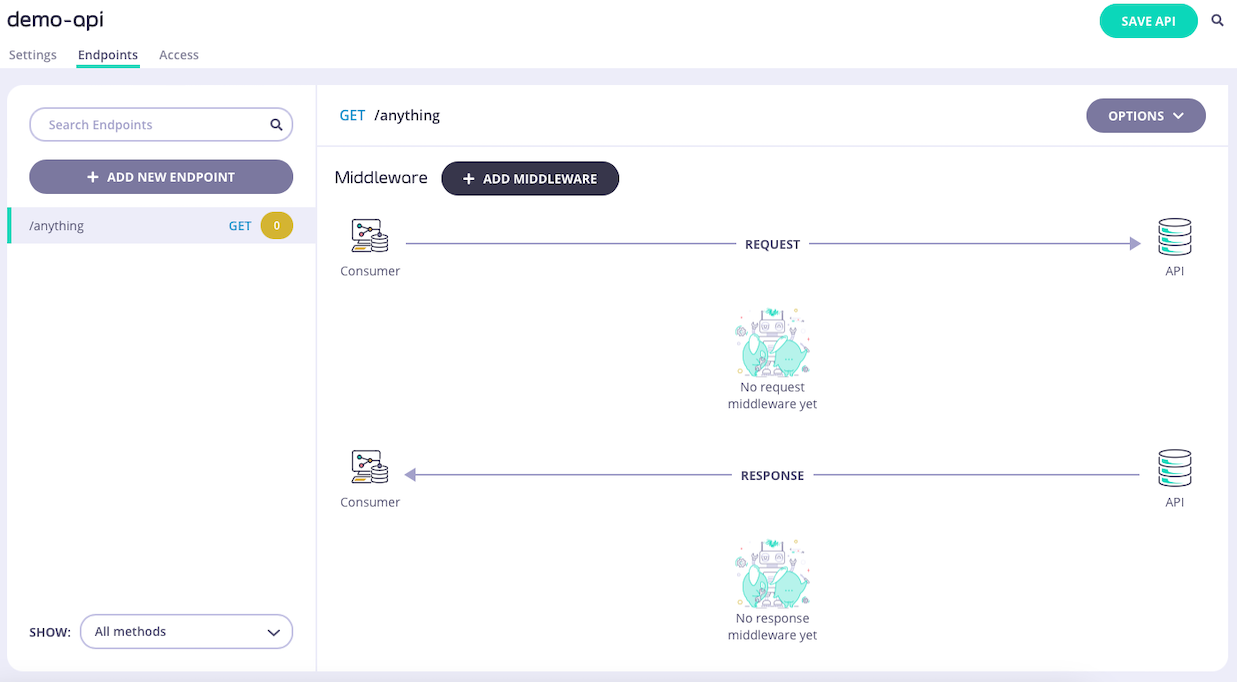 2. **Select the Request Size Limit middleware**
Select **ADD MIDDLEWARE** and choose the **Request Size Limit** middleware from the *Add Middleware* screen.
2. **Select the Request Size Limit middleware**
Select **ADD MIDDLEWARE** and choose the **Request Size Limit** middleware from the *Add Middleware* screen.
 3. **Configure the middleware**
Now you can set the **size limit** that the middleware should enforce - remember that this is given in bytes.
3. **Configure the middleware**
Now you can set the **size limit** that the middleware should enforce - remember that this is given in bytes.
 4. **Save the API**
Select **ADD MIDDLEWARE** to save the middleware configuration. Remember to select **SAVE API** to apply the changes to your API.
## Using Classic
The [request size limit](/api-management/traffic-transformation/request-size-limits) middleware enables you to apply limits to the size of requests made to your HTTP APIs. You might use this feature to protect your Tyk Gateway or upstream services from excessive memory usage or brute force attacks.
This middleware is configured in the Tyk Classic API Definition. You can do this via the Tyk Dashboard API or in the API Designer.
If you're using the newer Tyk OAS APIs, then check out the [Tyk OAS](#request-size-limits-using-tyk-oas) page.
If you're using Tyk Operator then check out the [configuring the middleware in Tyk Operator](#tyk-operator) section below.
### API Definition
There are three different levels of granularity that can be used when configuring a request size limit.
* [system-wide](#applying-a-system-level-size-limit): affecting all APIs deployed on the gateway
* [API-level](/api-management/traffic-transformation/request-headers#tyk-classic-api): affecting all endpoints for an API
* [endpoint-level](#tyk-classic-endpoint): affecting a single API endpoint
#### Applying a size limit for a specific API
You can configure a request size limit (in bytes) to an API by configuring the `global_size_limit` within the `version` element of the API Definition, for example:
```
"global_size_limit": 2500
```
A value of zero (default) means that no maximum is set and the API-level size limit check will not be performed.
This limit is applied for all endpoints within an API. It is evaluated after the Gateway-wide size limit and before any endpoint-specific size limit. If this test fails, the Tyk Gateway will report `HTTP 400 Request is too large`.
#### Applying a size limit for a specific endpoint
The most granular control over request sizes is provided by the endpoint-level configuration. This limit will be applied after any Gateway-level or API-level size limits and is given in bytes. If this test fails, the Tyk Gateway will report `HTTP 400 Request is too large`.
To enable the middleware you must add a new `size_limits` object to the `extended_paths` section of your API definition.
The `size_limits` object has the following configuration:
* `path`: the endpoint path
* `method`: the endpoint HTTP method
* `size_limit`: the maximum size permitted for a request to the endpoint (in bytes)
For example:
```.json {linenos=true, linenostart=1} theme={null}
{
"extended_paths": {
"size_limits": [
{
"disabled": false,
"path": "/anything",
"method": "POST",
"size_limit": 100
}
]
}
}
```
In this example the endpoint-level Request Size Limit middleware has been configured for HTTP `POST` requests to the `/anything` endpoint. For any call made to this endpoint, Tyk will check the size of the payload (Request body) and, if it is larger than 100 bytes, will reject the request, returning `HTTP 400 Request is too large`.
### API Designer
You can use the API Designer in the Tyk Dashboard to configure a request size limit for your Tyk Classic API by following these steps.
1. **Add an endpoint for the path and select the plugin**
From the **Endpoint Designer** add an endpoint that matches the path for which you want to limit the size of requests. Select the **Request size limit** plugin.
4. **Save the API**
Select **ADD MIDDLEWARE** to save the middleware configuration. Remember to select **SAVE API** to apply the changes to your API.
## Using Classic
The [request size limit](/api-management/traffic-transformation/request-size-limits) middleware enables you to apply limits to the size of requests made to your HTTP APIs. You might use this feature to protect your Tyk Gateway or upstream services from excessive memory usage or brute force attacks.
This middleware is configured in the Tyk Classic API Definition. You can do this via the Tyk Dashboard API or in the API Designer.
If you're using the newer Tyk OAS APIs, then check out the [Tyk OAS](#request-size-limits-using-tyk-oas) page.
If you're using Tyk Operator then check out the [configuring the middleware in Tyk Operator](#tyk-operator) section below.
### API Definition
There are three different levels of granularity that can be used when configuring a request size limit.
* [system-wide](#applying-a-system-level-size-limit): affecting all APIs deployed on the gateway
* [API-level](/api-management/traffic-transformation/request-headers#tyk-classic-api): affecting all endpoints for an API
* [endpoint-level](#tyk-classic-endpoint): affecting a single API endpoint
#### Applying a size limit for a specific API
You can configure a request size limit (in bytes) to an API by configuring the `global_size_limit` within the `version` element of the API Definition, for example:
```
"global_size_limit": 2500
```
A value of zero (default) means that no maximum is set and the API-level size limit check will not be performed.
This limit is applied for all endpoints within an API. It is evaluated after the Gateway-wide size limit and before any endpoint-specific size limit. If this test fails, the Tyk Gateway will report `HTTP 400 Request is too large`.
#### Applying a size limit for a specific endpoint
The most granular control over request sizes is provided by the endpoint-level configuration. This limit will be applied after any Gateway-level or API-level size limits and is given in bytes. If this test fails, the Tyk Gateway will report `HTTP 400 Request is too large`.
To enable the middleware you must add a new `size_limits` object to the `extended_paths` section of your API definition.
The `size_limits` object has the following configuration:
* `path`: the endpoint path
* `method`: the endpoint HTTP method
* `size_limit`: the maximum size permitted for a request to the endpoint (in bytes)
For example:
```.json {linenos=true, linenostart=1} theme={null}
{
"extended_paths": {
"size_limits": [
{
"disabled": false,
"path": "/anything",
"method": "POST",
"size_limit": 100
}
]
}
}
```
In this example the endpoint-level Request Size Limit middleware has been configured for HTTP `POST` requests to the `/anything` endpoint. For any call made to this endpoint, Tyk will check the size of the payload (Request body) and, if it is larger than 100 bytes, will reject the request, returning `HTTP 400 Request is too large`.
### API Designer
You can use the API Designer in the Tyk Dashboard to configure a request size limit for your Tyk Classic API by following these steps.
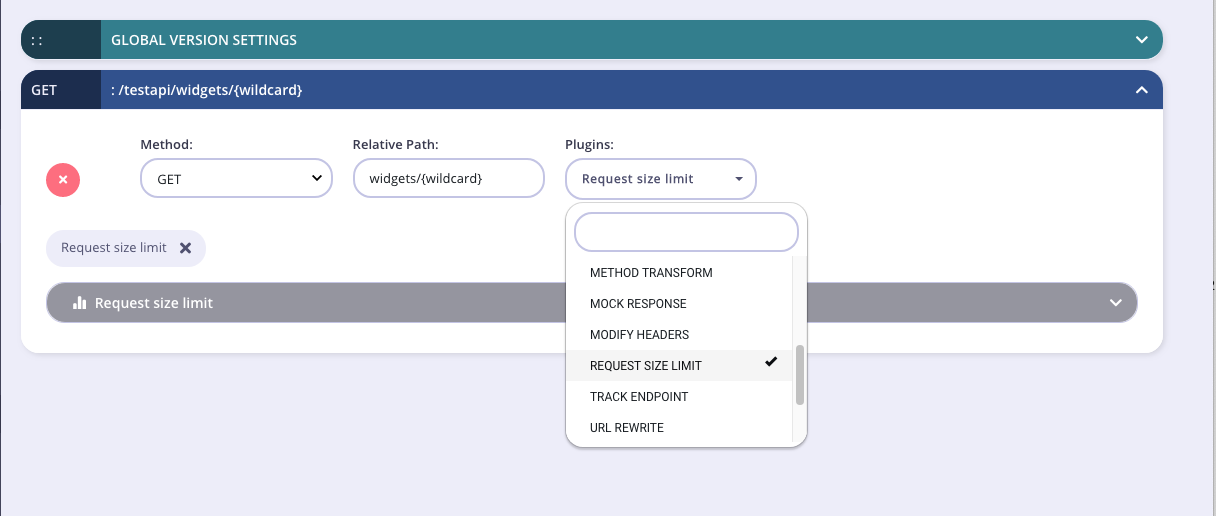
1. **Add an endpoint for the path and select the plugin**
From the **Endpoint Designer** add an endpoint that matches the path for which you want to limit the size of requests. Select the **Request size limit** plugin.
 2. **Configure the middleware**
Set the request size limit, in bytes.
2. **Configure the middleware**
Set the request size limit, in bytes.
 3. **Save the API**
Use the *save* or *create* buttons to save the changes and activate the middleware.
The Tyk Classic API Designer does not provide an option to configure `global_size_limit`, but you can do this from the Raw Definition editor.
### Tyk Operator
The process for configuring a request size limit is similar to that defined in section configuring the middleware in the Tyk Classic API Definition. Tyk Operator allows you to configure a request size limit for [all endpoints of an API](#tyk-operator-api) or for a [specific API endpoint](#tyk-operator-endpoint).
#### Applying a size limit for a specific API
The process for configuring the request size\_limits middleware for a specific API is similar to that explained in [applying a size limit for a specific API](#tyk-classic-api).
You can configure a request size limit (in bytes) for all endpoints within an API by configuring the `global_size_limit` within the `version` element of the API Definition, for example:
```yaml {linenos=true, linenostart=1, hl_lines=["19"]} theme={null}
apiVersion: tyk.tyk.io/v1alpha1
kind: ApiDefinition
metadata:
name: httpbin-global-limit
spec:
name: httpbin-global-limit
use_keyless: true
protocol: http
active: true
proxy:
target_url: http://httpbin.org
listen_path: /httpbin-global-limit
strip_listen_path: true
version_data:
default_version: Default
not_versioned: true
versions:
Default:
global_size_limit: 5
name: Default
```
The example API Definition above configures an API to listen on path `/httpbin-global-limit` and forwards requests upstream to [http://httpbin.org](http://httpbin.org).
In this example the request size limit is set to 5 bytes. If the limit is exceeded then the Tyk Gateway will report `HTTP 400 Request is too large`.
#### Applying a size limit for a specific endpoint
The process for configuring the request size\_limits middleware for a specific endpoint is similar to that explained in [applying a size limit for a specific endpoint](#tyk-classic-endpoint).
To configure the request size\_limits middleware you must add a new `size_limits` object to the `extended_paths` section of your API definition, for example:
```yaml {linenos=true, linenostart=1, hl_lines=["22-25"]} theme={null}
apiVersion: tyk.tyk.io/v1alpha1
kind: ApiDefinition
metadata:
name: httpbin-limit
spec:
name: httpbin-limit
use_keyless: true
protocol: http
active: true
proxy:
target_url: http://httpbin.org
listen_path: /httpbin-limit
strip_listen_path: true
version_data:
default_version: Default
not_versioned: true
versions:
Default:
name: Default
use_extended_paths: true
extended_paths:
size_limits:
- method: POST
path: /post
size_limit: 5
```
The example API Definition above configures an API to listen on path `/httpbin-limit` and forwards requests upstream to [http://httpbin.org](http://httpbin.org).
In this example the endpoint-level Request Size Limit middleware has been configured for `HTTP POST` requests to the `/post` endpoint. For any call made to this endpoint, Tyk will check the size of the payload (Request body) and, if it is larger than 5 bytes, will reject the request, returning `HTTP 400 Request is too large`.
3. **Save the API**
Use the *save* or *create* buttons to save the changes and activate the middleware.
The Tyk Classic API Designer does not provide an option to configure `global_size_limit`, but you can do this from the Raw Definition editor.
### Tyk Operator
The process for configuring a request size limit is similar to that defined in section configuring the middleware in the Tyk Classic API Definition. Tyk Operator allows you to configure a request size limit for [all endpoints of an API](#tyk-operator-api) or for a [specific API endpoint](#tyk-operator-endpoint).
#### Applying a size limit for a specific API
The process for configuring the request size\_limits middleware for a specific API is similar to that explained in [applying a size limit for a specific API](#tyk-classic-api).
You can configure a request size limit (in bytes) for all endpoints within an API by configuring the `global_size_limit` within the `version` element of the API Definition, for example:
```yaml {linenos=true, linenostart=1, hl_lines=["19"]} theme={null}
apiVersion: tyk.tyk.io/v1alpha1
kind: ApiDefinition
metadata:
name: httpbin-global-limit
spec:
name: httpbin-global-limit
use_keyless: true
protocol: http
active: true
proxy:
target_url: http://httpbin.org
listen_path: /httpbin-global-limit
strip_listen_path: true
version_data:
default_version: Default
not_versioned: true
versions:
Default:
global_size_limit: 5
name: Default
```
The example API Definition above configures an API to listen on path `/httpbin-global-limit` and forwards requests upstream to [http://httpbin.org](http://httpbin.org).
In this example the request size limit is set to 5 bytes. If the limit is exceeded then the Tyk Gateway will report `HTTP 400 Request is too large`.
#### Applying a size limit for a specific endpoint
The process for configuring the request size\_limits middleware for a specific endpoint is similar to that explained in [applying a size limit for a specific endpoint](#tyk-classic-endpoint).
To configure the request size\_limits middleware you must add a new `size_limits` object to the `extended_paths` section of your API definition, for example:
```yaml {linenos=true, linenostart=1, hl_lines=["22-25"]} theme={null}
apiVersion: tyk.tyk.io/v1alpha1
kind: ApiDefinition
metadata:
name: httpbin-limit
spec:
name: httpbin-limit
use_keyless: true
protocol: http
active: true
proxy:
target_url: http://httpbin.org
listen_path: /httpbin-limit
strip_listen_path: true
version_data:
default_version: Default
not_versioned: true
versions:
Default:
name: Default
use_extended_paths: true
extended_paths:
size_limits:
- method: POST
path: /post
size_limit: 5
```
The example API Definition above configures an API to listen on path `/httpbin-limit` and forwards requests upstream to [http://httpbin.org](http://httpbin.org).
In this example the endpoint-level Request Size Limit middleware has been configured for `HTTP POST` requests to the `/post` endpoint. For any call made to this endpoint, Tyk will check the size of the payload (Request body) and, if it is larger than 5 bytes, will reject the request, returning `HTTP 400 Request is too large`.