> ## Documentation Index
> Fetch the complete documentation index at: https://tyk.io/docs/llms.txt
> Use this file to discover all available pages before exploring further.
# Rich Plugins
> Learn how to write powerful custom middleware for Tyk using Python, Lua, or gRPC-supported languages
export const ButtonLeft = ({href, color, content}) => {
const buttonStyle = {
display: 'inline-block',
padding: '5px 16px',
fontSize: '14px',
fontWeight: '500',
textDecoration: 'none',
borderRadius: '25px',
transition: 'all 0.2s ease',
cursor: 'pointer',
border: '1.2px solid black'
};
const colorStyles = {
green: {
backgroundColor: '#20EDBA',
color: 'black'
},
red: {
backgroundColor: '#dc2626',
color: 'white'
},
black: {
backgroundColor: '#1f2937',
color: 'white'
}
};
const hoverStyle = {
transform: 'translateY(-1px)',
boxShadow: '0 4px 8px rgba(0,0,0,0.15)'
};
const finalStyle = {
...buttonStyle,
...colorStyles[color] || colorStyles.black
};
return {
Object.assign(e.target.style, hoverStyle);
}} onMouseLeave={e => {
e.target.style.transform = 'translateY(0)';
e.target.style.boxShadow = 'none';
}}>
{content}
;
};
## Introduction
Rich plugins make it possible to write powerful middleware for Tyk. Tyk supports:
* [Python](/api-management/plugins/rich-plugins#overview)
* [gRPC](/api-management/plugins/rich-plugins#overview-1)
* [Lua](/api-management/plugins/rich-plugins#using-lua)
gRPC provides the ability to write plugins using many languages including C++, Java, Ruby and C#.
The dynamically built Tyk binaries can expose and call Foreign Function Interfaces in guest languages that extend the functionality of a gateway process.
The plugins are able to directly call some Tyk API functions from within their guest language. They can also be configured so that they hook into various points along the standard middleware chain.
When using Python plugins, the middleware function names are set globally. So, if you include two or more plugins that implement the same function, the last declared plugin implementation of the function will be returned. We plan to add namespaces in the future.
## How do rich plugins work ?
### ID Extractor & Auth Plugins
The ID Extractor is a caching mechanism that's used in combination with Tyk Plugins. It can be used specifically with plugins that implement custom authentication mechanisms. The ID Extractor works for all rich plugins: gRPC-based plugins, Python and Lua.
See [ID Extractor](/api-management/plugins/plugin-types#plugin-caching-mechanism) for more details.
### Interoperability
This feature implements an in-process message passing mechanism, based on [Protocol Buffers](https://developers.google.com/protocol-buffers/), any supported languages should provide a function to receive, unmarshal and process this kind of messages.
The main interoperability task is achieved by using [cgo](https://golang.org/cmd/cgo/) as a bridge between a supported language -like Python- and the Go codebase.
Your C bridge function must accept and return a `CoProcessMessage` data structure like the one described in [`api.h`](https://github.com/TykTechnologies/tyk/blob/master/coprocess/api.h), where `p_data` is a pointer to the serialised data and `length` indicates the length of it.
```{.copyWrapper} theme={null}
struct CoProcessMessage {
void* p_data;
int length;
};
```
The unpacked data will hold the actual `CoProcessObject` data structure.
* `HookType` - the hook type (see below)
* `Request` - the HTTP request
* `Session` - the client's [Session](/api-management/access-control/sessions-and-keys/understanding-sessions).
* `Metadata` - the metadata from the session data above (key/value string map).
* `Spec` - the API specification data. Currently organization ID, API ID and config\_data.
```{.copyWrapper} theme={null}
type CoProcessObject struct {
HookType string
Request CoProcessMiniRequestObject
Session SessionState
Metadata map[string]string
Spec map[string]string
}
```
### Coprocess Dispatcher
`Coprocess.Dispatcher` describes a very simple interface for implementing the dispatcher logic, the required methods are: `Dispatch`, `DispatchEvent` and `Reload`.
`Dispatch` accepts a pointer to a struct `CoProcessObject` (as described above) and must return an object of the same type. This method is called for every configured hook on every request.
Typically, it performs a single function call in the target language (such as `Python_DispatchHook` in `coprocess_python`), where the corresponding logic is handled—mainly because different languages have different ways of loading, referencing, or calling middleware.
`DispatchEvent` provides a way of dispatching Tyk events to a target language. This method doesn't return any variables but does receive a JSON-encoded object containing the event data. For extensibility purposes, this method doesn't use Protocol Buffers, the input is a `[]byte`, the target language will take this (as a `char`) and perform the JSON decoding operation.
`Reload` is called when triggering a hot reload, this method could be useful for reloading scripts or modules in the target language.
### Coprocess Dispatcher - Hooks
This component is in charge of dispatching your HTTP requests to the custom middleware. The list, from top to bottom, shows the order of execution. The dispatcher follows the standard middleware chain logic and provides a simple mechanism for "hooking" your custom middleware behavior, the supported hooks are:
* **Pre**: gets executed before the request is sent to your upstream target and before any authentication information is extracted from the header or parameter list of the request. When enabled, this applies to both keyless and protected APIs.
* **AuthCheck**: gets executed as a custom authentication middleware, instead of the standard ones provided by Tyk. Use this to provide your own authentication mechanism.
* **PostKeyAuth**: gets executed right after the authentication process.
* **Post**: gets executed after the authentication, validation, throttling, and quota-limiting middleware has been executed, just before the request is proxied upstream. Use this to post-process a request before sending it to your upstream API. This is only called when using protected APIs. If you want to call a hook after the authentication but before the validation, throttling and other middleware, see **PostKeyAuth**.
* **Response**: gets executed after the upstream API replies. The arguments passed to this hook include both the request and response data. Use this to modify the HTTP response before it's sent to the client. This hook also receives the request object, the session object, the metadata and API definition associated with the request.
Response hooks are not available for native Go plugins. Python and gRPC plugins are supported.
### Coprocess Gateway API
[`coprocess_api.go`](https://github.com/TykTechnologies/tyk/tree/master/coprocess) provides a bridge between the Gateway API and C. Any function that needs to be exported should have the `export` keyword:
```{.copyWrapper} theme={null}
//export TykTriggerEvent
func TykTriggerEvent( CEventName *C.char, CPayload *C.char ) {
eventName := C.GoString(CEventName)
payload := C.GoString(CPayload)
FireSystemEvent(tykcommon.TykEvent(eventName), EventMetaDefault{
Message: payload,
})
}
```
You should also expect a header file declaration of this function in [`api.h`](https://github.com/TykTechnologies/tyk/blob/master/coprocess/api.h), like this:
```{.copyWrapper} theme={null}
#ifndef TYK_COPROCESS_API
#define TYK_COPROCESS_API
extern void TykTriggerEvent(char* event_name, char* payload);
#endif
```
The language binding will include this header file (or declare the function inline) and perform the necessary steps to call it with the appropriate arguments (like an FFI mechanism could do). As a reference, this is how this could be achieved if you're building a [Cython](http://cython.org/) module:
```{.copyWrapper} theme={null}
cdef extern:
void TykTriggerEvent(char* event_name, char* payload);
def call():
event_name = 'my event'.encode('utf-8')
payload = 'my payload'.encode('utf-8')
TykTriggerEvent( event_name, payload )
```
### Basic usage
The intended way of using a Coprocess middleware is to specify it as part of an API Definition:
```{.json} theme={null}
"custom_middleware": {
"pre": [
{
"name": "MyPreMiddleware",
"require_session": false
},
{
"name": "AnotherPreMiddleware",
"require_session": false
}
],
"post": [
{
"name": "MyPostMiddleware",
"require_session": false
}
],
"post_key_auth": [
{
"name": "MyPostKeyAuthMiddleware",
"require_session": true
}
],
"auth_check": {
"name": "MyAuthCheck"
},
"driver": "python"
}
```
All hook types support chaining except the custom auth check (`auth_check`).
***
## Rich Plugins Data Structures
This section describes the data structures used by the Tyk rich plugins.
The coprocess object is a message dispatched by Tyk to the gRPC server handling the custom plugins.
The Tyk [Protocol Buffer definitions](https://github.com/TykTechnologies/tyk/tree/master/coprocess/proto) are intended for users to generate their own bindings using the appropriate gRPC tools for the required target language.
The remainder of this document illustrates a class diagram and explins the attributes of the protobuf messages.
### Coprocess Object
The `Coprocess.Object` data structure wraps a `Coprocess.MiniRequestObject` and `Coprocess.ResponseObject` It contains additional fields that are useful for users that implement their own request dispatchers, like the middleware hook type and name.
It also includes the session state object (`SessionState`), which holds information about the current key/user that's used for authentication.
```protobuf theme={null}
message Object {
HookType hook_type = 1;
string hook_name = 2;
MiniRequestObject request = 3;
SessionState session = 4;
map metadata = 5;
map spec = 6;
ResponseObject response = 7;
}
```
This class diagram presents the structure of the object:
 #### Field Descriptions
`hook_type`
Contains the middleware hook type: pre, post, custom auth.
`hook_name`
Contains the hook name.
`request`
Contains the request object, see `MiniRequestObject` for more details.
`session`
Contains the session object, see `SessionState` for more details.
`metadata`
Contains the metadata. This is a dynamic field.
`spec`
Contains information about API definition, including `APIID`, `OrgID` and `config_data`.
`response`
Contains information populated from the upstream HTTP response data, for response hooks. See [ResponseObject](#responseobject) for more details. All the field contents can be modified.
### MiniRequestObject
The `Coprocess.MiniRequestObject` is the main request data structure used by rich plugins. It's used for middleware calls and contains important fields like headers, parameters, body and URL. A `MiniRequestObject` is part of a `Coprocess.Object`.
```protobuf theme={null}
message MiniRequestObject {
map headers = 1;
map set_headers = 2;
repeated string delete_headers = 3;
string body = 4;
string url = 5;
map params = 6;
map add_params = 7;
map extended_params = 8;
repeated string delete_params = 9;
ReturnOverrides return_overrides = 10;
string method = 11;
string request_uri = 12;
string scheme = 13;
bytes raw_body = 14;
}
```
#### Field Descriptions
`headers`
A read-only field for reading headers injected by previous middleware. Modifying this field won't alter the request headers See `set_headers` and `delete_headers` for this.
`set_headers`
This field appends the given headers (keys and values) to the request.
`delete_headers`
This field contains an array of header names to be removed from the request.
`body`
Contains the request body. See `ReturnOverrides` for response body modifications.
`raw_body`
Contains the raw request body (bytes).
`url`
The request URL.
`params`
A read-only field that contains the request params. Modifying this value won't affect the request params.
`add_params`
Add paramaters to the request.
`delete_params`
This field contains an array of parameter keys to be removed from the request.
`return_overrides`
See `ReturnOverrides` for more information.
`method`
The request method, e.g. GET, POST, etc.
`request_uri`
Raw unprocessed URL which includes query string and fragments.
`scheme`
Contains the URL scheme, e.g. `http`, `https`.
***
### ResponseObject
The `ResponseObject` exists within an [object](#coprocess-object) for response hooks. The fields are populated with the upstream HTTP response data. All the field contents can be modified.
```protobuf theme={null}
syntax = "proto3";
package coprocess;
message ResponseObject {
int32 status_code = 1;
bytes raw_body = 2;
string body = 3;
map headers = 4;
repeated Header multivalue_headers = 5;
}
message Header {
string key = 1;
repeated string values = 2;
}
```
#### Field Descriptions
`status_code`
This field indicates the HTTP status code that was sent by the upstream.
`raw_body`
This field contains the HTTP response body (bytes). It's always populated.
`body`
This field contains the HTTP response body in string format. It's not populated if the `raw_body` contains invalid UTF-8 characters.
`headers`
A map that contains the headers sent by the upstream.
`multivalue_headers`
A list of headers, each header in this list is a structure that consists of two parts: a key and its corresponding values.
The key is a string that denotes the name of the header, the values are a list of strings that hold the content of the header, this is useful when the header has multiple associated values.
This field is available for Go, Python and Ruby since tyk v5.0.4 and 5.1.1+.
***
### ReturnOverrides
The `ReturnOverrides` object, when returned as part of a `Coprocess.Object`, overrides the response of a given HTTP request. It also stops the request flow and the HTTP request isn't passed upstream. The fields specified in the `ReturnOverrides` object are used as the HTTP response.
A sample usage for `ReturnOverrides` is when a rich plugin needs to return a custom error to the user.
```protobuf theme={null}
syntax = "proto3";
package coprocess;
message ReturnOverrides {
int32 response_code = 1;
string response_error = 2;
map headers = 3;
bool override_error = 4;
string response_body = 5;
}
```
#### Field Descriptions
`response_code`
This field overrides the HTTP response code and can be used for error codes (403, 500, etc.) or for overriding the response.
`response_error`
This field overrides the HTTP response body.
`headers`
This field overrides response HTTP headers.
`override_error`
This setting provides enhanced customization for returning custom errors. It should be utilized alongside `response_body` for optimal effect.
`response_body`
This field serves as an alias for `response_erro`r and holds the HTTP response body.
***
### SessionState
A `SessionState` data structure is created for every authenticated request and stored in Redis. It's used to track the activity of a given key in different ways, mainly by the built-in Tyk middleware like the quota middleware or the rate limiter.
A rich plugin can create a `SessionState` object and store it in the same way built-in authentication mechanisms do. This is what a custom authentication middleware does. This is also part of a `Coprocess.Object`.
Returning a null session object from a custom authentication middleware is considered a failed authentication and the appropriate HTTP 403 error is returned by the gateway (this is the default behavior) and can be overridden by using `ReturnOverrides`.
#### Field Descriptions
`last_check`
No longer used.
`allowance`
No longer in use, should be the same as `rate`.
`rate`
The number of requests that are allowed in the specified rate limiting window.
`per`
The number of seconds that the rate window should encompass.
`expires`
An epoch that defines when the key should expire.
`quota_max`
The maximum number of requests allowed during the quota period.
`quota_renews`
An epoch that defines when the quota renews.
`quota_remaining`
Indicates the remaining number of requests within the user's quota, which is independent of the rate limit.
`quota_renewal_rate`
The time in seconds during which the quota is valid. So for 1000 requests per hour, this value would be 3600 while `quota_max` and `quota_remaining` would be 1000.
`access_rights`
Defined as a `map` instance, that maps the session's API ID to an [AccessDefinition](#access-definition). The AccessDefinition defines the [access rights](/api-management/access-control/sessions-and-keys/access-rights) for the API in terms of allowed: versions and URLs(endpoints). Each URL (endpoint) has a list of allowed methods. For further details consult the tutorials for how to create a [security policy](/api-management/gateway-config-managing-classic#secure-an-api) for Tyk Cloud, Tyk Self Managed and Tyk OSS platforms.
`org_id`
The organization this user belongs to. This can be used in conjunction with the org\_id setting in the API Definition object to have tokens "owned" by organizations.
`oauth_client_id`
This is set by Tyk if the token is generated by an OAuth client during an OAuth authorization flow.
`basic_auth_data`
This section contains a hashed representation of the basic auth password and the hashing method used.
For further details see [BasicAuthData](#basicauthdata).
`jwt_data`
Added to sessions where a Tyk key (embedding a shared secret) is used as the public key for signing the JWT. The JWT token's KID header value references the ID of a Tyk key. See [JWTData](#jwtdata) for an example.
`hmac_enabled`
When set to `true` this indicates generation of a [HMAC signature](/basic-config-and-security/security/authentication-authorization/hmac-signatures) using the secret provided in `hmac_secret`. If the generated signature matches the signature provided in the *Authorization* header then authentication of the request has passed.
`hmac_secret`
The value of the HMAC shared secret.
`is_inactive`
Set this value to true to deny access.
`apply_policy_id`
The policy ID that is bound to this token.
Although `apply_policy_id` is still supported, it is now deprecated. `apply_policies` is now used to list your policy IDs as an array. See [here](/api-management/access-control/policies/applying-policies#policy-ids) for more details.
`data_expires`
A value, in seconds, that defines when data generated by this token expires in the analytics DB (must be using Pro edition and MongoDB).
`monitor`
Defines a [quota monitor](/api-management/gateway-events#monitoring-quota-consumption) containing a list of percentage threshold limits in descending order. These limits determine when webhook notifications are triggered for API users or an organization. Each threshold represents a percentage of the quota that, when reached, triggers a notification. See [Monitor](#monitor) for further details and an example.
`enable_detailed_recording`
Set this value to true to have Tyk store the inbound request and outbound response data in HTTP Wire format as part of the analytics data.
`metadata`
Metadata to be included as part of the session. This is a key/value string map that can be used in other middleware such as transforms and header injection to embed user-specific data into a request, or alternatively to query the providence of a key.
`tags`
Tags are embedded into analytics data when the request completes. If a policy has tags, those tags will supersede the ones carried by the token (they will be overwritten).
`alias`
As of v2.1, an Alias offers a way to identify a token in a more human-readable manner, add an Alias to a token in order to have the data transferred into Analytics later on so you can track both hashed and un-hashed tokens to a meaningful identifier that doesn't expose the security of the underlying token.
`last_updated`
A UNIX timestamp that represents the time the session was last updated. Applicable to *Post*, *PostAuth* and *Response* plugins. When developing *CustomAuth* plugins developers should add this to the SessionState instance.
`id_extractor_deadline`
This is a UNIX timestamp that signifies when a cached key or ID will expire. This relates to custom authentication, where authenticated keys can be cached to save repeated requests to the gRPC server. See [id\_extractor](/api-management/plugins/plugin-types#plugin-caching-mechanism) and [Auth Plugins](/api-management/plugins/plugin-types#authentication-plugins) for additional information.
`session_lifetime`
UNIX timestamp that denotes when the key will automatically expire. Any·subsequent API request made using the key will be rejected. Overrides the global session lifetime. See [Key Expiry and Deletion](/api-management/access-control/sessions-and-keys/session-lifecycle) for more information.
`key_id`
This is the unique identifier for the access token used to authenticate the request, introduced in v5.9.0.
***
### AccessDefinition
```protobuf theme={null}
message AccessDefinition {
string api_name = 1;
string api_id = 2;
repeated string versions = 3;
repeated AccessSpec allowed_urls = 4;
}
```
Defined as an attribute within a [SessionState](#session-state) instance. Contains the allowed versions and URLs (endpoints) for the API that the session request relates to. Each URL (endpoint) specifies an associated list of allowed methods. See also [AccessSpec](#access-spec).
#### Field Descriptions
`api_name`
The name of the API that the session request relates to.
`api_id`
The ID of the API that the session request relates to.
`versions`
List of allowed API versions, e.g. `"versions": [ "Default" ]`.
`allowed_urls` List of [AccessSpec](#access-spec) instances. Each instance defines a URL (endpoint) with an associated allowed list of methods. If all URLs (endpoints) are allowed then the attribute is not set.
***
### AccessSpec
Defines an API's URL (endpoint) and associated list of allowed methods
```protobuf theme={null}
message AccessSpec {
string url = 1;
repeated string methods = 2;
}
```
#### Field Descriptions
`url`
A URL (endpoint) belonging to the API associated with the request session.
`methods`
List of allowed methods for the URL (endpoint), e.g. `"methods": [ "GET". "POST", "PUT", "PATCH" ]`.
***
### BasicAuthData
The `BasicAuthData` contains a hashed password and the name of the hashing algorithm used. This is represented by the `basic_auth_data` attribute in [SessionState](#session-state) message.
```yaml theme={null}
"basicAuthData": {
"password": ,
"hash":
}
```
#### Field Descriptions
`password`
A hashed password.
`hash`
Name of the [hashing algorithm](/api-management/access-control/sessions-and-keys/key-hashing#hashing-algorithms) used to hash the password.
***
### JWTData
Added to [sessions](#session-state) where a Tyk key (embedding a shared secret) is used as the public key for signing the JWT. This message contains the shared secret.
```yaml theme={null}
"jwtData": {
"secret": "the_secret"
}
```
#### Field Descriptions
`secret`
The shared secret.
***
### Monitor
Added to a [session](#session-state) when [monitor quota thresholds](/api-management/gateway-events#monitoring-quota-consumption) are defined within the Tyk key. This message contains the quota percentage threshold limits, defined in descending order, that trigger webhook notification.
```yaml theme={null}
message Monitor {
repeated double trigger_limits = 1;
}
```
#### Field Descriptions
`trigger_limits`
List of trigger limits defined in descending order. Each limit represents the percentage of the quota that must be reached in order for the webhook notification to be triggered.
```yaml theme={null}
"monitor": {
"trigger_limits": [80.0, 60.0, 50.0]
}
```
***
#### Field Descriptions
`hook_type`
Contains the middleware hook type: pre, post, custom auth.
`hook_name`
Contains the hook name.
`request`
Contains the request object, see `MiniRequestObject` for more details.
`session`
Contains the session object, see `SessionState` for more details.
`metadata`
Contains the metadata. This is a dynamic field.
`spec`
Contains information about API definition, including `APIID`, `OrgID` and `config_data`.
`response`
Contains information populated from the upstream HTTP response data, for response hooks. See [ResponseObject](#responseobject) for more details. All the field contents can be modified.
### MiniRequestObject
The `Coprocess.MiniRequestObject` is the main request data structure used by rich plugins. It's used for middleware calls and contains important fields like headers, parameters, body and URL. A `MiniRequestObject` is part of a `Coprocess.Object`.
```protobuf theme={null}
message MiniRequestObject {
map headers = 1;
map set_headers = 2;
repeated string delete_headers = 3;
string body = 4;
string url = 5;
map params = 6;
map add_params = 7;
map extended_params = 8;
repeated string delete_params = 9;
ReturnOverrides return_overrides = 10;
string method = 11;
string request_uri = 12;
string scheme = 13;
bytes raw_body = 14;
}
```
#### Field Descriptions
`headers`
A read-only field for reading headers injected by previous middleware. Modifying this field won't alter the request headers See `set_headers` and `delete_headers` for this.
`set_headers`
This field appends the given headers (keys and values) to the request.
`delete_headers`
This field contains an array of header names to be removed from the request.
`body`
Contains the request body. See `ReturnOverrides` for response body modifications.
`raw_body`
Contains the raw request body (bytes).
`url`
The request URL.
`params`
A read-only field that contains the request params. Modifying this value won't affect the request params.
`add_params`
Add paramaters to the request.
`delete_params`
This field contains an array of parameter keys to be removed from the request.
`return_overrides`
See `ReturnOverrides` for more information.
`method`
The request method, e.g. GET, POST, etc.
`request_uri`
Raw unprocessed URL which includes query string and fragments.
`scheme`
Contains the URL scheme, e.g. `http`, `https`.
***
### ResponseObject
The `ResponseObject` exists within an [object](#coprocess-object) for response hooks. The fields are populated with the upstream HTTP response data. All the field contents can be modified.
```protobuf theme={null}
syntax = "proto3";
package coprocess;
message ResponseObject {
int32 status_code = 1;
bytes raw_body = 2;
string body = 3;
map headers = 4;
repeated Header multivalue_headers = 5;
}
message Header {
string key = 1;
repeated string values = 2;
}
```
#### Field Descriptions
`status_code`
This field indicates the HTTP status code that was sent by the upstream.
`raw_body`
This field contains the HTTP response body (bytes). It's always populated.
`body`
This field contains the HTTP response body in string format. It's not populated if the `raw_body` contains invalid UTF-8 characters.
`headers`
A map that contains the headers sent by the upstream.
`multivalue_headers`
A list of headers, each header in this list is a structure that consists of two parts: a key and its corresponding values.
The key is a string that denotes the name of the header, the values are a list of strings that hold the content of the header, this is useful when the header has multiple associated values.
This field is available for Go, Python and Ruby since tyk v5.0.4 and 5.1.1+.
***
### ReturnOverrides
The `ReturnOverrides` object, when returned as part of a `Coprocess.Object`, overrides the response of a given HTTP request. It also stops the request flow and the HTTP request isn't passed upstream. The fields specified in the `ReturnOverrides` object are used as the HTTP response.
A sample usage for `ReturnOverrides` is when a rich plugin needs to return a custom error to the user.
```protobuf theme={null}
syntax = "proto3";
package coprocess;
message ReturnOverrides {
int32 response_code = 1;
string response_error = 2;
map headers = 3;
bool override_error = 4;
string response_body = 5;
}
```
#### Field Descriptions
`response_code`
This field overrides the HTTP response code and can be used for error codes (403, 500, etc.) or for overriding the response.
`response_error`
This field overrides the HTTP response body.
`headers`
This field overrides response HTTP headers.
`override_error`
This setting provides enhanced customization for returning custom errors. It should be utilized alongside `response_body` for optimal effect.
`response_body`
This field serves as an alias for `response_erro`r and holds the HTTP response body.
***
### SessionState
A `SessionState` data structure is created for every authenticated request and stored in Redis. It's used to track the activity of a given key in different ways, mainly by the built-in Tyk middleware like the quota middleware or the rate limiter.
A rich plugin can create a `SessionState` object and store it in the same way built-in authentication mechanisms do. This is what a custom authentication middleware does. This is also part of a `Coprocess.Object`.
Returning a null session object from a custom authentication middleware is considered a failed authentication and the appropriate HTTP 403 error is returned by the gateway (this is the default behavior) and can be overridden by using `ReturnOverrides`.
#### Field Descriptions
`last_check`
No longer used.
`allowance`
No longer in use, should be the same as `rate`.
`rate`
The number of requests that are allowed in the specified rate limiting window.
`per`
The number of seconds that the rate window should encompass.
`expires`
An epoch that defines when the key should expire.
`quota_max`
The maximum number of requests allowed during the quota period.
`quota_renews`
An epoch that defines when the quota renews.
`quota_remaining`
Indicates the remaining number of requests within the user's quota, which is independent of the rate limit.
`quota_renewal_rate`
The time in seconds during which the quota is valid. So for 1000 requests per hour, this value would be 3600 while `quota_max` and `quota_remaining` would be 1000.
`access_rights`
Defined as a `map` instance, that maps the session's API ID to an [AccessDefinition](#access-definition). The AccessDefinition defines the [access rights](/api-management/access-control/sessions-and-keys/access-rights) for the API in terms of allowed: versions and URLs(endpoints). Each URL (endpoint) has a list of allowed methods. For further details consult the tutorials for how to create a [security policy](/api-management/gateway-config-managing-classic#secure-an-api) for Tyk Cloud, Tyk Self Managed and Tyk OSS platforms.
`org_id`
The organization this user belongs to. This can be used in conjunction with the org\_id setting in the API Definition object to have tokens "owned" by organizations.
`oauth_client_id`
This is set by Tyk if the token is generated by an OAuth client during an OAuth authorization flow.
`basic_auth_data`
This section contains a hashed representation of the basic auth password and the hashing method used.
For further details see [BasicAuthData](#basicauthdata).
`jwt_data`
Added to sessions where a Tyk key (embedding a shared secret) is used as the public key for signing the JWT. The JWT token's KID header value references the ID of a Tyk key. See [JWTData](#jwtdata) for an example.
`hmac_enabled`
When set to `true` this indicates generation of a [HMAC signature](/basic-config-and-security/security/authentication-authorization/hmac-signatures) using the secret provided in `hmac_secret`. If the generated signature matches the signature provided in the *Authorization* header then authentication of the request has passed.
`hmac_secret`
The value of the HMAC shared secret.
`is_inactive`
Set this value to true to deny access.
`apply_policy_id`
The policy ID that is bound to this token.
Although `apply_policy_id` is still supported, it is now deprecated. `apply_policies` is now used to list your policy IDs as an array. See [here](/api-management/access-control/policies/applying-policies#policy-ids) for more details.
`data_expires`
A value, in seconds, that defines when data generated by this token expires in the analytics DB (must be using Pro edition and MongoDB).
`monitor`
Defines a [quota monitor](/api-management/gateway-events#monitoring-quota-consumption) containing a list of percentage threshold limits in descending order. These limits determine when webhook notifications are triggered for API users or an organization. Each threshold represents a percentage of the quota that, when reached, triggers a notification. See [Monitor](#monitor) for further details and an example.
`enable_detailed_recording`
Set this value to true to have Tyk store the inbound request and outbound response data in HTTP Wire format as part of the analytics data.
`metadata`
Metadata to be included as part of the session. This is a key/value string map that can be used in other middleware such as transforms and header injection to embed user-specific data into a request, or alternatively to query the providence of a key.
`tags`
Tags are embedded into analytics data when the request completes. If a policy has tags, those tags will supersede the ones carried by the token (they will be overwritten).
`alias`
As of v2.1, an Alias offers a way to identify a token in a more human-readable manner, add an Alias to a token in order to have the data transferred into Analytics later on so you can track both hashed and un-hashed tokens to a meaningful identifier that doesn't expose the security of the underlying token.
`last_updated`
A UNIX timestamp that represents the time the session was last updated. Applicable to *Post*, *PostAuth* and *Response* plugins. When developing *CustomAuth* plugins developers should add this to the SessionState instance.
`id_extractor_deadline`
This is a UNIX timestamp that signifies when a cached key or ID will expire. This relates to custom authentication, where authenticated keys can be cached to save repeated requests to the gRPC server. See [id\_extractor](/api-management/plugins/plugin-types#plugin-caching-mechanism) and [Auth Plugins](/api-management/plugins/plugin-types#authentication-plugins) for additional information.
`session_lifetime`
UNIX timestamp that denotes when the key will automatically expire. Any·subsequent API request made using the key will be rejected. Overrides the global session lifetime. See [Key Expiry and Deletion](/api-management/access-control/sessions-and-keys/session-lifecycle) for more information.
`key_id`
This is the unique identifier for the access token used to authenticate the request, introduced in v5.9.0.
***
### AccessDefinition
```protobuf theme={null}
message AccessDefinition {
string api_name = 1;
string api_id = 2;
repeated string versions = 3;
repeated AccessSpec allowed_urls = 4;
}
```
Defined as an attribute within a [SessionState](#session-state) instance. Contains the allowed versions and URLs (endpoints) for the API that the session request relates to. Each URL (endpoint) specifies an associated list of allowed methods. See also [AccessSpec](#access-spec).
#### Field Descriptions
`api_name`
The name of the API that the session request relates to.
`api_id`
The ID of the API that the session request relates to.
`versions`
List of allowed API versions, e.g. `"versions": [ "Default" ]`.
`allowed_urls` List of [AccessSpec](#access-spec) instances. Each instance defines a URL (endpoint) with an associated allowed list of methods. If all URLs (endpoints) are allowed then the attribute is not set.
***
### AccessSpec
Defines an API's URL (endpoint) and associated list of allowed methods
```protobuf theme={null}
message AccessSpec {
string url = 1;
repeated string methods = 2;
}
```
#### Field Descriptions
`url`
A URL (endpoint) belonging to the API associated with the request session.
`methods`
List of allowed methods for the URL (endpoint), e.g. `"methods": [ "GET". "POST", "PUT", "PATCH" ]`.
***
### BasicAuthData
The `BasicAuthData` contains a hashed password and the name of the hashing algorithm used. This is represented by the `basic_auth_data` attribute in [SessionState](#session-state) message.
```yaml theme={null}
"basicAuthData": {
"password": ,
"hash":
}
```
#### Field Descriptions
`password`
A hashed password.
`hash`
Name of the [hashing algorithm](/api-management/access-control/sessions-and-keys/key-hashing#hashing-algorithms) used to hash the password.
***
### JWTData
Added to [sessions](#session-state) where a Tyk key (embedding a shared secret) is used as the public key for signing the JWT. This message contains the shared secret.
```yaml theme={null}
"jwtData": {
"secret": "the_secret"
}
```
#### Field Descriptions
`secret`
The shared secret.
***
### Monitor
Added to a [session](#session-state) when [monitor quota thresholds](/api-management/gateway-events#monitoring-quota-consumption) are defined within the Tyk key. This message contains the quota percentage threshold limits, defined in descending order, that trigger webhook notification.
```yaml theme={null}
message Monitor {
repeated double trigger_limits = 1;
}
```
#### Field Descriptions
`trigger_limits`
List of trigger limits defined in descending order. Each limit represents the percentage of the quota that must be reached in order for the webhook notification to be triggered.
```yaml theme={null}
"monitor": {
"trigger_limits": [80.0, 60.0, 50.0]
}
```
***
## Using Python
### Overview
#### Requirements
Since v2.9, Tyk supports any currently stable [Python 3.x version](https://www.python.org/downloads/). The main requirement is to have the Python shared libraries installed. These are available as `libpython3.x` in most Linux distributions.
* Python3-dev
* [Protobuf](https://pypi.org/project/protobuf/): provides [Protocol Buffers](https://developers.google.com/protocol-buffers/) support
* [gRPC](https://pypi.org/project/grpcio/): provides [gRPC](http://www.grpc.io/) support
#### Important Note Regarding Performance
Python plugins are [embedded](https://docs.python.org/3/extending/embedding.html) within the Tyk Gateway process. Tyk Gateway integrates with Python custom plugins via a [cgo](https://golang.org/cmd/cgo) bridge.
`Tyk Gateway` \<-> CGO \<-> `Python Custom Plugin`
In order to integrate with Python custom plugins, the *libpython3.x.so* shared object library is used to embed a Python interpreter directly in the Tyk Gateway. Further details can be found [here](/api-management/plugins/rich-plugins#coprocess-gateway-api)
This allows combining the strengths of both Python and Go in a single application. However, it's essential to be aware of the potential complexities and performance implications of mixing languages, as well as the need for careful memory management when working with Python objects from Go.
The Tyk Gateway process initialises the Python interpreter using [Py\_initialize](https://docs.python.org/3/c-api/init.html#c.Py_Initialize). The Python [Global Interpreter Lock (GIL)](https://docs.python.org/3/glossary.html#term-global-interpreter-lock) allows only one thread to execute Python bytecode at a time, ensuring thread safety and simplifying memory management. While the GIL simplifies these aspects, it can limit the scalability of multi-threaded applications, particularly those with CPU-bound tasks, as it restricts parallel execution of Python code.
In the context of custom Python plugins, API calls are queued and the Python interpreter handles requests sequentially, processing them one at a time. Subsequently, this would consume large amounts of memory, and network sockets would remain open and blocked until the API request is processed.
#### Install the Python development packages
Starting from Tyk Gateway version `v5.3.0`, Python is no longer bundled with the official Tyk Gateway Docker image by default, to address security vulnerabilities in the Python libraries highlighted by [Docker Scout](https://docs.docker.com/scout/).
Whilst Python plugins are still supported by Tyk Gateway, if you want to use them you must extend the image to add support for Python. For further details, please refer to the [release notes](/developer-support/release-notes/gateway) for Tyk Gateway `v5.3.0`.
If you wish to use Python plugins using Docker, you can extend the official Tyk Gateway Docker image by adding Python to it.
This example Dockerfile extends the official Tyk Gateway image to support Python plugins by installing python and the required modules:
```dockerfile theme={null}
ARG BASE_IMAGE
FROM ${BASE_IMAGE} AS base
FROM python:3.11-bookworm
COPY --from=base /opt/tyk-gateway/ /opt/tyk-gateway/
RUN pip install setuptools && pip install google && pip install 'protobuf==4.24.4'
EXPOSE 8080 80 443
ENV PYTHON_VERSION=3.11
ENV PORT=8080
WORKDIR /opt/tyk-gateway/
ENTRYPOINT ["/opt/tyk-gateway/tyk" ]
CMD [ "--conf=/opt/tyk-gateway/tyk.conf" ]
```
To use this, you simply run `docker build` with this Dockerfile, providing the Tyk Gateway image that you would like to extend as build argument `BASE_IMAGE`.
As an example, this command will extend Tyk Gateway `v5.3.0` to support Python plugins, generating the image `tyk-gateway-python:v5.3.0`:
```bash theme={null}
docker build --build-arg BASE_IMAGE=tykio/tyk-gateway:v5.3.0 -t tyk-gateway-python:v5.3.0 .
```
```apt theme={null}
apt install python3 python3-dev python3-pip build-essential
```
#### Install the Required Python Modules
Make sure that "pip" is available in your system, it should be typically available as "pip", "pip3" or "pipX.X" (where X.X represents the Python version):
```pip3 theme={null}
pip3 install protobuf grpcio
```
```yum theme={null}
yum install python3-devel python3-setuptools
python3 -m ensurepip
```
#### Install the Required Python Modules
Make sure that "pip" is now available in your system, it should be typically available as "pip", "pip3" or "pipX.X" (where X.X represents the Python version):
```pip3 theme={null}
pip3 install protobuf grpcio
```
#### Python versions
Newer Tyk versions provide more flexibility when using Python plugins, allowing the users to set which Python version to use. By default, Tyk will try to use the latest version available.
To see the Python initialisation log, run the Tyk gateway in debug mode.
To use a specific Python version, set the `python_version` flag under `coprocess_options` in the Tyk Gateway configuration file (tyk.conf).
Tyk doesn't support Python 2.x.
#### Troubleshooting
To verify that the required Python Protocol Buffers module is available:
```python3 theme={null}
python3 -c 'from google import protobuf'
```
No output is expected from this command on successful setups.
#### How do I write Python Plugins?
We have created [a demo Python plugin repository](https://github.com/TykTechnologies/tyk-plugin-demo-python).
The project implements a simple middleware for header injection, using a Pre hook (see [Tyk custom middleware hooks](/api-management/plugins/rich-plugins#coprocess-dispatcher-hooks). A single Python script contains the code for it, see [middleware.py](https://github.com/TykTechnologies/tyk-plugin-demo-python/blob/master/middleware.py).
### Custom Authentication Plugin Tutorial
#### Introduction
This tutorial will guide you through the creation of a custom authentication plugin, written in Python.
A custom authentication plugin allows you to implement your own authentication logic and override the default Tyk authentication mechanism. The sample code implements a very simple key check; currently it supports a single, hard-coded key. It could serve as a starting point for your own authentication logic. We have tested this plugin with Ubuntu 14.
The code used in this tutorial is also available in [this GitHub repository](https://github.com/TykTechnologies/tyk-plugin-demo-python).
#### Requirements
* Tyk API Gateway: This can be installed using standard package management tools like Yum or APT, or from source code. See [here](/tyk-self-managed/install) for more installation options.
##### Dependencies
* The Tyk CLI utility, which is bundled with our RPM and DEB packages, and can be installed separately from [https://github.com/TykTechnologies/tyk-cli](https://github.com/TykTechnologies/tyk-cli)
* In Tyk 2.8 the Tyk CLI is part of the gateway binary, you can find more information by running "tyk help bundle".
* Python 3.4
#### Create the Plugin
The first step is to create a new directory for your plugin file:
```bash theme={null}
mkdir ~/my-tyk-plugin
cd ~/my-tyk-plugin
```
Next you need to create a manifest file. This file contains information about our plugin file structure and how you expect it to interact with the API that will load it.
This file should be named `manifest.json` and needs to contain the following content:
```json theme={null}
{
"file_list": [
"middleware.py"
],
"custom_middleware": {
"driver": "python",
"auth_check": {
"name": "MyAuthMiddleware"
}
}
}
```
* The `file_list` block contains the list of files to be included in the bundle, the CLI tool expects to find these files in the current working directory.
* The `custom_middleware` block contains the middleware settings like the plugin driver we want to use (`driver`) and the hooks that our plugin will expose. You use the `auth_check` for this tutorial. For other hooks see [here](/api-management/plugins/rich-plugins#coprocess-dispatcher-hooks).
* The `name` field references the name of the function that you implement in your plugin code: `MyAuthMiddleware`.
* You add an additional file called `middleware.py`, this will contain the main implementation of our middleware.
Your bundle should always contain a file named `middleware.py` as this is the entry point file.
##### Contents of middleware.py
You import decorators from the Tyk module as this gives you the `Hook` decorator, and you import [Tyk Python API helpers](/api-management/plugins/rich-plugins#tyk-python-api-methods)
You implement a middleware function and register it as a hook, the input includes the request object, the session object, the API meta data and its specification:
```python theme={null}
from tyk.decorators import *
from gateway import TykGateway as tyk
@Hook
def MyAuthMiddleware(request, session, metadata, spec):
auth_header = request.get_header('Authorization')
if auth_header == '47a0c79c427728b3df4af62b9228c8ae':
tyk.log("I'm logged!", "info")
tyk.log("Request body" + request.object.body, "info")
tyk.log("API config_data" + spec['config_data'], "info")
session.rate = 1000.0
session.per = 1.0
metadata["token"] = "47a0c79c427728b3df4af62b9228c8ae"
return request, session, metadata
```
You can modify the `manifest.json` to add as many files as you want. Files that aren't listed in the `manifest.json` file will be ignored when building the plugin bundle.
#### Building the Plugin
A plugin bundle is a packaged version of the plugin, it may also contain a cryptographic signature of its contents. The `-y` flag tells the Tyk CLI tool to skip the signing process in order to simplify the flow of this tutorial. For more information on the Tyk CLI tool, see [here](/api-management/plugins/overview#plugin-bundles).
You will use the Dockerised version of the Tyk CLI tool to bundle our package.
First, export your Tyk Gateway version to a variable.
```bash theme={null}
##### THIS MUST MATCH YOUR TYK GATEWAY VERSION
$ IMAGETAG=v3.1.2
```
Then run the following commands to generate a `bundle.zip` in your current directory:
```docker theme={null}
$ docker run \
--rm -w "/tmp" -v $(pwd):/tmp \
--entrypoint "/bin/sh" -it \
tykio/tyk-gateway:$IMAGETAG \
-c '/opt/tyk-gateway/tyk bundle build -y'
```
**Success!**
You should now have a `bundle.zip` file in the plugin directory.
#### Publishing the Plugin
To allow Tyk access to the plugin bundle, you need to serve this file using a web server. For this tutorial we'll use the Python built-in HTTP server (check the official docs for additional information). This server listens on port 8000 by default. To start it use:
`python3 -m http.server`
When the server is started our current working directory is used as the web root path, this means that our `bundle.zip` file should be accessible from the following URL:
`http://:8000/bundle.zip`
The Tyk Gateway fetches and loads a plugin bundle during startup time and subsequent reloads. For updating plugins using the hot reload feature, you should use different plugin bundle names as you expect them to be used for versioning purposes, e.g. bundle-1, bundle-2, etc.
If a bundle already exists, Tyk will skip the download process and load the version that's already present.
#### Configure Tyk
You will need to modify the Tyk global configuration file (`tyk.conf`) to use Python plugins. The following block should be present in this file:
```json theme={null}
"coprocess_options": {
"enable_coprocess": true,
"python_path_prefix": "/opt/tyk-gateway"
},
"enable_bundle_downloader": true,
"bundle_base_url": "http://dummy-bundle-server.com/bundles/",
"public_key_path": "/path/to/my/pubkey"
```
##### Options
* `enable_coprocess`: This enables the plugin
* `python_path_prefix`: Sets the path to built-in Tyk modules, this will be part of the Python module lookup path. The value used here is the default one for most installations.
* `enable_bundle_downloader`: This enables the bundle downloader
* `bundle_base_url`: This is a base URL that will be used to download the bundle. You should replace the `bundle_base_url` with the appropriate URL of the web server that's serving your plugin bundles. For now HTTP and HTTPS are supported but we plan to add more options in the future (like pulling directly from S3 buckets). You use the URL that's exposed by the test HTTP server in the previous step.
* `public_key_path`: Modify `public_key_path` in case you want to enforce the cryptographic check of the plugin bundle signatures. If the `public_key_path` isn't set, the verification process will be skipped and unsigned plugin bundles will be loaded normally.
#### Configure an API Definition
There are two important parameters that you need to add or modify in the API definition.
The first one is `custom_middleware_bundle` which must match the name of the plugin bundle file. If we keep this with the default name that the Tyk CLI tool uses, it will be `bundle.zip`.
`"custom_middleware_bundle": "bundle.zip"`
The second parameter is specific to this tutorial, and should be used in combination with `use_keyless` to allow an API to authenticate against our plugin:
`"use_keyless": false`
`"enable_coprocess_auth": true`
`"enable_coprocess_auth"` will instruct the Tyk gateway to authenticate this API using the associated custom authentication function that's implemented by the plugin.
#### Configuration via the Tyk Dashboard
To attach the plugin to an API, From the **Advanced Options** tab in the **API Designer** enter **bundle.zip** in the **Plugin Bundle ID** field.
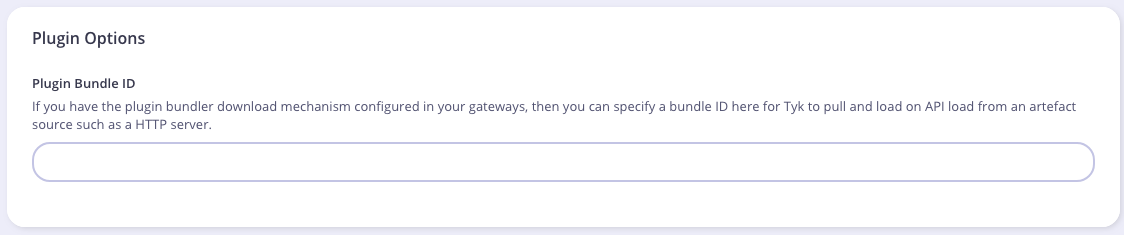 You also need to modify the authentication mechanism that's used by the API.
From the **Core Settings** tab in the **API Designer** select **Use Custom Authentication (Python, CoProcess, and JSVM plugins)** from the **Authentication - Authentication Mode** drop-down list.
You also need to modify the authentication mechanism that's used by the API.
From the **Core Settings** tab in the **API Designer** select **Use Custom Authentication (Python, CoProcess, and JSVM plugins)** from the **Authentication - Authentication Mode** drop-down list.
 #### Testing the Plugin
Now you can simply make an API call against the API for which we've loaded the Python plugin.
##### If Running Tyk Gateway from Source
At this point you have your test HTTP server ready to serve the plugin bundle and the configuration with all the required parameters.
The final step is to start or restart the **Tyk Gateway** (this may vary depending on how you setup Tyk).
A separate service is used to load the Tyk version that supports Python (`tyk-gateway-python`), so we need to stop the standard one first (`tyk-gateway`):
```service theme={null}
service tyk-gateway stop
service tyk-gateway-python start
```
From now on you should use the following command to restart the service:
```service theme={null}
service tyk-gateway-python restart
```
A cURL request will be enough for testing our custom authentication middleware.
This request will trigger a bad authentication:
```curl theme={null}
curl http://:8080/my-api/my-path -H 'Authorization: badtoken'
```
This request will trigger a successful authentication. You are using the token that's set by your Python plugin:
```curl theme={null}
curl http://:8080/my-api/my-path -H 'Authorization: 47a0c79c427728b3df4af62b9228c8ae'
```
#### What's Next?
In this tutorial you learned how Tyk plugins work. For a production-level setup we suggest the following steps:
* Configure Tyk to use your own key so that you can enforce cryptographic signature checks when loading plugin bundles, and sign your plugin bundles!
* Configure an appropriate web server and path to serve your plugin bundles.
### Add Python Plugin To Your Gateway
#### API settings
To add a Python plugin to your API, you must specify the bundle name using the `custom_middleware_bundle` field:
```{.json} theme={null}
{
"name": "Tyk Test API",
"api_id": "1",
"org_id": "default",
"definition": {
"location": "header",
"key": "version"
},
"auth": {
"auth_header_name": "authorization"
},
"use_keyless": true,
"version_data": {
"not_versioned": true,
"versions": {
"Default": {
"name": "Default",
"expires": "3000-01-02 15:04",
"use_extended_paths": true,
"extended_paths": {
"ignored": [],
"white_list": [],
"black_list": []
}
}
}
},
"proxy": {
"listen_path": "/quickstart/",
"target_url": "http://httpbin.org",
"strip_listen_path": true
},
"custom_middleware_bundle": "test-bundle"
}
```
#### Global settings
To enable Python plugins you need to add the following block to `tyk.conf`:
```{.copyWrapper} theme={null}
"coprocess_options": {
"enable_coprocess": true,
"python_path_prefix": "/opt/tyk-gateway"
},
"enable_bundle_downloader": true,
"bundle_base_url": "http://dummy-bundle-server.com/bundles/",
"public_key_path": "/path/to/my/pubkey",
```
`enable_coprocess`: enables the rich plugins feature.
`python_path_prefix`: Sets the path to built-in Tyk modules, this will be part of the Python module lookup path. The value used here is the default one for most installations.
`enable_bundle_downloader`: enables the bundle downloader.
`bundle_base_url`: is a base URL that will be used to download the bundle, in this example we have `test-bundle` specified in the API settings, Tyk will fetch the URL for your specified bundle server (in the above example): `dummy-bundle-server.com/bundles/test-bundle`. You need to create and then specify your own bundle server URL.
`public_key_path`: sets a public key, this is used for verifying signed bundles, you may omit this if unsigned bundles are used.
### Tyk Python API methods
Python plugins may call these Tyk API methods:
#### store\_data(key, value, ttl)
`store_data` sets a Redis `key` with the specified `value` and `ttl`.
#### get\_data(key)
`get_data` retrieves a Redis `key`.
#### trigger\_event(event\_name, payload)
`trigger_event` triggers an internal Tyk event, the `payload` must be a JSON object.
#### log(msg, level)
`log` will log a message (`msg`) using the specified `level`.
#### log\_error(\*args)
`log_error` is a shortcut for `log`, it uses the error log level.
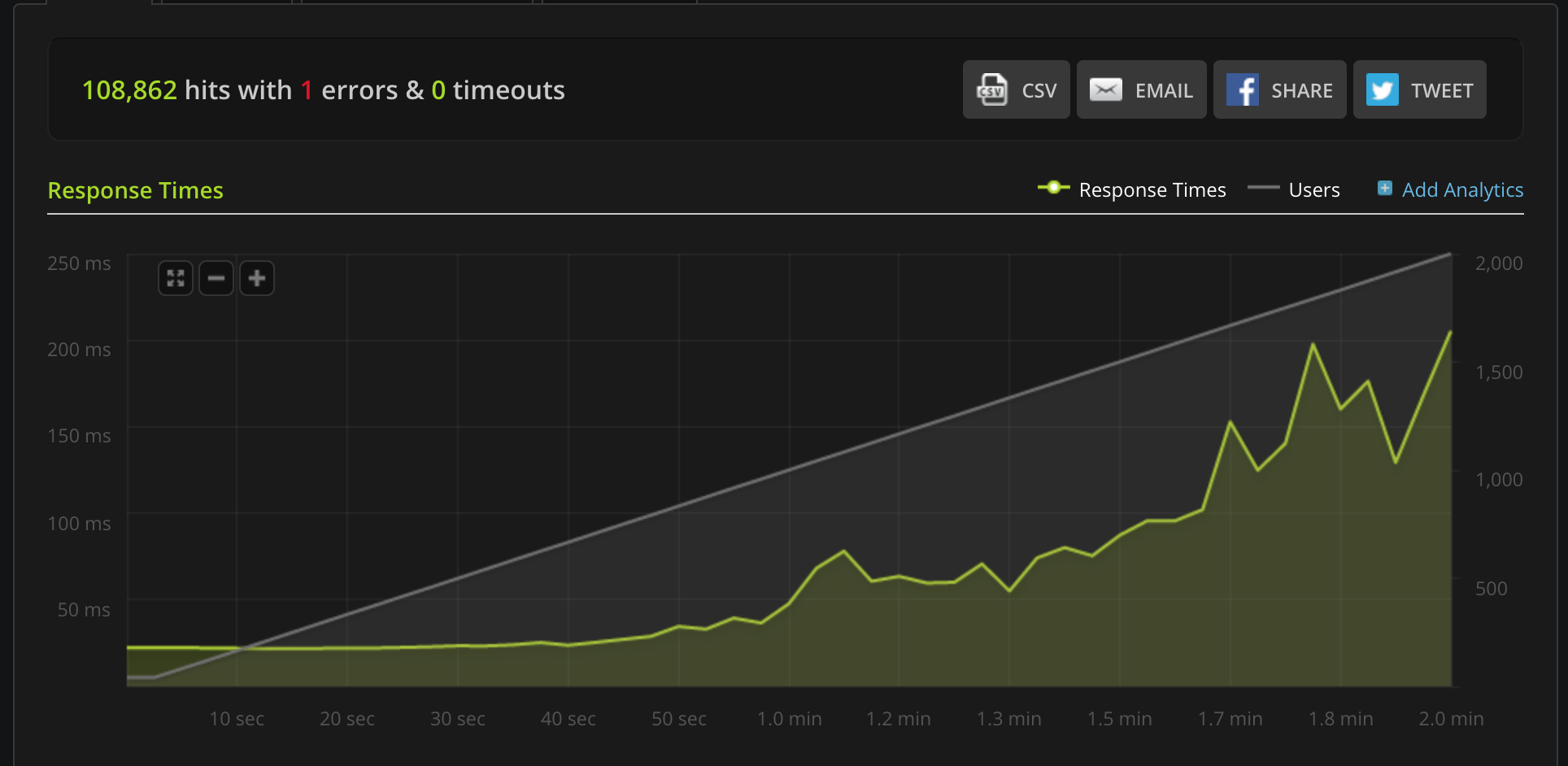
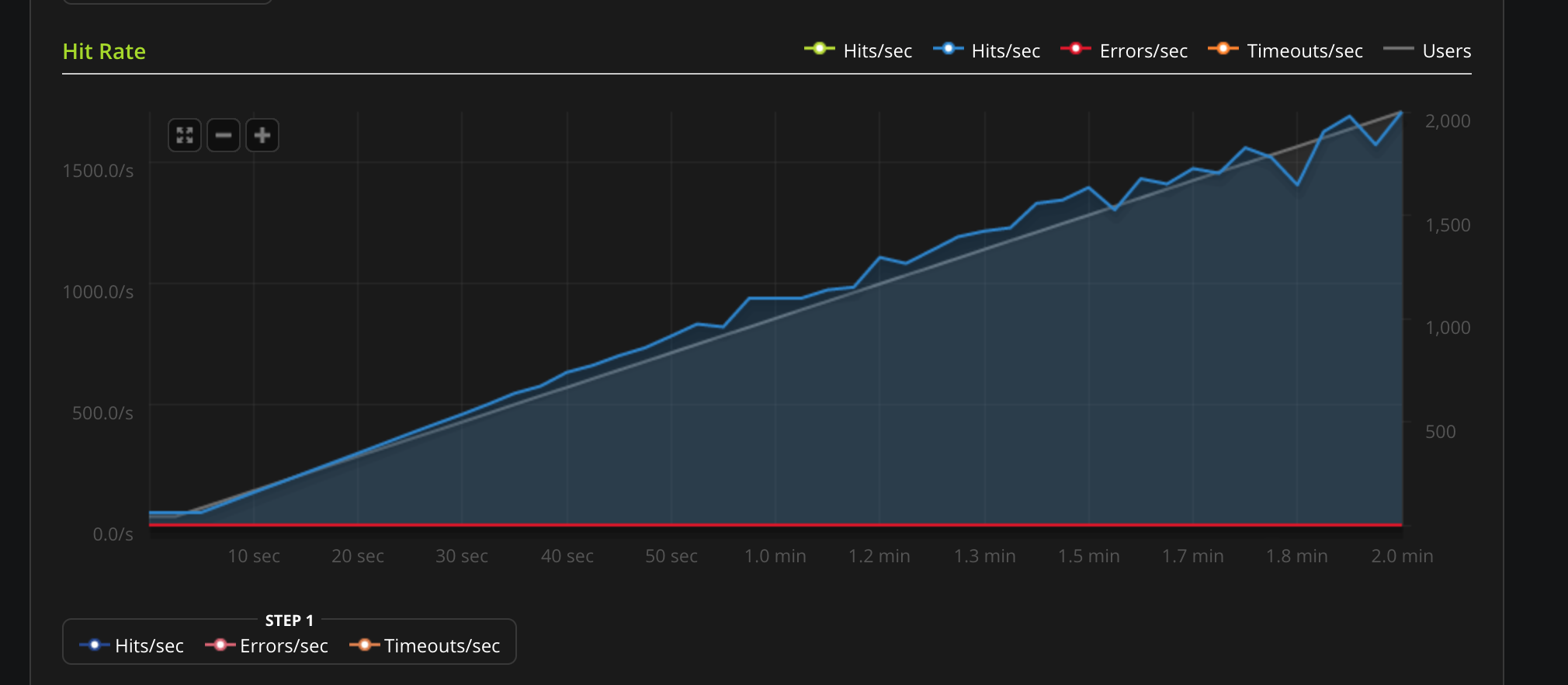
### Python Performance
These are some benchmarks performed on Python plugins. Python plugins run in a standard Python interpreter, embedded inside Tyk.
#### Testing the Plugin
Now you can simply make an API call against the API for which we've loaded the Python plugin.
##### If Running Tyk Gateway from Source
At this point you have your test HTTP server ready to serve the plugin bundle and the configuration with all the required parameters.
The final step is to start or restart the **Tyk Gateway** (this may vary depending on how you setup Tyk).
A separate service is used to load the Tyk version that supports Python (`tyk-gateway-python`), so we need to stop the standard one first (`tyk-gateway`):
```service theme={null}
service tyk-gateway stop
service tyk-gateway-python start
```
From now on you should use the following command to restart the service:
```service theme={null}
service tyk-gateway-python restart
```
A cURL request will be enough for testing our custom authentication middleware.
This request will trigger a bad authentication:
```curl theme={null}
curl http://:8080/my-api/my-path -H 'Authorization: badtoken'
```
This request will trigger a successful authentication. You are using the token that's set by your Python plugin:
```curl theme={null}
curl http://:8080/my-api/my-path -H 'Authorization: 47a0c79c427728b3df4af62b9228c8ae'
```
#### What's Next?
In this tutorial you learned how Tyk plugins work. For a production-level setup we suggest the following steps:
* Configure Tyk to use your own key so that you can enforce cryptographic signature checks when loading plugin bundles, and sign your plugin bundles!
* Configure an appropriate web server and path to serve your plugin bundles.
### Add Python Plugin To Your Gateway
#### API settings
To add a Python plugin to your API, you must specify the bundle name using the `custom_middleware_bundle` field:
```{.json} theme={null}
{
"name": "Tyk Test API",
"api_id": "1",
"org_id": "default",
"definition": {
"location": "header",
"key": "version"
},
"auth": {
"auth_header_name": "authorization"
},
"use_keyless": true,
"version_data": {
"not_versioned": true,
"versions": {
"Default": {
"name": "Default",
"expires": "3000-01-02 15:04",
"use_extended_paths": true,
"extended_paths": {
"ignored": [],
"white_list": [],
"black_list": []
}
}
}
},
"proxy": {
"listen_path": "/quickstart/",
"target_url": "http://httpbin.org",
"strip_listen_path": true
},
"custom_middleware_bundle": "test-bundle"
}
```
#### Global settings
To enable Python plugins you need to add the following block to `tyk.conf`:
```{.copyWrapper} theme={null}
"coprocess_options": {
"enable_coprocess": true,
"python_path_prefix": "/opt/tyk-gateway"
},
"enable_bundle_downloader": true,
"bundle_base_url": "http://dummy-bundle-server.com/bundles/",
"public_key_path": "/path/to/my/pubkey",
```
`enable_coprocess`: enables the rich plugins feature.
`python_path_prefix`: Sets the path to built-in Tyk modules, this will be part of the Python module lookup path. The value used here is the default one for most installations.
`enable_bundle_downloader`: enables the bundle downloader.
`bundle_base_url`: is a base URL that will be used to download the bundle, in this example we have `test-bundle` specified in the API settings, Tyk will fetch the URL for your specified bundle server (in the above example): `dummy-bundle-server.com/bundles/test-bundle`. You need to create and then specify your own bundle server URL.
`public_key_path`: sets a public key, this is used for verifying signed bundles, you may omit this if unsigned bundles are used.
### Tyk Python API methods
Python plugins may call these Tyk API methods:
#### store\_data(key, value, ttl)
`store_data` sets a Redis `key` with the specified `value` and `ttl`.
#### get\_data(key)
`get_data` retrieves a Redis `key`.
#### trigger\_event(event\_name, payload)
`trigger_event` triggers an internal Tyk event, the `payload` must be a JSON object.
#### log(msg, level)
`log` will log a message (`msg`) using the specified `level`.
#### log\_error(\*args)
`log_error` is a shortcut for `log`, it uses the error log level.
### Python Performance
These are some benchmarks performed on Python plugins. Python plugins run in a standard Python interpreter, embedded inside Tyk.
 ***
## Using gRPC
### Overview
gRPC is a very powerful framework for RPC communication across different [languages](https://www.grpc.io/docs). It was created by Google and makes heavy use of HTTP2 capabilities and the [Protocol Buffers](https://developers.google.com/protocol-buffers/) serialisation mechanism to dispatch and exchange requests between Tyk and your gRPC plugins.
When it comes to built-in plugins, we have been able to integrate several languages like Python, Javascript & Lua in a native way: this means the middleware you write using any of these languages runs in the same process. At the time of writing, the following languages are supported: C++, Java, Objective-C, Python, Ruby, Go, C# and Node.JS.
For supporting additional languages we have decided to integrate gRPC connections and perform the middleware operations within a gRPC server that is external to the Tyk process. Please contact us to learn more:
***
## Using gRPC
### Overview
gRPC is a very powerful framework for RPC communication across different [languages](https://www.grpc.io/docs). It was created by Google and makes heavy use of HTTP2 capabilities and the [Protocol Buffers](https://developers.google.com/protocol-buffers/) serialisation mechanism to dispatch and exchange requests between Tyk and your gRPC plugins.
When it comes to built-in plugins, we have been able to integrate several languages like Python, Javascript & Lua in a native way: this means the middleware you write using any of these languages runs in the same process. At the time of writing, the following languages are supported: C++, Java, Objective-C, Python, Ruby, Go, C# and Node.JS.
For supporting additional languages we have decided to integrate gRPC connections and perform the middleware operations within a gRPC server that is external to the Tyk process. Please contact us to learn more:
Tyk has built-in support for gRPC backends, enabling you to build rich plugins using any of the gRPC supported languages. See [gRPC by language](http://www.grpc.io/docs/) for further details.
#### Use Cases
Deploying an external gRPC server to handle plugins provides numerous technical advantages:
* Allows for independent scalability of the service from the Tyk Gateway.
* Utilizes a custom-designed server tailored to address specific security concerns, effectively mitigating various security risks associated with native plugins.
#### gRPC Plugin Architectural Overview
An example architecture is illustrated below.
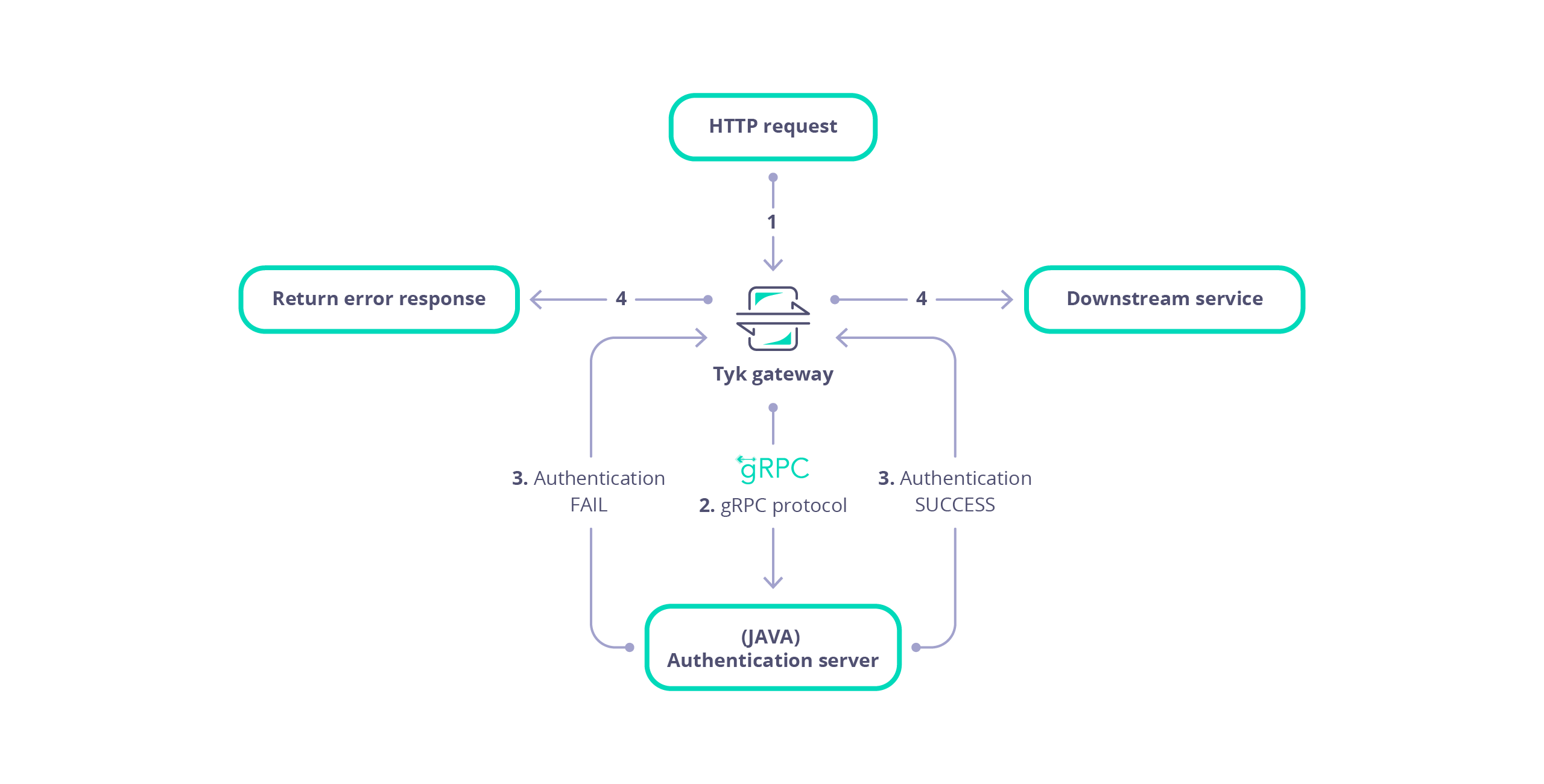 Here we can see that Tyk Gateway sends requests to an external Java gRPC server to handle authentication, via a CustomAuth plugin. The flow is as follows:
* Tyk receives a HTTP request.
* Tyk serialises the request and session into a protobuf message that is dispatched to your gRPC server.
* The gRPC server performs custom middleware operations (for example, any modification of the request object). Each plugin (Pre, PostAuthKey, Post, Response etc.) is handled as separate gRPC request.
* The gRPC server sends the request back to Tyk.
* Tyk proxies the request to your upstream API.
#### Limitations of gRPC plugins
At the time of writing the following features are currently unsupported and unavailable in the serialised request:
* Client certificiates
* OAuth keys
* For graphQL APIs details concerning the *max\_query\_depth* is unavailable
* A request query parameter cannot be associated with multiple values
#### gRPC Developer Resources
The [Protocol Buffers](https://github.com/TykTechnologies/tyk/tree/master/coprocess/proto) and [bindings](https://github.com/TykTechnologies/tyk/tree/master/coprocess/bindings) provided by Tyk should be used in order for successful ommunication between Tyk Gateway and your gRPC plugin server. Documentation for the protobuf messages is available in the [Rich Plugins Data Structures](/api-management/plugins/rich-plugins#rich-plugins-data-structures) page.
You can generate supporting HTML documentation using the *docs* task in the [Taskfile](https://github.com/TykTechnologies/tyk/blob/master/coprocess/proto/Taskfile.yml) file of the [Tyk repository](https://github.com/TykTechnologies/tyk). This documentation explains the protobuf messages and services that allow gRPC plugins to handle a request made to the Gateway. Please refer to the README file within the proto folder of the tyk repository for further details.
You may re-use the bindings that were generated for our samples or generate the bindings youself for Go, Python and Ruby, as implemented by the *generate* task in the [Taskfile](https://github.com/TykTechnologies/tyk/blob/master/coprocess/proto/Taskfile.yml) file of the [Tyk repository](https://github.com/TykTechnologies/tyk).
If you wish to generate bindings for another target language you may generate the bindings yourself. The [Protocol Buffers](https://developers.google.com/protocol-buffers/) and [gRPC documentation](http://www.grpc.io/docs) provide specific requirements and instructions for each language.
#### Load Balancing Between gRPC Servers
Since Tyk 5.8.3 Tyk Gateway has had the ability to load balance between multiple gRPC servers.
To implement this you must first specify the address of the load balanced service using the `dns:///` (note: triple slash) [protocol](https://github.com/grpc/grpc/blob/master/doc/naming.md) in Tyk Gateway's [gRPC server address](/tyk-oss-gateway/configuration#coprocess_options-coprocess_grpc_server) configuration (`TYK_GW_COPROCESSOPTIONS_COPROCESSGRPCSERVER`). Tyk will retrieve the list of addresses for each gRPC server from that service.
You can control whether Tyk will implement load balancing using the [gRPC round robin load balancing](/tyk-oss-gateway/configuration#coprocess_options-grpc_round_robin_load_balancing)) config (`TYK_GW_COPROCESSOPTIONS_GRPCROUNDROBINLOADBALANCING`):
* If set to `true`, Tyk will balance load between the server addresses retrieved using a round robin approach.
* If set to `false`, Tyk will implement a sticky session approach without load balancing.
Note that Tyk will only query the DNS on start-up, so if you need to update the list of gRPC servers that you want Tyk to target, you must restart Tyk Gateway.
If you are not load balancing, you can alternatively provide the `tcp://` address of the gRPC server in Tyk Gateway's [gRPC server address](/tyk-oss-gateway/configuration#coprocess_options-coprocess_grpc_server) configuration (`TYK_GW_COPROCESSOPTIONS_COPROCESSGRPCSERVER`) and set [gRPC round robin load balancing](/tyk-oss-gateway/configuration#coprocess_options-grpc_round_robin_load_balancing) (`TYK_GW_COPROCESSOPTIONS_GRPCROUNDROBINLOADBALANCING`) to `false`.
***
### Getting Started: Key Concepts
This document serves as a developer's guide for understanding the key concepts and practical steps for writing and configuring gRPC plugins for Tyk Gateway. It provides technical insights and practical guidance to seamlessly integrate Tyk plugins into your infrastructure through gRPC. The goal is to equip developers with the knowledge and tools needed to effectively utilize gRPC for enhancing Tyk Gateway functionalities.
This comprehensive guide covers essential tasks, including:
1. **Developing a gRPC Server:** Learn how to develop a gRPC server using [Tyk protocol buffers](https://github.com/TykTechnologies/tyk/tree/master/coprocess/proto). The gRPC server facilitates the execution of Tyk plugins, which offer custom middleware for various phases of the API request lifecycle. By integrating these plugins, developers can enable Tyk Gateway with enhanced control and flexibility in managing API requests, allowing for fine-grained customization and tailored processing at each stage of the request lifecycle.
2. **Configuring Tyk Gateway:** Set up Tyk Gateway to communicate with your gRPC Server and, optionally, an external secured web server hosting the gRPC plugin bundle for API configurations. Configure Tyk Gateway to fetch the bundle configured for an API from the web server, enabling seamless integration with gRPC plugins. Specify connection settings for streamlined integration.
3. **API Configuration:** Customize API settings within Tyk Gateway to configure gRPC plugin utilization. Define plugin hooks directly within the API Definition or remotely via an external web server for seamless request orchestration. Tyk plugins provide custom middleware for different phases of the API request lifecycle, enhancing control and flexibility.
4. **API Testing:** Test that Tyk Gateway integrates with your gRPC server for the plugins configured for your API.
***
#### Develop gRPC server
Develop your gRPC server, using your preferred language, to handle requests from Tyk Gateway for each of the required plugin hooks. These hooks allow Tyk Gateway to communicate with your gRPC server to execute custom middleware at various stages of the API request lifecycle.
##### Prerequisites
The following prerequisites are necessary for developing a gRPC server that integrates with Tyk Gateway.
\####### Tyk gRPC Protocol Buffers
A collection of [Protocol Buffer](https://github.com/TykTechnologies/tyk/tree/master/coprocess/proto) messages are available in the Tyk Gateway repository to allow Tyk Gateway to integrate with your gRPC server, requesting execution of plugin code. These messages establish a standard set of data structures that are serialised between Tyk Gateway and your gRPC Server. Developers should consult the [Rich Plugins Data Structures](/api-management/plugins/rich-plugins#rich-plugins-data-structures) page for further details.
\####### Protocol Buffer Compiler
The protocol buffer compiler, `protoc`, should be installed to generate the service and data structures in your preferred language(s) from the [Tyk gRPC Protocol Buffer](https://github.com/TykTechnologies/tyk/tree/master/coprocess/proto) files. Developers should consult the [installation](https://grpc.io/docs/protoc-installation/) documentation at [grpc.io](https://grpc.io/) for an explanation of how to install `protoc`.
##### Generate Bindings
Generate the bindings (service and data structures) for your target language using the `protoc` compiler. Tutorials are available at [protobuf.dev](https://protobuf.dev/getting-started/) for your target language.
##### Implement service
Your gRPC server should implement the *Dispatcher* service to enable Tyk Gateway to integrate with your gRPC server. The Protocol Buffer definition for the *Dispatcher* service is listed below:
```protobuf theme={null}
service Dispatcher {
rpc Dispatch (Object) returns (Object) {}
rpc DispatchEvent (Event) returns (EventReply) {}
}
```
The *Dispatcher* service contains two RPC methods, *Dispatch* and *DispatchEvent*. Dispatch handles a requests made by Tyk Gateway for each plugin configured in your API. DispatchEvent receives notification of an event.
Your *Dispatch* RPC should handle the request made by Tyk Gateway, implementing custom middleware for the intended plugin hooks. Each plugin hook allows Tyk Gateway to communicate with your gRPC server to execute custom middleware at various stages of the API request lifecycle, such as Pre, PostAuth, Post, Response etc. The Tyk Protocol Buffers define the [HookType](https://github.com/TykTechnologies/tyk/blob/master/coprocess/proto/coprocess_common.proto) enumeration to inspect the type of the intended gRPC plugin associated with the request. This is accessible as an attribute on the *Object* message, e.g. *object\_message\_instance.hook\_type*.
##### Developer resources
Consult the [Tyk protocol buffers](https://github.com/TykTechnologies/tyk/tree/master/coprocess/proto) for the definition of the service and data structures that enable integration of Tyk gateway with your gRPC server. Tyk provides pre-generated [bindings](https://github.com/TykTechnologies/tyk/tree/master/coprocess/bindings) for C++, Java, Python and Ruby.
Example tutorials are available that explain how to generate the protobuf bindings and implement a server for [Java](/api-management/plugins/rich-plugins#create-a-request-transformation-plugin-with-java), [.NET](/api-management/plugins/rich-plugins#create-custom-auth-plugin-with-dotnet) and [NodeJS](/api-management/plugins/rich-plugins#create-custom-auth-plugin-with-dotnet).
Tyk Github repositories are also available with examples for [Ruby](https://github.com/TykTechnologies/tyk-plugin-demo-ruby) and [C#/.NET](https://github.com/TykTechnologies/tyk-plugin-demo-dotnet)
***
#### Configure Tyk Gateway
Configure Tyk Gateway to issue requests to your gRPC server and optionally, specify the URL of the web server that will serve plugin bundles.
##### Configure gRPC server
Modify the root of your `tyk.conf` file to include the *coprocess\_options* section, similar to that listed below:
```yaml theme={null}
"coprocess_options": {
"enable_coprocess": true,
"coprocess_grpc_server": "tcp://127.0.0.1:5555",
"grpc_authority": "localhost",
"grpc_recv_max_size": 100000000,
"grpc_send_max_size": 100000000
},
```
A gRPC server can configured under the `coprocess_options` section as follows:
* `enable_coprocess`: Enables the rich plugins feature.
* `coprocess_grpc_server`: Specifies the gRPC server URL, in this example we're using TCP. Tyk will attempt a connection on startup and keep reconnecting in case of failure.
* `grpc_recv_max_size`: Specifies the message size supported by the gateway gRPC client, for receiving gRPC responses.
* `grpc_send_max_size`: Specifies the message size supported by the gateway gRPC client for sending gRPC requests.
* `grpc_authority`: The `authority` header value, defaults to `localhost` if omitted. Allows configuration according to [RFC 7540](https://datatracker.ietf.org/doc/html/rfc7540#section-8.1.2.3).
When using gRPC plugins, Tyk acts as a gRPC client and dispatches requests to your gRPC server. gRPC libraries usually set a default maximum size, for example, the official gRPC Java library establishes a 4
MB message size [https://jbrandhorst.com/post/grpc-binary-blob-stream/](https://jbrandhorst.com/post/grpc-binary-blob-stream/).
Configuration parameters are available for establishing a message size in both directions (send and receive). For most use cases and especially if you're dealing with multiple hooks, where the same request object is dispatched, it is recommended to set both values to the same size.
##### Configure Web server (optional)
Tyk Gateway can be configured to download the gRPC plugin configuration for an API from a web server. For further details related to the concept of bundling plugins please refer to [plugin bundles](/api-management/plugins/overview#plugin-bundles).
```yaml theme={null}
"enable_bundle_downloader": true,
"bundle_base_url": "https://my-bundle-server.com/bundles/",
"public_key_path": "/path/to/my/pubkey",
```
The following parameters can be configured:
* `enable_bundle_downloader`: Enables the bundle downloader to download bundles from a webserver.
* `bundle_base_url`: Base URL from which to serve bundled plugins.
* `public_key_path`: Public key for bundle verification (optional)
The `public_key_path` value is used for verifying signed bundles, you may omit this if unsigned bundles are used.
***
#### Configure API
Plugin hooks for your APIs in Tyk can be configured either by directly specifying them in a configuration file on the Gateway server or by hosting the configuration externally on a web server. This section explains how to configure gRPC plugins for your API endpoints on the local Gateway or remotely from an external secured web server.
##### Local
This section provides examples for how to configure gRPC plugin hooks, locally within an API Definition. Examples are provided for Tyk Gateway and Tyk Operator.
###### Tyk Gateway
For configurations directly embedded within the Tyk Gateway, plugin hooks can be defined within your API Definition. An example snippet from a Tyk Classic API Definition is provided below:
```yaml theme={null}
"custom_middleware": {
"pre": [
{"name": "MyPreMiddleware"}
],
"post": [
{"name": "MyPostMiddleware"}
],
"auth_check": {
"name": "MyAuthCheck"
},
"driver": "grpc"
}
```
For example, a Post request plugin hook has been configured with name `MyPostMiddleware`. Before the request is sent upstream Tyk Gateway will serialize the request into a [Object protobuf message](/api-management/plugins/rich-plugins#coprocess-object) with the `hook_name` property set to `MyPostMiddleware` and the `hook_type` property set to `Post`. This message will then then be dispatched to the gRPC server for processing before the request is sent upstream.
Here we can see that Tyk Gateway sends requests to an external Java gRPC server to handle authentication, via a CustomAuth plugin. The flow is as follows:
* Tyk receives a HTTP request.
* Tyk serialises the request and session into a protobuf message that is dispatched to your gRPC server.
* The gRPC server performs custom middleware operations (for example, any modification of the request object). Each plugin (Pre, PostAuthKey, Post, Response etc.) is handled as separate gRPC request.
* The gRPC server sends the request back to Tyk.
* Tyk proxies the request to your upstream API.
#### Limitations of gRPC plugins
At the time of writing the following features are currently unsupported and unavailable in the serialised request:
* Client certificiates
* OAuth keys
* For graphQL APIs details concerning the *max\_query\_depth* is unavailable
* A request query parameter cannot be associated with multiple values
#### gRPC Developer Resources
The [Protocol Buffers](https://github.com/TykTechnologies/tyk/tree/master/coprocess/proto) and [bindings](https://github.com/TykTechnologies/tyk/tree/master/coprocess/bindings) provided by Tyk should be used in order for successful ommunication between Tyk Gateway and your gRPC plugin server. Documentation for the protobuf messages is available in the [Rich Plugins Data Structures](/api-management/plugins/rich-plugins#rich-plugins-data-structures) page.
You can generate supporting HTML documentation using the *docs* task in the [Taskfile](https://github.com/TykTechnologies/tyk/blob/master/coprocess/proto/Taskfile.yml) file of the [Tyk repository](https://github.com/TykTechnologies/tyk). This documentation explains the protobuf messages and services that allow gRPC plugins to handle a request made to the Gateway. Please refer to the README file within the proto folder of the tyk repository for further details.
You may re-use the bindings that were generated for our samples or generate the bindings youself for Go, Python and Ruby, as implemented by the *generate* task in the [Taskfile](https://github.com/TykTechnologies/tyk/blob/master/coprocess/proto/Taskfile.yml) file of the [Tyk repository](https://github.com/TykTechnologies/tyk).
If you wish to generate bindings for another target language you may generate the bindings yourself. The [Protocol Buffers](https://developers.google.com/protocol-buffers/) and [gRPC documentation](http://www.grpc.io/docs) provide specific requirements and instructions for each language.
#### Load Balancing Between gRPC Servers
Since Tyk 5.8.3 Tyk Gateway has had the ability to load balance between multiple gRPC servers.
To implement this you must first specify the address of the load balanced service using the `dns:///` (note: triple slash) [protocol](https://github.com/grpc/grpc/blob/master/doc/naming.md) in Tyk Gateway's [gRPC server address](/tyk-oss-gateway/configuration#coprocess_options-coprocess_grpc_server) configuration (`TYK_GW_COPROCESSOPTIONS_COPROCESSGRPCSERVER`). Tyk will retrieve the list of addresses for each gRPC server from that service.
You can control whether Tyk will implement load balancing using the [gRPC round robin load balancing](/tyk-oss-gateway/configuration#coprocess_options-grpc_round_robin_load_balancing)) config (`TYK_GW_COPROCESSOPTIONS_GRPCROUNDROBINLOADBALANCING`):
* If set to `true`, Tyk will balance load between the server addresses retrieved using a round robin approach.
* If set to `false`, Tyk will implement a sticky session approach without load balancing.
Note that Tyk will only query the DNS on start-up, so if you need to update the list of gRPC servers that you want Tyk to target, you must restart Tyk Gateway.
If you are not load balancing, you can alternatively provide the `tcp://` address of the gRPC server in Tyk Gateway's [gRPC server address](/tyk-oss-gateway/configuration#coprocess_options-coprocess_grpc_server) configuration (`TYK_GW_COPROCESSOPTIONS_COPROCESSGRPCSERVER`) and set [gRPC round robin load balancing](/tyk-oss-gateway/configuration#coprocess_options-grpc_round_robin_load_balancing) (`TYK_GW_COPROCESSOPTIONS_GRPCROUNDROBINLOADBALANCING`) to `false`.
***
### Getting Started: Key Concepts
This document serves as a developer's guide for understanding the key concepts and practical steps for writing and configuring gRPC plugins for Tyk Gateway. It provides technical insights and practical guidance to seamlessly integrate Tyk plugins into your infrastructure through gRPC. The goal is to equip developers with the knowledge and tools needed to effectively utilize gRPC for enhancing Tyk Gateway functionalities.
This comprehensive guide covers essential tasks, including:
1. **Developing a gRPC Server:** Learn how to develop a gRPC server using [Tyk protocol buffers](https://github.com/TykTechnologies/tyk/tree/master/coprocess/proto). The gRPC server facilitates the execution of Tyk plugins, which offer custom middleware for various phases of the API request lifecycle. By integrating these plugins, developers can enable Tyk Gateway with enhanced control and flexibility in managing API requests, allowing for fine-grained customization and tailored processing at each stage of the request lifecycle.
2. **Configuring Tyk Gateway:** Set up Tyk Gateway to communicate with your gRPC Server and, optionally, an external secured web server hosting the gRPC plugin bundle for API configurations. Configure Tyk Gateway to fetch the bundle configured for an API from the web server, enabling seamless integration with gRPC plugins. Specify connection settings for streamlined integration.
3. **API Configuration:** Customize API settings within Tyk Gateway to configure gRPC plugin utilization. Define plugin hooks directly within the API Definition or remotely via an external web server for seamless request orchestration. Tyk plugins provide custom middleware for different phases of the API request lifecycle, enhancing control and flexibility.
4. **API Testing:** Test that Tyk Gateway integrates with your gRPC server for the plugins configured for your API.
***
#### Develop gRPC server
Develop your gRPC server, using your preferred language, to handle requests from Tyk Gateway for each of the required plugin hooks. These hooks allow Tyk Gateway to communicate with your gRPC server to execute custom middleware at various stages of the API request lifecycle.
##### Prerequisites
The following prerequisites are necessary for developing a gRPC server that integrates with Tyk Gateway.
\####### Tyk gRPC Protocol Buffers
A collection of [Protocol Buffer](https://github.com/TykTechnologies/tyk/tree/master/coprocess/proto) messages are available in the Tyk Gateway repository to allow Tyk Gateway to integrate with your gRPC server, requesting execution of plugin code. These messages establish a standard set of data structures that are serialised between Tyk Gateway and your gRPC Server. Developers should consult the [Rich Plugins Data Structures](/api-management/plugins/rich-plugins#rich-plugins-data-structures) page for further details.
\####### Protocol Buffer Compiler
The protocol buffer compiler, `protoc`, should be installed to generate the service and data structures in your preferred language(s) from the [Tyk gRPC Protocol Buffer](https://github.com/TykTechnologies/tyk/tree/master/coprocess/proto) files. Developers should consult the [installation](https://grpc.io/docs/protoc-installation/) documentation at [grpc.io](https://grpc.io/) for an explanation of how to install `protoc`.
##### Generate Bindings
Generate the bindings (service and data structures) for your target language using the `protoc` compiler. Tutorials are available at [protobuf.dev](https://protobuf.dev/getting-started/) for your target language.
##### Implement service
Your gRPC server should implement the *Dispatcher* service to enable Tyk Gateway to integrate with your gRPC server. The Protocol Buffer definition for the *Dispatcher* service is listed below:
```protobuf theme={null}
service Dispatcher {
rpc Dispatch (Object) returns (Object) {}
rpc DispatchEvent (Event) returns (EventReply) {}
}
```
The *Dispatcher* service contains two RPC methods, *Dispatch* and *DispatchEvent*. Dispatch handles a requests made by Tyk Gateway for each plugin configured in your API. DispatchEvent receives notification of an event.
Your *Dispatch* RPC should handle the request made by Tyk Gateway, implementing custom middleware for the intended plugin hooks. Each plugin hook allows Tyk Gateway to communicate with your gRPC server to execute custom middleware at various stages of the API request lifecycle, such as Pre, PostAuth, Post, Response etc. The Tyk Protocol Buffers define the [HookType](https://github.com/TykTechnologies/tyk/blob/master/coprocess/proto/coprocess_common.proto) enumeration to inspect the type of the intended gRPC plugin associated with the request. This is accessible as an attribute on the *Object* message, e.g. *object\_message\_instance.hook\_type*.
##### Developer resources
Consult the [Tyk protocol buffers](https://github.com/TykTechnologies/tyk/tree/master/coprocess/proto) for the definition of the service and data structures that enable integration of Tyk gateway with your gRPC server. Tyk provides pre-generated [bindings](https://github.com/TykTechnologies/tyk/tree/master/coprocess/bindings) for C++, Java, Python and Ruby.
Example tutorials are available that explain how to generate the protobuf bindings and implement a server for [Java](/api-management/plugins/rich-plugins#create-a-request-transformation-plugin-with-java), [.NET](/api-management/plugins/rich-plugins#create-custom-auth-plugin-with-dotnet) and [NodeJS](/api-management/plugins/rich-plugins#create-custom-auth-plugin-with-dotnet).
Tyk Github repositories are also available with examples for [Ruby](https://github.com/TykTechnologies/tyk-plugin-demo-ruby) and [C#/.NET](https://github.com/TykTechnologies/tyk-plugin-demo-dotnet)
***
#### Configure Tyk Gateway
Configure Tyk Gateway to issue requests to your gRPC server and optionally, specify the URL of the web server that will serve plugin bundles.
##### Configure gRPC server
Modify the root of your `tyk.conf` file to include the *coprocess\_options* section, similar to that listed below:
```yaml theme={null}
"coprocess_options": {
"enable_coprocess": true,
"coprocess_grpc_server": "tcp://127.0.0.1:5555",
"grpc_authority": "localhost",
"grpc_recv_max_size": 100000000,
"grpc_send_max_size": 100000000
},
```
A gRPC server can configured under the `coprocess_options` section as follows:
* `enable_coprocess`: Enables the rich plugins feature.
* `coprocess_grpc_server`: Specifies the gRPC server URL, in this example we're using TCP. Tyk will attempt a connection on startup and keep reconnecting in case of failure.
* `grpc_recv_max_size`: Specifies the message size supported by the gateway gRPC client, for receiving gRPC responses.
* `grpc_send_max_size`: Specifies the message size supported by the gateway gRPC client for sending gRPC requests.
* `grpc_authority`: The `authority` header value, defaults to `localhost` if omitted. Allows configuration according to [RFC 7540](https://datatracker.ietf.org/doc/html/rfc7540#section-8.1.2.3).
When using gRPC plugins, Tyk acts as a gRPC client and dispatches requests to your gRPC server. gRPC libraries usually set a default maximum size, for example, the official gRPC Java library establishes a 4
MB message size [https://jbrandhorst.com/post/grpc-binary-blob-stream/](https://jbrandhorst.com/post/grpc-binary-blob-stream/).
Configuration parameters are available for establishing a message size in both directions (send and receive). For most use cases and especially if you're dealing with multiple hooks, where the same request object is dispatched, it is recommended to set both values to the same size.
##### Configure Web server (optional)
Tyk Gateway can be configured to download the gRPC plugin configuration for an API from a web server. For further details related to the concept of bundling plugins please refer to [plugin bundles](/api-management/plugins/overview#plugin-bundles).
```yaml theme={null}
"enable_bundle_downloader": true,
"bundle_base_url": "https://my-bundle-server.com/bundles/",
"public_key_path": "/path/to/my/pubkey",
```
The following parameters can be configured:
* `enable_bundle_downloader`: Enables the bundle downloader to download bundles from a webserver.
* `bundle_base_url`: Base URL from which to serve bundled plugins.
* `public_key_path`: Public key for bundle verification (optional)
The `public_key_path` value is used for verifying signed bundles, you may omit this if unsigned bundles are used.
***
#### Configure API
Plugin hooks for your APIs in Tyk can be configured either by directly specifying them in a configuration file on the Gateway server or by hosting the configuration externally on a web server. This section explains how to configure gRPC plugins for your API endpoints on the local Gateway or remotely from an external secured web server.
##### Local
This section provides examples for how to configure gRPC plugin hooks, locally within an API Definition. Examples are provided for Tyk Gateway and Tyk Operator.
###### Tyk Gateway
For configurations directly embedded within the Tyk Gateway, plugin hooks can be defined within your API Definition. An example snippet from a Tyk Classic API Definition is provided below:
```yaml theme={null}
"custom_middleware": {
"pre": [
{"name": "MyPreMiddleware"}
],
"post": [
{"name": "MyPostMiddleware"}
],
"auth_check": {
"name": "MyAuthCheck"
},
"driver": "grpc"
}
```
For example, a Post request plugin hook has been configured with name `MyPostMiddleware`. Before the request is sent upstream Tyk Gateway will serialize the request into a [Object protobuf message](/api-management/plugins/rich-plugins#coprocess-object) with the `hook_name` property set to `MyPostMiddleware` and the `hook_type` property set to `Post`. This message will then then be dispatched to the gRPC server for processing before the request is sent upstream.
Ensure the plugin driver is configured as type *grpc*. Tyk will issue a request to your gRPC server for each plugin hook that you have configured.
###### Tyk Operator
The examples below illustrate how to configure plugin hooks for an API Definition within Tyk Operator.
Setting the `driver` configuring parameter to `gRPC` instructs Tyk Gateway to issue a request to your gRPC server for each plugin hook that you have configured.
**Pre plugin hook example**
In this example we can see that a `custom_middleware` configuration block has been used to configure a gRPC Pre request plugin hook with name `HelloFromPre`. Before any middleware is executed Tyk Gateway will serialize the request into a [Object protobuf message](/api-management/plugins/rich-plugins#coprocess-object) with the `hook_name` property set to `HelloFromPre` and the `hook_type` property set to `Pre`. This message will then then be dispatched to the gRPC server.
```yaml {linenos=table,hl_lines=["14-18"],linenostart=1} theme={null}
apiVersion: tyk.tyk.io/v1alpha1
kind: ApiDefinition
metadata:
name: httpbin-grpc-pre
spec:
name: httpbin-grpc-pre
use_keyless: true
protocol: http
active: true
proxy:
target_url: http://httpbin.default.svc:8000
listen_path: /httpbin-grpc-pre
strip_listen_path: true
custom_middleware:
driver: grpc
pre:
- name: HelloFromPre
path: ""
```
**Post plugin hook example**
In the example we can see that a `custom_middleware` configuration block has been used to configure a gRPC Post plugin with name `HelloFromPost`.
Before the request is sent upstream Tyk Gateway will serialize the request and session details into a [Object protobuf message](/api-management/plugins/rich-plugins#coprocess-object) with the `hook_name` property set to `HelloFromPost` and the `hook_type` property set to `Post`. This message will then then be dispatched to the gRPC server for processing before the request is sent upstream.
```yaml {linenos=table,hl_lines=["14-18"],linenostart=1} theme={null}
apiVersion: tyk.tyk.io/v1alpha1
kind: ApiDefinition
metadata:
name: httpbin-grpc-post
spec:
name: httpbin-grpc-post
use_keyless: true
protocol: http
active: true
proxy:
target_url: http://httpbin.default.svc:8000
listen_path: /httpbin-grpc-post
strip_listen_path: true
custom_middleware:
driver: grpc
post:
- name: HelloFromPost
path: ""
```
##### Remote
It is possible to configure your API so that it downloads a bundled configuration of your plugins from an external webserver. The bundled plugin configuration is contained within a zip file.
A gRPC plugin bundle is similar to the [standard bundling mechanism](/api-management/plugins/overview#plugin-bundles). The standard bundling mechanism zips the configuration and plugin source code, which will be executed by Tyk. Conversely, a gRPC plugin bundle contains only the configuration (`manifest.json`), with plugin code execution being handled independently by the gRPC server.
Bundling a gRPC plugin requires the following steps:
* Create a `manifest.json` that contains the configuration of your plugins
* Build a zip file that bundles your plugin
* Upload the zip file to an external secured webserver
* Configure your API to download your plugin bundle
###### Create the manifest file
The `manifest.json` file specifies the configuration for your gRPC plugins. An example `manifest.json` is listed below:
```yaml theme={null}
{
"file_list": [],
"custom_middleware": {
"pre": [{"name": "MyPreMiddleware"}],
"post": [{"name": "MyPostMiddleware"}],
"auth_check": {"name": "MyAuthCheck"},
"driver": "grpc"
},
"checksum": "",
"signature": ""
}
```
The source code files, *file\_list*, are empty for gRPC plugins. Your gRPC server contains the source code for handling plugins.
###### Build plugin bundle
A plugin bundle can be built using the Tyk Gateway binary and should only contain the `manifest.json` file:
```bash theme={null}
tyk bundle build -output mybundle.zip -key mykey.pem
```
The example above generates a zip file, name `mybundle.zip`. The zip file is signed with key `mykey.pem`.
The resulting bundle file should then be uploaded to the webserver that hosts your plugin bundles.
###### Configure API
\####### Tyk Gateway
To add a gRPC plugin to your API definition, you must specify the bundle file name within the `custom_middleware_bundle` field:
```yaml theme={null}
{
"name": "Tyk Test API",
...
+ "custom_middleware_bundle": "mybundle.zip"
}
```
The value of the `custom_middleware_bundle` field will be used in combination with the gateway settings to construct a bundle URL. For example, if Tyk Gateway is configured with a webserver base URL of `https://my-bundle-server.com/bundles/` then an attempt would be made to download the bundle from `https://my-bundle-server.com/bundles/mybundle.zip`.
\####### Tyk Operator
Currently this feature is not yet documented with a Tyk Operator example for configuring an API to use plugin bundles. For further details please reach out and contact us on the [community support forum](https://community.tyk.io).
***
#### Test your API Endpoint
It is crucial to ensure the security and reliability of your gRPC server. As the developer, it is your responsibility to verify that your gRPC server is secured and thoroughly tested with appropriate test coverage. Consider implementing unit tests, integration tests and other testing methodologies to ensure the robustness of your server's functionality and security measures. This step ensures that the Tyk Gateway properly communicates with your gRPC server and executes the custom logic defined by the plugin hooks.
Test the API endpoint using tools like *Curl* or *Postman*. Ensure that your gRPC server is running and the gRPC plugin(s) are functioning. An example using *Curl* is listed below:
```bash theme={null}
curl -X GET https://www.your-gateway-server.com:8080/api/path
```
Replace `https://www.your-gateway-server.com:8080/api/path` with the actual endpoint of your API.
***
#### Summary
This guide has explained the key concepts and processes for writing gRPC plugins that integrate with Tyk Gateway. The following explanations have been given:
* Prerequisites for developing a gRPC server for your target language.
* The *Dispatcher* service interface.
* How to configure Tyk Gateway to integrate with your gRPC server.
* How to configure Tyk Gateway with an optional external web server for fetching plugin configuration.
* How to configure gRPC plugins for your APIs.
* How to test your API integration with your gRPC server using curl.
***
#### What's Next?
* Consult the [Protocol Buffer messages](/api-management/plugins/rich-plugins#rich-plugins-data-structures) that Tyk Gateway uses when making a request to a gRPC server.
* Visit tutorial guides that explain how to implement a [Java](/api-management/plugins/rich-plugins#create-a-request-transformation-plugin-with-java), [.NET](/api-management/plugins/rich-plugins#create-custom-auth-plugin-with-dotnet) and [NodeJS](/api-management/plugins/rich-plugins#create-custom-auth-plugin-with-dotnet) gRPC server.
* Visit our [plugins hub](/api-management/plugins/overview#plugins-hub) to explore further gRPC development examples and resources.
***
### Getting Started: Creating A Python gRPC Server
In the realm of API integration, establishing seamless connections between services is paramount.
Understanding the fundamentals of gRPC server implementation is crucial, especially when integrating with a Gateway solution like Tyk. This guide aims to provide practical insights into this process, starting with the basic principles of how to implement a Python gRPC server that integrates with Tyk Gateway.
#### Objectives
By the end of this guide, you will be able to implement a gRPC server that will integrate with Tyk Gateway, setting the stage for further exploration in subsequent parts:
* Establishing the necessary tools, Python libraries and gRPC service definition for implementing a gRPC server that integrates with Tyk Gateway.
* Developing a basic gRPC server that echoes the request payload to the console, showcasing the core principles of integration.
* Configuring Tyk Gateway to interact with our gRPC server, enabling seamless communication between the two services.
Before implementing our first gRPC server it is first necessary to understand the service interface that defines how Tyk Gateway integrates with a gRPC server.
#### Tyk Dispatcher Service
The *Dispatcher* service, defined in the [coprocess\_object.proto](https://github.com/TykTechnologies/tyk/blob/master/coprocess/proto/coprocess_object.proto) file, contains the *Dispatch* RPC method, invoked by Tyk Gateway to request remote execution of gRPC plugins. Tyk Gateway dispatches accompanying data relating to the original client request and session. The service definition is listed below:
```protobuf theme={null}
service Dispatcher {
rpc Dispatch (Object) returns (Object) {}
rpc DispatchEvent (Event) returns (EventReply) {}
}
```
On the server side, we will implement the *Dispatcher* service methods and a gRPC server to handle requests from Tyk Gateway. The gRPC infrastructure decodes incoming requests, executes service methods and encodes service responses.
Before we start developing our gRPC server we need to setup our development environment with the supporting libraries and tools.
#### Prerequisites
Firstly, we need to download the [Tyk Protocol Buffers](https://github.com/TykTechnologies/tyk/tree/master/coprocess/proto) and install the Python protoc compiler.
We are going to use the *protoc* compiler to generate the supporting classes and data structures to implement the *Dispatcher* service.
##### Tyk Protocol Buffers
Issue the following command to download and extract the Tyk Protocol Buffers from the Tyk GitHub repository:
```bash theme={null}
curl -sL "https://github.com/TykTechnologies/tyk/archive/master.tar.gz " -o tyk.tar.gz && \
mkdir tyk && \
tar -xzvf tyk.tar.gz --strip-components=1 -C tyk && \
mv tyk/coprocess/proto/* . && \
rm -r tyk tyk.tar.gz
```
##### Install Dependencies
We are going to setup a Python virtual environment and install some supporting dependencies. Assuming that you have Python [virtualenv](https://virtualenv.pypa.io/en/latest/) already installed, then issue the following commands to setup a Python virtual environment containing the grpcio and grpcio-tools libraries:
```bash theme={null}
python3 -m venv .venv
source .venv/bin/activate
pip install –upgrade pip
pip install grpcio grpcio-tools grpcio-reflection
```
The [grpcio](https://pypi.org/project/grpcio/) library offers essential functionality to support core gRPC features such as message serialisation and deserialisation. The [grpcio-tools](https://pypi.org/project/grpcio-tools/) library provides the Python *protoc* compiler that we will use to generate the supporting classes and data structures to implement our gRPC server. The [grpcio-reflection](https://pypi.org/project/grpcio-reflection/) library allows clients to query information about the services and methods provided by a gRPC server at runtime. It enables clients to dynamically discover available services, their RPC methods, in addition to the message types and field names associated with those methods.
##### Install grpcurl
Follow the [installation instructions](https://github.com/fullstorydev/grpcurl?tab=readme-ov-file#installation) to install grpcurl. We will use grpcurl to send test requests to our gRPC server.
##### Generate Python Bindings
We are now able to generate the Python classes and data structures to allow us to implement our gRPC server. To accomplish this we will use the Python *protoc* command as listed below:
```bash theme={null}
python -m grpc_tools.protoc --proto_path=. --python_out=. --grpc_python_out=. *.proto
```
This compiles the Protocol Buffer files (\*.proto) from the current working directory and generates the Python classes representing the Protocol Buffer messages and services. A series of *.py* files should now exist in the current working directory. We are interested in the *coprocess\_object\_pb2\_grpc.py* file, containing a default implementation of *Tyk’s Dispatcher* service.
Inspect the generated Python file, *coprocess\_object\_pb2\_grpc.py*, containing the *DispatcherServicer* class:
```python theme={null}
class DispatcherServicer(object):
""" GRPC server interface, that must be implemented by the target language """
def Dispatch(self, request, context):
""" Accepts and returns an Object message """
context.set_code(grpc.StatusCode.UNIMPLEMENTED)
context.set_details('Method not implemented!')
raise NotImplementedError('Method not implemented!')
def DispatchEvent(self, request, context):
""" Dispatches an event to the target language """
context.set_code(grpc.StatusCode.UNIMPLEMENTED)
context.set_details('Method not implemented!')
raise NotImplementedError('Method not implemented!')
```
This superclass contains a default stub implementation for the **Dispatch** and **DispatchEvent** RPC methods, each defining request and context parameters:
The *request* parameter allows our server to access the message payload sent by Tyk Gateway. We can use this data, pertaining to the request and session, to process and generate a response.
The *context* parameter provides additional information and functionalities related to the RPC call, such as timeout limits, cancelation signals etc. This is a [grpc.ServicerContext](https://grpc.github.io/grpc/python/grpc.html#grpc.ServicerContext) or a [grpc.aio.ServicerContext](https://grpc.github.io/grpc/python/grpc_asyncio.html#grpc.aio.ServicerContext), object depending upon whether a synchronous or AsyncIO gRPC server is implemented.
In the next step we will implement a subclass that will handle requests made by Tyk Gateway for remote execution of custom plugins.
#### Implement Dispatcher Service
We will now develop the *Dispatcher* service, adding implementations of the *Dispatch* and *DispatchEvent* methods, to allow our gRPC server to integrate with Tyk Gateway. Before we continue, create a file, *async\_server.py*, within the same folder as the generated Protocol Buffer (.proto) files.
##### Dispatch
Our implementation of the Dispatch RPC method will deserialize the request payload and output to the console as JSON format. This serves as a useful development and debugging aid, allowing inspection of the request and session state dispatched by Tyk Gateway to our gRPC server.
Copy and paste the following source code into the *async\_server.py* file. Notice that we have used type hinting to aid readability. The type hints are located within the type hint files (.pyi) we generated with the protoc compiler.
```python theme={null}
import asyncio
import grpc
import json
import signal
import logging
from google.protobuf.json_format import MessageToJson
from grpc_reflection.v1alpha import reflection
import coprocess_object_pb2_grpc
import coprocess_object_pb2
from coprocess_common_pb2 import HookType
from coprocess_session_state_pb2 import SessionState
class PythonDispatcher(coprocess_object_pb2_grpc.DispatcherServicer):
async def Dispatch(
self, object: coprocess_object_pb2.Object, context: grpc.aio.ServicerContext
) -> coprocess_object_pb2.Object:
logging.info(f"STATE for {object.hook_name}\n{MessageToJson(object)}\n")
if object.hook_type == HookType.Pre:
logging.info(f"Pre plugin name: {object.hook_name}")
logging.info(f"Activated Pre Request plugin from API: {object.spec.get('APIID')}")
elif object.hook_type == HookType.CustomKeyCheck:
logging.info(f"CustomAuth plugin: {object.hook_name}")
logging.info(f"Activated CustomAuth plugin from API: {object.spec.get('APIID')}")
elif object.hook_type == HookType.PostKeyAuth:
logging.info(f"PostKeyAuth plugin name: {object.hook_name}")
logging.info(f"Activated PostKeyAuth plugin from API: {object.spec.get('APIID')}")
elif object.hook_type == HookType.Post:
logging.info(f"Post plugin name: {object.hook_name}")
logging.info(f"Activated Post plugin from API: {object.spec.get('APIID')}")
elif object.hook_type == HookType.Response:
logging.info(f"Response plugin name: {object.hook_name}")
logging.info(f"Activated Response plugin from API: {object.spec.get('APIID')}")
logging.info("--------\n")
return object
```
Our *Dispatch* RPC method accepts the two parameters, *object* and *context*. The object parameter allows us to inspect the state and session of the request object dispatched by Tyk Gateway, via accessor methods. The *context* parameter can be used to set timeout limits etc. associated with the RPC call.
The important takeaways from the source code listing above are:
* The [MessageToJson](https://googleapis.dev/python/protobuf/latest/google/protobuf/json_format.html#google.protobuf.json_format.MessageToJson) function is used to deserialize the request payload as JSON.
* In the context of custom plugins we access the *hook\_type* and *hook\_name* attributes of the *Object* message to determine which plugin to execute.
* The ID of the API associated with the request is accessible from the spec dictionary, *object.spec.get('APIID')*.
An implementation of the *Dispatch* RPC method must return the object payload received from Tyk Gateway. The payload can be modified by the service implementation, for example to add or remove headers and query parameters before the request is sent upstream.
##### DispatchEvent
Our implementation of the *DispatchEvent* RPC method will deserialize and output the event payload as JSON. Append the following source code to the *async\_server.py* file:
```python theme={null}
async def DispatchEvent(
self, event: coprocess_object_pb2.Event, context: grpc.aio.ServicerContext
) -> coprocess_object_pb2.EventReply:
event = json.loads(event.payload)
http://logging.info (f"RECEIVED EVENT: {event}")
return coprocess_object_pb2.EventReply()
```
The *DispatchEvent* RPC method accepts the two parameters, *event* and *context*. The event parameter allows us to inspect the payload of the event dispatched by Tyk Gateway. The context parameter can be used to set timeout limits etc. associated with the RPC call.
The important takeaways from the source code listing above are:
* The event data is accessible from the *payload* attribute of the event parameter.
* An implementation of the *DispatchEvent* RPC method must return an instance of *coprocess\_object\_pb2.EventReply*.
#### Create gRPC Server
Finally, we will implement an AsyncIO gRPC server to handle requests from Tyk Gateway to the *Dispatcher* service. We will add functions to start and stop our gRPC server. Finally, we will use *grpcurl* to issue a test payload to our gRPC server to test that it is working.
##### Develop gRPC Server
Append the following source code from the listing below to the *async\_server.py* file:
```python theme={null}
async def serve() -> None:
server = grpc.aio.server()
coprocess_object_pb2_grpc.add_DispatcherServicer_to_server(
PythonDispatcher(), server
)
listen_addr = "[::]:50051"
SERVICE_NAMES = (
coprocess_object_pb2.DESCRIPTOR.services_by_name["Dispatcher"].full_name,
reflection.SERVICE_NAME,
)
reflection.enable_server_reflection(SERVICE_NAMES, server)
server.add_insecure_port(listen_addr)
logging.info ("Starting server on %s", listen_addr)
await server.start()
await server.wait_for_termination()
async def shutdown_server(server) -> None:
http://logging.info ("Shutting down server...")
await server.stop(None)
```
The *serve* function starts the gRPC server, listening for requests on port 50051 with reflection enabled.
Clients can use reflection to list available services, obtain their RPC methods and retrieve their message types and field names dynamically. This is particularly useful for tooling and debugging purposes, allowing clients to discover server capabilities without prior knowledge of the service definitions.
**note**
A descriptor is a data structure that describes the structure of the messages, services, enums and other elements defined in a .proto file. The purpose of the descriptor is primarily metadata: it provides information about the types and services defined in the protocol buffer definition. The *coprocess\_object\_pb2.py* file that we generated using *protoc* contains a DESCRIPTOR field that we can use to retrieve this metadata. For further details consult the documentation for the Google's protobuf [FileDescriptor](https://googleapis.dev/python/protobuf/latest/google/protobuf/descriptor.html#google.protobuf.descriptor.FileDescriptor.services_by_name) class.
The *shutdown\_server* function stops the gRPC server via the *stop* method of the server instance.
The key takeaways from the source code listing above are:
* An instance of a gRPC server is created using *grpc.aio.server()*.
* A service implementation should be registered with the gRPC server. We register our *PythonDispatcher* class via *coprocess\_object\_pb2\_grpc.add\_DispatcherServicer\_to\_server(PythonDispatcher(), server)*.
* Reflection can be enabled to allow clients to dynamically discover the services available at a gRPC server. We enabled our *Dispatcher* service to be discovered via *reflection.enable\_server\_reflection(SERVICE\_NAMES, server)*. SERVICE\_NAMES is a tuple containing the full names of two gRPC services: the *Dispatcher* service obtained by using the DESCRIPTOR field within the *coprocess\_object\_pb2* module and the other being the standard reflection service.
* The server instance should be started via invoking and awaiting the *start* and *wait\_for\_termination* methods of the server instance.
* A port may be configured for the server. In this example we configured an insecure port of 50051 on the server instance via the [add\_insecure\_port function](https://grpc.github.io/grpc/python/grpc.html#grpc.Server.add_insecure_port). It is also possible to add a secure port via the [add\_secure\_port](https://grpc.github.io/grpc/python/grpc.html#grpc.Server.add_secure_port) method of the server instance, which accepts the port number in addition to an SSL certificate and key to enable TLS encryption.
* The server instance can be stopped via its stop method.
Finally, we will allow our server to terminate upon receipt of SIGTERM and SIGINT signals. To achieve this, append the source code listed below to the *async\_server.py* file.
```python theme={null}
def handle_sigterm(sig, frame) -> None:
asyncio.create_task(shutdown_server(server))
async def handle_sigint() -> None:
loop = asyncio.get_running_loop()
for sig in (signal.SIGINT, signal.SIGTERM):
loop.add_signal_handler(sig, loop.stop)
if __name__ == '__main__':
logging.basicConfig(level=logging.INFO)
server = None
signal.signal(signal.SIGTERM, handle_sigterm)
try:
asyncio.get_event_loop().run_until_complete(serve())
except KeyboardInterrupt:
pass
```
##### Start gRPC Server
Issue the following command to start the gRPC server:
```bash theme={null}
python3 -m async_server
```
A message should be output on the console, displaying the port number and confirming that the gRPC server has started.
##### Test gRPC Server
To test our gRPC server is working, issue test requests to the *Dispatch* and *DispatchEvent* methods, using *grpcurl*.
\####### Send Dispatch Request
Use the *grpcurl* command to send a test dispatch request to our gRPC server:
```bash theme={null}
grpcurl -plaintext -d '{
"hookType": "Pre",
"hookName": "MyPreCustomPluginForBasicAuth",
"request": {
"headers": {
"User-Agent": "curl/8.1.2",
"Host": "tyk-gateway.localhost:8080",
"Authorization": "Basic ZGV2QHR5ay5pbzpwYXN0cnk=",
"Accept": "*/*"
},
"url": "/basic-authentication-valid/get",
"returnOverrides": {
"responseCode": -1
},
"method": "GET",
"requestUri": "/basic-authentication-valid/get",
"scheme": "https"
},
"spec": {
"bundle_hash": "d41d8cd98f00b204e9800998ecf8427e",
"OrgID": "5e9d9544a1dcd60001d0ed20",
"APIID": "04e911d3012646d97fcdd6c846fafc4b"
}
}' localhost:50051 coprocess.Dispatcher/Dispatch
```
Inspect the console output of your gRPC server. It should echo the payload that you sent in the request.
\####### Send DispatchEvent Request
Use the grpcurl command to send a test event payload to our gRPC server:
```bash theme={null}
grpcurl -plaintext -d '{"payload": "{\"event\": \"test\"}"}' localhost:50051 coprocess.Dispatcher/DispatchEvent
```
Inspect the console output of your gRPC server. It should display a log similar to that shown below:
```bash theme={null}
INFO:root:RECEIVED EVENT: {'event': 'test'}
```
The response received from the server should be an empty event reply, similar to that shown below:
```bash theme={null}
grpcurl -plaintext -d '{"payload": "{\"event\": \"test\"}"}' localhost:50051 coprocess.Dispatcher/DispatchEvent
{}
```
At this point we have tested, independently of Tyk Gateway, that our gRPC Server can handle an example request payload for gRPC plugin execution. In the next section we will create a test environment for testing that Tyk Gateway integrates with our gRPC server for API requests.
#### Configure Test Environment
Now that we have implemented and started a gRPC server, Tyk Gateway needs to be configured to integrate with it. To achieve this we will enable the coprocess feature and configure the URL of the gRPC server.
We will also create an API so that we can test that Tyk Gateway integrates with our gRPC server.
##### Configure Tyk Gateway
Within the root of the *tyk.conf* file, add the following configuration, replacing host and port with values appropriate for your environment:
```yaml theme={null}
"coprocess_options": {
"enable_coprocess": true,
"coprocess_grpc_server": "tcp://host:port"
}
```
Alternatively, the following environment variables can be set in your .env file:
```bash theme={null}
TYK_GW_COPROCESSOPTIONS_ENABLECOPROCESS=true
TYK_GW_COPROCESSOPTIONS_COPROCESSGRPCSERVER=tcp://host:port
```
Replace host and port with values appropriate for your environment.
##### Configure API
Before testing our gRPC server we will create and configure an API with 2 plugins:
* **Pre Request**: Named *MyPreRequestPlugin*.
* **Response**: Named *MyResponsePlugin* and configured so that Tyk Gateway dispatches the session state with the request.
Each plugin will be configured to use the *grpc* plugin driver.
Tyk Gateway will forward details of an incoming request to the gRPC server, for each of the configured API plugins.
\####### Tyk Classic API
gRPC plugins can be configured within the *custom\_middleware* section of the Tyk Classic ApiDefinition, as shown in the listing below:
```yaml theme={null}
{
"created_at": "2024-03-231T12:49:52Z",
"api_model": {},
"api_definition": {
...
...
"custom_middleware": {
"pre": [
{
"disabled": false,
"name": "MyPreRequestPlugin",
"path": "",
"require_session": false,
"raw_body_only": false
}
],
"post": [],
"post_key_auth": [],
"auth_check": {
"disabled": false,
"name": "",
"path": "",
"require_session": false,
"raw_body_only": false
},
"response": [
{
"disabled": false,
"name": "MyResponsePlugin",
"path": "",
"require_session": true,
"raw_body_only": false
}
],
"driver": "grpc",
"id_extractor": {
"disabled": false,
"extract_from": "",
"extract_with": "",
"extractor_config": {}
}
}
}
```
In the above listing, the plugin driver parameter has been configured with a value of *grpc*. Two plugins are configured within the *custom\_middleware* section: a *Pre Request* plugin and a *Response* plugin.
The *Response* plugin is configured with *require\_session* enabled, so that Tyk Gateway will send details for the authenticated key / user with the gRPC request. Note, this is not configured for *Pre Request* plugins that are triggered before authentication in the request lifecycle.
\####### Tyk OAS API
To quickly get started, a Tyk OAS API schema can be created by importing the infamous [pet store](https://petstore3.swagger.io/api/v3/openapi.json) OAS schema. Then the [findByStatus](https://petstore3.swagger.io/#/pet/findPetsByStatus) endpoint can be used for testing.
The resulting Tyk OAS API Definition contains the OAS JSON schema with an *x-tyk-api-gateway* section appended, as listed below. gRPC plugins can be configured within the middleware section of the *x-tyk-api-gateway* that is appended at the end of the OAS schema:
```yaml theme={null}
"x-tyk-api-gateway": {
"info": {
"id": "6e2ae9b858734ea37eb772c666517f55",
"dbId": "65f457804773a600011af41d",
"orgId": "5e9d9544a1dcd60001d0ed20",
"name": "Swagger Petstore - OpenAPI 3.0 Custom Authentication",
"state": {
"active": true
}
},
"upstream": {
"url": "https://petstore3.swagger.io/api/v3/"
},
"server": {
"listenPath": {
"value": "/custom_auth",
"strip": true
},
"authentication": {
"enabled": true,
"custom": {
"enabled": true,
"header": {
"enabled": false,
"name": "Authorization"
}
}
}
},
"middleware": {
"global": {
"pluginConfig": {
"driver": "grpc"
}
},
"cors": {
"enabled": false,
"maxAge": 24,
"allowedHeaders": [
"Accept",
"Content-Type",
"Origin",
"X-Requested-With",
"Authorization"
],
"allowedOrigins": [
"*"
],
"allowedMethods": [
"GET",
"HEAD",
"POST"
]
},
"prePlugin": {
"api-management/plugins/overview#": [
{
"enabled": true,
"functionName": "MyPreRequestPlugin",
"path": ""
}
]
},
"responsePlugin": {
"api-management/plugins/overview#": [
{
"enabled": true,
"functionName": "MyResponsePlugin",
"path": "",
"requireSession": true
}
]
}
}
}
```
In the above listing, the plugin driver parameter has been set to *grpc*. Two plugins are configured within the middleware section: a *Pre Request* plugin and a *Response* plugin.
The *Response* plugin is configured with *requireSession* enabled, so that Tyk Gateway will send details for the authenticated key / user with the gRPC request. Note, this is not configurable for *Pre Request* plugins that are triggered before authentication in the request lifecycle.
Tyk Gateway will forward details of an incoming request to the gRPC server, for each plugin.
#### Test API
We have implemented and configured a gRPC server to integrate with Tyk Gateway. Furthermore, we have created an API that has been configured with two gRPC plugins: a *Pre Request* and *Response* plugin.
When we issue a request to our API and observe the console output of our gRPC server we should see a JSON representation of the request headers etc. echoed in the terminal.
Issue a request for your API in the terminal window. For example:
```bash theme={null}
curl -L http://.localhost:8080/grpc-http-bin
```
Observe the console output of your gRPC server. Tyk Gateway should have dispatched two requests to your gRPC server; a request for the *Pre Request* plugin and a request for the *Response* plugin.
The gRPC server we implemented echoes a JSON representation of the request payload dispatched by Tyk Gateway.
Note that this is a useful feature for learning how to develop gRPC plugins and understanding the structure of the request payload dispatched by Tyk Gateway to the gRPC server. However, in production environments care should be taken to avoid inadvertently exposing sensitive data such as secrets in the session.
#### Summary
In this guide, we've delved into the integration of a Python gRPC server with Tyk Gateway.
We have explained how to implement a Python gRPC server and equipped developers with the necessary tools, knowledge and capabilities to effectively utilize Tyk Gateway through gRPC services.
The following essential groundwork has been covered:
* Setting up tools, libraries and service definitions for the integration.
* Developing a basic gRPC server with functionality to echo the request payload, received from Tyk Gateway, in JSON format.
* Configuring Tyk Gateway for seamless communication with our gRPC server.
### Create a Request Transformation Plugin with Java
This tutorial will guide you through the creation of a gRPC-based Java plugin for Tyk.
Our plugin will inject a header into the request before it gets proxied upstream. For additional information about gRPC, check the official documentation [here](https://grpc.io/docs/guides/index.html).
The sample code that we'll use implements a request transformation plugin using Java and uses the proper gRPC bindings generated from our Protocol Buffers definition files.
#### Requirements
* Tyk Gateway: This can be installed using standard package management tools like Yum or APT, or from source code. See [here][1] for more installation options.
* The Tyk CLI utility, which is bundled with our RPM and DEB packages, and can be installed separately from [https://github.com/TykTechnologies/tyk-cli][2].
* In Tyk 2.8 the Tyk CLI is part of the gateway binary, you can find more information by running "tyk help bundle".
* Gradle Build Tool: [https://gradle.org/install/](https://gradle.org/install/).
* gRPC tools: [https://grpc.io/docs/quickstart/csharp.html#generate-grpc-code](https://grpc.io/docs/quickstart/csharp.html#generate-grpc-code)
* Java JDK 7 or higher.
#### Create the Plugin
##### Setting up the Java Project
We will use the Gradle build tool to generate the initial files for our project:
```bash theme={null}
cd ~
mkdir tyk-plugin
cd tyk-plugin
gradle init
```
We now have a `tyk-plugin` directory containing the basic skeleton of our application.
Add the following to `build.gradle`
```{.copyWrapper} theme={null}
buildscript {
repositories {
jcenter()
}
dependencies {
classpath 'com.google.protobuf:protobuf-gradle-plugin:0.8.1'
}
}
plugins {
id "com.google.protobuf" version "0.8.1"
id "java"
id "application"
id "idea"
}
protobuf {
protoc {
artifact = "com.google.protobuf:protoc:3.3.0"
}
plugins {
grpc {
artifact = 'io.grpc:protoc-gen-grpc-java:1.5.0'
}
}
generateProtoTasks {
all()*.plugins {
grpc {}
}
}
generatedFilesBaseDir = "$projectDir/src/generated"
}
sourceCompatibility = 1.8
targetCompatibility = 1.8
mainClassName = "com.testorg.testplugin.PluginServer"
repositories {
mavenCentral()
}
dependencies {
compile 'io.grpc:grpc-all:1.5.0'
}
idea {
module {
sourceDirs += file("${projectDir}/src/generated/main/java");
sourceDirs += file("${projectDir}/src/generated/main/grpc");
}
}
```
##### Create the Directory for the Server Class
```bash theme={null}
cd ~/tyk-plugin
mkdir -p src/main/java/com/testorg/testplugin
```
##### Install the gRPC Tools
We need to download the Tyk Protocol Buffers definition files, these files contains the data structures used by Tyk. See [Data Structures](/api-management/plugins/rich-plugins#rich-plugins-data-structures) for more information:
```bash theme={null}
cd ~/tyk-plugin
git clone https://github.com/TykTechnologies/tyk
mv tyk/coprocess/proto src/main/proto
```
##### Generate the Bindings
To generate the Protocol Buffers bindings we use the Gradle build task:
```bash theme={null}
gradle build
```
If you need to customize any setting related to the bindings generation step, check the `build.gradle` file.
##### Implement Server
We need to implement two classes: one class will contain the request dispatcher logic and the actual middleware implementation. The other one will implement the gRPC server using our own dispatcher.
From the `~/tyk-plugin/src/main/java/com/testorg/testplugin` directory, create a file named `PluginDispatcher.java` with the following code:
```java theme={null}
package com.testorg.testplugin;
import coprocess.DispatcherGrpc;
import coprocess.CoprocessObject;
public class PluginDispatcher extends DispatcherGrpc.DispatcherImplBase {
@Override
public void dispatch(CoprocessObject.Object request,
io.grpc.stub.StreamObserver responseObserver) {
CoprocessObject.Object modifiedRequest = null;
switch (request.getHookName()) {
case "MyPreMiddleware":
modifiedRequest = MyPreHook(request);
default:
// Do nothing, the hook name isn't implemented!
}
// Return the modified request (if the transformation was done):
if (modifiedRequest != null) {
responseObserver.onNext(modifiedRequest);
};
responseObserver.onCompleted();
}
CoprocessObject.Object MyPreHook(CoprocessObject.Object request) {
CoprocessObject.Object.Builder builder = request.toBuilder();
builder.getRequestBuilder().putSetHeaders("customheader", "customvalue");
return builder.build();
}
}
```
In the same directory, create a file named `PluginServer.java` with the following code. This is the server implementation:
```java theme={null}
package com.testorg.testplugin;
import coprocess.DispatcherGrpc;
import io.grpc.Server;
import io.grpc.ServerBuilder;
import io.grpc.stub.StreamObserver;
import java.io.IOException;
import java.util.logging.Level;
import java.util.logging.Logger;
public class PluginServer {
private static final Logger logger = Logger.getLogger(PluginServer.class.getName());
static Server server;
static int port = 5555;
public static void main(String[] args) throws IOException, InterruptedException {
System.out.println("Initializing gRPC server.");
// Our dispatcher is instantiated and attached to the server:
server = ServerBuilder.forPort(port)
.addService(new PluginDispatcher())
.build()
.start();
blockUntilShutdown();
}
static void blockUntilShutdown() throws InterruptedException {
if (server != null) {
server.awaitTermination();
}
}
}
```
To run the gRPC server we can use the following command:
```bash theme={null}
cd ~/tyk-plugin
gradle runServer
```
The gRPC server will listen on port 5555 (as defined in `Server.java`). In the next steps we'll setup the plugin bundle and modify Tyk to connect to our gRPC server.
#### Bundle the Plugin
We need to create a manifest file within the `tyk-plugin` directory. This file contains information about our plugin and how we expect it to interact with the API that will load it. This file should be named `manifest.json` and needs to contain the following:
```json theme={null}
{
"custom_middleware": {
"driver": "grpc",
"pre": [{
"name": "MyPreMiddleware"
}]
}
}
```
* The `custom_middleware` block contains the middleware settings like the plugin driver we want to use (`driver`) and the hooks that our plugin will expose. We use the `pre` hook for this tutorial. For other hooks see [here](/api-management/plugins/rich-plugins#coprocess-dispatcher-hooks).
* The `name` field references the name of the function that we implemented in our plugin code - `MyPreMiddleware`. This will be handled by our dispatcher gRPC method in `PluginServer.java`.
To bundle our plugin run the following command in the `tyk-plugin` directory. Check your tyk-cli install path first:
```bash theme={null}
/opt/tyk-gateway/utils/tyk-cli bundle build -y
```
For Tyk 2.8 use:
```bash theme={null}
/opt/tyk-gateway/bin/tyk bundle build -y
```
A plugin bundle is a packaged version of the plugin. It may also contain a cryptographic signature of its contents. The `-y` flag tells the Tyk CLI tool to skip the signing process in order to simplify the flow of this tutorial.
For more information on the Tyk CLI tool, see [here](/api-management/plugins/overview#plugin-bundles).
You should now have a `bundle.zip` file in the `tyk-plugin` directory.
#### Publish the Plugin
To publish the plugin, copy or upload `bundle.zip` to a local web server like Nginx, or Apache or storage like Amazon S3. For this tutorial we'll assume you have a web server listening on `localhost` and accessible through `http://localhost`.
**Configure Tyk**
You will need to modify the Tyk global configuration file `tyk.conf` to use gRPC plugins. The following block should be present in this file:
```{.copyWrapper} theme={null}
"coprocess_options": {
"enable_coprocess": true,
"coprocess_grpc_server": "tcp://localhost:5555"
},
"enable_bundle_downloader": true,
"bundle_base_url": "http://localhost/bundles/",
"public_key_path": ""
```
**tyk.conf Options**
* `enable_coprocess`: This enables the plugin.
* `coprocess_grpc_server`: This is the URL of our gRPC server.
* `enable_bundle_downloader`: This enables the bundle downloader.
* `bundle_base_url`: This is a base URL that will be used to download the bundle. You should replace the bundle\_base\_url with the appropriate URL of the web server that's serving your plugin bundles. For now HTTP and HTTPS are supported but we plan to add more options in the future (like pulling directly from S3 buckets).
* `public_key_path`: Modify `public_key_path` in case you want to enforce the cryptographic check of the plugin bundle signatures. If the `public_key_path` isn't set, the verification process will be skipped and unsigned plugin bundles will be loaded normally.
**Configure an API Definition**
There are two important parameters that we need to add or modify in the API definition.
The first one is `custom_middleware_bundle` which must match the name of the plugin bundle file. If we keep this with the default name that the Tyk CLI tool uses, it will be `bundle.zip`:
```{.copyWrapper} theme={null}
"custom_middleware_bundle": "bundle.zip"
```
Assuming the `bundle_base_url` is `http://localhost/bundles/`, Tyk will use the following URL to download our file:
`http://localhost/bundles/bundle.zip`
The second parameter is specific to this tutorial, and should be used in combination with `use_keyless` to allow an API to authenticate against our plugin:
```{.copyWrapper} theme={null}
"use_keyless": false,
"enable_coprocess_auth": true
```
`enable_coprocess_auth` will instruct the Tyk gateway to authenticate this API using the associated custom authentication function that's implemented by our plugin.
**Configuration via the Tyk Dashboard**
To attach the plugin to an API, from the **Advanced Options** tab in the **API Designer** enter `bundle.zip` in the **Plugin Bundle ID** field.
We also need to modify the authentication mechanism that's used by the API.
From the **Core Settings** tab in the **API Designer** select **Use Custom Authentication (Python, CoProcess, and JSVM plugins)** from the **Target Details - Authentication Mode** drop-down list.
**Testing the Plugin**
At this point we have our test HTTP server ready to serve the plugin bundle and the configuration with all the required parameters.
The final step is to start or restart the **Tyk Gateway** (this may vary depending on how you set up Tyk):
```{.copyWrapper} theme={null}
service tyk-gateway start
```
A simple CURL request will be enough for testing our custom authentication middleware.
This request will trigger an authentication error:
```{.copyWrapper} theme={null}
curl http://localhost:8080/my-api/my-path -H 'Authorization: badtoken'
```
This will trigger a successful authentication. We're using the token that's specified in our server implementation (see line 57 in `Server.cs`):
```{.copyWrapper} theme={null}
curl http://localhost:8080/my-api/my-path -H 'Authorization: abc123'
```
We also have a [GitHub repository](https://github.com/TykTechnologies/tyk-plugin-demo-java/tree/maven) that includes tests and authentication middleware.
[3]: /img/dashboard/system-management/plugin_options_2.5.png
[4]: /img/dashboard/system-management/plugin_auth_mode_2.5.png
#### What's Next?
In this tutorial we learned how Tyk gRPC plugins work. For a production-level setup we suggest the following:
* Configure an appropriate web server and path to serve your plugin bundles.
[1]: /tyk-self-managed/install
[2]: https://github.com/TykTechnologies/tyk-cli
[3]: /img/dashboard/system-management/api_settings.png
[4]: /img/dashboard/system-management/plugin_options.png
### Create Custom Authentication Plugin with .NET
This tutorial will guide you through the creation of a custom authentication plugin for Tyk with a gRPC based plugin with .NET and C#. For additional information check the official gRPC [documentation](https://grpc.io/docs/guides/index.html).
The sample code that we’ll use implements a very simple authentication layer using .NET and the proper gRPC bindings generated from our Protocol Buffers definition files.
#### Requirements
* Tyk Gateway: This can be installed using standard package management tools like Yum or APT, or from source code. See [here][1] for more installation options.
* The Tyk CLI utility, which is bundled with our RPM and DEB packages, and can be installed separately from [https://github.com/TykTechnologies/tyk-cli][2]
* In Tyk 2.8 the Tyk CLI is part of the gateway binary, you can find more information by running "tyk help bundle".
* .NET Core for your OS: [https://www.microsoft.com/net/core](https://www.microsoft.com/net/core)
* gRPC tools: [https://grpc.io/docs/quickstart/csharp.html#generate-grpc-code](https://grpc.io/docs/quickstart/csharp.html#generate-grpc-code)
#### Create the Plugin
##### Create .NET Project
We use the .NET CLI tool to generate the initial files for our project:
```bash theme={null}
cd ~
dotnet new console -o tyk-plugin
```
We now have a `tyk-plugin` directory containing the basic skeleton of a .NET application.
From the `tyk-plugin` directory we need to install a few packages that the gRPC server requires:
```bash theme={null}
dotnet add package Grpc --version 1.6.0
dotnet add package System.Threading.ThreadPool --version 4.3.0
dotnet add package Google.Protobuf --version 3.4.0
```
* The `Grpc` package provides base code for our server implementation.
* The `ThreadPool` package is used by `Grpc`.
* The `Protobuf` package will be used by our gRPC bindings.
##### Install the gRPC Tools
We need to install the gRPC tools to generate the bindings. We recommended you follow the official guide here: [https://grpc.io/docs/quickstart/csharp.html#generate-grpc-code](https://grpc.io/docs/quickstart/csharp.html#generate-grpc-code).
Run the following Commands (both MacOS and Linux):
```bash theme={null}
cd ~/tyk-plugin
temp_dir=packages/Grpc.Tools.1.6.x/tmp
curl_url=https://www.nuget.org/api/v2/package/Grpc.Tools/
mkdir -p $temp_dir && cd $temp_dir && curl -sL $curl_url > tmp.zip; unzip tmp.zip && cd .. && cp -r tmp/tools . && rm -rf tmp && cd ../..
chmod -Rf +x packages/Grpc.Tools.1.6.x/tools/
```
Then run the following, depending on your OS:
**MacOS (x64)**
```bash theme={null}
export GRPC_TOOLS=packages/Grpc.Tools.1.6.x/tools/macosx_x64
```
**Linux (x64)**
```bash theme={null}
export GRPC_TOOLS=packages/Grpc.Tools.1.6.x/tools/linux_x64
```
The `GRPC_TOOLS` environment variable will point to the appropriate GrpcTools path that matches our operating system and architecture. The last step is to export a variable for the `protoc` program; this is the main program used to generate bindings:
```bash theme={null}
export GRPC_PROTOC=$GRPC_TOOLS/protoc
```
Now that we can safely run `protoc`, we can download the Tyk Protocol Buffers definition files. These files contain the data structures used by Tyk. See [Data Structures](/api-management/plugins/rich-plugins#rich-plugins-data-structures) for more information:
```bash theme={null}
cd ~/tyk-plugin
git clone https://github.com/TykTechnologies/tyk
```
##### Generate the bindings
To generate the bindings, we create an empty directory and run the `protoc` tool using the environment variable that was set before:
```bash theme={null}
mkdir Coprocess
$GRPC_PROTOC -I=tyk/coprocess/proto --csharp_out=Coprocess --grpc_out=Coprocess --plugin=protoc-gen-grpc=$GRPC_TOOLS/grpc_csharp_plugin tyk/coprocess/proto/*.proto
```
Run the following command to check the binding directory:
```bash theme={null}
ls Coprocess
```
The output will look like this:
```
CoprocessCommon.cs CoprocessObject.cs CoprocessReturnOverrides.cs
CoprocessMiniRequestObject.cs CoprocessObjectGrpc.cs CoprocessSessionState.cs
```
##### Implement Server
Create a file called `Server.cs`.
Add the following code to `Server.cs`.
```c# theme={null}
using System;
using System.Threading.Tasks;
using Grpc.Core;
using Coprocess;
class DispatcherImpl : Dispatcher.DispatcherBase
{
public DispatcherImpl()
{
Console.WriteLine("Instantiating DispatcherImpl");
}
// The Dispatch method will be called by Tyk for every configured hook, we'll implement a very simple dispatcher here:
public override Task Dispatch(Coprocess.Object thisObject, ServerCallContext context)
{
// thisObject is the request object:
Console.WriteLine("Receiving object: " + thisObject.ToString());
// hook contains the hook name, this will be defined in our plugin bundle and the implementation will be a method in this class (DispatcherImpl), we'll look it up:
var hook = this.GetType().GetMethod(thisObject.HookName);
// If hook is null then a handler method for this hook isn't implemented, we'll log this anyway:
if (hook == null)
{
Console.WriteLine("Hook name: " + thisObject.HookName + " (not implemented!)");
// We return the unmodified request object, so that Tyk can proxy this in the normal way.
return Task.FromResult(thisObject);
};
// If there's a handler method, let's log it and proceed with our dispatch work:
Console.WriteLine("Hook name: " + thisObject.HookName + " (implemented)");
// This will dynamically invoke our hook method, and cast the returned object to the required Protocol Buffers data structure:
var output = hook.Invoke(this, new object[] { thisObject, context });
return (Task)output;
}
// MyPreMiddleware implements a PRE hook, it will be called before the request is proxied upstream and before the authentication step:
public Task MyPreMiddleware(Coprocess.Object thisObject, ServerCallContext context)
{
Console.WriteLine("Calling MyPreMiddleware.");
// We'll inject a header in this request:
thisObject.Request.SetHeaders["my-header"] = "my-value";
return Task.FromResult(thisObject);
}
// MyAuthCheck implements a custom authentication mechanism, it will initialize a session object if the token matches a certain value:
public Task MyAuthCheck(Coprocess.Object thisObject, ServerCallContext context)
{
// Request.Headers contains all the request headers, we retrieve the authorization token:
var token = thisObject.Request.Headers["Authorization"];
Console.WriteLine("Calling MyAuthCheck with token = " + token);
// We initialize a session object if the token matches "abc123":
if (token == "abc123")
{
Console.WriteLine("Successful auth!");
var session = new Coprocess.SessionState();
session.Rate = 1000;
session.Per = 10;
session.QuotaMax = 60;
session.QuotaRenews = 1479033599;
session.QuotaRemaining = 0;
session.QuotaRenewalRate = 120;
session.Expires = 1479033599;
session.LastUpdated = 1478033599.ToString();
thisObject.Metadata["token"] = token;
thisObject.Session = session;
return Task.FromResult(thisObject);
}
// If the token isn't "abc123", we return the request object in the original state, without a session object, Tyk will reject this request:
Console.WriteLine("Rejecting auth!");
return Task.FromResult(thisObject);
}
}
```
Create a file called `Program.cs` to instantiate our dispatcher implementation and start a gRPC server.
Add the following code to `Program.cs`.
```bash theme={null}
using System;
using Grpc.Core;
namespace tyk_plugin
{
class Program
{
// Port to attach the gRPC server to:
const int Port = 5555;
static void Main(string[] args)
{
// We initialize a Grpc.Core.Server and attach our dispatcher implementation to it:
Server server = new Server
{
Services = { Coprocess.Dispatcher.BindService(new DispatcherImpl()) },
Ports = { new ServerPort("localhost", Port, ServerCredentials.Insecure) }
};
server.Start();
Console.WriteLine("gRPC server listening on " + Port);
Console.WriteLine("Press any key to stop the server...");
Console.ReadKey();
server.ShutdownAsync().Wait();
}
}
}
```
To run the gRPC server use the following command from the plugin directory:
```bash theme={null}
dotnet run
```
The gRPC server will listen on port 5555 (as defined in `Program.cs`). In the next steps we'll setup the plugin bundle and modify Tyk to connect to our gRPC server.
#### Bundle the Plugin
We need to create a manifest file within the `tyk-plugin` directory. This file contains information about our plugin and how we expect it to interact with the API that will load it. This file should be named `manifest.json` and needs to contain the following:
```json theme={null}
{
"custom_middleware": {
"driver": "grpc",
"auth_check": {
"name": "MyAuthMiddleware",
"path": "",
"raw_body_only": false,
"require_session": false
}
}
}
```
* The `custom_middleware` block contains the middleware settings like the plugin driver we want to use (`driver`) and the hooks that our plugin will expose. We use the `auth_check` hook for this tutorial. For other hooks see [here](/api-management/plugins/rich-plugins#coprocess-dispatcher-hooks).
* The `name` field references the name of the function that we implement in our plugin code - `MyAuthMiddleware`. This will be handled by our dispatcher gRPC method (implemented in `Server.cs`).
* The `path` field is the path to the middleware component.
* The `raw_body_only` field
* The `require_session` field, if set to `true` gives you access to the session object. It will be supplied as a session variable to your middleware processor function
To bundle our plugin run the following command in the `tyk-plugin` directory. Check your tyk-cli install path first:
```bash theme={null}
/opt/tyk-gateway/utils/tyk-cli bundle build -y
```
From Tyk v2.8 upwards you can use:
```bash theme={null}
/opt/tyk-gateway/bin/tyk bundle build -y
```
A plugin bundle is a packaged version of the plugin. It may also contain a cryptographic signature of its contents. The `-y` flag tells the Tyk CLI tool to skip the signing process in order to simplify the flow of this tutorial.
For more information on the Tyk CLI tool, see [here](/api-management/plugins/overview#plugin-bundles).
You should now have a `bundle.zip` file in the `tyk-plugin` directory.
#### Publish the Plugin
To publish the plugin, copy or upload `bundle.zip` to a local web server like Nginx, or Apache or storage like Amazon S3. For this tutorial we'll assume you have a web server listening on `localhost` and accessible through `http://localhost`.
**Configure Tyk**
You will need to modify the Tyk global configuration file `tyk.conf` to use gRPC plugins. The following block should be present in this file:
```{.copyWrapper} theme={null}
"coprocess_options": {
"enable_coprocess": true,
"coprocess_grpc_server": "tcp://localhost:5555"
},
"enable_bundle_downloader": true,
"bundle_base_url": "http://localhost/bundles/",
"public_key_path": ""
```
**tyk.conf Options**
* `enable_coprocess`: This enables the plugin.
* `coprocess_grpc_server`: This is the URL of our gRPC server.
* `enable_bundle_downloader`: This enables the bundle downloader.
* `bundle_base_url`: This is a base URL that will be used to download the bundle. You should replace the bundle\_base\_url with the appropriate URL of the web server that's serving your plugin bundles. For now HTTP and HTTPS are supported but we plan to add more options in the future (like pulling directly from S3 buckets).
* `public_key_path`: Modify `public_key_path` in case you want to enforce the cryptographic check of the plugin bundle signatures. If the `public_key_path` isn't set, the verification process will be skipped and unsigned plugin bundles will be loaded normally.
**Configure an API Definition**
There are two important parameters that we need to add or modify in the API definition.
The first one is `custom_middleware_bundle` which must match the name of the plugin bundle file. If we keep this with the default name that the Tyk CLI tool uses, it will be `bundle.zip`:
```{.copyWrapper} theme={null}
"custom_middleware_bundle": "bundle.zip"
```
Assuming the `bundle_base_url` is `http://localhost/bundles/`, Tyk will use the following URL to download our file:
`http://localhost/bundles/bundle.zip`
The second parameter is specific to this tutorial, and should be used in combination with `use_keyless` to allow an API to authenticate against our plugin:
```{.copyWrapper} theme={null}
"use_keyless": false,
"enable_coprocess_auth": true
```
`enable_coprocess_auth` will instruct the Tyk gateway to authenticate this API using the associated custom authentication function that's implemented by our plugin.
**Configuration via the Tyk Dashboard**
To attach the plugin to an API, from the **Advanced Options** tab in the **API Designer** enter `bundle.zip` in the **Plugin Bundle ID** field.
We also need to modify the authentication mechanism that's used by the API.
From the **Core Settings** tab in the **API Designer** select **Use Custom Authentication (Python, CoProcess, and JSVM plugins)** from the **Target Details - Authentication Mode** drop-down list.
**Testing the Plugin**
At this point we have our test HTTP server ready to serve the plugin bundle and the configuration with all the required parameters.
The final step is to start or restart the **Tyk Gateway** (this may vary depending on how you set up Tyk):
```{.copyWrapper} theme={null}
service tyk-gateway start
```
A simple CURL request will be enough for testing our custom authentication middleware.
This request will trigger an authentication error:
```{.copyWrapper} theme={null}
curl http://localhost:8080/my-api/my-path -H 'Authorization: badtoken'
```
This will trigger a successful authentication. We're using the token that's specified in our server implementation (see line 57 in `Server.cs`):
```{.copyWrapper} theme={null}
curl http://localhost:8080/my-api/my-path -H 'Authorization: abc123'
```
We also have a [GitHub repository](https://github.com/TykTechnologies/tyk-plugin-demo-java/tree/maven) that includes tests and authentication middleware.
[3]: /img/dashboard/system-management/plugin_options_2.5.png
[4]: /img/dashboard/system-management/plugin_auth_mode_2.5.png
#### What's Next?
In this tutorial we learned how Tyk gRPC plugins work. For a production-level setup we suggest the following:
* Configure an appropriate web server and path to serve your plugin bundles.
* See the following [GitHub repo](https://github.com/TykTechnologies/tyk-plugin-demo-dotnet) for a gRPC based .NET plugin that incorporates authentication based on Microsoft SQL Server.
[1]: /tyk-self-managed/install
[2]: https://github.com/TykTechnologies/tyk-cli
[3]: /img/dashboard/system-management/plugin_options.png
[4]: /img/dashboard/system-management/plugin_auth_mode.png
### Create Custom Authentication Plugin with NodeJS
This tutorial will guide you through the creation of a custom authentication plugin for Tyk with a gRPC based plugin written in NodeJS. For additional information about gRPC, check the official documentation [here](https://grpc.io/docs/guides/index.html).
The sample code that we'll use implements a very simple authentication layer using NodeJS and the proper gRPC bindings generated from our Protocol Buffers definition files.
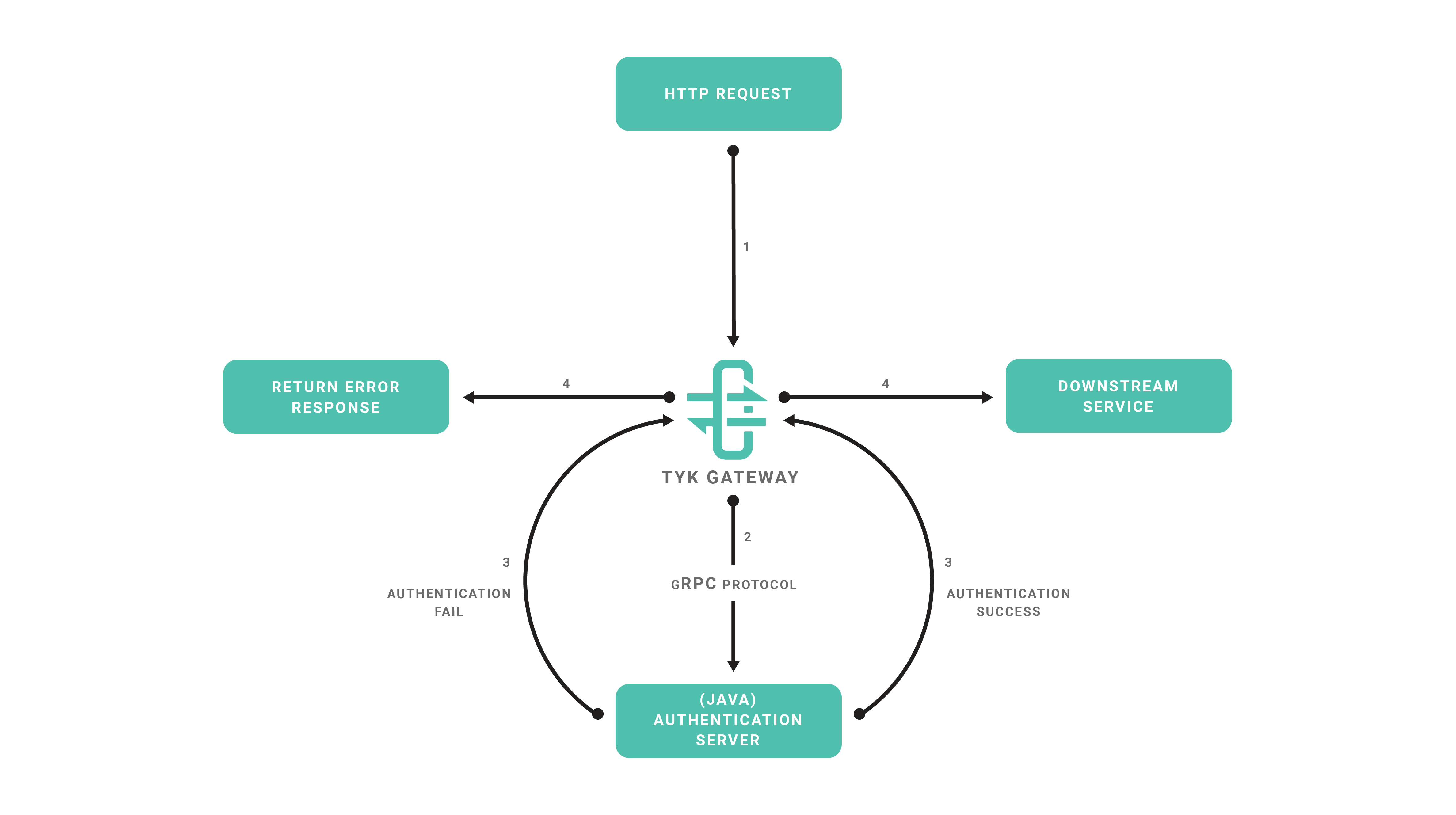 #### Requirements
* Tyk Gateway: This can be installed using standard package management tools like Yum or APT, or from source code. See [here](/tyk-self-managed/install) for more installation options.
* The Tyk CLI utility, which is bundled with our RPM and DEB packages, and can be installed separately from [https://github.com/TykTechnologies/tyk-cli](https://github.com/TykTechnologies/tyk-cli)
* In Tyk 2.8 and upwards the Tyk CLI is part of the gateway binary, you can find more information by running "tyk help bundle".
* NodeJS v6.x.x [https://nodejs.org/en/download/](https://nodejs.org/en/download/)
#### Create the Plugin
##### Create NodeJS Project
We will use the NPM tool to initialize our project, follow the steps provided by the `init` command:
```bash theme={null}
cd ~
mkdir tyk-plugin
cd tyk-plugin
npm init
```
Now we'll add the gRPC package for this project:
```bash theme={null}
npm install --save grpc
```
##### Install gRPC Tools
Typically to use gRPC and Protocol Buffers you need to use a code generator and generate bindings for the target language that you're using. For this tutorial we'll skip this step and use the dynamic loader that's provided by the NodeJS gRPC library. This mechanism allows a program to load Protocol Buffers definitions directly from `.proto` files. See [this section](https://grpc.io/docs/tutorials/basic/node.html#loading-service-descriptors-from-proto-files) in the gRPC documentation for more details.
To fetch the required `.proto` files, you may use an official repository where we keep the Tyk Protocol Buffers definition files:
```bash theme={null}
cd ~/tyk-plugin
git clone https://github.com/TykTechnologies/tyk
```
##### Implement Server
Now we're ready to implement our gRPC server, create a file called `main.js` in the project's directory
Add the following code to `main.js`.
```nodejs theme={null}
const grpc = require('grpc'),
resolve = require('path').resolve
const tyk = grpc.load({
file: 'coprocess_object.proto',
root: resolve(__dirname, 'tyk/coprocess/proto')
}).coprocess
const listenAddr = '127.0.0.1:5555',
authHeader = 'Authorization'
validToken = '71f6ac3385ce284152a64208521c592b'
// The dispatch function is called for every hook:
const dispatch = (call, callback) => {
var obj = call.request
// We dispatch the request based on the hook name, we pass obj.request which is the coprocess.Object:
switch (obj.hook_name) {
case 'MyPreMiddleware':
preMiddleware(obj, callback)
break
case 'MyAuthMiddleware':
authMiddleware(obj, callback)
break
default:
callback(null, obj)
break
}
}
const preMiddleware = (obj, callback) => {
var req = obj.request
// req is the coprocess.MiniRequestObject, we inject a header using the "set_headers" field:
req.set_headers = {
'mycustomheader': 'mycustomvalue'
}
// Use this callback to finish the operation, sending back the modified object:
callback(null, obj)
}
const authMiddleware = (obj, callback) => {
var req = obj.request
// We take the value from the "Authorization" header:
var token = req.headers[authHeader]
// The token should be attached to the object metadata, this is used internally for key management:
obj.metadata = {
token: token
}
// If the request token doesn't match the "validToken" constant we return the call:
if (token != validToken) {
callback(null, obj)
return
}
// At this point the token is valid and a session state object is initialized and attached to the coprocess.Object:
var session = new tyk.SessionState()
session.id_extractor_deadline = Date.now() + 100000000000
obj.session = session
callback(null, obj)
}
main = function() {
server = new grpc.Server()
server.addService(tyk.Dispatcher.service, {
dispatch: dispatch
})
server.bind(listenAddr, grpc.ServerCredentials.createInsecure())
server.start()
}
main()
```
To run the gRPC server run:
```bash theme={null}
node main.js
```
The gRPC server will listen on port `5555` (see the `listenAddr` constant). In the next steps we'll setup the plugin bundle and modify Tyk to connect to our gRPC server.
#### Bundle the Plugin
We need to create a manifest file within the `tyk-plugin` directory. This file contains information about our plugin and how we expect it to interact with the API that will load it. This file should be named `manifest.json` and needs to contain the following:
```json theme={null}
{
"custom_middleware": {
"driver": "grpc",
"auth_check": {
"name": "MyAuthMiddleware",
"path": "",
"raw_body_only": false,
"require_session": false
}
}
}
```
* The `custom_middleware` block contains the middleware settings like the plugin driver we want to use (`driver`) and the hooks that our plugin will expose. We use the `auth_check` hook for this tutorial. For other hooks see [here](/api-management/plugins/rich-plugins#coprocess-dispatcher-hooks).
* The `name` field references the name of the function that we implement in our plugin code - `MyAuthMiddleware`. The implemented dispatcher uses a switch statement to handle this hook, and calls the `authMiddleware` function in `main.js`.
* The `path` field is the path to the middleware component.
* The `raw_body_only` field
* The `require_session` field, if set to `true` gives you access to the session object. It will be supplied as a session variable to your middleware processor function
To bundle our plugin run the following command in the `tyk-plugin` directory. Check your tyk-cli install path first:
```bash theme={null}
/opt/tyk-gateway/utils/tyk-cli bundle build -y
```
For Tyk 2.8 use:
```bash theme={null}
/opt/tyk-gateway/bin/tyk bundle build -y
```
A plugin bundle is a packaged version of the plugin. It may also contain a cryptographic signature of its contents. The `-y` flag tells the Tyk CLI tool to skip the signing process in order to simplify the flow of this tutorial.
For more information on the Tyk CLI tool, see [here](/api-management/plugins/overview#plugin-bundles).
You should now have a `bundle.zip` file in the `tyk-plugin` directory.
#### Publish the Plugin
To publish the plugin, copy or upload `bundle.zip` to a local web server like Nginx, Apache or storage like Amazon S3. For this tutorial we'll assume you have a web server listening on `localhost` and accessible through `http://localhost`.
**Configure Tyk**
You will need to modify the Tyk global configuration file `tyk.conf` to use gRPC plugins. The following block should be present in this file:
```{.copyWrapper} theme={null}
"coprocess_options": {
"enable_coprocess": true,
"coprocess_grpc_server": "tcp://localhost:5555"
},
"enable_bundle_downloader": true,
"bundle_base_url": "http://localhost/bundles/",
"public_key_path": ""
```
**tyk.conf Options**
* `enable_coprocess`: This enables the plugin.
* `coprocess_grpc_server`: This is the URL of our gRPC server.
* `enable_bundle_downloader`: This enables the bundle downloader.
* `bundle_base_url`: This is a base URL that will be used to download the bundle. You should replace the bundle\_base\_url with the appropriate URL of the web server that's serving your plugin bundles. For now HTTP and HTTPS are supported but we plan to add more options in the future (like pulling directly from S3 buckets).
* `public_key_path`: Modify `public_key_path` in case you want to enforce the cryptographic check of the plugin bundle signatures. If the `public_key_path` isn't set, the verification process will be skipped and unsigned plugin bundles will be loaded normally.
**Configure an API Definition**
There are two important parameters that we need to add or modify in the API definition.
The first one is `custom_middleware_bundle` which must match the name of the plugin bundle file. If we keep this with the default name that the Tyk CLI tool uses, it will be `bundle.zip`:
```{.copyWrapper} theme={null}
"custom_middleware_bundle": "bundle.zip"
```
Assuming the `bundle_base_url` is `http://localhost/bundles/`, Tyk will use the following URL to download our file:
`http://localhost/bundles/bundle.zip`
The second parameter is specific to this tutorial, and should be used in combination with `use_keyless` to allow an API to authenticate against our plugin:
```{.copyWrapper} theme={null}
"use_keyless": false,
"enable_coprocess_auth": true
```
`enable_coprocess_auth` will instruct the Tyk gateway to authenticate this API using the associated custom authentication function that's implemented by our plugin.
**Configuration via the Tyk Dashboard**
To attach the plugin to an API, from the **Advanced Options** tab in the **API Designer** enter `bundle.zip` in the **Plugin Bundle ID** field.
We also need to modify the authentication mechanism that's used by the API.
From the **Core Settings** tab in the **API Designer** select **Use Custom Authentication (Python, CoProcess, and JSVM plugins)** from the **Target Details - Authentication Mode** drop-down list.
**Testing the Plugin**
At this point we have our test HTTP server ready to serve the plugin bundle and the configuration with all the required parameters.
The final step is to start or restart the **Tyk Gateway** (this may vary depending on how you set up Tyk):
```{.copyWrapper} theme={null}
service tyk-gateway start
```
A simple CURL request will be enough for testing our custom authentication middleware.
This request will trigger an authentication error:
```{.copyWrapper} theme={null}
curl http://localhost:8080/my-api/my-path -H 'Authorization: badtoken'
```
This will trigger a successful authentication. We're using the token that's specified in our server implementation (see line 57 in `Server.cs`):
```{.copyWrapper} theme={null}
curl http://localhost:8080/my-api/my-path -H 'Authorization: abc123'
```
We also have a [GitHub repository](https://github.com/TykTechnologies/tyk-plugin-demo-java/tree/maven) that includes tests and authentication middleware.
[3]: /img/dashboard/system-management/plugin_options_2.5.png
[4]: /img/dashboard/system-management/plugin_auth_mode_2.5.png
#### What's Next?
In this tutorial we learned how Tyk gRPC plugins work. For a production-level setup we suggest the following:
* Configure an appropriate web server and path to serve your plugin bundles.
[1]: /tyk-self-managed/install
[2]: https://github.com/TykTechnologies/tyk-cli
[3]: /img/dashboard/system-management/plugin_options.png
[4]: /img/dashboard/system-management/plugin_auth_mode.png
### Create Custom Authentication Plugin With Python
In the realm of API security, HMAC-signed authentication serves as a foundational concept. In this developer-focused blog post, we'll use HMAC-signed authentication as the basis for learning how to write gRPC custom authentication plugins with Tyk Gateway. Why learn how to write Custom Authentication Plugins?
* **Foundational knowledge**: Writing custom authentication plugins provides foundational knowledge of Tyk's extensibility and customization capabilities.
* **Practical experience**: Gain hands-on experience in implementing custom authentication logic tailored to specific use cases, starting with HMAC-signed authentication.
* **Enhanced control**: Exercise greater control over authentication flows and response handling, empowering developers to implement advanced authentication mechanisms beyond built-in features.
While Tyk Gateway offers built-in support for HMAC-signed authentication, this tutorial serves as a practical guide for developers looking to extend Tyk's capabilities through custom authentication plugins. It extends the gRPC server that we developed in our [getting started guide](/api-management/plugins/rich-plugins#using-python).
We will develop a basic gRPC server that implements the Tyk Dispatcher service with a custom authentication plugin to handle authentication keys, signed using the HMAC SHA512 algorithm. Subsequently, you will be able to make a request to your API with a HMAC signed authentication key in the *Authorization* header. Tyk Gateway will intercept the request and forward it to your Python gRPC server for HMAC signature and token verification.
Our plugin will only verify the key against an expected value. In a production environment it will be necessary to verify the key against Redis storage.
Before we continue ensure that you have:
* Read and completed our getting started guide that explains how to implement a basic Python gRPC server to echo the request payload received from Tyk Gateway. This tutorial extends the source code of the tyk\_async\_server.py file to implement a custom authentication plugin for a HMAC signed authentication key.
* Read our HMAC signatures documentation for an explanation of HMAC signed authentication with Tyk Gateway. A brief summary is given in the HMAC Signed Authentication section below.
#### HMAC Signed Authentication
Before diving in further, we will give a brief overview of HMAC signed authentication using our custom authentication plugin.
* **Client request**: The journey begins with a client requesting access to a protected resource on the Tyk API.
* **HMAC signing**: Before dispatching the request, the client computes an HMAC signature using a secret key and request date, ensuring the payload's integrity.
* **Authorization header**: The HMAC signature, along with essential metadata such as the API key and HMAC algorithm, is embedded within the Authorization header.
* **Tyk Gateway verification**: Upon receipt, Tyk Gateway forwards the request to our gRPC server to execute the custom authentication plugin. This will validate the HMAC signature, ensuring the request's authenticity before proceeding with further processing.
Requests should be made to an API that uses our custom authentication plugin as follows. A HMAC signed key should be included in the *Authorization* header and a date/time string in the *Date* header. An example request is shown in the curl command below:
```bash theme={null}
curl -v -H 'Date: Fri, 03 May 2024 12:00:42 GMT' \
-H 'Authorization: Signature keyId="eyJvcmciOiI1ZTlkOTU0NGExZGNkNjAwMDFkMGVkMjAiLCJpZCI6ImdycGNfaG1hY19rZXkiLCJoIjoibXVybXVyNjQifQ==", \
algorithm="hmac-sha512",signature="9kwBK%2FyrjbSHJDI7INAhBmhHLTHRDkIe2uRWHEP8bgQFQvfXRksm6t2MHeLUyk9oosWDZyC17AbGeP8EFqrp%2BA%3D%3D"' \
http://localhost:8080/grpc-custom-auth/get
```
From the above example, it should be noted that:
* The *Date* header contains a date string formatted as follows: *Fri, 03 May 2024 11:06:00 GMT*.
* The *Authorization* header is formatted as `Signature keyId="", algorithm="", signature=""` where:
* **keyId** is a Tyk authentication key.
* **algorithm** is the HMAC algorithm used to sign the signature, *hmac-sha512* or *hmac-sha256*.
* **signature** is the HAMC signature calculated with the date string from the *Date* header, signed with a base64 encoded secret value, using the specified HMAC algorithm. The HMAC signature is then encoded as base64.
#### Prerequisites
Firstly, we need to create the following:
* An API configured to use a custom authentication plugin.
* A HMAC enabled key with a configured secret for signing.
This will enable us to issue a request to test that Tyk Gateway integrates with our custom authentication plugin on the gRPC server.
###### Create API
We will create an API served by Tyk Gateway, that will forward requests upstream to [https://httpbin.org/](https://httpbin.org/).
The API will have the following parameters configured:
* **Listen path**: Tyk Gateway will listen to API requests on */grpc-custom-auth/* and will strip the listen path for upstream requests.
* **Target URL**: The target URL will be configured to send requests to *[http://httpbin/](http://httpbin/)*.
* **Authentication Mode**: The authentication mode will be configured for custom authentication. This is used to trigger CoProcess (gRPC), Python or JSVM plugins to handle custom authentication.
You can use the following Tyk Classic API definition to get you started, replacing the *org\_id* with the ID of your organization.
```json theme={null}
{
"api_definition": {
"id": "662facb2f03e750001a03500",
"api_id": "6c56dd4d3ad942a94474df6097df67ed",
"org_id": "5e9d9544a1dcd60001d0ed20",
"name": "Python gRPC Custom Auth",
"enable_coprocess_auth": true,
"auth": {
"auth_header_name": "Authorization"
},
"proxy": {
"preserve_host_header": false,
"listen_path": "/grpc-custom-auth/",
"disable_strip_slash": true,
"strip_listen_path": true,
"target_url": "http://httpbin/"
},
"version_data": {
"not_versioned": false,
"versions": {
"Default": {
"name": "Default",
"expires": "",
"use_extended_paths": true,
"extended_paths": {
"ignored": [],
"white_list": [],
"black_list": []
}
}
},
"default_version": "Default"
},
"active": true
}
}
```
The Tyk API definition above can be imported via Tyk Dashboard. Alternatively, if using Tyk Gateway OSS, a POST request can be made to the *api/apis* endpoint of Tyk Gateway. Consult the [Tyk Gateway Open API Specification documentation](/tyk-gateway-api) for usage.
An illustrative example using *curl* is given below. Please note that you will need to:
* Update the location to use the protocol scheme, host and port suitable for your environment.
* Replace the value in the *x-tyk-authorization* header with the secret value in your *tyk.conf* file.
* Replace the *org\_id* with the ID of your organization.
```bash theme={null}
curl -v \
--header 'Content-Type: application/json' \
--header 'x-tyk-authorization: your Gateway admin secret' \
--location http://localhost:8080/tyk/apis/ \
--data '{\
"api_definition": {\
"id": "662facb2f03e750001a03502",\
"api_id": "6c56dd4d3ad942a94474df6097df67ef",\
"org_id": "5e9d9544a1dcd60001d0ed20",\
"name": "Python gRPC Custom Auth",\
"enable_coprocess_auth": true,\
"auth": {\
"auth_header_name": "Authorization"\
},\
"proxy": {\
"preserve_host_header": false,\
"listen_path": "/grpc-custom-auth-error/",\
"disable_strip_slash": true,\
"strip_listen_path": true,\
"target_url": "http://httpbin/"\
},\
"version_data": {\
"not_versioned": false,\
"versions": {\
"Default": {\
"name": "Default",\
"expires": "",\
"use_extended_paths": true,\
"extended_paths": {\
"ignored": [],\
"white_list": [],\
"black_list": []\
}\
}\
},\
"default_version": "Default"\
},\
"active": true\
}\
}'
```
A response similar to that given below will be returned by Tyk Gateway:
```bash theme={null}
{
"key": "f97b748fde734b099001ca15f0346dfe",
"status": "ok",
"action": "added"
}
```
###### Create HMAC Key
We will create an key configured to use HMAC signing, with a secret of *secret*. The key will configured to have access to our test API.
You can use the following configuration below, replacing the value of the *org\_id* with the ID of your organization.
```bash theme={null}
{
"quota_max": 1000,
"quota_renews": 1596929526,
"quota_remaining": 1000,
"quota_reset": 1596843126,
"quota_used": 0,
"org_id": "5e9d9544a1dcd60001d0ed20",
"access_rights": {
"662facb2f03e750001a03500": {
"api_id": "662facb2f03e750001a03500",
"api_name": "Python gRPC Custom Auth",
"versions": ["Default"],
"allowed_urls": [],
"limit": null,
"quota_max": 1000,
"quota_renews": 1596929526,
"quota_remaining": 1000,
"quota_reset": 1596843126,
"quota_used": 0,
"per": 1,
"expires": -1
}
},
"enable_detailed_recording": true,
"hmac_enabled": true,
"hmac_string": "secret",
"meta_data": {}
}
```
You can use Tyk Gateway’s API to create the key by issuing a POST request to the *tyk/keys* endpoint. Consult the [Tyk Gateway Open API Specification documentation](/tyk-gateway-api) for usage.
An illustrative example using *curl* is given below. Please note that you will need to:
* Update the location to use the protocol scheme, host and port suitable for your environment.
* Replace the value in the *x-tyk-authorization* header with the secret value in your *tyk.conf* file.
Replace the *org\_id* with the ID of your organization.
```bash theme={null}
curl --location 'http://localhost:8080/tyk/keys/grpc_hmac_key' \
--header 'x-tyk-authorization: your Gateay admin secret' \
--header 'Content-Type: application/json' \
--data '{\
"alias": "grpc_hmac_key",\
"quota_max": 1000,\
"quota_renews": 1596929526,\
"quota_remaining": 1000,\
"quota_reset": 1596843126,\
"quota_used": 0,\
"org_id": "5e9d9544a1dcd60001d0ed20",\
"access_rights": {\
"662facb2f03e750001a03500": {\
"api_id": "662facb2f03e750001a03500",\
"api_name": "python-grpc-custom-auth",\
"versions": ["Default"],\
"allowed_urls": [],\
"limit": null,\
"quota_max": 1000,\
"quota_renews": 1596929526,\
"quota_remaining": 1000,\
"quota_reset": 1596843126,\
"quota_used": 0,\
"per": 1,\
"expires": -1\
}\
},\
"enable_detailed_recording": true,\
"hmac_enabled": true,\
"hmac_string": "secret",\
"meta_data": {}\
}\
'
```
A response similar to that given below should be returned by Tyk Gateway:
```json theme={null}
{
"key": "eyJvcmciOiI1ZTlkOTU0NGExZGNkNjAwMDFkMGVkMjAiLCJpZCI6ImdycGNfaG1hY19rZXkiLCJoIjoibXVybXVyNjQifQ==",
"status": "ok",
"action": "added",
"key_hash": "a72fcdc09caa86b5"
}
```
Make a note of the key ID given in the response, since we will need this to test our API.
#### Implement Plugin
Our custom authentication plugin will perform the following tasks:
* Extract the *Authorization* and *Date* headers from the request object.
* Parse the *Authorization* header to extract the *keyId*, *algorithm* and *signature* attributes.
* Compute the HMAC signature using the specific algorithm and date included in the header.
* Verify that the computed HMAC signature matches the signature included in the *Authorization* header. A 401 error response will be returned if verification fails. Our plugin will only verify the key against an expected value. In a production environment it will be necessary to verify the key against Redis storage.
* Verify that the *keyId* matches an expected value (VALID\_TOKEN). A 401 error response will be returned to Tyk Gateway if verification fails.
* If verification of the signature and key passes then update the session with HMAC enabled and set the HMAC secret. Furthermore, add the key to the *Object* metadata.
Return the request *Object* containing the updated session back to Tyk Gateway. When developing custom authentication plugins it is the responsibility of the developer to update the session state with the token, in addition to setting the appropriate response status code and error message when authentication fails.
##### Import Python Modules
Ensure that the following Python modules are imported at the top of your *tyk\_async\_server.py* file:
```python theme={null}
import asyncio
import base64
import hashlib
import hmac
import json
import re
import signal
import logging
import urllib.parse
import grpc
from google.protobuf.json_format import MessageToJson
from grpc_reflection.v1alpha import reflection
import coprocess_object_pb2_grpc
import coprocess_object_pb2
from coprocess_common_pb2 import HookType
from coprocess_session_state_pb2 import SessionState
```
##### Add Constants
Add the following constants to the top of the *tyk\_async\_server.py* file, after the import statements:
```bash theme={null}
SECRET = "c2VjcmV0"
VALID_TOKEN = "eyJvcmciOiI1ZTlkOTU0NGExZGNkNjAwMDFkMGVkMjAiLCJpZCI6ImdycGNfaG1hY19rZXkiLCJoIjoibXVybXVyNjQifQ=="
```
* **SECRET** is a base64 representation of the secret used for HMAC signing.
* **VALID\_TOKEN** is the key ID that we will authenticate against.
The values listed above are designed to align with the examples provided in the *Prerequisites* section, particularly those related to HMAC key generation. If you've made adjustments to the HMAC secret or you've modified the key alias referred to in the endpoint path (for instance, *grpc\_hmac\_key*), you'll need to update these constants accordingly.
##### Extract headers
Add the following function to your *tyk\_async\_server.py* file to extract a dictionary of the key value pairs from the *Authorization* header. We will use a regular expression to extract the key value pairs.
```python theme={null}
def parse_auth_header(auth_header: str) -> dict[str,str]:
pattern = r'(\w+)\s*=\s*"([^"]+)"'
matches = re.findall(pattern, auth_header)
parsed_data = dict(matches)
return parsed_data
```
##### Compute HMAC Signature
Add the following function to your *tyk\_async\_server.py* to compute the HMAC signature.
```python theme={null}
def generate_hmac_signature(algorithm: str, date_string: str, secret_key: str) -> str:
if algorithm == "hmac-sha256":
hash_algorithm = hashlib.sha256
elif algorithm == "hmac-sha512":
hash_algorithm = hashlib.sha512
else:
raise ValueError("Unsupported hash algorithm")
base_string = f"date: {date_string}"
logging.info(f"generating signature from: {base_string}")
hmac_signature = hmac.new(secret_key.encode(), base_string.encode(), hash_algorithm)
return base64.b64encode(hmac_signature.digest()).decode()
```
Our function accepts three parameters:
* **algorithm** is the HMAC algorithm to use for signing. We will use HMAC SHA256 or HMAC SHA512 in our custom authentication plugin
* **date\_string** is the date extracted from the date header in the request sent by Tyk Gateway.
* **secret\_key** is the value of the secret used for signing.
The function computes and returns the HMAC signature for a string formatted as *date: date\_string*, where *date\_string* corresponds to the value of the *date\_string* parameter. The signature is computed using the secret value given in the *secret\_key* parameter and the HMAC algorithm given in the *algorithm* parameter. A *ValueError* is raised if the hash algorithm is unrecognized.
We use the following Python modules in our implementation:
* hmac Python module to compute the HMAC signature.
* base64 Python module to encode the result.
##### Verify HMAC Signature
Add the following function to your *tyk\_async\_server.py* file to verify the HMAC signature provided by the client:
```python theme={null}
def verify_hmac_signature(algorithm: str, signature: str, source_string) -> bool:
expected_signature = generate_hmac_signature(algorithm, source_string, SECRET)
received_signature = urllib.parse.unquote(signature)
if expected_signature != received_signature:
error = f"Signatures did not match\nreceived: {received_signature}\nexpected: {expected_signature}"
logging.error(error)
else:
logging.info("Signatures matched!")
return expected_signature == received_signature
```
Our function accepts three parameters:
* **algorithm** is the HMAC algorithm to use for signing. We will use hmac-sha256 or hmac-sha512 in our custom authentication plugin.
* **signature** is the signature string extracted from the *Authorization* header.
* **source\_string** is the date extracted from the date header in the request sent by Tyk Gateway.
* **secret\_key** is the value of the secret used for signing.
The function calls *generate\_hmac\_signature* to verify the signatures match. It returns true if the computed and client HMAC signatures match, otherwise false is returned.
##### Set Error Response
Add the following helper function to *tyk\_async\_server.py* to allow us to set the response status and error message if authentication fails.
```python theme={null}
def set_response_error(object: coprocess_object_pb2.Object, code: int, message: str) -> None:
object.request.return_overrides.response_code = code
object.request.return_overrides.response_error = message
```
Our function accepts the following three parameters:
* **object** is an instance of the [Object](/api-management/plugins/rich-plugins#coprocess-object) message representing the payload sent by Tyk Gateway to the *Dispatcher* service in our gRPC server. For further details of the payload structure dispatched by Tyk Gateway to a gRPC server please consult our gRPC documentation.
* **code** is the HTTP status code to return in the response.
* **message** is the response message.
The function modifies the *return\_overrides* attribute of the request, updating the response status code and error message. The *return\_overrides* attribute is an instance of a [ReturnOverrides](/api-management/plugins/rich-plugins#returnoverrides) message that can be used to override the response of a given HTTP request. When this attribute is modified the request is terminated and is not sent upstream.
##### Authenticate
Add the following to your *tyk\_async\_server.py* file to implement the main custom authentication function. This parses the headers to extract the signature and date from the request, in addition to verifying the HMAC signature and key:
```python theme={null}
def authenticate(object: coprocess_object_pb2.Object) -> coprocess_object_pb2.Object:
keys_to_check = ["keyId", "algorithm", "signature"]
auth_header = object.request.headers.get("Authorization")
date_header = object.request.headers.get("Date")
parse_dict = parse_auth_header(auth_header)
if not all(key in parse_dict for key in keys_to_check) or not all([auth_header, date_header]):
set_response_error(object, 400, "Custom middleware: Bad request")
return object
try:
signature_valid = verify_hmac_signature(
parse_dict["algorithm"],
parse_dict["signature"],
date_header
)
except ValueError:
set_response_error(object, 400, "Bad HMAC request, unsupported algorithm")
return object
if not signature_valid or parse_dict["keyId"] != VALID_TOKEN:
set_response_error(object, 401, "Custom middleware: Not authorized")
else:
new_session = SessionState()
new_session.hmac_enabled = True
new_session.hmac_secret = SECRET
object.metadata["token"] = VALID_TOKEN
object.session.CopyFrom(new_session)
return object
```
The *Object* payload received from the Gateway is updated and returned as a response from the *Dispatcher* service:
* If authentication fails then we set the error message and status code for the response accordingly, using our *set\_response\_error* function.
* If authentication passes then we update the session attribute in the *Object* payload to indicate that HMAC verification was performed and provide the secret used for signing. We also add the verified key to the meta data of the request payload.
Specifically, our function performs the following tasks:
* Extracts the *Date* and *Authorization* headers from the request and verifies that the *Authorization* header is structured correctly, using our *parse\_auth\_header* function. We store the extracted *Authorization* header fields in the *parse\_dict* dictionary. If the structure is invalid then a 400 bad request response is returned to Tyk Gateway, using our *set\_response\_error* function.
* We use our *verify\_hmac\_signature* function to compute and verify the HMAC signature. A 400 bad request error is returned to the Gateway if HMAC signature verification fails, due to an unrecognized HMAC algorithm.
* A 401 unauthorized error response is returned to the Gateway under the following conditions:
* The client HMAC signature and the computed HMAC signature do not match.
* The extracted key ID does not match the expected key value in VALID\_TOKEN.
* If HMAC signature verification passed and the key included in the *Authorization* header is valid then we update the *SessionState* instance to indicate that HMAC signature verification is enabled, i.e. *hmac\_enabled* is set to true. We also specify the HMAC secret used for signing in the *hmac\_secret* field and include the valid token in the metadata dictionary.
##### Integrate Plugin
Update the *Dispatch* method of the *PythonDispatcher* class in your *tyk\_async\_server.py* file so that our authenticate function is called when the a request is made by Tyk Gateway to execute a custom authentication (*HookType.CustomKeyCheck*) plugin.
```python theme={null}
class PythonDispatcher(coprocess_object_pb2_grpc.DispatcherServicer):
async def Dispatch(
self, object: coprocess_object_pb2.Object, context: grpc.aio.ServicerContext
) -> coprocess_object_pb2.Object:
logging.info(f"STATE for {object.hook_name}\n{MessageToJson(object)}\n")
if object.hook_type == HookType.Pre:
logging.info(f"Pre plugin name: {object.hook_name}")
logging.info(f"Activated Pre Request plugin from API: {object.spec.get('APIID')}")
elif object.hook_type == HookType.CustomKeyCheck:
logging.info(f"CustomAuth plugin: {object.hook_name}")
logging.info(f"Activated CustomAuth plugin from API: {object.spec.get('APIID')}")
authenticate(object)
elif object.hook_type == HookType.PostKeyAuth:
logging.info(f"PostKeyAuth plugin name: {object.hook_name}")
logging.info(f"Activated PostKeyAuth plugin from API: {object.spec.get('APIID')}")
elif object.hook_type == HookType.Post:
logging.info(f"Post plugin name: {object.hook_name}")
logging.info(f"Activated Post plugin from API: {object.spec.get('APIID')}")
elif object.hook_type == HookType.Response:
logging.info(f"Response plugin name: {object.hook_name}")
logging.info(f"Activated Response plugin from API: {object.spec.get('APIID')}")
logging.info("--------\n")
return object
```
#### Test Plugin
Create the following bash script, *hmac.sh*, to issue a test request to an API served by Tyk Gateway. The script computes a HMAC signature and constructs the *Authorization* and *Date* headers for a specified API. The *Authorization* header contains the HMAC signature and key for authentication.
Replace the following constant values with values suitable for your environment:
* **KEY** represents the key ID for the HMAC signed key that you created at the beginning of this guide.
* **HMAC\_SECRET** represents the base64 encoded value of the secret for your HMAC key that you created at the beginning of this guide.
* **BASE\_URL** represents the base URL, containing the protocol scheme, host and port number that Tyk Gateway listens to for API requests.
* **ENDPOINT** represents the path of your API that uses HMAC signed authentication.
```bash theme={null}
#!/bin/bash
BASE_URL=http://localhost:8080
ENDPOINT=/grpc-custom-auth/get
HMAC_ALGORITHM=hmac-sha512
HMAC_SECRET=c2VjcmV0
KEY=eyJvcmciOiI1ZTlkOTU0NGExZGNkNjAwMDFkMGVkMjAiLCJpZCI6ImdycGNfaG1hY19rZXkiLCJoIjoibXVybXVyNjQifQ==
REQUEST_URL=${BASE_URL}${ENDPOINT}
function urlencode() {
echo -n "$1" | perl -MURI::Escape -ne 'print uri_escape($_)' | sed "s/%20/+/g"
}
# Set date in expected format
date="$(LC_ALL=C date -u +"%a, %d %b %Y %H:%M:%S GMT")"
# Generate the signature using hmac algorithm with hmac secret from created Tyk key and
# then base64 encoded
signature=$(echo -n "date: ${date}" | openssl sha512 -binary -hmac "${HMAC_SECRET}" | base64)
# Ensure the signature is base64 encoded
url_encoded_signature=$(echo -n "${signature}" | perl -MURI::Escape -ne 'print uri_escape($_)' | sed "s/%20/+/g")
# Output the date, encoded date, signature and the url encoded signature
echo "request: ${REQUEST_URL}"
echo "date: $date"
echo "signature: $signature"
echo "url_encoded_signature: $url_encoded_signature"
# Make the curl request using headers
printf "\n\n----\n\nMaking request to http://localhost:8080/grpc-custom-auth/get\n\n"
set -x
curl -v -H "Date: ${date}" \
-H "Authorization: Signature keyId=\"${KEY}\",algorithm=\"${HMAC_ALGORITHM}\",signature=\"${url_encoded_signature}\"" \
${REQUEST_URL}
```
After creating and saving the script, ensure that it is executable by issuing the following command:
```bash theme={null}
chmod +x hmac.sh
```
Issue a test request by running the script:
```bash theme={null}
./hmac.sh
```
Observe the output of your gRPC server. You should see the request payload appear in the console output for the server and your custom authentication plugin should have been triggered. An illustrative example is given below:
```bash theme={null}
2024-05-13 12:53:49 INFO:root:STATE for CustomHMACCheck
2024-05-13 12:53:49 {
2024-05-13 12:53:49 "hookType": "CustomKeyCheck",
2024-05-13 12:53:49 "hookName": "CustomHMACCheck",
2024-05-13 12:53:49 "request": {
2024-05-13 12:53:49 "headers": {
2024-05-13 12:53:49 "User-Agent": "curl/8.1.2",
2024-05-13 12:53:49 "Date": "Mon, 13 May 2024 11:53:49 GMT",
2024-05-13 12:53:49 "Host": "localhost:8080",
2024-05-13 12:53:49 "Authorization": "Signature keyId=\"eyJvcmciOiI1ZTlkOTU0NGExZGNkNjAwMDFkMGVkMjAiLCJpZCI6ImdycGNfaG1hY19rZXkiLCJoIjoibXVybXVyNjQifQ==\",algorithm=\"hmac-sha512\",signature=\"e9OiifnTDgi3PW2EGJWfeQXCuhuhi6bGLiGhUTFpjEfgdKmX%2FQOFrePAQ%2FAoSFGU%2FzpP%2FCabmQi4zQDPdRh%2FZg%3D%3D\"",
2024-05-13 12:53:49 "Accept": "*/*"
2024-05-13 12:53:49 },
2024-05-13 12:53:49 "url": "/grpc-custom-auth/get",
2024-05-13 12:53:49 "returnOverrides": {
2024-05-13 12:53:49 "responseCode": -1
2024-05-13 12:53:49 },
2024-05-13 12:53:49 "method": "GET",
2024-05-13 12:53:49 "requestUri": "/grpc-custom-auth/get",
2024-05-13 12:53:49 "scheme": "http"
2024-05-13 12:53:49 },
2024-05-13 12:53:49 "spec": {
2024-05-13 12:53:49 "bundle_hash": "d41d8cd98f00b204e9800998ecf8427e",
2024-05-13 12:53:49 "OrgID": "5e9d9544a1dcd60001d0ed20",
2024-05-13 12:53:49 "APIID": "6c56dd4d3ad942a94474df6097df67ed"
2024-05-13 12:53:49 }
2024-05-13 12:53:49 }
2024-05-13 12:53:49
2024-05-13 12:53:49 INFO:root:CustomAuth plugin: CustomHMACCheck
2024-05-13 12:53:49 INFO:root:Activated CustomAuth plugin from API: 6c56dd4d3ad942a94474df6097df67ed
2024-05-13 12:53:49 INFO:root:generating signature from: date: Mon, 13 May 2024 11:53:49 GMT
2024-05-13 12:53:49 INFO:root:Signatures matched!
2024-05-13 12:53:49 INFO:root:--------
```
Try changing the SECRET and/or KEY constants with invalid values and observe the output of your gRPC server. You should notice that authentication fails. An illustrative example is given below:
```
2024-05-13 12:56:37 INFO:root:STATE for CustomHMACCheck
2024-05-13 12:56:37 {
2024-05-13 12:56:37 "hookType": "CustomKeyCheck",
2024-05-13 12:56:37 "hookName": "CustomHMACCheck",
2024-05-13 12:56:37 "request": {
2024-05-13 12:56:37 "headers": {
2024-05-13 12:56:37 "User-Agent": "curl/8.1.2",
2024-05-13 12:56:37 "Date": "Mon, 13 May 2024 11:56:37 GMT",
2024-05-13 12:56:37 "Host": "localhost:8080",
2024-05-13 12:56:37 "Authorization": "Signature keyId=\"eyJvcmciOiI1ZTlkOTU0NGExZGNkNjAwMDFkMGVkMjAiLCJpZCI6ImdycGNfaG1hY19rZXkiLCJoIjoibXVybXVyNjQifQ==\",algorithm=\"hmac-sha512\",signature=\"KXhkWOS01nbxuFfK7wEBggkydXlKJswxbukiplboJ2n%2BU6JiYOil%2Bx4OE4edWipg4EcG9T49nvY%2Fc9G0XFJcfg%3D%3D\"",
2024-05-13 12:56:37 "Accept": "*/*"
2024-05-13 12:56:37 },
2024-05-13 12:56:37 "url": "/grpc-custom-auth/get",
2024-05-13 12:56:37 "returnOverrides": {
2024-05-13 12:56:37 "responseCode": -1
2024-05-13 12:56:37 },
2024-05-13 12:56:37 "method": "GET",
2024-05-13 12:56:37 "requestUri": "/grpc-custom-auth/get",
2024-05-13 12:56:37 "scheme": "http"
2024-05-13 12:56:37 },
2024-05-13 12:56:37 "spec": {
2024-05-13 12:56:37 "bundle_hash": "d41d8cd98f00b204e9800998ecf8427e",
2024-05-13 12:56:37 "OrgID": "5e9d9544a1dcd60001d0ed20",
2024-05-13 12:56:37 "APIID": "6c56dd4d3ad942a94474df6097df67ed"
2024-05-13 12:56:37 }
2024-05-13 12:56:37 }
2024-05-13 12:56:37
2024-05-13 12:56:37 INFO:root:CustomAuth plugin: CustomHMACCheck
2024-05-13 12:56:37 INFO:root:Activated CustomAuth plugin from API: 6c56dd4d3ad942a94474df6097df67ed
2024-05-13 12:56:37 INFO:root:generating signature from: date: Mon, 13 May 2024 11:56:37 GMT
2024-05-13 12:56:37 ERROR:root:Signatures did not match
2024-05-13 12:56:37 received: KXhkWOS01nbxuFfK7wEBggkydXlKJswxbukiplboJ2n+U6JiYOil+x4OE4edWipg4EcG9T49nvY/c9G0XFJcfg==
2024-05-13 12:56:37 expected: zT17C2tgDCYBJCgFFN/mknf6XydPaV98a5gMPNUHYxZyYwYedIPIhyDRQsMF9GTVFe8khCB1FhfyhpmzrUR2Lw==
```
#### Summary
In this guide, we've explained how to write a Python gRPC custom authentication plugin for Tyk Gateway, using HMAC-signed authentication as a practical example. Through clear instructions and code examples, we've provided developers with insights into the process of creating custom authentication logic tailored to their specific API authentication needs.
While Tyk Gateway already supports HMAC-signed authentication out of the box, this guide goes beyond basic implementation by demonstrating how to extend its capabilities through custom plugins. By focusing on HMAC-signed authentication, developers have gained valuable experience in crafting custom authentication mechanisms that can be adapted and expanded to meet diverse authentication requirements.
It's important to note that the authentication mechanism implemented in this guide solely verifies the HMAC signature's validity and does not include access control checks against specific API resources. Developers should enhance this implementation by integrating access control logic to ensure authenticated requests have appropriate access permissions.
By mastering the techniques outlined in this guide, developers are better equipped to address complex authentication challenges and build robust API security architectures using Tyk Gateway's extensibility features. This guide serves as a foundation for further exploration and experimentation with custom authentication plugins, empowering developers to innovate and customize API authentication solutions according to their unique requirements.
***
#### Requirements
* Tyk Gateway: This can be installed using standard package management tools like Yum or APT, or from source code. See [here](/tyk-self-managed/install) for more installation options.
* The Tyk CLI utility, which is bundled with our RPM and DEB packages, and can be installed separately from [https://github.com/TykTechnologies/tyk-cli](https://github.com/TykTechnologies/tyk-cli)
* In Tyk 2.8 and upwards the Tyk CLI is part of the gateway binary, you can find more information by running "tyk help bundle".
* NodeJS v6.x.x [https://nodejs.org/en/download/](https://nodejs.org/en/download/)
#### Create the Plugin
##### Create NodeJS Project
We will use the NPM tool to initialize our project, follow the steps provided by the `init` command:
```bash theme={null}
cd ~
mkdir tyk-plugin
cd tyk-plugin
npm init
```
Now we'll add the gRPC package for this project:
```bash theme={null}
npm install --save grpc
```
##### Install gRPC Tools
Typically to use gRPC and Protocol Buffers you need to use a code generator and generate bindings for the target language that you're using. For this tutorial we'll skip this step and use the dynamic loader that's provided by the NodeJS gRPC library. This mechanism allows a program to load Protocol Buffers definitions directly from `.proto` files. See [this section](https://grpc.io/docs/tutorials/basic/node.html#loading-service-descriptors-from-proto-files) in the gRPC documentation for more details.
To fetch the required `.proto` files, you may use an official repository where we keep the Tyk Protocol Buffers definition files:
```bash theme={null}
cd ~/tyk-plugin
git clone https://github.com/TykTechnologies/tyk
```
##### Implement Server
Now we're ready to implement our gRPC server, create a file called `main.js` in the project's directory
Add the following code to `main.js`.
```nodejs theme={null}
const grpc = require('grpc'),
resolve = require('path').resolve
const tyk = grpc.load({
file: 'coprocess_object.proto',
root: resolve(__dirname, 'tyk/coprocess/proto')
}).coprocess
const listenAddr = '127.0.0.1:5555',
authHeader = 'Authorization'
validToken = '71f6ac3385ce284152a64208521c592b'
// The dispatch function is called for every hook:
const dispatch = (call, callback) => {
var obj = call.request
// We dispatch the request based on the hook name, we pass obj.request which is the coprocess.Object:
switch (obj.hook_name) {
case 'MyPreMiddleware':
preMiddleware(obj, callback)
break
case 'MyAuthMiddleware':
authMiddleware(obj, callback)
break
default:
callback(null, obj)
break
}
}
const preMiddleware = (obj, callback) => {
var req = obj.request
// req is the coprocess.MiniRequestObject, we inject a header using the "set_headers" field:
req.set_headers = {
'mycustomheader': 'mycustomvalue'
}
// Use this callback to finish the operation, sending back the modified object:
callback(null, obj)
}
const authMiddleware = (obj, callback) => {
var req = obj.request
// We take the value from the "Authorization" header:
var token = req.headers[authHeader]
// The token should be attached to the object metadata, this is used internally for key management:
obj.metadata = {
token: token
}
// If the request token doesn't match the "validToken" constant we return the call:
if (token != validToken) {
callback(null, obj)
return
}
// At this point the token is valid and a session state object is initialized and attached to the coprocess.Object:
var session = new tyk.SessionState()
session.id_extractor_deadline = Date.now() + 100000000000
obj.session = session
callback(null, obj)
}
main = function() {
server = new grpc.Server()
server.addService(tyk.Dispatcher.service, {
dispatch: dispatch
})
server.bind(listenAddr, grpc.ServerCredentials.createInsecure())
server.start()
}
main()
```
To run the gRPC server run:
```bash theme={null}
node main.js
```
The gRPC server will listen on port `5555` (see the `listenAddr` constant). In the next steps we'll setup the plugin bundle and modify Tyk to connect to our gRPC server.
#### Bundle the Plugin
We need to create a manifest file within the `tyk-plugin` directory. This file contains information about our plugin and how we expect it to interact with the API that will load it. This file should be named `manifest.json` and needs to contain the following:
```json theme={null}
{
"custom_middleware": {
"driver": "grpc",
"auth_check": {
"name": "MyAuthMiddleware",
"path": "",
"raw_body_only": false,
"require_session": false
}
}
}
```
* The `custom_middleware` block contains the middleware settings like the plugin driver we want to use (`driver`) and the hooks that our plugin will expose. We use the `auth_check` hook for this tutorial. For other hooks see [here](/api-management/plugins/rich-plugins#coprocess-dispatcher-hooks).
* The `name` field references the name of the function that we implement in our plugin code - `MyAuthMiddleware`. The implemented dispatcher uses a switch statement to handle this hook, and calls the `authMiddleware` function in `main.js`.
* The `path` field is the path to the middleware component.
* The `raw_body_only` field
* The `require_session` field, if set to `true` gives you access to the session object. It will be supplied as a session variable to your middleware processor function
To bundle our plugin run the following command in the `tyk-plugin` directory. Check your tyk-cli install path first:
```bash theme={null}
/opt/tyk-gateway/utils/tyk-cli bundle build -y
```
For Tyk 2.8 use:
```bash theme={null}
/opt/tyk-gateway/bin/tyk bundle build -y
```
A plugin bundle is a packaged version of the plugin. It may also contain a cryptographic signature of its contents. The `-y` flag tells the Tyk CLI tool to skip the signing process in order to simplify the flow of this tutorial.
For more information on the Tyk CLI tool, see [here](/api-management/plugins/overview#plugin-bundles).
You should now have a `bundle.zip` file in the `tyk-plugin` directory.
#### Publish the Plugin
To publish the plugin, copy or upload `bundle.zip` to a local web server like Nginx, Apache or storage like Amazon S3. For this tutorial we'll assume you have a web server listening on `localhost` and accessible through `http://localhost`.
**Configure Tyk**
You will need to modify the Tyk global configuration file `tyk.conf` to use gRPC plugins. The following block should be present in this file:
```{.copyWrapper} theme={null}
"coprocess_options": {
"enable_coprocess": true,
"coprocess_grpc_server": "tcp://localhost:5555"
},
"enable_bundle_downloader": true,
"bundle_base_url": "http://localhost/bundles/",
"public_key_path": ""
```
**tyk.conf Options**
* `enable_coprocess`: This enables the plugin.
* `coprocess_grpc_server`: This is the URL of our gRPC server.
* `enable_bundle_downloader`: This enables the bundle downloader.
* `bundle_base_url`: This is a base URL that will be used to download the bundle. You should replace the bundle\_base\_url with the appropriate URL of the web server that's serving your plugin bundles. For now HTTP and HTTPS are supported but we plan to add more options in the future (like pulling directly from S3 buckets).
* `public_key_path`: Modify `public_key_path` in case you want to enforce the cryptographic check of the plugin bundle signatures. If the `public_key_path` isn't set, the verification process will be skipped and unsigned plugin bundles will be loaded normally.
**Configure an API Definition**
There are two important parameters that we need to add or modify in the API definition.
The first one is `custom_middleware_bundle` which must match the name of the plugin bundle file. If we keep this with the default name that the Tyk CLI tool uses, it will be `bundle.zip`:
```{.copyWrapper} theme={null}
"custom_middleware_bundle": "bundle.zip"
```
Assuming the `bundle_base_url` is `http://localhost/bundles/`, Tyk will use the following URL to download our file:
`http://localhost/bundles/bundle.zip`
The second parameter is specific to this tutorial, and should be used in combination with `use_keyless` to allow an API to authenticate against our plugin:
```{.copyWrapper} theme={null}
"use_keyless": false,
"enable_coprocess_auth": true
```
`enable_coprocess_auth` will instruct the Tyk gateway to authenticate this API using the associated custom authentication function that's implemented by our plugin.
**Configuration via the Tyk Dashboard**
To attach the plugin to an API, from the **Advanced Options** tab in the **API Designer** enter `bundle.zip` in the **Plugin Bundle ID** field.
We also need to modify the authentication mechanism that's used by the API.
From the **Core Settings** tab in the **API Designer** select **Use Custom Authentication (Python, CoProcess, and JSVM plugins)** from the **Target Details - Authentication Mode** drop-down list.
**Testing the Plugin**
At this point we have our test HTTP server ready to serve the plugin bundle and the configuration with all the required parameters.
The final step is to start or restart the **Tyk Gateway** (this may vary depending on how you set up Tyk):
```{.copyWrapper} theme={null}
service tyk-gateway start
```
A simple CURL request will be enough for testing our custom authentication middleware.
This request will trigger an authentication error:
```{.copyWrapper} theme={null}
curl http://localhost:8080/my-api/my-path -H 'Authorization: badtoken'
```
This will trigger a successful authentication. We're using the token that's specified in our server implementation (see line 57 in `Server.cs`):
```{.copyWrapper} theme={null}
curl http://localhost:8080/my-api/my-path -H 'Authorization: abc123'
```
We also have a [GitHub repository](https://github.com/TykTechnologies/tyk-plugin-demo-java/tree/maven) that includes tests and authentication middleware.
[3]: /img/dashboard/system-management/plugin_options_2.5.png
[4]: /img/dashboard/system-management/plugin_auth_mode_2.5.png
#### What's Next?
In this tutorial we learned how Tyk gRPC plugins work. For a production-level setup we suggest the following:
* Configure an appropriate web server and path to serve your plugin bundles.
[1]: /tyk-self-managed/install
[2]: https://github.com/TykTechnologies/tyk-cli
[3]: /img/dashboard/system-management/plugin_options.png
[4]: /img/dashboard/system-management/plugin_auth_mode.png
### Create Custom Authentication Plugin With Python
In the realm of API security, HMAC-signed authentication serves as a foundational concept. In this developer-focused blog post, we'll use HMAC-signed authentication as the basis for learning how to write gRPC custom authentication plugins with Tyk Gateway. Why learn how to write Custom Authentication Plugins?
* **Foundational knowledge**: Writing custom authentication plugins provides foundational knowledge of Tyk's extensibility and customization capabilities.
* **Practical experience**: Gain hands-on experience in implementing custom authentication logic tailored to specific use cases, starting with HMAC-signed authentication.
* **Enhanced control**: Exercise greater control over authentication flows and response handling, empowering developers to implement advanced authentication mechanisms beyond built-in features.
While Tyk Gateway offers built-in support for HMAC-signed authentication, this tutorial serves as a practical guide for developers looking to extend Tyk's capabilities through custom authentication plugins. It extends the gRPC server that we developed in our [getting started guide](/api-management/plugins/rich-plugins#using-python).
We will develop a basic gRPC server that implements the Tyk Dispatcher service with a custom authentication plugin to handle authentication keys, signed using the HMAC SHA512 algorithm. Subsequently, you will be able to make a request to your API with a HMAC signed authentication key in the *Authorization* header. Tyk Gateway will intercept the request and forward it to your Python gRPC server for HMAC signature and token verification.
Our plugin will only verify the key against an expected value. In a production environment it will be necessary to verify the key against Redis storage.
Before we continue ensure that you have:
* Read and completed our getting started guide that explains how to implement a basic Python gRPC server to echo the request payload received from Tyk Gateway. This tutorial extends the source code of the tyk\_async\_server.py file to implement a custom authentication plugin for a HMAC signed authentication key.
* Read our HMAC signatures documentation for an explanation of HMAC signed authentication with Tyk Gateway. A brief summary is given in the HMAC Signed Authentication section below.
#### HMAC Signed Authentication
Before diving in further, we will give a brief overview of HMAC signed authentication using our custom authentication plugin.
* **Client request**: The journey begins with a client requesting access to a protected resource on the Tyk API.
* **HMAC signing**: Before dispatching the request, the client computes an HMAC signature using a secret key and request date, ensuring the payload's integrity.
* **Authorization header**: The HMAC signature, along with essential metadata such as the API key and HMAC algorithm, is embedded within the Authorization header.
* **Tyk Gateway verification**: Upon receipt, Tyk Gateway forwards the request to our gRPC server to execute the custom authentication plugin. This will validate the HMAC signature, ensuring the request's authenticity before proceeding with further processing.
Requests should be made to an API that uses our custom authentication plugin as follows. A HMAC signed key should be included in the *Authorization* header and a date/time string in the *Date* header. An example request is shown in the curl command below:
```bash theme={null}
curl -v -H 'Date: Fri, 03 May 2024 12:00:42 GMT' \
-H 'Authorization: Signature keyId="eyJvcmciOiI1ZTlkOTU0NGExZGNkNjAwMDFkMGVkMjAiLCJpZCI6ImdycGNfaG1hY19rZXkiLCJoIjoibXVybXVyNjQifQ==", \
algorithm="hmac-sha512",signature="9kwBK%2FyrjbSHJDI7INAhBmhHLTHRDkIe2uRWHEP8bgQFQvfXRksm6t2MHeLUyk9oosWDZyC17AbGeP8EFqrp%2BA%3D%3D"' \
http://localhost:8080/grpc-custom-auth/get
```
From the above example, it should be noted that:
* The *Date* header contains a date string formatted as follows: *Fri, 03 May 2024 11:06:00 GMT*.
* The *Authorization* header is formatted as `Signature keyId="", algorithm="", signature=""` where:
* **keyId** is a Tyk authentication key.
* **algorithm** is the HMAC algorithm used to sign the signature, *hmac-sha512* or *hmac-sha256*.
* **signature** is the HAMC signature calculated with the date string from the *Date* header, signed with a base64 encoded secret value, using the specified HMAC algorithm. The HMAC signature is then encoded as base64.
#### Prerequisites
Firstly, we need to create the following:
* An API configured to use a custom authentication plugin.
* A HMAC enabled key with a configured secret for signing.
This will enable us to issue a request to test that Tyk Gateway integrates with our custom authentication plugin on the gRPC server.
###### Create API
We will create an API served by Tyk Gateway, that will forward requests upstream to [https://httpbin.org/](https://httpbin.org/).
The API will have the following parameters configured:
* **Listen path**: Tyk Gateway will listen to API requests on */grpc-custom-auth/* and will strip the listen path for upstream requests.
* **Target URL**: The target URL will be configured to send requests to *[http://httpbin/](http://httpbin/)*.
* **Authentication Mode**: The authentication mode will be configured for custom authentication. This is used to trigger CoProcess (gRPC), Python or JSVM plugins to handle custom authentication.
You can use the following Tyk Classic API definition to get you started, replacing the *org\_id* with the ID of your organization.
```json theme={null}
{
"api_definition": {
"id": "662facb2f03e750001a03500",
"api_id": "6c56dd4d3ad942a94474df6097df67ed",
"org_id": "5e9d9544a1dcd60001d0ed20",
"name": "Python gRPC Custom Auth",
"enable_coprocess_auth": true,
"auth": {
"auth_header_name": "Authorization"
},
"proxy": {
"preserve_host_header": false,
"listen_path": "/grpc-custom-auth/",
"disable_strip_slash": true,
"strip_listen_path": true,
"target_url": "http://httpbin/"
},
"version_data": {
"not_versioned": false,
"versions": {
"Default": {
"name": "Default",
"expires": "",
"use_extended_paths": true,
"extended_paths": {
"ignored": [],
"white_list": [],
"black_list": []
}
}
},
"default_version": "Default"
},
"active": true
}
}
```
The Tyk API definition above can be imported via Tyk Dashboard. Alternatively, if using Tyk Gateway OSS, a POST request can be made to the *api/apis* endpoint of Tyk Gateway. Consult the [Tyk Gateway Open API Specification documentation](/tyk-gateway-api) for usage.
An illustrative example using *curl* is given below. Please note that you will need to:
* Update the location to use the protocol scheme, host and port suitable for your environment.
* Replace the value in the *x-tyk-authorization* header with the secret value in your *tyk.conf* file.
* Replace the *org\_id* with the ID of your organization.
```bash theme={null}
curl -v \
--header 'Content-Type: application/json' \
--header 'x-tyk-authorization: your Gateway admin secret' \
--location http://localhost:8080/tyk/apis/ \
--data '{\
"api_definition": {\
"id": "662facb2f03e750001a03502",\
"api_id": "6c56dd4d3ad942a94474df6097df67ef",\
"org_id": "5e9d9544a1dcd60001d0ed20",\
"name": "Python gRPC Custom Auth",\
"enable_coprocess_auth": true,\
"auth": {\
"auth_header_name": "Authorization"\
},\
"proxy": {\
"preserve_host_header": false,\
"listen_path": "/grpc-custom-auth-error/",\
"disable_strip_slash": true,\
"strip_listen_path": true,\
"target_url": "http://httpbin/"\
},\
"version_data": {\
"not_versioned": false,\
"versions": {\
"Default": {\
"name": "Default",\
"expires": "",\
"use_extended_paths": true,\
"extended_paths": {\
"ignored": [],\
"white_list": [],\
"black_list": []\
}\
}\
},\
"default_version": "Default"\
},\
"active": true\
}\
}'
```
A response similar to that given below will be returned by Tyk Gateway:
```bash theme={null}
{
"key": "f97b748fde734b099001ca15f0346dfe",
"status": "ok",
"action": "added"
}
```
###### Create HMAC Key
We will create an key configured to use HMAC signing, with a secret of *secret*. The key will configured to have access to our test API.
You can use the following configuration below, replacing the value of the *org\_id* with the ID of your organization.
```bash theme={null}
{
"quota_max": 1000,
"quota_renews": 1596929526,
"quota_remaining": 1000,
"quota_reset": 1596843126,
"quota_used": 0,
"org_id": "5e9d9544a1dcd60001d0ed20",
"access_rights": {
"662facb2f03e750001a03500": {
"api_id": "662facb2f03e750001a03500",
"api_name": "Python gRPC Custom Auth",
"versions": ["Default"],
"allowed_urls": [],
"limit": null,
"quota_max": 1000,
"quota_renews": 1596929526,
"quota_remaining": 1000,
"quota_reset": 1596843126,
"quota_used": 0,
"per": 1,
"expires": -1
}
},
"enable_detailed_recording": true,
"hmac_enabled": true,
"hmac_string": "secret",
"meta_data": {}
}
```
You can use Tyk Gateway’s API to create the key by issuing a POST request to the *tyk/keys* endpoint. Consult the [Tyk Gateway Open API Specification documentation](/tyk-gateway-api) for usage.
An illustrative example using *curl* is given below. Please note that you will need to:
* Update the location to use the protocol scheme, host and port suitable for your environment.
* Replace the value in the *x-tyk-authorization* header with the secret value in your *tyk.conf* file.
Replace the *org\_id* with the ID of your organization.
```bash theme={null}
curl --location 'http://localhost:8080/tyk/keys/grpc_hmac_key' \
--header 'x-tyk-authorization: your Gateay admin secret' \
--header 'Content-Type: application/json' \
--data '{\
"alias": "grpc_hmac_key",\
"quota_max": 1000,\
"quota_renews": 1596929526,\
"quota_remaining": 1000,\
"quota_reset": 1596843126,\
"quota_used": 0,\
"org_id": "5e9d9544a1dcd60001d0ed20",\
"access_rights": {\
"662facb2f03e750001a03500": {\
"api_id": "662facb2f03e750001a03500",\
"api_name": "python-grpc-custom-auth",\
"versions": ["Default"],\
"allowed_urls": [],\
"limit": null,\
"quota_max": 1000,\
"quota_renews": 1596929526,\
"quota_remaining": 1000,\
"quota_reset": 1596843126,\
"quota_used": 0,\
"per": 1,\
"expires": -1\
}\
},\
"enable_detailed_recording": true,\
"hmac_enabled": true,\
"hmac_string": "secret",\
"meta_data": {}\
}\
'
```
A response similar to that given below should be returned by Tyk Gateway:
```json theme={null}
{
"key": "eyJvcmciOiI1ZTlkOTU0NGExZGNkNjAwMDFkMGVkMjAiLCJpZCI6ImdycGNfaG1hY19rZXkiLCJoIjoibXVybXVyNjQifQ==",
"status": "ok",
"action": "added",
"key_hash": "a72fcdc09caa86b5"
}
```
Make a note of the key ID given in the response, since we will need this to test our API.
#### Implement Plugin
Our custom authentication plugin will perform the following tasks:
* Extract the *Authorization* and *Date* headers from the request object.
* Parse the *Authorization* header to extract the *keyId*, *algorithm* and *signature* attributes.
* Compute the HMAC signature using the specific algorithm and date included in the header.
* Verify that the computed HMAC signature matches the signature included in the *Authorization* header. A 401 error response will be returned if verification fails. Our plugin will only verify the key against an expected value. In a production environment it will be necessary to verify the key against Redis storage.
* Verify that the *keyId* matches an expected value (VALID\_TOKEN). A 401 error response will be returned to Tyk Gateway if verification fails.
* If verification of the signature and key passes then update the session with HMAC enabled and set the HMAC secret. Furthermore, add the key to the *Object* metadata.
Return the request *Object* containing the updated session back to Tyk Gateway. When developing custom authentication plugins it is the responsibility of the developer to update the session state with the token, in addition to setting the appropriate response status code and error message when authentication fails.
##### Import Python Modules
Ensure that the following Python modules are imported at the top of your *tyk\_async\_server.py* file:
```python theme={null}
import asyncio
import base64
import hashlib
import hmac
import json
import re
import signal
import logging
import urllib.parse
import grpc
from google.protobuf.json_format import MessageToJson
from grpc_reflection.v1alpha import reflection
import coprocess_object_pb2_grpc
import coprocess_object_pb2
from coprocess_common_pb2 import HookType
from coprocess_session_state_pb2 import SessionState
```
##### Add Constants
Add the following constants to the top of the *tyk\_async\_server.py* file, after the import statements:
```bash theme={null}
SECRET = "c2VjcmV0"
VALID_TOKEN = "eyJvcmciOiI1ZTlkOTU0NGExZGNkNjAwMDFkMGVkMjAiLCJpZCI6ImdycGNfaG1hY19rZXkiLCJoIjoibXVybXVyNjQifQ=="
```
* **SECRET** is a base64 representation of the secret used for HMAC signing.
* **VALID\_TOKEN** is the key ID that we will authenticate against.
The values listed above are designed to align with the examples provided in the *Prerequisites* section, particularly those related to HMAC key generation. If you've made adjustments to the HMAC secret or you've modified the key alias referred to in the endpoint path (for instance, *grpc\_hmac\_key*), you'll need to update these constants accordingly.
##### Extract headers
Add the following function to your *tyk\_async\_server.py* file to extract a dictionary of the key value pairs from the *Authorization* header. We will use a regular expression to extract the key value pairs.
```python theme={null}
def parse_auth_header(auth_header: str) -> dict[str,str]:
pattern = r'(\w+)\s*=\s*"([^"]+)"'
matches = re.findall(pattern, auth_header)
parsed_data = dict(matches)
return parsed_data
```
##### Compute HMAC Signature
Add the following function to your *tyk\_async\_server.py* to compute the HMAC signature.
```python theme={null}
def generate_hmac_signature(algorithm: str, date_string: str, secret_key: str) -> str:
if algorithm == "hmac-sha256":
hash_algorithm = hashlib.sha256
elif algorithm == "hmac-sha512":
hash_algorithm = hashlib.sha512
else:
raise ValueError("Unsupported hash algorithm")
base_string = f"date: {date_string}"
logging.info(f"generating signature from: {base_string}")
hmac_signature = hmac.new(secret_key.encode(), base_string.encode(), hash_algorithm)
return base64.b64encode(hmac_signature.digest()).decode()
```
Our function accepts three parameters:
* **algorithm** is the HMAC algorithm to use for signing. We will use HMAC SHA256 or HMAC SHA512 in our custom authentication plugin
* **date\_string** is the date extracted from the date header in the request sent by Tyk Gateway.
* **secret\_key** is the value of the secret used for signing.
The function computes and returns the HMAC signature for a string formatted as *date: date\_string*, where *date\_string* corresponds to the value of the *date\_string* parameter. The signature is computed using the secret value given in the *secret\_key* parameter and the HMAC algorithm given in the *algorithm* parameter. A *ValueError* is raised if the hash algorithm is unrecognized.
We use the following Python modules in our implementation:
* hmac Python module to compute the HMAC signature.
* base64 Python module to encode the result.
##### Verify HMAC Signature
Add the following function to your *tyk\_async\_server.py* file to verify the HMAC signature provided by the client:
```python theme={null}
def verify_hmac_signature(algorithm: str, signature: str, source_string) -> bool:
expected_signature = generate_hmac_signature(algorithm, source_string, SECRET)
received_signature = urllib.parse.unquote(signature)
if expected_signature != received_signature:
error = f"Signatures did not match\nreceived: {received_signature}\nexpected: {expected_signature}"
logging.error(error)
else:
logging.info("Signatures matched!")
return expected_signature == received_signature
```
Our function accepts three parameters:
* **algorithm** is the HMAC algorithm to use for signing. We will use hmac-sha256 or hmac-sha512 in our custom authentication plugin.
* **signature** is the signature string extracted from the *Authorization* header.
* **source\_string** is the date extracted from the date header in the request sent by Tyk Gateway.
* **secret\_key** is the value of the secret used for signing.
The function calls *generate\_hmac\_signature* to verify the signatures match. It returns true if the computed and client HMAC signatures match, otherwise false is returned.
##### Set Error Response
Add the following helper function to *tyk\_async\_server.py* to allow us to set the response status and error message if authentication fails.
```python theme={null}
def set_response_error(object: coprocess_object_pb2.Object, code: int, message: str) -> None:
object.request.return_overrides.response_code = code
object.request.return_overrides.response_error = message
```
Our function accepts the following three parameters:
* **object** is an instance of the [Object](/api-management/plugins/rich-plugins#coprocess-object) message representing the payload sent by Tyk Gateway to the *Dispatcher* service in our gRPC server. For further details of the payload structure dispatched by Tyk Gateway to a gRPC server please consult our gRPC documentation.
* **code** is the HTTP status code to return in the response.
* **message** is the response message.
The function modifies the *return\_overrides* attribute of the request, updating the response status code and error message. The *return\_overrides* attribute is an instance of a [ReturnOverrides](/api-management/plugins/rich-plugins#returnoverrides) message that can be used to override the response of a given HTTP request. When this attribute is modified the request is terminated and is not sent upstream.
##### Authenticate
Add the following to your *tyk\_async\_server.py* file to implement the main custom authentication function. This parses the headers to extract the signature and date from the request, in addition to verifying the HMAC signature and key:
```python theme={null}
def authenticate(object: coprocess_object_pb2.Object) -> coprocess_object_pb2.Object:
keys_to_check = ["keyId", "algorithm", "signature"]
auth_header = object.request.headers.get("Authorization")
date_header = object.request.headers.get("Date")
parse_dict = parse_auth_header(auth_header)
if not all(key in parse_dict for key in keys_to_check) or not all([auth_header, date_header]):
set_response_error(object, 400, "Custom middleware: Bad request")
return object
try:
signature_valid = verify_hmac_signature(
parse_dict["algorithm"],
parse_dict["signature"],
date_header
)
except ValueError:
set_response_error(object, 400, "Bad HMAC request, unsupported algorithm")
return object
if not signature_valid or parse_dict["keyId"] != VALID_TOKEN:
set_response_error(object, 401, "Custom middleware: Not authorized")
else:
new_session = SessionState()
new_session.hmac_enabled = True
new_session.hmac_secret = SECRET
object.metadata["token"] = VALID_TOKEN
object.session.CopyFrom(new_session)
return object
```
The *Object* payload received from the Gateway is updated and returned as a response from the *Dispatcher* service:
* If authentication fails then we set the error message and status code for the response accordingly, using our *set\_response\_error* function.
* If authentication passes then we update the session attribute in the *Object* payload to indicate that HMAC verification was performed and provide the secret used for signing. We also add the verified key to the meta data of the request payload.
Specifically, our function performs the following tasks:
* Extracts the *Date* and *Authorization* headers from the request and verifies that the *Authorization* header is structured correctly, using our *parse\_auth\_header* function. We store the extracted *Authorization* header fields in the *parse\_dict* dictionary. If the structure is invalid then a 400 bad request response is returned to Tyk Gateway, using our *set\_response\_error* function.
* We use our *verify\_hmac\_signature* function to compute and verify the HMAC signature. A 400 bad request error is returned to the Gateway if HMAC signature verification fails, due to an unrecognized HMAC algorithm.
* A 401 unauthorized error response is returned to the Gateway under the following conditions:
* The client HMAC signature and the computed HMAC signature do not match.
* The extracted key ID does not match the expected key value in VALID\_TOKEN.
* If HMAC signature verification passed and the key included in the *Authorization* header is valid then we update the *SessionState* instance to indicate that HMAC signature verification is enabled, i.e. *hmac\_enabled* is set to true. We also specify the HMAC secret used for signing in the *hmac\_secret* field and include the valid token in the metadata dictionary.
##### Integrate Plugin
Update the *Dispatch* method of the *PythonDispatcher* class in your *tyk\_async\_server.py* file so that our authenticate function is called when the a request is made by Tyk Gateway to execute a custom authentication (*HookType.CustomKeyCheck*) plugin.
```python theme={null}
class PythonDispatcher(coprocess_object_pb2_grpc.DispatcherServicer):
async def Dispatch(
self, object: coprocess_object_pb2.Object, context: grpc.aio.ServicerContext
) -> coprocess_object_pb2.Object:
logging.info(f"STATE for {object.hook_name}\n{MessageToJson(object)}\n")
if object.hook_type == HookType.Pre:
logging.info(f"Pre plugin name: {object.hook_name}")
logging.info(f"Activated Pre Request plugin from API: {object.spec.get('APIID')}")
elif object.hook_type == HookType.CustomKeyCheck:
logging.info(f"CustomAuth plugin: {object.hook_name}")
logging.info(f"Activated CustomAuth plugin from API: {object.spec.get('APIID')}")
authenticate(object)
elif object.hook_type == HookType.PostKeyAuth:
logging.info(f"PostKeyAuth plugin name: {object.hook_name}")
logging.info(f"Activated PostKeyAuth plugin from API: {object.spec.get('APIID')}")
elif object.hook_type == HookType.Post:
logging.info(f"Post plugin name: {object.hook_name}")
logging.info(f"Activated Post plugin from API: {object.spec.get('APIID')}")
elif object.hook_type == HookType.Response:
logging.info(f"Response plugin name: {object.hook_name}")
logging.info(f"Activated Response plugin from API: {object.spec.get('APIID')}")
logging.info("--------\n")
return object
```
#### Test Plugin
Create the following bash script, *hmac.sh*, to issue a test request to an API served by Tyk Gateway. The script computes a HMAC signature and constructs the *Authorization* and *Date* headers for a specified API. The *Authorization* header contains the HMAC signature and key for authentication.
Replace the following constant values with values suitable for your environment:
* **KEY** represents the key ID for the HMAC signed key that you created at the beginning of this guide.
* **HMAC\_SECRET** represents the base64 encoded value of the secret for your HMAC key that you created at the beginning of this guide.
* **BASE\_URL** represents the base URL, containing the protocol scheme, host and port number that Tyk Gateway listens to for API requests.
* **ENDPOINT** represents the path of your API that uses HMAC signed authentication.
```bash theme={null}
#!/bin/bash
BASE_URL=http://localhost:8080
ENDPOINT=/grpc-custom-auth/get
HMAC_ALGORITHM=hmac-sha512
HMAC_SECRET=c2VjcmV0
KEY=eyJvcmciOiI1ZTlkOTU0NGExZGNkNjAwMDFkMGVkMjAiLCJpZCI6ImdycGNfaG1hY19rZXkiLCJoIjoibXVybXVyNjQifQ==
REQUEST_URL=${BASE_URL}${ENDPOINT}
function urlencode() {
echo -n "$1" | perl -MURI::Escape -ne 'print uri_escape($_)' | sed "s/%20/+/g"
}
# Set date in expected format
date="$(LC_ALL=C date -u +"%a, %d %b %Y %H:%M:%S GMT")"
# Generate the signature using hmac algorithm with hmac secret from created Tyk key and
# then base64 encoded
signature=$(echo -n "date: ${date}" | openssl sha512 -binary -hmac "${HMAC_SECRET}" | base64)
# Ensure the signature is base64 encoded
url_encoded_signature=$(echo -n "${signature}" | perl -MURI::Escape -ne 'print uri_escape($_)' | sed "s/%20/+/g")
# Output the date, encoded date, signature and the url encoded signature
echo "request: ${REQUEST_URL}"
echo "date: $date"
echo "signature: $signature"
echo "url_encoded_signature: $url_encoded_signature"
# Make the curl request using headers
printf "\n\n----\n\nMaking request to http://localhost:8080/grpc-custom-auth/get\n\n"
set -x
curl -v -H "Date: ${date}" \
-H "Authorization: Signature keyId=\"${KEY}\",algorithm=\"${HMAC_ALGORITHM}\",signature=\"${url_encoded_signature}\"" \
${REQUEST_URL}
```
After creating and saving the script, ensure that it is executable by issuing the following command:
```bash theme={null}
chmod +x hmac.sh
```
Issue a test request by running the script:
```bash theme={null}
./hmac.sh
```
Observe the output of your gRPC server. You should see the request payload appear in the console output for the server and your custom authentication plugin should have been triggered. An illustrative example is given below:
```bash theme={null}
2024-05-13 12:53:49 INFO:root:STATE for CustomHMACCheck
2024-05-13 12:53:49 {
2024-05-13 12:53:49 "hookType": "CustomKeyCheck",
2024-05-13 12:53:49 "hookName": "CustomHMACCheck",
2024-05-13 12:53:49 "request": {
2024-05-13 12:53:49 "headers": {
2024-05-13 12:53:49 "User-Agent": "curl/8.1.2",
2024-05-13 12:53:49 "Date": "Mon, 13 May 2024 11:53:49 GMT",
2024-05-13 12:53:49 "Host": "localhost:8080",
2024-05-13 12:53:49 "Authorization": "Signature keyId=\"eyJvcmciOiI1ZTlkOTU0NGExZGNkNjAwMDFkMGVkMjAiLCJpZCI6ImdycGNfaG1hY19rZXkiLCJoIjoibXVybXVyNjQifQ==\",algorithm=\"hmac-sha512\",signature=\"e9OiifnTDgi3PW2EGJWfeQXCuhuhi6bGLiGhUTFpjEfgdKmX%2FQOFrePAQ%2FAoSFGU%2FzpP%2FCabmQi4zQDPdRh%2FZg%3D%3D\"",
2024-05-13 12:53:49 "Accept": "*/*"
2024-05-13 12:53:49 },
2024-05-13 12:53:49 "url": "/grpc-custom-auth/get",
2024-05-13 12:53:49 "returnOverrides": {
2024-05-13 12:53:49 "responseCode": -1
2024-05-13 12:53:49 },
2024-05-13 12:53:49 "method": "GET",
2024-05-13 12:53:49 "requestUri": "/grpc-custom-auth/get",
2024-05-13 12:53:49 "scheme": "http"
2024-05-13 12:53:49 },
2024-05-13 12:53:49 "spec": {
2024-05-13 12:53:49 "bundle_hash": "d41d8cd98f00b204e9800998ecf8427e",
2024-05-13 12:53:49 "OrgID": "5e9d9544a1dcd60001d0ed20",
2024-05-13 12:53:49 "APIID": "6c56dd4d3ad942a94474df6097df67ed"
2024-05-13 12:53:49 }
2024-05-13 12:53:49 }
2024-05-13 12:53:49
2024-05-13 12:53:49 INFO:root:CustomAuth plugin: CustomHMACCheck
2024-05-13 12:53:49 INFO:root:Activated CustomAuth plugin from API: 6c56dd4d3ad942a94474df6097df67ed
2024-05-13 12:53:49 INFO:root:generating signature from: date: Mon, 13 May 2024 11:53:49 GMT
2024-05-13 12:53:49 INFO:root:Signatures matched!
2024-05-13 12:53:49 INFO:root:--------
```
Try changing the SECRET and/or KEY constants with invalid values and observe the output of your gRPC server. You should notice that authentication fails. An illustrative example is given below:
```
2024-05-13 12:56:37 INFO:root:STATE for CustomHMACCheck
2024-05-13 12:56:37 {
2024-05-13 12:56:37 "hookType": "CustomKeyCheck",
2024-05-13 12:56:37 "hookName": "CustomHMACCheck",
2024-05-13 12:56:37 "request": {
2024-05-13 12:56:37 "headers": {
2024-05-13 12:56:37 "User-Agent": "curl/8.1.2",
2024-05-13 12:56:37 "Date": "Mon, 13 May 2024 11:56:37 GMT",
2024-05-13 12:56:37 "Host": "localhost:8080",
2024-05-13 12:56:37 "Authorization": "Signature keyId=\"eyJvcmciOiI1ZTlkOTU0NGExZGNkNjAwMDFkMGVkMjAiLCJpZCI6ImdycGNfaG1hY19rZXkiLCJoIjoibXVybXVyNjQifQ==\",algorithm=\"hmac-sha512\",signature=\"KXhkWOS01nbxuFfK7wEBggkydXlKJswxbukiplboJ2n%2BU6JiYOil%2Bx4OE4edWipg4EcG9T49nvY%2Fc9G0XFJcfg%3D%3D\"",
2024-05-13 12:56:37 "Accept": "*/*"
2024-05-13 12:56:37 },
2024-05-13 12:56:37 "url": "/grpc-custom-auth/get",
2024-05-13 12:56:37 "returnOverrides": {
2024-05-13 12:56:37 "responseCode": -1
2024-05-13 12:56:37 },
2024-05-13 12:56:37 "method": "GET",
2024-05-13 12:56:37 "requestUri": "/grpc-custom-auth/get",
2024-05-13 12:56:37 "scheme": "http"
2024-05-13 12:56:37 },
2024-05-13 12:56:37 "spec": {
2024-05-13 12:56:37 "bundle_hash": "d41d8cd98f00b204e9800998ecf8427e",
2024-05-13 12:56:37 "OrgID": "5e9d9544a1dcd60001d0ed20",
2024-05-13 12:56:37 "APIID": "6c56dd4d3ad942a94474df6097df67ed"
2024-05-13 12:56:37 }
2024-05-13 12:56:37 }
2024-05-13 12:56:37
2024-05-13 12:56:37 INFO:root:CustomAuth plugin: CustomHMACCheck
2024-05-13 12:56:37 INFO:root:Activated CustomAuth plugin from API: 6c56dd4d3ad942a94474df6097df67ed
2024-05-13 12:56:37 INFO:root:generating signature from: date: Mon, 13 May 2024 11:56:37 GMT
2024-05-13 12:56:37 ERROR:root:Signatures did not match
2024-05-13 12:56:37 received: KXhkWOS01nbxuFfK7wEBggkydXlKJswxbukiplboJ2n+U6JiYOil+x4OE4edWipg4EcG9T49nvY/c9G0XFJcfg==
2024-05-13 12:56:37 expected: zT17C2tgDCYBJCgFFN/mknf6XydPaV98a5gMPNUHYxZyYwYedIPIhyDRQsMF9GTVFe8khCB1FhfyhpmzrUR2Lw==
```
#### Summary
In this guide, we've explained how to write a Python gRPC custom authentication plugin for Tyk Gateway, using HMAC-signed authentication as a practical example. Through clear instructions and code examples, we've provided developers with insights into the process of creating custom authentication logic tailored to their specific API authentication needs.
While Tyk Gateway already supports HMAC-signed authentication out of the box, this guide goes beyond basic implementation by demonstrating how to extend its capabilities through custom plugins. By focusing on HMAC-signed authentication, developers have gained valuable experience in crafting custom authentication mechanisms that can be adapted and expanded to meet diverse authentication requirements.
It's important to note that the authentication mechanism implemented in this guide solely verifies the HMAC signature's validity and does not include access control checks against specific API resources. Developers should enhance this implementation by integrating access control logic to ensure authenticated requests have appropriate access permissions.
By mastering the techniques outlined in this guide, developers are better equipped to address complex authentication challenges and build robust API security architectures using Tyk Gateway's extensibility features. This guide serves as a foundation for further exploration and experimentation with custom authentication plugins, empowering developers to innovate and customize API authentication solutions according to their unique requirements.
***
### Performance
These are some benchmarks performed on gRPC plugins.
gRPC plugins may use different transports, we've tested TCP and Unix Sockets.
#### TCP
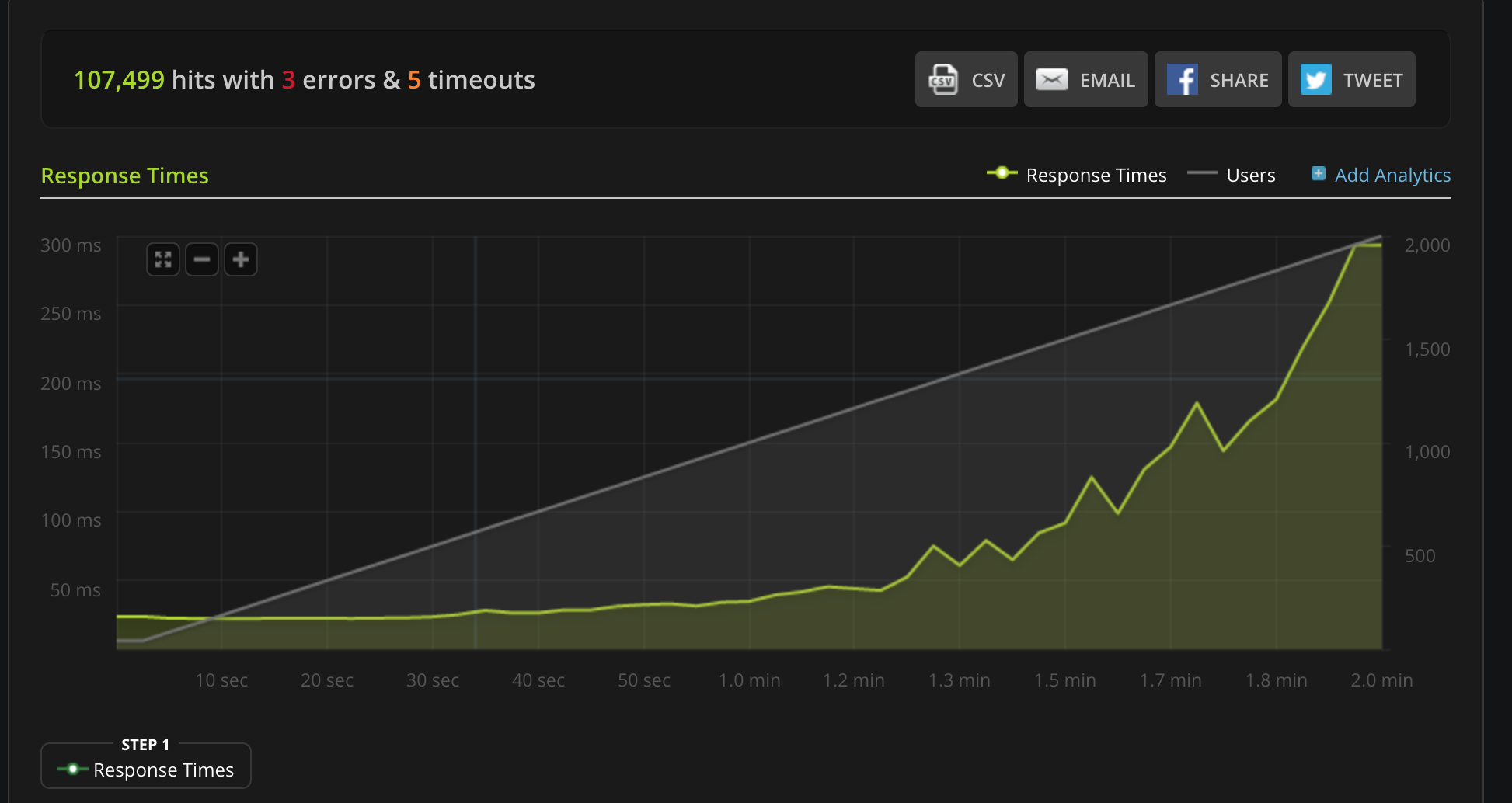
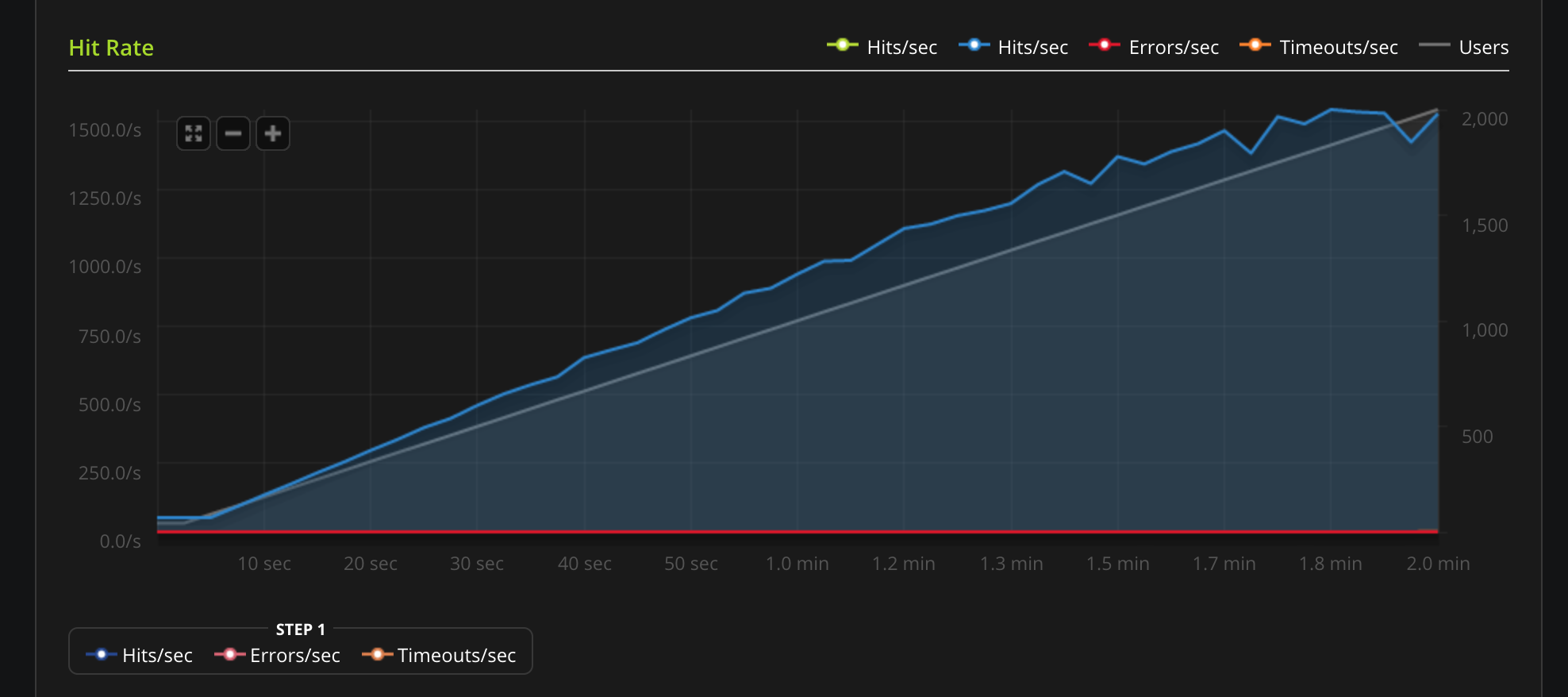 #### Unix Socket
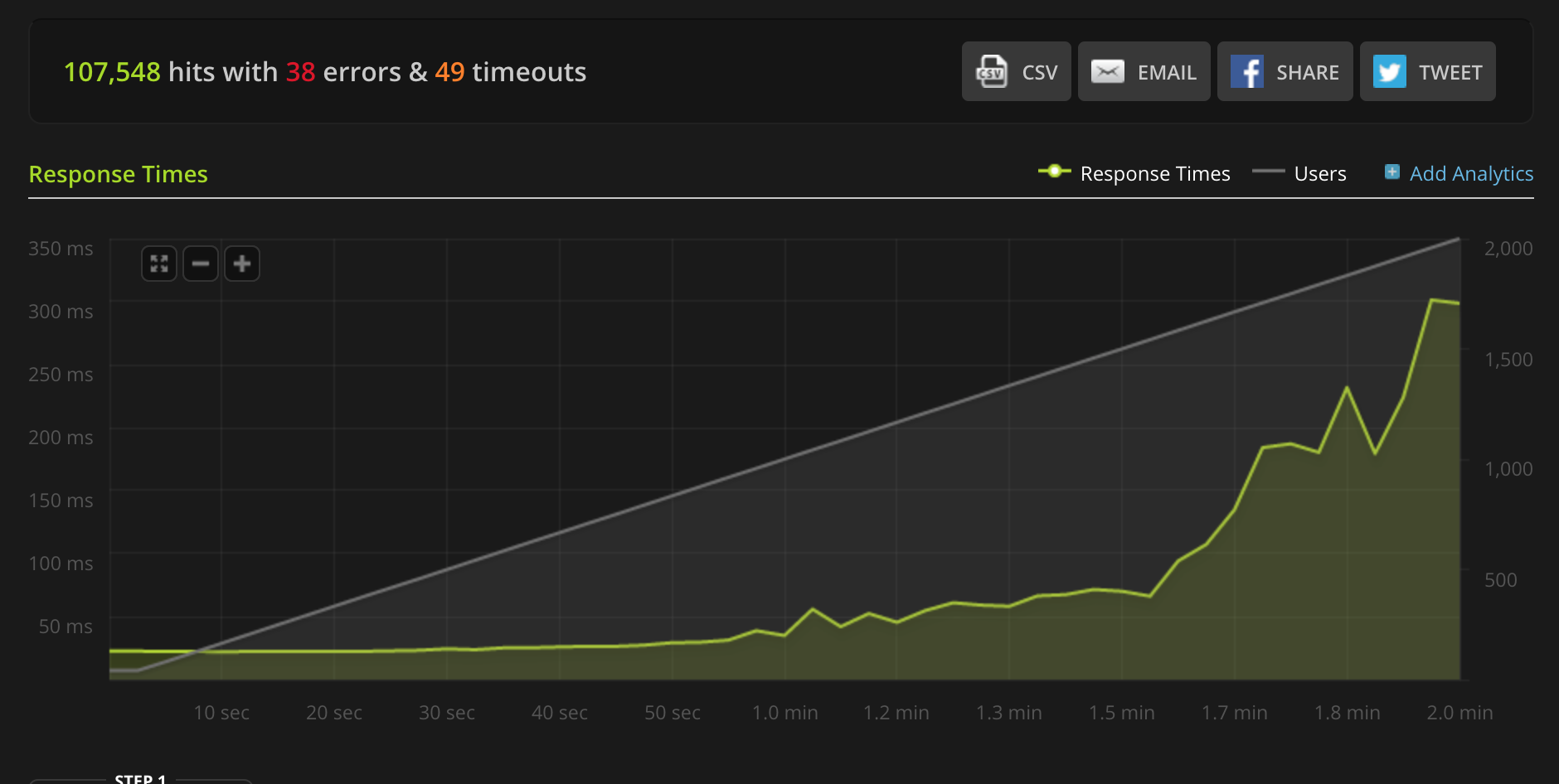
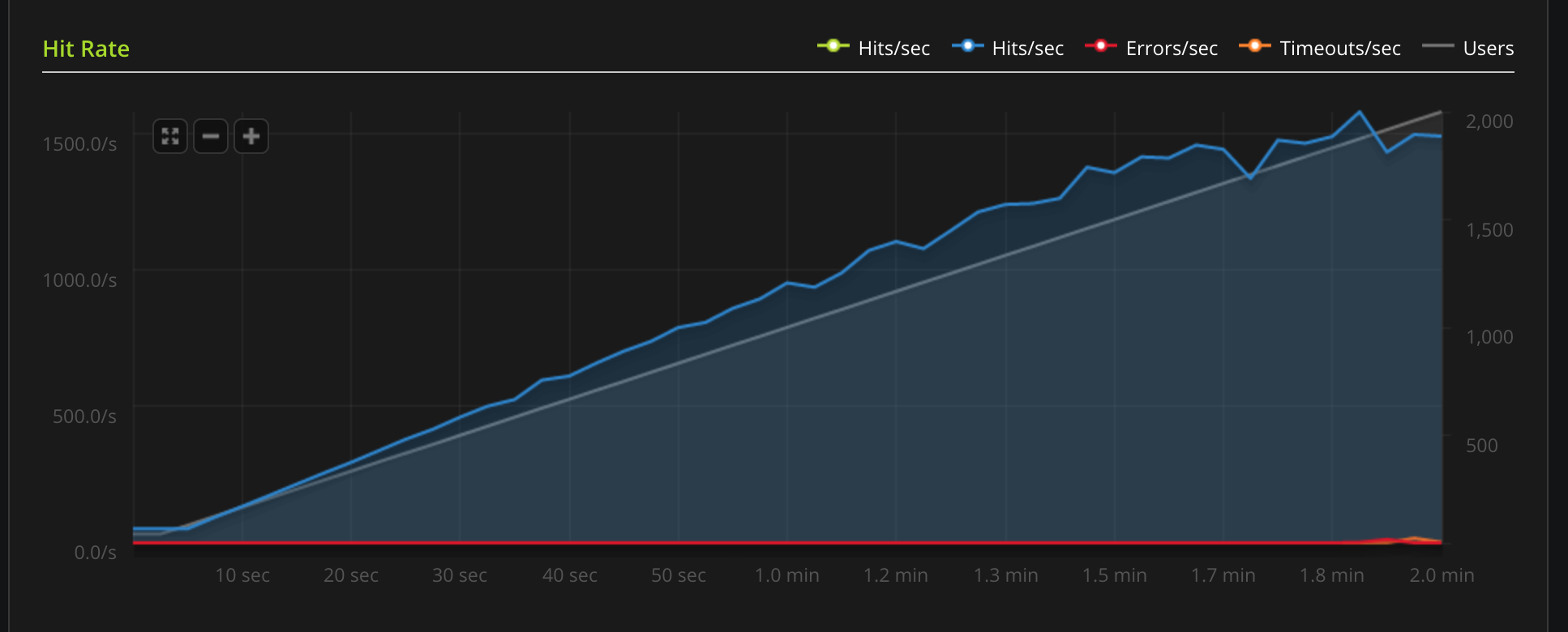 ***
## Using Lua
### Overview
#### Requirements
Tyk uses [LuaJIT](http://luajit.org/). The main requirement is the LuaJIT shared library, you may find this as `libluajit-x` in most distros.
For Ubuntu 14.04 you may use:
`$ apt-get install libluajit-5.1-2
$ apt-get install luarocks`
The LuaJIT required modules are as follows:
* [lua-cjson](https://github.com/mpx/lua-cjson): in case you have `luarocks`, run: `$ luarocks install lua-cjson`
#### How to write LuaJIT Plugins
We have a demo plugin hosted in the repo [tyk-plugin-demo-lua](https://github.com/TykTechnologies/tyk-plugin-demo-lua). The project implements a simple middleware for header injection, using a Pre hook (see [Tyk custom middleware hooks](/api-management/plugins/javascript#using-javascript-with-tyk)) and [mymiddleware.lua](https://github.com/TykTechnologies/tyk-plugin-demo-lua/blob/master/mymiddleware.lua).
#### Lua Performance
Lua support is currently in beta stage. We are planning performance optimizations for future releases.
#### Tyk Lua API Methods
Tyk Lua API methods aren’t currently supported.
### Lua Plugin Tutorial
#### Settings in the API Definition
To add a Lua plugin to your API, you must specify the bundle name using the `custom_middleware_bundle` field:
```json theme={null}
{
"name": "Tyk Test API",
"api_id": "1",
"org_id": "default",
"definition": {
"location": "header",
"key": "version"
},
"auth": {
"auth_header_name": "authorization"
},
"use_keyless": true,
"version_data": {
"not_versioned": true,
"versions": {
"Default": {
"name": "Default",
"expires": "3000-01-02 15:04",
"use_extended_paths": true,
"extended_paths": {
"ignored": [],
"white_list": [],
"black_list": []
}
}
}
},
"proxy": {
"listen_path": "/quickstart/",
"target_url": "http://httpbin.org",
"strip_listen_path": true
},
"custom_middleware_bundle": "test-bundle",
}
```
#### Global settings
To enable Lua plugins you need to add the following block to `tyk.conf`:
```json theme={null}
"coprocess_options": {
"enable_coprocess": true,
},
"enable_bundle_downloader": true,
"bundle_base_url": "http://my-bundle-server.com/bundles/",
"public_key_path": "/path/to/my/pubkey",
```
`enable_coprocess` enables the rich plugins feature.
`enable_bundle_downloader` enables the bundle downloader.
`bundle_base_url` is a base URL that will be used to download the bundle, in this example we have "test-bundle" specified in the API settings, Tyk will fetch the following URL: `http://my-bundle-server.com/bundles/test-bundle`.
`public_key_path` sets a public key, this is used for verifying signed bundles, you may omit this if unsigned bundles are used.
#### Running the Tyk Lua build
To use Tyk with Lua support you will need to use an alternative binary, it is provided in the standard Tyk package but it has a different service name.
Firstly stop the standard Tyk version:
```console theme={null}
service tyk-gateway stop
```
and then start the Lua build:
```console theme={null}
service tyk-gateway-lua start
```
***
## Using Lua
### Overview
#### Requirements
Tyk uses [LuaJIT](http://luajit.org/). The main requirement is the LuaJIT shared library, you may find this as `libluajit-x` in most distros.
For Ubuntu 14.04 you may use:
`$ apt-get install libluajit-5.1-2
$ apt-get install luarocks`
The LuaJIT required modules are as follows:
* [lua-cjson](https://github.com/mpx/lua-cjson): in case you have `luarocks`, run: `$ luarocks install lua-cjson`
#### How to write LuaJIT Plugins
We have a demo plugin hosted in the repo [tyk-plugin-demo-lua](https://github.com/TykTechnologies/tyk-plugin-demo-lua). The project implements a simple middleware for header injection, using a Pre hook (see [Tyk custom middleware hooks](/api-management/plugins/javascript#using-javascript-with-tyk)) and [mymiddleware.lua](https://github.com/TykTechnologies/tyk-plugin-demo-lua/blob/master/mymiddleware.lua).
#### Lua Performance
Lua support is currently in beta stage. We are planning performance optimizations for future releases.
#### Tyk Lua API Methods
Tyk Lua API methods aren’t currently supported.
### Lua Plugin Tutorial
#### Settings in the API Definition
To add a Lua plugin to your API, you must specify the bundle name using the `custom_middleware_bundle` field:
```json theme={null}
{
"name": "Tyk Test API",
"api_id": "1",
"org_id": "default",
"definition": {
"location": "header",
"key": "version"
},
"auth": {
"auth_header_name": "authorization"
},
"use_keyless": true,
"version_data": {
"not_versioned": true,
"versions": {
"Default": {
"name": "Default",
"expires": "3000-01-02 15:04",
"use_extended_paths": true,
"extended_paths": {
"ignored": [],
"white_list": [],
"black_list": []
}
}
}
},
"proxy": {
"listen_path": "/quickstart/",
"target_url": "http://httpbin.org",
"strip_listen_path": true
},
"custom_middleware_bundle": "test-bundle",
}
```
#### Global settings
To enable Lua plugins you need to add the following block to `tyk.conf`:
```json theme={null}
"coprocess_options": {
"enable_coprocess": true,
},
"enable_bundle_downloader": true,
"bundle_base_url": "http://my-bundle-server.com/bundles/",
"public_key_path": "/path/to/my/pubkey",
```
`enable_coprocess` enables the rich plugins feature.
`enable_bundle_downloader` enables the bundle downloader.
`bundle_base_url` is a base URL that will be used to download the bundle, in this example we have "test-bundle" specified in the API settings, Tyk will fetch the following URL: `http://my-bundle-server.com/bundles/test-bundle`.
`public_key_path` sets a public key, this is used for verifying signed bundles, you may omit this if unsigned bundles are used.
#### Running the Tyk Lua build
To use Tyk with Lua support you will need to use an alternative binary, it is provided in the standard Tyk package but it has a different service name.
Firstly stop the standard Tyk version:
```console theme={null}
service tyk-gateway stop
```
and then start the Lua build:
```console theme={null}
service tyk-gateway-lua start
```