> ## Documentation Index
> Fetch the complete documentation index at: https://tyk.io/docs/llms.txt
> Use this file to discover all available pages before exploring further.
# Plugin Types
> Understand the different types of custom plugins and execution hooks available in the Tyk middleware chain
## Introduction
Custom Plugins enable users to execute custom code to complete tasks specific to their use case, allowing users to complete tasks that would not otherwise be possible using Tyk’s standard middleware options.
Tyk has a [pre-defined execution order](/api-management/traffic-transformation#request-middleware-chain) for the middleware which also includes **seven hooks** for the custom plugins. As such, users can execute, or `hook`, their plugin in these phases of the API request/response lifecycle based on their specific use case.
## Plugin and Hook Types
This table includes all the plugin types with the relevant hooks, their place in the execution chain, description and examples:
| Hook Type (in their execution order) | Plugin Type | HTTP Request/Response phase | Executed before/after reverse proxy to the upstream API | Details | Common Use Cases | |
| ------------------------------------ | --------------------- | --------------------------- | ------------------------------------------------------- | ---------------------------------------------------------------------------------------- | ------------------------------------------------------------------------------------------------------------------------------------------------------------------------------- | ------------------------------------------------------------------------------------------------------------------- |
| Pre (Request) | Request Plugin | HTTP request | Before | The first thing to be executed, before any middleware | IP Rate Limit plugins, API Request enrichment | |
| Authentication | Authentication Plugin | HTTP request | Before | Replaces Tyk's authentication & authorization middleware with your own business logic | When you need your a custom flow, for example, interfacing with legacy Auth database | |
| Post-Auth (Request) | Authentication Plugin | HTTP request | Before | Executed immediately after authentication middleware | Additional special custom authentication is needed | |
| Post (Request) | Request Plugin | HTTP request | Before | The final middleware to be executed during the *HTTP request* phase (see **Note** below) | Update the request before it gets to the upstream, for example, adding a header that might override another header, so we add it at the end to ensure it doesn't get overridden | |
| Response Plugin | Response Plugin | HTTP Response | After | Executed after the reverse proxy to the upstream API | Executed straight after the reverse proxy returns from the upstream API to Tyk | Change the response before the user gets it, for example, change `Location` header from internal to an external URL |
| Analytics Plugin (Request+Response) | Analytics Plugin | HTTP request | After | The final middleware to be executed during the *HTTP response* phase | Change analytics records, for example, obfuscating sensitive data such as the `Authorization` header | |
There are two different options for the Post Plugin that is executed at the end of the request processing chain. The API-level Post Plugin is applied to all requests, whilst the [endpoint-level](/api-management/plugins/plugin-types#per-endpoint-custom-plugins) custom Golang plugin is only applied to requests made to specific endpoints. If both are configured, the endpoint-level plugin will be executed first.
## Plugin Types
Tyk supports four types of plugins:
1. **[Request Plugin](#request-plugins)**
2. **[Authentication Plugin](#authentication-plugins)**
3. **[Response Plugin](#response-plugins)**
4. **[Analytics Plugin](#analytics-plugins)**
## Request Plugins
There are 4 different phases in the [request lifecycle](/api-management/traffic-transformation#request-middleware-chain) you can inject custom plugins, including [Authentication plugins](/api-management/plugins/plugin-types#authentication-plugins). There are performance advantages to picking the correct phase, and of course that depends on your use case and what functionality you need.
### Hook Capabilities
| Functionality | Pre | Auth | Post-Auth | Post |
| :------------------------------------------------------------------------------ | :-- | :--- | :-------- | :--- |
| Can modify the Header | ✅ | ✅ | ✅ | ✅ |
| Can modify the Body | ✅ | ✅ | ✅ | ✅ |
| Can modify Query Params | ✅ | ✅ | ✅ | ✅ |
| Can view Session1 Details (metadata, quota, context-vars, tags, etc) | ❌ | ✅ | ✅ | ✅ |
| Can modify Session1 2 | ❌ | ✅ | ❌ | ❌ |
| Can Add More Than One3 | ✅ | ❌ | ✅ | ✅ |
1. A [Session](/api-management/access-control/sessions-and-keys/understanding-sessions) contains allowances and identity information that is unique to each requestor
2. You can modify the session by using your programming language's SDK for Redis. Here is an [example](https://github.com/TykTechnologies/custom-plugins/blob/master/plugins/go-auth-multiple_hook_example/main.go#L135) of doing that in Golang.
3. For select hook locations, you can add more than one plugin. For example, in the same API request, you can have 3 Pre, 1 auth, 5 post-auth, and 2 post plugins.
### Return Overrides / ReturnOverrides
You can have your plugin finish the request lifecycle and return a response with custom payload & headers to the requestor.
[Read more here](/api-management/plugins/rich-plugins#returnoverrides)
##### Python Example
```python theme={null}
from tyk.decorators import *
@Hook
def MyCustomMiddleware(request, session, spec):
print("my_middleware: MyCustomMiddleware")
request.object.return_overrides.headers['content-type'] = 'application/json'
request.object.return_overrides.response_code = 200
request.object.return_overrides.response_error = "{\"key\": \"value\"}\n"
return request, session
```
##### JavaScript Example
```javascript theme={null}
var testJSVMData = new TykJS.TykMiddleware.NewMiddleware({});
testJSVMData.NewProcessRequest(function(request, session, config) {
request.ReturnOverrides.ResponseError = "Foobarbaz"
request.ReturnOverrides.ResponseBody = "Foobar"
request.ReturnOverrides.ResponseCode = 200
request.ReturnOverrides.ResponseHeaders = {
"X-Foo": "Bar",
"X-Baz": "Qux"
}
return testJSVMData.ReturnData(request, {});
});
```
## Authentication Plugins
If you have unique authentication requirements, you can write a custom authentication plugin.
### Session Authentication and Authorization
A very important thing to understand when using custom authentication plugins is that Tyk will continue to perform session authentication and authorization using the information returned by your plugin. Tyk will cache this Session information. **This is necessary in order to do things like rate limiting, access control, quotas, throttling, etc.**
Tyk will try to be clever about what to cache, but we need to help it. There are two ways to do that, with and without the `ID Extractor`.
#### The ID Extractor
The ID Extractor is a caching mechanism that's used in combination with Tyk Plugins. It can be used specifically with plugins that implement custom authentication mechanisms. The ID Extractor works for all rich plugins: gRPC-based plugins, Python and Lua.
See [ID Extractor](/api-management/plugins/plugin-types#plugin-caching-mechanism) for more details.
#### Token Metadata
Tyk creates an in-memory object to track the rate limit, quotas, and more for each session.
This is why we set the `token` metadata when using custom authentication middleware, in order to give Tyk a unique ID with which to track each session.
For backwards compatibility, even when using an ID Extractor, we need to continue to set the `token` metadata. For example, when building a session object in GoLang custom middleware:
```{.copyWrapper} theme={null}
object.Session = &coprocess.SessionState{
LastUpdated: time.Now().String(),
Rate: 5,
Per: 10,
QuotaMax: int64(0),
QuotaRenews: time.Now().Unix(),
IdExtractorDeadline: extractorDeadline,
Metadata: map[string]string{
"token": "my-unique-token",
},
ApplyPolicies: ["5d8929d8f56e1a138f628269"],
}
```
[source](https://github.com/TykTechnologies/tyk-grpc-go-basicauth-jwt/blob/master/main.go#L102)
#### Without ID Extractor
When not using ID Extractor, Tyk will continue to cache authenticated sessions returned by custom auth plugins. We must set a unique `token` field in the Metadata (see above) that Tyk will use to cache.
### Supported Languages
The following languages are supported for custom authentication plugins:
* All Rich Plugins (gRPC, Python, Lua)
* GoLang
See the [supported languages](/api-management/plugins/overview#supported-languages) section for custom authentication plugin examples in a language of your choosing. There's also a [blog that walks you through setting up gRPC custom auth in Java](https://tyk.io/blog/how-to-setup-custom-authentication-middleware-using-grpc-and-java/).
### Tyk Operator
Please consult the Tyk Operator supporting documentation for examples of how to configure a Tyk Operator API to use:
* [Go custom authentication plugin](/tyk-stack/tyk-operator/create-an-api#custom-plugin-auth-go)
* [gRPC custom authentication plugin](/tyk-stack/tyk-operator/create-an-api#custom-plugin-auth-grpc)
## Response Plugins
Since Tyk 3.0 we have incorporated response hooks, this type of hook allows you to modify the response object returned by the upstream. The flow is follows:
* Tyk receives the request.
* Tyk runs the full middleware chain, including any other plugins hooks like Pre, Post, Custom Authentication, etc.
* Tyk sends the request to your upstream API.
* The request is received by Tyk and the response hook is triggered.
* Your plugin modifies the response and sends it back to Tyk.
* Tyk takes the modified response and is received by the client.
This snippet illustrates the hook function signature:
```python theme={null}
@Hook
def ResponseHook(request, response, session, metadata, spec):
tyk.log("ResponseHook is called", "info")
# In this hook we have access to the response object, to inspect it, uncomment the following line:
# print(response)
tyk.log("ResponseHook: upstream returned {0}".format(response.status_code), "info")
# Attach a new response header:
response.headers["injectedkey"] = "injectedvalue"
return response
```
If working with a Tyk Classic API, you would add this configuration to the API definition:
```
{
"custom_middleware": {
"response": [
{
"name": "ResponseHook",
"path": "middleware/middleware.py"
}
],
"driver": "python"
}
}
```
* `driver`: set this to the appropriate value for the plugin type (e.g. `python`, `goplugin`)
* `response`: this is the hook name. You use middleware with the `response` hook type because you want this custom middleware to process the request on its return leg of a round trip.
* `response.name`: is your function name from the plugin file.
* `response.path`: is the full or relative (to the Tyk binary) path to the plugin source file. Ensure Tyk has read access to this file.
Starting from versions 5.0.4 and 5.1.1+ for our Go, Python and Ruby users we have introduced the `multivalue_headers` field to facilitate more flexible and efficient management of headers, particularly for scenarios involving a single header key associated with multiple values. The `multivalue_headers` field, similar to its predecessor, the `headers` field, is a key-value store. However, it can accommodate an array or list of string values for each key, instead of a single string value. This feature empowers you to represent multiple values for a single header key. Here's an example of how you might use `multivalue_headers`, using the Set-Cookie header which often has multiple values:
```
multivalue_headers = {
"Set-Cookie": ["sessionToken=abc123; HttpOnly; Secure", "language=en-US; Secure"],
}
```
In this example, Set-Cookie header has two associated values: `"sessionToken=abc123; HttpOnly; Secure"` and `"language=en-US; Secure"`. To help you understand this further, let's see how `multivalue_headers` can be used in a Tyk response plugin written in Python:
```python theme={null}
from tyk.decorators import *
from gateway import TykGateway as tyk
@Hook
def Del_ResponseHeader_Middleware(request, response, session, metadata, spec):
# inject a new header with 2 values
new_header = response.multivalue_headers.add()
new_header.key = "Set-Cookie"
new_header.values.extend("sessionToken=abc123; HttpOnly; Secure")
new_header.values.extend("language=en-US; Secure")
tyk.log(f"Headers content :\n {response.headers}\n----------", "info")
tyk.log(f"Multivalue Headers updated :\n {response.multivalue_headers}\n----------", "info")
return response
```
In this script, we add 2 values for the `Set-Cookie` header and then log both: the traditional `headers` and the new `multivalue_headers`. This is a great way to monitor your transition to `multivalue_headers` and ensure that everything is functioning as expected.
Please note, while the `headers` field will continue to be available and maintained for backward compatibility, we highly encourage the adoption of `multivalue_headers` for the added flexibility in handling multiple header values.
### Go response plugins
[Go response plugins](/api-management/plugins/golang#creating-a-custom-response-plugin) have been available since Tyk v3.2.
### Supported Response Plugin Languages
See [Supported Plugins](/api-management/plugins/overview#supported-languages) for details on which languages the response plugin is supported in.
## Analytics Plugins
Since Tyk 4.1.0 we have incorporated analytic plugins which enables editing or removal of all parts of analytics records and raw request and responses recorded by Tyk at the gateway level. This feature leverages existing Go plugin infrastructure.
* Tyk receives the request.
* Tyk runs the full middleware chain, including any other plugins hooks like Pre, Post, Custom Authentication, etc.
* Tyk sends the request to your upstream API.
* The response is received and analytics plugin function is triggered before recording the hit to redis.
* Your plugin modifies the analytics record and sends it back to Tyk.
* Tyk takes the modified analytics record and record the hit in redis.
Example analytics Go plugins can be found [here](https://github.com/TykTechnologies/tyk/blob/master/test/goplugins/test_goplugin.go#L149)
An analytics plugin is configured using the `analytics_plugin` configuration block within an API Definition. This contains the following configuration parameters:
* `enable`: Set to `true` to enable the plugin
* `func_name`: The name of the function representing the plugin
* `plugin_path`: The path to the source code file containing the function that implements the plugin
To enable the analytics rewriting functionality, adjust the following in API definition:
```json theme={null}
{
"analytics_plugin": {
"enable": true,
"func_name": "",
"plugin_path": "/analytics_plugin.so"
}
}
```
The example API Definition resource listed below listens on path */httpbin* and forwards requests upstream to *[http://httpbin.org](http://httpbin.org)*. A Go Analytics Plugin is enabled for function *MaskAnalyticsData*, located within the */opt/tyk-gateway/plugins/example-plugin.so* shared object file.
```yaml {linenos=table,hl_lines=["15-18"],linenostart=1} theme={null}
apiVersion: tyk.tyk.io/v1alpha1
kind: ApiDefinition
metadata:
name: analytics-plugin
spec:
name: httpbin-analytics-plugin
active: true
protocol: http
proxy:
listen_path: /httpbin
strip_listen_path: true
target_url: http://httpbin.org
use_keyless: true
enable_detailed_recording: true
analytics_plugin:
enable: true
func_name: MaskAnalyticsData # Replace it with function name of your plugin
plugin_path: /opt/tyk-gateway/plugins/example-plugin.so # Replace it with path of your plugin file
```
## Advance Configuration
There are two advance configuratin with plugin types:
1. **[Per Endpoint Custom Plugin](#per-endpoint-custom-plugins)**
2. **[Plugin Caching Mechanism for Authentication Plugin](#plugin-caching-mechanism)**
## Per-Endpoint Custom Plugins
Tyk's custom plugin architecture allows you to deploy custom logic that will be invoked at certain points in the [middleware chain](/api-management/traffic-transformation#request-middleware-chain) as Tyk processes requests to your APIs.
At the API-level, there are several points in the processing flow where custom plugins can be "hooked", as explained [here](/api-management/plugins/plugin-types#plugin-types). Each of these will be invoked for calls to any endpoint on an API. If you want to perform custom logic only for specific endpoints, you must include selective processing logic within the plugin.
At the endpoint-level, Tyk provides the facility to attach a custom Golang plugin at the end of the request processing chain (immediately before the API-level post-plugin is executed).
### When to use the per-endpoint custom plugin
##### Aggregating data from multiple services
From a custom plugin, you can make calls out to other internal and upstream APIs. You can then aggregate and process the responses, returning a single response object to the originating client. This allows you to configure a single externally facing API to simplify interaction with multiple internal services, leaving the heavy lifting to Tyk rather than standing up an aggregation service within your stack.
##### Enforcing custom policies
Tyk provides a very flexible middleware chain where you can combine functions to implement the access controls you require to protect your upstream services. Of course, not all scenarios can be covered by Tyk’s standard middleware functions, but you can use a custom plugin to apply whatever custom logic you require to optimize your API experience.
##### Dynamic Routing
With a custom plugin you can implement complex dynamic routing of requests made to a single external endpoint on to different upstream services. The flexibility of the virtual endpoint gives access to data within the request (including the key session) and also the ability to make calls to other APIs to make decisions on the routing of the request. It can operate as a super-powered URL rewrite middleware.
### How the per-endpoint custom plugin works
Tyk Gateway is written using Golang. This has a flexible plugin architecture which allows for custom code to be compiled separately from the gateway and then invoked natively by the gateway. When registering a custom Go plugin in the API definition, you must provide the location of the compiled plugin and also the name of the function to be invoked within that package.
Go plugins must therefore be [compiled](/api-management/plugins/golang#plugin-compiler) and [loaded](/api-management/plugins/golang#loading-custom-go-plugins-into-tyk) into the Gateway in order that the function named in the plugin configuration in the API definition can be located and executed at the appropriate stage in the request middleware processing chain.
The custom code within the plugin has access to contextual data such as the session object and API definition. If required, it can [terminate the request](/api-management/plugins/golang#terminating-the-request) and hence can provide a [Virtual Endpoint](/api-management/traffic-transformation/virtual-endpoints) style capability using the Go language, rather than JavaScript (as supported by the virtual endpoint middleware). This can then act as a high-performance replacement for the JavaScript virtual endpoints or for cases when you want to make use of external libraries.
### Using the Per-Endpoint Plugin with Tyk OAS APIs
The [per-endpoint custom plugin](/api-management/plugins/plugin-types#per-endpoint-custom-plugins) provides the facility to attach a custom Go plugin at the end of the request processing chain.
This plugin allows you to add custom logic to the processing flow for the specific endpoint without adding to the processing complexity of other endpoints.
It can [terminate the request](/api-management/plugins/golang#terminating-the-request) if required,
and provides a [Virtual Endpoint](/api-management/traffic-transformation/virtual-endpoints) style capability using the Go language, rather than JavaScript (as supported by the virtual endpoint middleware).
The middleware is configured in the [Tyk OAS API Definition](/api-management/gateway-config-tyk-oas#operation). You can do this via the Tyk Dashboard API or in the API Designer.
If you're using the legacy Tyk Classic APIs, then check out the [Tyk Classic](/api-management/plugins/plugin-types#using-the-per-endpoint-plugin-with-tyk-classic-apis) page.
#### Using Tyk OAS API Definition
The design of the Tyk OAS API Definition takes advantage of the `operationId` defined in the OpenAPI Document that declares both the path and method for which the middleware should be added. The `path` can contain wildcards in the form of any string bracketed by curly braces, for example `{user_id}`. These wildcards are so they are human readable and do not translate to variable names. Under the hood, a wildcard translates to the “match everything” regex of: `(.*)`.
The endpoint plugin middleware (`postPlugins`) can be added to the `operations` section of the Tyk OAS Extension (`x-tyk-api-gateway`) in your Tyk OAS API Definition for the appropriate `operationId` (as configured in the `paths` section of your OpenAPI Document).
The `postPlugins` object has the following configuration:
* `enabled`: enable the middleware for the endpoint
* `functionName`: this is the name of the Go function that will be executed when the middleware is triggered
* `path`: the relative path to the source file containing the compiled Go code
You can chain multiple plugin functions in an array. Tyk will process them in the order they appear in the API definition.
For example:
```json {hl_lines=["39-45"],linenos=true, linenostart=1} theme={null}
{
"components": {},
"info": {
"title": "example-endpoint-plugin",
"version": "1.0.0"
},
"openapi": "3.0.3",
"paths": {
"/anything": {
"get": {
"operationId": "anythingget",
"responses": {
"200": {
"description": ""
}
}
}
}
},
"x-tyk-api-gateway": {
"info": {
"name": "example-endpoint-plugin",
"state": {
"active": true
}
},
"upstream": {
"url": "http://httpbin.org/"
},
"server": {
"listenPath": {
"value": "/example-endpoint-plugin/",
"strip": true
}
},
"middleware": {
"operations": {
"anythingget": {
"postPlugins": [
{
"enabled": true,
"functionName": "myUniqueFunctionName",
"path": "/middleware/myPlugin.so"
}
]
}
}
}
}
}
```
In this example the per-endpoint custom plugin middleware has been configured for HTTP `GET` requests to the `/anything` endpoint. For any call made to this endpoint, Tyk will invoke the function `myUniqueFunctionName` in the file located at `/middleware/myPlugin.so`.
The configuration above is a complete and valid Tyk OAS API Definition that you can import into Tyk to try out the per-endpoint custom plugin middleware.
#### Using API Designer
Adding a per-endpoint custom plugin to your API endpoints is easy when using the API Designer in the Tyk Dashboard, simply follow these steps:
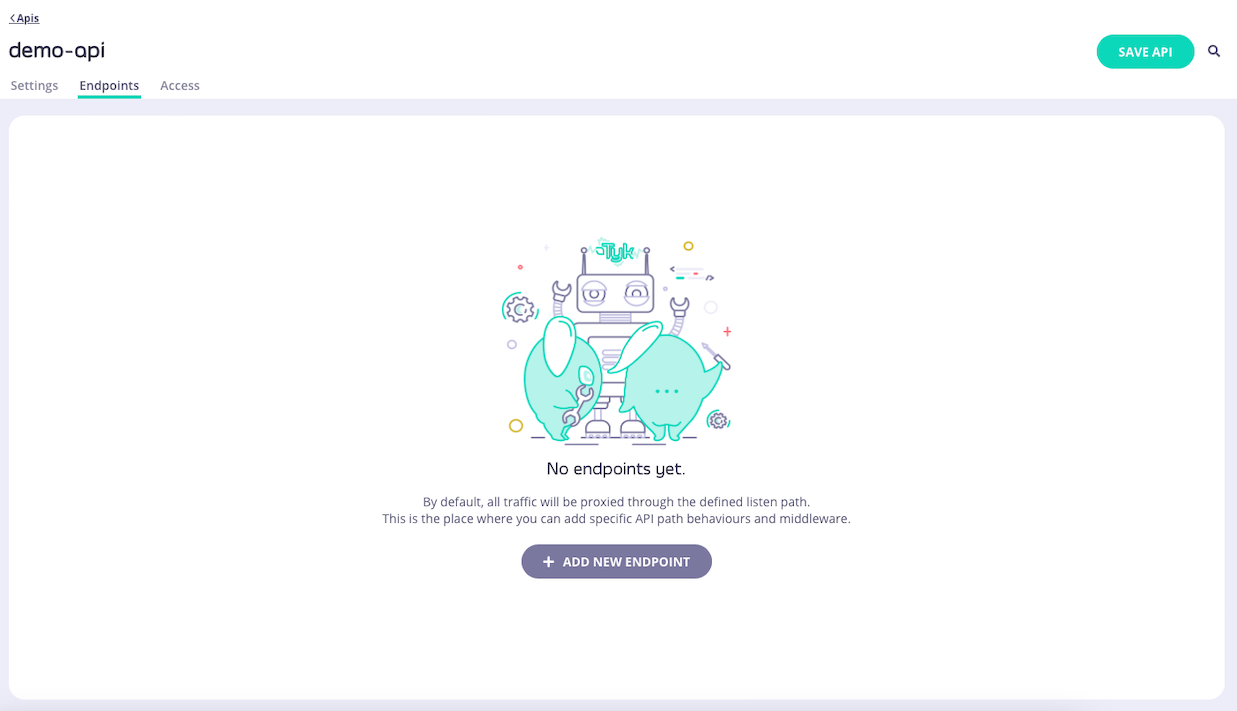
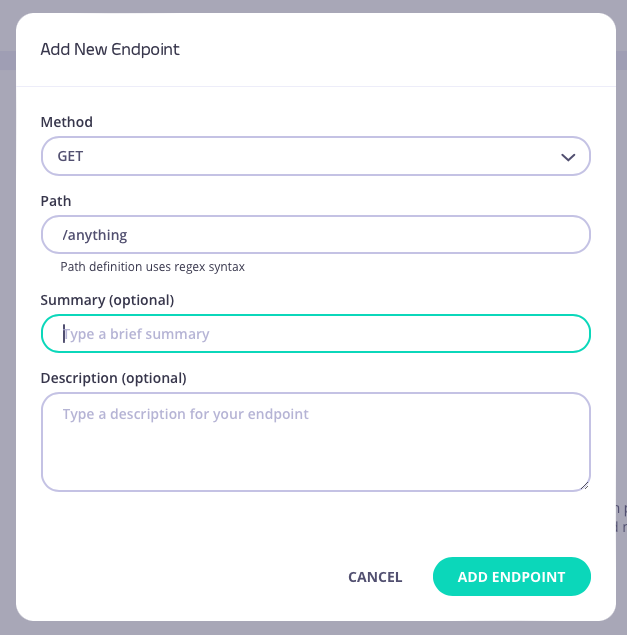
1. **Add an endpoint**
From the **API Designer** add an endpoint that matches the path and method to which you want to apply the middleware.
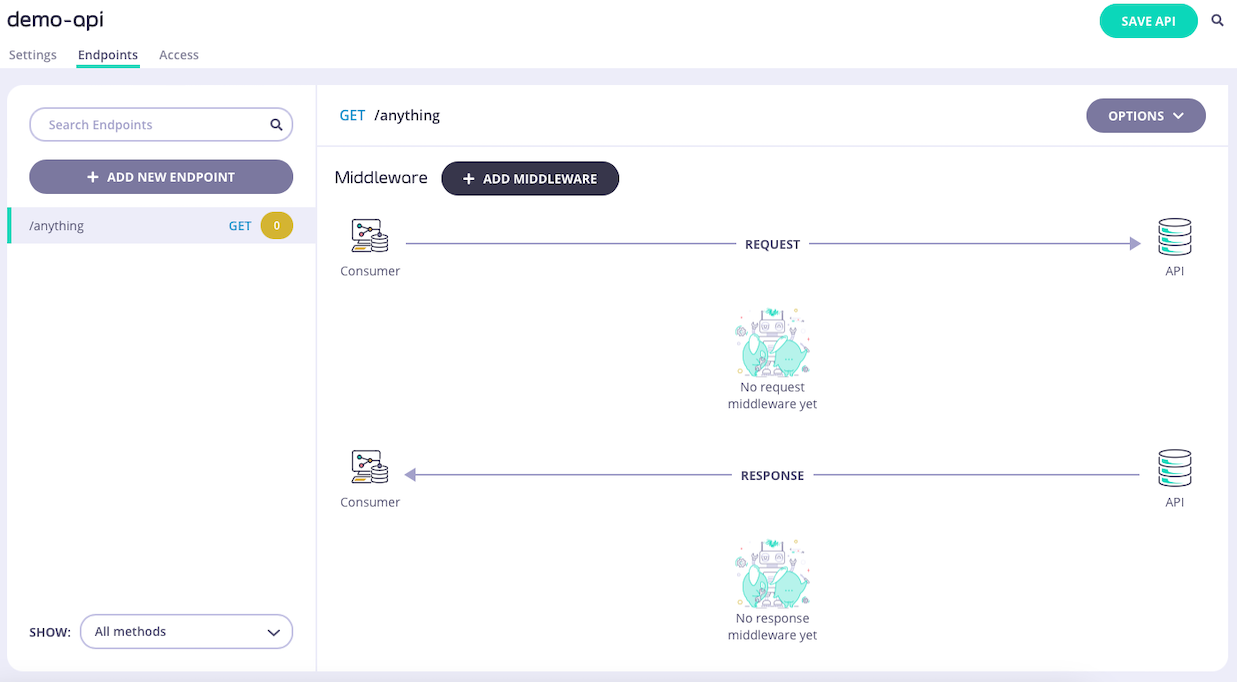 2. **Select the Go Post-Plugin middleware**
Select **ADD MIDDLEWARE** and choose **Go Post-Plugin** from the *Add Middleware* screen.
2. **Select the Go Post-Plugin middleware**
Select **ADD MIDDLEWARE** and choose **Go Post-Plugin** from the *Add Middleware* screen.
 3. **Configure the middleware**
You must provide the path to the compiled plugin and the name of the Go function that should be invoked by Tyk Gateway when the middleware is triggered.
3. **Configure the middleware**
You must provide the path to the compiled plugin and the name of the Go function that should be invoked by Tyk Gateway when the middleware is triggered.
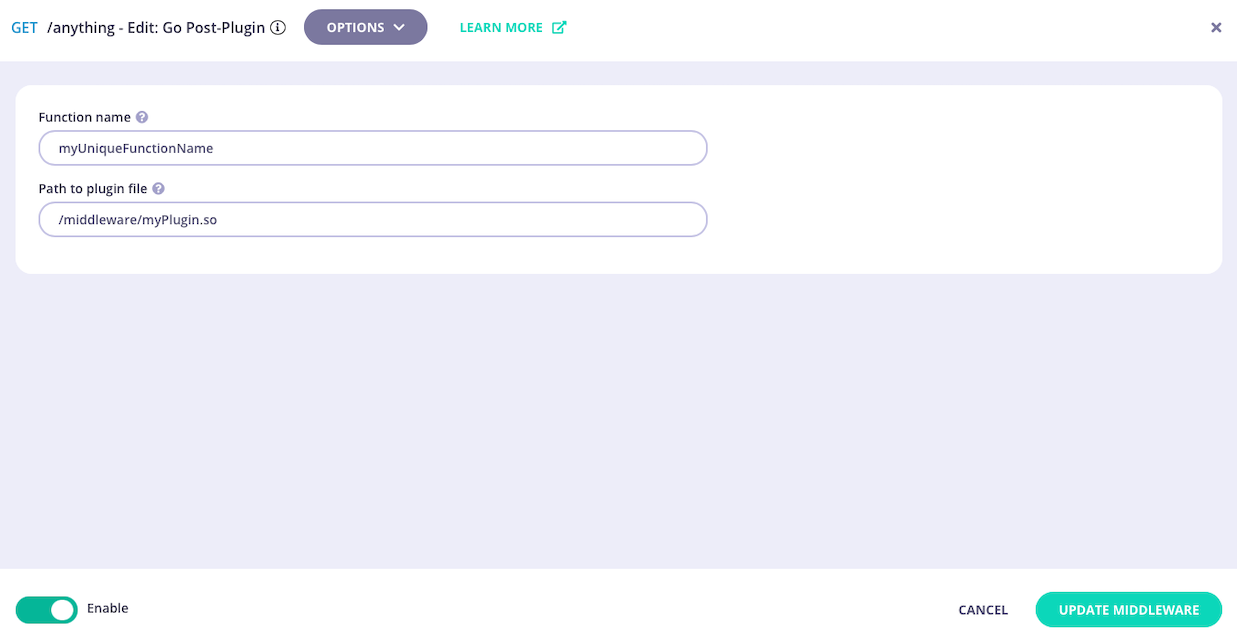 4. **Save the API**
Select **ADD MIDDLEWARE** to save the middleware configuration. Remember to select **SAVE API** to apply the changes.
You are only able to add one custom plugin to each endpoint when using the API Designer, however you can add more by editing the API definition directly in the Raw Definition editor.
### Using the Per-Endpoint Plugin with Tyk Classic APIs
The [per-endpoint custom plugin](/api-management/plugins/plugin-types#per-endpoint-custom-plugins) provides the facility to attach a custom Golang plugin at the end of the request processing chain.
This plugin allows you to add custom logic to the processing flow for the specific endpoint without adding to the processing complexity of other endpoints.
It can [terminate the request](/api-management/plugins/golang#terminating-the-request), if required,
and hence can provide a [Virtual Endpoint](/api-management/traffic-transformation/virtual-endpoints) style capability using the Go language, rather than JavaScript (as supported by the virtual endpoint middleware).
This middleware is configured in the Tyk Classic API Definition. You can do this via the Tyk Dashboard API or in the API Designer.
If you're using the newer Tyk OAS APIs, then check out the [Tyk OAS](/api-management/plugins/plugin-types#using-the-per-endpoint-plugin-with-tyk-oas-apis) page.
#### Using Tyk Classic API Definition
To enable the middleware you must add a new `go_plugin` object to the `extended_paths` section of your API definition.
The `go_plugin` object has the following configuration:
* `path`: the endpoint path
* `method`: the endpoint HTTP method
* `func_name`: this is the "symbol" or function name you are calling in your Go plugin once loaded - a function can be called by one or more APIs
* `plugin_path`: the relative path of the shared object containing the function you wish to call, one or many `.so` files can be called
You can register multiple plugin functions for a single endpoint. Tyk will process them in the order they appear in the API definition.
For example:
```json {linenos=true, linenostart=1} theme={null}
{
"extended_paths": {
"go_plugin": [
{
"disabled": false,
"path": "/anything",
"method": "GET",
"plugin_path": "/middleware/myPlugin.so",
"func_name": "myUniqueFunctionName"
}
]
}
}
```
In this example the per-endpoint custom plugin middleware has been configured for HTTP `GET` requests to the `/anything` endpoint. For any call made to this endpoint, Tyk will invoke the function `myUniqueFunctionName` in the file located at `/middleware/myPlugin.so`.
#### Using API Designer
You can use the API Designer in the Tyk Dashboard to add the per-endpoint custom plugin middleware for your Tyk Classic API by following these steps.
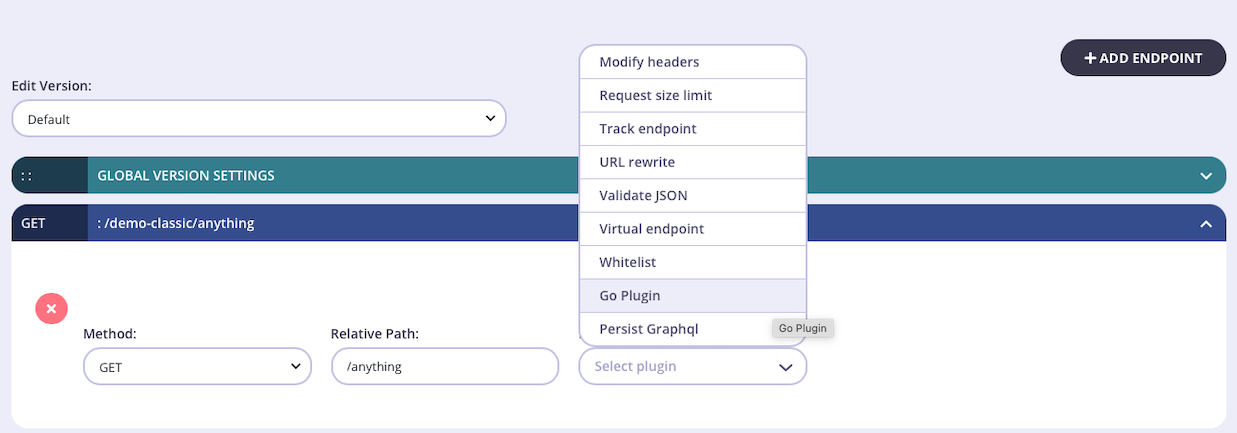
1. **Add an endpoint for the path and select the plugin**
From the **Endpoint Designer** add an endpoint that matches the path for which you want to trigger the custom plugin function. Select the **Go Plugin** plugin.
4. **Save the API**
Select **ADD MIDDLEWARE** to save the middleware configuration. Remember to select **SAVE API** to apply the changes.
You are only able to add one custom plugin to each endpoint when using the API Designer, however you can add more by editing the API definition directly in the Raw Definition editor.
### Using the Per-Endpoint Plugin with Tyk Classic APIs
The [per-endpoint custom plugin](/api-management/plugins/plugin-types#per-endpoint-custom-plugins) provides the facility to attach a custom Golang plugin at the end of the request processing chain.
This plugin allows you to add custom logic to the processing flow for the specific endpoint without adding to the processing complexity of other endpoints.
It can [terminate the request](/api-management/plugins/golang#terminating-the-request), if required,
and hence can provide a [Virtual Endpoint](/api-management/traffic-transformation/virtual-endpoints) style capability using the Go language, rather than JavaScript (as supported by the virtual endpoint middleware).
This middleware is configured in the Tyk Classic API Definition. You can do this via the Tyk Dashboard API or in the API Designer.
If you're using the newer Tyk OAS APIs, then check out the [Tyk OAS](/api-management/plugins/plugin-types#using-the-per-endpoint-plugin-with-tyk-oas-apis) page.
#### Using Tyk Classic API Definition
To enable the middleware you must add a new `go_plugin` object to the `extended_paths` section of your API definition.
The `go_plugin` object has the following configuration:
* `path`: the endpoint path
* `method`: the endpoint HTTP method
* `func_name`: this is the "symbol" or function name you are calling in your Go plugin once loaded - a function can be called by one or more APIs
* `plugin_path`: the relative path of the shared object containing the function you wish to call, one or many `.so` files can be called
You can register multiple plugin functions for a single endpoint. Tyk will process them in the order they appear in the API definition.
For example:
```json {linenos=true, linenostart=1} theme={null}
{
"extended_paths": {
"go_plugin": [
{
"disabled": false,
"path": "/anything",
"method": "GET",
"plugin_path": "/middleware/myPlugin.so",
"func_name": "myUniqueFunctionName"
}
]
}
}
```
In this example the per-endpoint custom plugin middleware has been configured for HTTP `GET` requests to the `/anything` endpoint. For any call made to this endpoint, Tyk will invoke the function `myUniqueFunctionName` in the file located at `/middleware/myPlugin.so`.
#### Using API Designer
You can use the API Designer in the Tyk Dashboard to add the per-endpoint custom plugin middleware for your Tyk Classic API by following these steps.
1. **Add an endpoint for the path and select the plugin**
From the **Endpoint Designer** add an endpoint that matches the path for which you want to trigger the custom plugin function. Select the **Go Plugin** plugin.
 2. **Locate the middleware in the raw API definition**
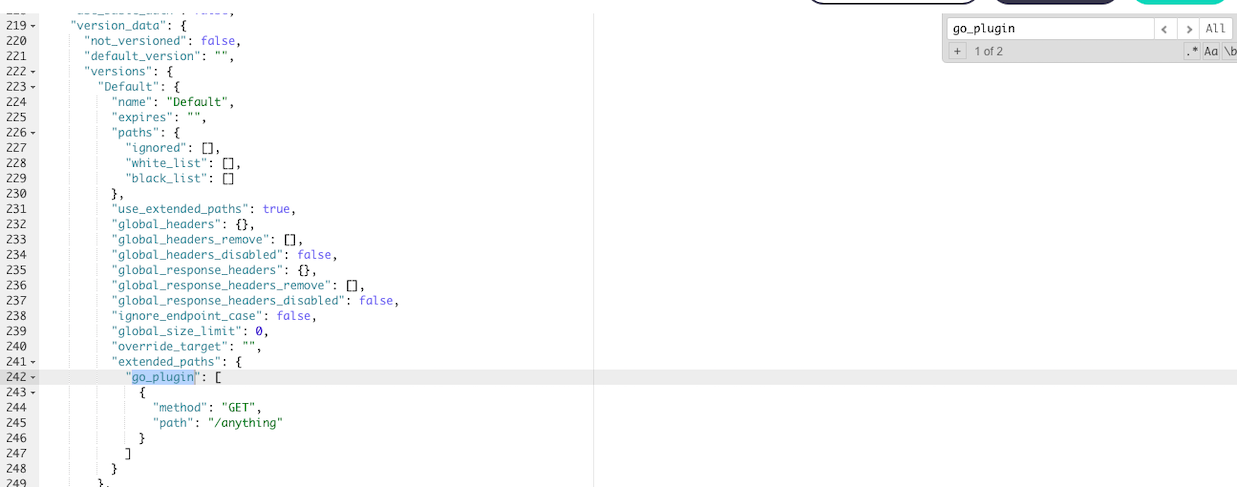
Once you have selected the middleware for the endpoint, you need to switch to the *Raw Definition* view and then locate the `go_plugin` section (you can search within the text editor window).
2. **Locate the middleware in the raw API definition**
Once you have selected the middleware for the endpoint, you need to switch to the *Raw Definition* view and then locate the `go_plugin` section (you can search within the text editor window).
 3. **Configure the middleware**
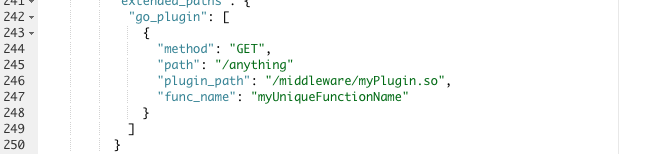
Now you can directly edit the `plugin_path` and `func_name` to locate your compiled plugin function.
3. **Configure the middleware**
Now you can directly edit the `plugin_path` and `func_name` to locate your compiled plugin function.
 4. **Save the API**
Use the *save* or *create* buttons to save the changes and activate the middleware.
## Plugin Caching Mechanism
The **ID extractor** is a caching mechanism that's used in combination with Tyk Plugins. It is used specifically with plugins that implement **custom authentication mechanisms**.
We use the term `ID` to describe any key that's used for authentication purposes.
When a custom authentication mechanism is used, every API call triggers a call to the associated middleware function, if you're using a gRPC-based plugin this translates into a gRPC call. If you're using a native plugin -like a Python plugin-, this involves a Python interpreter call.
The ID extractor works the following rich plugins: gRPC-based plugins, Python and Lua.
### When to use the ID Extractor?
The main idea of the ID extractor is to reduce the number of calls made to your plugin and cache the API keys that have been already authorized by your authentication mechanism. This means that after a successful authentication event, subsequent calls will be handled by the Tyk Gateway and its Redis cache, resulting in a performance similar to the built-in authentication mechanisms that Tyk provides.
### When does the ID Extractor Run?
When enabled, the ID extractor runs right before the authentication step, allowing it to take control of the flow and decide whether to call your authentication mechanism or not.
If my ID is cached by this mechanism and my plugin isn't longer called, how do I expire it?
When you implement your own authentication mechanism using plugins, you initialise the session object from your own code. The session object has a field that's used to configure the lifetime of a cached ID, this field is called `id_extractor_deadline`. See [Plugin Data Structures](/api-management/plugins/rich-plugins#rich-plugins-data-structures) for more details.
The value of this field should be a UNIX timestamp on which the cached ID will expire, like `1507268142958`. It's an integer.
For example, this snippet is used in a NodeJS plugin, inside a custom authentication function:
```
// Initialize a session state object
var session = new tyk.SessionState()
// Get the current UNIX timestamp
var timestamp = Math.floor( new Date() / 1000 )
// Based on the current timestamp, add 60 seconds:
session.id_extractor_deadline = timestamp + 60
// Finally inject our session object into the request object:
Obj.session = session
```
If you already have a plugin that implements a custom authentication mechanism, appending the `id_extractor_deadline` and setting its value is enough to activate this feature.
In the above sample, Tyk will cache the key for 60 seconds. During that time any requests that use the cached ID won't call your plugin.
### How to enable the ID Extractor
The ID extractor is configured on a per API basis.
The API should be a protected one and have the `enable_coprocess_auth` flag set to true, like the following definition:
```json theme={null}
{
"name": "Test API",
"api_id": "my-api",
"org_id": "my-org",
"use_keyless": false,
"auth": {
"auth_header_name": "Authorization"
},
"proxy": {
"listen_path": "/test-api/",
"target_url": "http://httpbin.org/",
"strip_listen_path": true
},
"enable_coprocess_auth": true,
"custom_middleware_bundle": "bundle.zip"
}
```
If you're not using the Community Edition, check the API settings in the dashboard and make sure that "Custom Auth" is selected.
The second requirement is to append an additional configuration block to your plugin manifest file, using the `id_extractor` key:
```json theme={null}
{
"custom_middleware": {
"auth_check": { "name": "MyAuthCheck" },
"id_extractor": {
"extract_from": "header",
"extract_with": "value",
"extractor_config": {
"header_name": "Authorization"
}
},
"driver": "grpc"
}
}
```
* `extract_from` specifies the source of the ID to extract.
* `extract_with` specifies how to extract and parse the extracted ID.
* `extractor_config` specifies additional parameters like the header name or the regular expression to use, this is different for every choice, see below for more details.
### Available ID Extractor Sources
#### Header Source
Use this source to extract the key from a HTTP header. Only the name of the header is required:
```json theme={null}
{
"id_extractor": {
"extract_from": "header",
"extract_with": "value",
"extractor_config": {
"header_name": "Authorization"
}
}
}
```
#### Form source
Use this source to extract the key from a submitted form, where `param_name` represents the key of the submitted parameter:
```json theme={null}
{
"id_extractor": {
"extract_from": "form",
"extract_with": "value",
"extractor_config": {
"param_name": "my_param"
}
}
}
```
### Available ID Extractor Modes
#### Value Extractor
Use this to take the value as its present. This is commonly used in combination with the header source:
```json theme={null}
{
"id_extractor": {
"extract_from": "header",
"extract_with": "value",
"extractor_config": {
"header_name": "Authorization"
}
}
}
```
#### Regular Expression Extractor
Use this to match the ID with a regular expression. This requires additional parameters like `regex_expression`, which represents the regular expression itself and `regex_match_index` which is the item index:
```json theme={null}
{
"id_extractor": {
"extract_from": "header",
"extract_with": "regex",
"extractor_config": {
"header_name": "Authorization",
"regex_expression": "[^-]+$",
"regex_match_index": 0
}
}
}
```
Using the example above, if we send a header like `prefix-d28e17f7`, given the regular expression we're using, the extracted ID value will be `d28e17f7`.
### Example Session
Here's an example of a Session being built in GoLang custom middleware:
```{.copyWrapper} theme={null}
extractorDeadline := time.Now().Add(time.Second * 5).Unix()
object.Session = &coprocess.SessionState{
LastUpdated: time.Now().String(),
Rate: 5,
Per: 10,
QuotaMax: int64(0),
QuotaRenews: time.Now().Unix(),
Metadata: map[string]string{
"token": "my-unique-token",
},
ApplyPolicies: ["5d8929d8f56e1a138f628269"],
}
```
[source](https://github.com/TykTechnologies/tyk-grpc-go-basicauth-jwt/blob/master/main.go#L102)
Note: When using an ID Extractor, you must set a `LastUpdated` or else token updates will not be applied. If you don't set an ID Extractor, Tyk will store session information in the cache based off the `token` field that is set in the metadata.
4. **Save the API**
Use the *save* or *create* buttons to save the changes and activate the middleware.
## Plugin Caching Mechanism
The **ID extractor** is a caching mechanism that's used in combination with Tyk Plugins. It is used specifically with plugins that implement **custom authentication mechanisms**.
We use the term `ID` to describe any key that's used for authentication purposes.
When a custom authentication mechanism is used, every API call triggers a call to the associated middleware function, if you're using a gRPC-based plugin this translates into a gRPC call. If you're using a native plugin -like a Python plugin-, this involves a Python interpreter call.
The ID extractor works the following rich plugins: gRPC-based plugins, Python and Lua.
### When to use the ID Extractor?
The main idea of the ID extractor is to reduce the number of calls made to your plugin and cache the API keys that have been already authorized by your authentication mechanism. This means that after a successful authentication event, subsequent calls will be handled by the Tyk Gateway and its Redis cache, resulting in a performance similar to the built-in authentication mechanisms that Tyk provides.
### When does the ID Extractor Run?
When enabled, the ID extractor runs right before the authentication step, allowing it to take control of the flow and decide whether to call your authentication mechanism or not.
If my ID is cached by this mechanism and my plugin isn't longer called, how do I expire it?
When you implement your own authentication mechanism using plugins, you initialise the session object from your own code. The session object has a field that's used to configure the lifetime of a cached ID, this field is called `id_extractor_deadline`. See [Plugin Data Structures](/api-management/plugins/rich-plugins#rich-plugins-data-structures) for more details.
The value of this field should be a UNIX timestamp on which the cached ID will expire, like `1507268142958`. It's an integer.
For example, this snippet is used in a NodeJS plugin, inside a custom authentication function:
```
// Initialize a session state object
var session = new tyk.SessionState()
// Get the current UNIX timestamp
var timestamp = Math.floor( new Date() / 1000 )
// Based on the current timestamp, add 60 seconds:
session.id_extractor_deadline = timestamp + 60
// Finally inject our session object into the request object:
Obj.session = session
```
If you already have a plugin that implements a custom authentication mechanism, appending the `id_extractor_deadline` and setting its value is enough to activate this feature.
In the above sample, Tyk will cache the key for 60 seconds. During that time any requests that use the cached ID won't call your plugin.
### How to enable the ID Extractor
The ID extractor is configured on a per API basis.
The API should be a protected one and have the `enable_coprocess_auth` flag set to true, like the following definition:
```json theme={null}
{
"name": "Test API",
"api_id": "my-api",
"org_id": "my-org",
"use_keyless": false,
"auth": {
"auth_header_name": "Authorization"
},
"proxy": {
"listen_path": "/test-api/",
"target_url": "http://httpbin.org/",
"strip_listen_path": true
},
"enable_coprocess_auth": true,
"custom_middleware_bundle": "bundle.zip"
}
```
If you're not using the Community Edition, check the API settings in the dashboard and make sure that "Custom Auth" is selected.
The second requirement is to append an additional configuration block to your plugin manifest file, using the `id_extractor` key:
```json theme={null}
{
"custom_middleware": {
"auth_check": { "name": "MyAuthCheck" },
"id_extractor": {
"extract_from": "header",
"extract_with": "value",
"extractor_config": {
"header_name": "Authorization"
}
},
"driver": "grpc"
}
}
```
* `extract_from` specifies the source of the ID to extract.
* `extract_with` specifies how to extract and parse the extracted ID.
* `extractor_config` specifies additional parameters like the header name or the regular expression to use, this is different for every choice, see below for more details.
### Available ID Extractor Sources
#### Header Source
Use this source to extract the key from a HTTP header. Only the name of the header is required:
```json theme={null}
{
"id_extractor": {
"extract_from": "header",
"extract_with": "value",
"extractor_config": {
"header_name": "Authorization"
}
}
}
```
#### Form source
Use this source to extract the key from a submitted form, where `param_name` represents the key of the submitted parameter:
```json theme={null}
{
"id_extractor": {
"extract_from": "form",
"extract_with": "value",
"extractor_config": {
"param_name": "my_param"
}
}
}
```
### Available ID Extractor Modes
#### Value Extractor
Use this to take the value as its present. This is commonly used in combination with the header source:
```json theme={null}
{
"id_extractor": {
"extract_from": "header",
"extract_with": "value",
"extractor_config": {
"header_name": "Authorization"
}
}
}
```
#### Regular Expression Extractor
Use this to match the ID with a regular expression. This requires additional parameters like `regex_expression`, which represents the regular expression itself and `regex_match_index` which is the item index:
```json theme={null}
{
"id_extractor": {
"extract_from": "header",
"extract_with": "regex",
"extractor_config": {
"header_name": "Authorization",
"regex_expression": "[^-]+$",
"regex_match_index": 0
}
}
}
```
Using the example above, if we send a header like `prefix-d28e17f7`, given the regular expression we're using, the extracted ID value will be `d28e17f7`.
### Example Session
Here's an example of a Session being built in GoLang custom middleware:
```{.copyWrapper} theme={null}
extractorDeadline := time.Now().Add(time.Second * 5).Unix()
object.Session = &coprocess.SessionState{
LastUpdated: time.Now().String(),
Rate: 5,
Per: 10,
QuotaMax: int64(0),
QuotaRenews: time.Now().Unix(),
Metadata: map[string]string{
"token": "my-unique-token",
},
ApplyPolicies: ["5d8929d8f56e1a138f628269"],
}
```
[source](https://github.com/TykTechnologies/tyk-grpc-go-basicauth-jwt/blob/master/main.go#L102)
Note: When using an ID Extractor, you must set a `LastUpdated` or else token updates will not be applied. If you don't set an ID Extractor, Tyk will store session information in the cache based off the `token` field that is set in the metadata.