> ## Documentation Index
> Fetch the complete documentation index at: https://tyk.io/docs/llms.txt
> Use this file to discover all available pages before exploring further.
# Semantic Routers in Tyk AI Studio
> Use a Semantic Router to send each LLM request to the right model, based on what the prompt says. Learn how classification works and how to configure, test, and publish a router.
## Availability
| Edition | Deployment Type |
| :- | :- |
| [Enterprise](/docs/ai-management/ai-studio/overview#enterprise-edition) | Self-Managed, Hybrid |
Semantic Routers are available from v2.2.0. They run on [Edge Gateways](/docs/ai-management/ai-studio/manage-edge-gateway). The embedded gateway in AI Studio does not route them.
## Overview
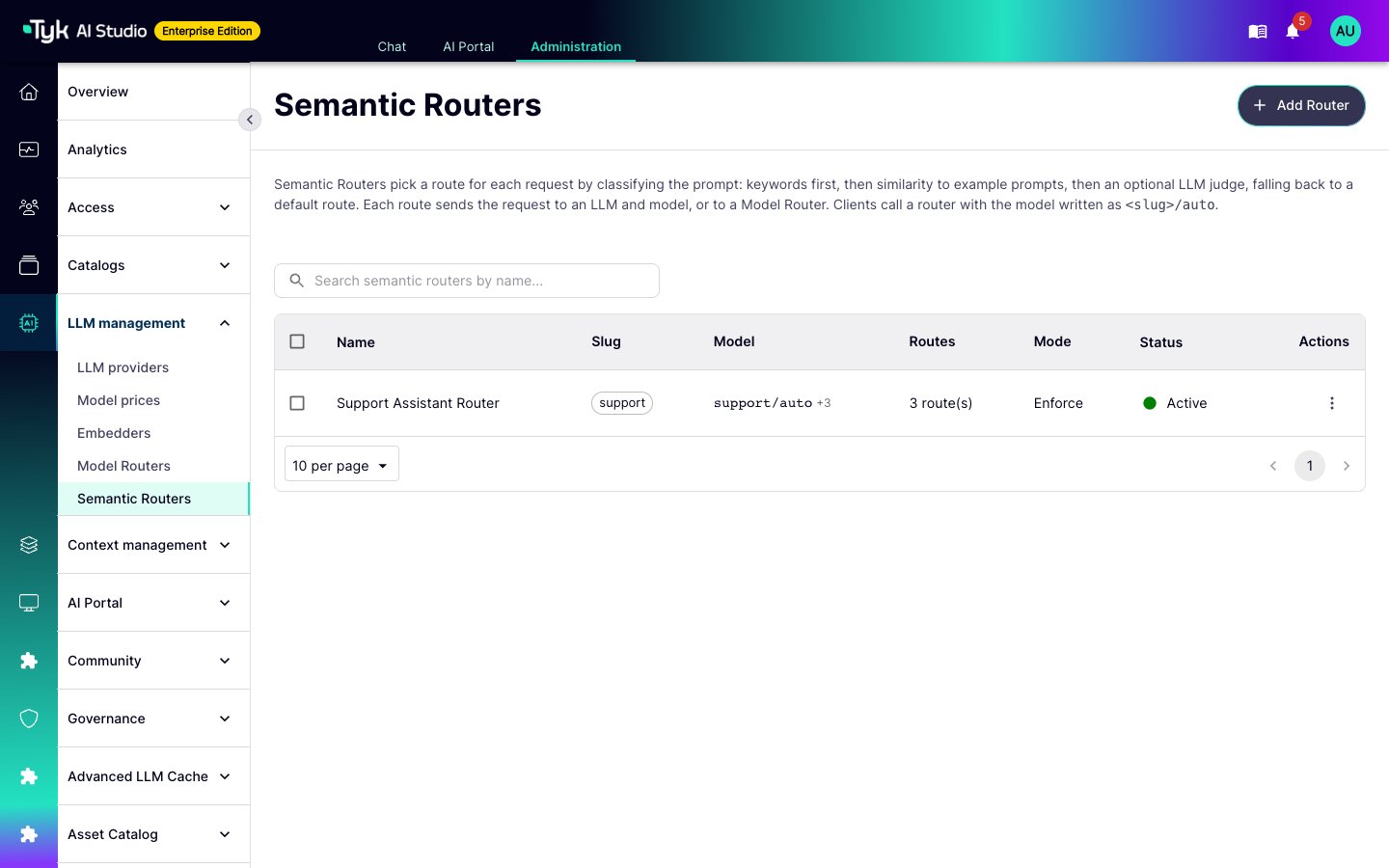
A Semantic Router picks the model for each request from what the prompt says. You define a small set of named routes, such as `code`, `billing`, and `general`. Each route sends requests to an LLM and a model. A client sends one model name, such as `support/auto`. The Edge Gateway reads the prompt, selects a route, and sends the request to the target of that route.
For example, you can send programming questions to a strong coding model and send all other questions to a less expensive model. The client does not change. It always calls `support/auto`.
A Semantic Router routes only OpenAI-compatible chat completion and completion requests.
To see your routers, go to **LLM management > Semantic Routers**.
 ### Semantic Routers and Model Routers
A [Model Router](/docs/ai-management/ai-studio/model-router) and a Semantic Router choose the target in different ways:
| | Model Router | Semantic Router |
| :- | :- | :- |
| Chooses the target from | The model name in the request, such as `prod/gpt-4o` | The text of the prompt |
| Client sends | `{slug}/{model}` | `{slug}/auto`, or `{slug}/{route}` when you allow explicit routes |
| Typical use | Spread traffic over vendors, and map model names | Send each type of request to the most suitable model |
You can use the two together. A route can send its requests to an LLM directly, or give a model name to a Model Router. In that case, the Semantic Router selects the route, and the Model Router selects the vendor. Neither router needs the other.
## How a Request Is Classified
The router classifies the text of the request. By default, this is the last user message. To classify all user messages together, set **Text classified** to **All user messages**. The router keeps the end of a long text, up to 4,000 characters by default.
The router then runs its stages in this order. The first stage that selects a route decides:
| Stage | Selects a Route When |
| :- | :- |
| Explicit route | The client sends `{slug}/{route}` and **Allow explicit routes** is on. |
| Session affinity | Session affinity is on, and the same App and session got a route recently. Refer to [Session Affinity](#session-affinity). |
| Keywords | A keyword of a route is in the text. The router checks routes in priority order, highest first. A literal keyword matches any part of the text, in any case. For example, `bill` matches `Billing`. A regular expression uses the Go RE2 syntax and is case-sensitive, unless it starts with `(?i)`. RE2 runs in linear time. |
| Embeddings | The text is similar to an example prompt of a route, and the similarity reaches the **Threshold** of the route. The default threshold is 0.75. If two routes have the same score, the route with the higher priority wins. |
| LLM judge | The judge is on. An LLM reads the names and descriptions of the routes and names one. |
| Default route | No other stage selected a route. |
The **Ask the judge** setting controls when the judge runs:
* **Only when the other stages are unsure** is the default. The judge runs only when no keyword and no example prompt selected a route.
* **On every request** makes the judge the classifier. Keywords still run first. The router does not use the example prompts.
The judge adds an LLM call to the request path, so it adds latency to each request that it classifies.
The router always answers:
* If a stage fails or times out, the next stage runs. By default, the embedding timeout is 1.5 seconds and the judge timeout is 3 seconds. The admin console does not show these timeouts. You can change them only through the API.
* If no stage selects a route, the default route serves the request. The decision reason is then `classifier_error` if the embedder or the judge failed, and `default` if not. When a later stage selects a route after a failure, the reason is the name of that stage.
* The judge can only select one of the routes of the router. AI Studio ignores any other answer. A prompt that tries to influence the judge can at most select another route of the same router.
### Example Prompts and Embeddings
To use the embedding stage, add example prompts to a route and select an **Embedder** for the router. The embedder turns the example prompts and each request into vectors. The router compares the request with the examples of each route.
* Each Edge Gateway embeds the examples in the background when it loads the router. It embeds them again when the router configuration changes. The vectors stay on the gateway.
* Until the examples are ready, the embedding stage cannot select a route. Keywords, the judge, and the default route still work. If the embedding fails, the gateway tries again after 30 seconds.
* A few varied, realistic examples for each route work better than many similar examples.
* You can change the embedding model of a router at any time. The router embeds its examples again.
### Shadow Mode
In shadow mode, the router classifies each request and records the route that it would select. It always serves the default route. Use shadow mode to measure a new router against real traffic before it changes anything.
A route that the client names explicitly is not affected. The router serves it as the client asks.
### Session Affinity
Session affinity keeps a conversation on the route where it started. The model does not change in the middle of a conversation. This also keeps the prompt cache of the provider warm.
* A request header identifies the session. The default header is `X-Tyk-Session-Id`.
* AI Studio combines the App and the header value, so two Apps never share a session.
* The router keeps the route of a session for 1,800 seconds by default. Set **Affinity TTL (seconds)** to change this.
* Each gateway node keeps its sessions in memory. Nodes do not share them. A restart of a node clears its sessions. A configuration sync does not clear them, unless the router configuration changed.
* A router keeps up to 50,000 sessions on each node. When the limit is reached, the node first removes expired sessions. If it is still full, it removes an arbitrary session to make space.
* If requests of one session go to different nodes, they can get different routes. To keep the route, send all requests of a session to the same node. For example, use sticky sessions on the load balancer.
## Create a Semantic Router
1. Go to **LLM management > Semantic Routers** and select **Add Router**.
2. Enter a **Name** and a **Slug**. The slug is the first part of the model string, for example `support` in `support/auto`. It must not be the slug of an LLM or of a Model Router.
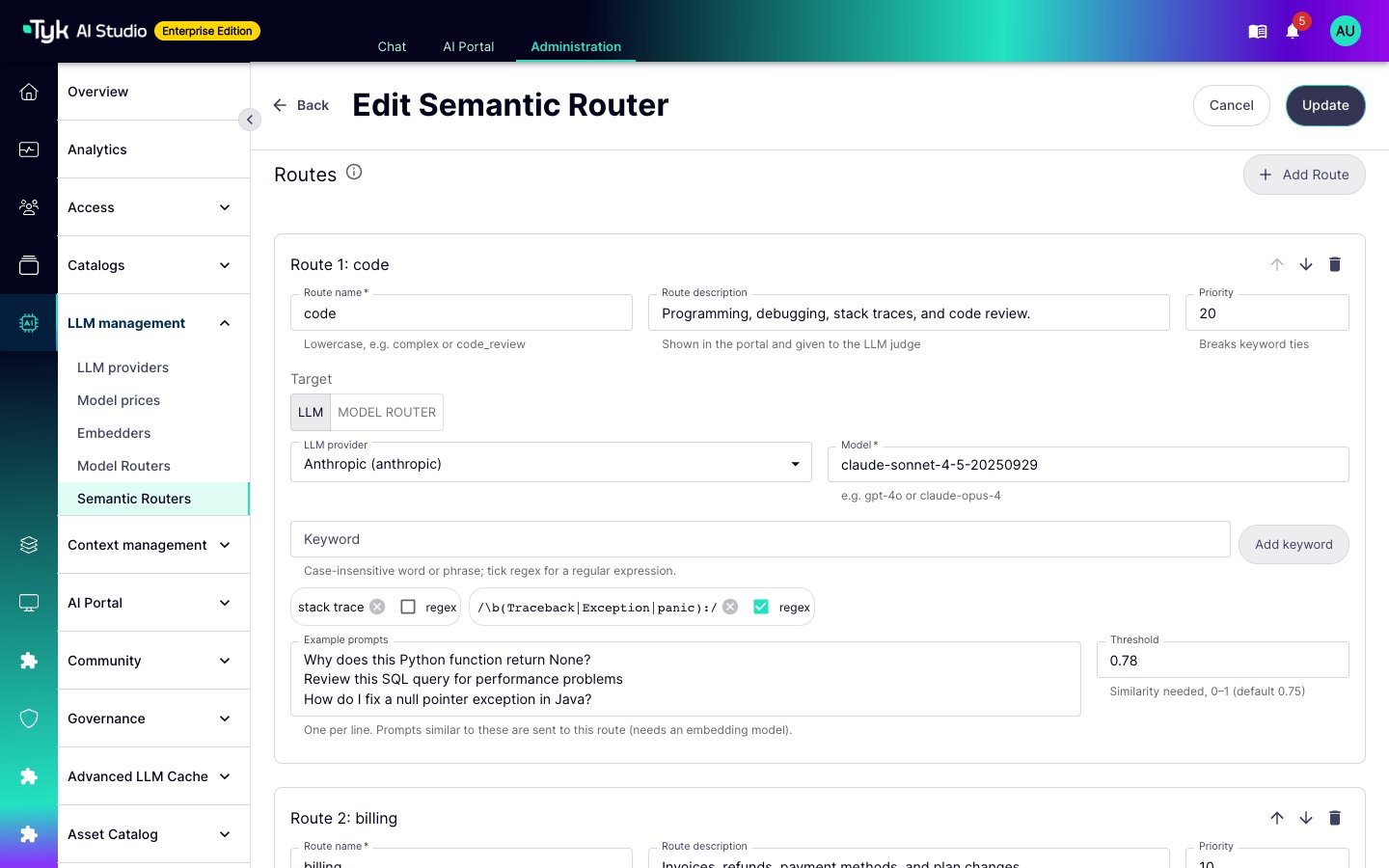
3. In **Routes**, select **Add Route** for each route. Set these fields:
* **Route name**: lowercase letters and digits, separated by `-` or `_`. You cannot use `auto`.
* **Route description**: what belongs on this route. The judge reads it, and the AI Portal shows it.
* **Priority**: a higher number wins a tie.
* **Target**: an LLM and a model, or a Model Router and the model name to send to it. AI Studio checks that a pool of the Model Router matches that name.
* **Keyword** (optional): a word or phrase. Select **regex** for a regular expression.
* **Example prompts** (optional): one prompt for each line.
* **Threshold** (optional): the similarity that an example must reach, from 0 to 1.
### Semantic Routers and Model Routers
A [Model Router](/docs/ai-management/ai-studio/model-router) and a Semantic Router choose the target in different ways:
| | Model Router | Semantic Router |
| :- | :- | :- |
| Chooses the target from | The model name in the request, such as `prod/gpt-4o` | The text of the prompt |
| Client sends | `{slug}/{model}` | `{slug}/auto`, or `{slug}/{route}` when you allow explicit routes |
| Typical use | Spread traffic over vendors, and map model names | Send each type of request to the most suitable model |
You can use the two together. A route can send its requests to an LLM directly, or give a model name to a Model Router. In that case, the Semantic Router selects the route, and the Model Router selects the vendor. Neither router needs the other.
## How a Request Is Classified
The router classifies the text of the request. By default, this is the last user message. To classify all user messages together, set **Text classified** to **All user messages**. The router keeps the end of a long text, up to 4,000 characters by default.
The router then runs its stages in this order. The first stage that selects a route decides:
| Stage | Selects a Route When |
| :- | :- |
| Explicit route | The client sends `{slug}/{route}` and **Allow explicit routes** is on. |
| Session affinity | Session affinity is on, and the same App and session got a route recently. Refer to [Session Affinity](#session-affinity). |
| Keywords | A keyword of a route is in the text. The router checks routes in priority order, highest first. A literal keyword matches any part of the text, in any case. For example, `bill` matches `Billing`. A regular expression uses the Go RE2 syntax and is case-sensitive, unless it starts with `(?i)`. RE2 runs in linear time. |
| Embeddings | The text is similar to an example prompt of a route, and the similarity reaches the **Threshold** of the route. The default threshold is 0.75. If two routes have the same score, the route with the higher priority wins. |
| LLM judge | The judge is on. An LLM reads the names and descriptions of the routes and names one. |
| Default route | No other stage selected a route. |
The **Ask the judge** setting controls when the judge runs:
* **Only when the other stages are unsure** is the default. The judge runs only when no keyword and no example prompt selected a route.
* **On every request** makes the judge the classifier. Keywords still run first. The router does not use the example prompts.
The judge adds an LLM call to the request path, so it adds latency to each request that it classifies.
The router always answers:
* If a stage fails or times out, the next stage runs. By default, the embedding timeout is 1.5 seconds and the judge timeout is 3 seconds. The admin console does not show these timeouts. You can change them only through the API.
* If no stage selects a route, the default route serves the request. The decision reason is then `classifier_error` if the embedder or the judge failed, and `default` if not. When a later stage selects a route after a failure, the reason is the name of that stage.
* The judge can only select one of the routes of the router. AI Studio ignores any other answer. A prompt that tries to influence the judge can at most select another route of the same router.
### Example Prompts and Embeddings
To use the embedding stage, add example prompts to a route and select an **Embedder** for the router. The embedder turns the example prompts and each request into vectors. The router compares the request with the examples of each route.
* Each Edge Gateway embeds the examples in the background when it loads the router. It embeds them again when the router configuration changes. The vectors stay on the gateway.
* Until the examples are ready, the embedding stage cannot select a route. Keywords, the judge, and the default route still work. If the embedding fails, the gateway tries again after 30 seconds.
* A few varied, realistic examples for each route work better than many similar examples.
* You can change the embedding model of a router at any time. The router embeds its examples again.
### Shadow Mode
In shadow mode, the router classifies each request and records the route that it would select. It always serves the default route. Use shadow mode to measure a new router against real traffic before it changes anything.
A route that the client names explicitly is not affected. The router serves it as the client asks.
### Session Affinity
Session affinity keeps a conversation on the route where it started. The model does not change in the middle of a conversation. This also keeps the prompt cache of the provider warm.
* A request header identifies the session. The default header is `X-Tyk-Session-Id`.
* AI Studio combines the App and the header value, so two Apps never share a session.
* The router keeps the route of a session for 1,800 seconds by default. Set **Affinity TTL (seconds)** to change this.
* Each gateway node keeps its sessions in memory. Nodes do not share them. A restart of a node clears its sessions. A configuration sync does not clear them, unless the router configuration changed.
* A router keeps up to 50,000 sessions on each node. When the limit is reached, the node first removes expired sessions. If it is still full, it removes an arbitrary session to make space.
* If requests of one session go to different nodes, they can get different routes. To keep the route, send all requests of a session to the same node. For example, use sticky sessions on the load balancer.
## Create a Semantic Router
1. Go to **LLM management > Semantic Routers** and select **Add Router**.
2. Enter a **Name** and a **Slug**. The slug is the first part of the model string, for example `support` in `support/auto`. It must not be the slug of an LLM or of a Model Router.
3. In **Routes**, select **Add Route** for each route. Set these fields:
* **Route name**: lowercase letters and digits, separated by `-` or `_`. You cannot use `auto`.
* **Route description**: what belongs on this route. The judge reads it, and the AI Portal shows it.
* **Priority**: a higher number wins a tie.
* **Target**: an LLM and a model, or a Model Router and the model name to send to it. AI Studio checks that a pool of the Model Router matches that name.
* **Keyword** (optional): a word or phrase. Select **regex** for a regular expression.
* **Example prompts** (optional): one prompt for each line.
* **Threshold** (optional): the similarity that an example must reach, from 0 to 1.
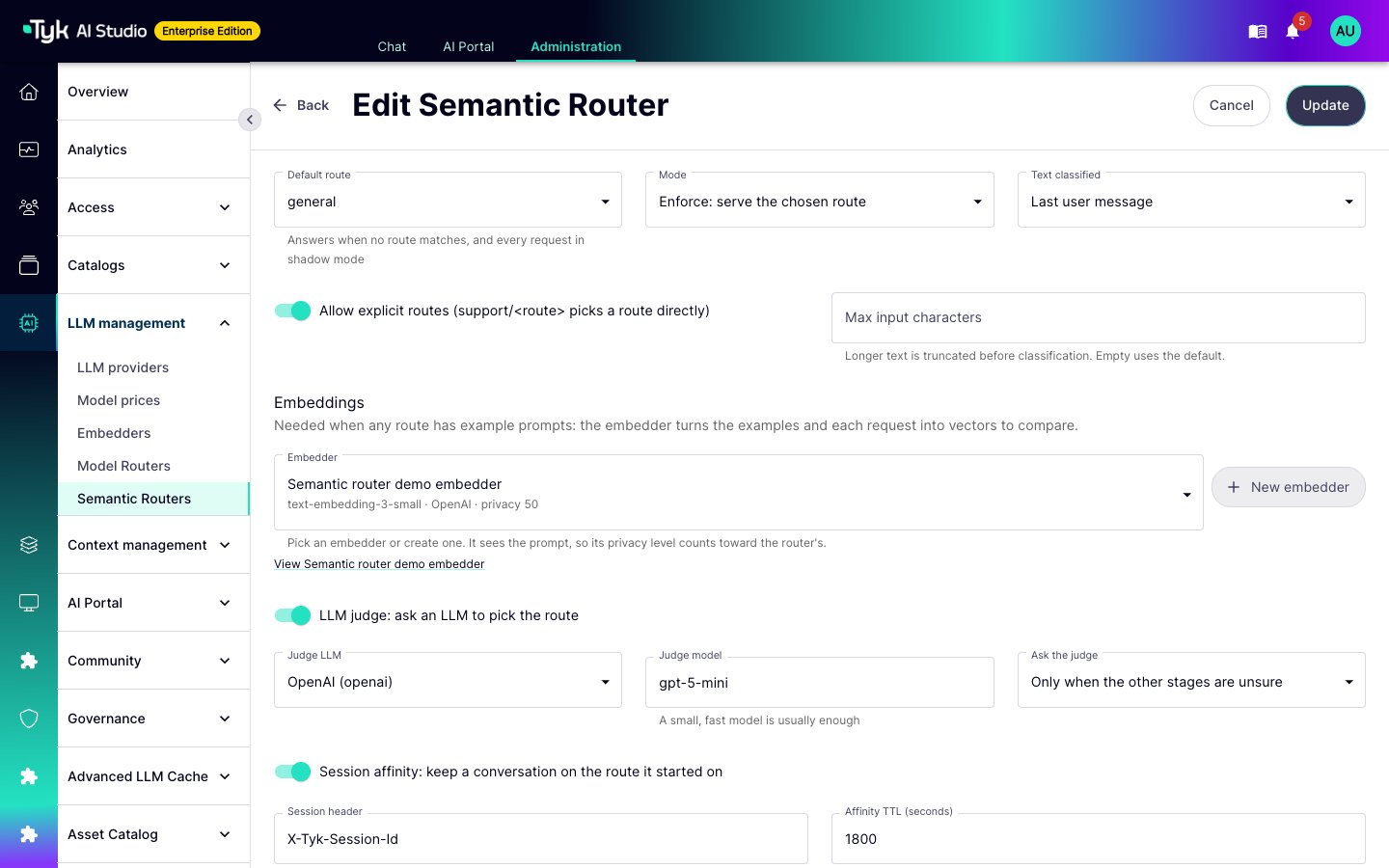
 4. In **Classification**, select the **Default route**. It is required. It serves every request that no stage selects.
5. Select the **Mode**: **Enforce** serves the selected route, and **Shadow** serves the default route.
6. If a route has example prompts, select an **Embedder**, or select **New embedder** to create one. An embedder can use an LLM provider whose vendor supports embeddings: OpenAI, Ollama, Google AI, Vertex, or Hugging Face. It can also have its own endpoint and key.
7. (Optional) Turn on the LLM judge. Select the **Judge LLM** and the **Judge model**. A small, fast model is usually sufficient.
8. (Optional) Turn on session affinity, and turn on **Allow explicit routes**.
With explicit routes, a client can select any route of the router, including a route to a more expensive model.
4. In **Classification**, select the **Default route**. It is required. It serves every request that no stage selects.
5. Select the **Mode**: **Enforce** serves the selected route, and **Shadow** serves the default route.
6. If a route has example prompts, select an **Embedder**, or select **New embedder** to create one. An embedder can use an LLM provider whose vendor supports embeddings: OpenAI, Ollama, Google AI, Vertex, or Hugging Face. It can also have its own endpoint and key.
7. (Optional) Turn on the LLM judge. Select the **Judge LLM** and the **Judge model**. A small, fast model is usually sufficient.
8. (Optional) Turn on session affinity, and turn on **Allow explicit routes**.
With explicit routes, a client can select any route of the router, including a route to a more expensive model.
 9. In **Portal**, select the LLM catalogs in **Publish in catalogs**. Refer to [Publish a Semantic Router](#publish-a-semantic-router).
10. Test the configuration in the **Test** panel. Then select **Create**.
11. To use the router, turn on **Active**.
## Test a Semantic Router
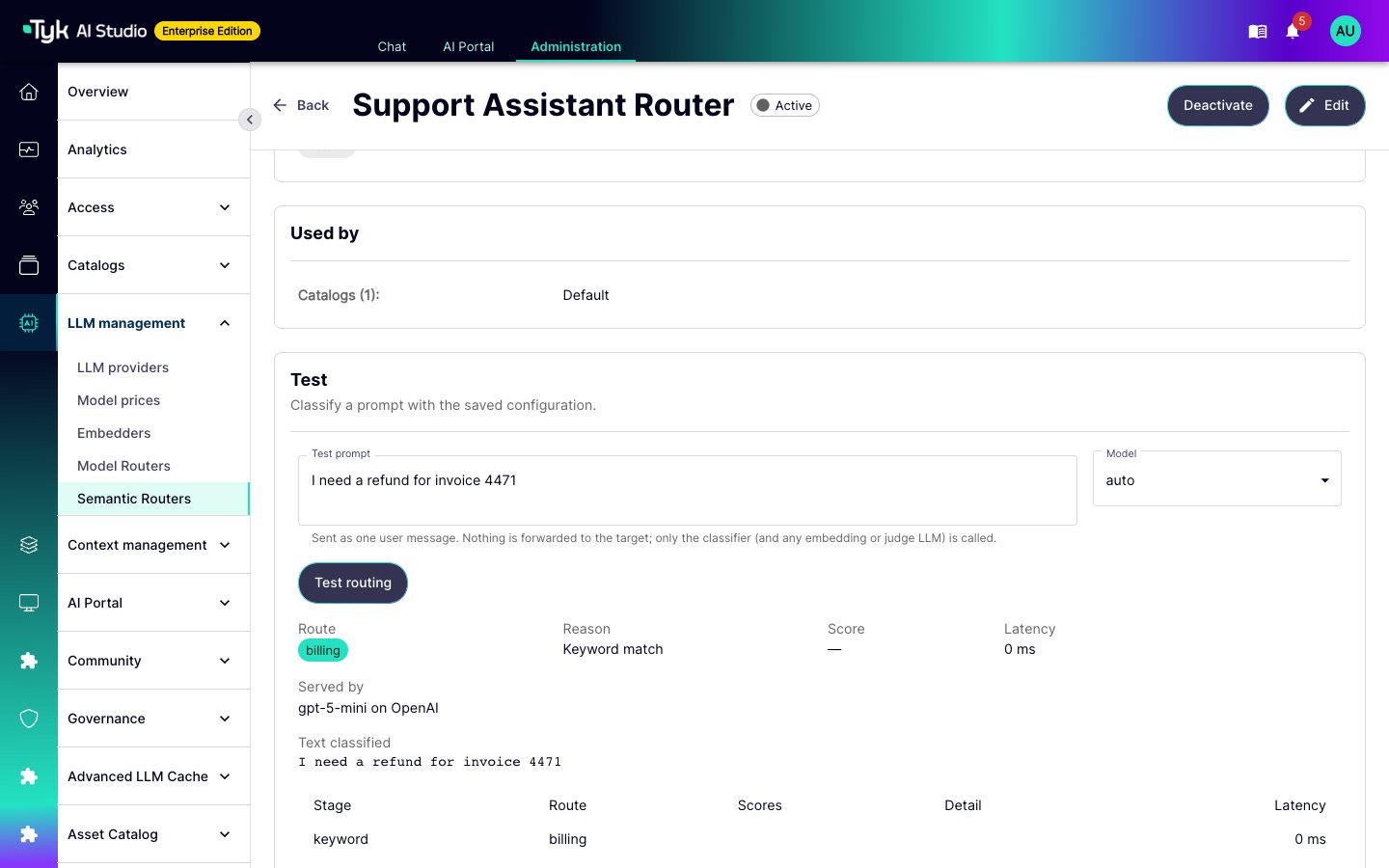
The **Test** panel classifies a prompt with the router configuration. It is on the router form, for a draft, and on the router page, for the saved router. The panel runs the same classifier as the Edge Gateway.
The panel shows the selected route, the reason, the similarity score, and the target that serves the route. The trace shows the result and latency of each stage.
The panel does not send the prompt to the target. It calls only the embedder and the judge LLM.
9. In **Portal**, select the LLM catalogs in **Publish in catalogs**. Refer to [Publish a Semantic Router](#publish-a-semantic-router).
10. Test the configuration in the **Test** panel. Then select **Create**.
11. To use the router, turn on **Active**.
## Test a Semantic Router
The **Test** panel classifies a prompt with the router configuration. It is on the router form, for a draft, and on the router page, for the saved router. The panel runs the same classifier as the Edge Gateway.
The panel shows the selected route, the reason, the similarity score, and the target that serves the route. The trace shows the result and latency of each stage.
The panel does not send the prompt to the target. It calls only the embedder and the judge LLM.
 ## Publish a Semantic Router
You grant and publish a Semantic Router in the same way as an LLM:
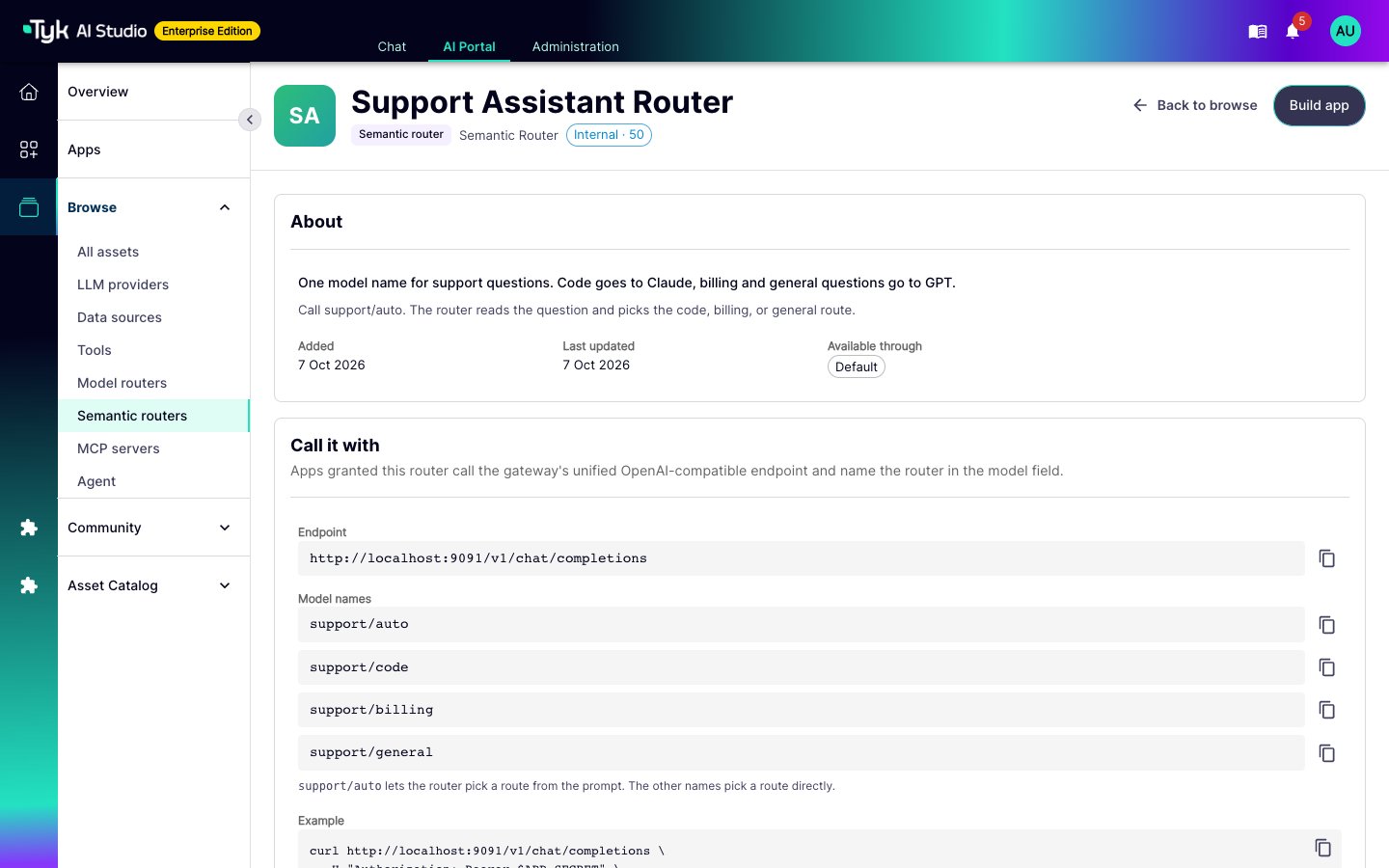
* **Catalogs**: Add the router to one or more LLM [Catalogs](/docs/ai-management/ai-studio/catalogs). Teams that have one of these catalogs see the router in the AI Portal. The AI Portal shows its model strings and route descriptions. It does not show keywords or example prompts.
* **Apps**: Developers add the router to an App in the AI Portal App builder. Administrators can grant it in the App editor. The grant lets the App reach every LLM that the routes can send to, but only through the router. It does not grant those LLMs directly. A route that sends to a Model Router does not need a separate grant of that Model Router.
* **No grant**: An App without a grant of the router gets `403`. Model Routers have a deprecated fallback for Apps without a grant. Semantic Routers do not.
## Publish a Semantic Router
You grant and publish a Semantic Router in the same way as an LLM:
* **Catalogs**: Add the router to one or more LLM [Catalogs](/docs/ai-management/ai-studio/catalogs). Teams that have one of these catalogs see the router in the AI Portal. The AI Portal shows its model strings and route descriptions. It does not show keywords or example prompts.
* **Apps**: Developers add the router to an App in the AI Portal App builder. Administrators can grant it in the App editor. The grant lets the App reach every LLM that the routes can send to, but only through the router. It does not grant those LLMs directly. A route that sends to a Model Router does not need a separate grant of that Model Router.
* **No grant**: An App without a grant of the router gets `403`. Model Routers have a deprecated fallback for Apps without a grant. Semantic Routers do not.
 ### Privacy Score
The privacy score of a Semantic Router is the lowest score of all LLMs that can see the text of a request:
* The LLMs that the routes send to.
* All vendors of each Model Router that a route sends to.
* The embedder: the LLM that it uses, or the score of a standalone embedder.
* The judge LLM.
The data sources and tools of an App must fit within this score, in the same way as for an LLM. Refer to [Privacy Levels](/docs/ai-management/ai-studio/privacy-levels).
## Monitor Routing Decisions
Each routed response names the router, the route, and the reason in the `X-Tyk-Router`, `X-Tyk-Route`, and `X-Tyk-Route-Reason` headers. The `X-Tyk-Served-LLM` and `X-Tyk-Served-Model` headers name the LLM and the model that answered.
The reason is one of these values:
| Reason | Meaning |
| :- | :- |
| `explicit` | The client named the route. |
| `affinity` | The session already had this route. |
| `keyword` | A keyword matched. |
| `embedding` | An example prompt was similar enough. |
| `judge` | The LLM judge selected the route. |
| `default` | No stage selected a route. |
| `classifier_error` | No stage selected a route, and the embedder or the judge failed. |
The proxy log of each request records the same decision. It includes the router, the route, the reason, the similarity score, and the shadow route. Edge Gateways send this data to AI Studio with their analytics. Refer to [Analytics](/docs/ai-management/ai-studio/analytics).
## Costs and Limits
* The router calls the embedder for each request that no keyword decides, and the judge when the judge runs. These calls belong to the router, not to the App. They do not count toward the App budget, and the App filters do not apply to them. Monitor their cost at the provider of the embedder and the judge LLM.
* The Edge Gateway sends the embedder and judge calls to the provider of each LLM. The gateway reads these LLMs from its synced configuration. Make sure that the judge LLM and the LLM of a linked embedder are available to it. If a call fails, the stage fails and the next stage runs.
### Privacy Score
The privacy score of a Semantic Router is the lowest score of all LLMs that can see the text of a request:
* The LLMs that the routes send to.
* All vendors of each Model Router that a route sends to.
* The embedder: the LLM that it uses, or the score of a standalone embedder.
* The judge LLM.
The data sources and tools of an App must fit within this score, in the same way as for an LLM. Refer to [Privacy Levels](/docs/ai-management/ai-studio/privacy-levels).
## Monitor Routing Decisions
Each routed response names the router, the route, and the reason in the `X-Tyk-Router`, `X-Tyk-Route`, and `X-Tyk-Route-Reason` headers. The `X-Tyk-Served-LLM` and `X-Tyk-Served-Model` headers name the LLM and the model that answered.
The reason is one of these values:
| Reason | Meaning |
| :- | :- |
| `explicit` | The client named the route. |
| `affinity` | The session already had this route. |
| `keyword` | A keyword matched. |
| `embedding` | An example prompt was similar enough. |
| `judge` | The LLM judge selected the route. |
| `default` | No stage selected a route. |
| `classifier_error` | No stage selected a route, and the embedder or the judge failed. |
The proxy log of each request records the same decision. It includes the router, the route, the reason, the similarity score, and the shadow route. Edge Gateways send this data to AI Studio with their analytics. Refer to [Analytics](/docs/ai-management/ai-studio/analytics).
## Costs and Limits
* The router calls the embedder for each request that no keyword decides, and the judge when the judge runs. These calls belong to the router, not to the App. They do not count toward the App budget, and the App filters do not apply to them. Monitor their cost at the provider of the embedder and the judge LLM.
* The Edge Gateway sends the embedder and judge calls to the provider of each LLM. The gateway reads these LLMs from its synced configuration. Make sure that the judge LLM and the LLM of a linked embedder are available to it. If a call fails, the stage fails and the next stage runs.