> ## Documentation Index
> Fetch the complete documentation index at: https://tyk.io/docs/llms.txt
> Use this file to discover all available pages before exploring further.
# Governed Metadata in Tyk AI Studio
> Define, validate, and enforce governance metadata such as owners, risk tier, and data classification on LLMs, tools, and data sources in Tyk AI Studio.
## Availability
| Edition | Deployment Type |
| :- | :- |
| [Enterprise](/docs/ai-management/ai-studio/overview#enterprise-edition) | Self-Managed, Hybrid |
Governed Metadata is available from v2.2.0. In the Community Edition, the metadata pages are not in the admin sidebar.
## Overview
Governed Metadata is a set of standard fields that you add to LLMs, tools, and data sources. Administrators decide which fields each object must have. AI Studio checks the values when you save an object. Examples of fields:
* Business, technical, and application owners
* Lifecycle state and expiration date
* Risk tier and data classification
* Regulatory applicability and approved consumers
* Support contact
Administrators define the fields once. AI Studio then validates the values on each object, records each change, and reports the objects that are not compliant.
Governed Metadata applies to these objects:
* LLMs
* Tools
* Data sources
* Plugin resource types that opt in. Refer to [Plugins](#plugins).
## Vocabularies
A vocabulary is a controlled list of terms. Each term has a value, a label, an optional description, and a **Deprecated** flag. A field of type vocabulary accepts only the terms of its vocabulary. A deprecated term is still valid, but it causes a warning.
To manage vocabularies, go to **Governance > Metadata vocabularies**. You cannot delete a vocabulary that a schema uses. The API returns `409` in this case.
## Schemas
A schema is a named set of fields. It applies to one or more object types, or to all object types. To manage schemas, go to **Governance > Metadata schemas**.
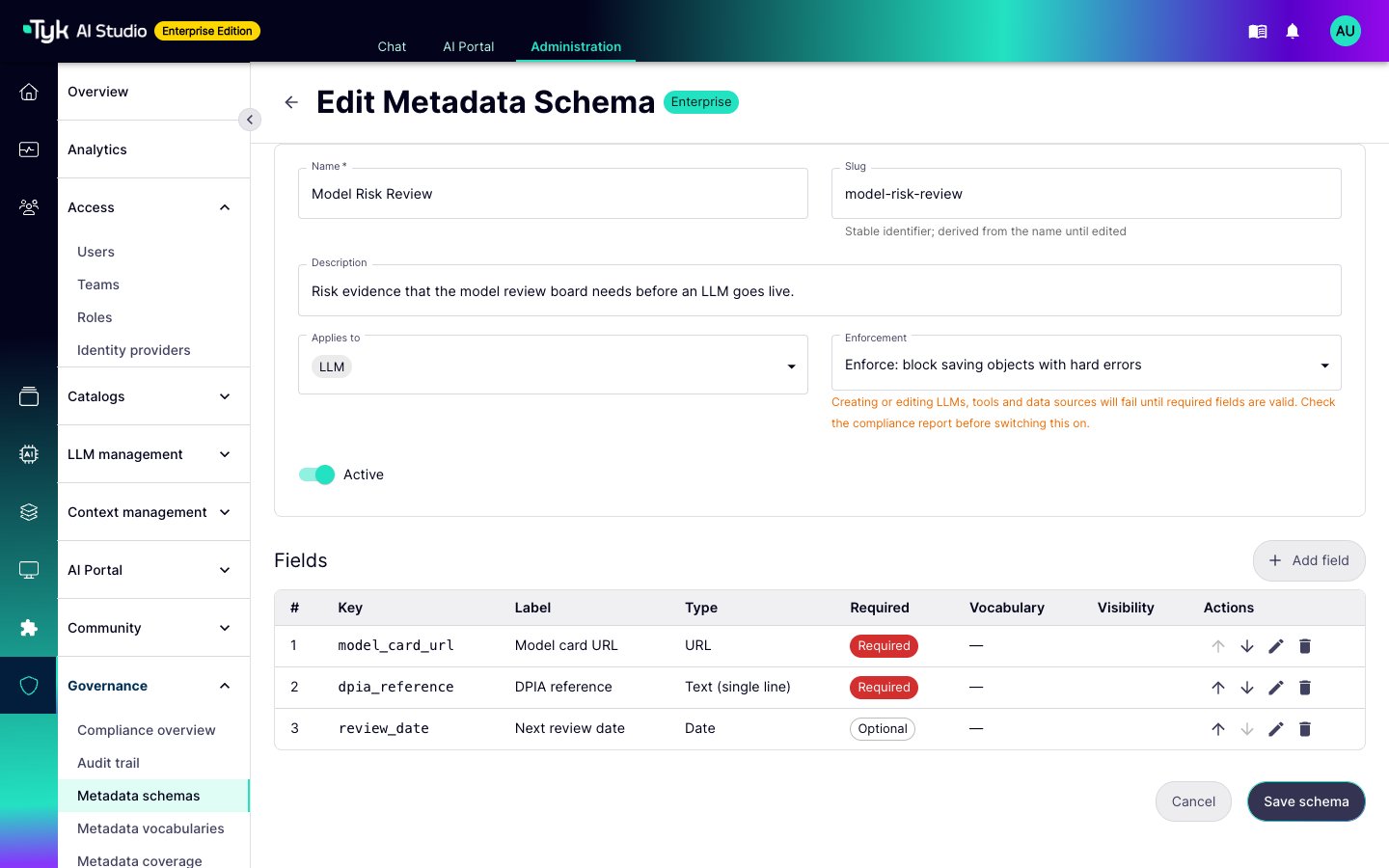 Each field has these settings:
| Setting | Description |
| :- | :- |
| Key | The stored identifier. It must match `^[a-z][a-z0-9_]*$`. The key must be unique across the active schemas for the same object type. |
| Type | Text, multi-line text, number, yes/no, date, email, URL, user, vocabulary, vocabulary (multiple values), or a list of text values. |
| Required and severity | A required field with the severity **Error** blocks a save when the schema is enforced. A required field with the severity **Warning** only reports the problem. |
| Required to publish | The field is optional while the object is a draft. The object cannot become active until the field has a value. This rule applies at all enforcement levels. |
| Constraints | A pattern, a maximum length, a minimum and maximum value, or a vocabulary. |
| Warn when in the past | For date fields, such as an expiration date. |
| Visible in portal | The AI Portal shows the field on the asset. |
| Sent to gateways | AI Studio sends the field to Edge Gateways. Refer to [Where the Values Go](#where-the-values-go). |
Use **Required to publish** to separate the person who submits an object from the person who releases it. The submitter saves a draft without the field. The reviewer adds the value when they activate the object.
### Enforcement
Each schema has an enforcement level:
* **Advisory:** AI Studio records validation problems on the object and shows them in the compliance report. It does not block a save.
* **Enforce:** AI Studio checks each create and edit of an LLM, a tool, or a data source. The save fails with `422` until all required fields with the severity **Error** are valid. This applies to the admin console and the admin API.
More than one active schema can apply to the same object type. AI Studio merges them. The required fields of an advisory schema stay warnings in the merged schema. Only the fields of an enforced schema block a save.
Start with an advisory schema. Change it to **Enforce** only after the compliance report shows no problems. If you enforce a schema first, edits to existing objects fail until someone adds the missing values.
### The Governance Core Schema
On the first start, the Enterprise Edition creates an advisory schema named **Governance Core**. It applies to all object types. It has these fields:
| Key | Type | Required | Visible in Portal | Sent to Gateways |
| :- | :- | :- | :- | :- |
| `business_owner` | User | No | No | No |
| `technical_owner` | User | No | No | No |
| `application_owner` | User | No | No | No |
| `lifecycle_state` | Vocabulary | Yes | Yes | No |
| `risk_tier` | Vocabulary | Yes | No | No |
| `data_classification` | Vocabulary | Yes | Yes | Yes |
| `regulatory_applicability` | Vocabulary (multiple values) | No | No | Yes |
| `approved_consumers` | List of text values | No | No | No |
| `support_contact` | Email | No | Yes | No |
| `expiration_date` | Date (warn when in the past) | No | No | No |
AI Studio also creates the four vocabularies that these fields use:
| Vocabulary | Terms |
| :- | :- |
| `lifecycle_state` | Draft, Active, Deprecated, Retired |
| `risk_tier` | Low, Medium, High, Critical |
| `data_classification` | Public, Internal, Confidential, Restricted |
| `regulatory_framework` | GDPR, HIPAA, PCI DSS, SOX, CCPA, None |
The `regulatory_applicability` field uses the `regulatory_framework` vocabulary. Each other vocabulary field uses the vocabulary with the same name.
You can edit the schema and the vocabularies, or add more schemas.
## Enter Metadata on an Object
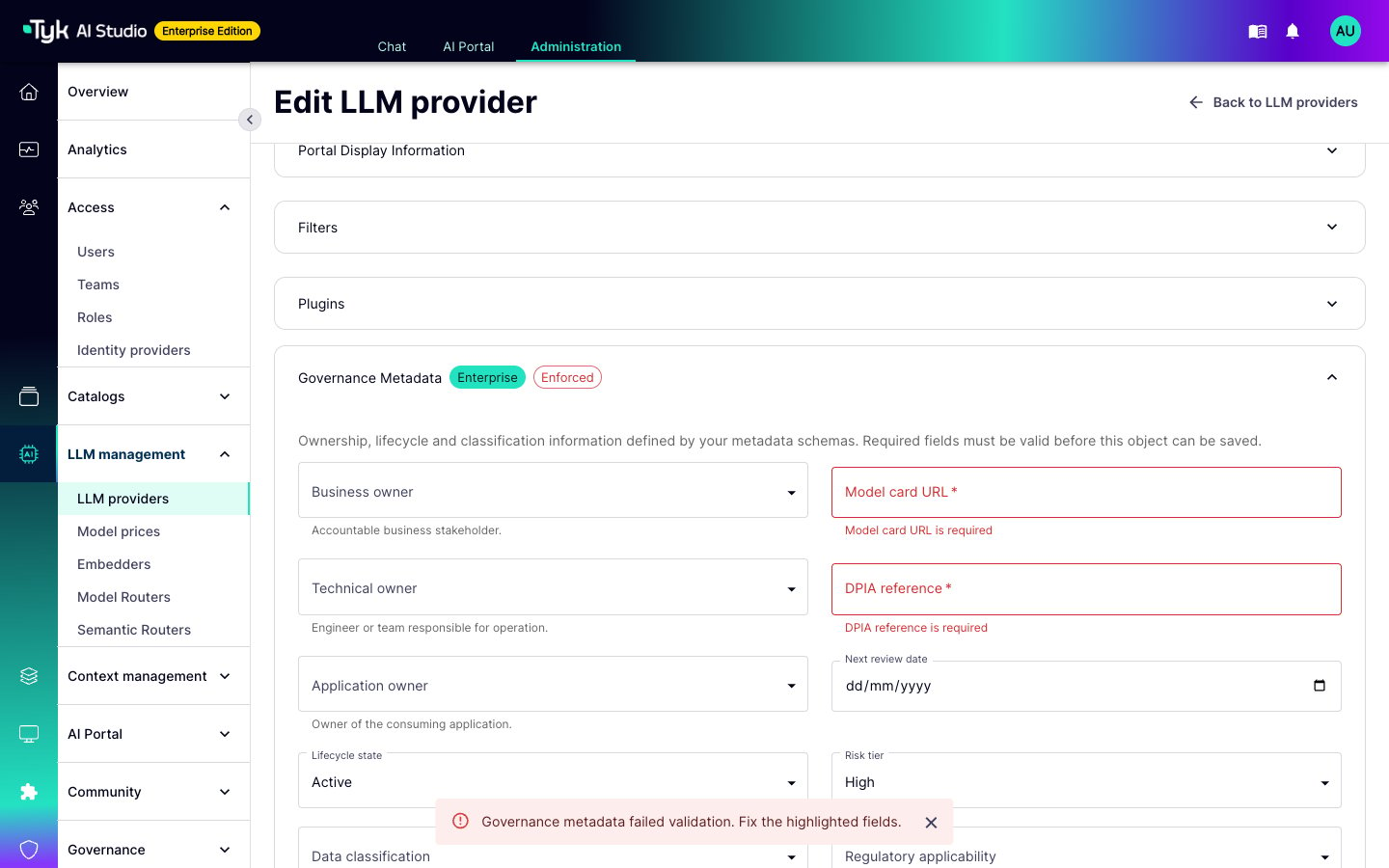
When a schema applies, the LLM, tool, and data source forms show a **Governance Metadata** section. AI Studio validates the values while you type. When a save fails, the form marks the fields that are not valid. The detail page of the object shows the stored values and the validation status.
Each field has these settings:
| Setting | Description |
| :- | :- |
| Key | The stored identifier. It must match `^[a-z][a-z0-9_]*$`. The key must be unique across the active schemas for the same object type. |
| Type | Text, multi-line text, number, yes/no, date, email, URL, user, vocabulary, vocabulary (multiple values), or a list of text values. |
| Required and severity | A required field with the severity **Error** blocks a save when the schema is enforced. A required field with the severity **Warning** only reports the problem. |
| Required to publish | The field is optional while the object is a draft. The object cannot become active until the field has a value. This rule applies at all enforcement levels. |
| Constraints | A pattern, a maximum length, a minimum and maximum value, or a vocabulary. |
| Warn when in the past | For date fields, such as an expiration date. |
| Visible in portal | The AI Portal shows the field on the asset. |
| Sent to gateways | AI Studio sends the field to Edge Gateways. Refer to [Where the Values Go](#where-the-values-go). |
Use **Required to publish** to separate the person who submits an object from the person who releases it. The submitter saves a draft without the field. The reviewer adds the value when they activate the object.
### Enforcement
Each schema has an enforcement level:
* **Advisory:** AI Studio records validation problems on the object and shows them in the compliance report. It does not block a save.
* **Enforce:** AI Studio checks each create and edit of an LLM, a tool, or a data source. The save fails with `422` until all required fields with the severity **Error** are valid. This applies to the admin console and the admin API.
More than one active schema can apply to the same object type. AI Studio merges them. The required fields of an advisory schema stay warnings in the merged schema. Only the fields of an enforced schema block a save.
Start with an advisory schema. Change it to **Enforce** only after the compliance report shows no problems. If you enforce a schema first, edits to existing objects fail until someone adds the missing values.
### The Governance Core Schema
On the first start, the Enterprise Edition creates an advisory schema named **Governance Core**. It applies to all object types. It has these fields:
| Key | Type | Required | Visible in Portal | Sent to Gateways |
| :- | :- | :- | :- | :- |
| `business_owner` | User | No | No | No |
| `technical_owner` | User | No | No | No |
| `application_owner` | User | No | No | No |
| `lifecycle_state` | Vocabulary | Yes | Yes | No |
| `risk_tier` | Vocabulary | Yes | No | No |
| `data_classification` | Vocabulary | Yes | Yes | Yes |
| `regulatory_applicability` | Vocabulary (multiple values) | No | No | Yes |
| `approved_consumers` | List of text values | No | No | No |
| `support_contact` | Email | No | Yes | No |
| `expiration_date` | Date (warn when in the past) | No | No | No |
AI Studio also creates the four vocabularies that these fields use:
| Vocabulary | Terms |
| :- | :- |
| `lifecycle_state` | Draft, Active, Deprecated, Retired |
| `risk_tier` | Low, Medium, High, Critical |
| `data_classification` | Public, Internal, Confidential, Restricted |
| `regulatory_framework` | GDPR, HIPAA, PCI DSS, SOX, CCPA, None |
The `regulatory_applicability` field uses the `regulatory_framework` vocabulary. Each other vocabulary field uses the vocabulary with the same name.
You can edit the schema and the vocabularies, or add more schemas.
## Enter Metadata on an Object
When a schema applies, the LLM, tool, and data source forms show a **Governance Metadata** section. AI Studio validates the values while you type. When a save fails, the form marks the fields that are not valid. The detail page of the object shows the stored values and the validation status.
 ## Compliance Report
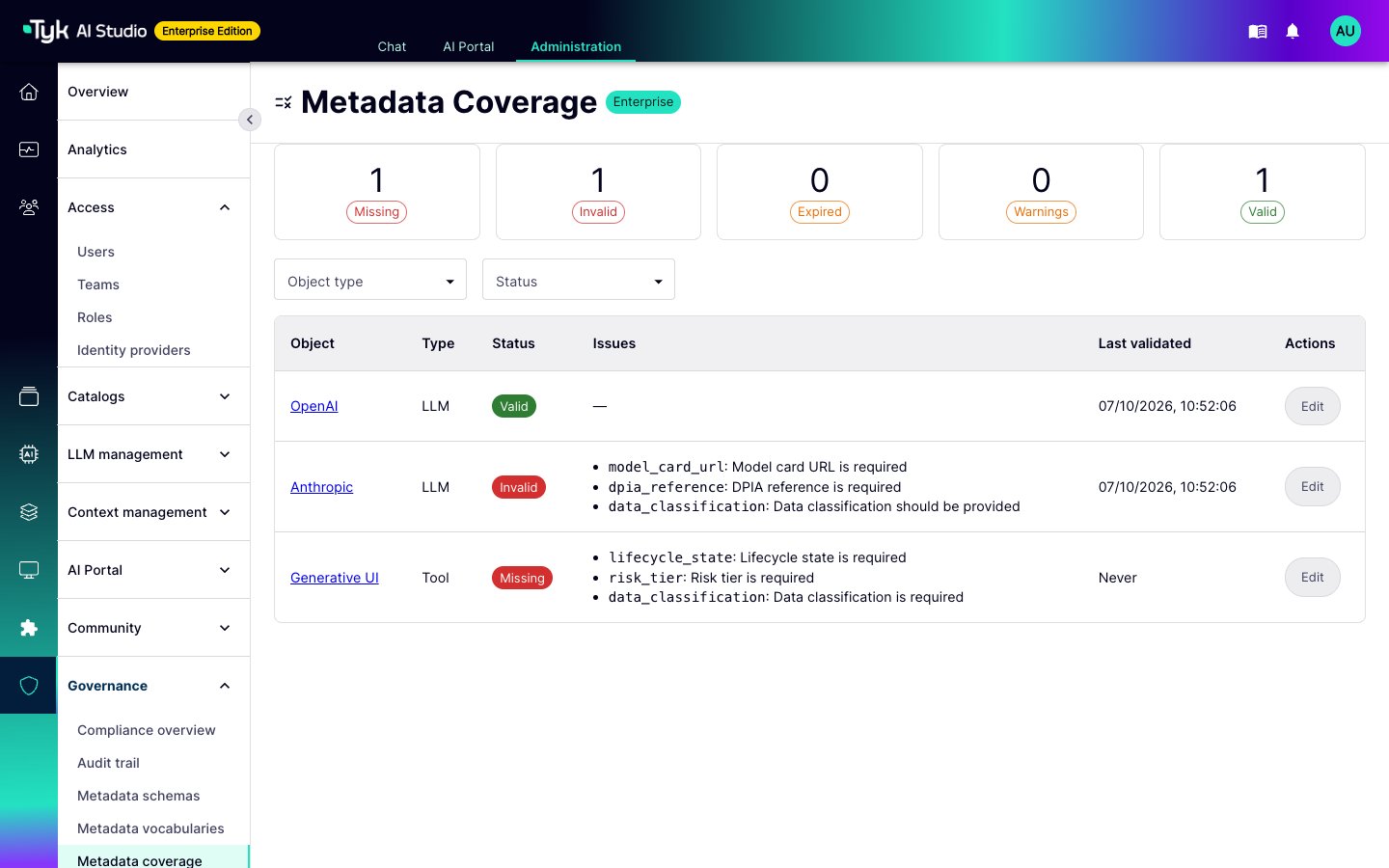
Go to **Governance > Metadata coverage**. AI Studio validates each object again against the current schemas. The report puts each object in one of these groups:
* Missing
* Invalid
* Expired: a date with **Warn when in the past** is in the past
* Warnings
* Valid
Each row has a link to the object, so you can fix it. The report also lists the instances of plugin resource types that opt in, and MCP servers.
## Compliance Report
Go to **Governance > Metadata coverage**. AI Studio validates each object again against the current schemas. The report puts each object in one of these groups:
* Missing
* Invalid
* Expired: a date with **Warn when in the past** is in the past
* Warnings
* Valid
Each row has a link to the object, so you can fix it. The report also lists the instances of plugin resource types that opt in, and MCP servers.
 ## Where the Values Go
| Destination | Fields |
| :- | :- |
| Admin console and API | All values, and the validation status of each object. |
| AI Portal | Only the fields with **Visible in portal**. The AI Portal shows them as badges, with labels and user names. |
| Edge Gateways | Only the fields with **Sent to gateways**. They are part of the configuration snapshot for LLMs, tools, and data sources. |
| Events | `system.governed_metadata.updated` and `system.governed_metadata.deleted` |
A change to a field with **Sent to gateways** changes the configuration snapshot. The Edge Gateways in the namespace then show **Pending** until you push the configuration. A change to any other field does not need a push.
## Change History
AI Studio records each change to the metadata of an object, and who made it. A change from a plugin shows as `plugin:`.
## Permissions
Governed Metadata uses the `metadata` resource of role-based access control:
| Action | Permission |
| :- | :- |
| Read schemas, vocabularies, and the compliance report | `metadata:read` |
| Create and edit schemas and vocabularies, and validate values | `metadata:write` |
| Activate or deactivate a schema | `metadata:publish` |
| Delete a schema or a vocabulary | `metadata:delete` |
To read or set the metadata of an object, you need the permission for that object, not for `metadata`. For example, a user who can edit LLMs (`llms:write`) can also set the metadata of an LLM.
The default Editor role does not have `metadata:publish`.
## Plugins
Plugins can use Governed Metadata in these ways:
* **Read and write metadata** with the management service API. Refer to [Governed Metadata in the Service API](/docs/ai-management/ai-studio/plugins/service-api#governed-metadata-enterprise).
* **Check or change values before AI Studio saves them** with object hooks on the `governed_metadata` object type. Refer to [Object Hooks](/docs/ai-management/ai-studio/plugins/object-hooks).
* **Add schemas and vocabularies** from the plugin manifest. AI Studio creates them as inactive and advisory. An administrator activates them. Refer to [Governed Metadata Contributions](/docs/ai-management/ai-studio/plugins/manifests#governed-metadata-contributions-enterprise).
* **Opt a resource type in** with `supports_metadata: true`. The instances of the type then use the object type `plugin_resource::`. A plugin can write `plugin_resource:self:` for its own types.
* **Show the metadata form in a plugin UI** with the `` and `` web components. Refer to [Governed Metadata Web Components](/docs/ai-management/ai-studio/plugins/studio-ui#governed-metadata-web-components).
* **Read the gateway-visible fields of an LLM** in a gateway plugin. Refer to [Governed Metadata in the Plugin Context](/docs/ai-management/ai-studio/plugins/edge-gateway#governed-metadata-in-the-plugin-context).
A plugin that publishes its own objects, such as prompts or agents, keeps them in its own storage. AI Studio does not validate these objects for the plugin. For plugin objects, enforcement works only if the plugin calls `SetObjectMetadata` on save and refuses the save when the call returns `ok=false`.
## Where the Values Go
| Destination | Fields |
| :- | :- |
| Admin console and API | All values, and the validation status of each object. |
| AI Portal | Only the fields with **Visible in portal**. The AI Portal shows them as badges, with labels and user names. |
| Edge Gateways | Only the fields with **Sent to gateways**. They are part of the configuration snapshot for LLMs, tools, and data sources. |
| Events | `system.governed_metadata.updated` and `system.governed_metadata.deleted` |
A change to a field with **Sent to gateways** changes the configuration snapshot. The Edge Gateways in the namespace then show **Pending** until you push the configuration. A change to any other field does not need a push.
## Change History
AI Studio records each change to the metadata of an object, and who made it. A change from a plugin shows as `plugin:`.
## Permissions
Governed Metadata uses the `metadata` resource of role-based access control:
| Action | Permission |
| :- | :- |
| Read schemas, vocabularies, and the compliance report | `metadata:read` |
| Create and edit schemas and vocabularies, and validate values | `metadata:write` |
| Activate or deactivate a schema | `metadata:publish` |
| Delete a schema or a vocabulary | `metadata:delete` |
To read or set the metadata of an object, you need the permission for that object, not for `metadata`. For example, a user who can edit LLMs (`llms:write`) can also set the metadata of an LLM.
The default Editor role does not have `metadata:publish`.
## Plugins
Plugins can use Governed Metadata in these ways:
* **Read and write metadata** with the management service API. Refer to [Governed Metadata in the Service API](/docs/ai-management/ai-studio/plugins/service-api#governed-metadata-enterprise).
* **Check or change values before AI Studio saves them** with object hooks on the `governed_metadata` object type. Refer to [Object Hooks](/docs/ai-management/ai-studio/plugins/object-hooks).
* **Add schemas and vocabularies** from the plugin manifest. AI Studio creates them as inactive and advisory. An administrator activates them. Refer to [Governed Metadata Contributions](/docs/ai-management/ai-studio/plugins/manifests#governed-metadata-contributions-enterprise).
* **Opt a resource type in** with `supports_metadata: true`. The instances of the type then use the object type `plugin_resource::`. A plugin can write `plugin_resource:self:` for its own types.
* **Show the metadata form in a plugin UI** with the `` and `` web components. Refer to [Governed Metadata Web Components](/docs/ai-management/ai-studio/plugins/studio-ui#governed-metadata-web-components).
* **Read the gateway-visible fields of an LLM** in a gateway plugin. Refer to [Governed Metadata in the Plugin Context](/docs/ai-management/ai-studio/plugins/edge-gateway#governed-metadata-in-the-plugin-context).
A plugin that publishes its own objects, such as prompts or agents, keeps them in its own storage. AI Studio does not validate these objects for the plugin. For plugin objects, enforcement works only if the plugin calls `SetObjectMetadata` on save and refuses the save when the call returns `ok=false`.