> ## Documentation Index
> Fetch the complete documentation index at: https://tyk.io/docs/llms.txt
> Use this file to discover all available pages before exploring further.
# Configuring Custom Rate Limit Keys in Developer Portal
> How to configure custom rate limit keys in Tyk Developer Portal
## Introduction
The Tyk Enterprise Developer Portal supports custom rate limiting patterns that allow you to apply rate limits based on entities other than just credentials, such as per application, per developer, or per organization. This is particularly useful for B2B scenarios where API quotas need to be shared across multiple developers and applications within an organization.
For detailed information about custom rate limiting concepts and configuration, see the [Custom Rate Limiting](/5.9/api-management/rate-limit#custom-rate-limiting) section in the main Rate Limiting documentation.
**Prerequisites**
This capability works with [Tyk 5.3.0](/5.9/developer-support/release-notes/dashboard#530-release-notes) or higher.
## Configuring Custom Rate Limit Keys in the Portal
If you are using Tyk Developer Portal version 1.13.0 or later, you can configure the custom rate limit keys directly from the Developer Portal in the Advanced settings (optional) collapsible section of the Plan's view (by Credentials metadata).
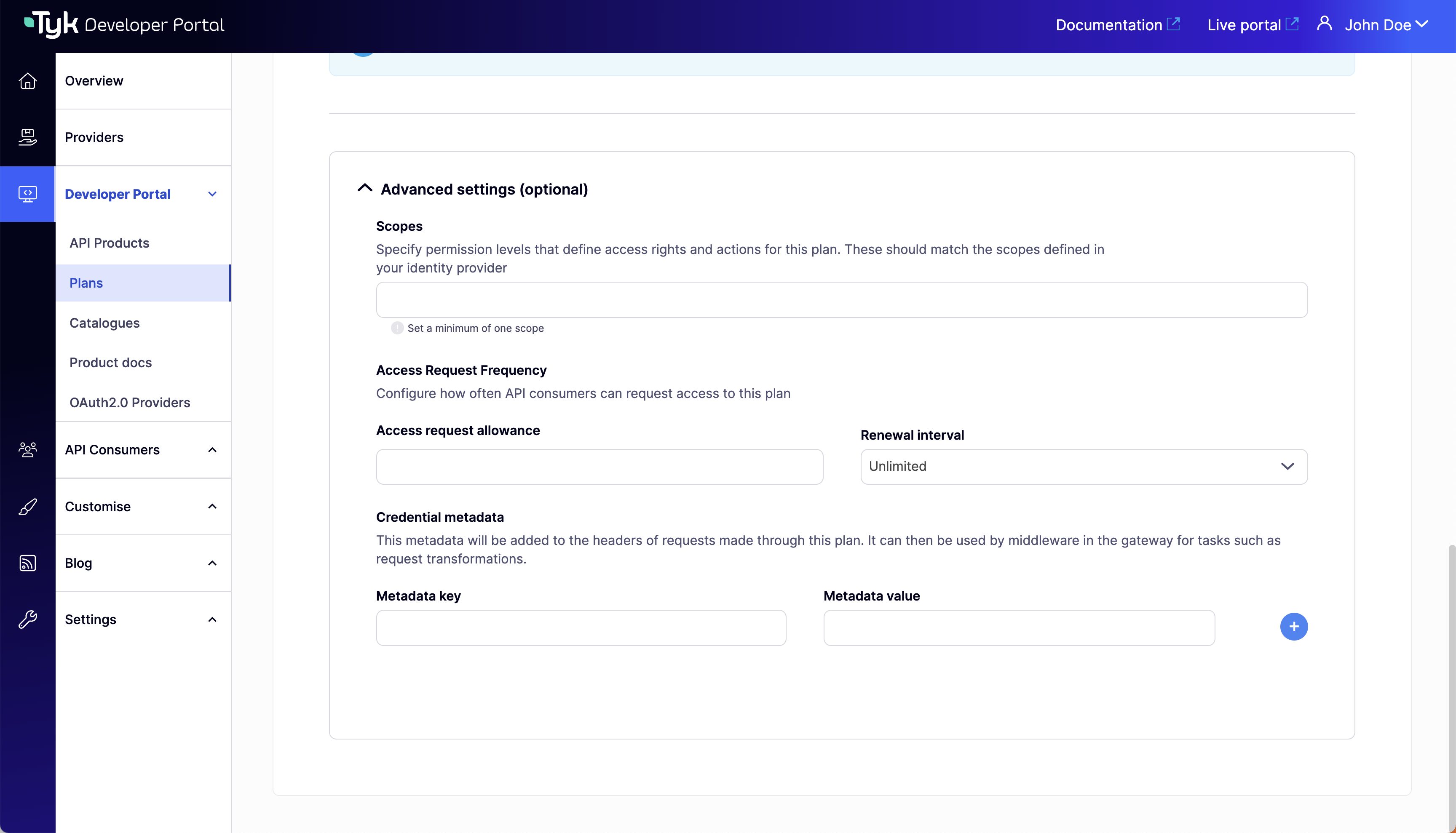 For general configuration of custom rate limit keys in policies, refer to the [Custom Rate Limiting](/5.9/api-management/rate-limit#custom-rate-limiting) documentation.
## Using Custom Rate Limit Keys with the Portal
The Tyk Enterprise Developer Portal facilitates the configuration of various rate limiting options based on a business model for API Products published in the portal.
To achieve this, the portal, by default, populates the following attributes in the credential metadata, which can be used as part of a custom rate limit key:
* **ApplicationID**: The ID of the application to which the credential belongs.
* **DeveloperID**: The ID of the developer who created the credential.
* **OrganisationID**: The ID of the organization to which the developer belongs.
Additionally, it's possible to attach [custom attribute values](/5.9/portal/customization/user-model#add-custom-attributes-to-the-user-model) defined in a developer profile as metadata fields to credentials.
When a credential is provisioned by the portal, all the fields described above are added as metadata values to the credential, making them valid options for configuring the rate limit key:
For general configuration of custom rate limit keys in policies, refer to the [Custom Rate Limiting](/5.9/api-management/rate-limit#custom-rate-limiting) documentation.
## Using Custom Rate Limit Keys with the Portal
The Tyk Enterprise Developer Portal facilitates the configuration of various rate limiting options based on a business model for API Products published in the portal.
To achieve this, the portal, by default, populates the following attributes in the credential metadata, which can be used as part of a custom rate limit key:
* **ApplicationID**: The ID of the application to which the credential belongs.
* **DeveloperID**: The ID of the developer who created the credential.
* **OrganisationID**: The ID of the organization to which the developer belongs.
Additionally, it's possible to attach [custom attribute values](/5.9/portal/customization/user-model#add-custom-attributes-to-the-user-model) defined in a developer profile as metadata fields to credentials.
When a credential is provisioned by the portal, all the fields described above are added as metadata values to the credential, making them valid options for configuring the rate limit key:
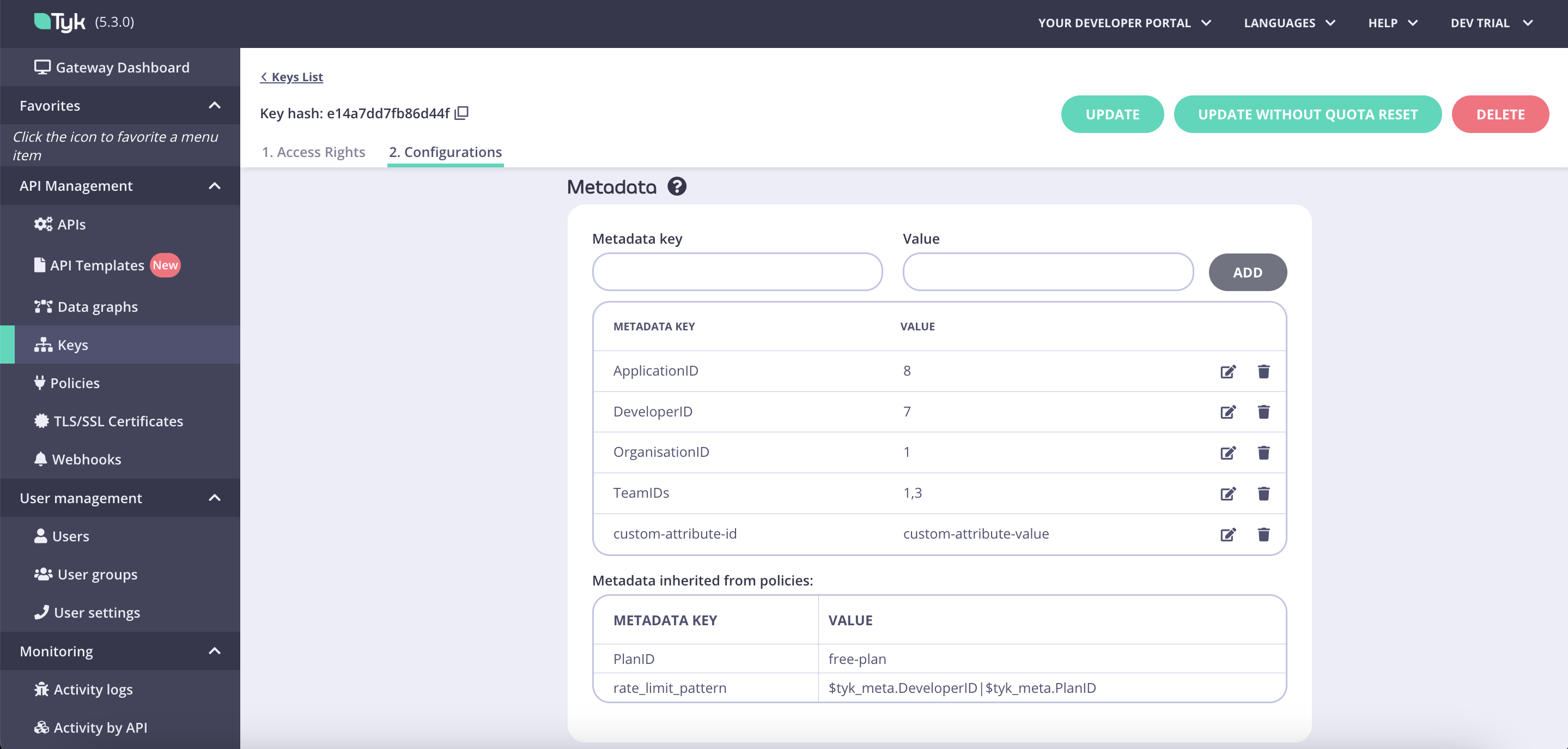 This approach allows the portal to seamlessly apply rate limits based on any combination of the aforementioned fields and other custom metadata objects defined in policies used for plans or products. This is in addition to credentials.
***
**Tyk Enterprise Developer Portal**
If you are interested in getting access contact us at [support@tyk.io]()
This approach allows the portal to seamlessly apply rate limits based on any combination of the aforementioned fields and other custom metadata objects defined in policies used for plans or products. This is in addition to credentials.
***
**Tyk Enterprise Developer Portal**
If you are interested in getting access contact us at [support@tyk.io]()