> ## Documentation Index
> Fetch the complete documentation index at: https://tyk.io/docs/llms.txt
> Use this file to discover all available pages before exploring further.
# Combine Authentication Methods
> How to combine multiple authentication methods in Tyk to enhance security and flexibility.
## Introduction
Tyk allows you to chain multiple authentication methods together so that each authentication must be successful for access to be granted to the API. For example, you can use an Access Token in combination with Basic Auth or with a JSON Web Token.
## Base Identity Provider
When you configure Tyk to use multiple authentication methods, you must declare one to be the **base identity provider**. The [session object](/5.9/api-management/policies#what-is-a-session-object) (access key/token) provided in that authentication step will be used by Tyk as the common "request context" and hence the source of truth for authorization (access control, rate limits and quotas).
You declare the base identity provider using the [server.authentication.baseIdentityProvider](/5.9/api-management/gateway-config-tyk-oas#authentication) field in the Tyk Vendor Extension (Tyk Classic: `base_identity_provided_by`).
## Enable Multi (Chained) Authentication win the API Designer
You can configure chained authentication using the Dashboard UI by following these steps:
1. Enable **Authentication** in the **Servers** section
2. Select the **Multiple Authentication Mechanisms** option from the drop-down list.
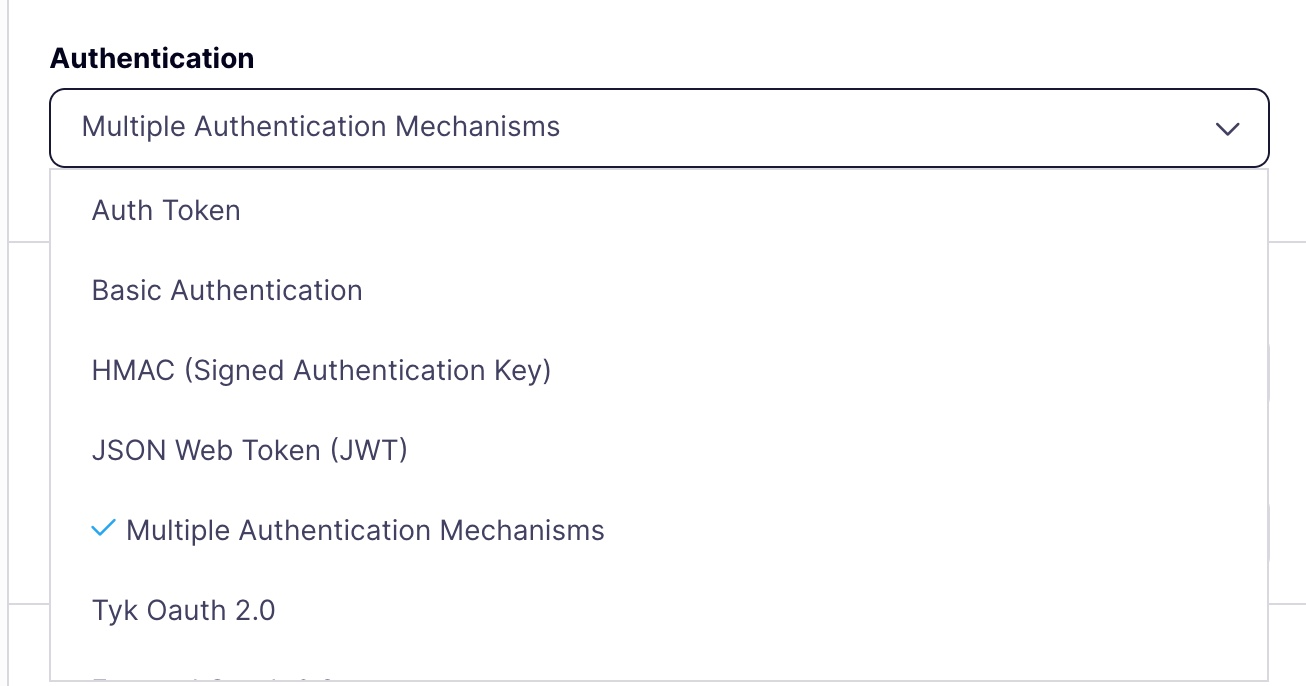 3. Select the **Authentication methods** you want to implement and identify the **Base identity provider**
 4. You can now configure each of the individual authentication methods in the usual manner using the options in the API designer.
## Configuring multiple auth methods in the API definition
The OpenAPI description can define multiple `securitySchemes` and then lists those to be used to protect the API in the `security` section. The OpenAPI Specification allows multiple entries in the `security` section of the API description, each of which can contain one or multiple schemes.
Tyk only takes into consideration the first object in the `security` list. If this contains multiple schemes, then Tyk will implement these sequentially.
In the following example, the OpenAPI description includes multiple security schemes and then defines three objects in the `security` list:
```yaml theme={null}
{
...
securitySchemes: {
"auth-A": {...},
"auth-B": {...},
"auth-C": {...},
"auth-D": {...},
},
security: [
{
"auth-A": [],
"auth-C": []
},
{
"auth-B": []
},
{
"auth-D": []
}
]
}
```
Tyk will consider only the first entry in the `security` list and so will implement the `auth-A` and `auth-C` schemes.
In the Tyk Vendor Extension this would result in the following configuration:
```yaml theme={null}
x-tyk-api-gateway:
server:
authentication:
enabled: true,
baseIdentityProvider: "auth-A"
securitySchemes:
auth-A:
enabled: true
auth-C:
enabled: true
...
```
Note the presence of the `baseIdentityProvider` field which is required.
## Using Tyk Classic APIs
To enable this mode, set the `base_identity_provided_by` field in your API Definitions to one of the supported chained enums below:
* `AuthToken`
* `HMACKey`
* `BasicAuthUser`
* `JWTClaim`
* `OIDCUser`
* `OAuthKey`
* `UnsetAuth`
The provider set here will then be the one that provides the session object that determines rate limits, ACL rules, and quotas.
You must also configure the authentication methods to be used in the usual manner, as described in the relevant documentation. To ensure that auth token is implemented as part of the chained authentication, you must set `use_standard_auth` to `true`.
4. You can now configure each of the individual authentication methods in the usual manner using the options in the API designer.
## Configuring multiple auth methods in the API definition
The OpenAPI description can define multiple `securitySchemes` and then lists those to be used to protect the API in the `security` section. The OpenAPI Specification allows multiple entries in the `security` section of the API description, each of which can contain one or multiple schemes.
Tyk only takes into consideration the first object in the `security` list. If this contains multiple schemes, then Tyk will implement these sequentially.
In the following example, the OpenAPI description includes multiple security schemes and then defines three objects in the `security` list:
```yaml theme={null}
{
...
securitySchemes: {
"auth-A": {...},
"auth-B": {...},
"auth-C": {...},
"auth-D": {...},
},
security: [
{
"auth-A": [],
"auth-C": []
},
{
"auth-B": []
},
{
"auth-D": []
}
]
}
```
Tyk will consider only the first entry in the `security` list and so will implement the `auth-A` and `auth-C` schemes.
In the Tyk Vendor Extension this would result in the following configuration:
```yaml theme={null}
x-tyk-api-gateway:
server:
authentication:
enabled: true,
baseIdentityProvider: "auth-A"
securitySchemes:
auth-A:
enabled: true
auth-C:
enabled: true
...
```
Note the presence of the `baseIdentityProvider` field which is required.
## Using Tyk Classic APIs
To enable this mode, set the `base_identity_provided_by` field in your API Definitions to one of the supported chained enums below:
* `AuthToken`
* `HMACKey`
* `BasicAuthUser`
* `JWTClaim`
* `OIDCUser`
* `OAuthKey`
* `UnsetAuth`
The provider set here will then be the one that provides the session object that determines rate limits, ACL rules, and quotas.
You must also configure the authentication methods to be used in the usual manner, as described in the relevant documentation. To ensure that auth token is implemented as part of the chained authentication, you must set `use_standard_auth` to `true`.