> ## Documentation Index
> Fetch the complete documentation index at: https://tyk.io/docs/llms.txt
> Use this file to discover all available pages before exploring further.
# OAuth 2.0
> How to configure OAuth 2.0 in Tyk?
## Use Tyk as an OAuth 2.0 Authorization Server
Tyk can act as an OAuth 2.0 *authorization server*, performing token generation and management for *clients* accessing APIs deployed on Tyk. There are many great resources on the Internet that will help you to understand the OAuth 2.0 Authorization Framework, which we won't attempt to duplicate here. We will provide a basic introduction to the [concepts and terminology](/5.9/#oauth-20-core-concepts) before we dive into the details of using Tyk as your *auth server*.
Tyk offers some great features when used as the *authorization server* including:
* **Fine-Grained Access Control:** Manage access using Tyk's built-in access controls, including versioning and named API IDs
* **Usage Analytics:** Leverage Tyk's analytics capabilities to monitor OAuth 2.0 usage effectively, grouping data by Client Id
* **Multi-API Access**: Enable access to multiple APIs using a single OAuth token; configure one API for OAuth 2.0 token issuance and the other APIs with the [Auth Token](/5.9/api-management/authentication/bearer-token) method, linking them through a common policy
*Tyk as OAuth authorization server* supports the following *grant types*:
* [Authorization Code Grant](/5.9/#using-the-authorization-code-grant): the *client* is redirected to an *identity server* where the *user* must approve access before an *access token* will be issued
* [Client Credentials Grant](/5.9/#using-the-client-credentials-grant): used for machine-to-machine access, authentication is performed using only the *client Id* and *client secret*
* [Resource Owner Password Grant](/5.9/#using-the-resource-owner-password-grant) (a.k.a. Password Grant): only for use where the *client* is highly trusted, as the *client* must provide the *Resource Owner*'s own credentials during authentication
**Tyk does not recommend the use of Resource Owner Password Grant**. This method is considered unsafe and is prohibited in the [OAuth 2.0 Security Best Practice](https://datatracker.ietf.org/doc/html/draft-ietf-oauth-security-topics-13#section-3.4") but is supported for use with legacy clients.
To make use of this, you'll need to:
* understand how to integrate your *client* (and, for Authorization Code grant, your *identity server*) according to the OAuth grant type
* [register a client app](/5.9/#client-app-registration) for each client that needs to access the API
* [configure your API proxy](/5.9/#configuring-your-api-proxy) to use the *Tyk OAuth 2.0* authentication method
## OAuth 2.0 Core Concepts
**OAuth 2.0** (Open Authorization 2.0) is a widely adopted authorization protocol that allows third-party applications to access user resources securely, without needing to expose sensitive credentials such as user passwords. It is an industry-standard framework that enables a delegated approach to securing access to APIs and services. The [IETF OAuth 2.0 specification](https://datatracker.ietf.org/doc/html/rfc6749) outlines the standard for OAuth 2.0.
> "The OAuth 2.0 authorization framework enables a third-party application to obtain limited access to an HTTP service, either on behalf of a resource owner by orchestrating an approval interaction between the resource owner and the HTTP service, or by allowing the third-party application to obtain access on its own behalf." — [RFC 6749](https://datatracker.ietf.org/doc/html/rfc6749)
OAuth 2.0 provides a mechanism for **client applications** to request limited access to resources hosted by a **resource server**, on behalf of a **resource owner** (typically a user), without exposing the resource owner's credentials. This allows secure sharing of data between applications—for example, allowing a calendar app to access a user's contacts to automatically find available time slots for meetings.
OAuth 2.0 has many variations and flows suited for different use cases, this section will provide an overview of the core principles, terminology, and key concepts, specifically focusing on how you can implement OAuth 2.0 with Tyk.
### Terminology
* **Protected Resource**: The service or data that is protected by OAuth (e.g. an API endpoint) and requires authorization to access.
* **Resource Owner**: The **user** or system that owns the *Protected Resource* and has the ability to grant or deny access to it.
* **Client**: The application or system that seeks access to the *Protected Resource*. It acts on behalf of the *Resource Owner*.
* **Access Token**: A short-lived piece of data that grants the *Client* access to the *Protected Resource*. The token proves that the *Client* has been authorized by the *Resource Owner*.
* **Authorization Server**: The server that issues *Access Tokens* to the *Client* after validating the *Client*'s identity and obtaining consent from the *Resource Owner*.
* **Client Application**: The application that requests authorization from the *Authorization Server*. This application must first be registered with the *Authorization Server* to obtain credentials (*Client Id* and *Client Secret*).
* **Resource Server**: The server that hosts the *Protected Resource*. It receives access requests from *Clients*, which must include a valid *Access Token*.
* **Identity Server**: A server that authenticates the *Resource Owner*, offering the facility to log in and authorize *Client* access to *Protected Resources*.
* **Scope**: Defines the specific permissions or access levels being requested by the *Client* (e.g. read, write, delete).
* **Grant Type**: The method by which the *Client* obtains an *Access Token*, based on the OAuth flow being used (e.g. Authorization Code, Client Credentials, Resource Owner Password Credentials).
### Access Tokens
In OAuth 2.0, **access tokens** are used to represent the authorization granted to the *client* by the *resource owner*. These tokens are typically small, opaque data objects that are passed along with each API request to authenticate the *client*. While the OAuth 2.0 specification does not mandate a specific format, **JSON Web Tokens (JWTs)** are commonly used as they can encode metadata, such as the *user*'s identity, permissions, and token expiry time.
Tokens usually come with an expiration date to limit the time they are valid and minimize the risk of abuse. *Access tokens* can often be refreshed via a **refresh token** if they expire, allowing for long-lived access without requiring the *user* (*resource owner*) to reauthorize the *application* (*client*).
### Client Application
For a *client* to request an *Access Token* from the *Authorization Server*, it must first authenticate itself. This ensures that the *Resource Owner* can confidently delegate access to the requested resources.
To do this, the *client* is registered with the *Authorization Server* as a **Client Application**, which requires the following elements:
* **Client Id**: A unique, public identifier for the *client application* (e.g., a username or application name).
* **Client Secret**: A confidential string (like a password) that is shared between the *client* and the *Authorization Server*. The *client secret* is never exposed to the *Resource Owner*.
* **Redirect URI**: The URL to which the *client* will be redirected after the authorization process is complete (either granted or denied).
The *client* sends the *client Id* and *client secret* during the authorization request to prove its identity and authenticate its request for an *access token*. Depending on the OAuth *grant type* being used (e.g. Authorization Code Flow, Client Credentials Flow), the *Authorization Server* will authenticate the *client* and, if successful, issue an *Access Token*.
## Manage Client Access Policies
The *access tokens* issued to clients by *Tyk Authorization Server* are the same as other [session objects](/5.9/api-management/policies#what-is-a-session-object) and can be associated with [access security policies](/5.9/api-management/policies#what-is-a-security-policy) at the point of creation. These allow the application of quotas, rate limits and access rights in the normal manner.
Security policies can be assigned to *client apps* and will be applied to all access tokens issued for that *client app*.
## Client App Registration
For all grant types, the first common step is the registration of the *client* with Tyk Dashboard by creation of a *Client App*. This will allocate a *client Id* and *client secret* that must be provided in future authentication requests by the *client*.
### Using the Tyk Dashboard UI
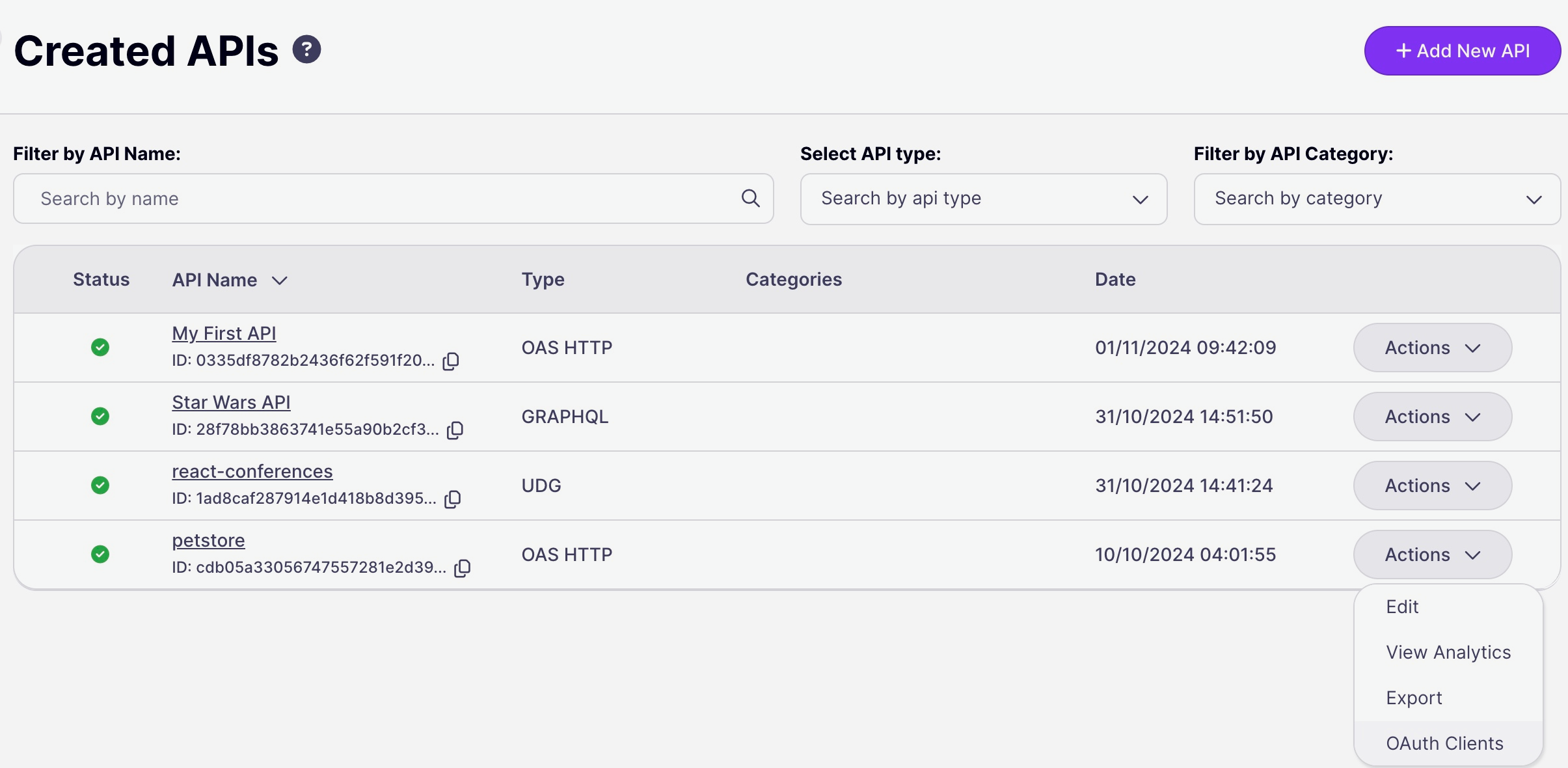
1. *Client apps* are registered per-API, so the first step is to [configure Tyk OAuth 2.0](/5.9/#configuring-your-api-proxy) as the security method to be used for the API. With this done, you can navigate to the OAuth Client management screen for the API from the **Actions** menu on the **Created APIs** screen:
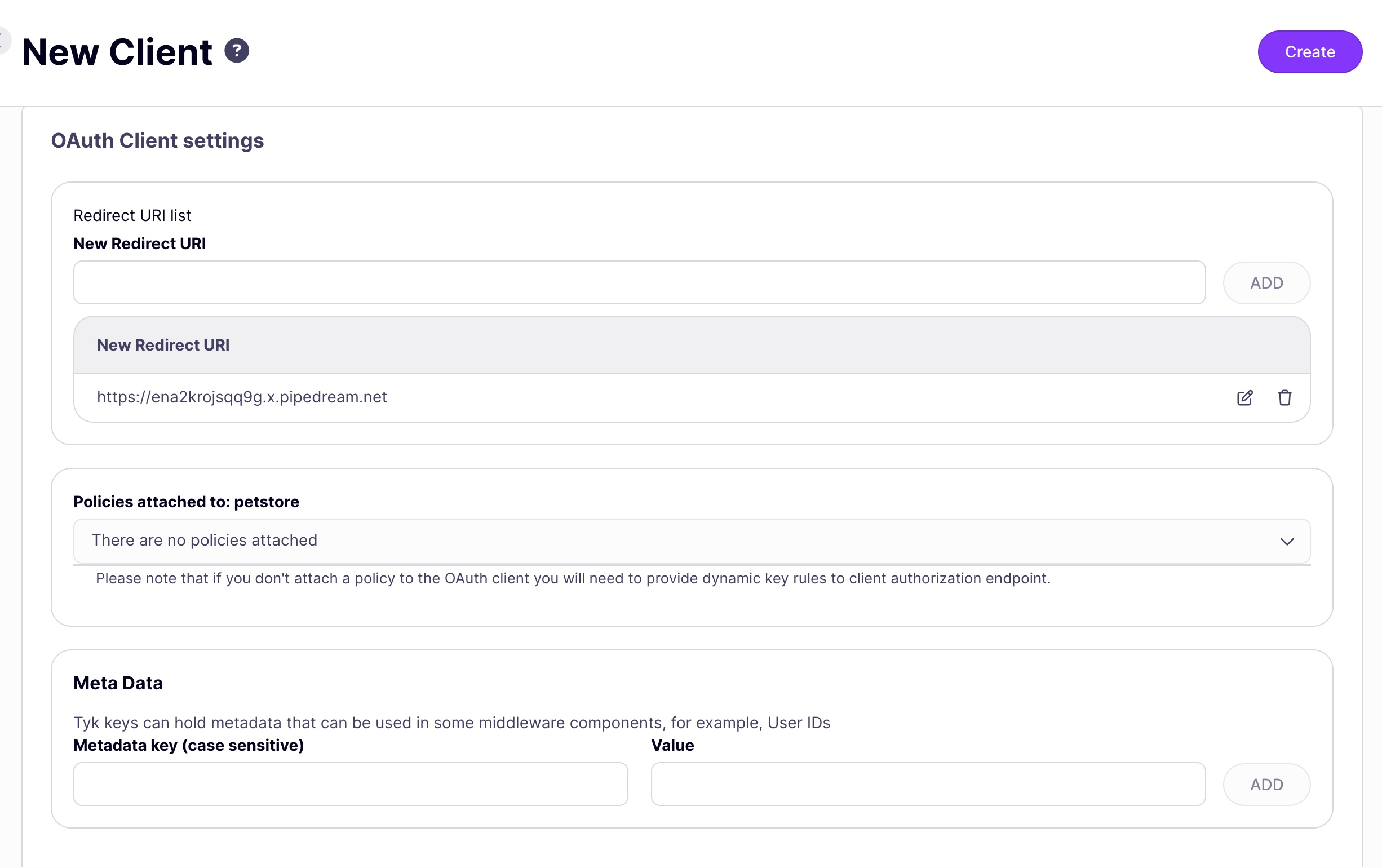
2. You will now be prompted to register a *client app* that will be granted access to the API configuring:
* redirect URI
* \[optional] [security policies](/5.9/#manage-client-access-policies) to be applied to access tokens generated for the client
* \[optional] [metadata](/5.9/api-management/policies#what-is-a-session-metadata) to be added to the access tokens
**Note**: when using *Authorization Code grant* the *redirect uri* configured for the *client app* must be the same as that configured in the API definition.
Select the **Create** button to register the *client app*.
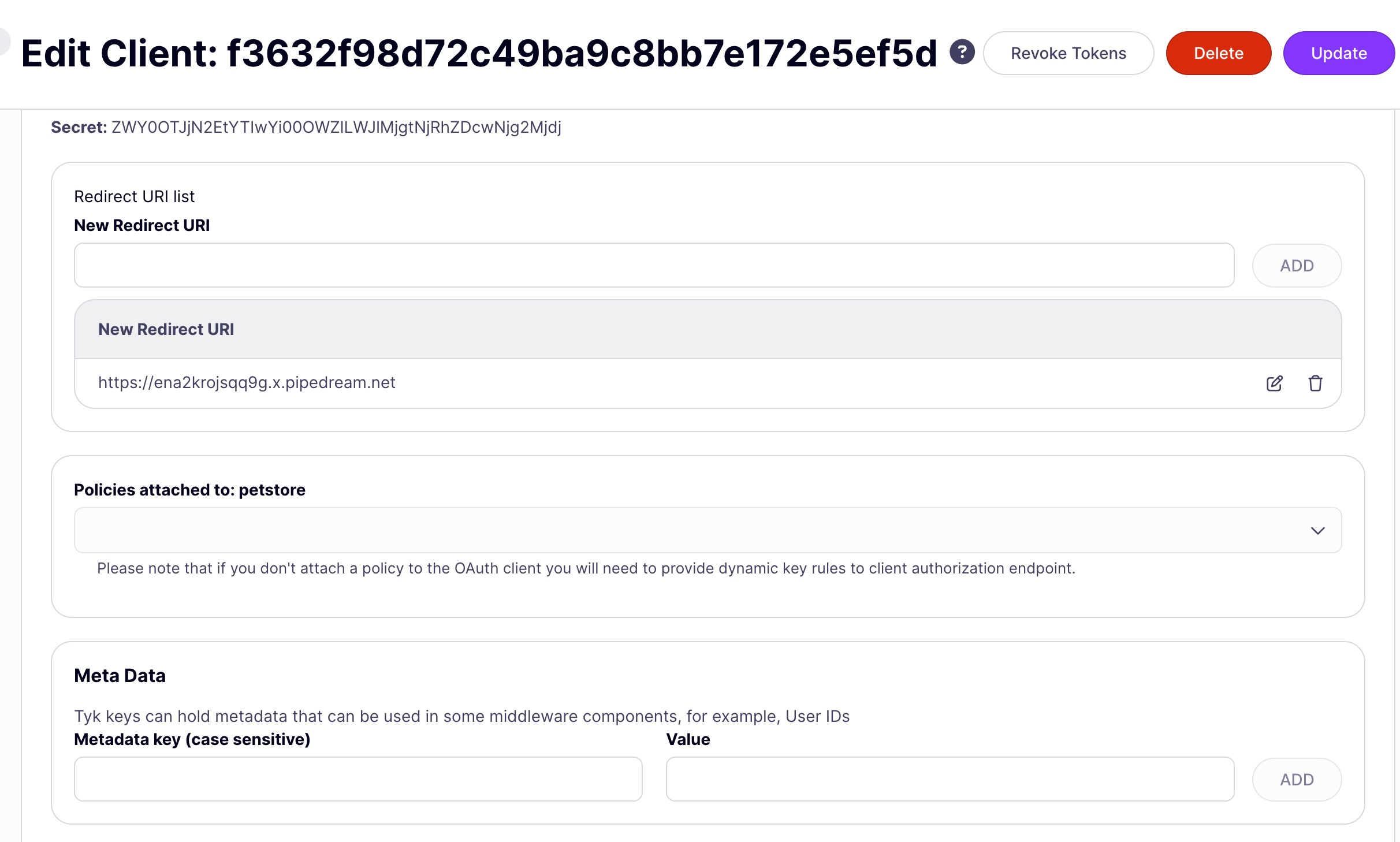
3. In the OAuth Client management screen, you will see a list of *client apps* registered with the API (as identified by their *client Id*). By clicking on the list item, or from the **Actions** menu's **Edit** option you will be taken to the *Edit Client app* screen, where you can see the *client secret* and make any modifications you need. There is also the option to [revoke tokens](/5.9/#revoking-access-tokens) that have been issued for this *client app*.
### Using the Tyk Dashboard API
The Tyk Dashboard API contains several endpoints that are provided to manage *client apps*. *Client apps* are registered per-API, so each takes as an input the *API Id* for the API:
| Action | Endpoint | Reference |
| :----------------------------------- | :------------------------------------------------ | :------------------------------------------------------------------------------ |
| Register a new client app | `POST /api/apis/oauth/{{api-id}}` | [link](/5.9/api-management/dashboard-configuration#create-a-new-oauth20-client) |
| Get a list of registered client apps | `GET /api/apis/oauth/{{api-id}}` | [link](/5.9/api-management/dashboard-configuration#list-oauth-clients) |
| Get the details of a client app | `GET /api/apis/oauth/{{api-id}}/{{client_id}}` | [link](/5.9/api-management/dashboard-configuration#get-an-oauth20-client) |
| Delete a client app | `DELETE /api/apis/oauth/{{api-id}}/{{client_id}}` | [link](/5.9/api-management/dashboard-configuration#delete-oauth-client) |
## Using the Authorization Code Grant
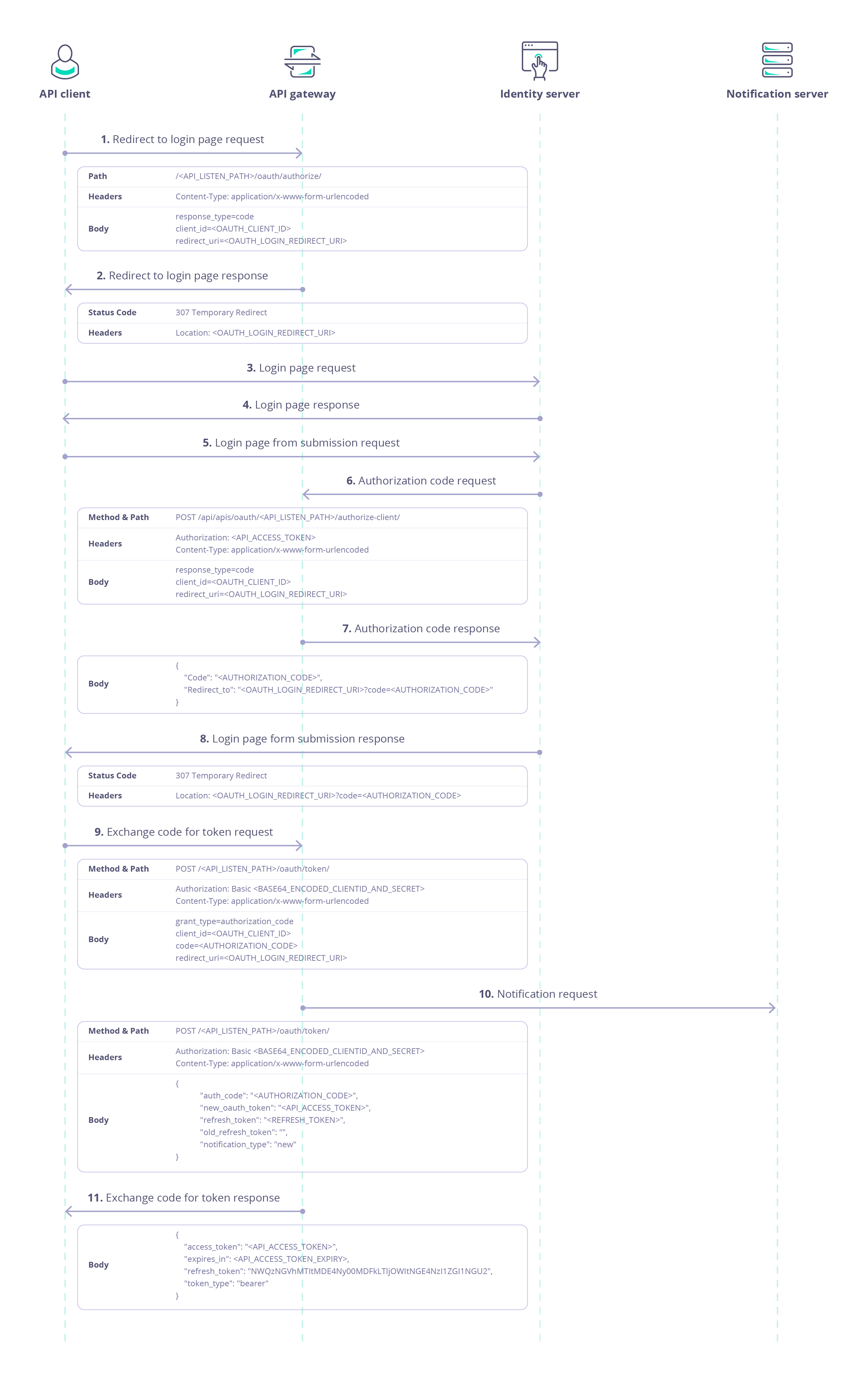
When using Tyk as the Authorization Server with the Authorization Code grant, the following steps are followed after [registering the Client App](/5.9/#client-app-registration):
**Explanatory notes:**
(1) *client* makes a request to the [authorization endpoint](/5.9/#authorization-request) on the *Auth Server*
(2) The *Auth Server* notes the request parameters and returns `HTTP 307 Temporary Redirect`, redirecting the user to an *Identity Server*
(5) the *user* must log in on the *Identity Server* and authorize the *client*
(6) when the *user* successfully authenticates and authorizes the request, the *Identity Server* must request an [Authorization Code](/5.9/#authorization-code-request) from the *Auth Server*
(8) The *Identity Server* provides the *Authorization Code* to the *client*
(9) The *client* exchanges the *Authorization Code* for an [Access Token](/5.9/#exchange-the-authorization-code-for-an-access-token) from the *Auth Server*
(10) The *client* uses the *Access Token* to authenticate with the protected API using the [Auth Token](/5.9/api-management/authentication/bearer-token) method
### Integration with Identity Server
Whilst Tyk can provide the *authorization server* functionality, issuing and managing access and authorization tokens, the *identity server* functions (authenticating users (resource owners) and allowing them to authorize client access) must be performed by a separate Identity Provider (IdP).
The identity server will need access to the Tyk Dashboard API to [obtain an Authorization Code](/5.9/api-management/dashboard-configuration#oauth20-authorization-code).
### Authorization Request
The authorization endpoint for an API proxy on Tyk is a special endpoint automatically added to the proxy definition, accessible from `POST //oauth/authorize`
The following parameters are required in a request to this endpoint:
| Parameter | Value |
| :-------------- | :------------------------- |
| `response_type` | `code` |
| `client_id` | client Id |
| `redirect_uri` | Redirect URI (URL encoded) |
For example:
```bash theme={null}
curl -X POST https://tyk.cloud.tyk.io/my-api/oauth/authorize/ \
-H "Content-Type: application/x-www-form-urlencoded" \
-d "response_type=code&client_id=my-client-id&redirect_uri=http%3A%2F%2Fidentityserver.com%2Fclient-redirect-uri"
```
This command, issued by the *client* is the first step of requesting access to the `/my-api` proxy deployed on a Tyk Gateway at `https://tyk.cloud.tyk.io`.
If the *client Id* (`my-client-id`) is valid, the response will be `HTTP 307 Temporary Redirect` with the redirect URI (`http://identityserver.com/client-redirect-uri`) in the `location` header.
### Authorization Code Request
The *Identity Server* requests an *Authorization Code* from the *Authentication Server*. Tyk's *authorization code* endpoint is hosted in the [Tyk Dashboard API](/5.9/api-management/dashboard-configuration#oauth20-authorization-code), accessible from `POST /api/apis/{api_id}/authorize-client`. The same `redirect_uri` as provided in the original request must be provided alongside the `client_id` as a security feature to verify the client identity.
This endpoint is protected using the Dashboard API secret assigned to the *Identity Server*, which must be provided in the `Authorization` header.
The following parameters are required in a `POST` request to this endpoint:
| Parameter | Value |
| :-------------- | :------------------------- |
| `response_type` | `code` |
| `client_id` | client Id |
| `redirect_uri` | Redirect URI (URL encoded) |
For example:
```bash theme={null}
curl -X POST \
https://admin.cloud.tyk.io/api/apis/oauth/{my-api-id}/authorize-client/ \
-H "Authorization: " \
-H "Content-Type: application/x-www-form-urlencoded" \
-d "response_type=code&client_id=my-client-id&redirect_uri=http%3A%2F%2Fidentityserver.com%2Fclient-redirect-uri"
```
This command, issued by the *identity server* requests an *authorization code* from the Tyk Dashboard at `https://admin.cloud.tyk.io` to access the proxy with API Id `my-api-id`.
If the *client Id* (`my-client-id`) is valid and `redirect_uri` matches the one provided in the initial request, an *authorization code* will be provided in the response payload, for example:
```json theme={null}
{
"code": "EaG1MK7LS8GbbwCAUwDo6Q",
"redirect_to": "http://example.com/client-redirect-uri?code=EaG1MK7LS8GbbwCAUwDo6Q"
}
```
### Exchange the Authorization Code for an Access Token
Once the *client* has the *authorization code*, it can exchange this for an *access token*, which is used to access the protected API. The token exchange endpoint for an API proxy on Tyk is a special endpoint automatically added to the proxy definition, accessible from `POST //oauth/token`.
This endpoint is protected using [Basic Authentication](/5.9/api-management/authentication/basic-authentication) where the username is the *client Id* and the password is the *client secret*.
The following parameters are required in the request:
| Parameter | Value |
| :------------- | :------------------------- |
| `grant_type` | `authorization_code` |
| `client_id` | client Id |
| `code` | Authorization Code |
| `redirect_uri` | Redirect URI (URL encoded) |
For example:
```bash theme={null}
curl -X POST \
https://tyk.cloud.tyk.io/my-api/oauth/token/ \
-H "Authorization: Basic bXktY2xpZW50LWlkOm15LWNsaWVudC1zZWNyZXQ=" \
-H "Content-Type: application/x-www-form-urlencoded" \
-d "grant_type=authorization_code&client_id=my-client-id&code=EaG1MK7LS8GbbwCAUwDo6Q&redirect_uri=http%3A%2F%2Fidentityserver.com%2Fclient-redirect-uri"
```
This command, issued by the *client* is the final step to obtain an access token for the `/my-api` proxy deployed on a Tyk Gateway at `https://tyk.cloud.tyk.io`. The basic auth key is the base64 encoded representation of `my-client-id:my-client-secret` The `client_id` and `redirect_uri` match those provided in the initial [authorization request](/5.9/#authorization-request). The `code` is the *authorization code* provided to the *identity server* in the [authorization code request](/5.9/#authorization-code-request).
The response payload contains:
* `access_token`: the token which can be used by the *client* to access the protected API
* `expires_in`: the expiration date/time of the access token
* `token_type`: set to `bearer` indicating that the access token should be provided in an [Auth Token](/5.9/api-management/authentication/bearer-token) request to the protected API
* `refresh_token`: \[optional] a special token that can be used in the [Refresh Token](/5.9/#using-refresh-tokens) flow
For example:
```json theme={null}
{
"access_token": "580defdbe1d21e0001c67e5c2a0a6c98ba8b4a059dc5825388501573",
"expires_in": 3600,
"refresh_token": "NWQzNGVhMTItMDE4Ny00MDFkLTljOWItNGE4NzI1ZGI1NGU2",
"token_type": "bearer"
}
```
## Using the Client Credentials Grant
When using Tyk as the *authorization server* with the Client Credentials grant, the *client* accesses resources on behalf of itself rather than on behalf of a *user*, so there is no user login/authorization step (as seen with [Authorization Code grant](/5.9/#using-the-authorization-code-grant)). This flow is ideal for server-to-server interactions.
After [registering the Client App](/5.9/#client-app-registration), the *client* simply requests an access token directly from the authorization server:
### Access Token Request
The *client* obtains an access token for an API proxy on Tyk from a special endpoint automatically added to the proxy definition, accessible from `POST //oauth/token`.
This endpoint is protected using Basic Authentication where the username is the client Id and the password is the client secret.
The following parameters are required in the request:
| Parameter | Value |
| :----------- | :------------------- |
| `grant_type` | `client_credentials` |
| `client_id` | client Id |
| `secret` | client secret |
For example:
```bash theme={null}
curl -X POST \
https://tyk.cloud.tyk.io/my-api/oauth/token/ \
-H "Authorization: Basic bXktY2xpZW50LWlkOm15LWNsaWVudC1zZWNyZXQ=" \
-H "Content-Type: application/x-www-form-urlencoded" \
-d "grant_type=client_credentials&client_id=my-client-id&client_secret=my-client-secret"
```
This command, issued by the *client* will obtain an access token for the `/my-api` proxy deployed on a Tyk Gateway at `https://tyk.cloud.tyk.io`. The basic auth key is the base64 encoded representation of `my-client-id:my-client-secret` The `client_id` and `client_secret` match those allocated by Tyk (the auth server) for the *client app*.
The response payload contains:
* `access_token`: the token which can be used by the *client* to access the protected API
* `expires_in`: the expiration date/time of the access token
* `token_type`: set to `bearer` indicating that the access token should be provided in an [Auth Token](/5.9/api-management/authentication/bearer-token) request to the protected API
For example:
```json theme={null}
{
"access_token": "580defdbe1d21e0001c67e5c2a0a6c98ba8b4a059dc5825388501573",
"expires_in": 3600,
"token_type": "bearer"
}
```
Note that Client Credentials grant does not produce a *refresh token*.
## Using the Resource Owner Password Grant
When using Tyk as the *authorization server* with the Resource Owner Password grant, the *client* provides the *user's* credentials when requesting an access token. There is no user login/authorization step (as seen with [Authorization Code grant](/5.9/#using-the-authorization-code-grant)). **This flow is not recommended and is provided only for integration with legacy clients.**
After [registering the Client App](/5.9/#client-app-registration), the *client* simply requests an access token directly from the authorization server:
### Access Token Request
The *client* obtains an access token for an API proxy on Tyk from a special endpoint automatically added to the proxy definition, accessible from `POST //oauth/token`.
This endpoint is protected using [Basic Authentication](/5.9/api-management/authentication/basic-authentication) where the username is the client Id and the password is the client secret.
The following parameters are required in the request:
| Parameter | Value |
| :----------- | :----------------------------------------------------- |
| `grant_type` | `password` |
| `client_id` | client Id |
| `username` | resource owner's username (`resource-owner-username`) |
| `password` | resource owner's password (`resource-owner-password`) |
For example:
```bash theme={null}
curl -X POST \
https://tyk.cloud.tyk.io/my-api/oauth/token/ \
-H "Authorization: Basic bXktY2xpZW50LWlkOm15LWNsaWVudC1zZWNyZXQ=" \
-H "Content-Type: application/x-www-form-urlencoded" \
-d "grant_type=password&client_id=my-client-id&username=resource-owner-username&password=resource-owner-password"
```
This command, issued by the *client* will obtain an access token for the `/my-api` proxy deployed on a Tyk Gateway at `https://tyk.cloud.tyk.io`. The basic auth key is the base64 encoded representation of `my-client-id:my-client-secret` The `client_id` and `client_secret` match those allocated by Tyk (the auth server) for the *client app*.
The response payload contains:
* `access_token`: the token which can be used by the *client* to access the protected API
* `expires_in`: the expiration date/time of the access token
* `token_type`: set to `bearer` indicating that the access token should be provided in an [Auth Token](/5.9/api-management/authentication/bearer-token) request to the protected API
* `refresh_token`: \[optional] a special token that can be used in the [Refresh Token](/5.9/#using-refresh-tokens) flow
For example:
```json theme={null}
{
"access_token": "580defdbe1d21e0001c67e5c2a0a6c98ba8b4a059dc5825388501573",
"expires_in": 3600,
"refresh_token": "YjdhOWFmZTAtNmExZi00ZTVlLWIwZTUtOGFhNmIwMWI3MzJj",
"token_type": "bearer"
}
```
## Configuring your API Proxy
As explained [previously](/5.9/api-management/client-authentication#how-does-tyk-implement-authentication-and-authorization), the AuthN/Z methods to be used to secure an API proxy are configured in the API definition. This permits granular application of the most appropriate method to each API deployed on Tyk Gateway.
When using Tyk as the Authorization Server, the API configuration can be applied using the Tyk Dashboard's API Designer UI, or by direct modification of the API definition. We will provide examples here when using Tyk OAS APIs. If you are using Tyk Classic APIs, the process is very similar, though there are differences in the location and specific labelling of options.
### Using the Tyk API Designer
1. Client Authentication is configured on the **Settings** screen within the API Designer, within the **Server** section. Ensure that you are in **Edit** mode, click on the button to **Enable** *Authentication* and then select **Tyk OAuth 2.0** from the drop down options:
2. Select the OAuth Grant Type that you wish to use for the API, if appropriate you can also select the *Refresh Token* grant so that the Auth Server (Tyk) will generate both access and refresh tokens.
3. Provide the requested configuration options depending on the selected Grant Type. Note that for *Authorization Code Grant*, **Redirect URL** should be the login page for your Identity Server and must be matched by the `redirect_uri` provided in the *client app* (and in the client's authentication request). The [Notifications](/5.9/#oauth-token-notifications) configuration can be provided for *Authorization Code* and *Password* grants.
4. Select **Save API** to apply the new settings.
### Using the API Definition
The OpenAPI Specification indicates the use of [OAuth 2.0 authentication](https://swagger.io/docs/specification/v3_0/authentication/oauth2/) in the `components.securitySchemes` object using the `type: oauth2`. Tyk supports the [authorizationCode](/5.9/api-management/authentication/oauth-2#using-the-authorization-code-grant), [clientCredentials](/5.9/#using-the-client-credentials-grant) and [password](/5.9/#using-the-resource-owner-password-grant) flows and implements Relative Endpoint URLs for the `authorizationUrl`, `tokenUrl` and `refreshUrl`.
```yaml theme={null}
components:
securitySchemes:
myAuthScheme:
type: oauth2
flows:
authorizationCode:
authorizationUrl: ...
tokenUrl: ...
scopes: ...
security:
- myAuthScheme: []
```
With this configuration provided by the OpenAPI description, in the Tyk Vendor Extension we need to enable authentication, to select this security scheme and to indicate where Tyk should look for the OAuth token. Usually the token will be provided in the `Authorization` header, but Tyk is configurable, via the Tyk Vendor Extension, to support custom header keys and credential passing via query parameter or cooke.
```yaml theme={null}
x-tyk-api-gateway:
server:
authentication:
enabled: true
securitySchemes:
myAuthScheme:
enabled: true
header:
enabled: true
name: Authorization
```
Note that URL query parameter keys and cookie names are case sensitive, whereas header names are case insensitive.
You can optionally [strip the user credentials](/5.9/api-management/client-authentication#managing-authorization-data) from the request prior to proxying to the upstream using the `authentication.stripAuthorizationData` field (Tyk Classic: `strip_auth_data`).
With the OAuth method selected, you'll need to configure Tyk to handle the specific configuration of OAuth grants that you will support. All of the OAuth specific configuration is performed within the [authentication.securitySchemes.oauth](/5.9/api-management/gateway-config-tyk-oas#oauth) object in the Tyk Vendor Extension.
For example:
```json {hl_lines=["7-11", "14-24", "35-55"],linenos=true, linenostart=1} theme={null}
{
"info": {
"title": "My OAuth API",
"version": "1.0.0"
},
"openapi": "3.0.3",
"security": [
{
"oauth": []
}
],
"paths": {},
"components": {
"securitySchemes": {
"oauth": {
"type": "oauth2",
"flows": {
"authorizationCode": {
"authorizationUrl": "/oauth/authorize",
"scopes": {},
"tokenUrl": "/oauth/token"
}
}
}
}
},
"x-tyk-api-gateway": {
"info": {
"name": "My OAuth API",
"state": {
"active": true,
}
},
"server": {
"authentication": {
"enabled": true,
"securitySchemes": {
"oauth": {
"enabled": true,
"allowedAuthorizeTypes": [
"code"
],
"authLoginRedirect": "http:///client-redirect-uri",
"header": {
"enabled": true,
"name": "Authorization"
},
"notifications": {
"onKeyChangeUrl": "http://notifyme.com",
"sharedSecret": "oauth-shared-secret"
},
"refreshToken": true
}
}
},
"listenPath": {
"strip": true,
"value": "/my-oauth-api/"
}
},
"upstream": {
"url": "http://httpbin.org/"
}
}
}
```
In this example:
* Client authentication has been enabled (line 44)
* The OpenAPI description declares the `oauth` security scheme that expects **Authorization Code** flow. Note that the `authorization URL` and `token URL` are declared relative to the API proxy listen path
* Authorization requests (made to `POST /my-oauth-api/oauth/authorize`) will be redirected to `http:///client-redirect-uri` where the *Resource Owner* should be prompted to authorize the request
* [Notifications](/5.9/#oauth-token-notifications) of token issuance will be sent to `http://notifyme.com` with the `X-Tyk-Shared-Secret` header set to `oauth-shared-secret`
The *auth server* (Tyk) will issue an *access token* and *refresh token* in exchange for a valid *authorization code*. Once the client has a valid access token, it will be expected in the `Authorization` header of the request.
The configuration above is a complete and valid Tyk OAS API Definition that you can import into Tyk and, with correctly configured and integrated *identity server* can be used to try out OAuth Client Authentication using Tyk as the Authorization Server.
### Using Tyk Classic APIs
As noted in the Tyk Classic API [documentation](/5.9/api-management/gateway-config-tyk-classic#configuring-authentication-for-tyk-classic-apis), you can select the Tyk as OAuth Server method using the `use_oauth2` option.
## Managing OAuth Tokens
### Using Refresh Tokens
The Refresh Token flow is used to obtain a new *access token* when the current token has expired or is about to expire. This allows clients to maintain a valid *access token* without requiring the user to go through the authentication and authorization process again.
*Refresh tokens* are single use and, when used, automatically invalidate the access token with which they were issued. This prevents accidental duplication of access tokens granting authorized access to a resource (API).
A *refresh token* can be issued by the *auth server* alongside the *access token* at the last stage of the OAuth flow for:
* Authentication Code grant
* Resource Owner Password grant
You configure whether Tyk should issue a refresh token within the [API proxy definition](/5.9/#configuring-your-api-proxy).
#### Refreshing an Access Token
If you have correctly configured your API, then Tyk will provide a *refresh token* with the *access token*. The *client* can subsequently exchange the *refresh token* for a new *access token* without having to re-authenticate, with another call to the `POST //oauth/token` endpoint as follows:
This endpoint is protected using Basic Authentication where the username is the *client Id* and the password is the *client secret*.
The following data is required in the request payload:
| Parameter | Value |
| :-------------- | :-------------------------------------------------------- |
| `grant_type` | `refresh_token` |
| `client_id` | client Id |
| `client_secret` | client secret |
| `refresh_token` | The refresh token provided with the original access token |
For example:
```bash theme={null}
curl -X POST \
https://tyk.cloud.tyk.io/my-api/oauth/token/ \
-H "Authorization: Basic bXktY2xpZW50LWlkOm15LWNsaWVudC1zZWNyZXQ=" \
-H "Content-Type: application/x-www-form-urlencoded" \
-d "grant_type=refresh_token&client_id=my-client-id&client_secret=my-client-secret&refresh_token=YjdhOWFmZTAtNmExZi00ZTVlLWIwZTUtOGFhNmIwMWI3MzJj"
```
This command, issued by the *client* will obtain a new access token for the `/my-api` proxy deployed on a Tyk Gateway at `https://tyk.cloud.tyk.io`. The basic auth key is the base64 encoded representation of `my-client-id:my-client-secret` The `client_id` and `client_secret` match those allocated by Tyk (the auth server) for the *client app*. The `refresh_token` is a valid *refresh token* previously issued to the *client*.
The response payload contains:
* `access_token`: a new *access token* which can be used by the *client* to access the protected API
* `expires_in`: the expiration date/time of the access token
* `token_type`: set to `bearer` indicating that the access token should be provided in an [Auth Token](/5.9/api-management/authentication/bearer-token) request to the protected API
* `refresh_token`: a new *refresh token* that can be used later to refresh the new *access token*
For example:
```json theme={null}
{
"access_token": "580defdbe1d21e0001c67e5c2a0a6c98ba8b4a059dc5825388501573",
"expires_in": 3600,
"refresh_token": "NWQzNGVhMTItMDE4Ny00MDFkLTljOWItNGE4NzI1ZGI1NGU2",
"token_type": "bearer"
}
```
### Revoking Access Tokens
OAuth access tokens have built in expiry, but if you need to [revoke](https://tools.ietf.org/html/rfc7009) a client's access to the API before this time, then you can use the option on the [OAuth Client management screen](/5.9/#using-the-tyk-dashboard-ui) screen in Tyk Dashboard UI or the Tyk Dashboard API to do so.
Using the **Tyk Dashboard API** you can revoke specific tokens (both access and refresh) or all tokens issued for a specific *client app* as follows:
* [retrieve a list of all tokens for a client app](/5.9/api-management/dashboard-configuration#retrieve-all-current-tokens-for-specified-oauth20-client)
* [revoke a single token](/5.9/api-management/dashboard-configuration#revoke-a-single-oauth-client-token)
* [revoke all tokens for a client app](/5.9/api-management/dashboard-configuration#revoke-all-oauth-client-tokens)
These endpoints are protected using the Dashboard API secret assigned to the user managing the tokens, which must be provided in the `Authorization` header.
In this example, we issue a request to the `/revoke` endpoint of the *auth server* via the Tyk Dashboard API to invalidate a specific *access token*:
```bash theme={null}
curl -X POST \
https://admin.cloud.tyk.io/api/apis/oauth/{CLIENT_ID}/revoke/ \
-H "Authorization: " \
-H "Content-Type: application/x-www-form-urlencoded" \
-d "token=580defdbe1d21e0001c67e5c2a0a6c98ba8b4a059dc5825388501573&token_type_hint=access_token&client_id=my-client-id&client_secret=my-client-secret"
```
Note that the `token_type_hint` must be set to `access_token` or `refresh_token` to match the type of `token` to be revoked.
### OAuth Token Notifications
When operating as an OAuth authorization server, Tyk can generate an event whenever it issues an *access token*. You can configure a dedicated webhook that will be triggered to notify the Resource Owner service of the occurrence of the event.
OAuth token notifications can only be configured when using **Authorization Code** or **Resource Owner Password Credentials** grants, not when using *Client Credentials* grant because this flow is primarily used for server-to-server communication, where the client acts on its own behalf without user-specific authorization changes.
You can configure the URL that the webhook will issue a `POST` request and a "shared secret" value that will be provided in a header (`X-Tyk-Shared-Secret`) used to secure the communication to the target application. The OAuth token notification webhook does not support any other authentication method.
The body of the webhook request will have this content:
```json theme={null}
{
"auth_code": "",
"new_oauth_token": "",
"refresh_token": "",
"old_refresh_token": "",
"notification_type": ""
}
```
where
* `auth_code` is the Authorization Code that has been issued
* `new_oauth_token` is the Access Token that has been issued
* `refresh_token` is the Refresh Token that has been issued
* `old_refresh_token` is the Refresh Token that has been consumed when refreshing an access token
* `notification_type` will indicate the cause of the event:
* `new`: a new access token has been issued
* `refresh`: a token has been refreshed and a new refresh token has been issued
#### Configuring Notifications in the Tyk API Designer
Client Authentication is configured on the **Settings** screen within the Tyk OAS API Designer, within the **Server** section. Ensuring that you are in **Edit** mode, go to the *Authentication* section where you should have selected **Tyk OAuth 2.0** from the drop down options.
Here you will see the *Notifications* section where you can configure:
* Notifications URL
* Notifications Shared Secret
Remember to select **Save API** to apply these settings to your API.
#### Configuring Notifications in the Tyk OAS API Definition
The example given [above](/5.9/#using-the-api-definition) includes the configuration necessary to issue notifications for token issuance (see lines 48-51 in the example).
 2. You will now be prompted to register a *client app* that will be granted access to the API configuring:
* redirect URI
* \[optional] [security policies](/5.9/#manage-client-access-policies) to be applied to access tokens generated for the client
* \[optional] [metadata](/5.9/api-management/policies#what-is-a-session-metadata) to be added to the access tokens
2. You will now be prompted to register a *client app* that will be granted access to the API configuring:
* redirect URI
* \[optional] [security policies](/5.9/#manage-client-access-policies) to be applied to access tokens generated for the client
* \[optional] [metadata](/5.9/api-management/policies#what-is-a-session-metadata) to be added to the access tokens
 **Note**: when using *Authorization Code grant* the *redirect uri* configured for the *client app* must be the same as that configured in the API definition.
Select the **Create** button to register the *client app*.
3. In the OAuth Client management screen, you will see a list of *client apps* registered with the API (as identified by their *client Id*). By clicking on the list item, or from the **Actions** menu's **Edit** option you will be taken to the *Edit Client app* screen, where you can see the *client secret* and make any modifications you need. There is also the option to [revoke tokens](/5.9/#revoking-access-tokens) that have been issued for this *client app*.
**Note**: when using *Authorization Code grant* the *redirect uri* configured for the *client app* must be the same as that configured in the API definition.
Select the **Create** button to register the *client app*.
3. In the OAuth Client management screen, you will see a list of *client apps* registered with the API (as identified by their *client Id*). By clicking on the list item, or from the **Actions** menu's **Edit** option you will be taken to the *Edit Client app* screen, where you can see the *client secret* and make any modifications you need. There is also the option to [revoke tokens](/5.9/#revoking-access-tokens) that have been issued for this *client app*.
 ### Using the Tyk Dashboard API
The Tyk Dashboard API contains several endpoints that are provided to manage *client apps*. *Client apps* are registered per-API, so each takes as an input the *API Id* for the API:
| Action | Endpoint | Reference |
| :----------------------------------- | :------------------------------------------------ | :------------------------------------------------------------------------------ |
| Register a new client app | `POST /api/apis/oauth/{{api-id}}` | [link](/5.9/api-management/dashboard-configuration#create-a-new-oauth20-client) |
| Get a list of registered client apps | `GET /api/apis/oauth/{{api-id}}` | [link](/5.9/api-management/dashboard-configuration#list-oauth-clients) |
| Get the details of a client app | `GET /api/apis/oauth/{{api-id}}/{{client_id}}` | [link](/5.9/api-management/dashboard-configuration#get-an-oauth20-client) |
| Delete a client app | `DELETE /api/apis/oauth/{{api-id}}/{{client_id}}` | [link](/5.9/api-management/dashboard-configuration#delete-oauth-client) |
## Using the Authorization Code Grant
When using Tyk as the Authorization Server with the Authorization Code grant, the following steps are followed after [registering the Client App](/5.9/#client-app-registration):
### Using the Tyk Dashboard API
The Tyk Dashboard API contains several endpoints that are provided to manage *client apps*. *Client apps* are registered per-API, so each takes as an input the *API Id* for the API:
| Action | Endpoint | Reference |
| :----------------------------------- | :------------------------------------------------ | :------------------------------------------------------------------------------ |
| Register a new client app | `POST /api/apis/oauth/{{api-id}}` | [link](/5.9/api-management/dashboard-configuration#create-a-new-oauth20-client) |
| Get a list of registered client apps | `GET /api/apis/oauth/{{api-id}}` | [link](/5.9/api-management/dashboard-configuration#list-oauth-clients) |
| Get the details of a client app | `GET /api/apis/oauth/{{api-id}}/{{client_id}}` | [link](/5.9/api-management/dashboard-configuration#get-an-oauth20-client) |
| Delete a client app | `DELETE /api/apis/oauth/{{api-id}}/{{client_id}}` | [link](/5.9/api-management/dashboard-configuration#delete-oauth-client) |
## Using the Authorization Code Grant
When using Tyk as the Authorization Server with the Authorization Code grant, the following steps are followed after [registering the Client App](/5.9/#client-app-registration):
 **Explanatory notes:**
(1) *client* makes a request to the [authorization endpoint](/5.9/#authorization-request) on the *Auth Server*
(2) The *Auth Server* notes the request parameters and returns `HTTP 307 Temporary Redirect`, redirecting the user to an *Identity Server*
(5) the *user* must log in on the *Identity Server* and authorize the *client*
(6) when the *user* successfully authenticates and authorizes the request, the *Identity Server* must request an [Authorization Code](/5.9/#authorization-code-request) from the *Auth Server*
(8) The *Identity Server* provides the *Authorization Code* to the *client*
(9) The *client* exchanges the *Authorization Code* for an [Access Token](/5.9/#exchange-the-authorization-code-for-an-access-token) from the *Auth Server*
(10) The *client* uses the *Access Token* to authenticate with the protected API using the [Auth Token](/5.9/api-management/authentication/bearer-token) method
### Integration with Identity Server
Whilst Tyk can provide the *authorization server* functionality, issuing and managing access and authorization tokens, the *identity server* functions (authenticating users (resource owners) and allowing them to authorize client access) must be performed by a separate Identity Provider (IdP).
The identity server will need access to the Tyk Dashboard API to [obtain an Authorization Code](/5.9/api-management/dashboard-configuration#oauth20-authorization-code).
### Authorization Request
The authorization endpoint for an API proxy on Tyk is a special endpoint automatically added to the proxy definition, accessible from `POST /
**Explanatory notes:**
(1) *client* makes a request to the [authorization endpoint](/5.9/#authorization-request) on the *Auth Server*
(2) The *Auth Server* notes the request parameters and returns `HTTP 307 Temporary Redirect`, redirecting the user to an *Identity Server*
(5) the *user* must log in on the *Identity Server* and authorize the *client*
(6) when the *user* successfully authenticates and authorizes the request, the *Identity Server* must request an [Authorization Code](/5.9/#authorization-code-request) from the *Auth Server*
(8) The *Identity Server* provides the *Authorization Code* to the *client*
(9) The *client* exchanges the *Authorization Code* for an [Access Token](/5.9/#exchange-the-authorization-code-for-an-access-token) from the *Auth Server*
(10) The *client* uses the *Access Token* to authenticate with the protected API using the [Auth Token](/5.9/api-management/authentication/bearer-token) method
### Integration with Identity Server
Whilst Tyk can provide the *authorization server* functionality, issuing and managing access and authorization tokens, the *identity server* functions (authenticating users (resource owners) and allowing them to authorize client access) must be performed by a separate Identity Provider (IdP).
The identity server will need access to the Tyk Dashboard API to [obtain an Authorization Code](/5.9/api-management/dashboard-configuration#oauth20-authorization-code).
### Authorization Request
The authorization endpoint for an API proxy on Tyk is a special endpoint automatically added to the proxy definition, accessible from `POST /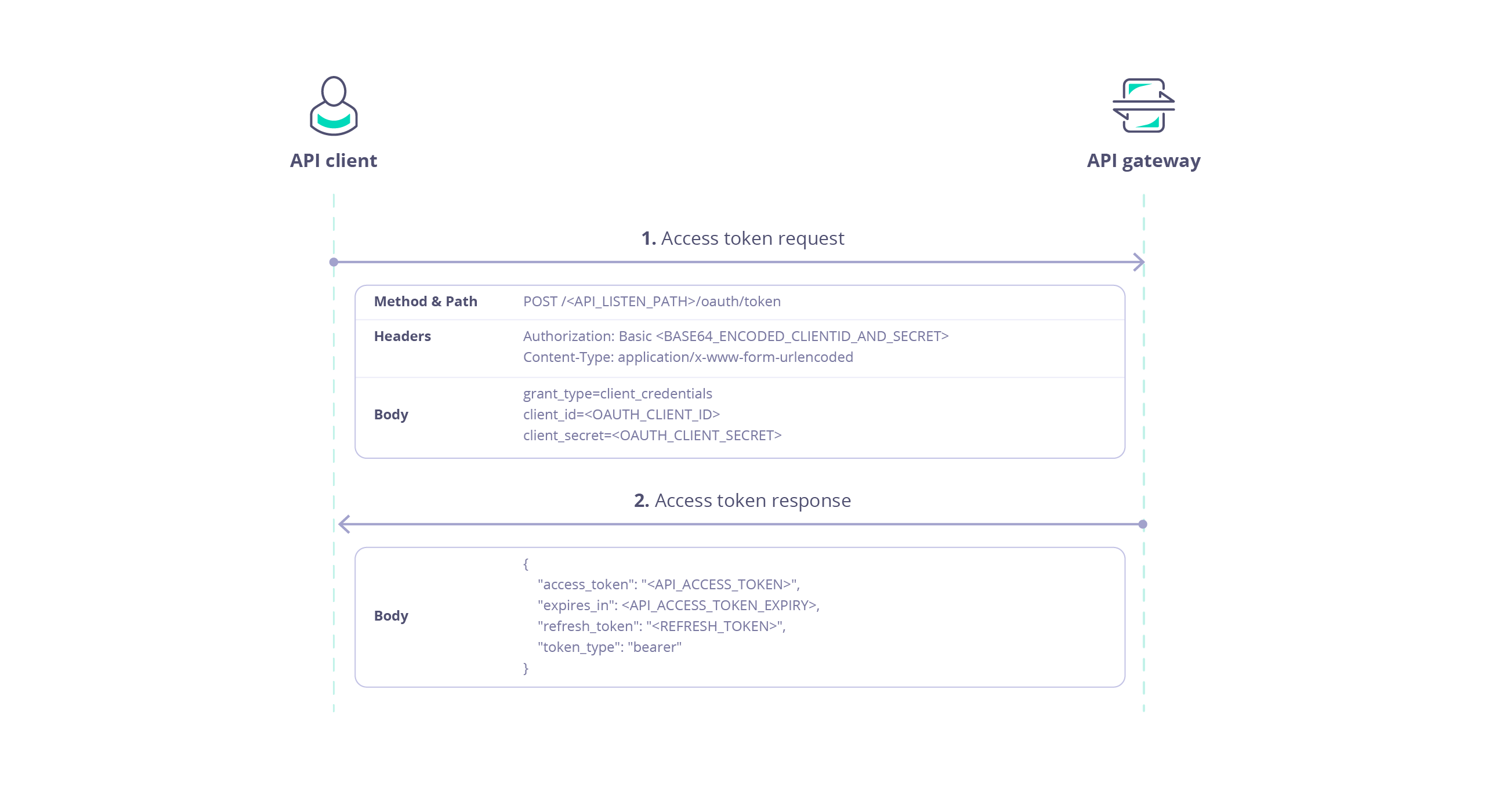 ### Access Token Request
The *client* obtains an access token for an API proxy on Tyk from a special endpoint automatically added to the proxy definition, accessible from `POST /
### Access Token Request
The *client* obtains an access token for an API proxy on Tyk from a special endpoint automatically added to the proxy definition, accessible from `POST /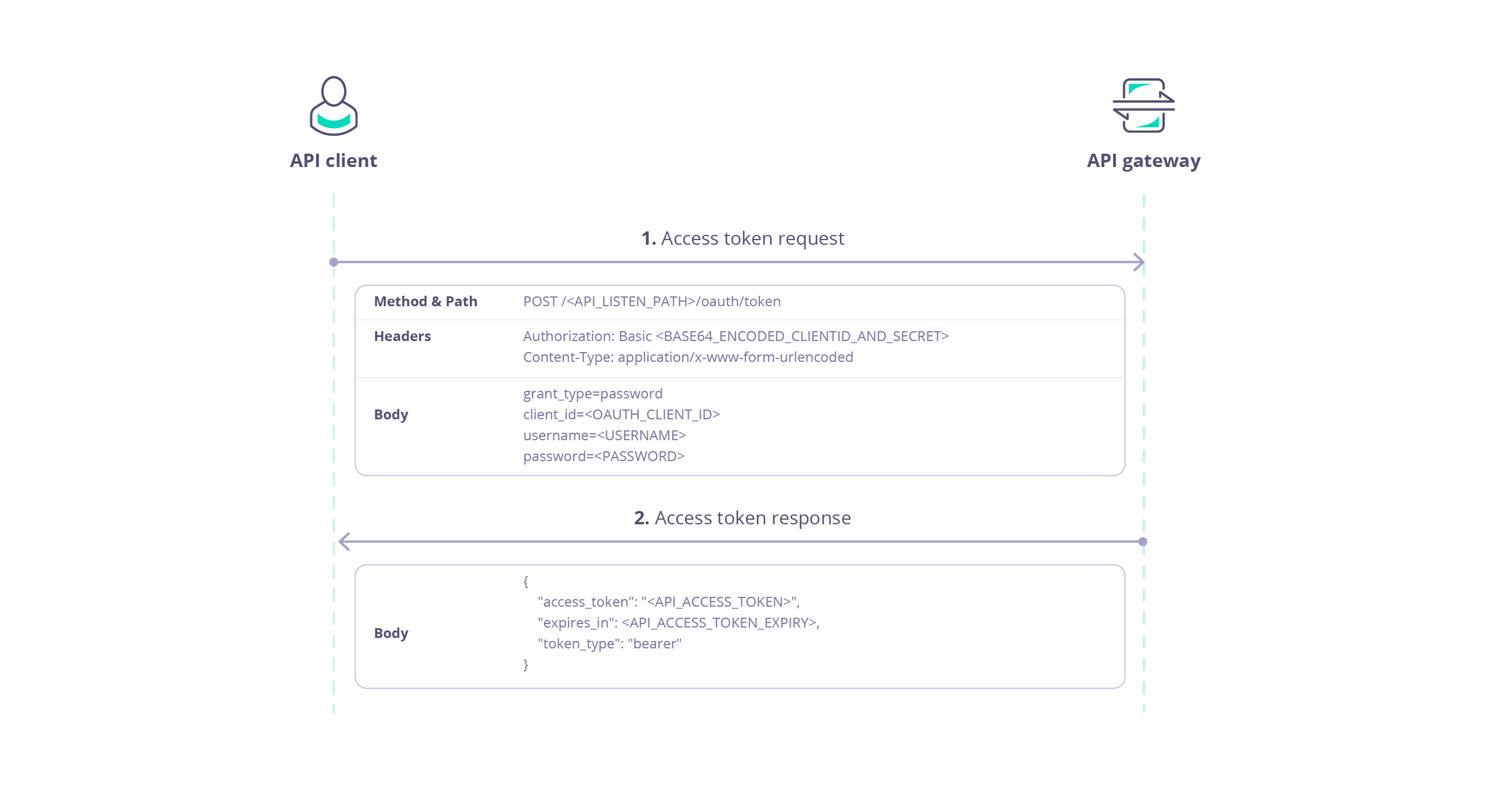 ### Access Token Request
The *client* obtains an access token for an API proxy on Tyk from a special endpoint automatically added to the proxy definition, accessible from `POST /
### Access Token Request
The *client* obtains an access token for an API proxy on Tyk from a special endpoint automatically added to the proxy definition, accessible from `POST /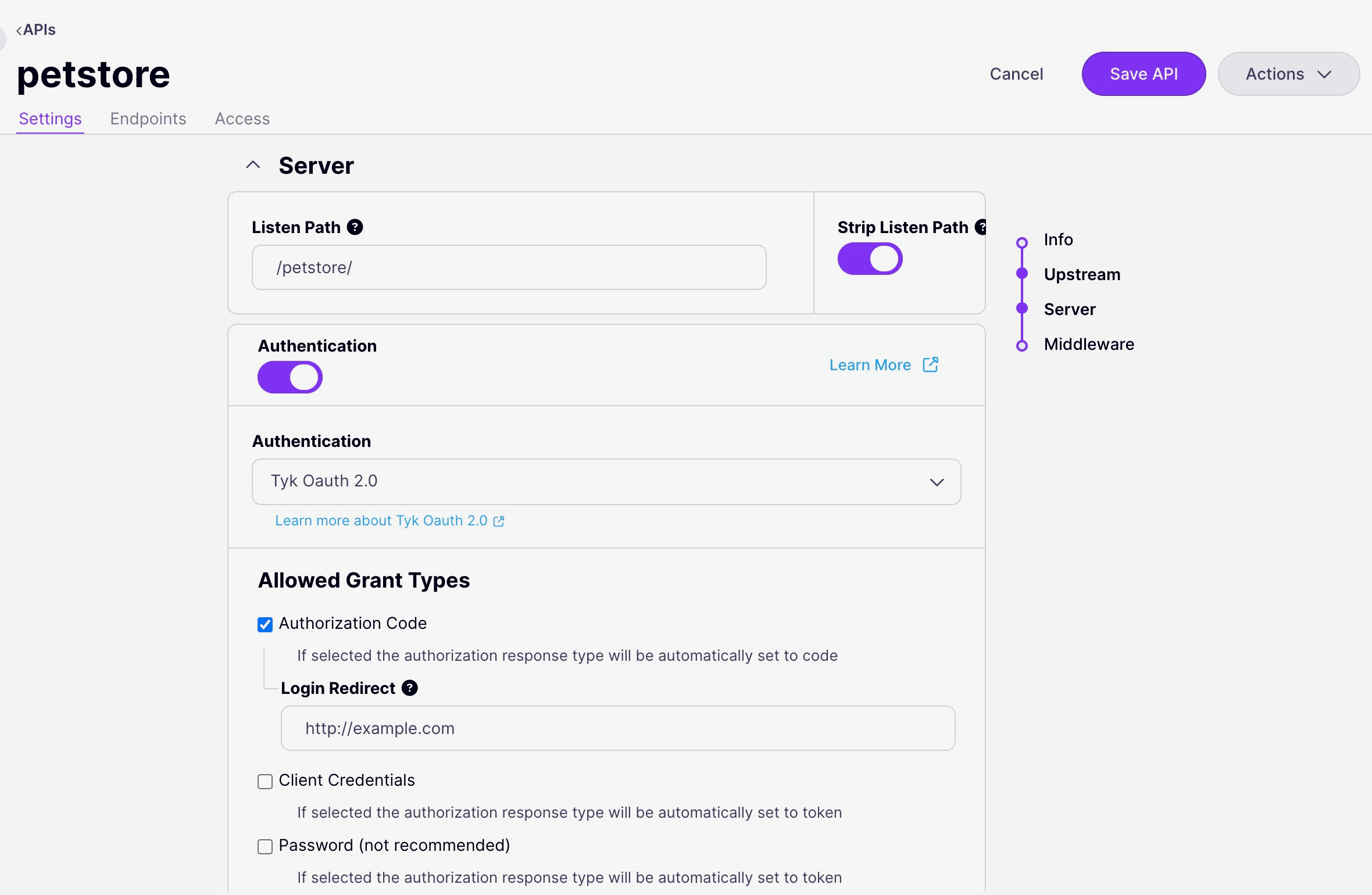 2. Select the OAuth Grant Type that you wish to use for the API, if appropriate you can also select the *Refresh Token* grant so that the Auth Server (Tyk) will generate both access and refresh tokens.
3. Provide the requested configuration options depending on the selected Grant Type. Note that for *Authorization Code Grant*, **Redirect URL** should be the login page for your Identity Server and must be matched by the `redirect_uri` provided in the *client app* (and in the client's authentication request). The [Notifications](/5.9/#oauth-token-notifications) configuration can be provided for *Authorization Code* and *Password* grants.
4. Select **Save API** to apply the new settings.
### Using the API Definition
The OpenAPI Specification indicates the use of [OAuth 2.0 authentication](https://swagger.io/docs/specification/v3_0/authentication/oauth2/) in the `components.securitySchemes` object using the `type: oauth2`. Tyk supports the [authorizationCode](/5.9/api-management/authentication/oauth-2#using-the-authorization-code-grant), [clientCredentials](/5.9/#using-the-client-credentials-grant) and [password](/5.9/#using-the-resource-owner-password-grant) flows and implements Relative Endpoint URLs for the `authorizationUrl`, `tokenUrl` and `refreshUrl`.
```yaml theme={null}
components:
securitySchemes:
myAuthScheme:
type: oauth2
flows:
authorizationCode:
authorizationUrl: ...
tokenUrl: ...
scopes: ...
security:
- myAuthScheme: []
```
With this configuration provided by the OpenAPI description, in the Tyk Vendor Extension we need to enable authentication, to select this security scheme and to indicate where Tyk should look for the OAuth token. Usually the token will be provided in the `Authorization` header, but Tyk is configurable, via the Tyk Vendor Extension, to support custom header keys and credential passing via query parameter or cooke.
```yaml theme={null}
x-tyk-api-gateway:
server:
authentication:
enabled: true
securitySchemes:
myAuthScheme:
enabled: true
header:
enabled: true
name: Authorization
```
Note that URL query parameter keys and cookie names are case sensitive, whereas header names are case insensitive.
You can optionally [strip the user credentials](/5.9/api-management/client-authentication#managing-authorization-data) from the request prior to proxying to the upstream using the `authentication.stripAuthorizationData` field (Tyk Classic: `strip_auth_data`).
With the OAuth method selected, you'll need to configure Tyk to handle the specific configuration of OAuth grants that you will support. All of the OAuth specific configuration is performed within the [authentication.securitySchemes.oauth](/5.9/api-management/gateway-config-tyk-oas#oauth) object in the Tyk Vendor Extension.
For example:
```json {hl_lines=["7-11", "14-24", "35-55"],linenos=true, linenostart=1} theme={null}
{
"info": {
"title": "My OAuth API",
"version": "1.0.0"
},
"openapi": "3.0.3",
"security": [
{
"oauth": []
}
],
"paths": {},
"components": {
"securitySchemes": {
"oauth": {
"type": "oauth2",
"flows": {
"authorizationCode": {
"authorizationUrl": "/oauth/authorize",
"scopes": {},
"tokenUrl": "/oauth/token"
}
}
}
}
},
"x-tyk-api-gateway": {
"info": {
"name": "My OAuth API",
"state": {
"active": true,
}
},
"server": {
"authentication": {
"enabled": true,
"securitySchemes": {
"oauth": {
"enabled": true,
"allowedAuthorizeTypes": [
"code"
],
"authLoginRedirect": "http://
2. Select the OAuth Grant Type that you wish to use for the API, if appropriate you can also select the *Refresh Token* grant so that the Auth Server (Tyk) will generate both access and refresh tokens.
3. Provide the requested configuration options depending on the selected Grant Type. Note that for *Authorization Code Grant*, **Redirect URL** should be the login page for your Identity Server and must be matched by the `redirect_uri` provided in the *client app* (and in the client's authentication request). The [Notifications](/5.9/#oauth-token-notifications) configuration can be provided for *Authorization Code* and *Password* grants.
4. Select **Save API** to apply the new settings.
### Using the API Definition
The OpenAPI Specification indicates the use of [OAuth 2.0 authentication](https://swagger.io/docs/specification/v3_0/authentication/oauth2/) in the `components.securitySchemes` object using the `type: oauth2`. Tyk supports the [authorizationCode](/5.9/api-management/authentication/oauth-2#using-the-authorization-code-grant), [clientCredentials](/5.9/#using-the-client-credentials-grant) and [password](/5.9/#using-the-resource-owner-password-grant) flows and implements Relative Endpoint URLs for the `authorizationUrl`, `tokenUrl` and `refreshUrl`.
```yaml theme={null}
components:
securitySchemes:
myAuthScheme:
type: oauth2
flows:
authorizationCode:
authorizationUrl: ...
tokenUrl: ...
scopes: ...
security:
- myAuthScheme: []
```
With this configuration provided by the OpenAPI description, in the Tyk Vendor Extension we need to enable authentication, to select this security scheme and to indicate where Tyk should look for the OAuth token. Usually the token will be provided in the `Authorization` header, but Tyk is configurable, via the Tyk Vendor Extension, to support custom header keys and credential passing via query parameter or cooke.
```yaml theme={null}
x-tyk-api-gateway:
server:
authentication:
enabled: true
securitySchemes:
myAuthScheme:
enabled: true
header:
enabled: true
name: Authorization
```
Note that URL query parameter keys and cookie names are case sensitive, whereas header names are case insensitive.
You can optionally [strip the user credentials](/5.9/api-management/client-authentication#managing-authorization-data) from the request prior to proxying to the upstream using the `authentication.stripAuthorizationData` field (Tyk Classic: `strip_auth_data`).
With the OAuth method selected, you'll need to configure Tyk to handle the specific configuration of OAuth grants that you will support. All of the OAuth specific configuration is performed within the [authentication.securitySchemes.oauth](/5.9/api-management/gateway-config-tyk-oas#oauth) object in the Tyk Vendor Extension.
For example:
```json {hl_lines=["7-11", "14-24", "35-55"],linenos=true, linenostart=1} theme={null}
{
"info": {
"title": "My OAuth API",
"version": "1.0.0"
},
"openapi": "3.0.3",
"security": [
{
"oauth": []
}
],
"paths": {},
"components": {
"securitySchemes": {
"oauth": {
"type": "oauth2",
"flows": {
"authorizationCode": {
"authorizationUrl": "/oauth/authorize",
"scopes": {},
"tokenUrl": "/oauth/token"
}
}
}
}
},
"x-tyk-api-gateway": {
"info": {
"name": "My OAuth API",
"state": {
"active": true,
}
},
"server": {
"authentication": {
"enabled": true,
"securitySchemes": {
"oauth": {
"enabled": true,
"allowedAuthorizeTypes": [
"code"
],
"authLoginRedirect": "http://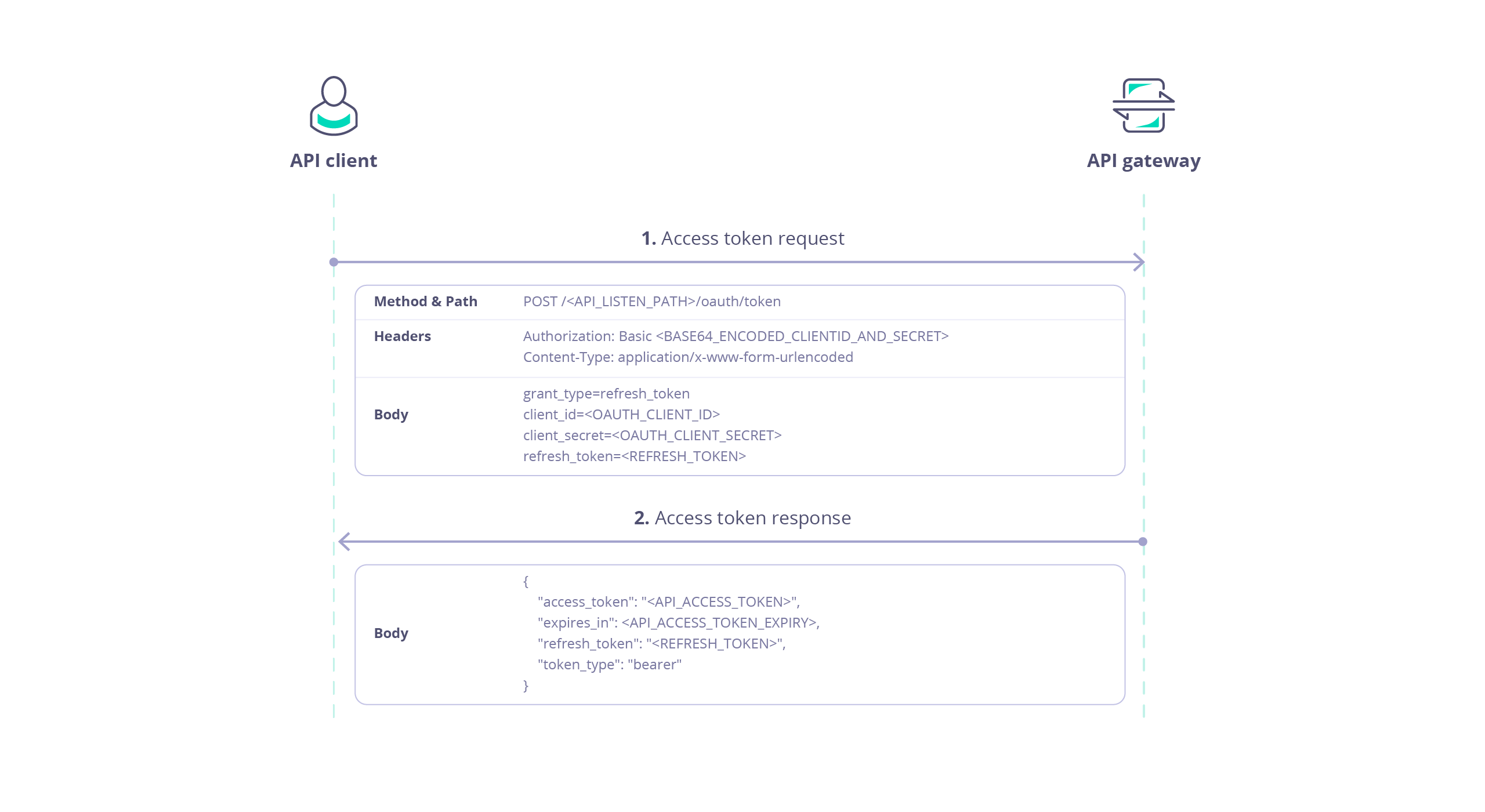 This endpoint is protected using Basic Authentication where the username is the *client Id* and the password is the *client secret*.
The following data is required in the request payload:
| Parameter | Value |
| :-------------- | :-------------------------------------------------------- |
| `grant_type` | `refresh_token` |
| `client_id` | client Id |
| `client_secret` | client secret |
| `refresh_token` | The refresh token provided with the original access token |
For example:
```bash theme={null}
curl -X POST \
https://tyk.cloud.tyk.io/my-api/oauth/token/ \
-H "Authorization: Basic bXktY2xpZW50LWlkOm15LWNsaWVudC1zZWNyZXQ=" \
-H "Content-Type: application/x-www-form-urlencoded" \
-d "grant_type=refresh_token&client_id=my-client-id&client_secret=my-client-secret&refresh_token=YjdhOWFmZTAtNmExZi00ZTVlLWIwZTUtOGFhNmIwMWI3MzJj"
```
This command, issued by the *client* will obtain a new access token for the `/my-api` proxy deployed on a Tyk Gateway at `https://tyk.cloud.tyk.io`. The basic auth key is the base64 encoded representation of `my-client-id:my-client-secret` The `client_id` and `client_secret` match those allocated by Tyk (the auth server) for the *client app*. The `refresh_token` is a valid *refresh token* previously issued to the *client*.
The response payload contains:
* `access_token`: a new *access token* which can be used by the *client* to access the protected API
* `expires_in`: the expiration date/time of the access token
* `token_type`: set to `bearer` indicating that the access token should be provided in an [Auth Token](/5.9/api-management/authentication/bearer-token) request to the protected API
* `refresh_token`: a new *refresh token* that can be used later to refresh the new *access token*
For example:
```json theme={null}
{
"access_token": "580defdbe1d21e0001c67e5c2a0a6c98ba8b4a059dc5825388501573",
"expires_in": 3600,
"refresh_token": "NWQzNGVhMTItMDE4Ny00MDFkLTljOWItNGE4NzI1ZGI1NGU2",
"token_type": "bearer"
}
```
### Revoking Access Tokens
OAuth access tokens have built in expiry, but if you need to [revoke](https://tools.ietf.org/html/rfc7009) a client's access to the API before this time, then you can use the option on the [OAuth Client management screen](/5.9/#using-the-tyk-dashboard-ui) screen in Tyk Dashboard UI or the Tyk Dashboard API to do so.
Using the **Tyk Dashboard API** you can revoke specific tokens (both access and refresh) or all tokens issued for a specific *client app* as follows:
* [retrieve a list of all tokens for a client app](/5.9/api-management/dashboard-configuration#retrieve-all-current-tokens-for-specified-oauth20-client)
* [revoke a single token](/5.9/api-management/dashboard-configuration#revoke-a-single-oauth-client-token)
* [revoke all tokens for a client app](/5.9/api-management/dashboard-configuration#revoke-all-oauth-client-tokens)
These endpoints are protected using the Dashboard API secret assigned to the user managing the tokens, which must be provided in the `Authorization` header.
In this example, we issue a request to the `/revoke` endpoint of the *auth server* via the Tyk Dashboard API to invalidate a specific *access token*:
```bash theme={null}
curl -X POST \
https://admin.cloud.tyk.io/api/apis/oauth/{CLIENT_ID}/revoke/ \
-H "Authorization:
This endpoint is protected using Basic Authentication where the username is the *client Id* and the password is the *client secret*.
The following data is required in the request payload:
| Parameter | Value |
| :-------------- | :-------------------------------------------------------- |
| `grant_type` | `refresh_token` |
| `client_id` | client Id |
| `client_secret` | client secret |
| `refresh_token` | The refresh token provided with the original access token |
For example:
```bash theme={null}
curl -X POST \
https://tyk.cloud.tyk.io/my-api/oauth/token/ \
-H "Authorization: Basic bXktY2xpZW50LWlkOm15LWNsaWVudC1zZWNyZXQ=" \
-H "Content-Type: application/x-www-form-urlencoded" \
-d "grant_type=refresh_token&client_id=my-client-id&client_secret=my-client-secret&refresh_token=YjdhOWFmZTAtNmExZi00ZTVlLWIwZTUtOGFhNmIwMWI3MzJj"
```
This command, issued by the *client* will obtain a new access token for the `/my-api` proxy deployed on a Tyk Gateway at `https://tyk.cloud.tyk.io`. The basic auth key is the base64 encoded representation of `my-client-id:my-client-secret` The `client_id` and `client_secret` match those allocated by Tyk (the auth server) for the *client app*. The `refresh_token` is a valid *refresh token* previously issued to the *client*.
The response payload contains:
* `access_token`: a new *access token* which can be used by the *client* to access the protected API
* `expires_in`: the expiration date/time of the access token
* `token_type`: set to `bearer` indicating that the access token should be provided in an [Auth Token](/5.9/api-management/authentication/bearer-token) request to the protected API
* `refresh_token`: a new *refresh token* that can be used later to refresh the new *access token*
For example:
```json theme={null}
{
"access_token": "580defdbe1d21e0001c67e5c2a0a6c98ba8b4a059dc5825388501573",
"expires_in": 3600,
"refresh_token": "NWQzNGVhMTItMDE4Ny00MDFkLTljOWItNGE4NzI1ZGI1NGU2",
"token_type": "bearer"
}
```
### Revoking Access Tokens
OAuth access tokens have built in expiry, but if you need to [revoke](https://tools.ietf.org/html/rfc7009) a client's access to the API before this time, then you can use the option on the [OAuth Client management screen](/5.9/#using-the-tyk-dashboard-ui) screen in Tyk Dashboard UI or the Tyk Dashboard API to do so.
Using the **Tyk Dashboard API** you can revoke specific tokens (both access and refresh) or all tokens issued for a specific *client app* as follows:
* [retrieve a list of all tokens for a client app](/5.9/api-management/dashboard-configuration#retrieve-all-current-tokens-for-specified-oauth20-client)
* [revoke a single token](/5.9/api-management/dashboard-configuration#revoke-a-single-oauth-client-token)
* [revoke all tokens for a client app](/5.9/api-management/dashboard-configuration#revoke-all-oauth-client-tokens)
These endpoints are protected using the Dashboard API secret assigned to the user managing the tokens, which must be provided in the `Authorization` header.
In this example, we issue a request to the `/revoke` endpoint of the *auth server* via the Tyk Dashboard API to invalidate a specific *access token*:
```bash theme={null}
curl -X POST \
https://admin.cloud.tyk.io/api/apis/oauth/{CLIENT_ID}/revoke/ \
-H "Authorization: