> ## Documentation Index
> Fetch the complete documentation index at: https://tyk.io/docs/llms.txt
> Use this file to discover all available pages before exploring further.
# Configure Provisioning Request
> How to configure Provisioning Request in Tyk developer portal
## Approve or Reject Provisioning Request
When an external developer is looking to access a specific API(s) as a part of an API Product, they will request access via the public facing portal.
**Prerequisites**
* A Tyk Enterprise portal installation
* A portal admin app login
* Log in to a provisioning request sent by an external API consumer
**Step by step instructions**
1. Log in to the portal admin app
2. Navigate to **Provisioning Requests**
3. Select which request you want to approve
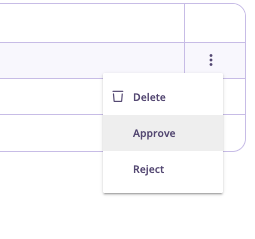
4. Click the **more** symbol and select either **approve** or **reject**
 ## Configure Auto Approval
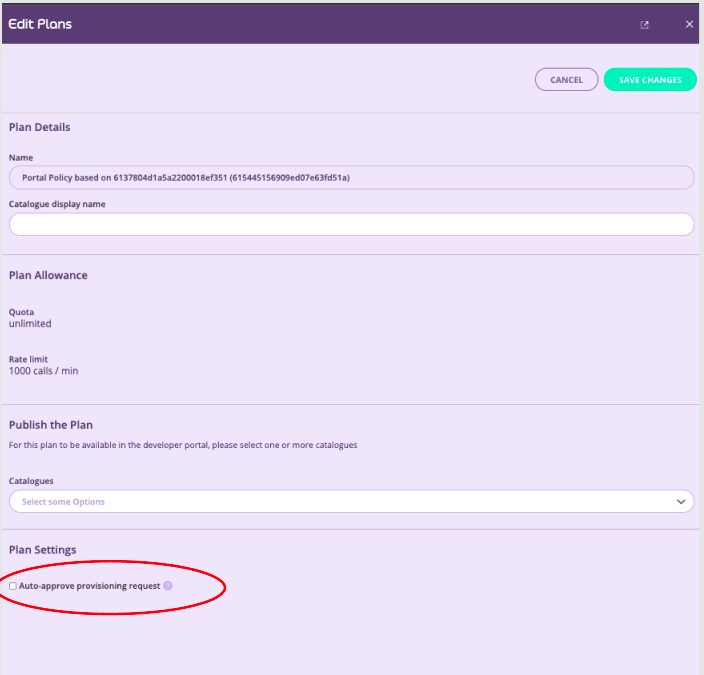
You can auto approve provisioning requests. From the **Plans** section of the admin app, edit a plan and select **Auto-approve provisioning request** from the **Plan Settings**. By default this setting is not selected, requiring manual approval of each request. Click **Save Changes** to enable this setting.
## Configure Auto Approval
You can auto approve provisioning requests. From the **Plans** section of the admin app, edit a plan and select **Auto-approve provisioning request** from the **Plan Settings**. By default this setting is not selected, requiring manual approval of each request. Click **Save Changes** to enable this setting.