> ## Documentation Index
> Fetch the complete documentation index at: https://tyk.io/docs/llms.txt
> Use this file to discover all available pages before exploring further.
# Tyk Self Managed
> This page serves as a comprehensive guide to migrating workloads to Tyk Self Managed
## What is Tyk Self-Managed
Tyk Self-Managed allows you to easily install our Full Lifecycle API Management solution in your own infrastructure. There is no calling home, and there are no usage limits. You have full control.
## What Does Tyk Self-Managed Include?
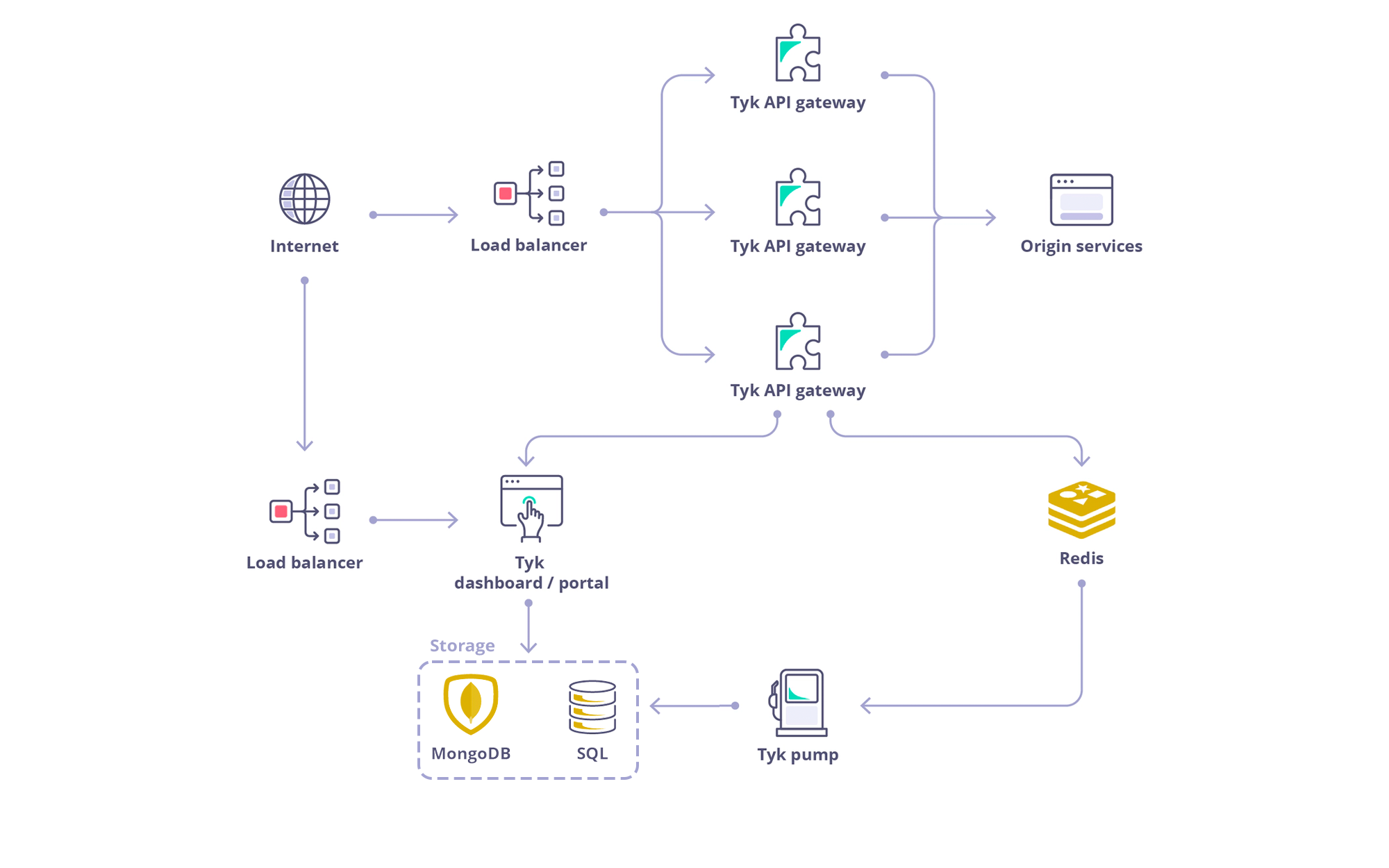
The full Tyk Self-Managed system consists of:
* [Tyk Gateway](/5.8/tyk-oss-gateway): Tyk Gateway is provided ‘Batteries-included’, with no feature lockout. It is an open source enterprise API Gateway, supporting REST, GraphQL, TCP and gRPC protocols, that protects, secures and processes your APIs.
* [Tyk Dashboard](/5.8/api-management/dashboard-configuration): The management Dashboard and integration API manage a cluster of Tyk Gateways and also show analytics and features of the [Developer portal](/5.8/portal/overview/intro). The Dashboard also provides the API Developer Portal, a customizable developer portal for your API documentation, developer auto-enrollment and usage tracking.
* [Tyk Pump](/5.8/api-management/tyk-pump): Tyk Pump handles moving analytics data between your gateways and your Dashboard (amongst other data sinks). The Tyk Pump is an open source analytics purger that moves the data generated by your Tyk nodes to any back-end.
* [Tyk Identity Broker](/5.8/api-management/external-service-integration#what-is-tyk-identity-broker-tib) (Optional): Tyk Identify Broker handles integrations with third-party IDP's. It (TIB) is a component providing a bridge between various Identity Management Systems such as LDAP, Social OAuth (e.g. GPlus, Twitter, GitHub) or Basic Authentication providers, to your Tyk installation.
* [Tyk Multi-Data Center Bridge](/5.8/api-management/mdcb) (Optional, add-on): Tyk Multi-Data Center Bridge allows for the configuration of a Tyk ecosystem that spans many data centers and clouds. It also (MDCB) acts as a broker between Tyk Gateway Instances that are isolated from one another and typically have their own Redis DB.
 ## Tyk Self Managed Pricing
Refer the [pricing page](https://tyk.io/pricing/)
## Tyk Dependencies and Database Support
### MongoDB / PostgreSQL
Tyk Dashboard requires a persistent datastore for its operations. By default MongoDB is used. From Tyk v4.0, we also support PostgreSQL. See [Database Options](/5.8/api-management/dashboard-configuration#supported-database) for a list of versions and drop-in replacements we support.
### Redis
Tyk Gateway requires Redis for its operations. Here is the list of supported versions:
**Supported Versions**
* Tyk 5.3 supports Redis 6.2.x, 7.0.x, and 7.2.x
* Tyk 5.2.x and earlier supports Redis 6.0.x and Redis 6.2.x only.
Visit the [Gateway page](/5.8/tyk-oss-gateway) for more info.
### Tyk Gateway Architecture
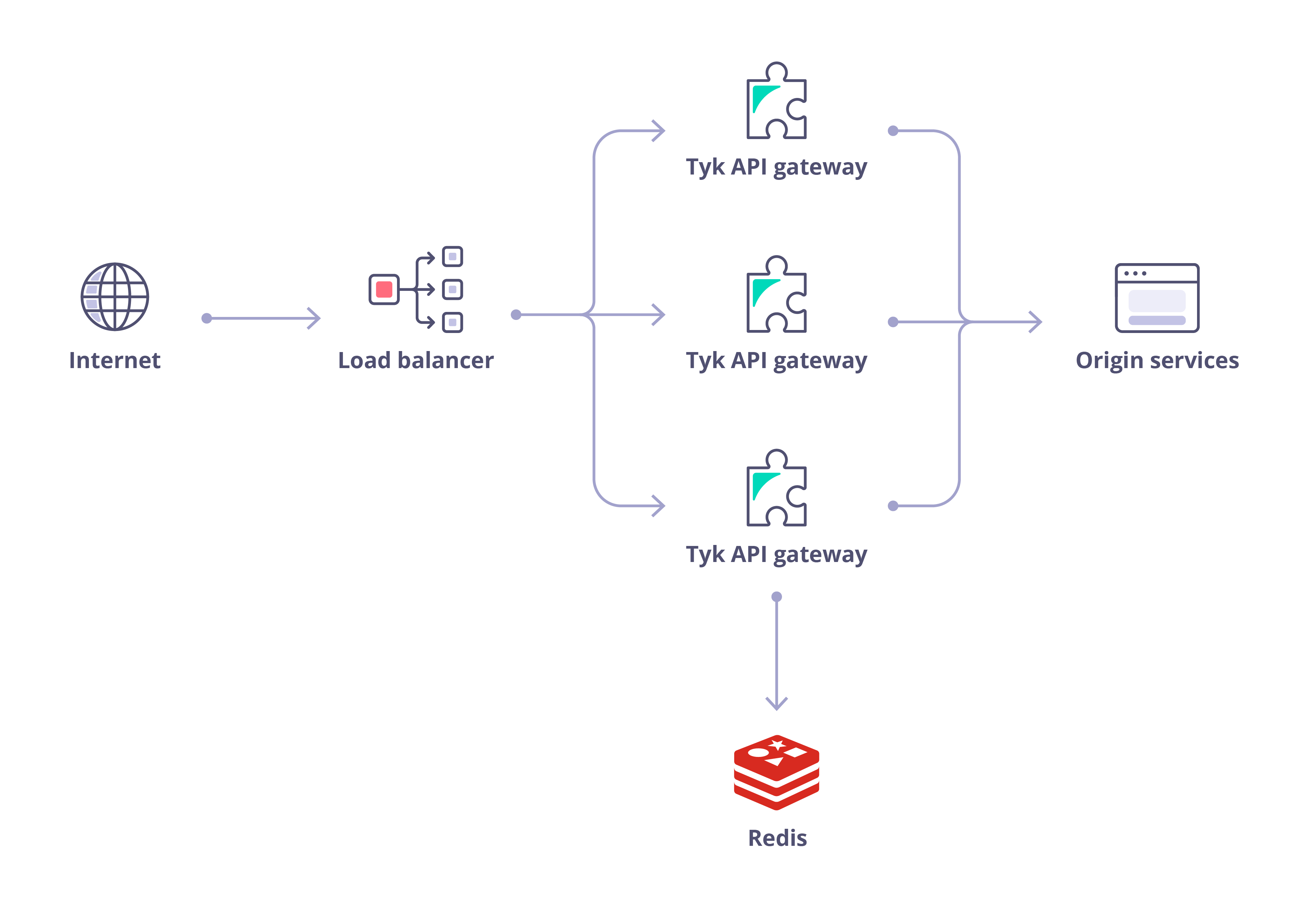
The Tyk Gateway can run completely independently, requiring only a Redis database, and can scale horizontally:
## Tyk Self Managed Pricing
Refer the [pricing page](https://tyk.io/pricing/)
## Tyk Dependencies and Database Support
### MongoDB / PostgreSQL
Tyk Dashboard requires a persistent datastore for its operations. By default MongoDB is used. From Tyk v4.0, we also support PostgreSQL. See [Database Options](/5.8/api-management/dashboard-configuration#supported-database) for a list of versions and drop-in replacements we support.
### Redis
Tyk Gateway requires Redis for its operations. Here is the list of supported versions:
**Supported Versions**
* Tyk 5.3 supports Redis 6.2.x, 7.0.x, and 7.2.x
* Tyk 5.2.x and earlier supports Redis 6.0.x and Redis 6.2.x only.
Visit the [Gateway page](/5.8/tyk-oss-gateway) for more info.
### Tyk Gateway Architecture
The Tyk Gateway can run completely independently, requiring only a Redis database, and can scale horizontally:
 ### Init Systems
Tyk packages support SysVinit Linux init systems, [systemd](https://www.freedesktop.org/wiki/Software/systemd/) and Upstart (both 0.6.x and 1.x, \[FYI - Ubuntu stopped supporting Upstart] upstart([https://askubuntu.com/questions/1024120/will-ubuntu-18-04-lts-still-support-upstart-or-do-we-have-to-change-to-systemd](https://askubuntu.com/questions/1024120/will-ubuntu-18-04-lts-still-support-upstart-or-do-we-have-to-change-to-systemd))).
During package installation only one is chosen depending on the operating system support, e.g.:
* CentOS 6, RHEL 6, Amazon Linux ship with Upstart 0.6.x
* Ubuntu 14.04, Debian Jessie with Upstart 1.x
* CentOS 7, RHEL 7, Ubuntu 16.04, Debian Stretch are running with systemd
* Certain older distros may only provide SysVinit but all of them typically provide compatibility with its scripts
Note that any init scripts of your choosing can be used instead of automatically detected ones by copying them from the `install/inits` directory inside the package directory.
This init system variance implies there are different ways to manage the services and collect service logs.
#### Upstart
For Upstart, service management can be performed through the `initctl` or a set of `start`, `stop`, `restart` and `status` commands. Upstart 1.x also works with the `service` command.
#### systemd
For systemd, either `systemctl` or `service` commands may be utilized.
The `service` command can usually be used with SysVinit scripts, as well as invoking them directly.
* Upstart 0.6.x and SysVinit: log files are located in `/var/logs` for every respective service, e.g. `/var/logs/tyk-gateway.stderr` and `/var/logs/tyk-gateway.stdout`
* Upstart 1.x: by default everything is stored in `/var/logs/upstart` directory, e.g. `/var/logs/upstart/tyk-gateway.log`
* systemd utilizes its own logging mechanism called journald, which is usable via the `journalctl` command, e.g. `journalctl -u tyk-gateway`
Please consult with respective init system documentation for more details on how to use and configure it.
### Init Systems
Tyk packages support SysVinit Linux init systems, [systemd](https://www.freedesktop.org/wiki/Software/systemd/) and Upstart (both 0.6.x and 1.x, \[FYI - Ubuntu stopped supporting Upstart] upstart([https://askubuntu.com/questions/1024120/will-ubuntu-18-04-lts-still-support-upstart-or-do-we-have-to-change-to-systemd](https://askubuntu.com/questions/1024120/will-ubuntu-18-04-lts-still-support-upstart-or-do-we-have-to-change-to-systemd))).
During package installation only one is chosen depending on the operating system support, e.g.:
* CentOS 6, RHEL 6, Amazon Linux ship with Upstart 0.6.x
* Ubuntu 14.04, Debian Jessie with Upstart 1.x
* CentOS 7, RHEL 7, Ubuntu 16.04, Debian Stretch are running with systemd
* Certain older distros may only provide SysVinit but all of them typically provide compatibility with its scripts
Note that any init scripts of your choosing can be used instead of automatically detected ones by copying them from the `install/inits` directory inside the package directory.
This init system variance implies there are different ways to manage the services and collect service logs.
#### Upstart
For Upstart, service management can be performed through the `initctl` or a set of `start`, `stop`, `restart` and `status` commands. Upstart 1.x also works with the `service` command.
#### systemd
For systemd, either `systemctl` or `service` commands may be utilized.
The `service` command can usually be used with SysVinit scripts, as well as invoking them directly.
* Upstart 0.6.x and SysVinit: log files are located in `/var/logs` for every respective service, e.g. `/var/logs/tyk-gateway.stderr` and `/var/logs/tyk-gateway.stdout`
* Upstart 1.x: by default everything is stored in `/var/logs/upstart` directory, e.g. `/var/logs/upstart/tyk-gateway.log`
* systemd utilizes its own logging mechanism called journald, which is usable via the `journalctl` command, e.g. `journalctl -u tyk-gateway`
Please consult with respective init system documentation for more details on how to use and configure it.