> ## Documentation Index
> Fetch the complete documentation index at: https://tyk.io/docs/llms.txt
> Use this file to discover all available pages before exploring further.
# URL Rewriting
> How to rewrite URL in Tyk
## Overview
URL rewriting in Tyk is a powerful feature that enables the modification of incoming API request paths to match the expected endpoint format of your backend services. This process is accomplished by using regular expressions (regexes) to identify and capture specific segments of the request URL, which can then be rearranged or augmented to construct the desired endpoint URL.
The flexibility of Tyk's URL rewriting mechanism allows for conditional rewrites based on the presence of certain parameters within the request, ensuring that the rewrite logic is applied only when appropriate. This allows for granular redirection of requests, for example to direct certain users to a beta service while others are sent to the production version.
By employing URL rewriting, Tyk facilitates seamless communication between client applications and backend services, ensuring that API requests are efficiently routed and processed. This feature is instrumental in maintaining a clean and organized API architecture, while also providing the adaptability required to handle evolving backend systems.
### Use Cases
#### Internal Looping
API requests can be redirected to other endpoints or APIs deployed on Tyk using the URL rewrite functionality. This allows requests to be redirected to internal APIs that are not directly exposed on the Gateway (for example to reduce complexity of the external interface or to perform additional processing or security checks before reaching sensitive upstream APIs). We refer to this practice as [looping](/5.8/advanced-configuration/transform-traffic/looping). By performing the looping internally using the URL rewrite middleware, latency is reduced because the redirection is handled entirely within Tyk with no unnecessary external network calls.
#### Improved Performance Optimization
You can use URL rewriting to route traffic intelligently to particular API endpoints, distributing the processing burden evenly across your system and minimizing load on your backend resources. This reduces the chances of overwhelming individual nodes and ensures consistent performance levels throughout the entire infrastructure.
#### Enhanced Scalability
As your API portfolio scales, you may find yourself dealing with an ever-increasing array of unique URLs. Instead of creating separate endpoints for every permutation, URL rewriting allows you to consolidate those disparate routes into a centralised location. This simplification makes it easier to monitor and manage the overall system, ultimately enhancing its resilience and stability.
#### Better User Experiences
With URL rewriting, you can design cleaner, more straightforward navigation structures for your APIs, making it simpler for consumers to locate and interact with the information they require.
### Working
Tyk's URL rewrite middleware uses the concepts of [triggers](/5.8/transform-traffic/url-rewriting#url-rewrite-triggers) and [rules](/5.8/transform-traffic/url-rewriting#url-rewrite-rules). These can be combined in flexible ways to create sophisticated logic to direct requests made to a single endpoint to various upstream services (or other APIs internally exposed within Tyk).
A rule is a simple pattern match - you identify the location of a `key` and define a regex (called the `pattern`). Tyk will examine the API request and compare the `key` with the `pattern`. If there is a match, the rule will pass.
A trigger combines one or more rules with a target (or `rewriteTo`) URL. If the logical combination of the rules results in a pass outcome, then the trigger is considered to have been fired and the target URL for the request will be rewritten.
More detail on URL Rewrite triggers and rules can be found [here](/5.8/transform-traffic/url-rewriting#url-rewriting-overview).
## URL Rewrite middleware
Tyk's [URL rewrite](/5.8/transform-traffic/url-rewriting#url-rewrite-middleware) middleware uses the concepts of [triggers](/5.8/#url-rewrite-triggers) and [rules](/5.8/#url-rewrite-rules) to determine if the request (target) URL should be modified. These can be combined in flexible ways to create sophisticated logic to direct requests made to a single endpoint to various upstream services (or other APIs internally exposed within Tyk Gateway through [looping](/5.8/advanced-configuration/transform-traffic/looping)).
### URL rewrite rules
The URL rewrite middleware compares a [key](/5.8/#key) with a [pattern](/5.8/#pattern) to determine if there is a match; the rules define the location of the key and the structure of the pattern.
#### Key
The key value is the content of a field in some element of the request; as such each key has a location (which element of the request) and a name (the name of the field within that element). For example, to obtain the key value `book` from the request `GET /asset?type=book` the key location would be `query parameter` and the key name would be `type`.
Keys can be located in the following elements of the request:
* request path / path parameter (i.e. components of the path itself)
* request header
* query parameter
* request body (payload)
* session metadata
* request context (for example to match by IP address or JWT scope)
Note that there is no key name when using the request body location, as the entire body (payload) of the request is used as the key value.
When using the request header location, the key name is the normalized form of the header name: with capitalization and use of `-` as separator. For example, the header name`customer_identifier` would be identified in a rule via the key name `Customer-Identifier`.
When using the request path location, you can use wildcards in the key name (which is the URL path) - for example `/asset/{type}/author/`. The URL rewrite middleware will treat the wildcard as a `(.*)` regex so that any value matches. The wildcard value itself will be ignored, is not extracted from the key, and is not available for use in constructing the [rewrite path](/5.8/#creating-the-rewrite-path).
#### Pattern
The pattern takes the form of a regular expression (regex) against which the key value will be compared.
This pattern can be a static regex or can contain dynamic variables:
* [context variables](/5.8/api-management/traffic-transformation/request-context-variables), extracted from the request at the start of the middleware chain, can be injected into the pattern regex using the `$tyk_context.` namespace
* [session metadata](/5.8/api-management/policies#what-is-a-session-metadata), from the Tyk Session Object linked to the request, can be injected into the pattern regex using the `$tyk_meta.METADATA_KEY` namespace
Percent-encoded (URL-encoded) characters can be used in the pattern regex when the key is the request path or path parameter
* if the middleware is called with percent-encoded characters in the key, matching will first be attempted using the raw URL as provided
* if there is no match, the percent-encoded characters will be replaced with their non-encoded form (e.g. `%2D` -> `-`) and checked again
Tyk does not check all combinations of encoded and decoded characters in the same string (so `my-test%2Durl` will only be checked as `my-test%2Durl` and `my-test-url`, it will not be checked against `my%2Dtest%2Durl` or `my%2Dtest-url`).
### URL rewrite triggers
There are two types of trigger in the URL rewriter: basic and advanced.
#### Basic trigger
The basic trigger has a single rule for which the key location is always the request path. For the simplest case of URL rewriting, you can simply configure the `pattern` regex and `rewriteTo` target URL for this basic trigger.
#### Advanced triggers
One or more advanced triggers can be configured alongside the basic trigger. These are processed in the order that they are defined in the API Definition. When using the API Designer in Tyk Dashboard, advanced triggers are automatically numbered in the order they are created and will be processed in numberical order.
Advanced triggers can have multiple rules that can be combined using a logical AND or OR operation, such that either `all` the rules must pass or `any` rule must pass for the trigger to fire.
Within advanced triggers, but not the basic trigger, each rule can be negated such that the rule is considered to have passed if the pattern does not match the key value.
Once an advanced trigger has fired, the middleware will apply its `rewriteTo` target and stop processing any more triggers.
The basic trigger acts as a control switch for any advanced triggers that are defined for the middleware: if the basic trigger is not fired then no rewriting will take place even if an advanced trigger would have fired based on the request.
### Creating the rewrite path
Each trigger (basic or advanced) defines a `rewriteTo` target.
* if just the basic trigger is fired, then the request path (target URL) will be rewritten with the `rewriteTo` value defined in that trigger.
* if both an advanced trigger and the basic trigger are fired, then the request path will be written with the `rewriteTo` value defined for the advanced trigger.
* if the basic trigger does not fire then no rewriting will take place.
#### Dynamic data in the rewrite path
The `rewriteTo` values can be simple URLs or they can be dynamically created using data available to the middleware:
* context variables, which can be referenced using the `$tyk_context.` namespace
* values from the successful [pattern match](/5.8/#using-data-from-the-key-in-the-rewrite-path)
* values from [key-value (KV) storage](/5.8/#using-data-from-kv-storage-in-the-rewrite-path)
You can redirect to a new hostname but to do so you must provide the full URL, for example:
```
https://my-new-target-host.com/library/service?value1=books&value2=author
```
#### Using data from the key in the rewrite path
For the basic trigger, each capture group you specify in the pattern regex is designated with an index (`n`), and can then be referenced in the `rewriteTo` target using the format `$n`.
* for example, if the `pattern` to be matched is `"(\w+)/(\w+)"` then the regex will attempt to capture two word groups. The first of these will be given index 1 and the second will be index 2. You can reference these in the `rewriteTo` target using `$1` and `$2` such as: `"my/service?value1=$1&value2=$2"`
With advanced triggers, the key values used in the pattern matches for each rule are stored as context variables which can then be referenced in the `rewriteTo` target as for other context variables.
The format for these advanced trigger context variables is: `$tyk_context.trigger-{n}-{name}-{i}` where `n` is the trigger index, `name` is the key name and `i` is the index of that match (since query strings and headers can be arrays of values).
* for example, if the first trigger fires based on a rule where the key is the query parameter "type", a context variable with the name `trigger-0-type-0` will be created and can be referenced in the `rewriteTo` target
#### Using data from KV storage in the rewrite path
You can retrieve a value from KV storage by including a reference in the [appropriate notation](/5.8/tyk-configuration-reference/kv-store#transformation-middleware) for the KV location where the key-value pair is stored.
If you use a value retrieved from [Consul](/5.8/tyk-configuration-reference/kv-store#using-consul-as-a-kv-store) or [Vault](/5.8/tyk-configuration-reference/kv-store#using-vault-as-a-kv-store), this must be the last part in the `rewriteTo` URL.
For example, say you have a key named `userName` with value `jo` in my Consul KV store:
* if you configure `rewriteTo` as `/my-api/users/$secret_consul.userName` this will redirect calls to `/my-api/users/jo`
* if, however, you configure my `rewriteTo` as `/my-api/users/$secret_consul.userName/contract` this will not redirect to `my-api/jo/contract` but instead the KV lookup will fail, as Tyk will check for a key named `userName/contract` in Consul (returning null), so the URL rewrite middleware will redirect to `/my-api/users`
This limitation does not apply to KV accessed from the other [supported KV stores](/5.8/tyk-configuration-reference/kv-store) (environment variable or Gateway `secrets`).
## Using Tyk OAS
Tyk's [URL rewriter](/5.8/transform-traffic/url-rewriting#url-rewrite-middleware) uses the concepts of triggers and rules to determine if the request (target) URL should be modified. These can be combined in flexible ways to create sophisticated logic to direct requests made to a single endpoint to various upstream services (or other APIs internally exposed within Tyk).
URL rewrite triggers and rules are explained in detail [here](/5.8/transform-traffic/url-rewriting#url-rewriting-overview).
When working with Tyk OAS APIs the rules and triggers are configured in the [Tyk OAS API Definition](/5.8/api-management/gateway-config-tyk-oas#operation); this can be done manually within the `.json` file or from the API Designer in the Tyk Dashboard.
If you're using the legacy Tyk Classic APIs, then check out [this](/5.8/transform-traffic/url-rewriting#url-rewriting-using-classic) page.
### API Definition
The design of the Tyk OAS API Definition takes advantage of the `operationId` defined in the OpenAPI Document that declares both the path and method for which the middleware should be added. Endpoint `paths` entries (and the associated `operationId`) can contain wildcards in the form of any string bracketed by curly braces, for example `/status/{code}`. These wildcards are so they are human readable and do not translate to variable names. Under the hood, a wildcard translates to the “match everything” regex of: `(.*)`.
The URl rewrite middleware can be added to the `operations` section of the Tyk OAS Extension (`x-tyk-api-gateway`) in your Tyk OAS API Definition for the appropriate `operationId` (as configured in the `paths` section of your OpenAPI Document).
#### Using the basic trigger
For the **basic trigger**, you only need to enable the middleware (set `enabled:true`) and then configure the `pattern` and the `rewriteTo` (target) URL. The design of the Tyk OAS API Definition takes advantage of the `operationID` defined in the OpenAPI Document that declares both the path and method required by the basic trigger.
```json {hl_lines=["39-43"],linenos=true, linenostart=1} theme={null}
{
"info": {
"title": "example-url-rewrite",
"version": "1.0.0"
},
"openapi": "3.0.3",
"servers": [
{
"url": "http://localhost:8181/example-url-rewrite/"
}
],
"security": [],
"paths": {
"/json": {
"get": {
"operationId": "jsonget",
"responses": {
"200": {
"description": ""
}
}
}
}
},
"components": {
"securitySchemes": {}
},
"x-tyk-api-gateway": {
"info": {
"name": "example-url-rewrite",
"state": {
"active": true,
"internal": false
}
},
"middleware": {
"operations": {
"jsonget": {
"urlRewrite": {
"enabled": true,
"pattern": "/(\\w+)/(\\w+)",
"rewriteTo": "anything?value1=$1&value2=$2"
}
}
}
},
"server": {
"listenPath": {
"strip": true,
"value": "/example-url-rewrite/"
}
},
"upstream": {
"url": "http://httpbin.org/"
}
}
}
```
In this example the basic trigger has been configured to match the path for a request to the `GET /json` endpoint against the regex `/(\w+)/(\w+)`. This is looking for two word groups in the path (after the API listen path) which, if found, will store the first string in context variable `$1` and the second in `$2`. The request (target) URL will then be rewritten to `anything?value1=$1&value2=$2`.
If you send a request to `GET http://localhost:8181/example-url-rewrite/json/hello`
```bash {hl_lines=["1"],linenos=true, linenostart=1} theme={null}
GET /example-url-rewrite/json/hello HTTP/1.1
User-Agent: PostmanRuntime/7.36.3
Accept: */*
Postman-Token: 1a84a792-f0c4-4c40-932a-795485cdd252
Host: localhost:8181
Accept-Encoding: gzip, deflate, br
Connection: keep-alive
```
The URL rewrite middleware will match the pattern:
`/json/hello` -> `/(\w+)/(\w+)` -> `$1` will take the value `json` and `$2` will take the value `hello`
It will then rewrite the target URL to `/anything?value1=json&value2=hello` and `httpbin.org` will respond with:
```bash {hl_lines=["13-16", "31"],linenos=true, linenostart=1} theme={null}
HTTP/1.1 200 OK
Access-Control-Allow-Credentials: true
Access-Control-Allow-Origin: *
Content-Length: 536
Content-Type: application/json
Date: Mon, 18 Mar 2024 17:37:40 GMT
Server: gunicorn/19.9.0
X-Ratelimit-Limit: 0
X-Ratelimit-Remaining: 0
X-Ratelimit-Reset: 0
{
"args": {
"value1": "json",
"value2": "hello"
},
"data": "",
"files": {},
"form": {},
"headers": {
"Accept": "*/*",
"Accept-Encoding": "gzip, deflate, br",
"Host": "httpbin.org",
"Postman-Token": "1a84a792-f0c4-4c40-932a-795485cdd252",
"User-Agent": "PostmanRuntime/7.36.3",
"X-Amzn-Trace-Id": "Root=1-65f87be4-18c50d554886f46f6b73d42b"
},
"json": null,
"method": "GET",
"origin": "::1, 85.9.213.196",
"url": "http://httpbin.org/anything?value1=json&value2=hello"
}
```
The configuration above is a complete and valid Tyk OAS API Definition that you can import into Tyk to try out the URL rewrite middleware.
#### Using advanced triggers
You can add **advanced triggers** to your URL rewriter configuration by adding the `triggers` element within the `urlRewrite` middleware configuration for the operation.
The `triggers` element is an array, with one entry per advanced trigger. For each of those triggers you configure:
* `condition` to set the logical condition to be applied to the rules (`any` or `all`)
* `rules` a list of rules for the trigger
* `rewriteTo` the address to which the (target) URL should be rewritten if the trigger fires
The rules are defined using this format:
```yaml theme={null}
{
"in": key_location,
"name": key_name,
"pattern": pattern,
"negate": true/false //set to true to trigger if pattern does not match
}
```
Key locations are encoded as follows:
* `header` - request header parameter
* `query` - query parameter
* `path` - path parameter (i.e. components of the path itself)
* `sessionMetadata` - session metadata
* `requestBody`- request body
* `requestContext`- request context
For example:
```json {hl_lines=["31-67"],linenos=true, linenostart=1} theme={null}
{
"info": {
"title": "example-url-rewrite2",
"version": "1.0.0"
},
"openapi": "3.0.3",
"paths": {
"/json": {
"get": {
"operationId": "jsonget",
"responses": {
"200": {
"description": ""
}
}
}
}
},
"components": {},
"x-tyk-api-gateway": {
"info": {
"name": "example-url-rewrite2",
"state": {
"active": true,
"internal": false
}
},
"middleware": {
"operations": {
"jsonget": {
"urlRewrite": {
"enabled": true,
"pattern": "/(\\w+)/(\\w+)",
"rewriteTo": "anything?value1=$1&value2=$2",
"triggers": [
{
"condition": "all",
"rewriteTo": "anything?value1=$1&query=$tyk_context.trigger-0-numBytes-0",
"rules": [
{
"in": "query",
"pattern": "[0-9]+",
"negate": false,
"name": "numBytes"
},
{
"in": "header",
"pattern": "true",
"negate": true,
"name": "x-bytes"
}
]
},
{
"condition": "any",
"rewriteTo": "bytes/$tyk_context.trigger-1-numBytes-0",
"rules": [
{
"in": "query",
"pattern": "[0-9]+",
"negate": false,
"name": "numBytes"
}
]
}
]
}
}
}
},
"server": {
"listenPath": {
"strip": true,
"value": "/example-url-rewrite2/"
}
},
"upstream": {
"url": "http://httpbin.org/"
}
}
}
```
In this example, the basic trigger is configured as before, but two advanced triggers have been added.
The first advanced trigger will fire if the request has this configuration:
* query parameter `numBytes` is provided with a numeric value, AND
* header parameter `x-bytes` is *not* set to `true` (note that `negate` is set to `true` in this rule)
Such a request will be redirected to `/anything` passing two query parameters
* `value1` with the first string matched in the basic trigger (i.e. `json`)
* `query` with the value provided in the `numBytes` query parameter
The second advanced trigger will fire if the first doesn't and if this condition is met:
* query parameter `numBytes` is provided with a numeric value
Such a request will be redirected to `/bytes/{numBytes}`, which will return `numBytes` random bytes from `httpbin.org`.
If neither advanced trigger fires, then the basic trigger will redirect the request to `/anything?value1=json&value2=hello` as before.
The configuration above is a complete and valid Tyk OAS API Definition that you can import into Tyk to try out the URL rewrite middleware.
### API Designer
Adding and configuring the URL rewrite feature to your API endpoints is easy when using the API Designer in the Tyk Dashboard, simply follow these steps:
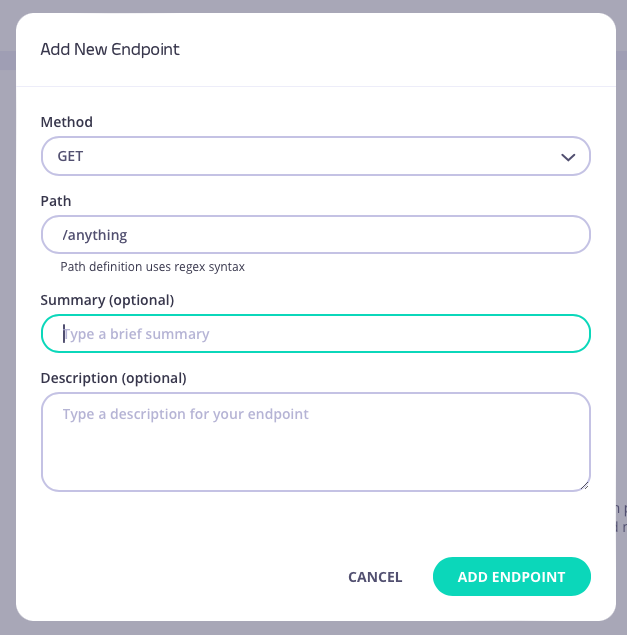
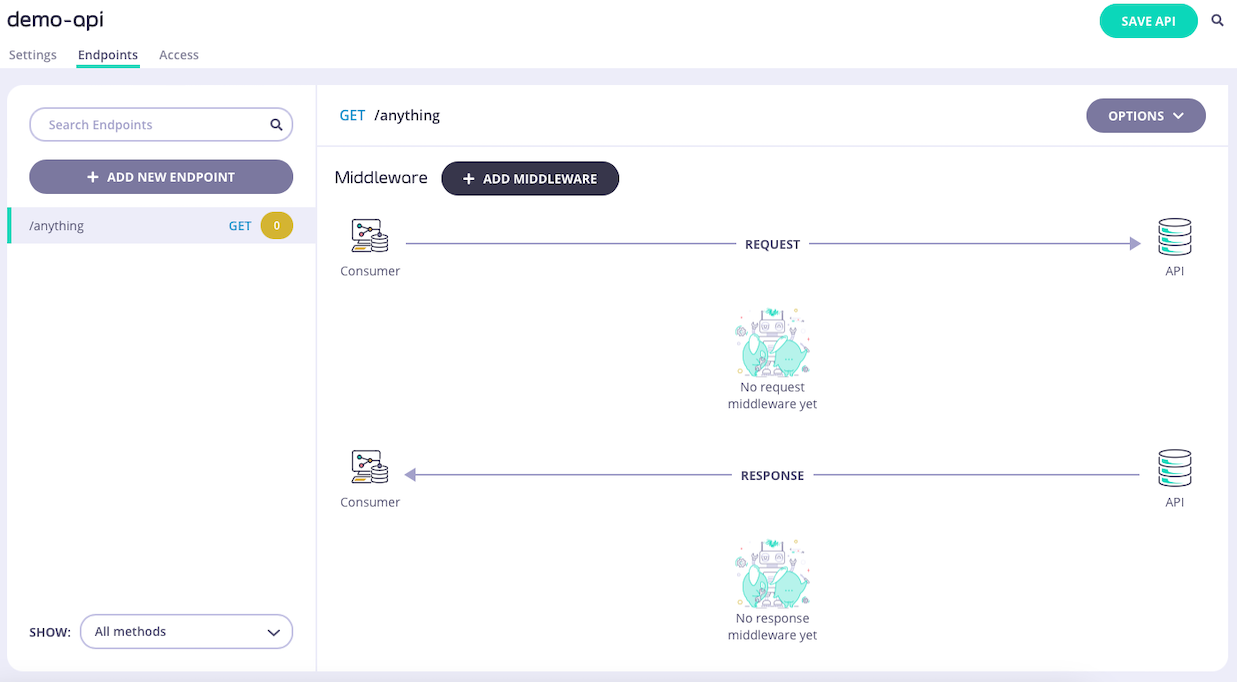
1. **Add an endpoint**
From the **API Designer** add an endpoint that matches the path and method to which you want to apply the middleware.

 2. **Select the URL Rewrite middleware**
Select **ADD MIDDLEWARE** and choose the **URL Rewrite** middleware from the *Add Middleware* screen.
2. **Select the URL Rewrite middleware**
Select **ADD MIDDLEWARE** and choose the **URL Rewrite** middleware from the *Add Middleware* screen.
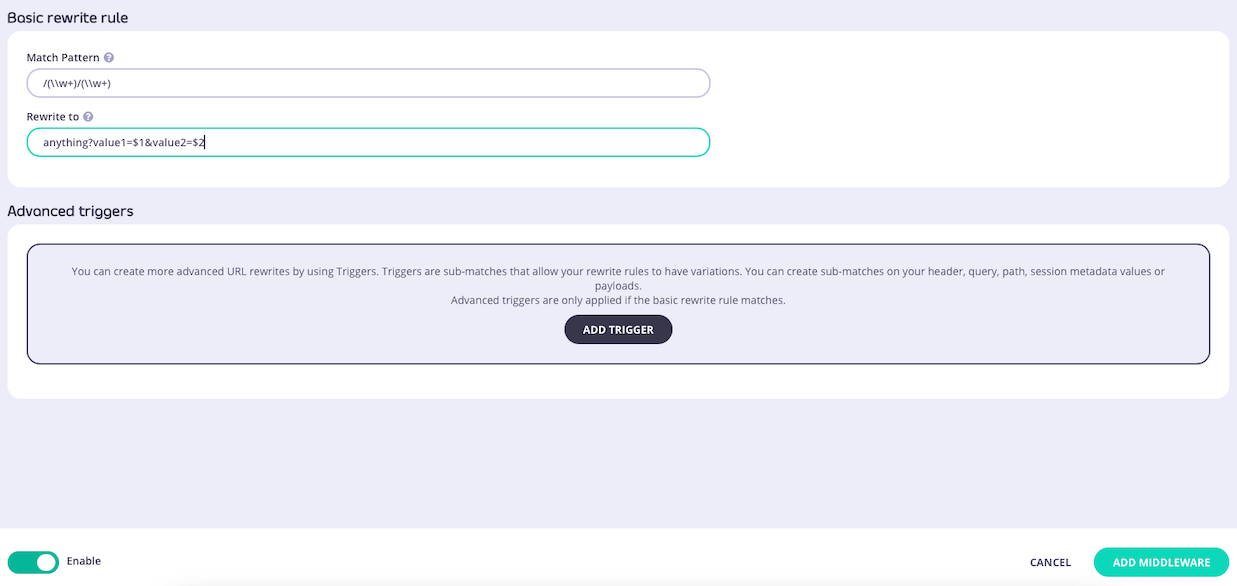
 3. **Configure the basic trigger**
Add the match pattern and the new URL to configure the basic trigger rule.
3. **Configure the basic trigger**
Add the match pattern and the new URL to configure the basic trigger rule.
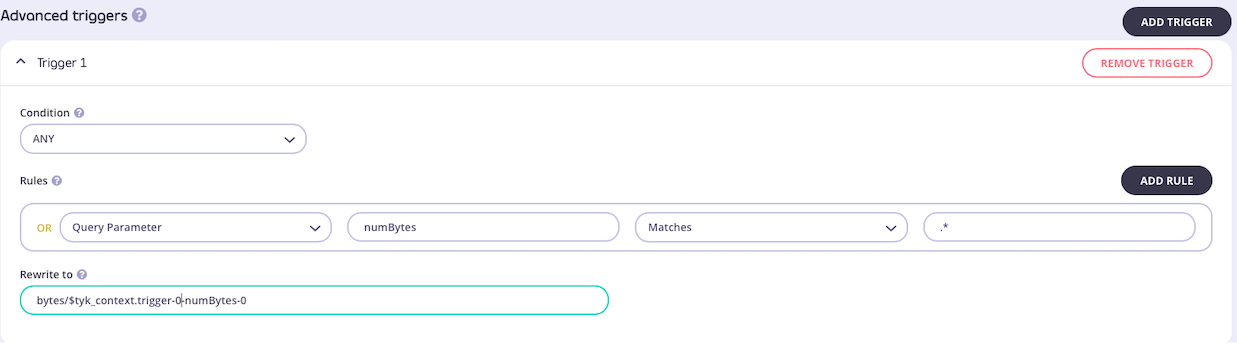
 4. **Optionally configure advanced triggers**
You can optionally apply advanced triggers by selecting **ADD TRIGGER** for each trigger you wish to configure. For each advanced trigger you can add one or more rules, selecting **ADD RULE** to add the second, third, etc.
4. **Optionally configure advanced triggers**
You can optionally apply advanced triggers by selecting **ADD TRIGGER** for each trigger you wish to configure. For each advanced trigger you can add one or more rules, selecting **ADD RULE** to add the second, third, etc.
 5. **Save the API**
Select **ADD MIDDLEWARE** to save the middleware configuration. Remember to select **SAVE API** to apply the changes.
## Using Classic
Tyk's [URL rewriter](/5.8/transform-traffic/url-rewriting#url-rewrite-middleware) uses the concepts of triggers and rules to determine if the request (target) URL should be modified. These can be combined in flexible ways to create sophisticated logic to direct requests made to a single endpoint to various upstream services (or other APIs internally exposed within Tyk).
URL rewrite triggers and rules are explained in detail [here](/5.8/transform-traffic/url-rewriting#url-rewriting-overview).
When working with Tyk Classic APIs the rules and triggers are configured in the Tyk Classic API Definition; this can be done manually within the `.json` file or from the API Designer in the Tyk Dashboard.
If you want to use dynamic data from context variables, you must [enable](/5.8/api-management/traffic-transformation/request-context-variables#enabling-context-variables-for-use-with-tyk-classic-apis) context variables for the API to be able to access them from the request header transform middleware.
If you're using the newer Tyk OAS APIs, then check out [this](/5.8/transform-traffic/url-rewriting#url-rewriting-using-tyk-oas) page.
If you're using Tyk Operator then check out the [configuring the URL rewriter in Tyk Operator](/5.8/#tyk-operator) section below.
### API Definition
To configure the URL rewriter you must add a new `url_rewrites` object to the `extended_paths` section of your API definition, for example:
```json theme={null}
{
"url_rewrites": [
{
"path": "books/author",
"method": "GET",
"match_pattern": "(\w+)/(\w+)",
"rewrite_to": "library/service?value1=$1&value2=$2"
}
]
}
```
In this example the basic trigger has been configured to match the path for a request to the `GET /books/author` endpoint against the pure regex `(\w+)/(\w+)`. This is looking for two word groups in the path which, if found, will store the first string (`books`) in context variable `$1` and the second (`author`) in `$2`. The request (target) URL will then be rewritten to `library/service?value1=books&value2=author` ready for processing by the next middleware in the chain.
You can add advanced triggers to your URL rewriter configuration by adding the `triggers` element within the `url_rewrites` object.
The `triggers` element is an array, with one entry per advanced trigger. For each of those triggers you configure:
* `on` to set the logical condition to be applied to the rules (`any` or `all`)
* `options` a list of rules for the trigger
* `rewrite_to` the address to which the (target) URL should be rewritten if the trigger fires
The rules are defined using this format:
````yaml theme={null}
{
key_location: {
key_name: {
"match_rx": pattern
"reverse": true/false (set to true to trigger if pattern does not match)
}
}
}
Key locations are encoded as follows:
- `header_matches` - request header parameter
- `query_val_matches` - query parameter
- `path_part_matches` - path parameter (i.e. components of the path itself)
- `session_meta_matches` - session metadata
- `payload_matches`- request body
- `request_context_matches`- request context
For example:
```json
{
"url_rewrites": [
{
"path": "books/author",
"method": "GET",
"match_pattern": "(\w+)/(\w+)",
"rewrite_to": "library/service?value1=$1&value2=$2",
"triggers": [
{
"on": "any",
"options": {
"query_val_matches": {
"genre": {
"match_rx": "fiction",
"reverse": false
}
}
},
"rewrite_to": "library/service/author?genre=$tyk_context.trigger-0-genre-0"
},
{
"on": "all",
"options": {
"header_matches": {
"X-Enable-Beta": {
"match_rx": "true",
"reverse": false
}
},
"session_meta_matches": {
"beta_enabled": {
"match_rx": "true",
"reverse": false
}
}
},
"rewrite_to": "https://beta.library.com/books/author"
}
]
}
]
}
````
In this example, the basic trigger is configured as before, but two advanced triggers have been added.
The first advanced trigger has this configuration:
* key location is query parameter
* key name is genre
* pattern is fiction
So if a `GET` request is made to `/books/author?genre=fiction` the advanced trigger will fire and the URL will be rewritten to `library/service/author?genre=fiction`.
The second advanced trigger has this configuration:
* rule condition: ALL
* rule 1
* key location is header parameter
* key name is `X-Enable-Beta`
* pattern is \`true\`\`
* rule 2
* key location is session metadata
* key name is `beta_enabled`
* pattern is `true`
So if a request is made to `GET /books/author` with a header `"X-Enable-Beta":"true"` and, within the session metadata, `"beta_enabled":"true"` the second advanced trigger will fire and the URL will be written to `https://beta.library.com/books/author` taking the request to a different upstream host entirely.
### API Designer
You can use the API Designer in the Tyk Designer to configure the URL rewrite middleware for your Tyk Classic API by following these steps.
1. **Add an endpoint for the path and select the URL rewrite plugin**
From the **Endpoint Designer** add an endpoint that matches the path you want to rewrite. Select the **URL Rewrite** plugin.
5. **Save the API**
Select **ADD MIDDLEWARE** to save the middleware configuration. Remember to select **SAVE API** to apply the changes.
## Using Classic
Tyk's [URL rewriter](/5.8/transform-traffic/url-rewriting#url-rewrite-middleware) uses the concepts of triggers and rules to determine if the request (target) URL should be modified. These can be combined in flexible ways to create sophisticated logic to direct requests made to a single endpoint to various upstream services (or other APIs internally exposed within Tyk).
URL rewrite triggers and rules are explained in detail [here](/5.8/transform-traffic/url-rewriting#url-rewriting-overview).
When working with Tyk Classic APIs the rules and triggers are configured in the Tyk Classic API Definition; this can be done manually within the `.json` file or from the API Designer in the Tyk Dashboard.
If you want to use dynamic data from context variables, you must [enable](/5.8/api-management/traffic-transformation/request-context-variables#enabling-context-variables-for-use-with-tyk-classic-apis) context variables for the API to be able to access them from the request header transform middleware.
If you're using the newer Tyk OAS APIs, then check out [this](/5.8/transform-traffic/url-rewriting#url-rewriting-using-tyk-oas) page.
If you're using Tyk Operator then check out the [configuring the URL rewriter in Tyk Operator](/5.8/#tyk-operator) section below.
### API Definition
To configure the URL rewriter you must add a new `url_rewrites` object to the `extended_paths` section of your API definition, for example:
```json theme={null}
{
"url_rewrites": [
{
"path": "books/author",
"method": "GET",
"match_pattern": "(\w+)/(\w+)",
"rewrite_to": "library/service?value1=$1&value2=$2"
}
]
}
```
In this example the basic trigger has been configured to match the path for a request to the `GET /books/author` endpoint against the pure regex `(\w+)/(\w+)`. This is looking for two word groups in the path which, if found, will store the first string (`books`) in context variable `$1` and the second (`author`) in `$2`. The request (target) URL will then be rewritten to `library/service?value1=books&value2=author` ready for processing by the next middleware in the chain.
You can add advanced triggers to your URL rewriter configuration by adding the `triggers` element within the `url_rewrites` object.
The `triggers` element is an array, with one entry per advanced trigger. For each of those triggers you configure:
* `on` to set the logical condition to be applied to the rules (`any` or `all`)
* `options` a list of rules for the trigger
* `rewrite_to` the address to which the (target) URL should be rewritten if the trigger fires
The rules are defined using this format:
````yaml theme={null}
{
key_location: {
key_name: {
"match_rx": pattern
"reverse": true/false (set to true to trigger if pattern does not match)
}
}
}
Key locations are encoded as follows:
- `header_matches` - request header parameter
- `query_val_matches` - query parameter
- `path_part_matches` - path parameter (i.e. components of the path itself)
- `session_meta_matches` - session metadata
- `payload_matches`- request body
- `request_context_matches`- request context
For example:
```json
{
"url_rewrites": [
{
"path": "books/author",
"method": "GET",
"match_pattern": "(\w+)/(\w+)",
"rewrite_to": "library/service?value1=$1&value2=$2",
"triggers": [
{
"on": "any",
"options": {
"query_val_matches": {
"genre": {
"match_rx": "fiction",
"reverse": false
}
}
},
"rewrite_to": "library/service/author?genre=$tyk_context.trigger-0-genre-0"
},
{
"on": "all",
"options": {
"header_matches": {
"X-Enable-Beta": {
"match_rx": "true",
"reverse": false
}
},
"session_meta_matches": {
"beta_enabled": {
"match_rx": "true",
"reverse": false
}
}
},
"rewrite_to": "https://beta.library.com/books/author"
}
]
}
]
}
````
In this example, the basic trigger is configured as before, but two advanced triggers have been added.
The first advanced trigger has this configuration:
* key location is query parameter
* key name is genre
* pattern is fiction
So if a `GET` request is made to `/books/author?genre=fiction` the advanced trigger will fire and the URL will be rewritten to `library/service/author?genre=fiction`.
The second advanced trigger has this configuration:
* rule condition: ALL
* rule 1
* key location is header parameter
* key name is `X-Enable-Beta`
* pattern is \`true\`\`
* rule 2
* key location is session metadata
* key name is `beta_enabled`
* pattern is `true`
So if a request is made to `GET /books/author` with a header `"X-Enable-Beta":"true"` and, within the session metadata, `"beta_enabled":"true"` the second advanced trigger will fire and the URL will be written to `https://beta.library.com/books/author` taking the request to a different upstream host entirely.
### API Designer
You can use the API Designer in the Tyk Designer to configure the URL rewrite middleware for your Tyk Classic API by following these steps.
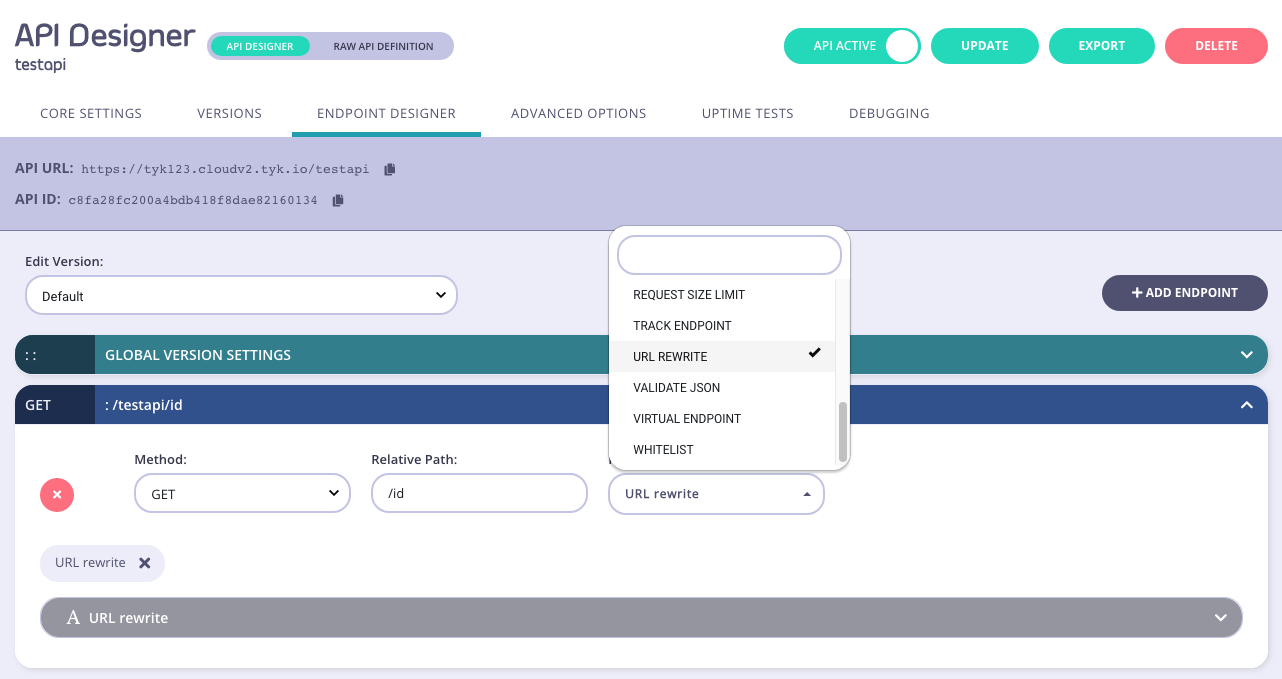
1. **Add an endpoint for the path and select the URL rewrite plugin**
From the **Endpoint Designer** add an endpoint that matches the path you want to rewrite. Select the **URL Rewrite** plugin.
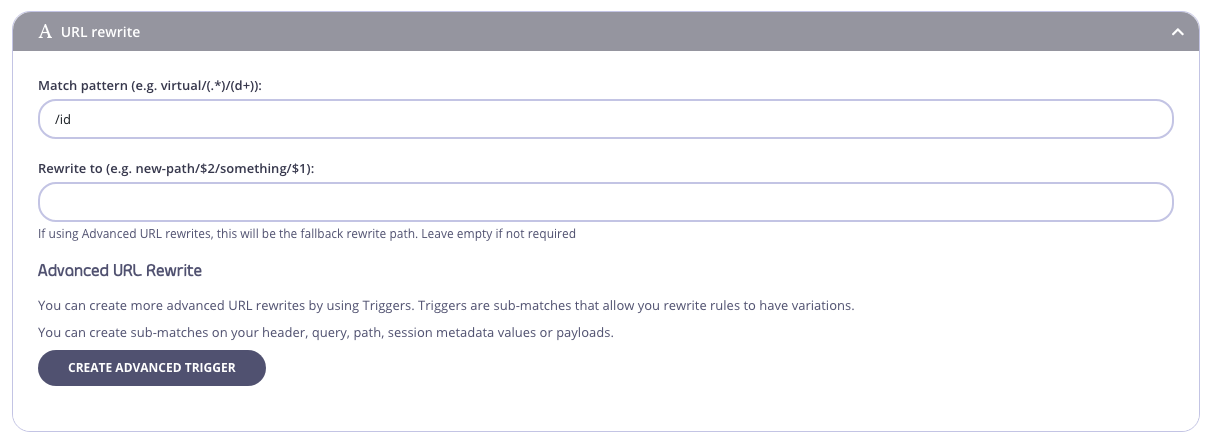
 2. **Configure the basic trigger**
Add the regex capture groups and the new URL to the relevant sections.
2. **Configure the basic trigger**
Add the regex capture groups and the new URL to the relevant sections.
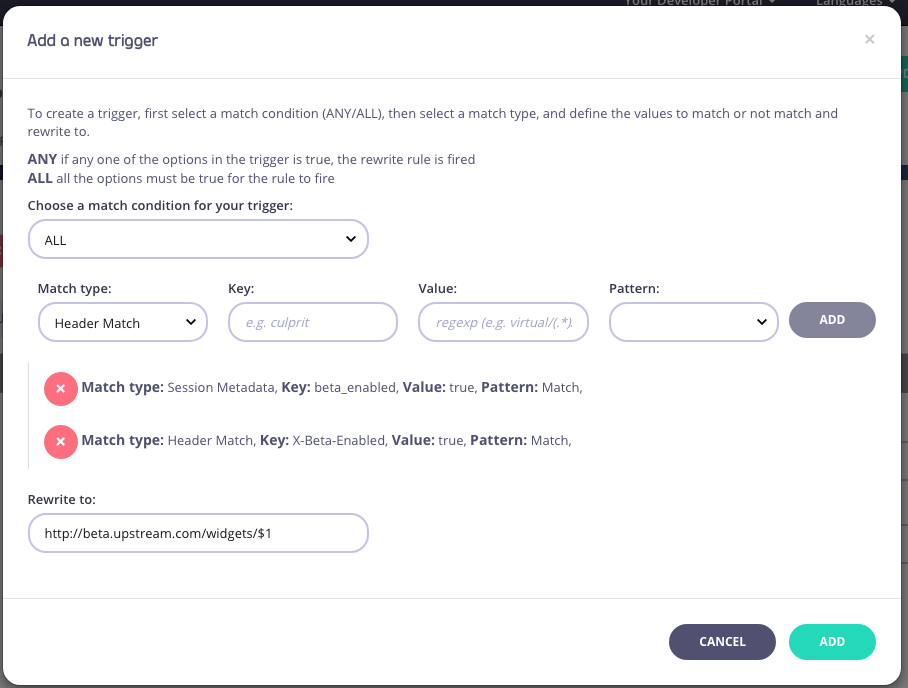
 3. **Configure an advanced trigger**
You can optionally configure advanced triggers by using the **Create Advanced Trigger** option from the **URL Rewriter** plugin.
You will see a screen like this:
3. **Configure an advanced trigger**
You can optionally configure advanced triggers by using the **Create Advanced Trigger** option from the **URL Rewriter** plugin.
You will see a screen like this:
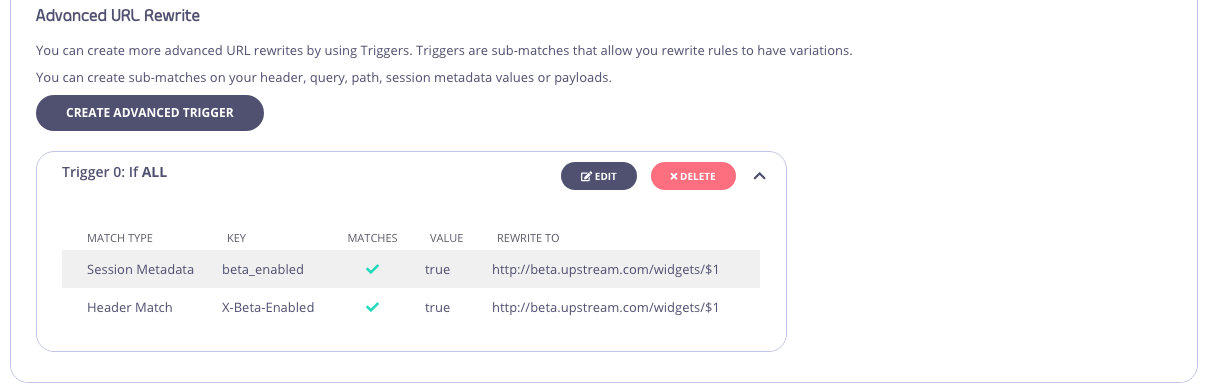
 When triggers are added, you can edit or remove them inside the **Advanced URL rewrite** section:
 4. **Save the API**
Use the *save* or *create* buttons to save the changes and activate the middleware.
### Tyk Operator
The process for configuring the URL rewriter in Tyk Operator is similar to that explained in configuring the URL rewriter in the Tyk Classic API Definition. To configure the URL rewriter you must add a new `url_rewrites` object to the `extended_paths` section of your API definition.
The example API Definition provides the corresponding custom resource configuration for the Tyk Classic API Definition example, configuring an API to listen on path `/url-rewrite` and forward requests upstream to [http://httpbin.org](http://httpbin.org). The URL rewrites middleware would match the path for a request to the `GET /anything/books/author` endpoint against the pure regex `/anything/(\w+)/(\w+)`. The request (target) URL will then be rewritten to `/anything/library/service?value1=$1&value2=$2`.
```yaml {linenos=true, linenostart=1, hl_lines=["26-31"]} theme={null}
apiVersion: tyk.tyk.io/v1alpha1
kind: ApiDefinition
metadata:
name: url-rewrite
spec:
name: URL Rewrite
use_keyless: true
protocol: http
active: true
proxy:
target_url: http://httpbin.org
listen_path: /url-rewrite
strip_listen_path: true
version_data:
default_version: Default
not_versioned: true
versions:
Default:
name: Default
use_extended_paths: true
paths:
black_list: []
ignored: []
white_list: []
extended_paths:
url_rewrites:
- path: /anything/books/author
match_pattern: /anything/(\w+)/(\w+)
method: GET
rewrite_to: /anything/library/service?value1=$1&value2=$2
triggers: []
```
URL Rewrite Triggers can be specified in a similar way. The Tyk Operator example below is the equivalent for the advanced triggers example included in the configuring the URL rewriter in the Tyk Classic API Definition section above.
```yaml {linenos=true, linenostart=1, hl_lines=["26-49"]} theme={null}
apiVersion: tyk.tyk.io/v1alpha1
kind: ApiDefinition
metadata:
name: url-rewrite-advanced
spec:
name: URL Rewrite Advanced
use_keyless: true
protocol: http
active: true
proxy:
target_url: http://httpbin.org
listen_path: /url-rewrite
strip_listen_path: true
version_data:
default_version: Default
not_versioned: true
versions:
Default:
name: Default
use_extended_paths: true
paths:
black_list: []
ignored: []
white_list: []
extended_paths:
url_rewrites:
- path: /anything/books/author
match_pattern: /anything/(\w+)/(\w+)
method: GET
rewrite_to: /anything/library/service?value1=$1&value2=$2
triggers:
- "on": "any"
"rewrite_to": "library/service/author?genre=$tyk_context.trigger-0-genre-0"
"options":
"query_val_matches":
"genre":
"match_rx": "fiction"
"reverse": false
- "on": "all"
"options":
"header_matches":
"X-Enable-Beta":
"match_rx": "true"
"reverse": false
"session_meta_matches":
"beta_enabled":
"match_rx": "true"
"reverse": false
"rewrite_to": "https://beta.library.com/books/author"
```
For further examples check out the [internal looping](/5.8/product-stack/tyk-operator/advanced-configurations/internal-looping) page.
4. **Save the API**
Use the *save* or *create* buttons to save the changes and activate the middleware.
### Tyk Operator
The process for configuring the URL rewriter in Tyk Operator is similar to that explained in configuring the URL rewriter in the Tyk Classic API Definition. To configure the URL rewriter you must add a new `url_rewrites` object to the `extended_paths` section of your API definition.
The example API Definition provides the corresponding custom resource configuration for the Tyk Classic API Definition example, configuring an API to listen on path `/url-rewrite` and forward requests upstream to [http://httpbin.org](http://httpbin.org). The URL rewrites middleware would match the path for a request to the `GET /anything/books/author` endpoint against the pure regex `/anything/(\w+)/(\w+)`. The request (target) URL will then be rewritten to `/anything/library/service?value1=$1&value2=$2`.
```yaml {linenos=true, linenostart=1, hl_lines=["26-31"]} theme={null}
apiVersion: tyk.tyk.io/v1alpha1
kind: ApiDefinition
metadata:
name: url-rewrite
spec:
name: URL Rewrite
use_keyless: true
protocol: http
active: true
proxy:
target_url: http://httpbin.org
listen_path: /url-rewrite
strip_listen_path: true
version_data:
default_version: Default
not_versioned: true
versions:
Default:
name: Default
use_extended_paths: true
paths:
black_list: []
ignored: []
white_list: []
extended_paths:
url_rewrites:
- path: /anything/books/author
match_pattern: /anything/(\w+)/(\w+)
method: GET
rewrite_to: /anything/library/service?value1=$1&value2=$2
triggers: []
```
URL Rewrite Triggers can be specified in a similar way. The Tyk Operator example below is the equivalent for the advanced triggers example included in the configuring the URL rewriter in the Tyk Classic API Definition section above.
```yaml {linenos=true, linenostart=1, hl_lines=["26-49"]} theme={null}
apiVersion: tyk.tyk.io/v1alpha1
kind: ApiDefinition
metadata:
name: url-rewrite-advanced
spec:
name: URL Rewrite Advanced
use_keyless: true
protocol: http
active: true
proxy:
target_url: http://httpbin.org
listen_path: /url-rewrite
strip_listen_path: true
version_data:
default_version: Default
not_versioned: true
versions:
Default:
name: Default
use_extended_paths: true
paths:
black_list: []
ignored: []
white_list: []
extended_paths:
url_rewrites:
- path: /anything/books/author
match_pattern: /anything/(\w+)/(\w+)
method: GET
rewrite_to: /anything/library/service?value1=$1&value2=$2
triggers:
- "on": "any"
"rewrite_to": "library/service/author?genre=$tyk_context.trigger-0-genre-0"
"options":
"query_val_matches":
"genre":
"match_rx": "fiction"
"reverse": false
- "on": "all"
"options":
"header_matches":
"X-Enable-Beta":
"match_rx": "true"
"reverse": false
"session_meta_matches":
"beta_enabled":
"match_rx": "true"
"reverse": false
"rewrite_to": "https://beta.library.com/books/author"
```
For further examples check out the [internal looping](/5.8/product-stack/tyk-operator/advanced-configurations/internal-looping) page.