> ## Documentation Index
> Fetch the complete documentation index at: https://tyk.io/docs/llms.txt
> Use this file to discover all available pages before exploring further.
# Request Method
> How to configure Request Method traffic transformation middleware in Tyk
## Overview
Tyk's Request Method Transform middleware allows you to modify the HTTP method of incoming requests to an API endpoint prior to the request being proxied to the upstream service. You might use this to map `POST` requests from clients to upstream services that support only `PUT` and `DELETE` operations, providing a modern interface to your users. It is a simple middleware that changes only the method and not the payload or headers. You can, however, combine this with the [Request Header Transform](/5.8/api-management/traffic-transformation/request-headers) and [Request Body Tranform](/5.8/api-management/traffic-transformation/request-body) to apply more complex transformation to requests.
### Use Cases
#### Simplifying API consumption
In cases where an upstream API requires different methods (e.g. `PUT` or `DELETE`) for different functionality but you want to wrap this in a single client-facing API, you can provide a simple interface offering a single method (e.g. `POST`) and then use the method transform middleware to map requests to correct upstream method.
#### Enforcing API governance and standardization
You can use the transform middleware to ensure that all requests to a service are made using the same HTTP method, regardless of the original method used by the client. This can help maintain consistency across different client applications accessing the same upstream API.
#### Error Handling and Redirection
You can use the method transformation middleware to handle errors and redirect requests to different endpoints, such as changing a DELETE request to a GET request when a specific resource is no longer available, allowing for graceful error handling and redirection.
#### Testing and debugging
Request method transformation can be useful when testing or debugging API endpoints; temporarily changing the request method can help to identify issues or test specific functionalities.
### Working
This is a very simple middleware that is assigned to an endpoint and configured with the HTTP method to which the request should be modified. The Request Method Transform middleware modifies the request method for the entire request flow, not just for the specific upstream request, so all subsequent middleware in the processing chain will use the new (transformed) method.
## Using Tyk OAS
Tyk's [request method transform](/5.8/api-management/traffic-transformation/request-method) middleware is configured at the endpoint level, where it modifies the HTTP method used in the request to a configured value.
When working with Tyk OAS APIs the transformation is configured in the [Tyk OAS API Definition](/5.8/api-management/gateway-config-tyk-oas#operation). You can do this via the Tyk Dashboard API or in the API Designer.
If you're using the legacy Tyk Classic APIs, then check out the [Tyk Classic](/5.8/#request-method-using-classic) page.
### API Definition
The request method transform middleware (`transformRequestMethod`) can be added to the `operations` section of the Tyk OAS Extension (`x-tyk-api-gateway`) in your Tyk OAS API Definition for the appropriate `operationId` (as configured in the `paths` section of your OpenAPI Document). Endpoint `paths` entries (and the associated `operationId`) can contain wildcards in the form of any string bracketed by curly braces, for example `/status/{code}`. These wildcards are so they are human readable and do not translate to variable names. Under the hood, a wildcard translates to the “match everything” regex of: `(.*)`.
You only need to enable the middleware (set `enabled:true`) and then configure `toMethod` as the new HTTP method to which the request should be transformed. The design of the Tyk OAS API Definition takes advantage of the `operationId` defined in the OpenAPI Document that declares both the path and method for which the method should be transformed.
All standard HTTP methods are supported: `GET`, `PUT`, `POST`, `PATCH`, `DELETE`, `HEAD`, `OPTIONS`.
For example:
```json {hl_lines=["39-41"],linenos=true, linenostart=1} theme={null}
{
"components": {},
"info": {
"title": "example-request-method",
"version": "1.0.0"
},
"openapi": "3.0.3",
"paths": {
"/status/200": {
"get": {
"operationId": "status/200get",
"responses": {
"200": {
"description": ""
}
}
}
}
},
"x-tyk-api-gateway": {
"info": {
"name": "example-request-method",
"state": {
"active": true
}
},
"upstream": {
"url": "http://httpbin.org/"
},
"server": {
"listenPath": {
"value": "/example-request-method/",
"strip": true
}
},
"middleware": {
"operations": {
"status/200get": {
"transformRequestMethod": {
"enabled": true,
"toMethod": "POST"
}
}
}
}
}
}
```
In this example the Request Method Transform middleware has been configured for requests to the `GET /status/200` endpoint. Any request received to that endpoint will be modified to `POST /status/200`.
The configuration above is a complete and valid Tyk OAS API Definition that you can import into Tyk to try out the request method transform.
### API Designer
Adding the transform to your API endpoints is easy when using the API Designer in the Tyk Dashboard, simply follow these steps:
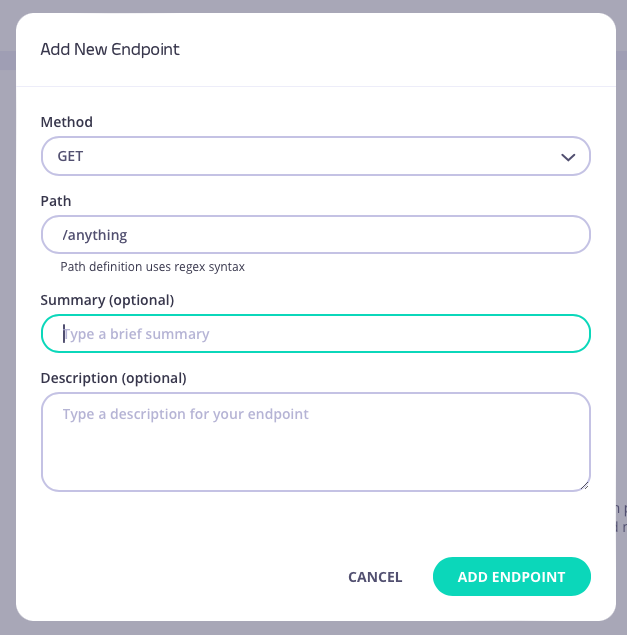
1. **Add an endpoint**
From the **API Designer** add an endpoint that matches the path and method to which you want to apply the middleware.

 2. **Select the Method Transform middleware**
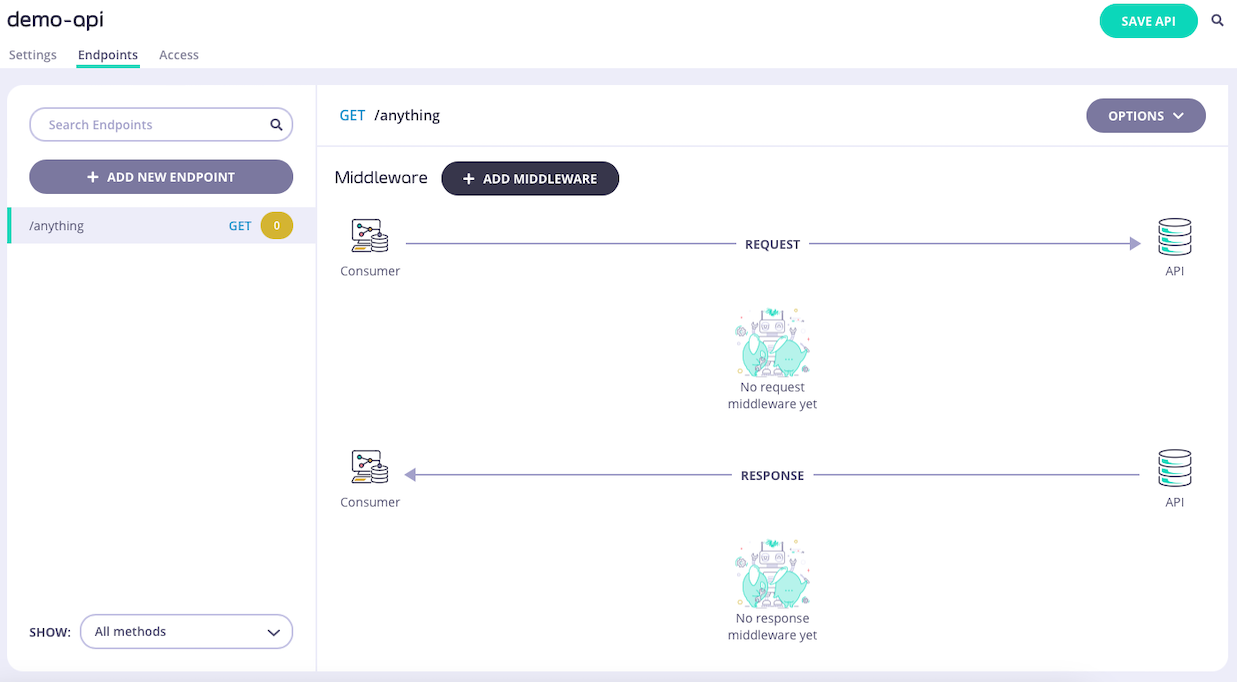
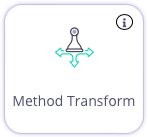
Select **ADD MIDDLEWARE** and choose the **Method Transform** middleware from the *Add Middleware* screen.
2. **Select the Method Transform middleware**
Select **ADD MIDDLEWARE** and choose the **Method Transform** middleware from the *Add Middleware* screen.
 3. **Configure the middleware**
Select the new HTTP method to which requests to this endpoint should be transformed
3. **Configure the middleware**
Select the new HTTP method to which requests to this endpoint should be transformed
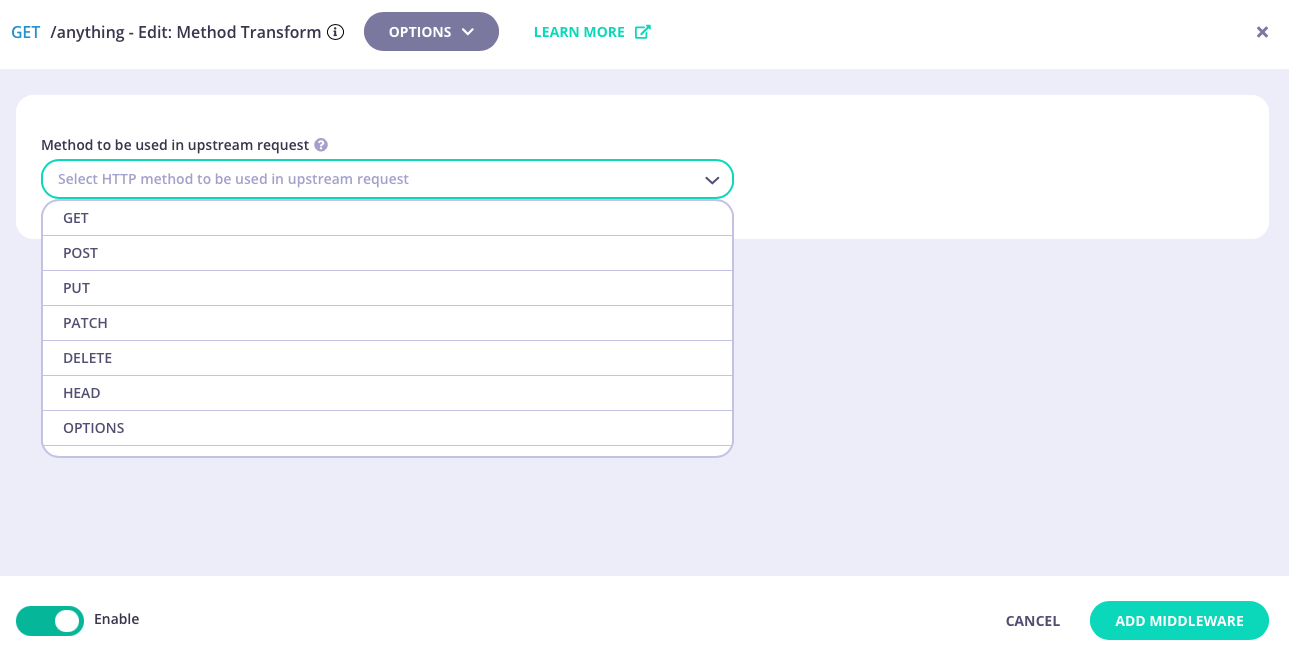 Select **ADD MIDDLEWARE** to apply the change to the middleware configuration.
4. **Save the API**
Select **SAVE API** to apply the changes to your API.
## Using Classic
Tyk's [request method transform](/5.8/api-management/traffic-transformation/request-method) middleware is configured at the endpoint level, where it modifies the HTTP method used in the request to a configured value.
When working with Tyk Classic APIs the transformation is configured in the Tyk Classic API Definition. You can do this via the Tyk Dashboard API or in the API Designer.
If you're using the newer Tyk OAS APIs, then check out the [Tyk OAS](/5.8/#request-method-using-tyk-oas) page.
If you're using Tyk Operator then check out the [configuring a Request Method Transform in Tyk Operator](/5.8/#tyk-operator) section below.
### API Definition
To configure a transformation of the request method you must add a new `method_transforms` object to the `extended_paths` section of your API definition.
It has the following configuration:
* `path`: the endpoint path
* `method`: the endpoint HTTP method
* `to_method`: The new HTTP method to which the request should be transformed
All standard HTTP methods are supported: `GET`, `PUT`, `POST`, `PATCH`, `DELETE`, `HEAD`, `OPTIONS`.
For example:
```json theme={null}
{
"method_transforms": [
{
"path": "/status/200",
"method": "GET",
"to_method": "POST"
}
]
}
```
In this example the Request Method Transform middleware has been configured for HTTP `GET` requests to the `/status/200` endpoint. Any request received to that endpoint will be modified to `POST /status/200`.
### API Designer
You can use the API Designer in the Tyk Dashboard to configure the request method transform middleware for your Tyk Classic API by following these steps.
1. **Add an endpoint for the path and select the Method Transform plugin**
From the **Endpoint Designer** add an endpoint that matches the path for which you want to perform the transformation. Select the **Method Transform** plugin.
Select **ADD MIDDLEWARE** to apply the change to the middleware configuration.
4. **Save the API**
Select **SAVE API** to apply the changes to your API.
## Using Classic
Tyk's [request method transform](/5.8/api-management/traffic-transformation/request-method) middleware is configured at the endpoint level, where it modifies the HTTP method used in the request to a configured value.
When working with Tyk Classic APIs the transformation is configured in the Tyk Classic API Definition. You can do this via the Tyk Dashboard API or in the API Designer.
If you're using the newer Tyk OAS APIs, then check out the [Tyk OAS](/5.8/#request-method-using-tyk-oas) page.
If you're using Tyk Operator then check out the [configuring a Request Method Transform in Tyk Operator](/5.8/#tyk-operator) section below.
### API Definition
To configure a transformation of the request method you must add a new `method_transforms` object to the `extended_paths` section of your API definition.
It has the following configuration:
* `path`: the endpoint path
* `method`: the endpoint HTTP method
* `to_method`: The new HTTP method to which the request should be transformed
All standard HTTP methods are supported: `GET`, `PUT`, `POST`, `PATCH`, `DELETE`, `HEAD`, `OPTIONS`.
For example:
```json theme={null}
{
"method_transforms": [
{
"path": "/status/200",
"method": "GET",
"to_method": "POST"
}
]
}
```
In this example the Request Method Transform middleware has been configured for HTTP `GET` requests to the `/status/200` endpoint. Any request received to that endpoint will be modified to `POST /status/200`.
### API Designer
You can use the API Designer in the Tyk Dashboard to configure the request method transform middleware for your Tyk Classic API by following these steps.
1. **Add an endpoint for the path and select the Method Transform plugin**
From the **Endpoint Designer** add an endpoint that matches the path for which you want to perform the transformation. Select the **Method Transform** plugin.
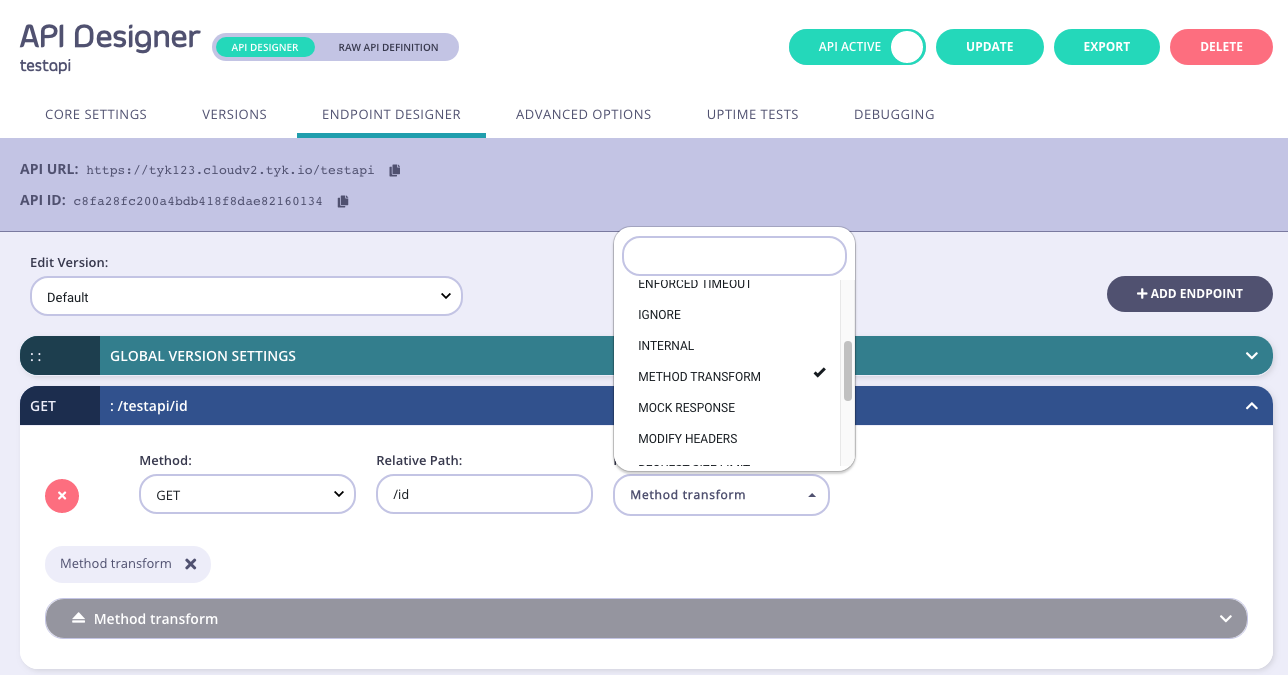 2. **Configure the transform**
Then select the HTTP method to which you wish to transform the request.
2. **Configure the transform**
Then select the HTTP method to which you wish to transform the request.
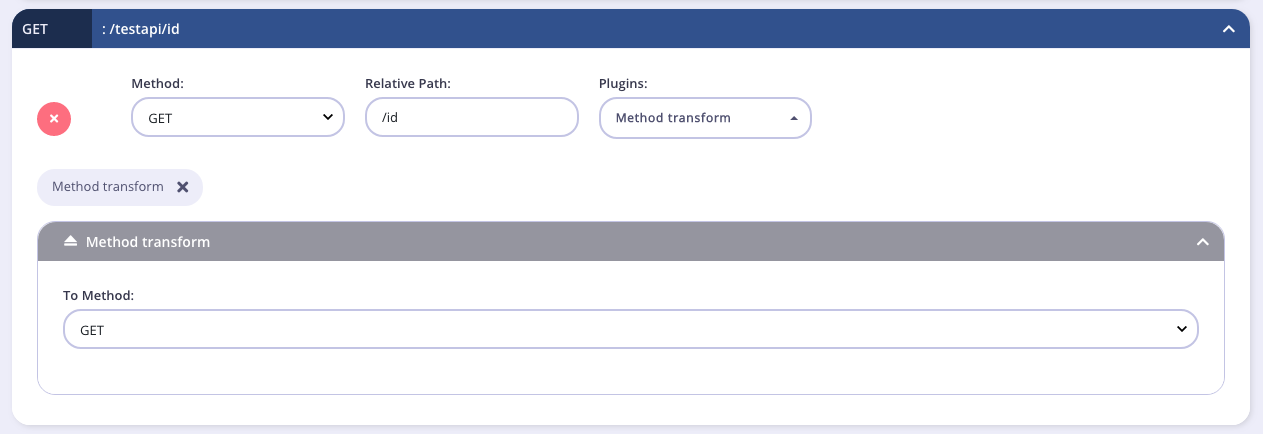 3. **Save the API**
Use the *save* or *create* buttons to save the changes and activate the middleware.
### Tyk Operator
The process for configuring a request method transform for an endpoint in Tyk Operator is similar to that defined in section configuring a Request Method Transform in the Tyk Classic API Definition.
To configure a transformation of the request method you must add a new `method_transforms` object to the `extended_paths` section of your API definition:
```yaml {linenos=true, linenostart=1, hl_lines=["26-29"]} theme={null}
apiVersion: tyk.tyk.io/v1alpha1
kind: ApiDefinition
metadata:
name: httpbin
spec:
name: httpbin
use_keyless: true
protocol: http
active: true
proxy:
target_url: http://httpbin.default.svc:8000
listen_path: /transform
strip_listen_path: true
version_data:
default_version: v1
not_versioned: true
versions:
v1:
name: v1
use_extended_paths: true
paths:
black_list: []
ignored: []
white_list: []
extended_paths:
method_transforms:
- path: /anything
method: GET
to_method: POST
```
The example API Definition above configures an API to listen on path `/transform` and forwards requests upstream to [http://httpbin.org](http://httpbin.org).
In this example the Request Method Transform middleware has been configured for `HTTP GET` requests to the `/anything` endpoint. Any request received to that endpoint will be modified to `POST /anything`.
3. **Save the API**
Use the *save* or *create* buttons to save the changes and activate the middleware.
### Tyk Operator
The process for configuring a request method transform for an endpoint in Tyk Operator is similar to that defined in section configuring a Request Method Transform in the Tyk Classic API Definition.
To configure a transformation of the request method you must add a new `method_transforms` object to the `extended_paths` section of your API definition:
```yaml {linenos=true, linenostart=1, hl_lines=["26-29"]} theme={null}
apiVersion: tyk.tyk.io/v1alpha1
kind: ApiDefinition
metadata:
name: httpbin
spec:
name: httpbin
use_keyless: true
protocol: http
active: true
proxy:
target_url: http://httpbin.default.svc:8000
listen_path: /transform
strip_listen_path: true
version_data:
default_version: v1
not_versioned: true
versions:
v1:
name: v1
use_extended_paths: true
paths:
black_list: []
ignored: []
white_list: []
extended_paths:
method_transforms:
- path: /anything
method: GET
to_method: POST
```
The example API Definition above configures an API to listen on path `/transform` and forwards requests upstream to [http://httpbin.org](http://httpbin.org).
In this example the Request Method Transform middleware has been configured for `HTTP GET` requests to the `/anything` endpoint. Any request received to that endpoint will be modified to `POST /anything`.