> ## Documentation Index
> Fetch the complete documentation index at: https://tyk.io/docs/llms.txt
> Use this file to discover all available pages before exploring further.
# How to use Existing Credentials with Multiple API Products
> This guide explains how to use existing credentials with multiple API Products in the Tyk Developer Portal
## Availability
| Component | Version | Editions |
| :--------------- | :------------------------------------------------------------------------------------------- | :--------- |
| Developer Portal | Available since [v1.16.0](/5.12/developer-support/release-notes/portal#1-16-0-release-notes) | Enterprise |
## Prerequisites
1. **Dashboard License**: [Contact our team](https://tyk.io/contact/) to obtain a license or get self-managed trial license by completing the registration on our [website](https://tyk.io/self-managed-trial/).
2. **Working Tyk Environment:** You need access to a running Tyk instance. For setup instructions using Docker, please refer to the [Tyk Getting Started Guide](/5.12/getting-started/quick-start).
3. Developer Portal Setup with
1. Admin access to the Tyk Developer Portal.
2. The end user (developer accounts) must exist in the portal.
3. Tyk Developer Portal v1.16.0 or later.
4. [API Products](/5.12/portal/api-products), [Plans](/5.12/portal/api-plans) and [Catalogue](/5.12/tyk-stack/tyk-developer-portal/enterprise-developer-portal/managing-access/manage-catalogues) already created and published in the portal.
5. Approved access request to an API Product as a developer and an application already created. please refer to the [guide](/5.12/tyk-developer-portal/direct-access-flow#instructions).
## What we will do
1. Request access to an [API Product](/5.12/portal/api-products) as a developer and create a new [application](/5.12/portal/developer-app).
2. Add more products to an existing application by reusing credentials.
3. Change the [Plan](/5.12/portal/api-plans) for an existing credential.
4. Handle scenarios where different plans require separate credentials within the same app.
## Instructions
Follow these steps to configure and use the Direct Access flow in the Tyk Developer Portal:
### 1. Add More Products Using an Existing Credential
Once you have an application with approved access to at least one API product, you can add access to additional products using your existing credential:
1. Log in to the **Developer Portal** as an API Consumer.
2. Navigate to **Catalogues** and select another API product.
3. Select the **same plan** that your existing credential uses (e.g., if your existing credential uses "Gold", select "Gold" for the new product).
4. Click **Access with this plan**.
5. On the access request page, select your existing **Application** from the dropdown. You will see the option to **use an existing credential**.
6. Choose the existing **Credential** that uses the matching plan.
7. Click **Submit request**.
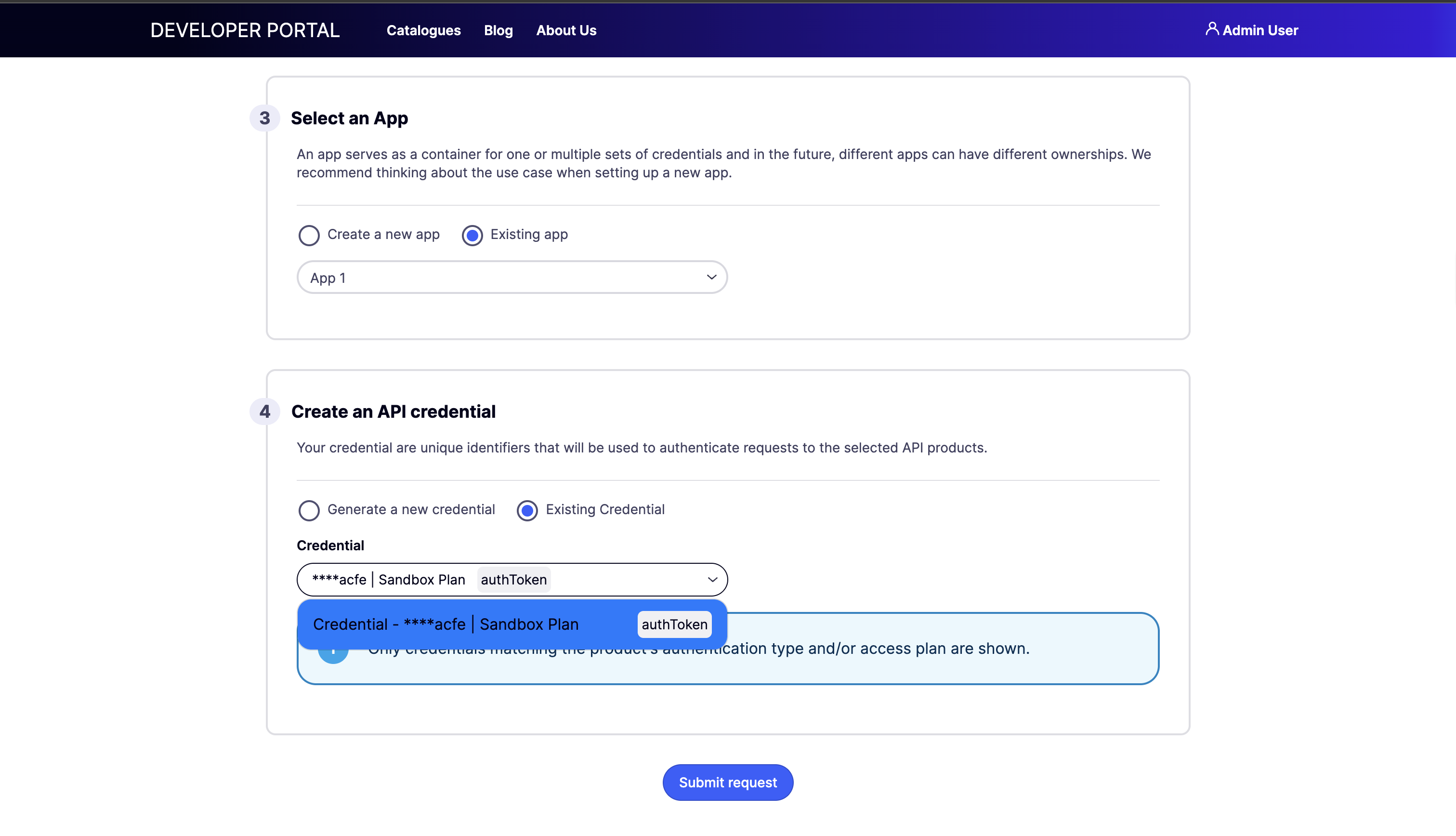 **Key benefit**: Your existing credential will now provide access to both API products. You don't need to manage multiple API keys when using the same plan across multiple products.
#### View Your Credentials
**After approval:**
1. Click on your profile icon in the top-right corner and select **My Dashboard** from the dropdown.
2. Go to **My Apps** in the left navigation.
3. Click on your application.
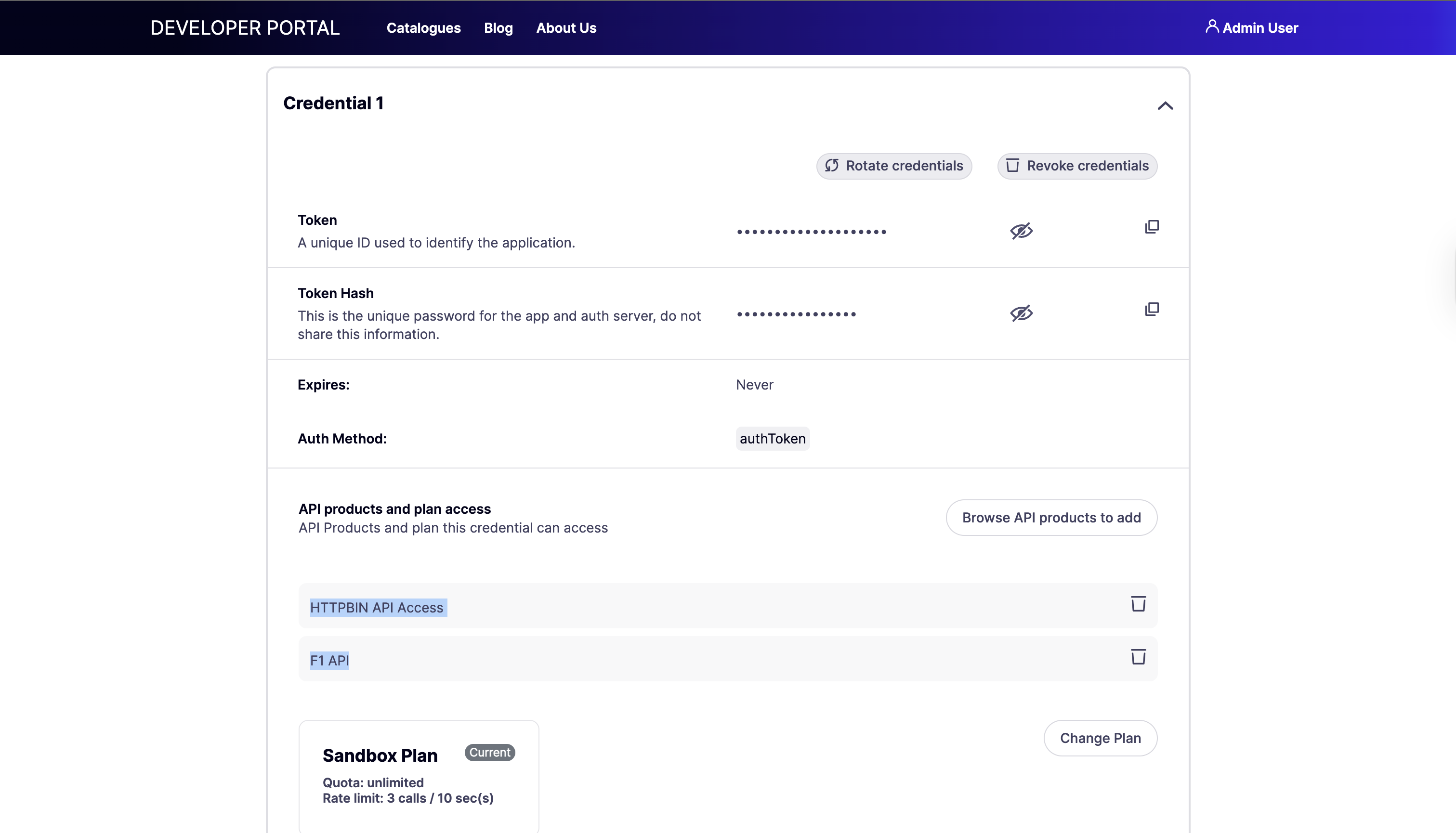
4. In the **Credential Management** section, you will see your access credentials.
* Click **Show** to reveal the API key.
* Copy the credentials for use in your API requests.
**Key benefit**: Your existing credential will now provide access to both API products. You don't need to manage multiple API keys when using the same plan across multiple products.
#### View Your Credentials
**After approval:**
1. Click on your profile icon in the top-right corner and select **My Dashboard** from the dropdown.
2. Go to **My Apps** in the left navigation.
3. Click on your application.
4. In the **Credential Management** section, you will see your access credentials.
* Click **Show** to reveal the API key.
* Copy the credentials for use in your API requests.
 ### 2. Change the Plan for an Existing Credential
Developers can upgrade or downgrade their plan for existing product access:
1. Log in to the **Developer Portal** and navigate to **My Dashboard**.
2. Go to **My Apps** and click on the relevant application.
3. Find the credential you want to modify.
4. Click **Change plan**
5. Choose your new plan from the available options (e.g., upgrade from Gold to Platinum).
6. Submit the plan change request.
**Important behavior for plan changes:**
* A plan change creates a new access request that requires approval (unless the new plan is configured for auto-approval).
* Your current access remains active on the existing plan until the new plan is approved.
* If your credential provides access to multiple API products, changing the plan will affect access to **all products** on that credential.
### 3. Handle Different Plans Within the Same Application
When you want to add an API product using a **different plan** than your existing credentials:
1. Log in to the **Developer Portal** and navigate to **Catalogues**.
2. Select an API product.
3. Select a **different plan** than your existing credentials use (e.g., if your existing credential uses "Gold" but you want "Bronze" for this product).
4. Click **Request access**.
5. On the access request page, you will **not** see the option to reuse your existing credential.
6. The system will require you to **create a new credential** for this plan:
* Enter a **Name** for the new credential.
* Complete the access request form.
7. Click **Submit request**.
**Why a new credential is required**: A single credential can only be associated with ONE API plan. This ensures consistent rate limiting and quota enforcement across all products accessed through that credential.
#### Credential Compatibility Reference
| Scenario | Can Reuse Existing Credential? | Action Required |
| --------------------------------------- | ------------------------------ | -------------------------- |
| Same plan as existing credential | Yes | Select existing credential |
| Different plan than existing credential | No | Create new credential |
### 2. Change the Plan for an Existing Credential
Developers can upgrade or downgrade their plan for existing product access:
1. Log in to the **Developer Portal** and navigate to **My Dashboard**.
2. Go to **My Apps** and click on the relevant application.
3. Find the credential you want to modify.
4. Click **Change plan**
5. Choose your new plan from the available options (e.g., upgrade from Gold to Platinum).
6. Submit the plan change request.
**Important behavior for plan changes:**
* A plan change creates a new access request that requires approval (unless the new plan is configured for auto-approval).
* Your current access remains active on the existing plan until the new plan is approved.
* If your credential provides access to multiple API products, changing the plan will affect access to **all products** on that credential.
### 3. Handle Different Plans Within the Same Application
When you want to add an API product using a **different plan** than your existing credentials:
1. Log in to the **Developer Portal** and navigate to **Catalogues**.
2. Select an API product.
3. Select a **different plan** than your existing credentials use (e.g., if your existing credential uses "Gold" but you want "Bronze" for this product).
4. Click **Request access**.
5. On the access request page, you will **not** see the option to reuse your existing credential.
6. The system will require you to **create a new credential** for this plan:
* Enter a **Name** for the new credential.
* Complete the access request form.
7. Click **Submit request**.
**Why a new credential is required**: A single credential can only be associated with ONE API plan. This ensures consistent rate limiting and quota enforcement across all products accessed through that credential.
#### Credential Compatibility Reference
| Scenario | Can Reuse Existing Credential? | Action Required |
| --------------------------------------- | ------------------------------ | -------------------------- |
| Same plan as existing credential | Yes | Select existing credential |
| Different plan than existing credential | No | Create new credential |