> ## Documentation Index
> Fetch the complete documentation index at: https://tyk.io/docs/llms.txt
> Use this file to discover all available pages before exploring further.
# How to Request Access to API Products Using Direct Access Flow
> This guide explains how to use the Direct Access Flow in the Tyk Developer Portal to request access to API products without the shopping cart, including creating applications, attaching credentials, changing plans, and admin configuration.
## Availability
| Component | Version | Editions |
| :--------------- | :------------------------------------------------------------------------------------------- | :--------- |
| Developer Portal | Available since [v1.16.0](/5.12/developer-support/release-notes/portal#1-16-0-release-notes) | Enterprise |
## Prerequisites
1. **Dashboard License**: [Contact our team](https://tyk.io/contact/) to obtain a license or get self-managed trial license by completing the registration on our [website](https://tyk.io/self-managed-trial/).
2. **Working Tyk Environment:** You need access to a running Tyk instance. For setup instructions using Docker, please refer to the [Tyk Getting Started Guide](/5.12/getting-started/quick-start).
3. Developer Portal Setup with
1. Admin access to the Tyk Developer Portal.
2. The end user (developer accounts) must exist in the portal.
3. Tyk Developer Portal v1.16.0 or later.
4. [API Products](/5.12/portal/api-products), [Plans](/5.12/portal/api-plans) and [Catalogue](/5.12/tyk-stack/tyk-developer-portal/enterprise-developer-portal/managing-access/manage-catalogues) already created and published in the portal.
## What we will do
1. Enable the Direct Access flow in the Admin Portal settings.
2. Request access to an [API Product](/5.12/portal/api-products) as a developer and create a new [application](/5.12/portal/developer-app).
3. Configure and manage access as an admin on behalf of developers.
## Instructions
Follow these steps to configure and use the Direct Access flow in the Tyk Developer Portal:
### 1. Enable Direct Access Flow (Admin)
1. Log in to the **Admin Portal** as an administrator.
2. In the main navigation, go to **Settings**.
3. Select **General** from the settings menu.
4. Locate the **API product access flow** setting.
* By default, this is set to **Cart-based flow**.
5. Switch the option from **Cart-based flow** to **Direct access flow**.
6. Click **Save** to apply the changes.
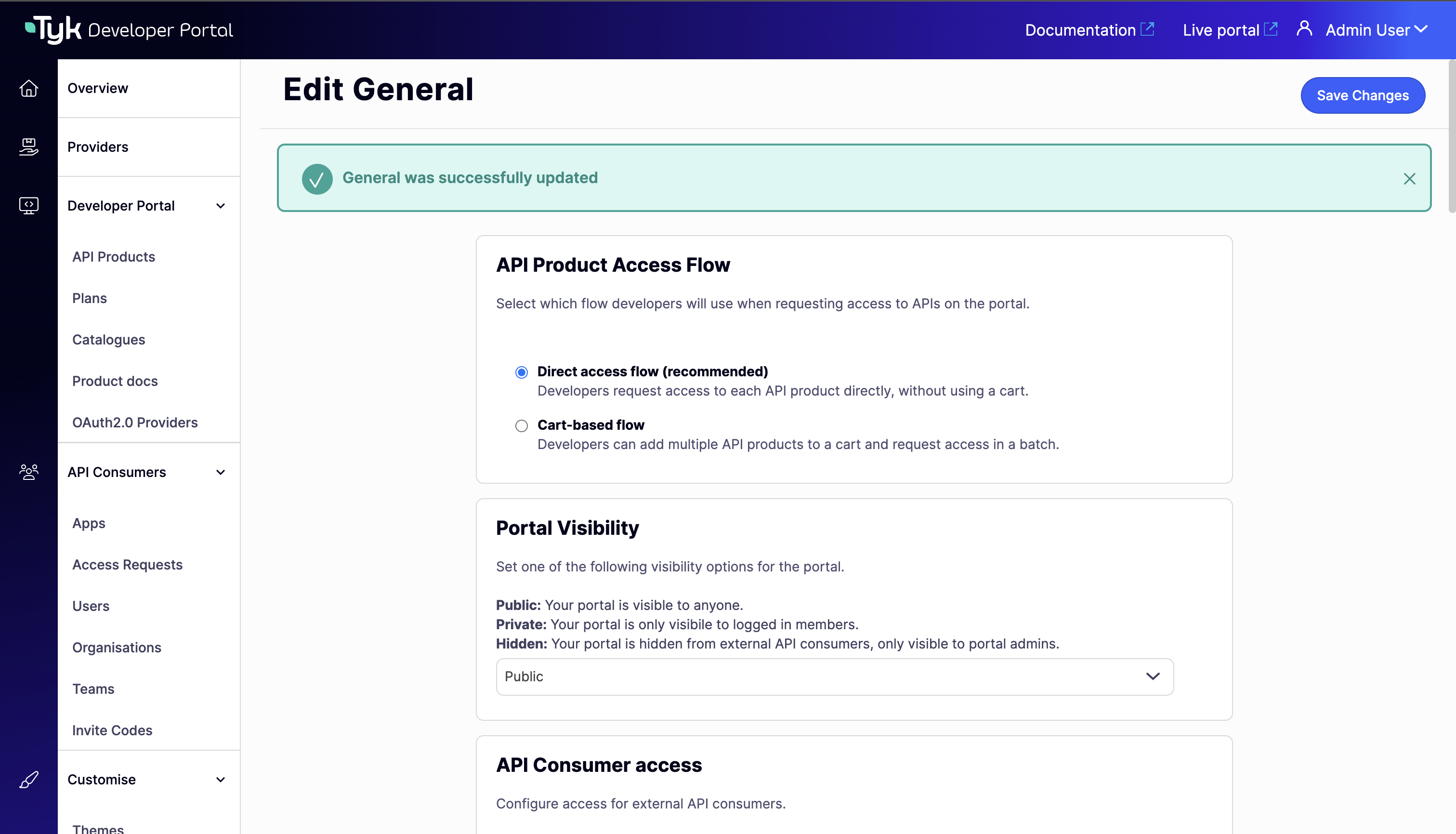 Once enabled, all API consumers will experience the Direct Access flow when requesting access to API products from the Live Portal.
### 2. Request Access to an API Product (Developer)
When the Direct Access flow is enabled, developers can request access to an API product without going through a shopping cart:
1. Log in to the **Developer Portal** as an API Consumer.
2. In the main navigation, go to **Catalogues**.
3. Browse the API Catalog and click on an API product you want to access.
4. Review the available plans and their rate limits/quotas.
5. Select the **Plan** you want to use.
6. Click **Access with this plan**.
* Notice there is no shopping cart step - you go directly to the access request page.
7. In the access request form:
* Enter an **Application name** (e.g., `My Weather App`).
* Optionally add a **Description** for the application.
8. Click **Submit request**.
If the plan is configured for auto-approval, credentials will be issued immediately. Otherwise, an API Owner will review and approve your request.
#### View Your Credentials
**After approval:**
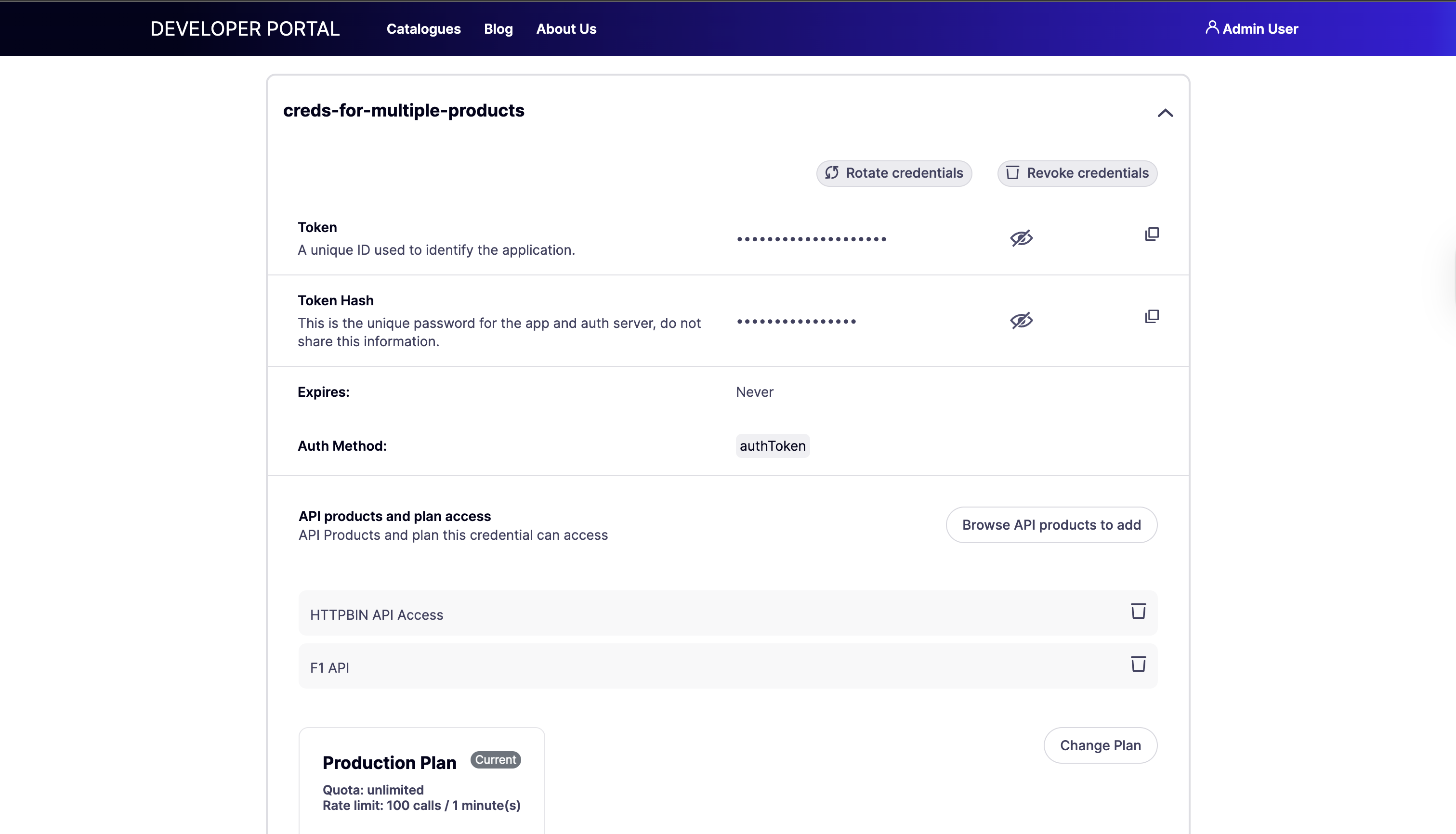
1. Click on your profile icon in the top-right corner and select **My Dashboard** from the dropdown.
2. Go to **My Apps** in the left navigation.
3. Click on your application.
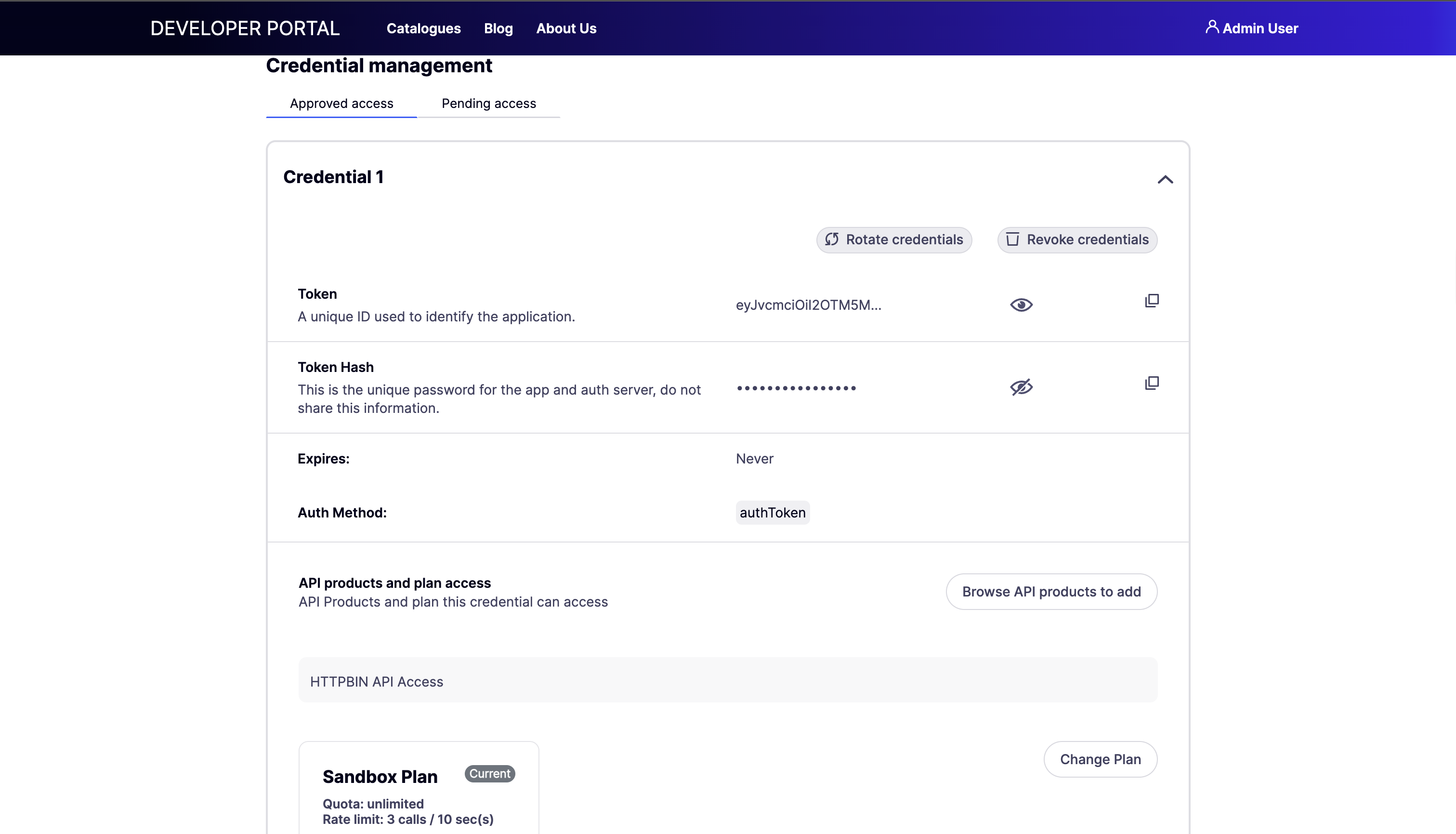
4. In the **Credential Management** section, you will see your access credentials.
* Click **Show** to reveal the API key.
* Copy the credentials for use in your API requests.
Once enabled, all API consumers will experience the Direct Access flow when requesting access to API products from the Live Portal.
### 2. Request Access to an API Product (Developer)
When the Direct Access flow is enabled, developers can request access to an API product without going through a shopping cart:
1. Log in to the **Developer Portal** as an API Consumer.
2. In the main navigation, go to **Catalogues**.
3. Browse the API Catalog and click on an API product you want to access.
4. Review the available plans and their rate limits/quotas.
5. Select the **Plan** you want to use.
6. Click **Access with this plan**.
* Notice there is no shopping cart step - you go directly to the access request page.
7. In the access request form:
* Enter an **Application name** (e.g., `My Weather App`).
* Optionally add a **Description** for the application.
8. Click **Submit request**.
If the plan is configured for auto-approval, credentials will be issued immediately. Otherwise, an API Owner will review and approve your request.
#### View Your Credentials
**After approval:**
1. Click on your profile icon in the top-right corner and select **My Dashboard** from the dropdown.
2. Go to **My Apps** in the left navigation.
3. Click on your application.
4. In the **Credential Management** section, you will see your access credentials.
* Click **Show** to reveal the API key.
* Copy the credentials for use in your API requests.
 ## Configure Access as an Admin
Portal administrators can perform similar operations on behalf of developers from the Admin Portal:
### Create Applications for Developers
1. Log in to the **Admin Portal** as an administrator.
2. Navigate to **API Consumers > Applications**.
3. Click **Add new application**.
4. Enter the application details:
* **Application name**
* **Description**
* Select the **Developer (API Consumer)** who will own the application.
* Configure **Visibility settings**.
5. Click **Save**.
### Add Credentials and Products
1. Navigate to the application details page.
2. Click **Add credential**.
3. Choose the **API Product** and **Plan** to associate with the credential.
## Configure Access as an Admin
Portal administrators can perform similar operations on behalf of developers from the Admin Portal:
### Create Applications for Developers
1. Log in to the **Admin Portal** as an administrator.
2. Navigate to **API Consumers > Applications**.
3. Click **Add new application**.
4. Enter the application details:
* **Application name**
* **Description**
* Select the **Developer (API Consumer)** who will own the application.
* Configure **Visibility settings**.
5. Click **Save**.
### Add Credentials and Products
1. Navigate to the application details page.
2. Click **Add credential**.
3. Choose the **API Product** and **Plan** to associate with the credential.
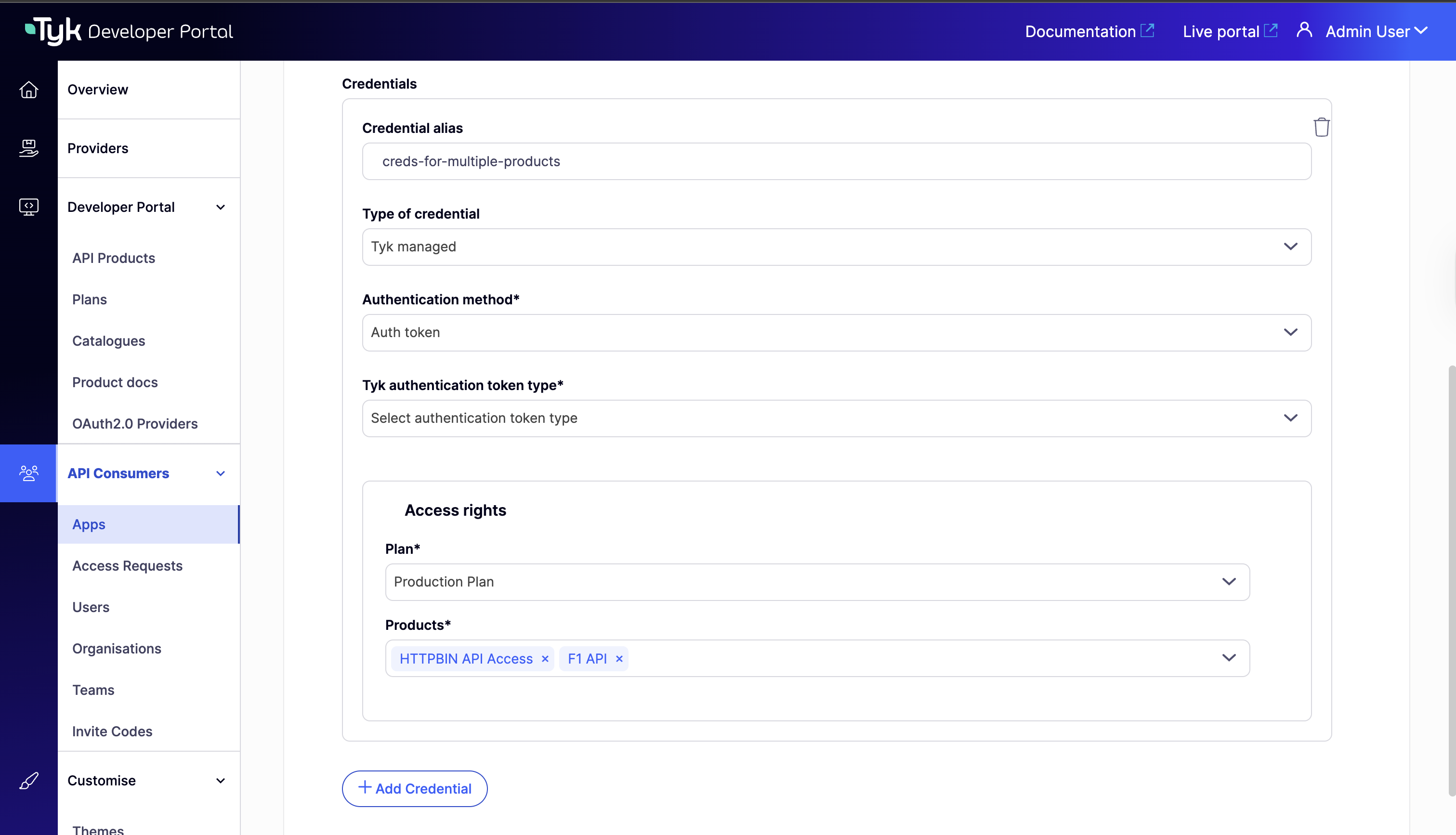 4. Click on **Save Changes**
5. The credential will be generated and associated with the selected product/plan.
6. Additional products on the same plan can be added to this credential.
4. Click on **Save Changes**
5. The credential will be generated and associated with the selected product/plan.
6. Additional products on the same plan can be added to this credential.