> ## Documentation Index
> Fetch the complete documentation index at: https://tyk.io/docs/llms.txt
> Use this file to discover all available pages before exploring further.
# Service Discovery
> How to configure service discovery in Tyk
## Introduction
Service Discovery is a very useful feature for when you have a dynamically changing upstream service set.
For example, you have ten Docker containers that are running the same service, and you are load balancing between them, if one or more fail, a new service will spawn but probably on a different IP address.
Now the Gateway would need to either be manually reconfigured, or, more appropriately, detect the failure and reconfigure itself.
This is what the service discovery module does.
We recommend using the SD module in conjunction with the circuit breaker features, as this makes detection and discovery of failures at the gateway level much more dynamic and responsive.
## Service Discovery: Dashboard
The Service Discovery settings are located in the Core tab from the API Designer.
 **Configuring Service Discovery via the Dashboard**
Select **Enable service discovery** to enable the discovery module.
Once enabled, you will have all the options to configure your Service Discovery endpoints:
**Configuring Service Discovery via the Dashboard**
Select **Enable service discovery** to enable the discovery module.
Once enabled, you will have all the options to configure your Service Discovery endpoints:
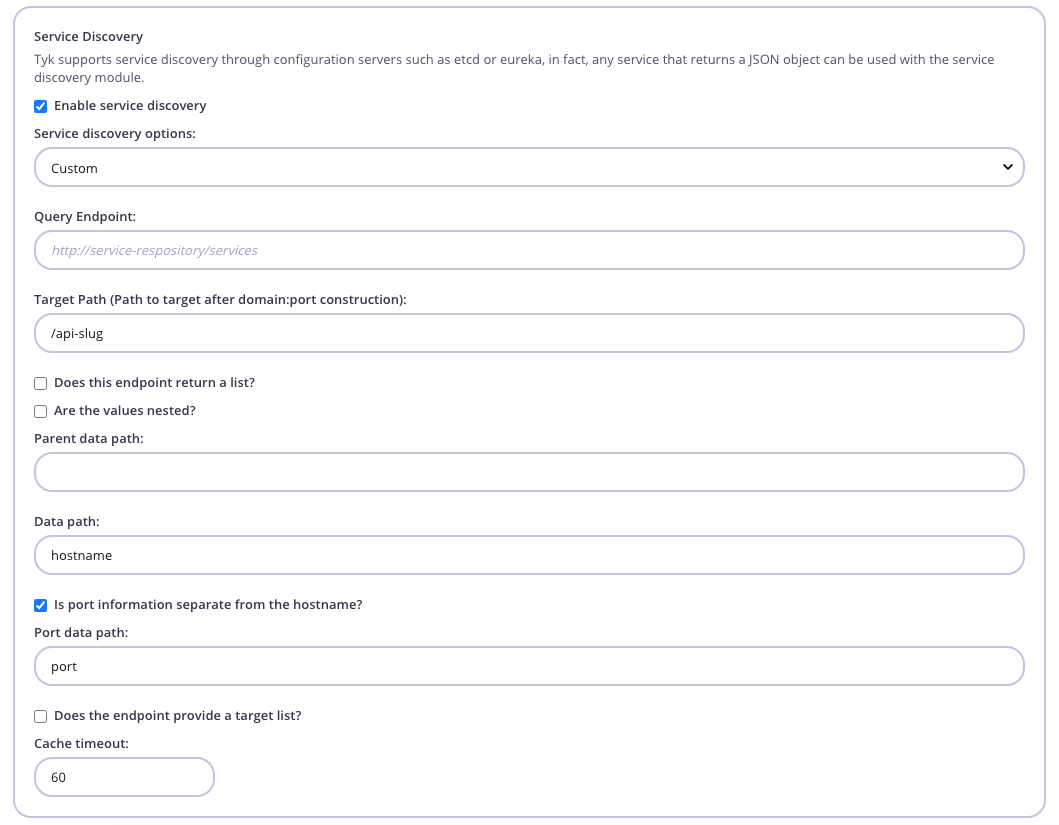 The settings are as follows:
* **Service discovery options**: New Functionality
* **Query endpoint**: The endpoint to call, this would probably be your Consul, etcd or Eureka K/V store.
* **Target path**: Use this setting to set a target path to append to the discovered endpoint, since many SD services only provide host and port data, it is important to be able to target a specific resource on that host, setting this value will enable that.
* **Data path**: The namespace of the data path, so for example if your service responds with:
```
{
"action": "get",
"node": {
"key": "/services/single",
"value": "http://httpbin.org:6000",
"modifiedIndex": 6,
"createdIndex": 6
}
}
```
Then your namespace would be `node.value`.
* **Are the values nested?**: Sometimes the data you are retrieving is nested in another JSON object, e.g. this is how etcd responds with a JSON object as a value key:
```
{
"action": "get",
"node": {
"key": "/services/single",
"value": "{"hostname": "http://httpbin.org", "port": "80"}",
"modifiedIndex": 6,
"createdIndex": 6
}
}
```
In this case, the data actually lives within this string-encoded JSON object, so in this case, you set the value to `checked`, and use a combination of the **data path** and **parent data path** (below).
* **Parent data path**: This is the namespace of the where to find the nested value, in the above example, it would be `node.value`. You would then change the **data path** setting to be `hostname`, since this is where the hostname data resides in the JSON string. Tyk automatically assumes that the data\_path in this case is in a string-encoded JSON object and will try to deserialise it.
Tyk will decode the JSON string and then apply the **data path** namespace to that object in order to find the value.
* **Port data path**: In the above nested example, we can see that there is a separate `port` value for the service in the nested JSON. In this case you can set the **port data path** value and Tyk will treat **data path** as the hostname and zip them together (this assumes that the hostname element does not end in a slash or resource identifier such as `/widgets/`).
In the above example, the **port data path** would be `port`.
* **Is port information separate from the hostname?**: New Functionality
* **Does the endpoint provide a target list?**: If you are using load balancing, set this value to true and Tyk will treat the data path as a list and inject it into the target list of your API Definition.
* **Cache timeout**: Tyk caches target data from a discovery service, in order to make this dynamic you can set a cache value when the data expires and new data is loaded. Setting it too low will cause Tyk to call the SD service too often, setting it too high could mean that failures are not recovered from quickly enough.
## Service Discovery Config: API Definition
Service discovery is configured on a per-API basis, and is set up in the API Object under the `proxy` section of your API Definition:
```yaml theme={null}
enable_load_balancing: true,
service_discovery: {
use_discovery_service: true,
query_endpoint: "http://127.0.0.1:4001/v2/keys/services/multiobj",
use_nested_query: true,
parent_data_path: "node.value",
data_path: "array.hostname",
port_data_path: "array.port",
use_target_list: true,
cache_timeout: 10,
target_path: "/append-this-api-path/"
},
```
Settings are as follows:
* `service_discovery.use_discovery_service`: Set this to `true` to enable the discovery module.
* `service_discovery.query_endpoint`: The endpoint to call, this would probably be your Consul, etcd or Eureka K/V store.
* `service_discovery.data_path`: The namespace of the data path so, for example, if your service responds with:
```
{
"action": "get",
"node": {
"key": "/services/single",
"value": "http://httpbin.org:6000",
"modifiedIndex": 6,
"createdIndex": 6
}
}
```
Then your namespace would be `node.value`.
* `service_discovery.use_nested_query`: Sometimes the data you are retrieving is nested in another JSON object, e.g. this is how etcd responds with a JSON object as a value key:
```
{
"action": "get",
"node": {
"key": "/services/single",
"value": "{"hostname": "http://httpbin.org", "port": "80"}",
"modifiedIndex": 6,
"createdIndex": 6
}
}
```
In this case, the data actually lives within this string-encoded JSON object, so in this case, you set the `use_nested_query` to `true`, and use a combination of the `data_path` and `parent_data_path` (below)
* `service_discovery.parent_data_path`: This is the namespace of the where to find the nested value, in the above example, it would be `node.value`. You would then change the `data_path` setting to be `hostname`, since this is where the host name data resides in the JSON string. Tyk automatically assumes that the `data_path` in this case is in a string-encoded JSON object and will try to deserialise it.
Tyk will decode the JSON string and then apply the `data_path` namespace to that object in order to find the value.
* `service_discovery.port_data_path`: In the above nested example, we can see that there is a separate `port` value for the service in the nested JSON. In this case you can set the `port_data_path` value and Tyk will treat `data_path` as the hostname and zip them together (this assumes that the hostname element does not end in a slash or resource identifier such as `/widgets/`).
In the above example, the `port_data_path` would be `port`.
* `service_discovery.use_target_list`: If you are using load balancing, set this value to `true` and Tyk will treat the data path as a list and inject it into the target list of your API Definition.
* `service_discovery.cache_timeout`: Tyk caches target data from a discovery service, in order to make this dynamic you can set a cache value when the data expires and new data is loaded. Setting it too low will cause Tyk to call the SD service too often, setting it too high could mean that failures are not recovered from quickly enough.
* `service_discovery.target_path`: Use this setting to set a target path to append to the discovered endpoint, since many SD services only provide host and port data, it is important to be able to target a specific resource on that host, setting this value will enable that.
## Service Discovery Examples
**Mesosphere Example**
For integrating service discovery with Mesosphere, you can use the following configuration parameters:
```yaml theme={null}
isNested = false
isTargetList = true
endpointReturnsList = false
portSeperate = true
dataPath = "host"
parentPath = "tasks"
portPath = "ports"
```
**Eureka Example**
For integrating service discovery with Eureka, you can use the following configuration parameters (this assumes that the endpoint will return JSON and not XML, this is achieved by creating an API Definition that injects the header that requests the data type and using this API Definition as the endpoint):
```yaml theme={null}
isNested = false
isTargetList = true
endpointReturnsList = false
portSeperate = true
dataPath = "hostName"
parentPath = "application.instance"
portPath = "port.$"
```
**Etcd Example**
For integrating with etcd, you can use the following configurations:
```yaml theme={null}
isNested = false
isTargetList = false
endpointReturnsList = false
portSeperate = false
dataPath = "node.value"
parentPath = ""
portPath = ""
```
**Zookeeper Example**
For this, you need to spin up a REST server that communicates with the Zookeeper instance.
Here is one open source project, ZooREST, that does just that: [https://github.com/Difrex/zoorest](https://github.com/Difrex/zoorest)
With Zookeeper and ZooREST running, test the query endpoint. Don't forget the `+json`:
```curl theme={null}
$ curl http://zoorest:8889/v1/get/zk_tyk+json
{
"data": {
"path": "httpbin.org"
},
"error": "",
"path": "/zk_tyk",
"state": "OK",
"zkstat": {}
}
```
Then, you can use the following Tyk SD configurations:
```yaml theme={null}
isNested = false
isTargetList = false
endpointReturnsList = false
portSeperate = false
dataPath = "data.path"
parentPath = ""
portPath = ""
```
**Consul Example**
For integrating service discovery with Consul, you can use the following configuration parameters:
```yaml theme={null}
isNested = false
isTargetList = true
endpointReturnsList = true
portSeperate = true
dataPath = "Address"
parentPath = ""
portPath = "ServicePort"
```
**Linkerd Example**
This configuration is a Tyk Community Contribution.
To integrate Tyk with Linkerd perform the following:
**Configure Linkerd**
To integrate with Linkerd, you need to add the following configuration to your `linkerd.yaml` file, located in the `config/` directory:
```yaml theme={null}
routers:
- protocol: http
identifier:
kind: io.l5d.header.token
header: Custom-Header
```
Then, in your Tyk Dashboard:
1. Select your API from the **System Management > APIs** section and click **Edit**.
2. From the **Core Settings** tab, set the **Target URL** to the Linkerd HTTP server `host:port` address.
3. From the **Endpoint Designer** tab click **Global Version Settings** and enter `Custom-Header` in the **Add this header**: field and the value of the Linkerd `app-id` in the **Header value** field.
4. Click **Update** to save your changes.
This is needed since Tyk appends a "Host" header when proxying the request and the "Host" header is also the default header expected by Linkerd.
**For further Linkerd information, see:**
[Linkerd - HTTP proxy documentation](https://linkerd.io/2-edge/reference/proxy-configuration/) (Alternatives Section)
[Linkered - Header Token Identifier documentation](https://linkerd.io/config/0.9.1/linkerd/index.html#header-token-identifier)
[The original Community Contribution](https://community.tyk.io/t/using-tyk-gateway-with-linkerd/1568)
The settings are as follows:
* **Service discovery options**: New Functionality
* **Query endpoint**: The endpoint to call, this would probably be your Consul, etcd or Eureka K/V store.
* **Target path**: Use this setting to set a target path to append to the discovered endpoint, since many SD services only provide host and port data, it is important to be able to target a specific resource on that host, setting this value will enable that.
* **Data path**: The namespace of the data path, so for example if your service responds with:
```
{
"action": "get",
"node": {
"key": "/services/single",
"value": "http://httpbin.org:6000",
"modifiedIndex": 6,
"createdIndex": 6
}
}
```
Then your namespace would be `node.value`.
* **Are the values nested?**: Sometimes the data you are retrieving is nested in another JSON object, e.g. this is how etcd responds with a JSON object as a value key:
```
{
"action": "get",
"node": {
"key": "/services/single",
"value": "{"hostname": "http://httpbin.org", "port": "80"}",
"modifiedIndex": 6,
"createdIndex": 6
}
}
```
In this case, the data actually lives within this string-encoded JSON object, so in this case, you set the value to `checked`, and use a combination of the **data path** and **parent data path** (below).
* **Parent data path**: This is the namespace of the where to find the nested value, in the above example, it would be `node.value`. You would then change the **data path** setting to be `hostname`, since this is where the hostname data resides in the JSON string. Tyk automatically assumes that the data\_path in this case is in a string-encoded JSON object and will try to deserialise it.
Tyk will decode the JSON string and then apply the **data path** namespace to that object in order to find the value.
* **Port data path**: In the above nested example, we can see that there is a separate `port` value for the service in the nested JSON. In this case you can set the **port data path** value and Tyk will treat **data path** as the hostname and zip them together (this assumes that the hostname element does not end in a slash or resource identifier such as `/widgets/`).
In the above example, the **port data path** would be `port`.
* **Is port information separate from the hostname?**: New Functionality
* **Does the endpoint provide a target list?**: If you are using load balancing, set this value to true and Tyk will treat the data path as a list and inject it into the target list of your API Definition.
* **Cache timeout**: Tyk caches target data from a discovery service, in order to make this dynamic you can set a cache value when the data expires and new data is loaded. Setting it too low will cause Tyk to call the SD service too often, setting it too high could mean that failures are not recovered from quickly enough.
## Service Discovery Config: API Definition
Service discovery is configured on a per-API basis, and is set up in the API Object under the `proxy` section of your API Definition:
```yaml theme={null}
enable_load_balancing: true,
service_discovery: {
use_discovery_service: true,
query_endpoint: "http://127.0.0.1:4001/v2/keys/services/multiobj",
use_nested_query: true,
parent_data_path: "node.value",
data_path: "array.hostname",
port_data_path: "array.port",
use_target_list: true,
cache_timeout: 10,
target_path: "/append-this-api-path/"
},
```
Settings are as follows:
* `service_discovery.use_discovery_service`: Set this to `true` to enable the discovery module.
* `service_discovery.query_endpoint`: The endpoint to call, this would probably be your Consul, etcd or Eureka K/V store.
* `service_discovery.data_path`: The namespace of the data path so, for example, if your service responds with:
```
{
"action": "get",
"node": {
"key": "/services/single",
"value": "http://httpbin.org:6000",
"modifiedIndex": 6,
"createdIndex": 6
}
}
```
Then your namespace would be `node.value`.
* `service_discovery.use_nested_query`: Sometimes the data you are retrieving is nested in another JSON object, e.g. this is how etcd responds with a JSON object as a value key:
```
{
"action": "get",
"node": {
"key": "/services/single",
"value": "{"hostname": "http://httpbin.org", "port": "80"}",
"modifiedIndex": 6,
"createdIndex": 6
}
}
```
In this case, the data actually lives within this string-encoded JSON object, so in this case, you set the `use_nested_query` to `true`, and use a combination of the `data_path` and `parent_data_path` (below)
* `service_discovery.parent_data_path`: This is the namespace of the where to find the nested value, in the above example, it would be `node.value`. You would then change the `data_path` setting to be `hostname`, since this is where the host name data resides in the JSON string. Tyk automatically assumes that the `data_path` in this case is in a string-encoded JSON object and will try to deserialise it.
Tyk will decode the JSON string and then apply the `data_path` namespace to that object in order to find the value.
* `service_discovery.port_data_path`: In the above nested example, we can see that there is a separate `port` value for the service in the nested JSON. In this case you can set the `port_data_path` value and Tyk will treat `data_path` as the hostname and zip them together (this assumes that the hostname element does not end in a slash or resource identifier such as `/widgets/`).
In the above example, the `port_data_path` would be `port`.
* `service_discovery.use_target_list`: If you are using load balancing, set this value to `true` and Tyk will treat the data path as a list and inject it into the target list of your API Definition.
* `service_discovery.cache_timeout`: Tyk caches target data from a discovery service, in order to make this dynamic you can set a cache value when the data expires and new data is loaded. Setting it too low will cause Tyk to call the SD service too often, setting it too high could mean that failures are not recovered from quickly enough.
* `service_discovery.target_path`: Use this setting to set a target path to append to the discovered endpoint, since many SD services only provide host and port data, it is important to be able to target a specific resource on that host, setting this value will enable that.
## Service Discovery Examples
**Mesosphere Example**
For integrating service discovery with Mesosphere, you can use the following configuration parameters:
```yaml theme={null}
isNested = false
isTargetList = true
endpointReturnsList = false
portSeperate = true
dataPath = "host"
parentPath = "tasks"
portPath = "ports"
```
**Eureka Example**
For integrating service discovery with Eureka, you can use the following configuration parameters (this assumes that the endpoint will return JSON and not XML, this is achieved by creating an API Definition that injects the header that requests the data type and using this API Definition as the endpoint):
```yaml theme={null}
isNested = false
isTargetList = true
endpointReturnsList = false
portSeperate = true
dataPath = "hostName"
parentPath = "application.instance"
portPath = "port.$"
```
**Etcd Example**
For integrating with etcd, you can use the following configurations:
```yaml theme={null}
isNested = false
isTargetList = false
endpointReturnsList = false
portSeperate = false
dataPath = "node.value"
parentPath = ""
portPath = ""
```
**Zookeeper Example**
For this, you need to spin up a REST server that communicates with the Zookeeper instance.
Here is one open source project, ZooREST, that does just that: [https://github.com/Difrex/zoorest](https://github.com/Difrex/zoorest)
With Zookeeper and ZooREST running, test the query endpoint. Don't forget the `+json`:
```curl theme={null}
$ curl http://zoorest:8889/v1/get/zk_tyk+json
{
"data": {
"path": "httpbin.org"
},
"error": "",
"path": "/zk_tyk",
"state": "OK",
"zkstat": {}
}
```
Then, you can use the following Tyk SD configurations:
```yaml theme={null}
isNested = false
isTargetList = false
endpointReturnsList = false
portSeperate = false
dataPath = "data.path"
parentPath = ""
portPath = ""
```
**Consul Example**
For integrating service discovery with Consul, you can use the following configuration parameters:
```yaml theme={null}
isNested = false
isTargetList = true
endpointReturnsList = true
portSeperate = true
dataPath = "Address"
parentPath = ""
portPath = "ServicePort"
```
**Linkerd Example**
This configuration is a Tyk Community Contribution.
To integrate Tyk with Linkerd perform the following:
**Configure Linkerd**
To integrate with Linkerd, you need to add the following configuration to your `linkerd.yaml` file, located in the `config/` directory:
```yaml theme={null}
routers:
- protocol: http
identifier:
kind: io.l5d.header.token
header: Custom-Header
```
Then, in your Tyk Dashboard:
1. Select your API from the **System Management > APIs** section and click **Edit**.
2. From the **Core Settings** tab, set the **Target URL** to the Linkerd HTTP server `host:port` address.
3. From the **Endpoint Designer** tab click **Global Version Settings** and enter `Custom-Header` in the **Add this header**: field and the value of the Linkerd `app-id` in the **Header value** field.
4. Click **Update** to save your changes.
This is needed since Tyk appends a "Host" header when proxying the request and the "Host" header is also the default header expected by Linkerd.
**For further Linkerd information, see:**
[Linkerd - HTTP proxy documentation](https://linkerd.io/2-edge/reference/proxy-configuration/) (Alternatives Section)
[Linkered - Header Token Identifier documentation](https://linkerd.io/config/0.9.1/linkerd/index.html#header-token-identifier)
[The original Community Contribution](https://community.tyk.io/t/using-tyk-gateway-with-linkerd/1568)