> ## Documentation Index
> Fetch the complete documentation index at: https://tyk.io/docs/llms.txt
> Use this file to discover all available pages before exploring further.
# Enforced Timeouts
> Learn how to use Tyk's Enforced Timeout middleware to manage upstream service response times, ensuring system stability and optimal performance.
## Introduction
In any system, a task or operation takes a certain period of time to complete. When a client makes a request to the Tyk Gateway, it will be dependent upon the responsiveness of the upstream service before it can continue. If the upstream service is suffering from resource overload or congestion the response may be returned too late leading to unacceptable experience for the end user or even to instability in the system.
Tyk's Enforced Timeout middleware can be used to apply a maximum time that the Gateway will wait for a response before it terminates (or times out) the request. If the timeout expires, then Tyk will notify the client with an `HTTP 504 Gateway Timeout` error.
This feature helps to maintain system stability and prevents unresponsive or long-running tasks from affecting the overall performance of the system. The enforced timeout can be customized and configured to suit specific requirements, providing control over resource allocation and ensuring optimal system functionality.
## When to use an enforced timeout
**Resource management**
The enforced timeout can be implemented to manage system resources efficiently, particularly in high-traffic environments, preventing long-running tasks from monopolising resources, ensuring fair distribution and optimal performance.
**Task prioritization**
Prioritizing critical tasks by setting timeouts based on their expected time-to-complete helps to ensure that essential tasks are completed by reducing the impact of non-responsive upstream services.
**Security measures**
Limiting task durations can help protect against potential security breaches or malicious activities by setting time constraints on user sessions or API requests.
**Time-sensitive operations**
For time-sensitive tasks, enforced timeouts can guarantee timely completion and avoid delays or missed deadlines.
## How the enforced timeout middleware works
The enforced timeout middleware is enabled and configured at the endpoint level.
The configuration is very simple, the only option being the duration of the timeout (which is declared in seconds) after which the upstream request will be terminated and an `HTTP 504 Gateway Timeout` error returned to the client.
If you are using the Service Discovery option, if an enforced timeout is triggered, the service discovery module will refresh the host / host list.
## Using the Enforced Timeout middleware with Tyk OAS APIs
Tyk's [enforced timeout](/5.12/planning-for-production/ensure-high-availability/circuit-breakers) middleware is configured at the endpoint level, where it sets a limit on the response time from the upstream service. If the upstream takes too long to respond to a request, Tyk will terminate the request and return `504 Gateway Timeout` to the client.
When working with Tyk OAS APIs the enforced timeout is configured in the [Tyk OAS API Definition](/5.12/api-management/gateway-config-tyk-oas#operation). You can do this via the Tyk Dashboard API or in the API Designer.
If you're using the legacy Tyk Classic APIs, then check out the [Tyk Classic](/5.12/#using-the-enforced-timeout-middleware-with-tyk-classic-apis) page.
**Configuring an enforced timeout in the Tyk OAS API Definition**
The design of the Tyk OAS API Definition takes advantage of the `operationId` defined in the OpenAPI Document that declares both the path and method for which the middleware should be added. Endpoint `paths` entries (and the associated `operationId`) can contain wildcards in the form of any string bracketed by curly braces, for example `/status/{code}`. These wildcards are so they are human readable and do not translate to variable names. Under the hood, a wildcard translates to the “match everything” regex of: `(.*)`.
The enforced timeout middleware (`enforceTimeout`) can be added to the `operations` section of the Tyk OAS Extension (`x-tyk-api-gateway`) in your Tyk OAS API Definition for the appropriate `operationId` (as configured in the `paths` section of your OpenAPI Document).
The `enforceTimeout` object has the following configuration:
* `enabled`: enable the middleware for the endpoint
* `value`: the duration of the upstream request timer
For example:
```json {hl_lines=["39-41"],linenos=true, linenostart=1} theme={null}
{
"components": {},
"info": {
"title": "example-timeout",
"version": "1.0.0"
},
"openapi": "3.0.3",
"paths": {
"/status/200": {
"get": {
"operationId": "status/200get",
"responses": {
"200": {
"description": ""
}
}
}
}
},
"x-tyk-api-gateway": {
"info": {
"name": "example-timeout",
"state": {
"active": true
}
},
"upstream": {
"url": "http://httpbin.org/"
},
"server": {
"listenPath": {
"value": "/example-timeout/",
"strip": true
}
},
"middleware": {
"operations": {
"status/200get": {
"enforceTimeout": {
"enabled": true,
"value": 3
}
}
}
}
}
}
```
In this example Tyk OAS API definition, the enforced timeout has been configured to monitor requests to the `GET /status/200` endpoint. It will configure a timer that will expire (`timeout`) 3 seconds after the request is proxied to the upstream service. If the upstream response is not received before the expiry of the timer, that request will be terminated and Tyk will return `504 Gateway Timeout` to the client.
The configuration above is a complete and valid Tyk OAS API Definition that you can import into Tyk to try out the enforced timeout.
**Configuring an enforced timeout in the API Designer**
Adding the enforced timeout to your API endpoints is easy when using the API Designer in the Tyk Dashboard, simply follow these steps:
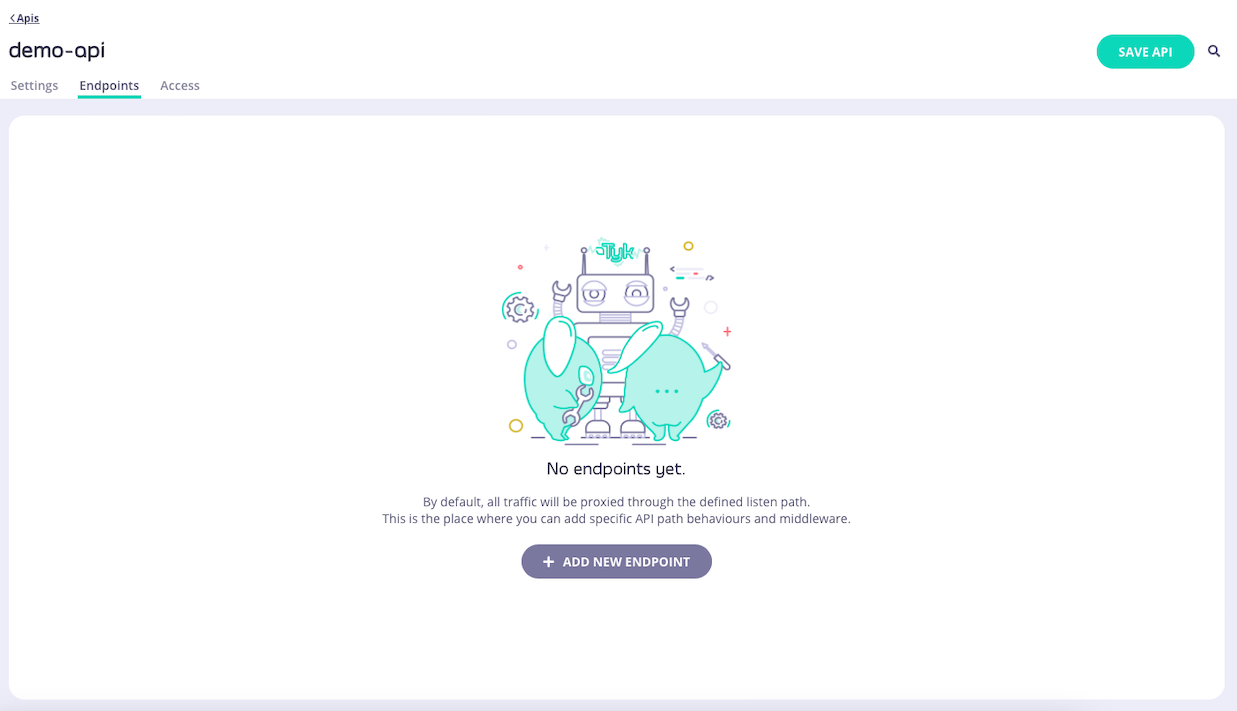
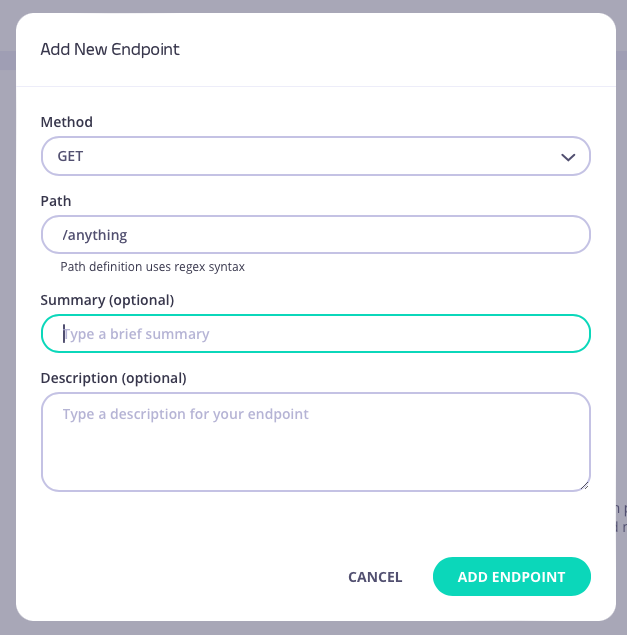
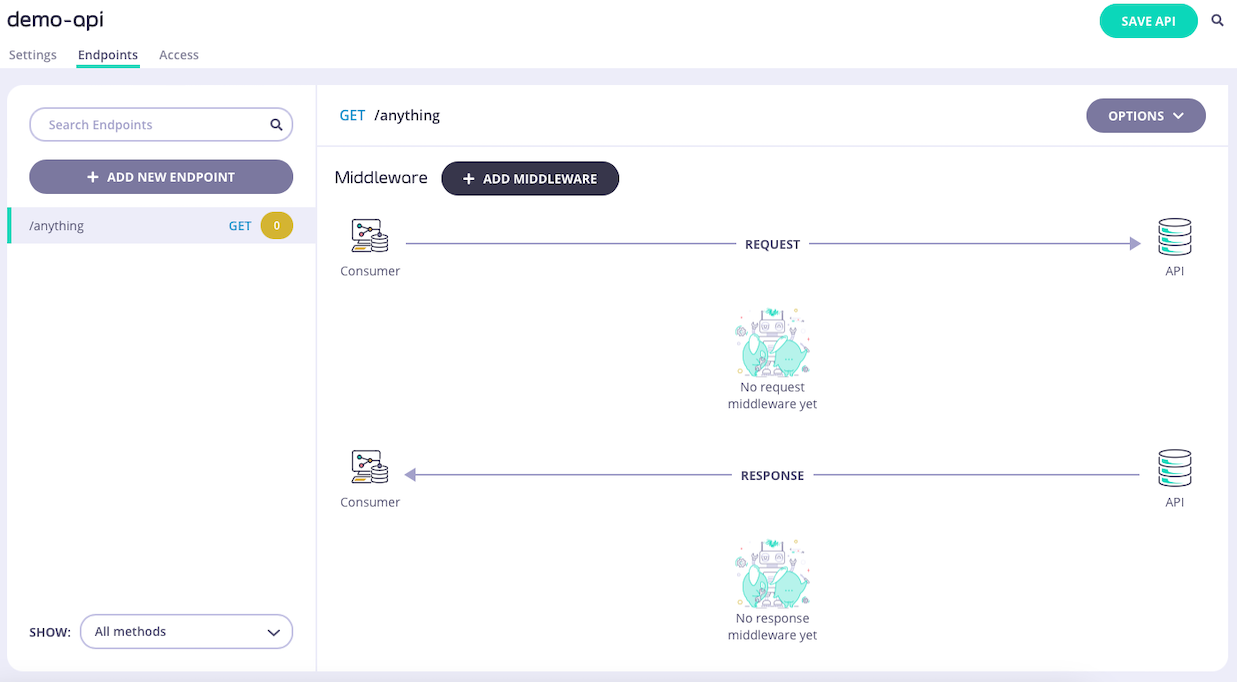
**Step 1: Add an endpoint**
From the **API Designer** add an endpoint that matches the path and method to which you want to apply the middleware.
 **Step 2: Select the Enforce Timeout middleware**
Select **ADD MIDDLEWARE** and choose the **Enforce Timeout** middleware from the *Add Middleware* screen.
**Step 2: Select the Enforce Timeout middleware**
Select **ADD MIDDLEWARE** and choose the **Enforce Timeout** middleware from the *Add Middleware* screen.
 **Step 3: Configure the middleware**
Set the timeout duration that you wish to enforce for requests to the endpoint.
**Step 3: Configure the middleware**
Set the timeout duration that you wish to enforce for requests to the endpoint.
 Select **ADD MIDDLEWARE** to apply the change to the middleware configuration.
**Step 4: Save the API**
Select **SAVE API** to apply the changes to your API.
## Using the Enforced Timeout middleware with Tyk Classic APIs
Tyk's [enforced timeout](/5.12/planning-for-production/ensure-high-availability/circuit-breakers) middleware is configured at the endpoint level, where it sets a limit on the response time from the upstream service. If the upstream takes too long to respond to a request, Tyk will terminate the request and return `504 Gateway Timeout` to the client.
When working with Tyk Classic APIs the enforced timeout is configured in the Tyk Classic API Definition. You can do this via the Tyk Dashboard API or in the API Designer.
If you're using the newer Tyk OAS APIs, then check out the [Tyk OAS](/5.12/#using-the-enforced-timeout-middleware-with-tyk-oas-apis) page.
If you're using Tyk Operator then check out the [configuring an enforced timeout in Tyk Operator](/5.12/#configuring-an-enforced-timeout-in-tyk-operator) section below.
**Configuring an enforced timeout in the Tyk Classic API Definition**
To configure an enforced timeout you must add a new `hard_timeouts` object to the `extended_paths` section of your API definition.
It has the following configuration:
* `path`: the endpoint path
* `method`: the endpoint HTTP method
* `timeout`: the duration of the upstream request timer
For example:
```json theme={null}
{
"hard_timeouts": [
{
"path": "/status/200",
"method": "GET",
"timeout": 3
}
]
}
```
In this example the enforced timeout has been configured to monitor requests to the `GET /status/200` endpoint. It will configure a timer that will expire (`timeout`) 3 seconds after the request is proxied to the upstream service.
If the upstream response is not received before the expiry of the timer, that request will be terminated and Tyk will return `504 Gateway Timeout` to the client.
**Configuring an enforced timeout in the API Designer**
You can use the API Designer in the Tyk Dashboard to configure the enforced timeout middleware for your Tyk Classic API by following these steps.
**Step 1: Add an endpoint for the path and select the Enforced Timeout plugin**
From the **Endpoint Designer** add an endpoint that matches the path for which you want to deploy the enforced timeout. Select the **Enforced timeout** plugin.
Select **ADD MIDDLEWARE** to apply the change to the middleware configuration.
**Step 4: Save the API**
Select **SAVE API** to apply the changes to your API.
## Using the Enforced Timeout middleware with Tyk Classic APIs
Tyk's [enforced timeout](/5.12/planning-for-production/ensure-high-availability/circuit-breakers) middleware is configured at the endpoint level, where it sets a limit on the response time from the upstream service. If the upstream takes too long to respond to a request, Tyk will terminate the request and return `504 Gateway Timeout` to the client.
When working with Tyk Classic APIs the enforced timeout is configured in the Tyk Classic API Definition. You can do this via the Tyk Dashboard API or in the API Designer.
If you're using the newer Tyk OAS APIs, then check out the [Tyk OAS](/5.12/#using-the-enforced-timeout-middleware-with-tyk-oas-apis) page.
If you're using Tyk Operator then check out the [configuring an enforced timeout in Tyk Operator](/5.12/#configuring-an-enforced-timeout-in-tyk-operator) section below.
**Configuring an enforced timeout in the Tyk Classic API Definition**
To configure an enforced timeout you must add a new `hard_timeouts` object to the `extended_paths` section of your API definition.
It has the following configuration:
* `path`: the endpoint path
* `method`: the endpoint HTTP method
* `timeout`: the duration of the upstream request timer
For example:
```json theme={null}
{
"hard_timeouts": [
{
"path": "/status/200",
"method": "GET",
"timeout": 3
}
]
}
```
In this example the enforced timeout has been configured to monitor requests to the `GET /status/200` endpoint. It will configure a timer that will expire (`timeout`) 3 seconds after the request is proxied to the upstream service.
If the upstream response is not received before the expiry of the timer, that request will be terminated and Tyk will return `504 Gateway Timeout` to the client.
**Configuring an enforced timeout in the API Designer**
You can use the API Designer in the Tyk Dashboard to configure the enforced timeout middleware for your Tyk Classic API by following these steps.
**Step 1: Add an endpoint for the path and select the Enforced Timeout plugin**
From the **Endpoint Designer** add an endpoint that matches the path for which you want to deploy the enforced timeout. Select the **Enforced timeout** plugin.
 **Step 2: Configure the timeout**
Then enter the timeout to be enforced for the endpoint (in seconds):
**Step 2: Configure the timeout**
Then enter the timeout to be enforced for the endpoint (in seconds):
 **Step 3: Save the API**
Use the *save* or *create* buttons to save the changes and activate the middleware.
## Configuring an enforced timeout in Tyk Operator
The process for configuring the middleware in Tyk Operator is similar to that explained in [configuring an enforced timeout in the Tyk Classic API Definition](/5.12/#using-the-enforced-timeout-middleware-with-tyk-classic-apis). It is possible to configure an enforced timeout using the `hard_timeouts` object within the `extended_paths` section of the API Definition.
The example API Definition below configures an API to listen on path `/httpbin-timeout-breaker` and forwards requests upstream to [http://httpbin.org](http://httpbin.org). A hard timeout value of 2 seconds is configured for path `/delay/{delay_seconds}`. This will return a `504 Gateway Timeout` response to the client if the upstream response is not received before expiry of the timer.
```yaml {linenos=true, linenostart=1, hl_lines=["26-29"]} theme={null}
apiVersion: tyk.tyk.io/v1alpha1
kind: ApiDefinition
metadata:
name: httpbin-timeout-breaker
spec:
name: httpbin-timeout-breaker
use_keyless: true
protocol: http
active: true
proxy:
target_url: http://httpbin.org
listen_path: /httpbin-timeout-breaker
strip_listen_path: true
version_data:
default_version: Default
not_versioned: true
versions:
Default:
name: Default
use_extended_paths: true
paths:
black_list: []
ignored: []
white_list: []
extended_paths:
hard_timeouts:
- method: GET
path: /delay/{delay_seconds}
timeout: 2
circuit_breakers:
- method: GET
path: /status/500
return_to_service_after: 10
samples: 4
threshold_percent: "0.5" # Tyk Dashboard API doesn't support strings.
```
We can test the example using the curl command as shown below:
```bash theme={null}
curl http://localhost:8081/httpbin-timeout/delay/3 -i
HTTP/1.1 504 Gateway Timeout
Content-Type: application/json
X-Generator: tyk.io
Date: Fri, 09 Aug 2024 07:43:48 GMT
Content-Length: 57
{
"error": "Upstream service reached hard timeout."
}
```
**Step 3: Save the API**
Use the *save* or *create* buttons to save the changes and activate the middleware.
## Configuring an enforced timeout in Tyk Operator
The process for configuring the middleware in Tyk Operator is similar to that explained in [configuring an enforced timeout in the Tyk Classic API Definition](/5.12/#using-the-enforced-timeout-middleware-with-tyk-classic-apis). It is possible to configure an enforced timeout using the `hard_timeouts` object within the `extended_paths` section of the API Definition.
The example API Definition below configures an API to listen on path `/httpbin-timeout-breaker` and forwards requests upstream to [http://httpbin.org](http://httpbin.org). A hard timeout value of 2 seconds is configured for path `/delay/{delay_seconds}`. This will return a `504 Gateway Timeout` response to the client if the upstream response is not received before expiry of the timer.
```yaml {linenos=true, linenostart=1, hl_lines=["26-29"]} theme={null}
apiVersion: tyk.tyk.io/v1alpha1
kind: ApiDefinition
metadata:
name: httpbin-timeout-breaker
spec:
name: httpbin-timeout-breaker
use_keyless: true
protocol: http
active: true
proxy:
target_url: http://httpbin.org
listen_path: /httpbin-timeout-breaker
strip_listen_path: true
version_data:
default_version: Default
not_versioned: true
versions:
Default:
name: Default
use_extended_paths: true
paths:
black_list: []
ignored: []
white_list: []
extended_paths:
hard_timeouts:
- method: GET
path: /delay/{delay_seconds}
timeout: 2
circuit_breakers:
- method: GET
path: /status/500
return_to_service_after: 10
samples: 4
threshold_percent: "0.5" # Tyk Dashboard API doesn't support strings.
```
We can test the example using the curl command as shown below:
```bash theme={null}
curl http://localhost:8081/httpbin-timeout/delay/3 -i
HTTP/1.1 504 Gateway Timeout
Content-Type: application/json
X-Generator: tyk.io
Date: Fri, 09 Aug 2024 07:43:48 GMT
Content-Length: 57
{
"error": "Upstream service reached hard timeout."
}
```