> ## Documentation Index
> Fetch the complete documentation index at: https://tyk.io/docs/llms.txt
> Use this file to discover all available pages before exploring further.
# Get an Organisation Key
> Get session info about specified organisation key. Should return up to date rate limit and quota usage numbers.
## OpenAPI
````yaml /swagger/5.12/gateway-swagger.yml get /tyk/org/keys/{keyID}
openapi: 3.0.3
info:
contact:
email: support@tyk.io
name: Tyk Technologies
url: https://tyk.io/contact
description: >+

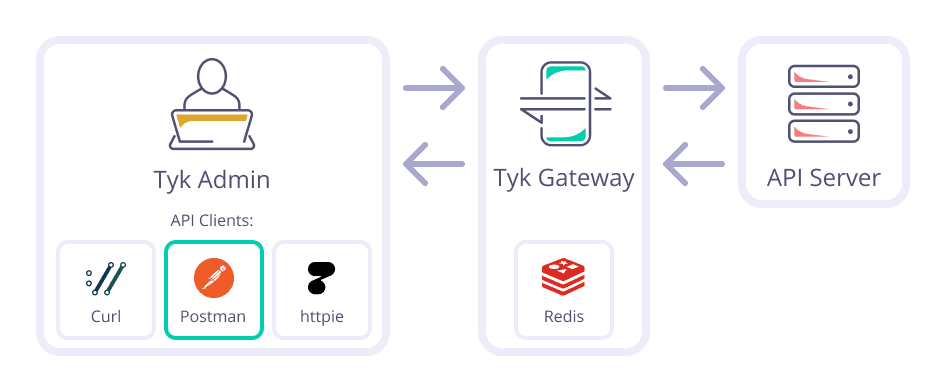 The Tyk Gateway API is the primary means for integrating your application
with the Tyk API Gateway system. This API is very small, and has no granular
permissions system. It is intended to be used purely for internal automation
and integration.
**Warning: Under no circumstances should outside parties be granted access
to this API.**
The Tyk Gateway API is capable of:
* Managing session objects (key generation).
* Managing and listing policies.
* Managing and listing API Definitions (only when not using the Tyk
Dashboard).
* Hot reloads / reloading a cluster configuration.
* OAuth client creation (only when not using the Tyk Dashboard).
In order to use the Gateway API, you'll need to set the **secret** parameter
in your tyk.conf file.
The shared secret you set should then be sent along as a header with each
Gateway API Request in order for it to be successful:
**x-tyk-authorization: ***
The Tyk Gateway API is the primary means for integrating your application
with the Tyk API Gateway system. This API is very small, and has no granular
permissions system. It is intended to be used purely for internal automation
and integration.
**Warning: Under no circumstances should outside parties be granted access
to this API.**
The Tyk Gateway API is capable of:
* Managing session objects (key generation).
* Managing and listing policies.
* Managing and listing API Definitions (only when not using the Tyk
Dashboard).
* Hot reloads / reloading a cluster configuration.
* OAuth client creation (only when not using the Tyk Dashboard).
In order to use the Gateway API, you'll need to set the **secret** parameter
in your tyk.conf file.
The shared secret you set should then be sent along as a header with each
Gateway API Request in order for it to be successful:
**x-tyk-authorization: ***
The Tyk Gateway API is subsumed by the Tyk Dashboard API in Pro
installations.
license:
name: Mozilla Public License Version 2.0
url: https://github.com/TykTechnologies/tyk/blob/master/LICENSE.md
title: Tyk Gateway API
version: 5.11.0
servers:
- url: https://{tenant}
variables:
tenant:
default: localhost:8080
description: Your gateway host
security:
- api_key: []
tags:
- description: >
**Note: Applies only to Tyk Gateway Community Edition**
API management is very simple using the Tyk Rest API: each update only
affects the underlying file, and this endpoint will only work with disk
based installations, not database-backed ones.
APIs that are added this way are flushed to to disk into the app_path
folder using the format: *{api-id}.json*. Updating existing APIs that use
a different naming convention will cause those APIs to be added, which
could subsequently lead to a loading error and crash if they use the same
listen_path.
These methods only work on a single API node. If updating a cluster, it is
important to ensure that all nodes are updated before initiating a
reload.
name: APIs
- description: |+
**Note: Applies only to Tyk Gateway Community Edition**
name: Tyk OAS APIs
- description: >
All keys that are used to access services via Tyk correspond to a session
object that informs Tyk about the context of this particular token, like
access rules and rate/quota allowance.
name: Keys
- description: >
It is possible to force API quota and rate limit across all keys that
belong to a specific organisation ID. Rate limiting at an organisation
level is useful for creating tiered access levels and trial accounts.
The Organisation rate limiting middleware works with both Quotas and Rate
Limiters. In order to manage this functionality, a simple API has been put
in place to manage these sessions.
Although the Organisation session-limiter uses the same session object,
all other security keys are optional as they are not used.
Managing active status
To disallow access to an entire group of keys without rate limiting the
organisation, create a session object with the "is_inactive" key set to
true. This will block access before any other middleware is executed. It
is useful when managing subscriptions for an organisation group and access
needs to be blocked because of non-payment.
name: Organisation Quotas
- description: >
Sometimes a cache might contain stale data, or it may just need to be
cleared because of an invalid configuration. This call will purge all keys
associated with a cache on an API-by-API basis.
name: Cache Invalidation
- description: >-
Use the endpoints under this tag to manage your certificates. You can add,
delete and list certificates using these endpoints.
name: Certs
- description: |
Force restart of the Gateway or whole cluster.
name: Hot Reload
- description: |
Check health status of the Tyk Gateway and loaded APIs.
name: Health Checking
- description: >
A Tyk security policy incorporates several security options that can be
applied to an API key. It acts as a template that can override individual
sections of an API key (or identity) in Tyk.
name: Policies
- description: |
Manage OAuth clients, and manage their tokens
name: OAuth
- description: >
Tyk supports batch requests, so a client makes a single request to the API
but gets a compound response object back.
This is especially handy if clients have complex requests that have
multiple synchronous dependencies and do not wish to have the entire
request / response cycle running for each event.
To enable batch request support, set the `enable_batch_request_support`
value to `true`
Batch requests that come into Tyk are *run through the whole Tyk
machinery* and *use a relative path to prevent spamming*. This means that
a batch request to Tyk for three resources with the same API key will have
three requests applied to their session quota and request limiting could
become active if they are being throttled.
Tyk reconstructs the API request based on the data in the batch request.
This is to ensure that Tyk is not being used to proxy requests to other
hosts outside of the upstream API being accessed.
Batch requests are created by POSTING to the `/{listen_path}/tyk/batch/`
endpoint. These requests **do not require a valid key**, but their request
list does.
Sample Request
```{json}
{
"requests": [
{
"method": "GET",
"headers": {
"x-tyk-test": "1",
"x-tyk-version": "1.2",
"authorization": "1dbc83b9c431649d7698faa9797e2900f"
},
"body": "",
"relative_url": "get"
},
{
"method": "GET",
"headers": {
"x-tyk-test": "2",
"x-tyk-version": "1.2",
"authorization": "1dbc83b9c431649d7698faa9797e2900f"
},
"body": "",
"relative_url": "get"
}
],
"suppress_parallel_execution": false
}
```
The response will be a structured reply that encapsulates the responses
for each of the outbound requests. If `suppress_parallel_execution` is set
to `true`, requests will be made synchronously. If set to `false` then
they will run in parallel and the response order is not guaranteed.
Sample Response
```
[
{
"relative_url": "get",
"code": 200,
"headers": {
"Access-Control-Allow-Credentials": [
"true"
],
"Access-Control-Allow-Origin": [
"*"
],
"Content-Length": [
"497"
],
"Content-Type": [
"application/json"
],
"Date": [
"Wed, 12 Nov 2014 15:32:43 GMT"
],
"Server": [
"gunicorn/18.0"
],
"Via": [
"1.1 vegur"
]
},
"body": "{
"args": {},
"headers": {
"Accept-Encoding": "gzip",
"Authorization": "1dbc83b9c431649d7698faa9797e2900f",
"Connect-Time": "2",
"Connection": "close",
"Host": "httpbin.org",
"Total-Route-Time": "0",
"User-Agent": "Go 1.1 package http",
"Via": "1.1 vegur",
"X-Request-Id": "6a22499a-2776-4aa1-80c0-686581a8be4d",
"X-Tyk-Test": "2",
"X-Tyk-Version": "1.2"
},
"origin": "127.0.0.1, 62.232.114.250",
"url": "http://httpbin.org/get"
}"
},
{
"relative_url": "get",
"code": 200,
"headers": {
"Access-Control-Allow-Credentials": [
"true"
],
"Access-Control-Allow-Origin": [
"*"
],
"Content-Length": [
"497"
],
"Content-Type": [
"application/json"
],
"Date": [
"Wed, 12 Nov 2014 15:32:43 GMT"
],
"Server": [
"gunicorn/18.0"
],
"Via": [
"1.1 vegur"
]
},
"body": "{
"args": {},
"headers": {
"Accept-Encoding": "gzip",
"Authorization": "1dbc83b9c431649d7698faa9797e2900f",
"Connect-Time": "7",
"Connection": "close",
"Host": "httpbin.org",
"Total-Route-Time": "0",
"User-Agent": "Go 1.1 package http",
"Via": "1.1 vegur",
"X-Request-Id": "1ab61f50-51ff-4828-a7e2-17240385a6d2",
"X-Tyk-Test": "1",
"X-Tyk-Version": "1.2"
},
"origin": "127.0.0.1, 62.232.114.250",
"url": "http://httpbin.org/get"
}"
}
]
```
With the body for each request string encoded in the `body` field.
* `expire_analytics_after`: If you are running a busy API, you may want to
ensure that your MongoDB database does not overflow with old data. Set the
`expire_analytics_after` value to the number of seconds you would like the
data to last for. Setting this flag to anything above `0` will set an
`expireAt` field for each record that is written to the database.
**Important:** Tyk will not create the expiry index for you. In order to
implement data expiry for your analytics data, ensure that the index is
created This is easily achieved using the [MongoDB command line
interface](https://docs.mongodb.com/getting-started/shell/client/).
* `dont_set_quota_on_create`: This setting defaults to `false`, but if set
to `true`, when the API is used to edit, create or add keys, the quota
cache in Redis will not be re-set. By default, all updates or creates to
Keys that have Quotas set will re-set the quota (This has been the default
behaviour since 1.0).
This behaviour can be bypassed on a case-by-case basis by using the `suppress_reset` parameter when making a REST API request. This is the advised mode of operation as it allows for manual, granular control over key quotas and reset timings.
* `cache_options`: This section enables you to configure the caching
behaviour of Tyk and to enable or disable the caching middleware for your
API.
* `cache_options.enable_cache`: Set this value to `true` if the cache
should be enabled for this endpoint, setting it to false will stop all
caching behaviour.
* `cache_options.cache_timeout`: The amount of time, in seconds, to keep
cached objects, defaults to `60` seconds.
* `cache_options.cache_all_safe_requests`: Set this to `true` if you want
all *safe* requests (GET, HEAD, OPTIONS) to be cached. This is a blanket
setting for APIs where caching is required but you don't want to set
individual paths up in the definition.
* `cache_options.enable_upstream_cache_control`: Set this to `true` if you
want your application to control the cache options for Tyk (TTL and
whether to cache or not). See
[Caching](/docs/basic-config-and-security/reduce-latency/caching/) for
more details.
* `response_processors`: Response processors need to be specifically
defined so they are loaded on API creation, otherwise the middleware will
not fire. In order to have the two main response middleware components
fire, the following configuration object should be supplied.
```{json}
"response_processors": [
{
"name": "header_injector",
"options": {
"add_headers": {"name": "value"},
"remove_headers": ["name"]
}
},
{
"name": "response_body_transform",
"options": {}
}
]
```
The options for the `header_injector` are global, and will apply to all
outbound requests.
name: Batch requests
paths:
/tyk/org/keys/{keyID}:
get:
tags:
- Organisation Quotas
summary: Get an Organisation Key
description: >-
Get session info about specified organisation key. Should return up to
date rate limit and quota usage numbers.
operationId: getOrgKey
parameters:
- description: The Org ID
example: 664a14650619d40001f1f00f
in: query
name: orgID
required: false
schema:
type: string
- description: The Key ID
example: e389ae00a2b145feaf28d6cc11f0f86d
in: path
name: keyID
required: true
schema:
type: string
responses:
'200':
content:
application/json:
example:
access_rights:
itachi-api:
allowed_urls:
- methods:
- GET
url: /users
api_id: 8ddd91f3cda9453442c477b06c4e2da4
api_name: Itachi api
limit:
per: 60
quota_max: 10000
quota_remaining: 10000
quota_renewal_rate: 3600
rate: 1000
throttle_interval: 10
throttle_retry_limit: 10
versions:
- Default
alias: portal-key
allowance: 1000
apply_policies:
- 5ead7120575961000181867e
date_created: '2024-08-09T14:40:34.87614+03:00'
enable_detailed_recording: true
last_updated: '1723203634'
meta_data:
new-update-key-sample: update-key-sample
tyk_developer_id: 62b3fb9a1d5e4f00017226f5
update: sample policy update
user_type: mobile_user
org_id: 5e9d9544a1dcd60001d0ed20
per: 60
quota_max: 10000
quota_renewal_rate: 3600
quota_renews: 1723207234
rate: 1000
tags:
- security
- edge
- edge-eu
throttle_interval: 10
throttle_retry_limit: 10
schema:
properties:
access_rights:
additionalProperties:
properties:
allowed_urls:
items:
properties:
methods:
items:
type: string
nullable: true
type: array
url:
type: string
type: object
nullable: true
type: array
api_id:
type: string
api_name:
type: string
limit:
properties:
per:
type: integer
quota_max:
type: integer
quota_remaining:
type: integer
quota_renewal_rate:
type: integer
rate:
type: integer
throttle_interval:
type: integer
throttle_retry_limit:
type: integer
type: object
versions:
items:
type: string
nullable: true
type: array
type: object
nullable: true
type: object
alias:
type: string
allowance:
type: integer
apply_policies:
items:
type: string
nullable: true
type: array
date_created:
format: date-time
type: string
enable_detailed_recording:
type: boolean
last_updated:
type: string
meta_data:
additionalProperties:
type: string
nullable: true
type: object
org_id:
type: string
per:
type: integer
quota_max:
type: integer
quota_renewal_rate:
type: integer
quota_renews:
type: integer
rate:
type: integer
tags:
items:
type: string
nullable: true
type: array
throttle_interval:
type: integer
throttle_retry_limit:
type: integer
type: object
description: OK
'403':
content:
application/json:
example:
message: Attempted administrative access with invalid or missing key!
status: error
schema:
$ref: '#/components/schemas/ApiStatusMessage'
description: Forbidden
'404':
content:
application/json:
example:
message: Org not found
status: error
schema:
$ref: '#/components/schemas/ApiStatusMessage'
description: Org not found
components:
schemas:
ApiStatusMessage:
properties:
message:
type: string
status:
type: string
type: object
securitySchemes:
api_key:
description: Api key
in: header
name: X-Tyk-Authorization
type: apiKey
````