> ## Documentation Index
> Fetch the complete documentation index at: https://tyk.io/docs/llms.txt
> Use this file to discover all available pages before exploring further.
# Mock Response
> How to configure Mock Response traffic transformation middleware in Tyk
## Overview
A mock response is a simulated API response that can be returned by the API gateway without actually sending the request to the backend API service. Mock responses are an integral feature for API development, enabling developers to emulate API behavior without the need for upstream execution.
Tyk's mock response middleware offers this functionality by allowing the configuration of custom responses for designated endpoints. This capability is crucial for facilitating front-end development, conducting thorough testing, and managing unexpected scenarios or failures.
### When is it useful
#### Rapid API Prototyping
Developers can create predefined static (mock) responses during early API prototyping phases to simulate responses without any backend. This is useful for several reasons:
* **Validate API Design Early**: It enables [trying an API before writing any code](https://tyk.io/blog/3-ways-to-try-out-your-api-design-before-you-build). API designers and product managers can validate concepts without waiting for full API implementations.
* **Enable Dependent Development**: Allows development of apps and tooling that depend on the upstream service to progress. For example, the front-end team can build their interface based on the mocked responses.
* **Support Test-Driven Development (TDD) and Behavior-Driven Development (BDD)**: Supports writing test cases for the API before implementation, enabling design and testing of the API without writing any backend code.
#### Legacy System Migration
When migrating from a legacy system to new APIs, mock responses can be used to emulate the old system's outputs during the transitional phases. This provides continuity for client apps relying on the old system while new APIs are built that will eventually replace the legacy hooks.
#### Disaster Recovery Testing
The ability for a gateway to return well-formed mocks when backend APIs are unavailable helps test disaster recovery plans. By intentionally taking APIs offline and verifying the mocks' surface instead, developers gain confidence in the gateway's fallback and business continuity capabilities
#### Enhanced CI/CD pipeline
Test cases that rely on API interactions can mock those dependencies and provide virtual test data. This removes wait times for real API calls to complete during automated builds. Consumer testing can verify that provider APIs meet expected contracts using mocks in the CI pipeline. This ensures the contract remains intact across code changes before deployment. Front-end/client code can scale release cycles faster than backend APIs by using mocks to simulate planned API behaviors before they are ready.
### Working
When the Mock Response middleware is configured for a specific endpoint, it terminates requests to the endpoint and generates an HTTP response that will be returned to the client as if it had come from the upstream service. No request will be passed to the upstream. The mock response to an API request should be designed to emulate how the service would respond to requests. To enable this, the content of the response can be configured to match the API contract for the service: you can set the HTTP status code, body and headers for the response.
### Advanced mock responses with Tyk OAS
When working with Tyk OAS APIs, Tyk Gateway can parse the [examples and schema](/5.12/api-management/traffic-transformation/mock-response#mock-responses-using-openapi-metadata) in the OpenAPI description and use this to automatically generate responses using those examples. Where multiple examples are defined, for example for different response codes, Tyk enables you to [configure special headers](/5.12/#multiple-mock-responses-for-a-single-endpoint) in the request to select the desired mock response.
### Middleware execution order during request processing
#### With **Tyk OAS APIs**
* the mock response middleware is executed at the **end** of the request processing chain, immediately prior to the request being proxied to the upstream
* all other request processing middleware (e.g. authentication, request transforms) will be executed prior to the mock response.
#### With **Tyk Classic APIs**
* the mock response middleware is executed at the **start** of the request processing chain
* an endpoint with a mock response will not run any other middleware and will immediately return the mocked response for any request. As such, it is always an unauthenticated (keyless) call.
If you’re using Tyk OAS APIs, then you can find details and examples of how to configure the mock response middleware [here](/5.12/#mock-response-using-tyk-oas).
If you’re using Tyk Classic APIs, then you can find details and examples of how to configure the response body transformation middleware [here](/5.12/#mock-response-using-classic).
## Mock Responses using OpenAPI Metadata
The [OpenAPI Specification](https://learn.openapis.org/specification/docs.html#adding-examples) provides metadata that can be used by automatic documentation generators to create comprehensive reference guides for APIs. Most objects in the specification include a `description` field that offers additional human-readable information for documentation. Alongside descriptions, some OpenAPI objects can include sample values in the OpenAPI Document, enhancing the generated documentation by providing representative content that the upstream service might return in responses.
Tyk leverages examples from your API documentation (in OpenAPI Spec format) to generate mock responses for the API exposed via the gateway. Based on this data, Tyk adds a new middleware named "Mock Response" and returns various mock responses according to your spec. Refer to the [Mock configuration guide](/5.12/#automatic-configuration-inferred-from-your-openapi-document) to learn how to do this.
The specification provides three methods for Tyk to deduce the mock response: `example`, `examples` and `schema`.
1. `example`: A sample value that could be returned in a specific field in a response (see [below](/5.12/#using-example-to-generate-a-mock-response))
2. `examples`: A map pairing an example name with an Example Object (see [below](/5.12/#using-examples-to-generate-a-mock-response))
3. `schema`: JSON schema for the expected response body (see [below](/5.12/#using-schema-to-generate-a-mock-response)
Note:
* `example` and `examples` are mutually exclusive within the OpenAPI Document for a field in the `responses` object: the developer cannot provide both for the same object.
* The `content-type` (e.g. `application/json`, `text/plain`), per OpenAPI Specification, must be declared for each `example` or `examples` in the API description.
Let's see how to use each method:
### Using `example` to generate a mock response
In the following extract from an OpenAPI description, a single `example` has been declared for a request to `GET /get` - the API developer indicates that such a call could return `HTTP 200` and the body value `Response body example` in plain text format.
```json {hl_lines=["9-11"],linenos=true, linenostart=1} theme={null}
{
"paths": {
"/get": {
"get": {
"operationId": "getget",
"responses": {
"200": {
"content": {
"text/plain": {
"example": "Response body example"
}
},
"description": "200 OK response for /get with a plain text"
}
}
}
}
}
}
```
### Using `examples` to generate a mock response
In this extract, the API developer also indicates that a call to `GET /get` could return `HTTP 200` but here provides two example body values `Response body from first-example` and `Response body from second-example`, again in plain text format.
```json {hl_lines=["9-18"],linenos=true, linenostart=1} theme={null}
{
"paths": {
"/get": {
"get": {
"operationId": "getget",
"responses": {
"200": {
"content": {
"text/plain": {
"examples": {
"first-example": {
"value": "Response body from first-example"
},
"second-example": {
"value": "Response body from second-example"
}
}
}
},
"description": "This is a mock response example with 200OK"
}
}
}
}
}
}
```
The `exampleNames` for these two values have been configured as `first-example` and `second-example` and can be used to [invoke the desired response](/5.12/#multiple-mock-responses-for-a-single-endpoint) from a mocked endpoint.
### Using `schema` to generate a mock response
If there is no `example` or `examples` defined for an endpoint, Tyk will try to find a `schema` for the response. If there is a schema, it will be used to generate a mock response. Tyk can extract values from referenced or nested schema objects when creating the mock response.
### Response headers schema
Response headers do not have standalone `example` or `examples` attributes, however, they can have a `schema` - the Mock Response middleware will include these in the mock response if provided in the OpenAPI description.
The schema properties may have an `example` field, in which case they will be used to build a mock response. If there is no `example` value in the schema then default values are used to build a response as follows:
* `string` > `"string"`
* `integer` > `0`
* `boolean` > `true`
For example, below is a partial OpenAPI description, that defines a schema for the `GET /get` endpoint
```json {hl_lines=["10-13", "18-33"],linenos=true, linenostart=1} theme={null}
{
"paths": {
"/get": {
"get": {
"operationId": "getget",
"responses": {
"200": {
"headers": {
"X-Status": {
"schema": {
"type": "string",
"example": "status-example"
}
}
},
"content": {
"application/json": {
"schema": {
"type": "object",
"properties": {
"lastName": {
"example": "Lastname-placeholder",
"type": "string"
},
"firstname": {
"type": "string"
},
"id": {
"type": "integer"
}
}
}
}
},
"description": "This is a mock response example with 200OK"
}
}
}
}
}
}
```
Tyk Gateway could use the above to generate the following mock response:
```http theme={null}
HTTP/1.1 200 OK
X-Status: status-example
Content-Type: application/json
{
"lastName": "Lastname-placeholder",
"firstname": "string",
"id": 0
}
```
Notice that in the mock response above, `firstname` has the value `string` since there was no example for it in the OpenAP document so Tyk used the word `string` as the value for this field.
## Using Tyk OAS
This tutorial is for Tyk OAS API definition users. If you're using the legacy Tyk Classic APIs, please refer to the [Tyk Classic Mock Response tutorial](/5.12/#mock-response-using-classic).
The [Mock Response](/5.12/api-management/traffic-transformation/mock-response) middleware allows you to configure Tyk to return a response for an API endpoint without requiring an upstream service.
When working with Tyk OAS APIs, this middleware is executed at the **end** of the request processing chain immediately prior to the upstream proxy stage. Thus, any other request processing middleware - including authentication - will be run before the request reaches the mock response.
The middleware is defined in the [Tyk OAS API Definition](/5.12/api-management/gateway-config-tyk-oas#operation). To create this definition, you can use the Tyk Dashboard API or the API Designer in the Tyk Dashboard UI.
To configure or create a Mock Response middleware you have two modes, manual and automatic. Following please find detailed guidance for each mode.
### Manual configuration
You can configure a mock response directly in the API definition, in the middleware object under the Tyk extension section, `x-tyk-api-gateway`. Once added, you need to update or import it to Tyk Dashboard using Tyk Dashboard API or via Tyk Dashboard UI. This is useful when you have already tested your API in dev environments and now you need to deploy it to staging or production in a declarative manner.
The design of the Tyk OAS API Definition takes advantage of the `operationId` defined in the OpenAPI Document that declares both the path and method for which the middleware should be added.
The mock response middleware (`mockResponse`) can be added to the `x-tyk-api-gateway.middleware.operations` section (Tyk OAS Extension) in your Tyk OAS API Definition for the appropriate `operationId` (as configured in the `paths` section of your OpenAPI Document).
For basic operation, the `mockResponse` object has the following configuration:
* `enabled`: enable the middleware for the endpoint
* `code`: the HTTP status code to be provided with the response (this defaults to `200` if not set)
* `body`: the payload to be returned as the body of the response
* `headers`: the headers to inject with the response
Please remember that this API definition needs to be updated in Tyk Dashboard. In the Dashboard UI it might be trivial but if you are doing it declaratively, you need to use the Tyk Dashboard API endpoint to update an existing API (PUT) or import as a new API (POST). Once updated, Tyk Gateway/s will return mock responses to all valid requests to the endpoint, depending on the [content of the request](/5.12/#multiple-mock-responses-for-a-single-endpoint).
In the following example, we configure a mock response middleware for requests to the `GET /example-mock-response1/anything` endpoint:
```json {hl_lines=["39-49"],linenos=true, linenostart=1} theme={null}
{
"components": {},
"info": {
"title": "example-mock-response1",
"version": "1.0.0"
},
"openapi": "3.0.3",
"paths": {
"/anything": {
"get": {
"operationId": "anythingget",
"responses": {
"200": {
"description": "200OK for /anything using anythingget"
}
}
}
}
},
"x-tyk-api-gateway": {
"info": {
"name": "example-mock-response1",
"state": {
"active": true
}
},
"upstream": {
"url": "http://httpbin.org/"
},
"server": {
"listenPath": {
"value": "/example-mock-response1/",
"strip": true
}
},
"middleware": {
"operations": {
"anythingget": {
"mockResponse": {
"enabled": true,
"code": 200,
"body": "This is the mock response body",
"headers": [
{
"name": "X-Mock-Example",
"value": "mock-header-value"
}
]
}
}
}
}
}
}
```
Once this API definition is updated in Tyk Dashboard, a call to `GET /example-mock-response1/anything` would return:
```bash theme={null}
HTTP/1.1 200 OK
X-Mock-Example: mock-header-value
Content-Type: text/plain; charset=utf-8
This is the mock response body
```
The configuration above is a complete and valid Tyk OAS API Definition that you can import into Tyk to try out the mock response middleware.
### Automatic configuration inferred from your OpenAPI Document
Tyk will parse the [examples and schema](/5.12/api-management/traffic-transformation/mock-response#mock-responses-using-openapi-metadata) in the OpenAPI document and use them to generate mock responses automatically.
The design of the Tyk OAS API Definition takes advantage of the `operationId` defined in the OpenAPI Document that declares both the path and method for which the middleware should be added. Endpoint `paths` entries (and the associated `operationId`) can contain wildcards in the form of any string bracketed by curly braces, for example `/status/{code}`. These wildcards are so they are human-readable and do not translate to variable names. Under the hood, a wildcard translates to the “match everything” regex of: `(.*)`.
The mock response middleware (`mockResponse`) can be added to the `operations` section of the Tyk OAS Extension (`x-tyk-api-gateway`) in your Tyk OAS API Definition for the appropriate `operationId` (as configured in the `paths` section of your OpenAPI Document).
For basic operation, the `mockResponse` object has the following configuration:
* `enabled`: enable the middleware for the endpoint
* `fromOASExamples`: an object used to instruct Tyk Gateway to return a response from the OpenAPI description
The `fromOASExamples` object has the following configuration:
* `enabled`: enable the automatic configuration of mock response
* `code`: \[optional] identifies which HTTP status code to be provided with the response (defaults to `200` if not set)
* `contentType`: \[optional] identifies which response body type to use (defaults to `application/json` if not set)
* `exampleName`: \[optional] the sample response to be returned from an `examples` list
The three optional fields (`code`, `contentType`, `exampleName`) are used to identify which sample response should be returned by the mock if multiple sample responses are declared in the OpenAPI description.
In the following example, the OpenAPI description declares three possible responses: two for HTTP 200 and one for HTTP 300. We have configured the Mock Response middleware to return the value defined for HTTP 200 (code) with `exampleName` set to "second-example". The JSON below shows the updated Tyk OAS API definition, after Tyk has generated and added the mock response middleware:
```json {hl_lines=["15-24", "29-33", "59-67"],linenos=true, linenostart=1} theme={null}
{
"components": {},
"info": {
"title": "example-mock-response2",
"version": "1.0.0"
},
"openapi": "3.0.3",
"paths": {
"/anything": {
"get": {
"operationId": "anythingget",
"responses": {
"200": {
"content": {
"text/plain": {
"examples": {
"first-example": {
"value": "My favorite is pasta"
},
"second-example": {
"value": "My second favorite is pizza"
}
}
}
},
"description": ""
},
"300": {
"content": {
"text/plain": {
"example": "There's too much choice"
}
},
"description": ""
}
}
}
}
},
"x-tyk-api-gateway": {
"info": {
"name": "example-mock-response2",
"state": {
"active": true
}
},
"upstream": {
"url": "http://httpbin.org/"
},
"server": {
"listenPath": {
"value": "/example-mock-response2/",
"strip": true
}
},
"middleware": {
"operations": {
"anythingget": {
"mockResponse": {
"enabled": true,
"fromOASExamples": {
"enabled": true,
"code": 200,
"contentType": "text/plain",
"exampleName": "second-example"
}
}
}
}
}
}
}
```
Once this API definition is updated in Tyk Dashboard, a call to `GET /example-mock-response2/anything` would return:
```bash theme={null}
HTTP/1.1 200 OK
Content-Type: text/plain
"My second favorite is pizza"
```
If you add `"code":300` in the `fromOASExamples` object, a call to `GET /example-mock-response2/anything` would instead respond as follows:
```bash theme={null}
HTTP/1.1 300 Multiple Choices
Content-Type: text/plain
"There's too much choice"
```
If multiple `examples` are defined in the OpenAPI description but no default `exampleName` is set in the middleware configuration `fromOASExamples` Tyk will select randomly from the multiple `examples`. Yes, that means the response may change with every request. You can [control which response](/5.12/#multiple-mock-responses-for-a-single-endpoint) will be returned using special headers in the request.
The configuration above is a complete and valid Tyk OAS API Definition that you can import into Tyk to try out the mock response middleware.
### Multiple mock responses for a single endpoint
When the mock response middleware in your Tyk OAS API is configured to return responses from the OpenAPI description within the API definition, you can invoke a specific response, overriding the defaults configured in the middleware, by providing specific headers in your request.
To invoke a non-default response from a mocked endpoint, you must add *one or more* special headers to the request:
* `Accept`: This standard HTTP header will override the response content type (e.g. `application/json`, `text/plain`)
* `X-Tyk-Accept-Example-Code`: This will select the HTTP response code for which to return the example response (e.g. `400`)
* `X-Tyk-Accept-Example-Name`: This identifies which example to select from an `examples` list
If an example response can’t be found for the configured `code`, `contentType` or `exampleName`, an HTTP 404 error will be returned to inform the client that there is no declared example for that configuration.
In the example below, the OpenAPI document declares two possible responses: one for HTTP 200 and one for HTTP 300. We have configured the Mock Response middleware to return the value defined for HTTP 200 for which the body (content) is in JSON format and a custom header `X-Status` which will take the default value of `true`.
```json {hl_lines=["15-19", "22-39", "45-50", "53-55", "82-89"],linenos=true, linenostart=1} theme={null}
{
"components": {},
"info": {
"title": "example-mock-response3",
"version": "1.0.0"
},
"openapi": "3.0.3",
"paths": {
"/anything": {
"get": {
"operationId": "anythingget",
"responses": {
"200": {
"headers": {
"X-Status": {
"schema": {
"type": "boolean"
}
}
},
"content": {
"application/json": {
"schema": {
"type": "object",
"properties": {
"lastName": {
"example": "Bar",
"type": "string"
},
"name": {
"example": "Foo",
"type": "string"
},
"id": {
"type": "integer"
}
}
}
}
},
"description": ""
},
"300": {
"headers": {
"X-Status": {
"schema": {
"type": "boolean",
"example": false
}
}
},
"content": {
"text/plain": {
"example": "Baz"
}
},
"description": ""
}
}
}
}
},
"x-tyk-api-gateway": {
"info": {
"name": "example-mock-response3",
"state": {
"active": true
}
},
"upstream": {
"url": "http://httpbin.org/"
},
"server": {
"listenPath": {
"value": "/example-mock-response3/",
"strip": true
}
},
"middleware": {
"operations": {
"anythingget": {
"mockResponse": {
"enabled": true,
"fromOASExamples": {
"enabled": true,
"code": 200,
"contentType": "application/json"
}
}
}
}
}
}
}
```
You can trigger the mock response for HTTP 300 by adding the following headers to your request:
* `X-Tyk-Accept-Example-Code`: 300
* `Accept`: text/plain
This would return a plain text body and the `X-Status` header set to `false`.
The configuration above is a complete and valid Tyk OAS API Definition that you can import into Tyk to try out the mock response middleware.
### Configuring mock response using Tyk Dashboard UI
Adding a mock response to your API endpoints is easy when using the API Designer in the Tyk Dashboard UI, simply follow the steps appropriate to the configuration method you wish to use:
* [manual configuration](/5.12/#manual-configuration) of the middleware config
* [automatic configuration](/5.12/#automatic-configuration) from the OpenAPI description
#### Manual configuration
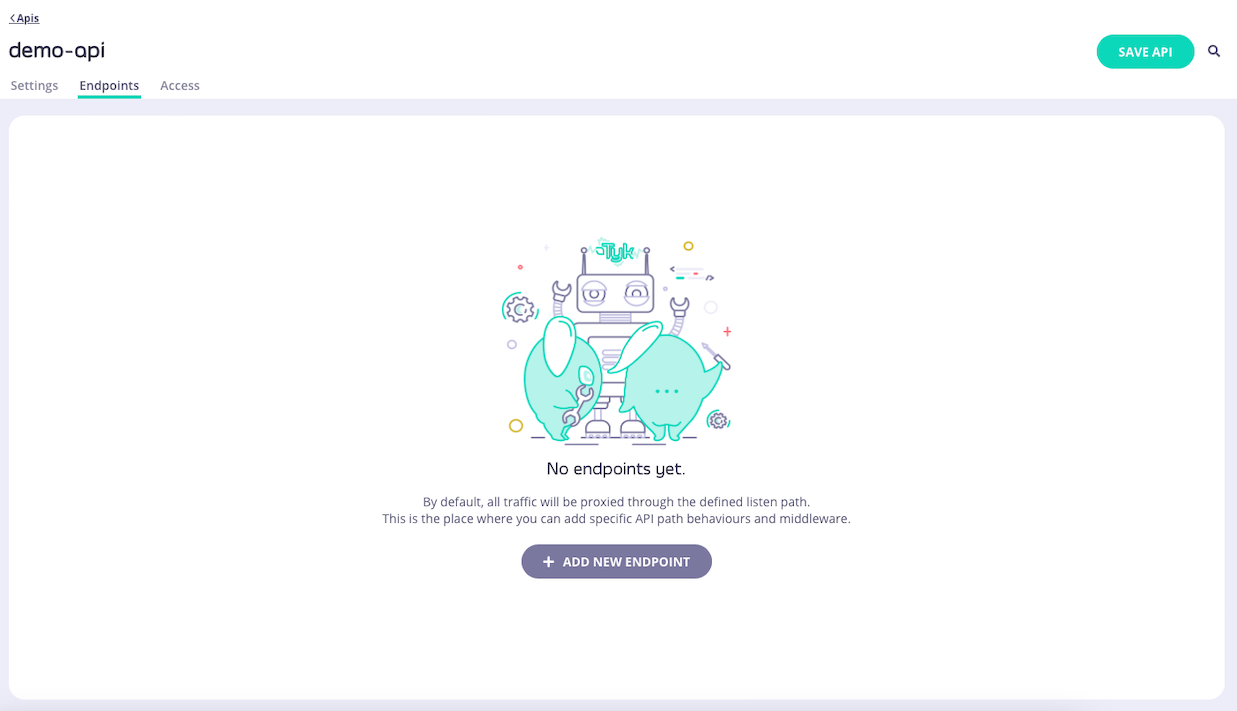
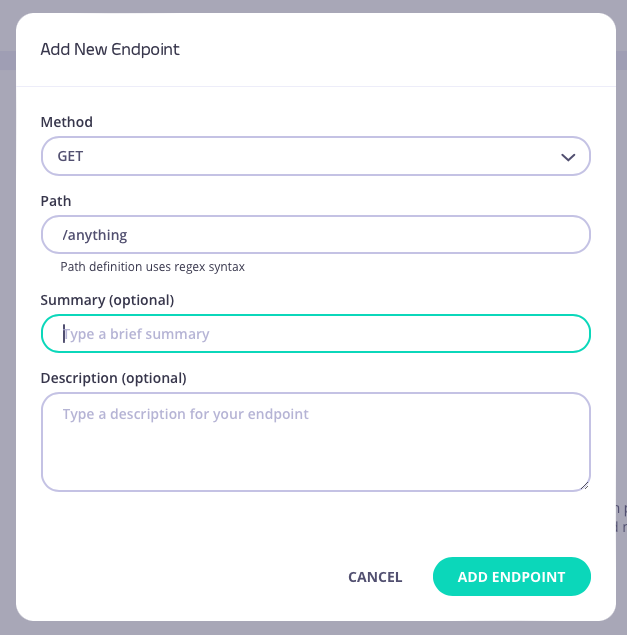
1. **Add an endpoint**
From the **API Designer** add an endpoint that matches the path and method to which you want to apply the middleware.
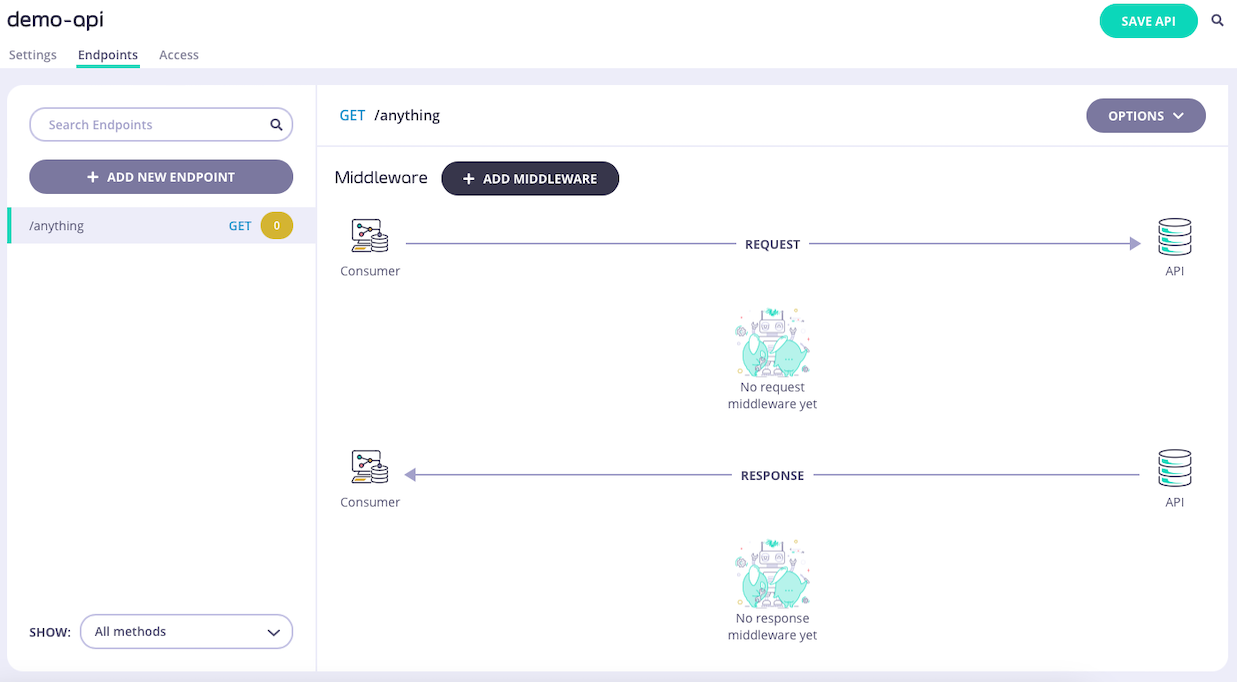 2. **Select the Mock Response middleware**
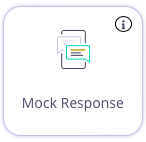
Select **ADD MIDDLEWARE** and choose **Mock Response** middleware from the *Add Middleware* screen.
2. **Select the Mock Response middleware**
Select **ADD MIDDLEWARE** and choose **Mock Response** middleware from the *Add Middleware* screen.
 3. **Configure the middleware**
Select **Manually configure mock response**
3. **Configure the middleware**
Select **Manually configure mock response**
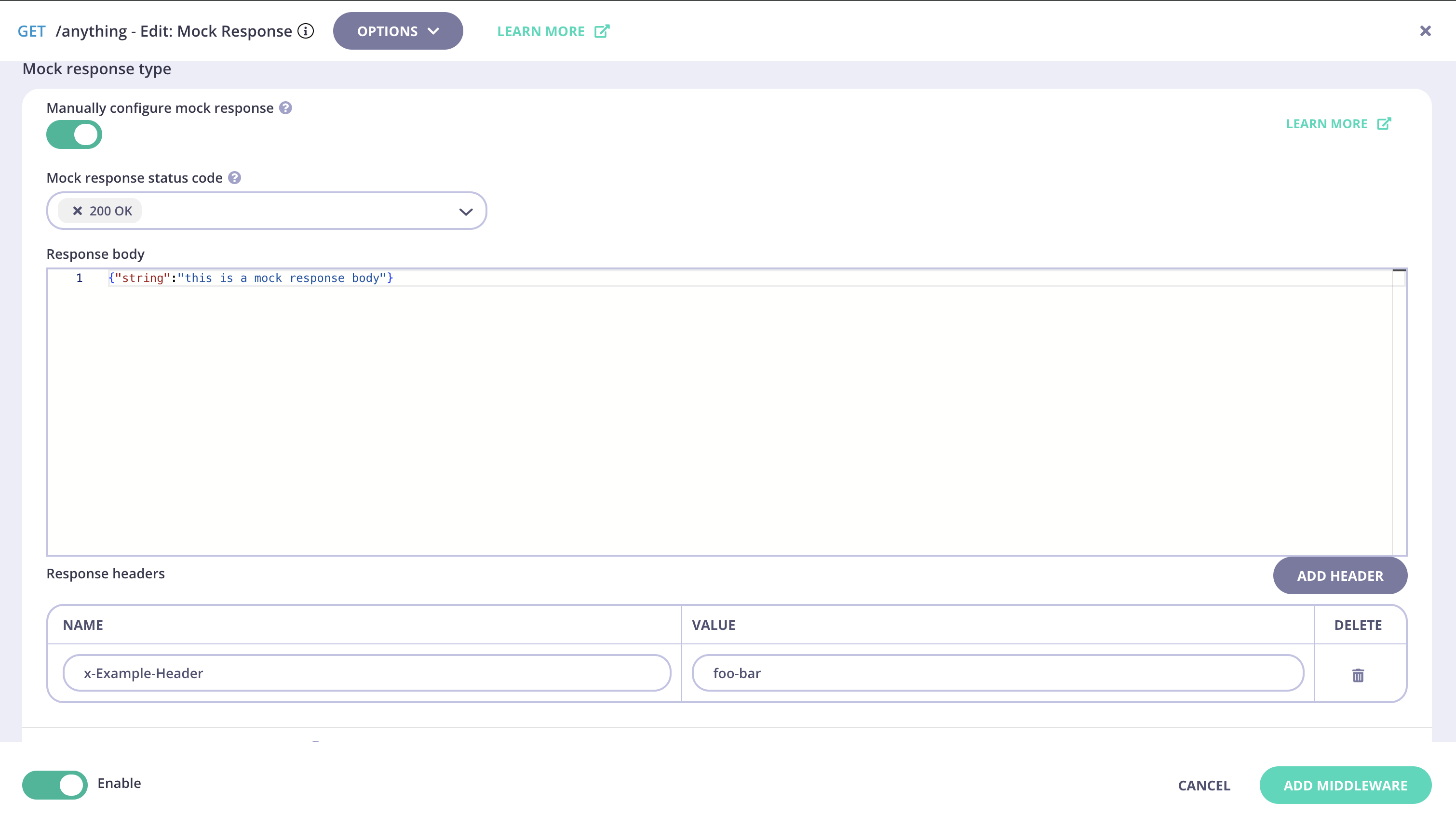
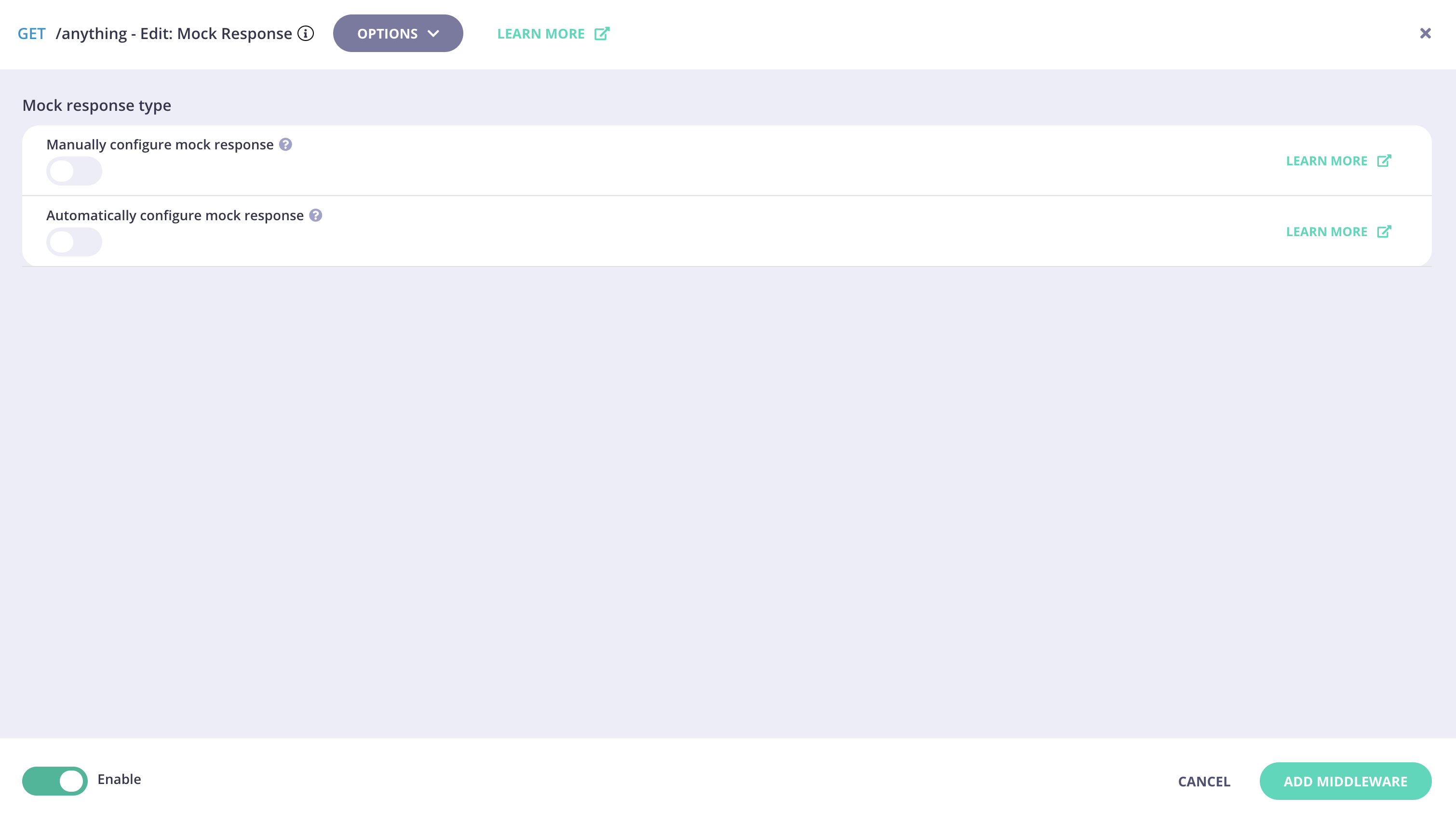 This takes you to the middleware configuration screen where you can:
* choose the HTTP status code that you want Tyk Gateway to return
* select the content type
* add a description for your mock response
* define headers to be provided with the response
* define the body that will be returned in the response (note that this must be defined as a JSON schema)
This takes you to the middleware configuration screen where you can:
* choose the HTTP status code that you want Tyk Gateway to return
* select the content type
* add a description for your mock response
* define headers to be provided with the response
* define the body that will be returned in the response (note that this must be defined as a JSON schema)
 Select **UPDATE MIDDLEWARE** to apply the change to the middleware configuration.
4. **Save the API**
Select **SAVE API** to apply the changes to your API.
#### Automatic configuration
1. **Import an OpenAPI Document containing sample responses or schema**
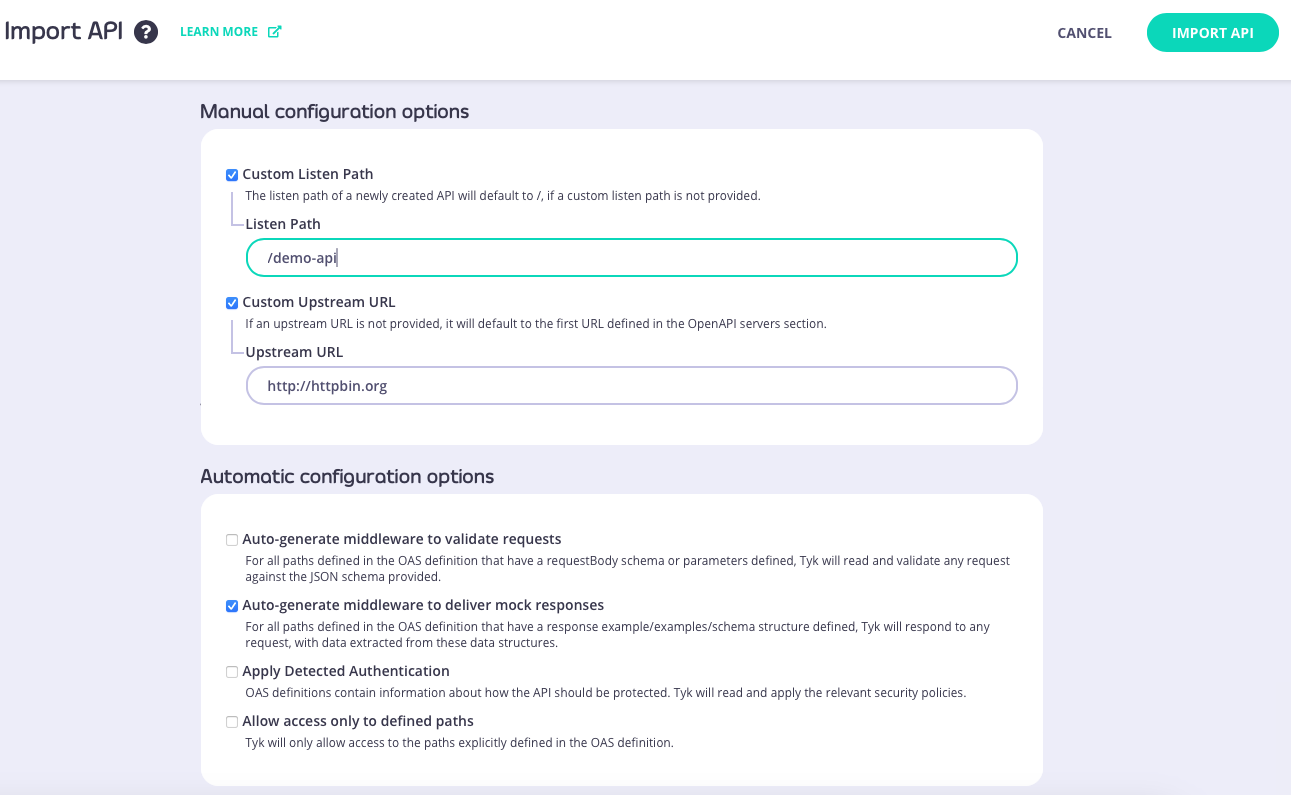
Import your OpenAPI Document (from file, URL or by pasting the JSON into the text editor) configure the **upstream URL** and **listen path**, and select **Auto-generate middleware to deliver mock responses**.
Selecting this option will cause Tyk Dashboard to check for sample responses or schema in the OpenAPI description and will automatically add the Mock Response middleware for any endpoints that have suitable data.
Select **UPDATE MIDDLEWARE** to apply the change to the middleware configuration.
4. **Save the API**
Select **SAVE API** to apply the changes to your API.
#### Automatic configuration
1. **Import an OpenAPI Document containing sample responses or schema**
Import your OpenAPI Document (from file, URL or by pasting the JSON into the text editor) configure the **upstream URL** and **listen path**, and select **Auto-generate middleware to deliver mock responses**.
Selecting this option will cause Tyk Dashboard to check for sample responses or schema in the OpenAPI description and will automatically add the Mock Response middleware for any endpoints that have suitable data.
 2. **Edit the Mock Response middleware**
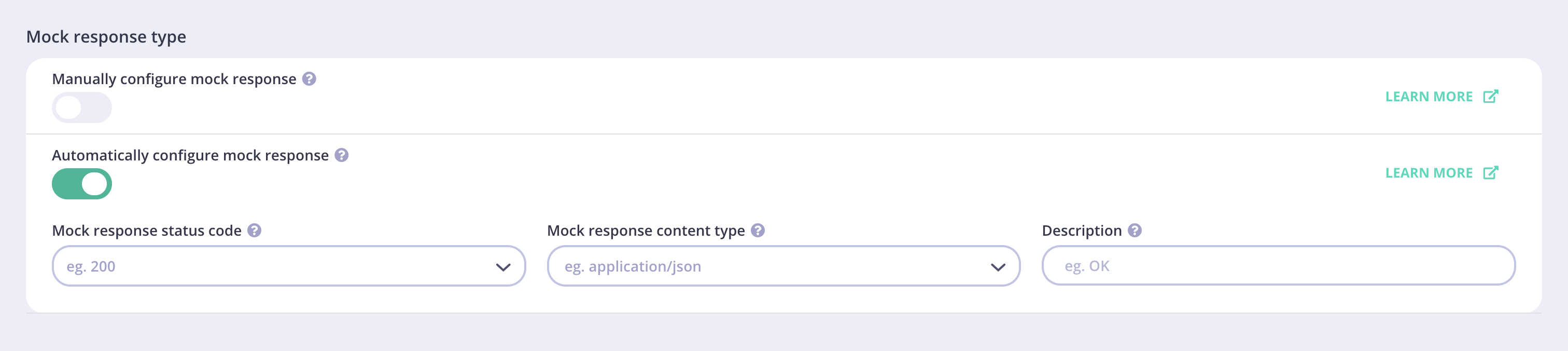
Select **EDIT** and then the **Mock Response** middleware from the **Endpoints** tab. This will take you to the Edit Middleware screen. Note that *Use mock response from Open API Specification* has been selected.
2. **Edit the Mock Response middleware**
Select **EDIT** and then the **Mock Response** middleware from the **Endpoints** tab. This will take you to the Edit Middleware screen. Note that *Use mock response from Open API Specification* has been selected.
 3. **Configure the middleware**
Tyk Dashboard will automatically select a valid HTTP response code from the drop-down. When you select a valid `content-type` for which a mock response is configured in the OpenAPI specification, the API Designer will display the associated response.
3. **Configure the middleware**
Tyk Dashboard will automatically select a valid HTTP response code from the drop-down. When you select a valid `content-type` for which a mock response is configured in the OpenAPI specification, the API Designer will display the associated response.
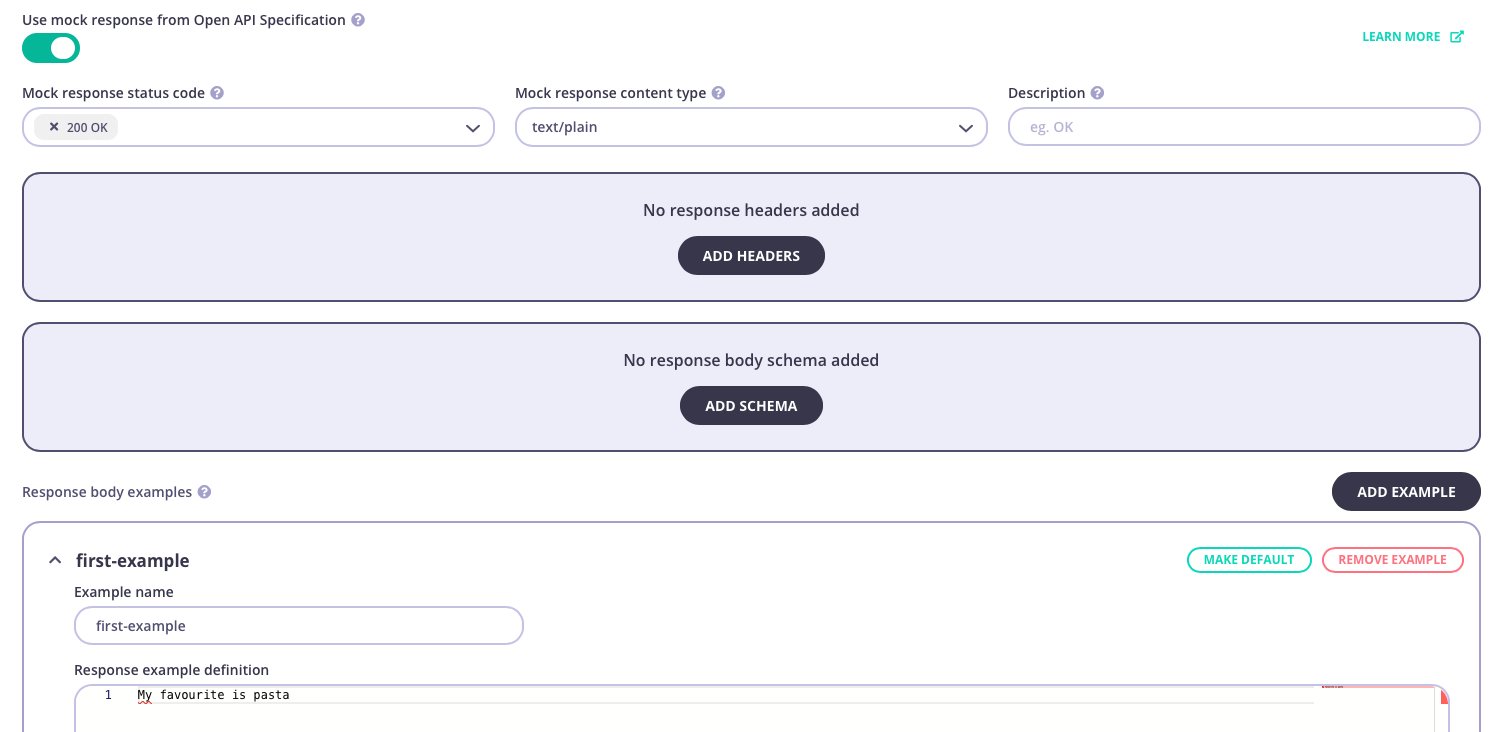 Here you can edit the mock response:
* modify, add or delete Response Body examples (note that this must follow the selected `content-type`)
* choose a default Response Body example that will be provided (unless [overridden in the request](/5.12/#multiple-mock-responses-for-a-single-endpoint))
* add a description for your mock response
* define headers to be provided with the response (note that these must be defined as a JSON schema)
* add a schema
You can create and edit mock responses for multiple HTTP status codes by choosing a different status code from the drop-down.
Select **UPDATE MIDDLEWARE** to apply the change to the middleware configuration.
4. **Save the API**
Select **SAVE API** to apply the changes to your API.
Modifying the automatically configured Mock Response middleware will update the OpenAPI description part of your Tyk OAS API definition, as the detail of the mock response is not set in the `x-tyk-api-gateway` extension but is automatically generated in response to the particular request received to the endpoint.
## Using Classic
The [Mock Response](/5.12/api-management/traffic-transformation/mock-response) middleware allows you to configure Tyk to return a response for an API endpoint without requiring an upstream service. This can be useful when creating a new API or making a development API available to an external team.
When working with Tyk Classic APIs, this middleware is executed at the start of the request processing chain. Thus an endpoint with the mock response middleware will not be authenticated, will not process other middleware configured for the API (neither API nor endpoint level) and will have no analytics created. It will simply return the configured response for any request made to that endpoint.
The middleware is configured in the Tyk Classic API Definition. You can do this via the Tyk Dashboard API, the API Designer or in [Tyk Operator](/5.12/#tyk-operator).
If you're using the newer Tyk OAS APIs, then check out the [Tyk OAS](/5.12/#mock-response-using-tyk-oas) page.
### API Definition
If you're using Tyk Operator then check out the [configuring the middleware in Tyk Operator](/5.12/#tyk-operator) section below.
To enable mock response, you must first add the endpoint to a list - one of [allow list](/5.12/api-management/traffic-transformation/allow-list), [block list](/5.12/api-management/traffic-transformation/block-list) or [ignore authentication](/5.12/api-management/traffic-transformation/ignore-authentication). This will add a new object to the `extended_paths` section of your API definition - `white_list`, `black_list` or `ignored`. The mock response can then be configured within the `method_actions` element within the new object.
The `white_list`, `black_list` and `ignored` objects all have the same structure and configuration as follows:
* `path`: the endpoint path
* `method`: this should be blank
* `ignore_case`: if set to `true` then the path matching will be case insensitive
* `method_actions`: the configuration of the mock response
The `method_actions` object should be configured as follows, with an entry created for each method on the path for which you wish to configure the mock response:
* `action`: this should be set to `reply`
* `code`: the HTTP status code to be provided with the response
* `headers`: the headers to inject with the response
* `data`: the payload to be returned as the body of the response
For example:
```json {linenos=true, linenostart=1} theme={null}
{
"extended_paths": {
"white_list": [
{
"disabled": false,
"path": "/anything",
"method": "",
"ignore_case": false,
"method_actions": {
"GET": {
"action": "reply",
"code": 200,
"data": "This is the mock response body",
"headers": {
"X-Example-Header": "foobar"
}
}
}
}
]
}
}
```
In this example the mock response middleware has been configured for requests to the `GET /anything` endpoint. The [allow list](/5.12/api-management/traffic-transformation/allow-list) middleware has been enabled for this endpoint and is case sensitive, so calls to `GET /Anything` will not return the mock response.
A call to `GET /anything` would return:
```
HTTP/1.1 200 OK
X-Example-Header: foobar
Date: Wed, 31 Jan 2024 16:21:05 GMT
Content-Length: 30
Content-Type: text/plain; charset=utf-8
This is the mock response body
```
### API Designer
You can use the API Designer in the Tyk Dashboard to configure the Mock Response middleware for your Tyk Classic API by following these steps.
1. **Add an endpoint for the path and configure a list plugin**
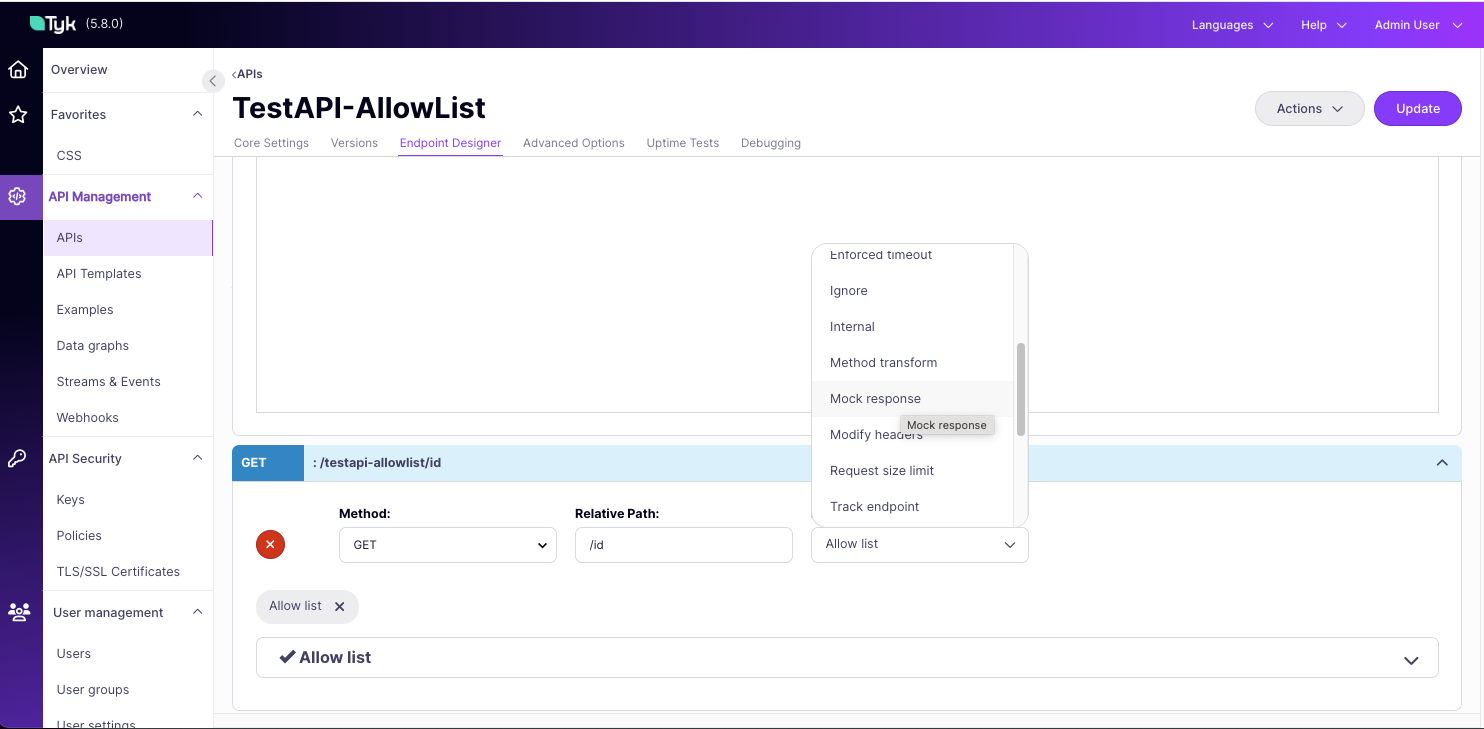
For the mock response to be enabled, the endpoint must also be in a list. We recommend adding the path to an allow list by [selecting](/5.12/api-management/traffic-transformation/allow-list#api-definition) the **Allow List** plugin.
2. **Add the mock response plugin**
Now select the **Mock response** plugin.
Here you can edit the mock response:
* modify, add or delete Response Body examples (note that this must follow the selected `content-type`)
* choose a default Response Body example that will be provided (unless [overridden in the request](/5.12/#multiple-mock-responses-for-a-single-endpoint))
* add a description for your mock response
* define headers to be provided with the response (note that these must be defined as a JSON schema)
* add a schema
You can create and edit mock responses for multiple HTTP status codes by choosing a different status code from the drop-down.
Select **UPDATE MIDDLEWARE** to apply the change to the middleware configuration.
4. **Save the API**
Select **SAVE API** to apply the changes to your API.
Modifying the automatically configured Mock Response middleware will update the OpenAPI description part of your Tyk OAS API definition, as the detail of the mock response is not set in the `x-tyk-api-gateway` extension but is automatically generated in response to the particular request received to the endpoint.
## Using Classic
The [Mock Response](/5.12/api-management/traffic-transformation/mock-response) middleware allows you to configure Tyk to return a response for an API endpoint without requiring an upstream service. This can be useful when creating a new API or making a development API available to an external team.
When working with Tyk Classic APIs, this middleware is executed at the start of the request processing chain. Thus an endpoint with the mock response middleware will not be authenticated, will not process other middleware configured for the API (neither API nor endpoint level) and will have no analytics created. It will simply return the configured response for any request made to that endpoint.
The middleware is configured in the Tyk Classic API Definition. You can do this via the Tyk Dashboard API, the API Designer or in [Tyk Operator](/5.12/#tyk-operator).
If you're using the newer Tyk OAS APIs, then check out the [Tyk OAS](/5.12/#mock-response-using-tyk-oas) page.
### API Definition
If you're using Tyk Operator then check out the [configuring the middleware in Tyk Operator](/5.12/#tyk-operator) section below.
To enable mock response, you must first add the endpoint to a list - one of [allow list](/5.12/api-management/traffic-transformation/allow-list), [block list](/5.12/api-management/traffic-transformation/block-list) or [ignore authentication](/5.12/api-management/traffic-transformation/ignore-authentication). This will add a new object to the `extended_paths` section of your API definition - `white_list`, `black_list` or `ignored`. The mock response can then be configured within the `method_actions` element within the new object.
The `white_list`, `black_list` and `ignored` objects all have the same structure and configuration as follows:
* `path`: the endpoint path
* `method`: this should be blank
* `ignore_case`: if set to `true` then the path matching will be case insensitive
* `method_actions`: the configuration of the mock response
The `method_actions` object should be configured as follows, with an entry created for each method on the path for which you wish to configure the mock response:
* `action`: this should be set to `reply`
* `code`: the HTTP status code to be provided with the response
* `headers`: the headers to inject with the response
* `data`: the payload to be returned as the body of the response
For example:
```json {linenos=true, linenostart=1} theme={null}
{
"extended_paths": {
"white_list": [
{
"disabled": false,
"path": "/anything",
"method": "",
"ignore_case": false,
"method_actions": {
"GET": {
"action": "reply",
"code": 200,
"data": "This is the mock response body",
"headers": {
"X-Example-Header": "foobar"
}
}
}
}
]
}
}
```
In this example the mock response middleware has been configured for requests to the `GET /anything` endpoint. The [allow list](/5.12/api-management/traffic-transformation/allow-list) middleware has been enabled for this endpoint and is case sensitive, so calls to `GET /Anything` will not return the mock response.
A call to `GET /anything` would return:
```
HTTP/1.1 200 OK
X-Example-Header: foobar
Date: Wed, 31 Jan 2024 16:21:05 GMT
Content-Length: 30
Content-Type: text/plain; charset=utf-8
This is the mock response body
```
### API Designer
You can use the API Designer in the Tyk Dashboard to configure the Mock Response middleware for your Tyk Classic API by following these steps.
1. **Add an endpoint for the path and configure a list plugin**
For the mock response to be enabled, the endpoint must also be in a list. We recommend adding the path to an allow list by [selecting](/5.12/api-management/traffic-transformation/allow-list#api-definition) the **Allow List** plugin.
2. **Add the mock response plugin**
Now select the **Mock response** plugin.
 3. **Configure the middleware**
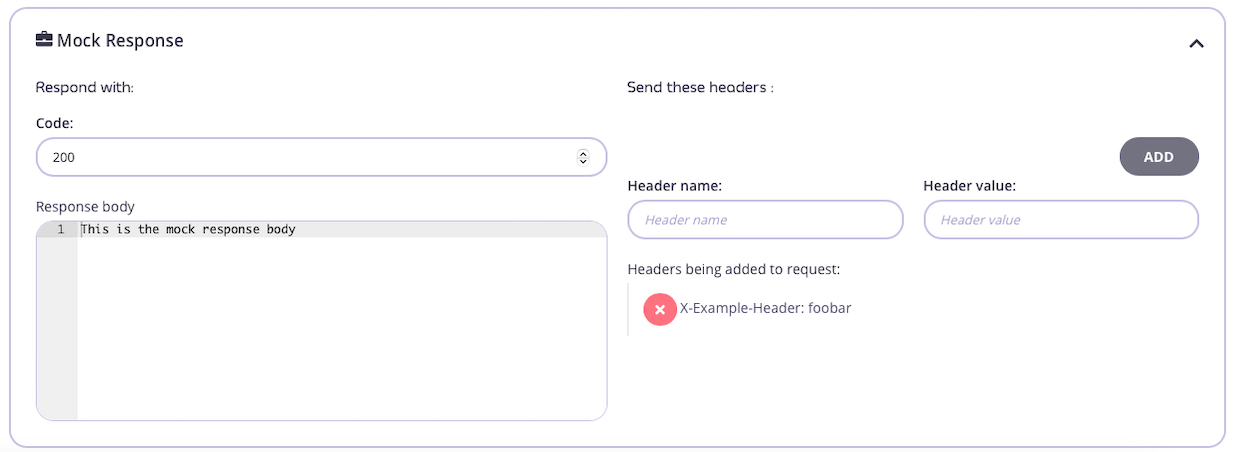
Once you have selected the Mock response middleware for the endpoint, you can configure the HTTP status code, headers and body to be included in the response. Remember to click **ADD**, to add each header to the response.
3. **Configure the middleware**
Once you have selected the Mock response middleware for the endpoint, you can configure the HTTP status code, headers and body to be included in the response. Remember to click **ADD**, to add each header to the response.
 4. **Save the API**
Use the *save* or *create* buttons to save the changes and activate the middleware.
For the mock response to be enabled, the endpoint must also be in a list. We recommend adding the path to an [allow list](/5.12/api-management/traffic-transformation/allow-list#allow-list-using-tyk-oas). If this isn't done, then the mock will not be saved when you save your API in the designer.
### Tyk Operator
The process of configuring a mock response is similar to that defined in the configuring the middleware in Tyk Classic API definition section.
To configure a mock response, you must first add a mock response configuration object to the `extended_paths` section, e.g. one of allow list (`white_list`), block list (`black_list`) or ignore authentication (`ignore`). The mock response configuration object has the following properties:
* path: the path of the endpoint, e.g `/foo`.
* ignore\_case: when set to true the path matching is case insensitive.
* method\_actions: a configuration object that allows the mock response to be configured for a given method, including the response body, response headers and status code. This object should also contain an `action` field with a value set to `reply`.
In the example below we can see that a mock response is configured to ignore authentication (`ignore`) for the `GET /foo` endpoint. When a request is made to the endpoint then authentication will be ignored and a mock response is returned with status code `200` and a response body payload of `{"foo": "bar"}`. The middleware has been configured to be case sensitive, so calls to `GET /Foo` will not ignore authentication.
```yaml {linenos=true, linenostart=1, hl_lines=["26-34"]} theme={null}
apiVersion: tyk.tyk.io/v1alpha1
kind: ApiDefinition
metadata:
name: httpbin
spec:
name: httpbin
protocol: http
active: true
use_keyless: true
proxy:
target_url: http://httpbin.org
listen_path: /httpbin
strip_listen_path: true
version_data:
default_version: Default
not_versioned: true
versions:
Default:
name: Default
use_extended_paths: true
paths:
black_list: []
ignored: []
white_list: []
extended_paths:
ignored:
- ignore_case: false
method_actions:
GET:
action: "reply"
code: 200
data: "{\"foo\": \"bar\"}"
headers: {}
path: /foo
```
4. **Save the API**
Use the *save* or *create* buttons to save the changes and activate the middleware.
For the mock response to be enabled, the endpoint must also be in a list. We recommend adding the path to an [allow list](/5.12/api-management/traffic-transformation/allow-list#allow-list-using-tyk-oas). If this isn't done, then the mock will not be saved when you save your API in the designer.
### Tyk Operator
The process of configuring a mock response is similar to that defined in the configuring the middleware in Tyk Classic API definition section.
To configure a mock response, you must first add a mock response configuration object to the `extended_paths` section, e.g. one of allow list (`white_list`), block list (`black_list`) or ignore authentication (`ignore`). The mock response configuration object has the following properties:
* path: the path of the endpoint, e.g `/foo`.
* ignore\_case: when set to true the path matching is case insensitive.
* method\_actions: a configuration object that allows the mock response to be configured for a given method, including the response body, response headers and status code. This object should also contain an `action` field with a value set to `reply`.
In the example below we can see that a mock response is configured to ignore authentication (`ignore`) for the `GET /foo` endpoint. When a request is made to the endpoint then authentication will be ignored and a mock response is returned with status code `200` and a response body payload of `{"foo": "bar"}`. The middleware has been configured to be case sensitive, so calls to `GET /Foo` will not ignore authentication.
```yaml {linenos=true, linenostart=1, hl_lines=["26-34"]} theme={null}
apiVersion: tyk.tyk.io/v1alpha1
kind: ApiDefinition
metadata:
name: httpbin
spec:
name: httpbin
protocol: http
active: true
use_keyless: true
proxy:
target_url: http://httpbin.org
listen_path: /httpbin
strip_listen_path: true
version_data:
default_version: Default
not_versioned: true
versions:
Default:
name: Default
use_extended_paths: true
paths:
black_list: []
ignored: []
white_list: []
extended_paths:
ignored:
- ignore_case: false
method_actions:
GET:
action: "reply"
code: 200
data: "{\"foo\": \"bar\"}"
headers: {}
path: /foo
```