> ## Documentation Index
> Fetch the complete documentation index at: https://tyk.io/docs/llms.txt
> Use this file to discover all available pages before exploring further.
# Do Not Track
> How to configure Do Not Track traffic transformation middleware in Tyk
## Overview
When [transaction logging](/5.12/api-management/tyk-pump#api-traffic-logs) is enabled in the Tyk Gateway, a transaction record will be generated for every request made to an API endpoint deployed on the gateway. You can suppress the generation of transaction records for any API by enabling the do-not-track middleware. This provides granular control over request tracking.
### Use Cases
#### Compliance and privacy
Disabling tracking on endpoints that handle personal or sensitive information is crucial for adhering to privacy laws such as GDPR or HIPAA. This action prevents the storage and logging of sensitive data, ensuring compliance and safeguarding user privacy.
#### Optimizing performance
For endpoints experiencing high traffic, disabling tracking can mitigate the impact on the analytics processing pipeline and storage systems. Disabling tracking on endpoints used primarily for health checks or load balancing can prevent the analytics data from being cluttered with information that offers little insight. These optimizations help to maintain system responsiveness and efficiency by reducing unnecessary data load and help to ensure that analytics efforts are concentrated on more meaningful data.
#### Cost Management
In scenarios where analytics data storage and processing incur significant costs, particularly in cloud-based deployments, disabling tracking for non-essential endpoints can be a cost-effective strategy. This approach allows for focusing resources on capturing valuable data from critical endpoints.
### Working
When transaction logging is enabled, the gateway will automatically generate a transaction record for every request made to deployed APIs.
You can enable the do-not-track middleware on whichever endpoints for which you do not want to generate logs. This will instruct the Gateway not to generate any transaction records for those endpoints or APIs. As no record of these transactions will be generated by the Gateway, there will be nothing created in Redis and hence nothing for the pumps to transfer to the persistent storage and these endpoints will not show traffic in the Dashboard's analytics screens.
When working with Tyk Classic APIs, you can disable tracking at the API or endpoint-level. When working with Tyk OAS APIs, you can currently disable tracking only at the more granular endpoint-level.
## Using Tyk OAS
The [Do-Not-Track](/5.12/#do-not-track-overview) middleware provides the facility to disable generation of transaction records (which are used to track requests to your APIs). When working with Tyk OAS APIs, you can currently disable tracking only at the endpoint-level.
When working with Tyk OAS APIs the middleware is configured in the [Tyk OAS API Definition](/5.12/api-management/gateway-config-tyk-oas#operation) either manually within the `.json` file or from the API Designer in the Tyk Dashboard.
If you're using the legacy Tyk Classic APIs, then check out the [Tyk Classic](/5.12/#do-not-track-using-classic) page.
### API Definition
The design of the Tyk OAS API Definition takes advantage of the `operationId` defined in the OpenAPI Document that declares both the path and method for which the middleware should be added. The `path` can contain wildcards in the form of any string bracketed by curly braces, for example `{user_id}`. These wildcards are so they are human readable and do not translate to variable names. Under the hood, a wildcard translates to the “match everything” regex of: `(.*)`.
The do-not-track middleware (`doNotTrackEndpoint`) can be added to the `operations` section of the Tyk OAS Extension (`x-tyk-api-gateway`) in your Tyk OAS API Definition for the appropriate `operationId` (as configured in the `paths` section of your OpenAPI Document).
The `doNotTrackEndpoint` object has the following configuration:
* `enabled`: enable the middleware for the endpoint
For example:
```json {hl_lines=["39-41"],linenos=true, linenostart=1} theme={null}
{
"components": {},
"info": {
"title": "example-do-not-track",
"version": "1.0.0"
},
"openapi": "3.0.3",
"paths": {
"/anything": {
"get": {
"operationId": "anythingget",
"responses": {
"200": {
"description": ""
}
}
}
}
},
"x-tyk-api-gateway": {
"info": {
"name": "example-do-not-track",
"state": {
"active": true
}
},
"upstream": {
"url": "http://httpbin.org/"
},
"server": {
"listenPath": {
"value": "/example-do-not-track/",
"strip": true
}
},
"middleware": {
"operations": {
"anythingget": {
"doNotTrackEndpoint": {
"enabled": true
}
}
}
}
}
}
```
In this example the do-not-track middleware has been configured for requests to the `GET /anything` endpoint. Any such calls will not generate transaction records from the Gateway and so will not appear in the analytics.
The configuration above is a complete and valid Tyk OAS API Definition that you can import into Tyk to try out the do-not-track middleware.
### API Designer
Adding do-not-track to your API endpoints is easy when using the API Designer in the Tyk Dashboard, simply follow these steps:
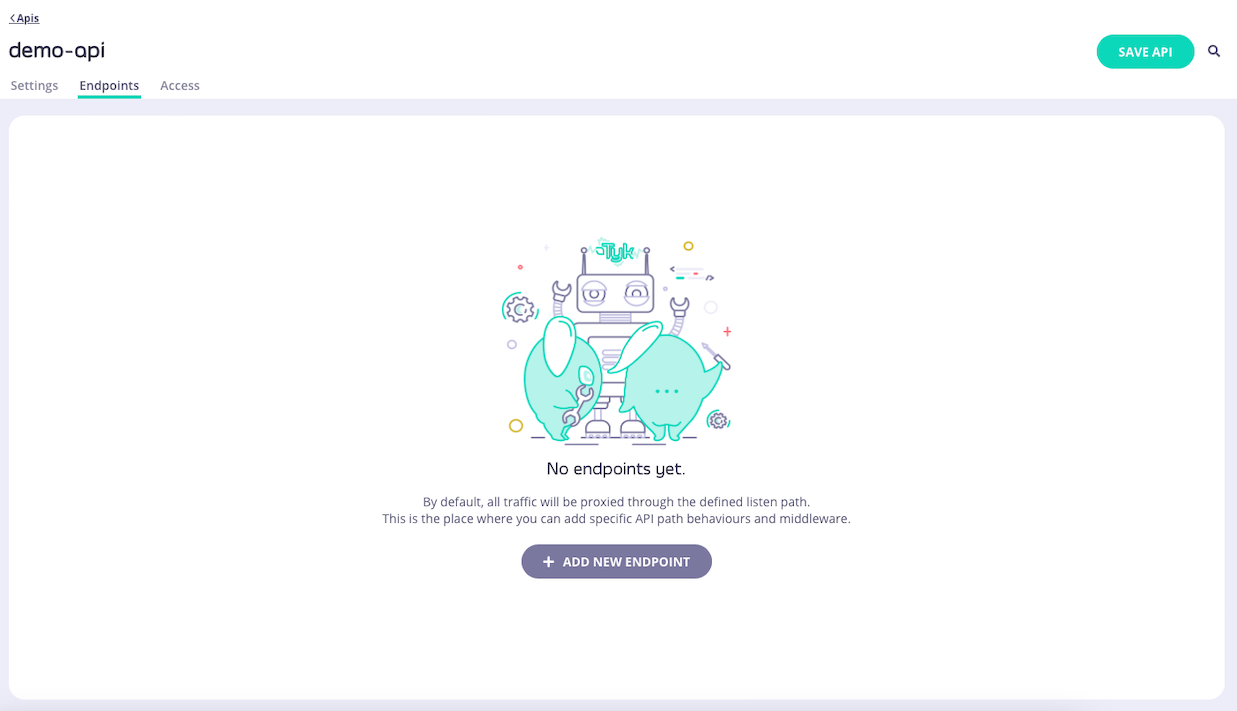
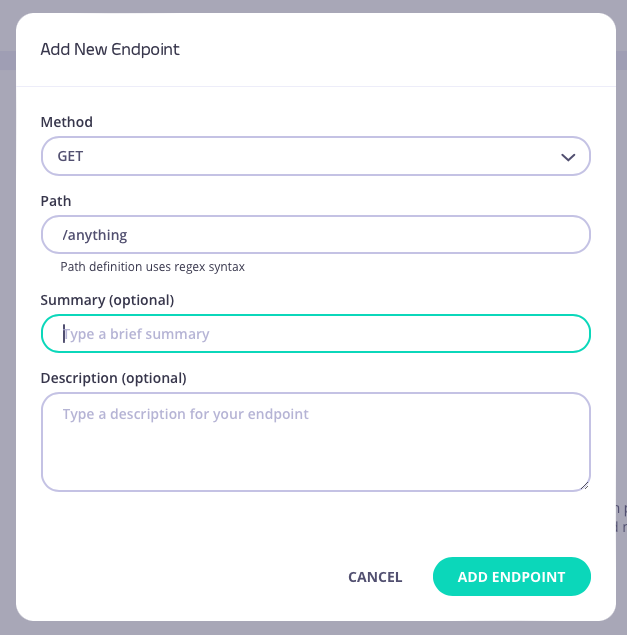
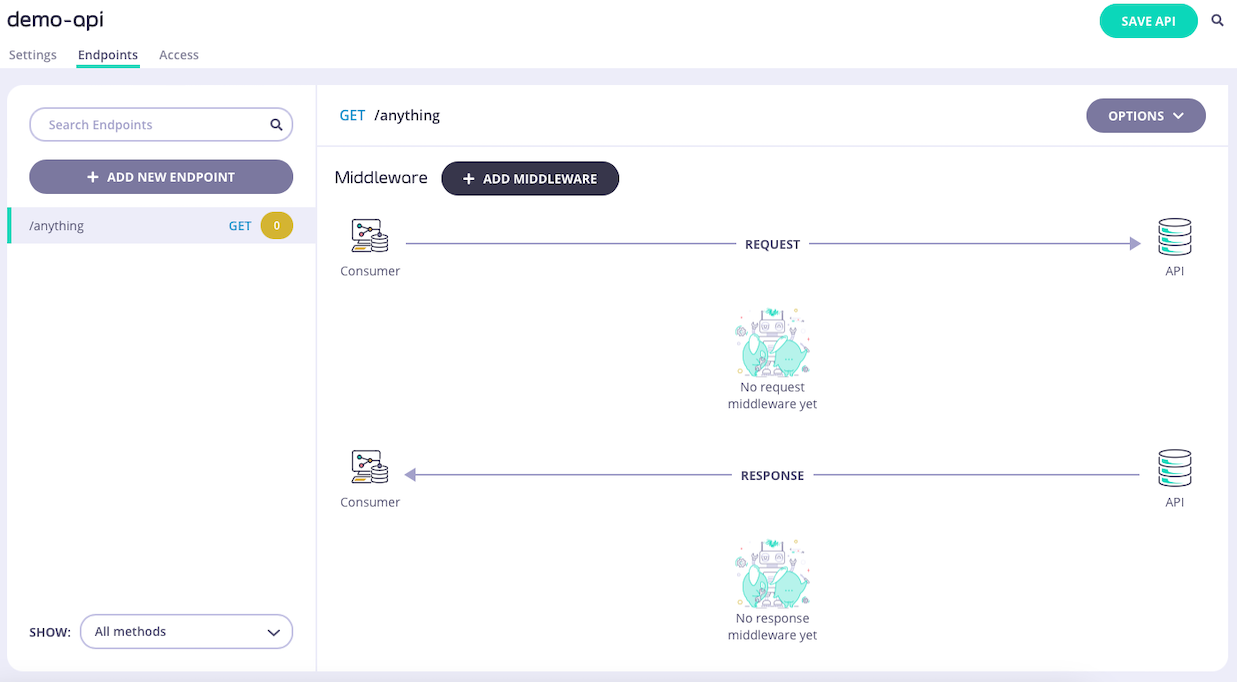
1. **Add an endpoint**
From the **API Designer** add an endpoint that matches the path and method to which you want to apply the middleware.
 2. **Select the Do Not Track Endpoint middleware**
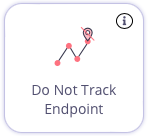
Select **ADD MIDDLEWARE** and choose the **Do Not Track Endpoint** middleware from the *Add Middleware* screen.
2. **Select the Do Not Track Endpoint middleware**
Select **ADD MIDDLEWARE** and choose the **Do Not Track Endpoint** middleware from the *Add Middleware* screen.
 3. **Save the API**
Select **SAVE API** to apply the changes to your API.
## Using Classic
The [Do-Not-Track](/5.12/#do-not-track-overview) middleware provides the facility to disable generation of transaction records (which are used to track requests) at the API or endpoint level.
When working with Tyk Classic APIs the middleware is configured in the Tyk Classic API Definition either manually within the `.json` file or from the API Designer in the Tyk Dashboard.
If you're using the newer Tyk OAS APIs, then check out the [Tyk OAS](/5.12/api-management/traffic-transformation/do-not-track#do-not-track-using-tyk-oas) page.
If you're using Tyk Operator then check out the [configuring the middleware in Tyk Operator](/5.12/#tyk-operator) section below.
### API Definition
You can prevent tracking for all endpoints of an API by configuring the `do_not_track` field in the root of your API definition.
* `true`: no transaction logs will be generated for requests to the API
* `false`: transaction logs will be generated for requests to the API
If you want to be more granular and disable tracking only for selected endpoints, then you must add a new `do_not_track_endpoints` object to the `extended_paths` section of your API definition.
The `do_not_track_endpoints` object has the following configuration:
* `path`: the endpoint path
* `method`: the endpoint HTTP method
The `path` can contain wildcards in the form of any string bracketed by curly braces, for example `{user_id}`. These wildcards are so they are human readable and do not translate to variable names. Under the hood, a wildcard translates to the “match everything” regex of: `(.*)`.
For example:
```json {linenos=true, linenostart=1} theme={null}
{
"extended_paths": {
"do_not_track_endpoints": [
{
"disabled": false,
"path": "/anything",
"method": "GET"
}
]
}
}
```
In this example the do-not-track middleware has been configured for requests to the `GET /anything` endpoint. Any such calls will not generate transaction records from the Gateway and so will not appear in the analytics.
### API Designer
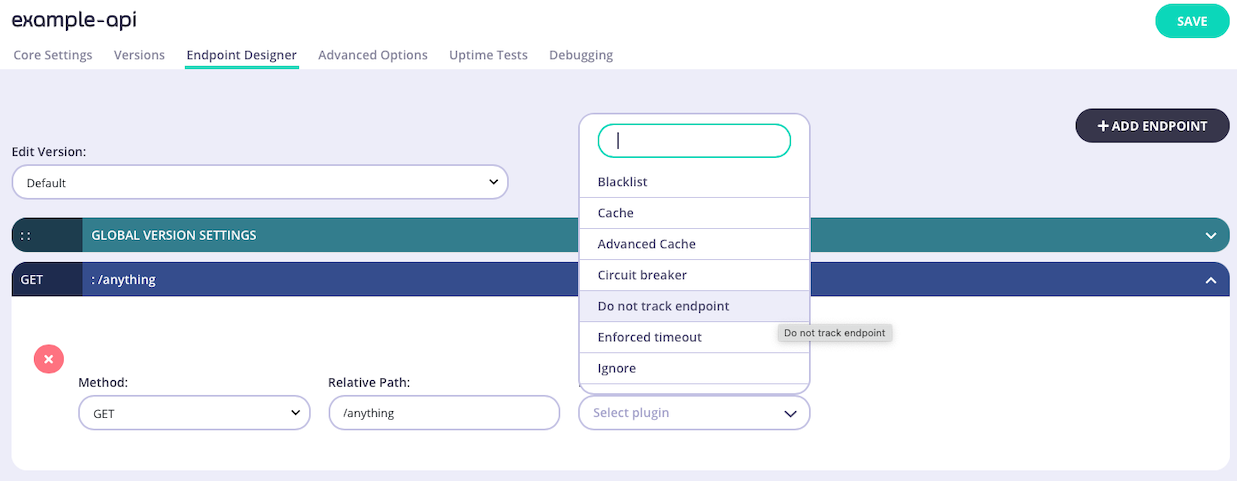
You can use the API Designer in the Tyk Dashboard to configure the per-endpoint Do-Not-Track middleware for your Tyk Classic API by following these steps. Note that the API-level middleware can only be configured from the Raw Definition screen.
1. **Add an endpoint for the path and select the plugin**
From the **Endpoint Designer** add an endpoint that matches the path for which you do not want to generate records. Select the **Do not track endpoint** plugin.
3. **Save the API**
Select **SAVE API** to apply the changes to your API.
## Using Classic
The [Do-Not-Track](/5.12/#do-not-track-overview) middleware provides the facility to disable generation of transaction records (which are used to track requests) at the API or endpoint level.
When working with Tyk Classic APIs the middleware is configured in the Tyk Classic API Definition either manually within the `.json` file or from the API Designer in the Tyk Dashboard.
If you're using the newer Tyk OAS APIs, then check out the [Tyk OAS](/5.12/api-management/traffic-transformation/do-not-track#do-not-track-using-tyk-oas) page.
If you're using Tyk Operator then check out the [configuring the middleware in Tyk Operator](/5.12/#tyk-operator) section below.
### API Definition
You can prevent tracking for all endpoints of an API by configuring the `do_not_track` field in the root of your API definition.
* `true`: no transaction logs will be generated for requests to the API
* `false`: transaction logs will be generated for requests to the API
If you want to be more granular and disable tracking only for selected endpoints, then you must add a new `do_not_track_endpoints` object to the `extended_paths` section of your API definition.
The `do_not_track_endpoints` object has the following configuration:
* `path`: the endpoint path
* `method`: the endpoint HTTP method
The `path` can contain wildcards in the form of any string bracketed by curly braces, for example `{user_id}`. These wildcards are so they are human readable and do not translate to variable names. Under the hood, a wildcard translates to the “match everything” regex of: `(.*)`.
For example:
```json {linenos=true, linenostart=1} theme={null}
{
"extended_paths": {
"do_not_track_endpoints": [
{
"disabled": false,
"path": "/anything",
"method": "GET"
}
]
}
}
```
In this example the do-not-track middleware has been configured for requests to the `GET /anything` endpoint. Any such calls will not generate transaction records from the Gateway and so will not appear in the analytics.
### API Designer
You can use the API Designer in the Tyk Dashboard to configure the per-endpoint Do-Not-Track middleware for your Tyk Classic API by following these steps. Note that the API-level middleware can only be configured from the Raw Definition screen.
1. **Add an endpoint for the path and select the plugin**
From the **Endpoint Designer** add an endpoint that matches the path for which you do not want to generate records. Select the **Do not track endpoint** plugin.
 2. **Save the API**
Use the *save* or *create* buttons to save the changes and activate the middleware.
### Tyk Operator
The process for configuring the middleware in Tyk Operator is similar to that explained in configuring the middleware in the Tyk Classic API Definition.
It is possible to prevent tracking for all endpoints of an API by configuring the `do_not_track` field in the root of your API definition as follows:
* `true`: no transaction logs will be generated for requests to the API
* `false`: transaction logs will be generated for requests to the API
```yaml {linenos=true, linenostart=1, hl_lines=["10"]} theme={null}
apiVersion: tyk.tyk.io/v1alpha1
kind: ApiDefinition
metadata:
name: httpbin-do-not-track
spec:
name: httpbin-do-not-track
use_keyless: true
protocol: http
active: true
do_not_track: true
proxy:
target_url: http://example.com
listen_path: /example
strip_listen_path: true
```
If you want to disable tracking only for selected endpoints, then the process is similar to that defined in configuring the middleware in the Tyk Classic API Definition, i.e. you must add a new `do_not_track_endpoints` list to the extended\_paths section of your API definition.
This should contain a list of objects representing each endpoint `path` and `method` that should have tracking disabled:
```yaml {linenos=true, linenostart=1, hl_lines=["31-33"]} theme={null}
apiVersion: tyk.tyk.io/v1alpha1
kind: ApiDefinition
metadata:
name: httpbin-endpoint-tracking
spec:
name: httpbin - Endpoint Track
use_keyless: true
protocol: http
active: true
do_not_track: false
proxy:
target_url: http://httpbin.org/
listen_path: /httpbin
strip_listen_path: true
version_data:
default_version: Default
not_versioned: true
versions:
Default:
name: Default
use_extended_paths: true
paths:
black_list: []
ignored: []
white_list: []
extended_paths:
track_endpoints:
- method: GET
path: "/get"
do_not_track_endpoints:
- method: GET
path: "/headers"
```
In the example above we can see that the `do_not_track_endpoints` list is configured so that requests to `GET /headers` will have tracking disabled.
2. **Save the API**
Use the *save* or *create* buttons to save the changes and activate the middleware.
### Tyk Operator
The process for configuring the middleware in Tyk Operator is similar to that explained in configuring the middleware in the Tyk Classic API Definition.
It is possible to prevent tracking for all endpoints of an API by configuring the `do_not_track` field in the root of your API definition as follows:
* `true`: no transaction logs will be generated for requests to the API
* `false`: transaction logs will be generated for requests to the API
```yaml {linenos=true, linenostart=1, hl_lines=["10"]} theme={null}
apiVersion: tyk.tyk.io/v1alpha1
kind: ApiDefinition
metadata:
name: httpbin-do-not-track
spec:
name: httpbin-do-not-track
use_keyless: true
protocol: http
active: true
do_not_track: true
proxy:
target_url: http://example.com
listen_path: /example
strip_listen_path: true
```
If you want to disable tracking only for selected endpoints, then the process is similar to that defined in configuring the middleware in the Tyk Classic API Definition, i.e. you must add a new `do_not_track_endpoints` list to the extended\_paths section of your API definition.
This should contain a list of objects representing each endpoint `path` and `method` that should have tracking disabled:
```yaml {linenos=true, linenostart=1, hl_lines=["31-33"]} theme={null}
apiVersion: tyk.tyk.io/v1alpha1
kind: ApiDefinition
metadata:
name: httpbin-endpoint-tracking
spec:
name: httpbin - Endpoint Track
use_keyless: true
protocol: http
active: true
do_not_track: false
proxy:
target_url: http://httpbin.org/
listen_path: /httpbin
strip_listen_path: true
version_data:
default_version: Default
not_versioned: true
versions:
Default:
name: Default
use_extended_paths: true
paths:
black_list: []
ignored: []
white_list: []
extended_paths:
track_endpoints:
- method: GET
path: "/get"
do_not_track_endpoints:
- method: GET
path: "/headers"
```
In the example above we can see that the `do_not_track_endpoints` list is configured so that requests to `GET /headers` will have tracking disabled.