> ## Documentation Index
> Fetch the complete documentation index at: https://tyk.io/docs/llms.txt
> Use this file to discover all available pages before exploring further.
# Allow List
> How to configure Allow List traffic transformation middleware in Tyk
## Overview
The Allow List middleware is a feature designed to restrict access to only specific API endpoints. It rejects requests to endpoints not specifically "allowed", returning `HTTP 403 Forbidden`. This enhances the security of the API by preventing unauthorized access to endpoints that are not explicitly permitted.
Note that this is not the same as Tyk's [IP allow list](/5.12/api-management/gateway-config-tyk-classic#ip-access-control) feature, which is used to restrict access to APIs based upon the IP of the requestor.
### Use Cases
#### Restricting access to private endpoints
If you have a service that exposes endpoints or supports methods that you do not want to be available to clients, you should use the allow list to perform strict restriction to a subset of methods and paths. If the allow list is not enabled, requests to endpoints that are not explicitly defined in Tyk will be proxied to the upstream service and may lead to unexpected behavior.
### Working
Tyk Gateway does not actually maintain a list of allowed endpoints but rather works on the model whereby if the *allow list* middleware is added to an endpoint then this will automatically block all other endpoints.
Tyk Gateway will subsequently return `HTTP 403 Forbidden` to any requested endpoint that doesn't have the *allow list* middleware enabled, even if the endpoint is defined and configured in the API definition.
If you enable the allow list feature by adding the middleware to any endpoint, ensure that you also add the middleware to any other endpoint for which you wish to accept requests.
#### Case sensitivity
By default the allow list is case-sensitive, so for example if you have defined the endpoint `GET /userID` in your API definition then only calls to `GET /userID` will be allowed: calls to `GET /UserID` or `GET /userid` will be rejected. You can configure the middleware to be case-insensitive at the endpoint level.
You can also set case sensitivity for the entire [gateway](/5.12/tyk-oss-gateway/configuration#ignore_endpoint_case) in the Gateway configuration file `tyk.conf`. If case insensitivity is configured at the gateway level, this will override the endpoint-level setting.
#### Endpoint parsing
When using the allow list middleware, we recommend that you familiarize yourself with Tyk's [URL matching](/5.12/getting-started/key-concepts/url-matching) options.
Tyk recommends that you use [exact](/5.12/getting-started/key-concepts/url-matching#exact-match) matching for maximum security, though prefix and wildcard strategies might also apply for your particular deployment or use case.
## Using Tyk OAS
The [allow list](/5.12/api-management/traffic-transformation/allow-list) is a feature designed to restrict access to only specific API endpoints. It rejects requests to endpoints not specifically "allowed", returning `HTTP 403 Forbidden`. This enhances the security of the API by preventing unauthorized access to endpoints that are not explicitly permitted.
When working with Tyk OAS APIs the middleware is configured in the [Tyk OAS API Definition](/5.12/api-management/gateway-config-tyk-oas#operation). You can do this via the Tyk Dashboard API or in the API Designer.
If you're using the legacy Tyk Classic APIs, then check out the [Tyk Classic](/5.12/#allow-list-using-classic) page.
### API Definition
The design of the Tyk OAS API Definition takes advantage of the `operationId` defined in the OpenAPI Document that declares both the path and method for which the middleware should be added. Endpoint `paths` entries (and the associated `operationId`) can contain wildcards in the form of any string bracketed by curly braces, for example `/status/{code}`. These wildcards are so they are human readable and do not translate to variable names. Under the hood, a wildcard translates to the “match everything” regex of: `(.*)`.
The allow list middleware (`allow`) can be added to the `operations` section of the Tyk OAS Extension (`x-tyk-api-gateway`) in your Tyk OAS API Definition for the appropriate `operationId` (as configured in the `paths` section of your OpenAPI Document).
The `allow` object has the following configuration:
* `enabled`: enable the middleware for the endpoint
* `ignoreCase`: if set to `true` then the path matching will be case insensitive
For example:
```json {hl_lines=["47-50", "53-56"],linenos=true, linenostart=1} theme={null}
{
"components": {},
"info": {
"title": "example-allow-list",
"version": "1.0.0"
},
"openapi": "3.0.3",
"paths": {
"/anything": {
"get": {
"operationId": "anythingget",
"responses": {
"200": {
"description": ""
}
}
},
"put": {
"operationId": "anythingput",
"responses": {
"200": {
"description": ""
}
}
}
}
},
"x-tyk-api-gateway": {
"info": {
"name": "example-allow-list",
"state": {
"active": true
}
},
"upstream": {
"url": "http://httpbin.org/"
},
"server": {
"listenPath": {
"value": "/example-allow-list/",
"strip": true
}
},
"middleware": {
"operations": {
"anythingget": {
"allow": {
"enabled": true,
"ignoreCase": true
}
},
"anythingput": {
"allow": {
"enabled": true,
"ignoreCase": true
}
}
}
}
}
}
```
In this example the allow list middleware has been configured for requests to the `GET /anything` and `PUT /anything` endpoints. Requests to any other endpoints will be rejected with `HTTP 403 Forbidden`, unless they also have the allow list middleware enabled.
Note that the allow list has been configured to be case insensitive, so calls to `GET /Anything` will be allowed
Note also that the endpoint path has not been terminated with `$`. Requests to, for example, `GET /anything/foobar` will be allowed as the [regular expression pattern match](/5.12/#endpoint-parsing) will recognize this as `GET /anything`.
The configuration above is a complete and valid Tyk OAS API Definition that you can import into Tyk to try out the allow list feature.
### API Designer
Adding the allow list to your API endpoints is easy is easy when using the API Designer in the Tyk Dashboard, simply follow these steps:
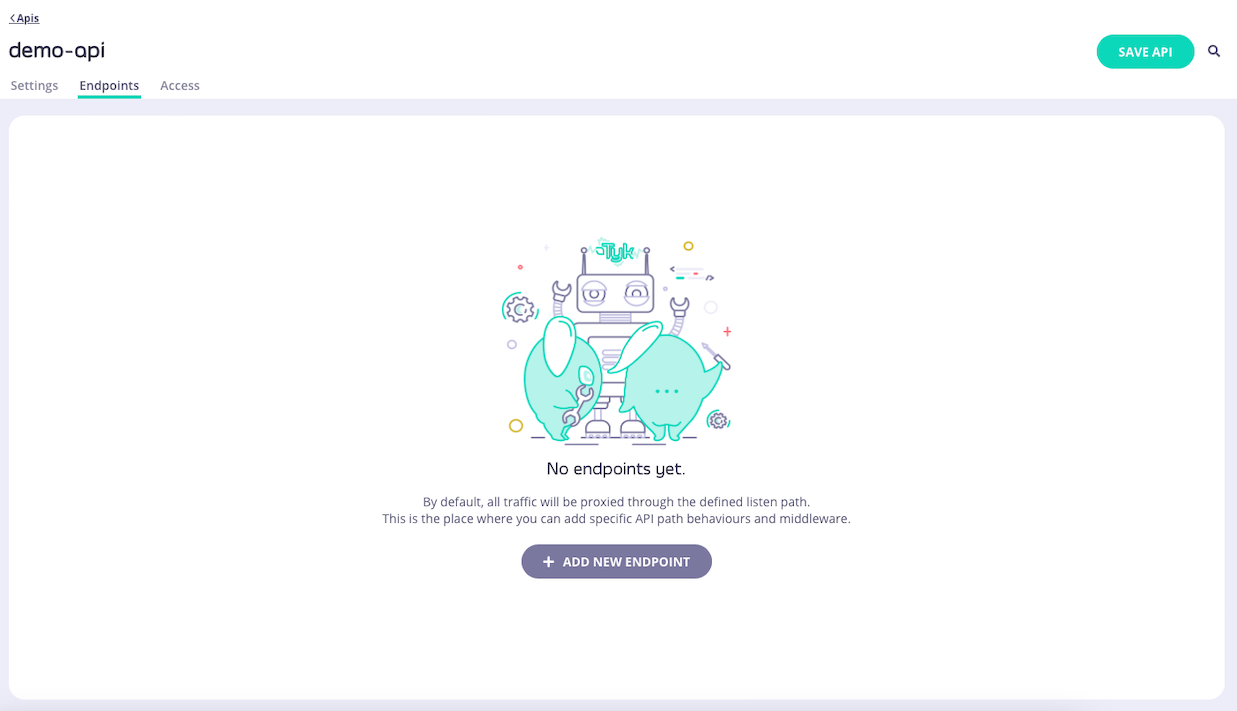
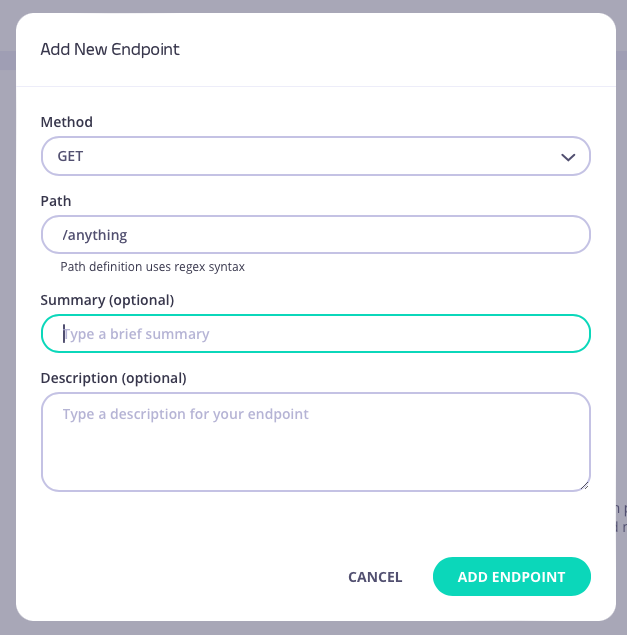
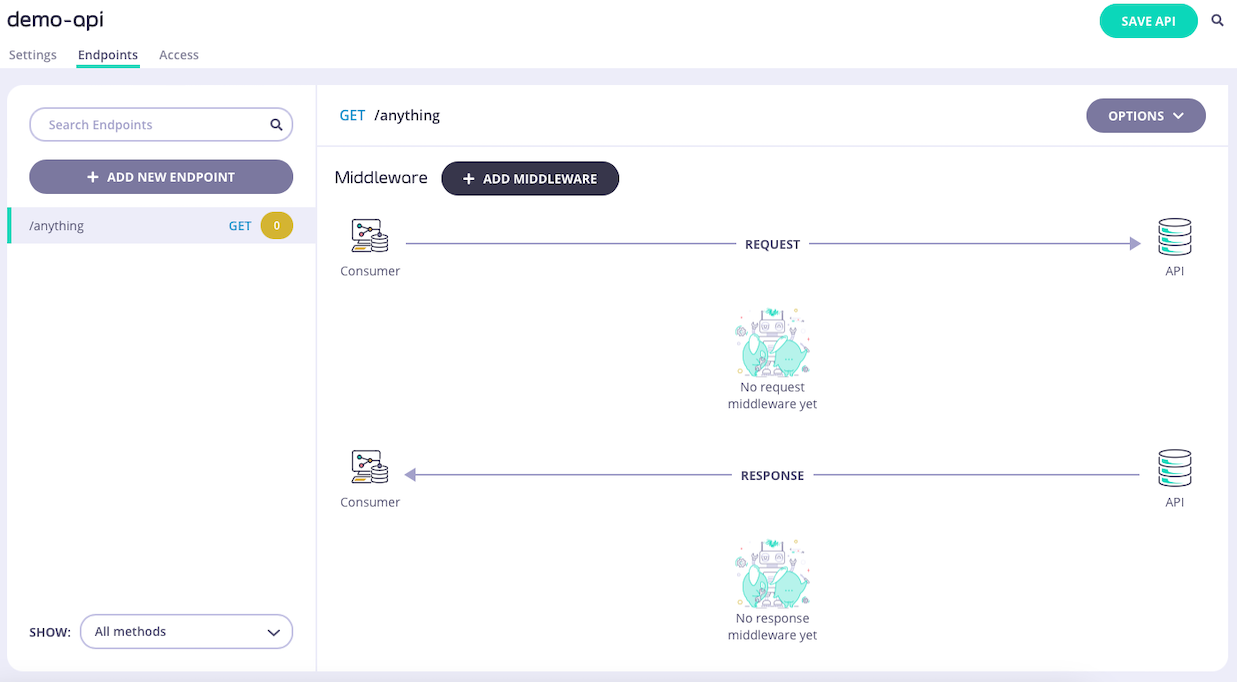
1. **Add an endpoint**
From the **API Designer** add an endpoint that matches the path and method to which you want to apply the middleware.
 2. **Select the Allow List middleware**
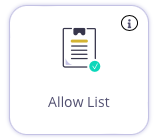
Select **ADD MIDDLEWARE** and choose the **Allow List** middleware from the *Add Middleware* screen.
2. **Select the Allow List middleware**
Select **ADD MIDDLEWARE** and choose the **Allow List** middleware from the *Add Middleware* screen.
 3. **Optionally configure case-insensitivity**
If you want to disable case-sensitivity for the allow list, then you must select **EDIT** on the Allow List icon.
3. **Optionally configure case-insensitivity**
If you want to disable case-sensitivity for the allow list, then you must select **EDIT** on the Allow List icon.
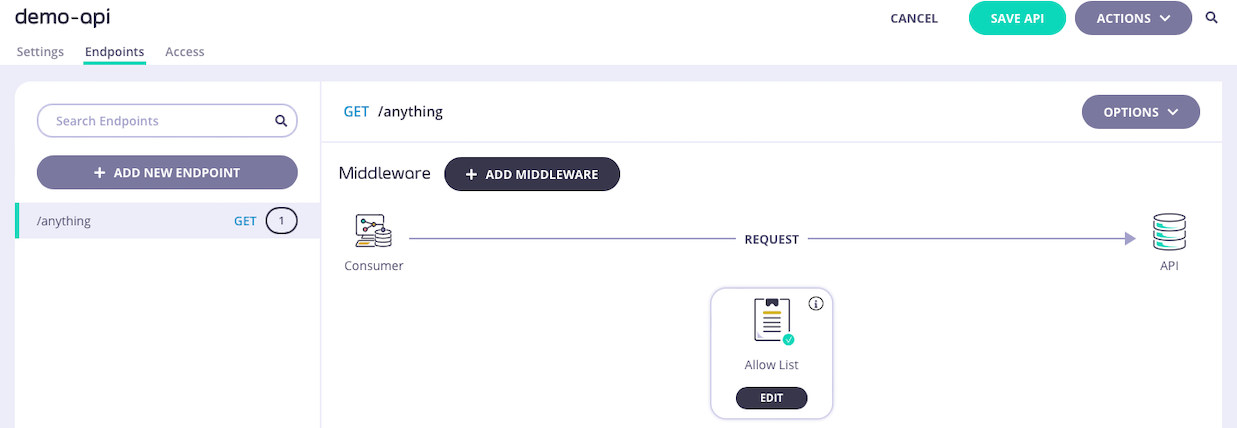 This takes you to the middleware configuration screen where you can alter the case sensitivity setting.
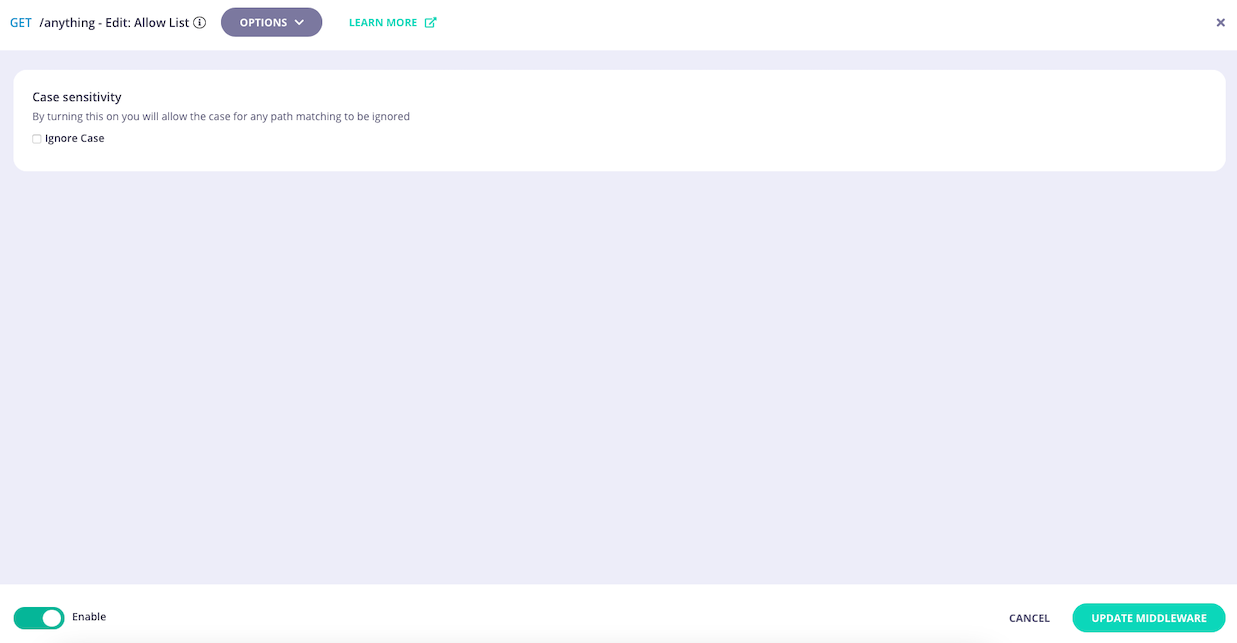 Select **UPDATE MIDDLEWARE** to apply the change to the middleware configuration.
4. **Save the API**
Select **SAVE API** to apply the changes to your API.
## Using Classic
The [allow list](/5.12/api-management/traffic-transformation/allow-list) is a feature designed to restrict access to only specific API endpoints. It rejects requests to endpoints not specifically "allowed", returning `HTTP 403 Forbidden`. This enhances the security of the API by preventing unauthorized access to endpoints that are not explicitly permitted.
When working with Tyk Classic APIs the middleware is configured in the Tyk Classic API Definition. You can do this via the Tyk Dashboard API or in the API Designer.
If you're using the newer Tyk OAS APIs, then check out the [Tyk OAS](/5.12/#allow-list-using-tyk-oas) page.
### API Definition
To enable and configure the allow list you must add a new `white_list` object to the `extended_paths` section of your API definition.
Historically, Tyk followed the out-dated whitelist/blacklist naming convention. We are working to remove this terminology from the product and documentation, however this configuration object currently retains the old name.
The `white_list` object has the following configuration:
* `path`: the endpoint path
* `method`: this should be blank
* `ignore_case`: if set to `true` then the path matching will be case insensitive
* `method_actions`: a shared object used to configure the [mock response](/5.12/api-management/traffic-transformation/mock-response#configuring-mock-response-using-tyk-dashboard-ui) middleware
The `method_actions` object should be configured as follows, with an entry created for each allowed method on the path:
* `action`: this should be set to `no_action`
* `code`: this should be set to `200`
* `headers` : this should be blank
For example:
```json {linenos=true, linenostart=1} theme={null}
{
"extended_paths": {
"white_list": [
{
"disabled": false,
"path": "/status/200",
"method": "",
"ignore_case": false,
"method_actions": {
"GET": {
"action": "no_action",
"code": 200,
"headers": {}
},
"PUT": {
"action": "no_action",
"code": 200,
"headers": {}
}
}
}
]
}
}
```
In this example the allow list middleware has been configured for HTTP `GET` and `PUT` requests to the `/status/200` endpoint. Requests to any other endpoints will be rejected with `HTTP 403 Forbidden`, unless they also have the allow list middleware enabled.
Note that the allow list has been configured to be case sensitive, so calls to `GET /Status/200` will also be rejected.
Note also that the endpoint path has not been terminated with `$`. Requests to, for example, `GET /status/200/foobar` will be allowed as the [regular expression pattern match](/5.12/#endpoint-parsing) will recognize this as `GET /status/200`.
Consult section [configuring the Allow List in Tyk Operator](/5.12/#tyk-operator) for details on how to configure allow lists for endpoints using Tyk Operator.
### API Designer
You can use the API Designer in the Tyk Dashboard to configure the allow list middleware for your Tyk Classic API by following these steps.
1. **Add an endpoint for the path and select the plugin**
From the **Endpoint Designer**, add an endpoint that matches the path for which you want to allow access. Select the **Whitelist** plugin.
2. **Configure the allow list**
Once you have selected the middleware for the endpoint, the only additional feature that you need to configure is whether to make the middleware case insensitive by selecting **Ignore Case**.
Select **UPDATE MIDDLEWARE** to apply the change to the middleware configuration.
4. **Save the API**
Select **SAVE API** to apply the changes to your API.
## Using Classic
The [allow list](/5.12/api-management/traffic-transformation/allow-list) is a feature designed to restrict access to only specific API endpoints. It rejects requests to endpoints not specifically "allowed", returning `HTTP 403 Forbidden`. This enhances the security of the API by preventing unauthorized access to endpoints that are not explicitly permitted.
When working with Tyk Classic APIs the middleware is configured in the Tyk Classic API Definition. You can do this via the Tyk Dashboard API or in the API Designer.
If you're using the newer Tyk OAS APIs, then check out the [Tyk OAS](/5.12/#allow-list-using-tyk-oas) page.
### API Definition
To enable and configure the allow list you must add a new `white_list` object to the `extended_paths` section of your API definition.
Historically, Tyk followed the out-dated whitelist/blacklist naming convention. We are working to remove this terminology from the product and documentation, however this configuration object currently retains the old name.
The `white_list` object has the following configuration:
* `path`: the endpoint path
* `method`: this should be blank
* `ignore_case`: if set to `true` then the path matching will be case insensitive
* `method_actions`: a shared object used to configure the [mock response](/5.12/api-management/traffic-transformation/mock-response#configuring-mock-response-using-tyk-dashboard-ui) middleware
The `method_actions` object should be configured as follows, with an entry created for each allowed method on the path:
* `action`: this should be set to `no_action`
* `code`: this should be set to `200`
* `headers` : this should be blank
For example:
```json {linenos=true, linenostart=1} theme={null}
{
"extended_paths": {
"white_list": [
{
"disabled": false,
"path": "/status/200",
"method": "",
"ignore_case": false,
"method_actions": {
"GET": {
"action": "no_action",
"code": 200,
"headers": {}
},
"PUT": {
"action": "no_action",
"code": 200,
"headers": {}
}
}
}
]
}
}
```
In this example the allow list middleware has been configured for HTTP `GET` and `PUT` requests to the `/status/200` endpoint. Requests to any other endpoints will be rejected with `HTTP 403 Forbidden`, unless they also have the allow list middleware enabled.
Note that the allow list has been configured to be case sensitive, so calls to `GET /Status/200` will also be rejected.
Note also that the endpoint path has not been terminated with `$`. Requests to, for example, `GET /status/200/foobar` will be allowed as the [regular expression pattern match](/5.12/#endpoint-parsing) will recognize this as `GET /status/200`.
Consult section [configuring the Allow List in Tyk Operator](/5.12/#tyk-operator) for details on how to configure allow lists for endpoints using Tyk Operator.
### API Designer
You can use the API Designer in the Tyk Dashboard to configure the allow list middleware for your Tyk Classic API by following these steps.
1. **Add an endpoint for the path and select the plugin**
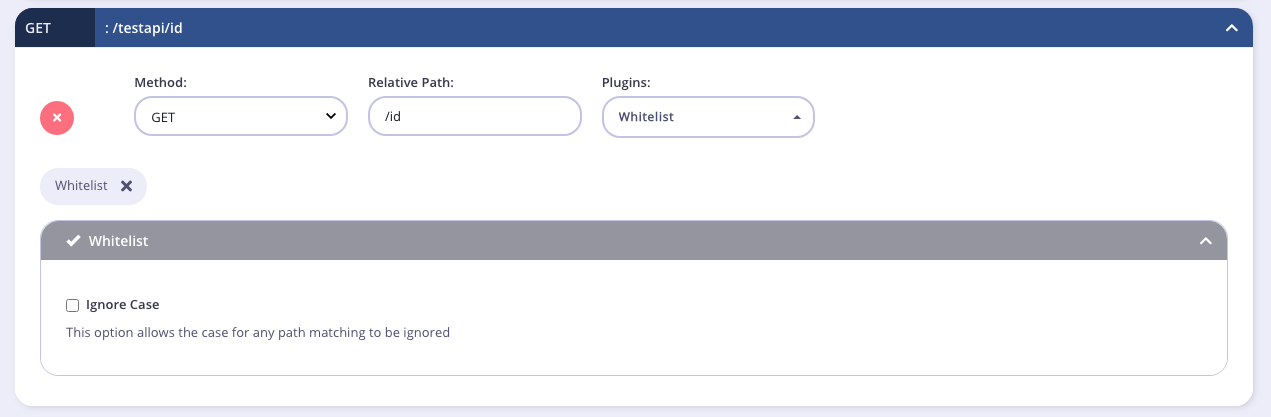
From the **Endpoint Designer**, add an endpoint that matches the path for which you want to allow access. Select the **Whitelist** plugin.
2. **Configure the allow list**
Once you have selected the middleware for the endpoint, the only additional feature that you need to configure is whether to make the middleware case insensitive by selecting **Ignore Case**.
 3. **Save the API**
Use the *save* or *create* buttons to save the changes and activate the allow list middleware.
### Tyk Operator
Similar to the configuration of a Tyk Classic API Definition you must add a new `white_list` object to the `extended_paths` section of your API definition. Furthermore, the `use_extended_paths` configuration parameter should be set to `true`.
Historically, Tyk followed the out-dated whitelist/blacklist naming convention. We are working to remove this terminology from the product and documentation, however this configuration object currently retains the old name.
```yaml {linenos=true,linenostart=1,hl_lines=["26-34"]} theme={null}
apiVersion: tyk.tyk.io/v1alpha1
kind: ApiDefinition
metadata:
name: httpbin-whitelist
spec:
name: httpbin-whitelist
use_keyless: true
protocol: http
active: true
proxy:
target_url: http://httpbin.org/
listen_path: /httpbin
strip_listen_path: true
version_data:
default_version: Default
not_versioned: true
versions:
Default:
name: Default
use_extended_paths: true
paths:
black_list: []
ignored: []
white_list: []
extended_paths:
white_list:
- ignore_case: true
method_actions:
GET:
action: "no_action"
code: 200
data: ""
headers: {}
path: "/get"
```
In this example the allow list middleware has been configured for `HTTP GET` requests to the `/get` endpoint. Requests to any other endpoints will be rejected with `HTTP 403 Forbidden`, unless they also have the allow list middleware enabled. Note that the allow list has been configured to case insensitive, so calls to `GET /Get` will also be accepted. Note also that the endpoint path has not been terminated with `$`. Requests to, for example, `GET /get/foobar` will be allowed as the [regular expression pattern match](/5.12/#endpoint-parsing) will recognize this as `GET /get`.
3. **Save the API**
Use the *save* or *create* buttons to save the changes and activate the allow list middleware.
### Tyk Operator
Similar to the configuration of a Tyk Classic API Definition you must add a new `white_list` object to the `extended_paths` section of your API definition. Furthermore, the `use_extended_paths` configuration parameter should be set to `true`.
Historically, Tyk followed the out-dated whitelist/blacklist naming convention. We are working to remove this terminology from the product and documentation, however this configuration object currently retains the old name.
```yaml {linenos=true,linenostart=1,hl_lines=["26-34"]} theme={null}
apiVersion: tyk.tyk.io/v1alpha1
kind: ApiDefinition
metadata:
name: httpbin-whitelist
spec:
name: httpbin-whitelist
use_keyless: true
protocol: http
active: true
proxy:
target_url: http://httpbin.org/
listen_path: /httpbin
strip_listen_path: true
version_data:
default_version: Default
not_versioned: true
versions:
Default:
name: Default
use_extended_paths: true
paths:
black_list: []
ignored: []
white_list: []
extended_paths:
white_list:
- ignore_case: true
method_actions:
GET:
action: "no_action"
code: 200
data: ""
headers: {}
path: "/get"
```
In this example the allow list middleware has been configured for `HTTP GET` requests to the `/get` endpoint. Requests to any other endpoints will be rejected with `HTTP 403 Forbidden`, unless they also have the allow list middleware enabled. Note that the allow list has been configured to case insensitive, so calls to `GET /Get` will also be accepted. Note also that the endpoint path has not been terminated with `$`. Requests to, for example, `GET /get/foobar` will be allowed as the [regular expression pattern match](/5.12/#endpoint-parsing) will recognize this as `GET /get`.