> ## Documentation Index
> Fetch the complete documentation index at: https://tyk.io/docs/llms.txt
> Use this file to discover all available pages before exploring further.
# Chat Interface
> How AI Studios Chat Interface works?
## Availability
| Edition | Deployment Type |
| :---------------------------------------------------------------------------------------------------------------------------------------------- | :------------------- |
| [Community](/5.12/ai-management/ai-studio/overview#community-edition) & [Enterprise](/5.12/ai-management/ai-studio/overview#enterprise-edition) | Self-Managed, Hybrid |
# Chat Interface
Tyk AI Studio's Chat Interface provides a secure and interactive environment for users to engage with Large Language Models (LLMs), leveraging integrated tools and data sources. It serves as the primary front-end for conversational AI interactions within the platform.
## Purpose
The main goals of the Chat Interface are:
* **User-Friendly Interaction:** Offer an intuitive web-based chat experience for users of all technical levels.
* **Unified Access:** Provide a single point of access to various configured LLMs, Tools, and Data Sources.
* **Context Management:** Maintain conversation history and manage context, including system prompts and retrieved data (RAG).
* **Secure & Governed:** Enforce access controls based on teams and apply configured Filters.
## Key Features
* **Chat Sessions:** Each conversation happens within a session, preserving history and context.
* **Streaming Responses:** LLM responses are streamed back to the user for a more interactive feel.
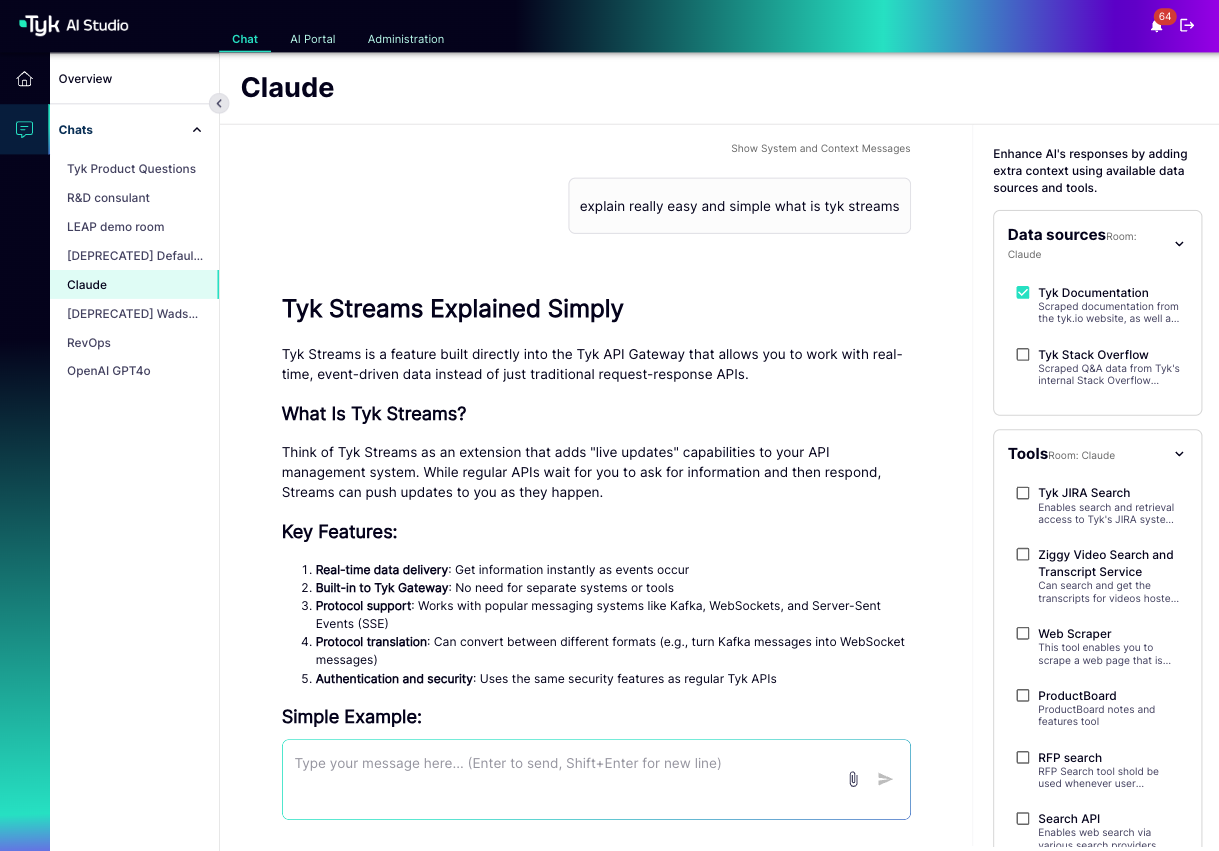
* **Tool Integration:** Seamlessly uses configured [Tools](/5.12/ai-management/ai-studio/tools) when the LLM determines they are necessary to fulfill a user's request. The available tools depend on the Chat Experience configuration and the user's team permissions.
* **Data Source (RAG) Integration:** Can automatically query configured [Data Sources](/5.12/ai-management/ai-studio/datasources-rag) to retrieve relevant information (Retrieval-Augmented Generation) to enhance LLM responses. The available data sources depend on the Chat Experience configuration and the user's team permissions.
* **System Prompts:** Administrators can define specific system prompts for different Chat Experiences to guide the LLM's persona, tone, and behavior.
* **History:** Users can view their past chat sessions.
* **File Upload (Context):** Users might be able to upload files directly within a chat to provide temporary context for the LLM (depending on configuration).
* **Access Control:** Users only see and can interact with Chat Experiences assigned to their [Teams](/5.12/ai-management/ai-studio/user-management).
## Using the Chat Interface
Users access the Chat Interface through the Tyk AI Studio web UI.
1. **Select Chat Experience:** Users choose from a list of available Chat Experiences (pre-configured chat environments) they have access to.
2. **Interact:** Users type their prompts or questions.
3. **Receive Responses:** The LLM processes the request, potentially using tools or data sources behind the scenes, and streams the response back.
 ## Configuration (Admin)
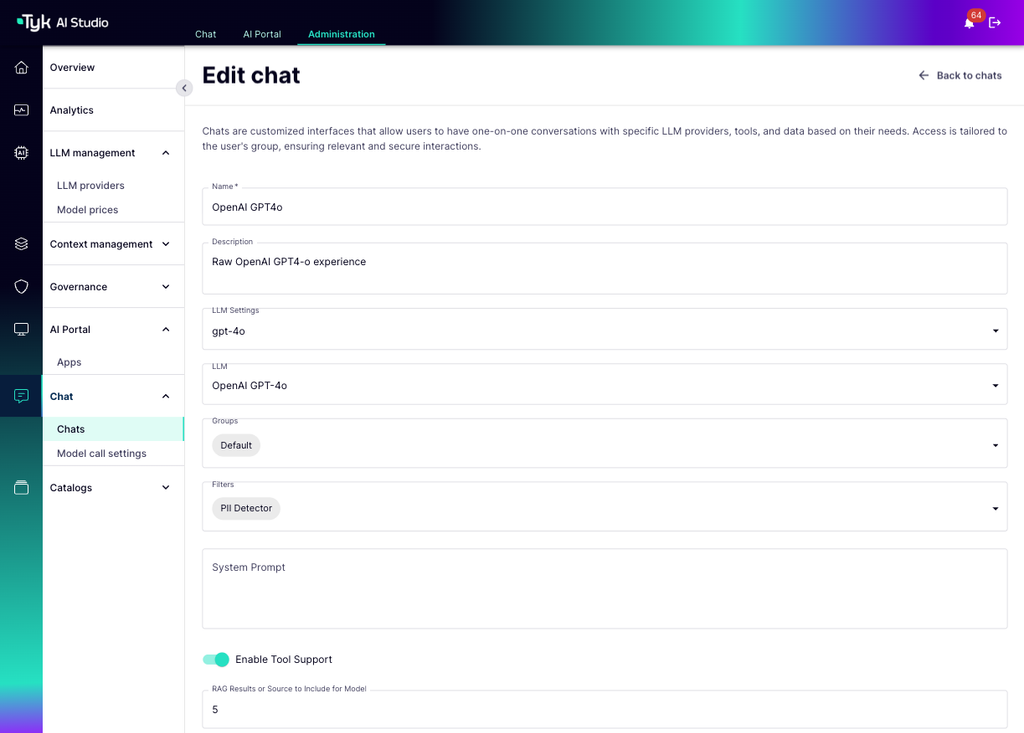
Administrators configure the available "Chat Experiences" (formerly known as Chat Rooms) via the UI or API. Configuration involves:
* **Naming:** Giving the Chat Experience a descriptive name.
* **Assigning LLM:** Linking to a specific [LLM Configuration](/5.12/ai-management/ai-studio/llm-management).
* **Enabling Tools:** Selecting which [Tool Catalogues](/5.12/ai-management/ai-studio/tools) are available.
* **Enabling Data Sources:** Selecting which [Data Source Catalogues](/5.12/ai-management/ai-studio/datasources-rag) are available.
* **Setting System Prompt:** Defining the guiding prompt for the LLM.
* **Applying Filters:** Associating specific [Filters](/5.12/ai-management/ai-studio/filters) for governance.
* **Assigning Teams:** Determining which [Teams](/5.12/ai-management/ai-studio/user-management) can access this Chat Experience.
* **Enabling/Disabling Features:** Toggling features like file uploads or direct tool usage.
## Configuration (Admin)
Administrators configure the available "Chat Experiences" (formerly known as Chat Rooms) via the UI or API. Configuration involves:
* **Naming:** Giving the Chat Experience a descriptive name.
* **Assigning LLM:** Linking to a specific [LLM Configuration](/5.12/ai-management/ai-studio/llm-management).
* **Enabling Tools:** Selecting which [Tool Catalogues](/5.12/ai-management/ai-studio/tools) are available.
* **Enabling Data Sources:** Selecting which [Data Source Catalogues](/5.12/ai-management/ai-studio/datasources-rag) are available.
* **Setting System Prompt:** Defining the guiding prompt for the LLM.
* **Applying Filters:** Associating specific [Filters](/5.12/ai-management/ai-studio/filters) for governance.
* **Assigning Teams:** Determining which [Teams](/5.12/ai-management/ai-studio/user-management) can access this Chat Experience.
* **Enabling/Disabling Features:** Toggling features like file uploads or direct tool usage.
 ## API Access
Beyond the UI, Tyk AI Studio provides APIs (`/api/v1/chat/...`) for programmatic interaction with the chat system, allowing developers to build custom applications or integrations that leverage the configured Chat Experiences.
This comprehensive system provides a powerful yet controlled way for users to interact with AI capabilities managed by Tyk AI Studio.
## API Access
Beyond the UI, Tyk AI Studio provides APIs (`/api/v1/chat/...`) for programmatic interaction with the chat system, allowing developers to build custom applications or integrations that leverage the configured Chat Experiences.
This comprehensive system provides a powerful yet controlled way for users to interact with AI capabilities managed by Tyk AI Studio.